-
-
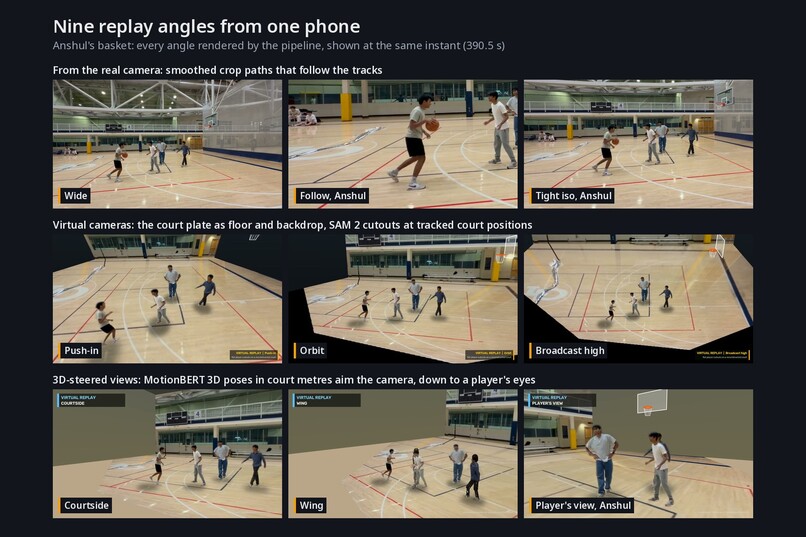
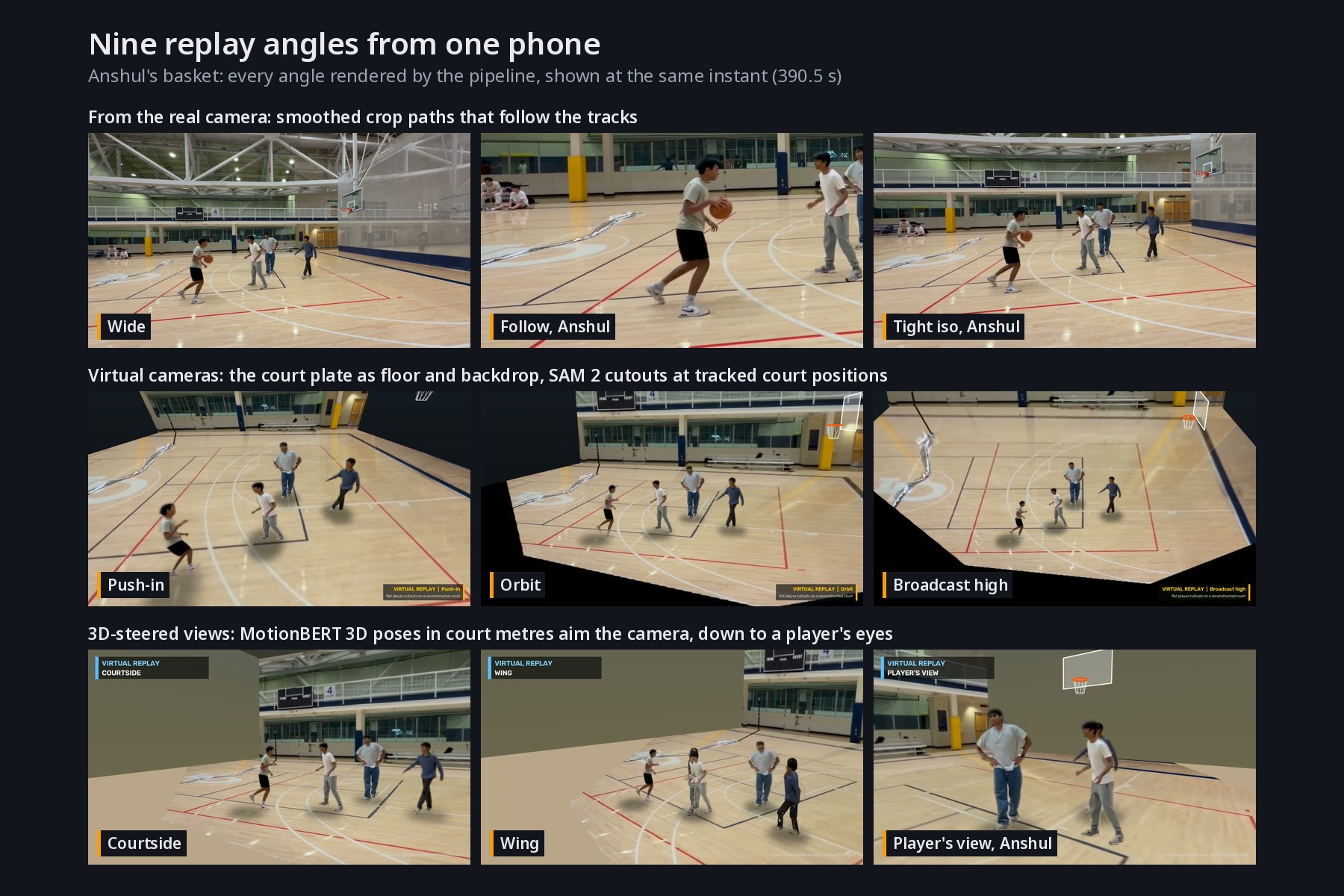
Nine replay angles of one basket from a single fixed phone: smart crops, virtual cameras, and 3D-steered views down to a player's own eyes.
-
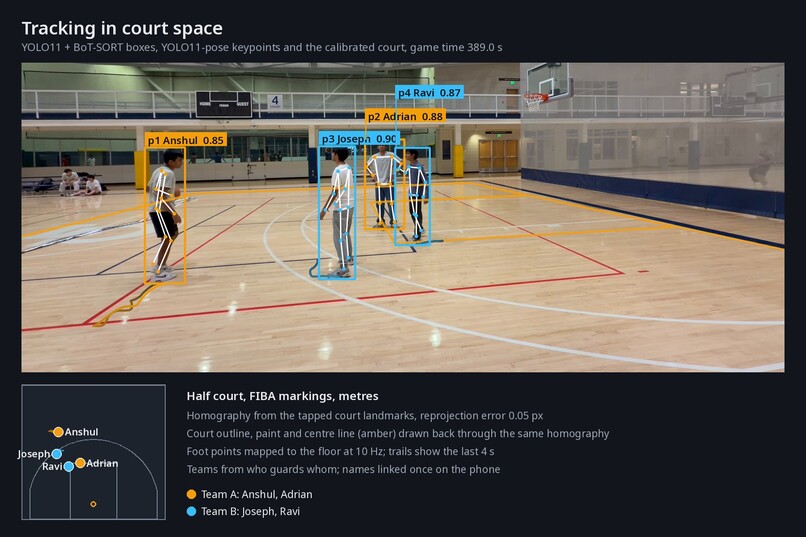
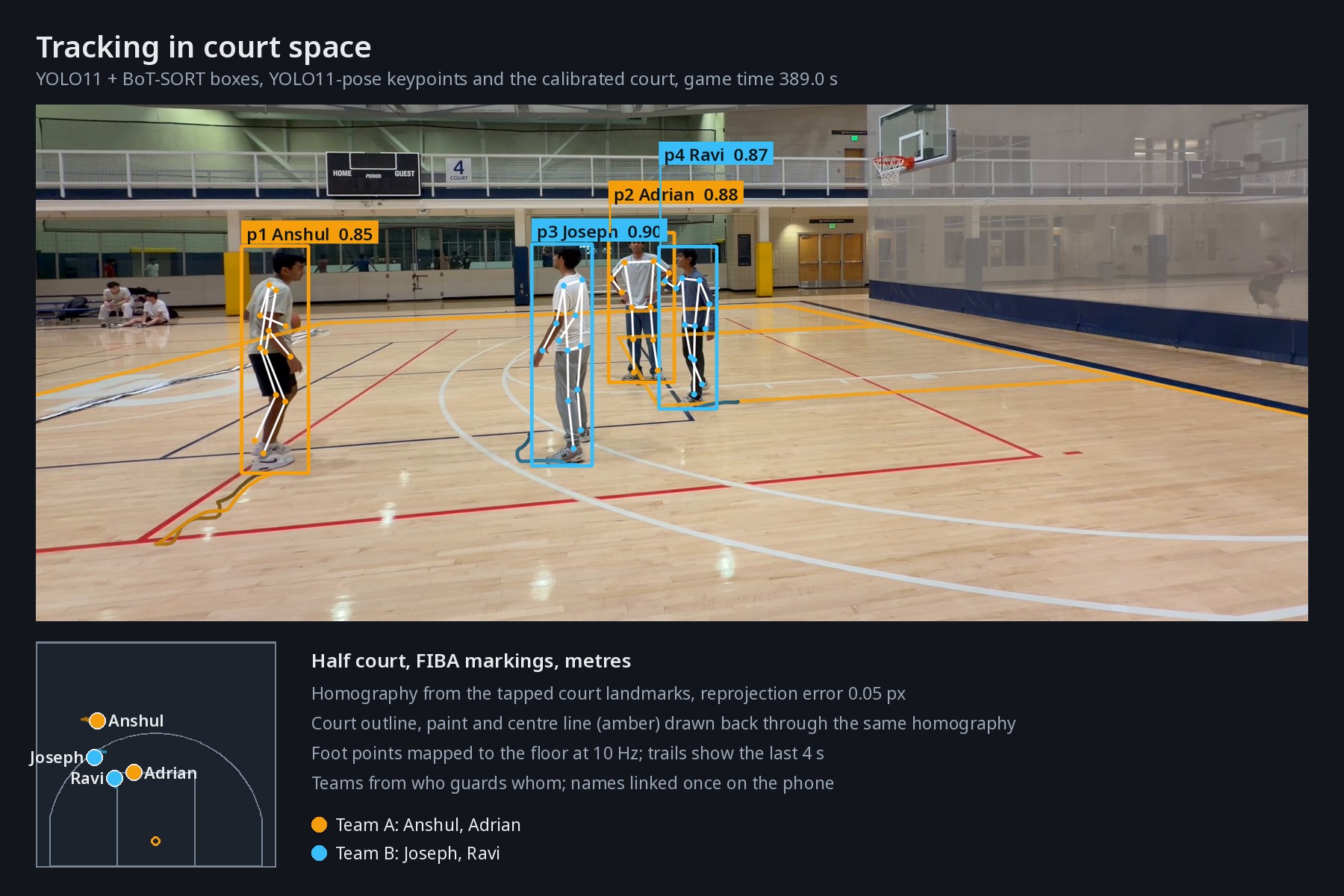
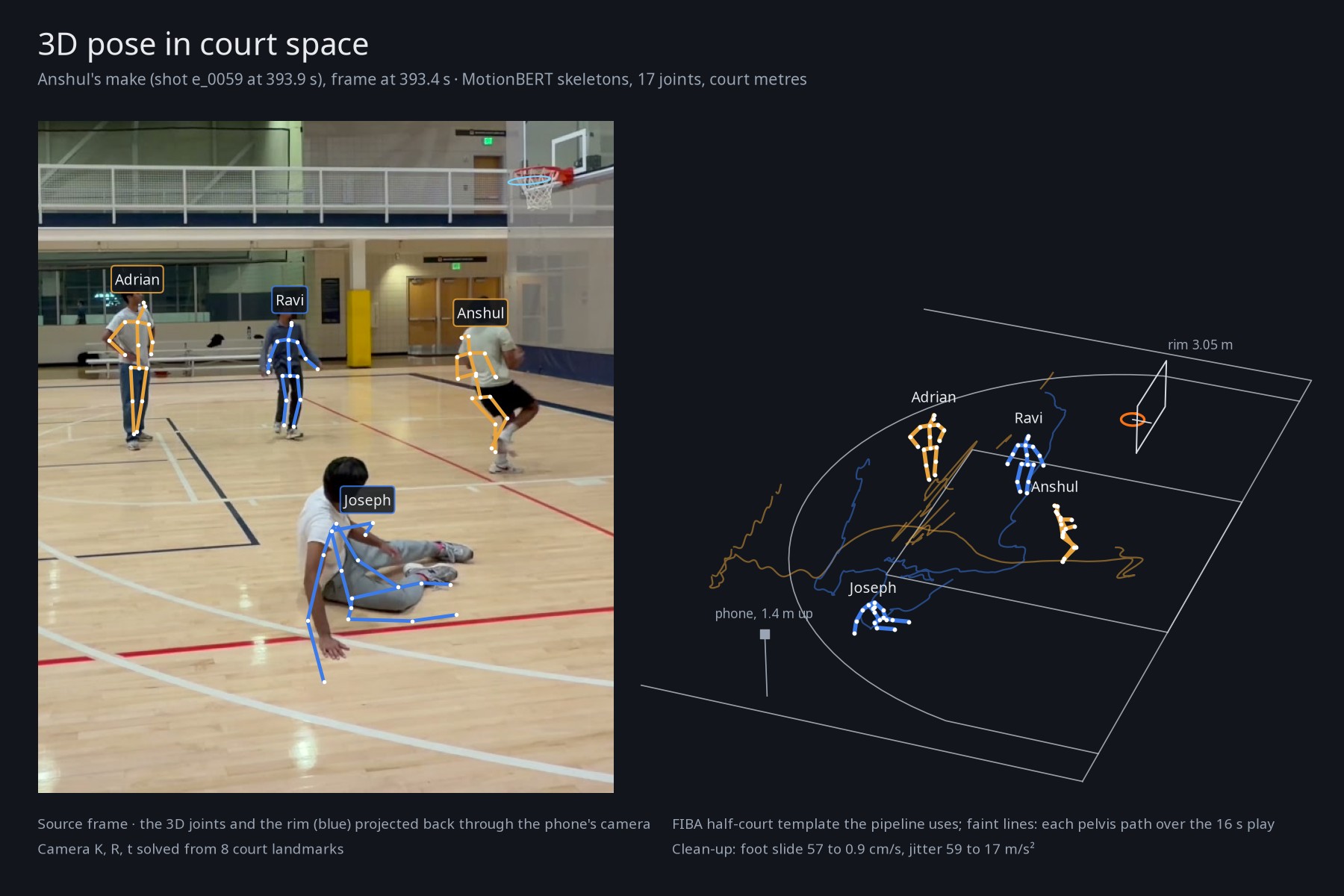
Every player is tracked, posed and mapped onto real court coordinates in metres from a calibration that fits to 0.05 px.
-
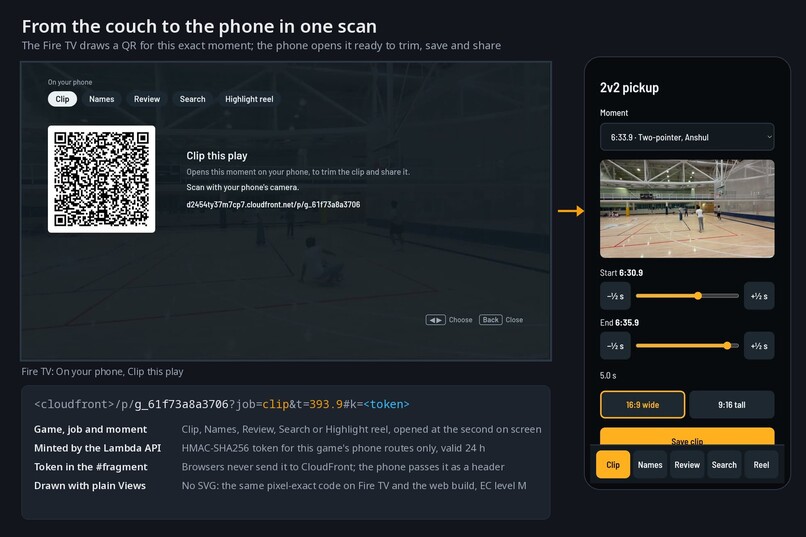
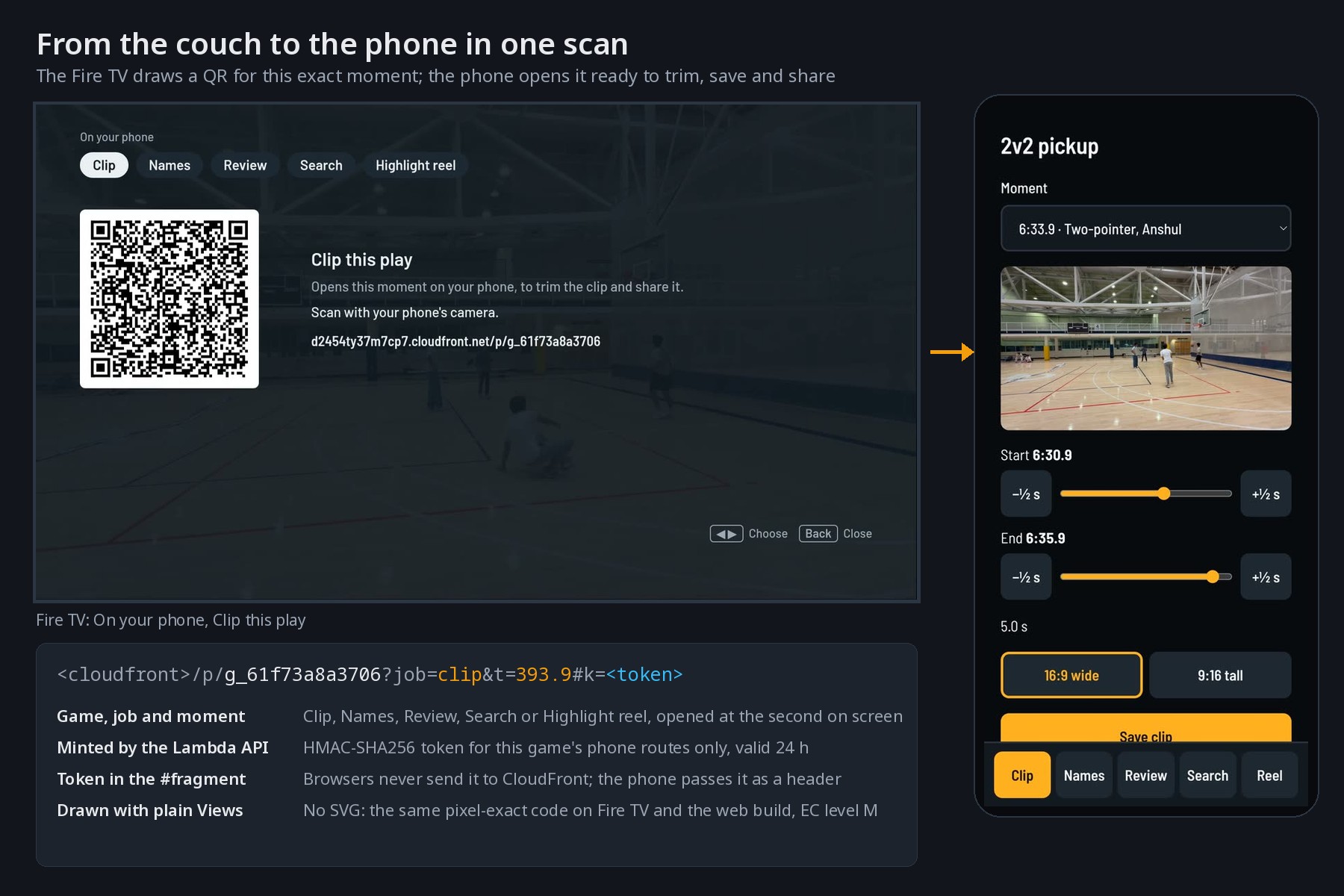
Scan the TV's QR code and that exact moment opens on your phone, with a short-lived secure link, ready to trim and share.
-
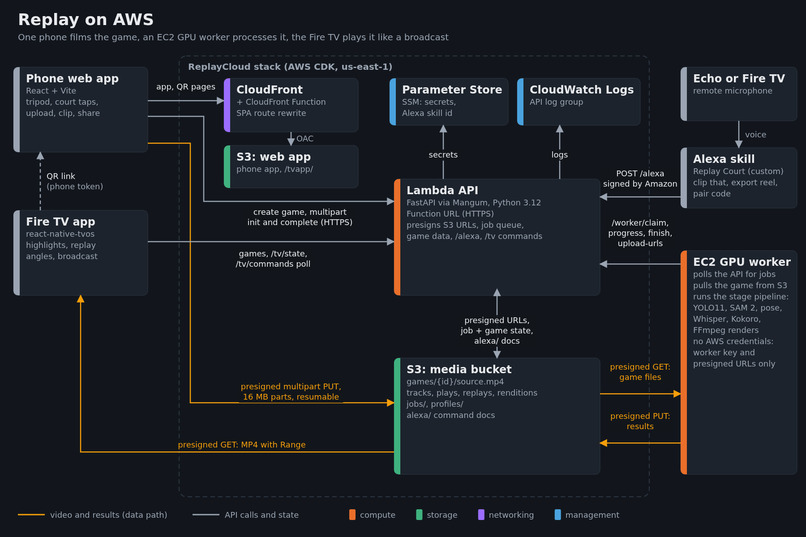
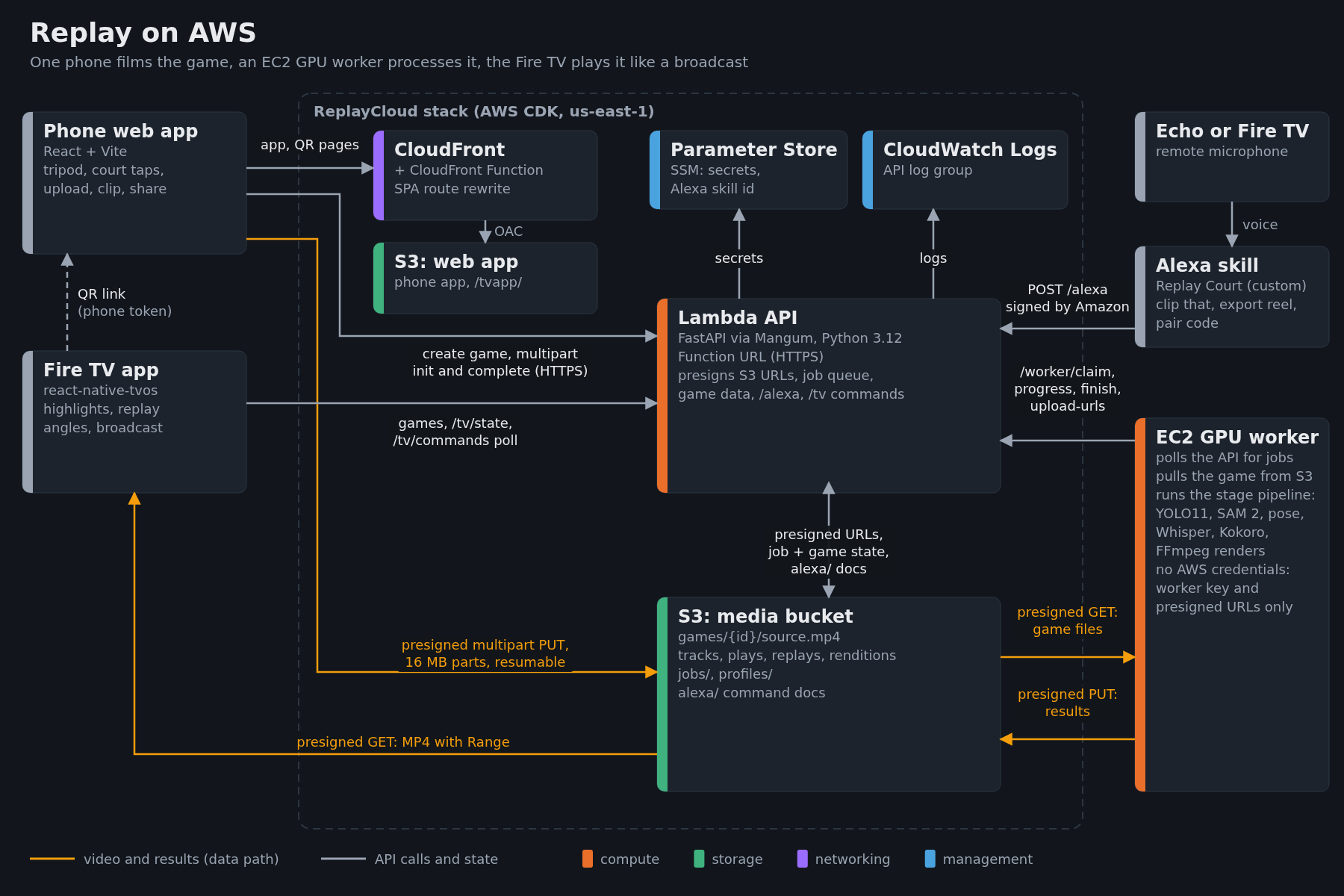
Uploads straight to S3, Lambda API runs the jobs, EC2 GPU workers process games, and Alexa commands reach the Fire TV through the same API.
-
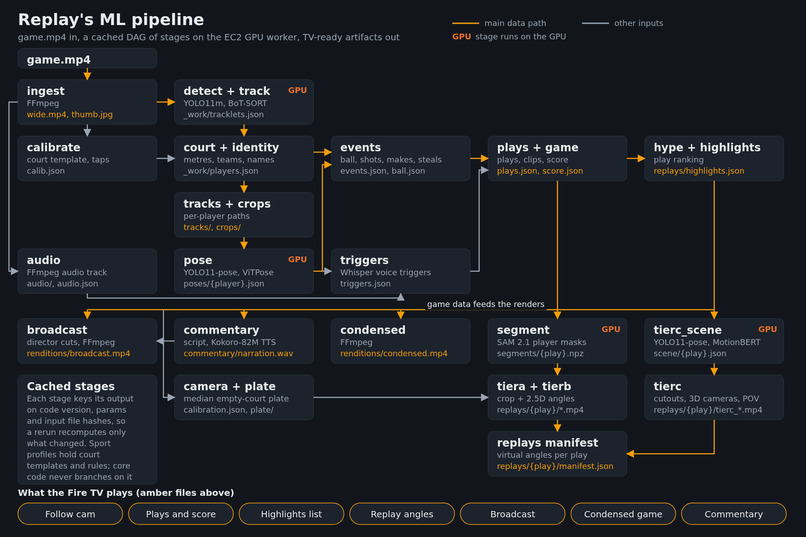
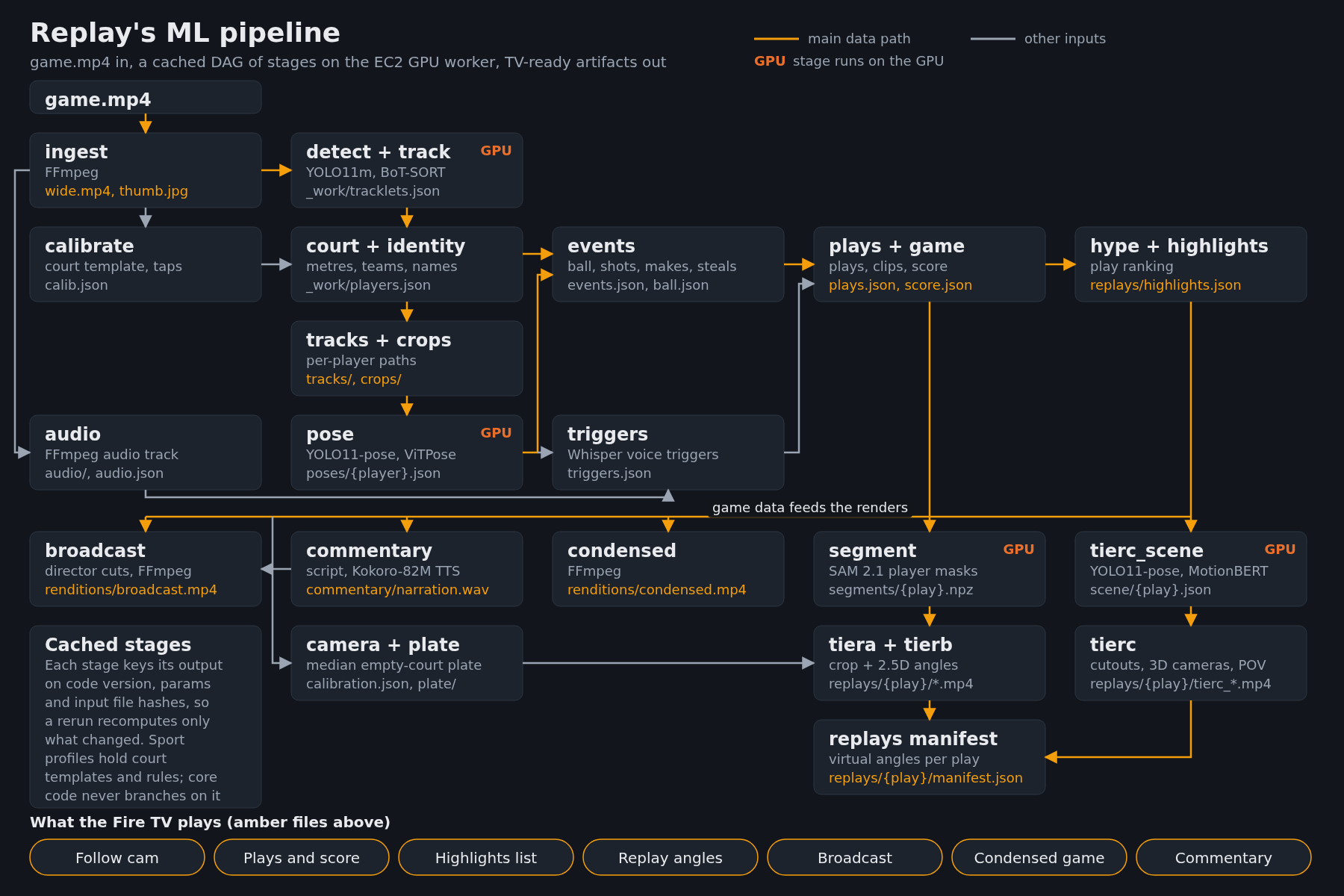
One phone video becomes tracks, plays, highlights, commentary and replay angles through a cached pipeline running YOLO11, SAM 2.1, and more.
-
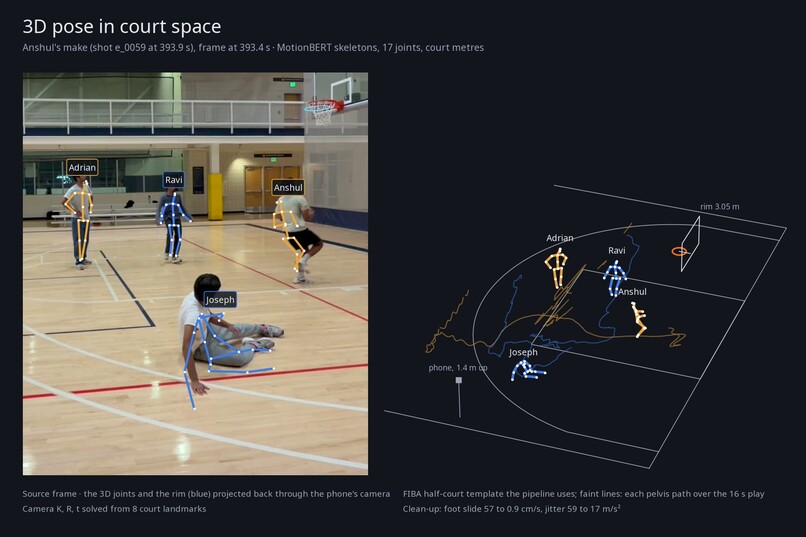
3D skeletons from one phone video, placed on the court in real metres and projected back onto the frame to show they line up.
-
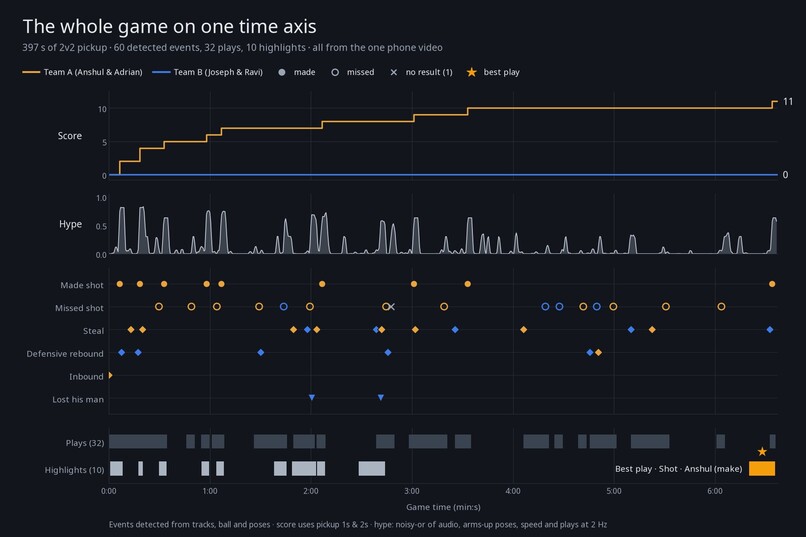
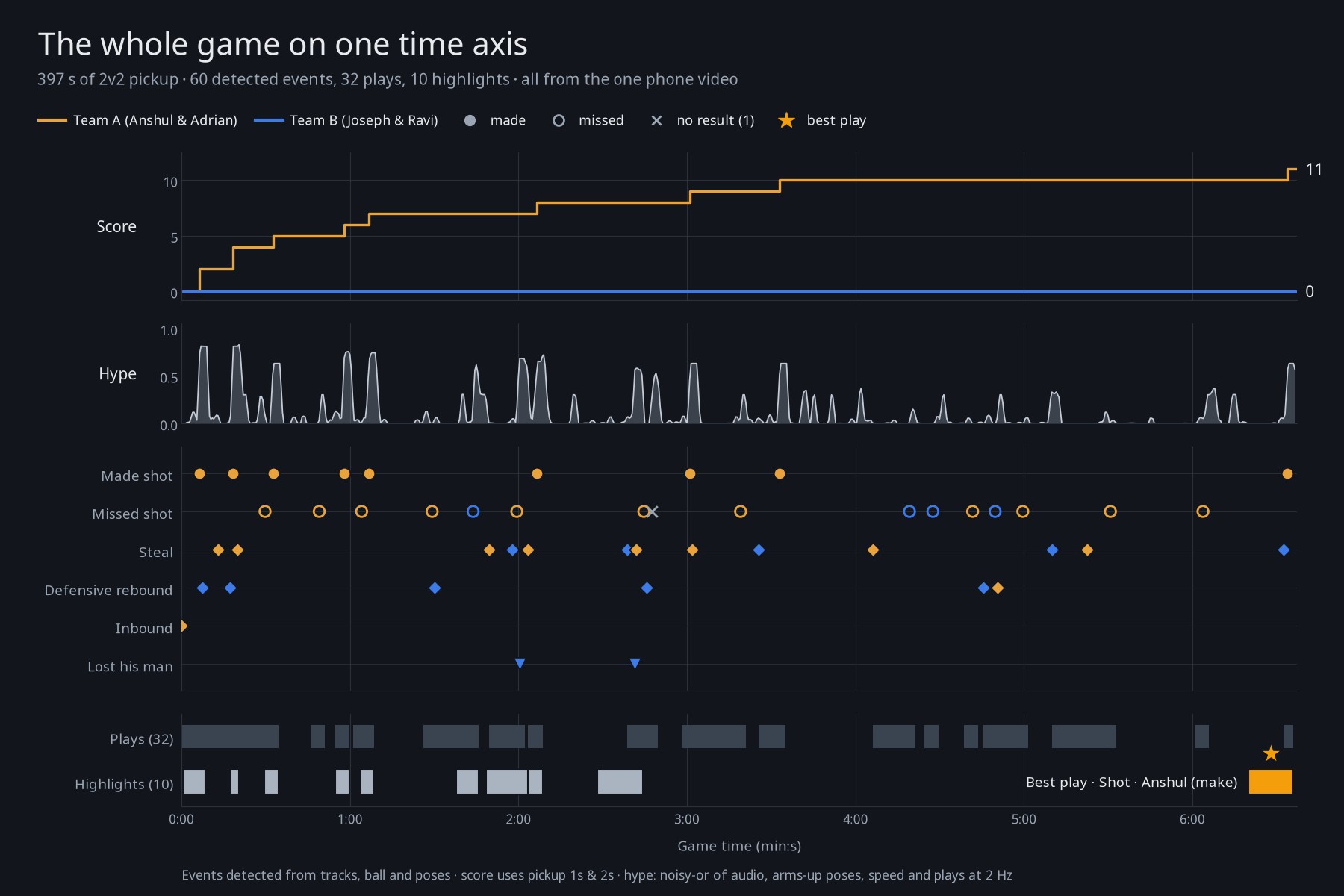
The whole game on one timeline: 60 detected events, the score, a hype curve, 32 plays and 10 highlights, ending on the best play.
-
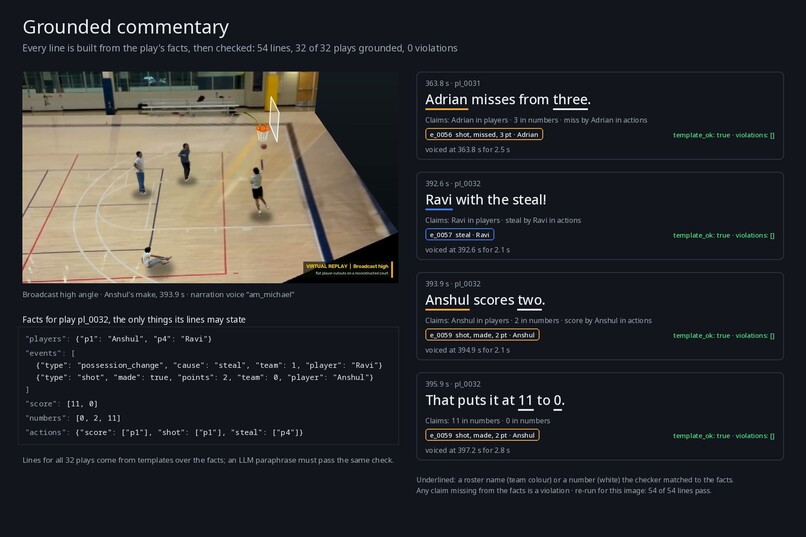
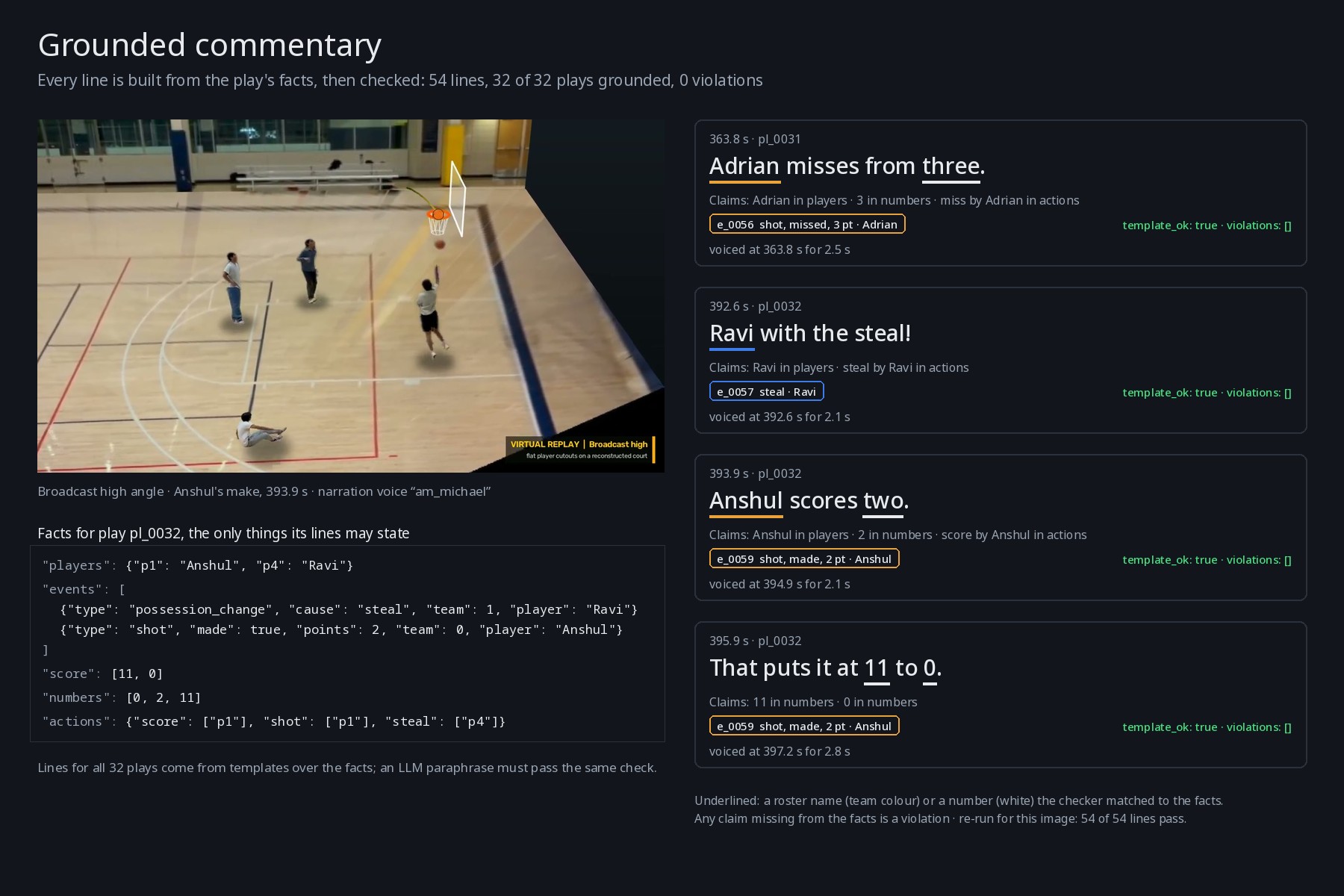
Every commentary line is built only from the play's facts and checked: all 54 name real players and numbers, voiced by Kokoro.
-
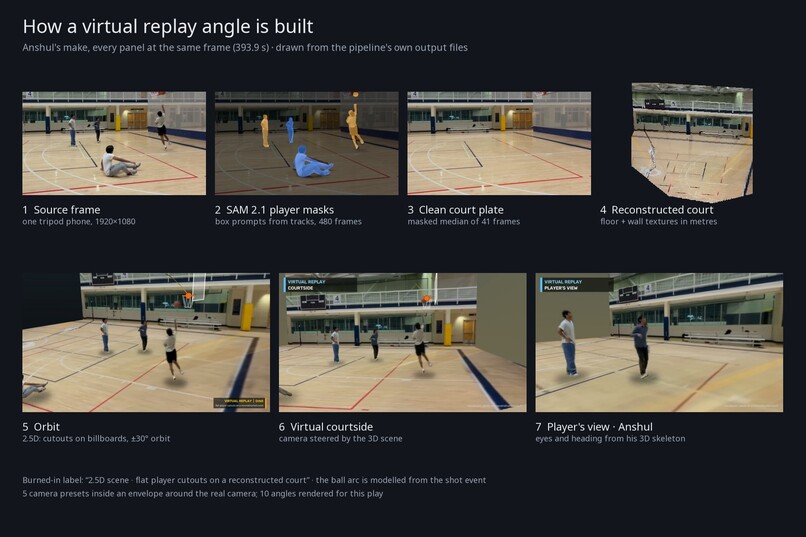
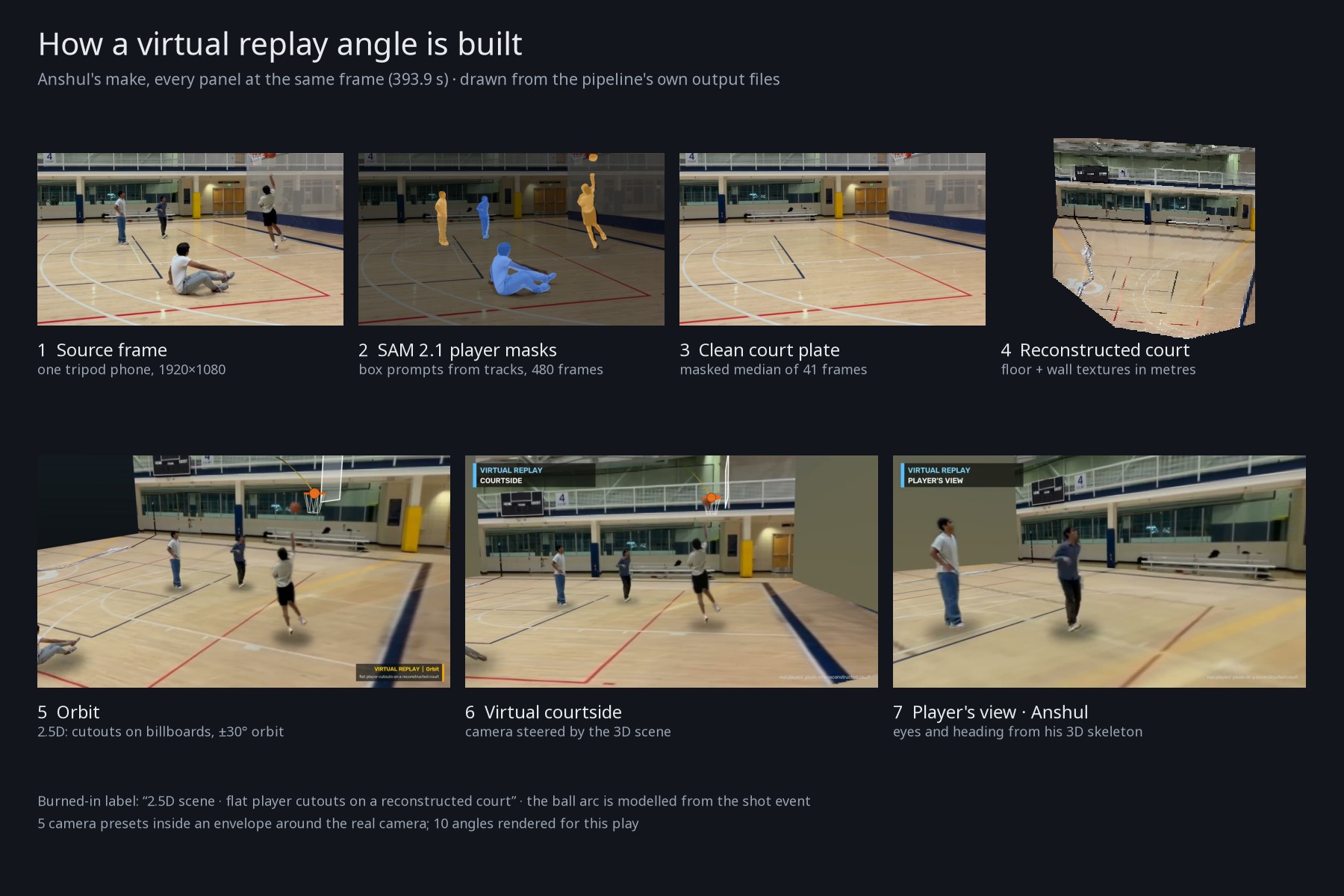
How a virtual angle is made: SAM 2.1 cuts out the players, the empty court is rebuilt, and new camera views are rendered from it.
Inspiration
Amateur game footage is a fixed wide shot from the sideline. Everyone is tiny, nobody is followed, and finding your own plays means scrubbing through the whole recording. Camera systems that fix this exist, but they need dedicated hardware or a coach-level budget. Most people who play pickup basketball, pickleball or volleyball have a phone and a tripod and nothing else.
The television is where people already watch together, and FireTV's remote allowed us to let people intuitively interact with replays as if they were playing a simulation or game of the sport themselves. Moments in games often stick with players long after, including both crazy plays and bad mistakes. Allowing for an intelligent system to advise or clip from the games themselves makes an easy post game analysis for all sorts of players, good or bad.
What it does
Replay takes one phone recording of a court-sports game and turns it into something you can explore on a Fire TV. Basketball is the main sport. Volleyball, pickleball and badminton work through sport profiles with fewer features proven.
Add a game. On the TV, choose Add game and a sport. The TV shows a QR code. The phone opens a web page (no phone app to install), uploads the video straight to S3 in parts, lets you tap the court's landmarks or accept an automatic fit, and starts processing. The TV moves on to the game when it is ready.
Watch.
- Alexa Integration: Everything mentioned below can work via voice commands using the FireTV remote, through an Alexa Skill created in the developer console.
- Highlights: The system intelligently picks out moments (e.g. rebound and score, 3 pointer, good steal, etc.) from the game, marking them so it's easy to navigate to in the video.
- Follow player: pick someone on the video with the arrow keys and the camera follows them. Back stops following.
- A timeline drawn as a court line, with notches for moments, and a Moments row with thumbnails and a Scores filter.
- Highlight reel: an auto-cut reel that ends on the best play of the game, found based by comparing crowd anticipation and noise, as well as overall player concentration and game impact.
- Replay angles: real-video cameras, plus virtual angles. The virtual "Free view" allows you to see the game from entirely different perspectives, providing deeper insights into tricky moments to see from a standard view.
- Player's view: See exactly what a player was looking at, from a first-person-style cut for a play, built from the tracks.
- Stats: a box score and shot chart from the game's own events, with a Review queue where you correct what the pipeline got wrong. Pickup scoring (1s and 2s, 2s and 3s) is a phone setting.
- Grounded commentary captions: templated text checked against the game's events, with optional TTS narration.
On your phone. Clip a play, tag and name players, review calls, search plays in words, set teams and scoring, and send "Watch it" to the TV.
Clip that. Taps work. On top of the intelligent detection, if players want to specifically clip something like Medal.tv, an X sign made facing the camera and the spoken phrase "Replay, clip that" are also detected as triggers.
How we built it
Fire TV app (apps/tv). React Native for TV (react-native-tvos) with react-native-video. Shared logic (API client, spatial focus, media clock, follow-cam math, request retry) lives in packages/tv-core, so the same screens also build as a react-native-web app that users can use with keyboard keys standing in for the D-pad. The APK runs on a Fire TV Stick (AFTSS, Fire OS 7).
Phone side (apps/web). One Vite and React 19 app for uploading and sharing clips. The TV's QR code carries a per-game capability token in the URL fragment, so it never reaches server logs.
API on AWS (services/api, infra/). FastAPI behind Mangum on one arm64 Lambda with a Function URL. State lives in a private S3 bucket: games, job records (claimed with conditional writes), and the profiles database mirrored write-through. Uploads are multipart through presigned URLs. Both web builds sit behind CloudFront with origin access control, and a runtime config.json carries the API address so builds bake in neither the address nor a key. Secrets are SSM Parameter Store SecureStrings created outside the template. The stack is AWS CDK (TypeScript). We chose this shape to have no idle cost, e.g. no VPC, NAT, API Gateway or database.
Pipeline (courtcam/, services/worker, render/). courtcam is an MIT Python library: ingest, court calibration (template fit plus tapped landmarks, with a lens model), YOLO11 person detection with BoT-SORT tracking, identity stitching, pose, events, sport play grammars, and crop paths. The worker on an EC2 GPU instance runs these as named, versioned stages cached by content hash. The render package makes the director, highlights, hype meter, and the real-video, 2.5D and virtual replay angles. Optional model stages: SAM 2.1 masks, Whisper for voice clips, Kokoro TTS, SigLIP search embeddings, a small local LLM for paraphrase and query parsing behind a grounding check.
Process. We worked with the Kiro coding agent to first plan out our project with detailed, test driven specs, and also used Kiro as an orchestrator that handed stages to coding and research agents. The commit gate ran ruff, pytest suites and the TV and web end-to-end tests. We accepted features on real game footage, not only synthetic clips.
Challenges we ran into
Real footage is harder than synthetic. We built a synthetic generator early so tests would be fast, and we labelled it synthetic everywhere. It stopped being a good guide quickly. On a real kit game (a CC BY Nottingham clip), D-97 found that the detector was not the bottleneck; the identity stage was. It capped live people at ten and three referees took three of those places, and red and dark kits fell into one team bin. Adding room for officials and a brightness channel to the kit colour moved player recall from 0.73 to 0.88 and team accuracy from 0.70 to 0.98 on hand-labelled frames. The same change made a clip where everyone wears dark tops slightly worse (right-person 64.1% to about 59%), which we accepted and recorded.
No Fire TV network we could trust. The Stick was tested headless over USB adb. It sleeps with HDMI unplugged until a wake key is sent. Campus Wi-Fi intercepted HTTPS or quarantined the device behind a captive portal, and joining a network on Fire OS 7 meant driving the Settings screens with key events. Details are in the friction log.
Lambda concurrency. The account limit is 10. One open Watch screen made about nine parallel requests, so throttling was a demo risk. We reduced it in the clients (retry with backoff, at most four requests in flight, extras after the first frame) and filed a limit increase request.
Honest labelling. Virtual views are recreated from cutouts of real players on a model of the court, so they cannot show what the camera never saw. We label them, and we skip views where a person is within 3.5 m of a fixed camera instead of showing a grey blob.
Accomplishments that we're proud of
It runs on a real Fire TV Stick against a real AWS deployment. The app runs on an AFTSS Stick (Fire OS 7.7.1.6, 32-bit, about 900 MB RAM) against the deployed API. Facing hardware constraints, we optimized heavily. Measured on the device: cold start to first frame about 1.0 s, cold start to Home with live games about 5 s, a Home focus move drawn within 0.13 s, opening a game to first video frame about 3.2 s, and a follow-cam over 8 s with 393 frames and 0.76% janky. Memory during playback was a total PSS of 165 to 177 MB.
The follow-cam interaction works as imagined. You pick a person on the video with the arrows and the camera follows them, driven on the client from the tracks.
A serverless cloud with almost no idle cost. One Lambda, two S3 buckets and CloudFront, no database, no VPC. The estimate we made is about $0.50 to $1 per month at usage.
Tracking measured against hand-labelled truth. On a labelled CC BY basketball game: player recall 0.73 to 0.88 and team accuracy 0.70 to 0.98. For few-player games, the K-person roster labelling raised right-person accuracy on a 2v2 proxy from 52% to 83%.
The demo game, scored against a hand list of moments.
- 5 of 5 X signs found, none false.
- 25 of 25 shot precision.
- Pickup score 11 to 0, the right winner, with one dead-ball shot counted.
- Replays cover 6 of 9 moments; the highlight reel covers 9 of 9.
What we learned
Measure against real, hand-labelled footage early.* Synthetic clips were useful for fast tests, but the real bottlenecks showed up only on real games: referees taking player slots, kit colours that need brightness to separate, and mirrored court labels. The table of recall by pipeline stage showed us the identity stage was losing players the detector had already found, which a total accuracy number would have hidden.
Design for the real device. The web build of the TV app let us test quickly, but the Stick found bugs the browser could not: no remote key reached JavaScript until the root view was focusable, the first request waited about 1.9 s on WebView's cookie manager, and ExoPlayer's own controller showed over the black frame while a video loaded. Each was fixed following more testing on the FireTV.
What's next for Replay
Testing with real games. We want to continue to test the application and the rendering and processing pipeline with as much footage as possible to improve the accuracy of the models behind it.
Continued Deployment We wish to continue this as a real FireTV or web app that users can actually use, as from a preliminary survey of students in our campus gym, a lot of them would love to see it.
Built With
- amazon-alexa
- amazon-cloudfront
- amazon-cloudwatch-logs
- amazon-ec2
- amazon-fire-tv
- amazon-web-services
- aws-cdk
- aws-iam
- aws-lambda
- aws-systems-manager-parameter-store
- fastapi
- ffmpeg
- gradle
- kokoro-tts
- opencv
- python
- react
- react-native-(react-native-tvos)
- sam-2
- vite
- whisper
- yolo11


Log in or sign up for Devpost to join the conversation.