-
-
Replay header
-
AWS Architecture Diagram
Inspiration
Robots are turning up in office towers, malls, airports and warehouses, and each vendor ships its own dashboard. Most of their work can't be planned ahead. A spill in the lobby or a robot that stops halfway through its route needs a response now, and the person who notices is almost never the person logged into that dashboard. The people running the building, meanwhile, already coordinate over WhatsApp and email.
So we asked a simple question: could you control a robot fleet from the messaging apps people already have open, handing out work as it comes in? Anyone in the building reports a job from their phone. The system works out what the job needs, picks a free robot that can do it, and asks a supervisor to approve with one tap. Before anything moves, plain code checks that the robot is able and allowed to do it.
We used cleaning robots for the demo because a coffee spill needs no explanation, and because cleaning already has the hard parts of fleet control: robots with different abilities (only some can mop), and jobs that should go to a person instead of a robot. The fleet control underneath doesn't know it's cleaning; a mess is one kind of task. The AWS Communication Developer Services hackathon gave us a reason to build it end to end.
What it does
re:play runs a fleet of nine cleaning robots across three floors of an office tower. The fleet is simulated; there is no real hardware yet. People talk to it on WhatsApp through AWS End User Messaging Social, supervisors also have a web console, and summaries and incident reports arrive by email through Amazon SES.
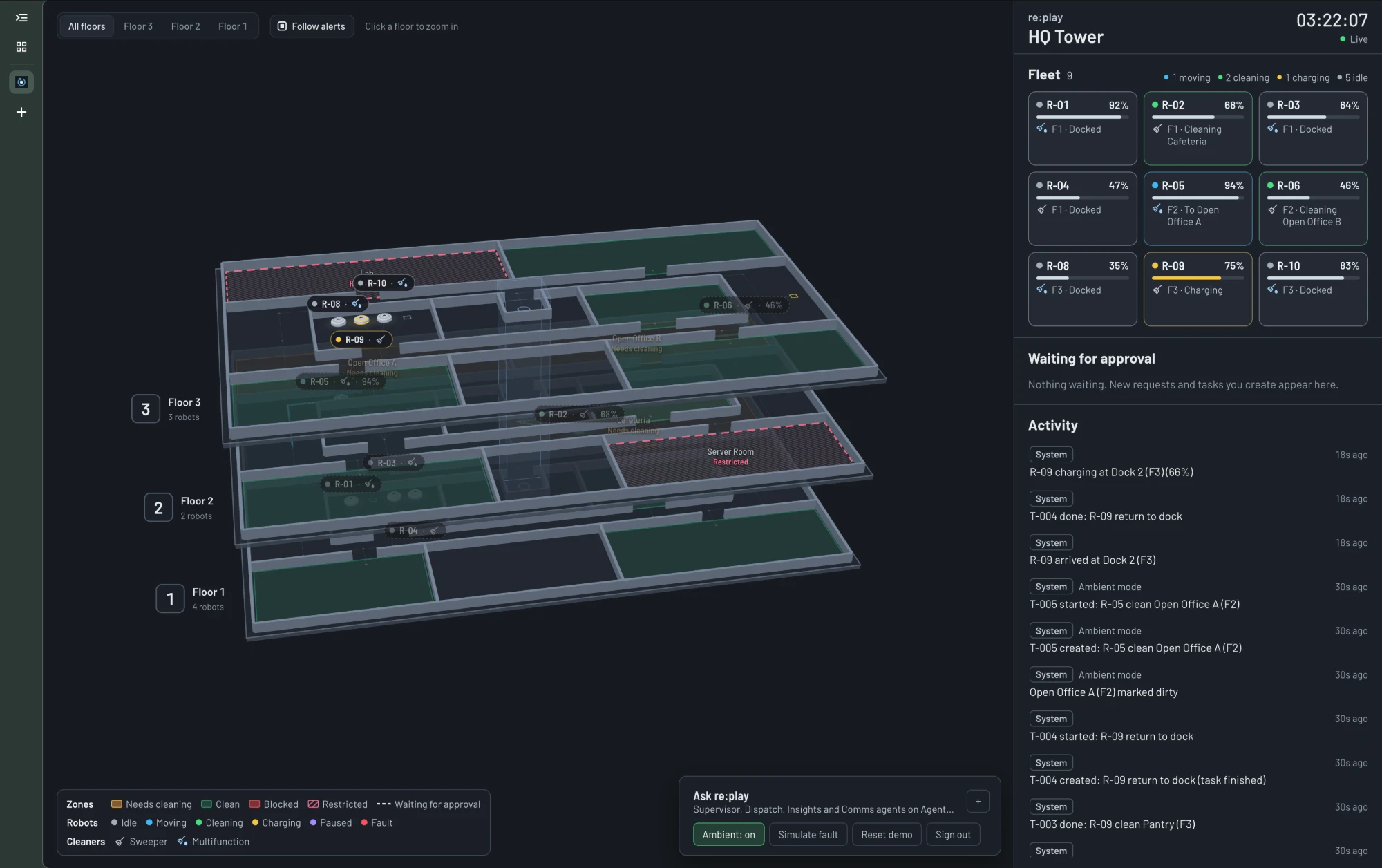
There are two roles. A user is anyone in the building. They message the WhatsApp number with something like "coffee spill in the level 1 cafe", or send a photo with the place in the caption. A supervisor runs the fleet from WhatsApp or the console. Supervisors can ask questions in plain language ("Why is R-02 not working?", "Email me the shift summary"), create tasks, pause or dock robots, and clear faults.

When a report comes in, the Dispatch agent reads the message or the photo and works out what the mess needs. Dry debris needs a sweep. Anything wet or sticky needs a mop, and only five of the nine robots can mop. It then picks a free robot that can do the job and creates a task.
No robot moves until a supervisor says yes. Every task, including one a supervisor created, is sent to the registered supervisors on WhatsApp as "Sending R-03 to mop Cafeteria (F1)" with Approve and Deny buttons, and it shows up in the console's approval list too. Requests for restricted areas come with a warning. The person who reported the mess is told when it is approved, declined or done, without being shown robot details.
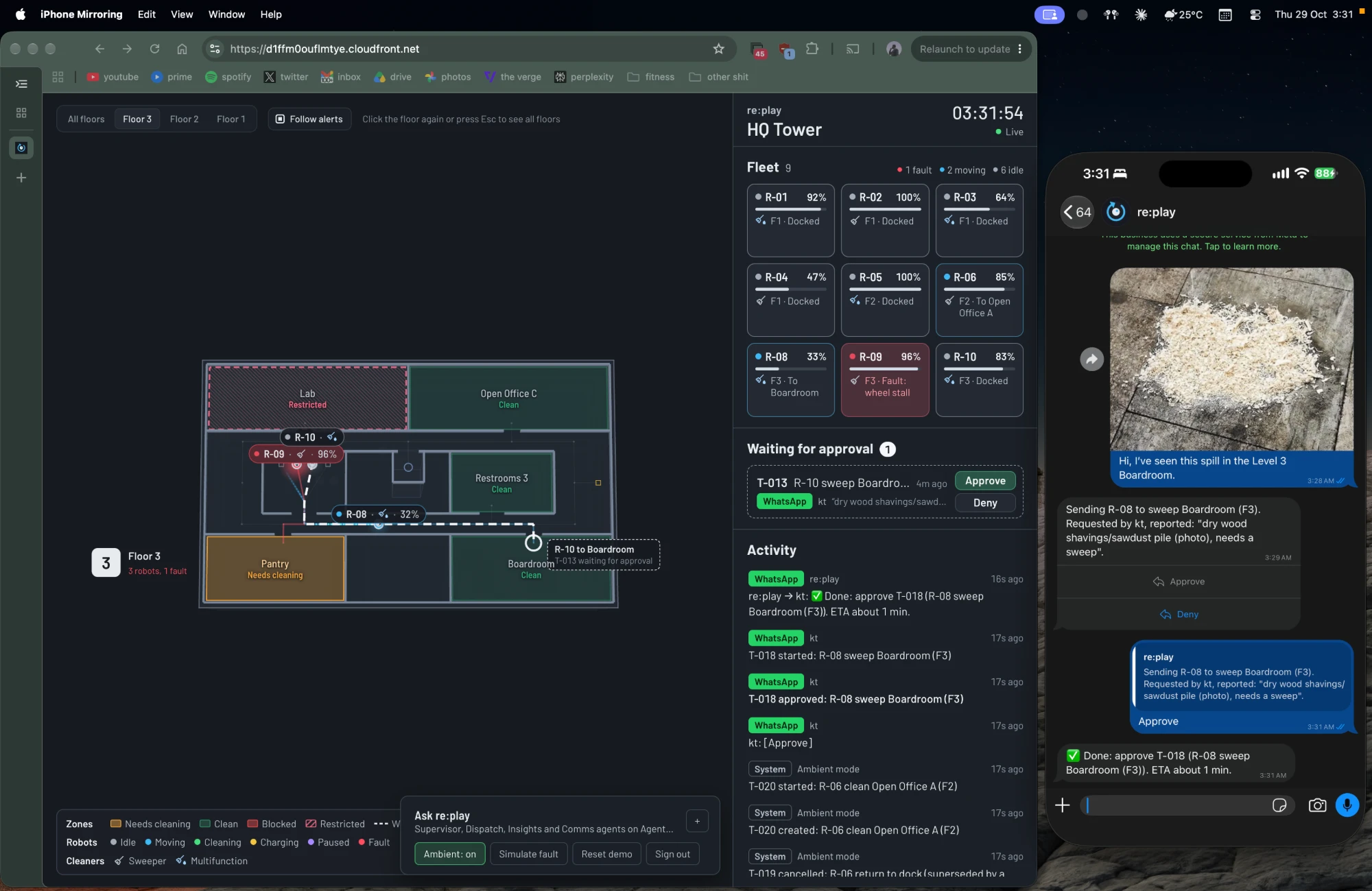
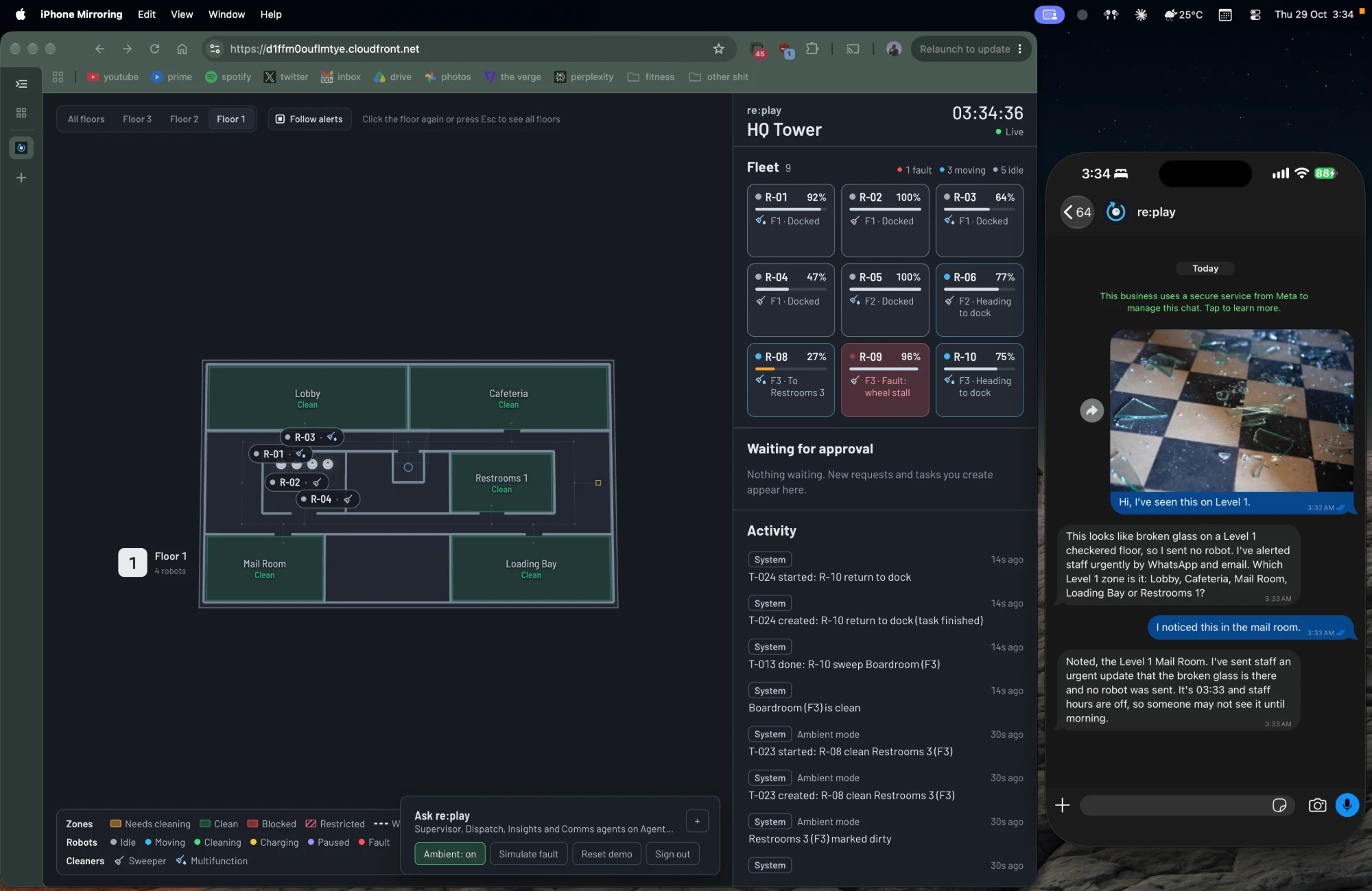
Some things should never go to a robot: broken glass, chemicals, bodily fluids, electrical damage, a person who needs help. For those, Dispatch sends nothing. The reporter is told to keep clear, and the Comms agent messages the supervisors on WhatsApp so a person comes to deal with it. Urgent notices also go out by email.
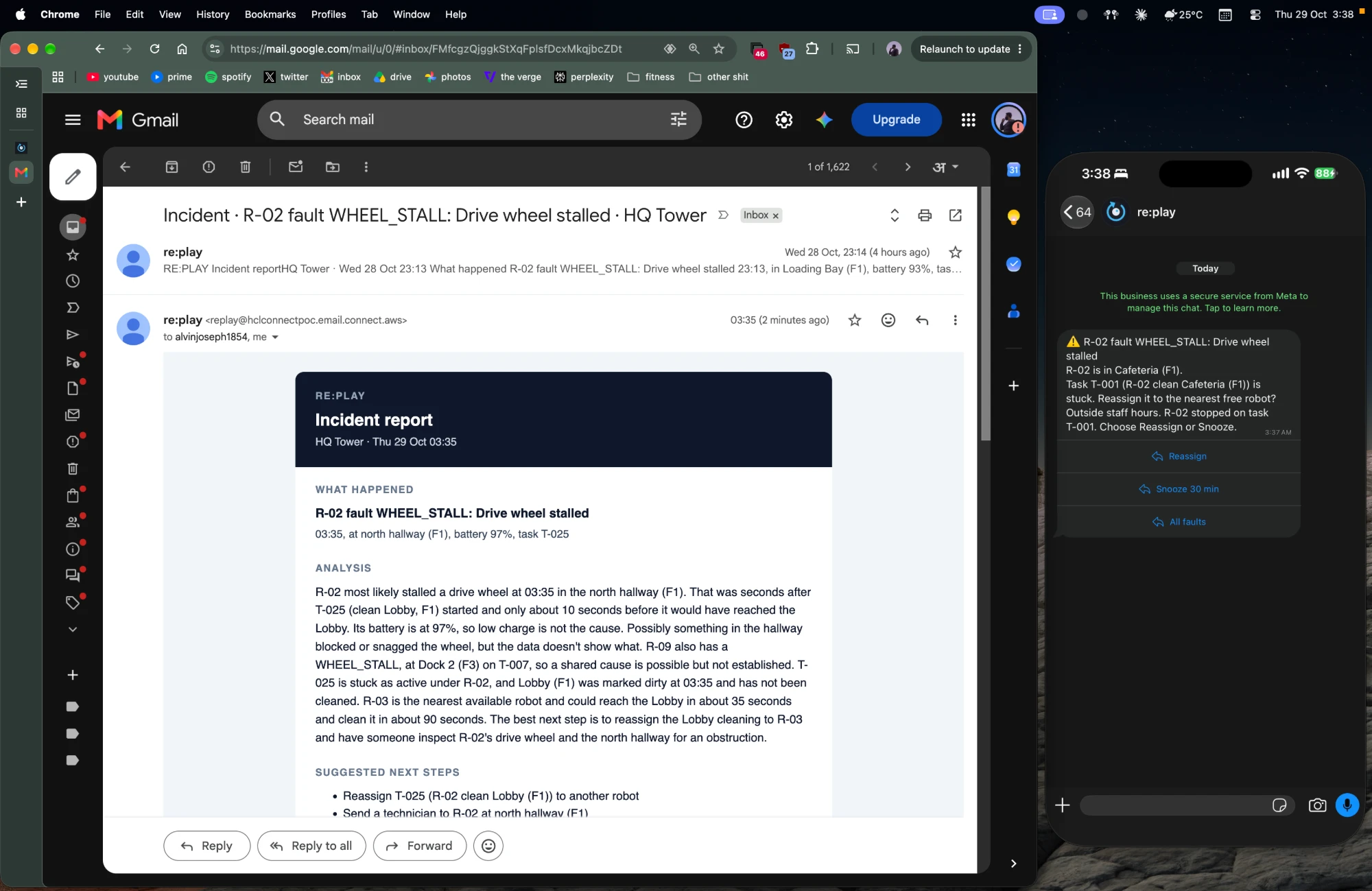
Robots also break down. When one faults, supervisors get a WhatsApp alert with buttons to act on it, and an incident report goes out through Amazon SES with an analysis written by the Insights agent. At 19:00 every evening a scheduled job emails a shift summary covering what happened that day.
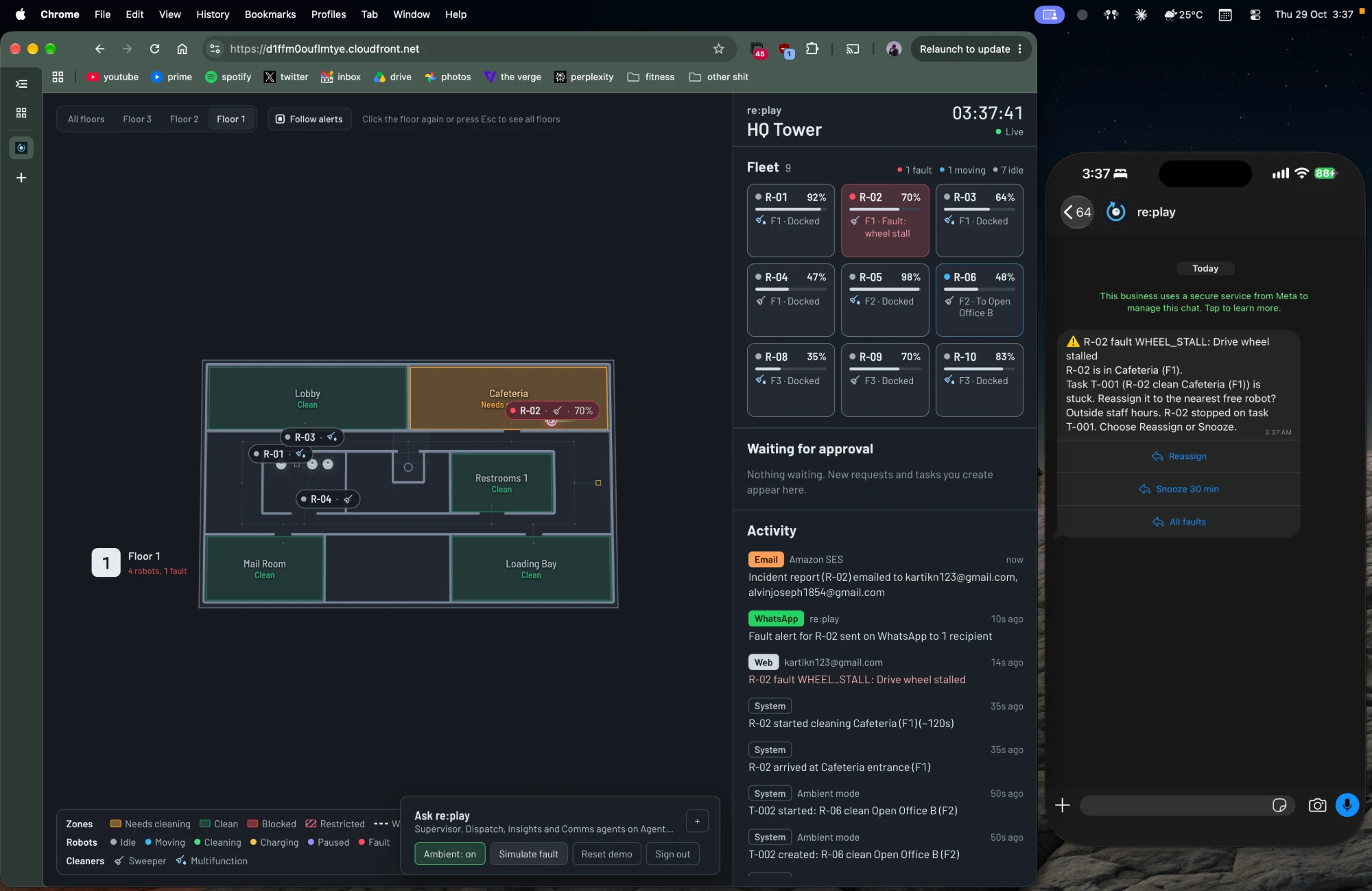
The console shows the building as stacked floors in 3D. Robots move along their routes, zones change colour as they get dirty and clean, and an audit feed lists every command, approval and robot action along with the channel it came from. A chat panel in the console talks to the same agents as WhatsApp. An ambient mode makes the building generate its own messes and the occasional fault, so there is always something going on.
How we built it
The simulator holds the building graph, intelligent routing across floors and lifts, time-based robot motion and battery, task state, and the guardrail. The browser imports the same package as the backend, so the 3D view and the server always agree on where a robot should be.
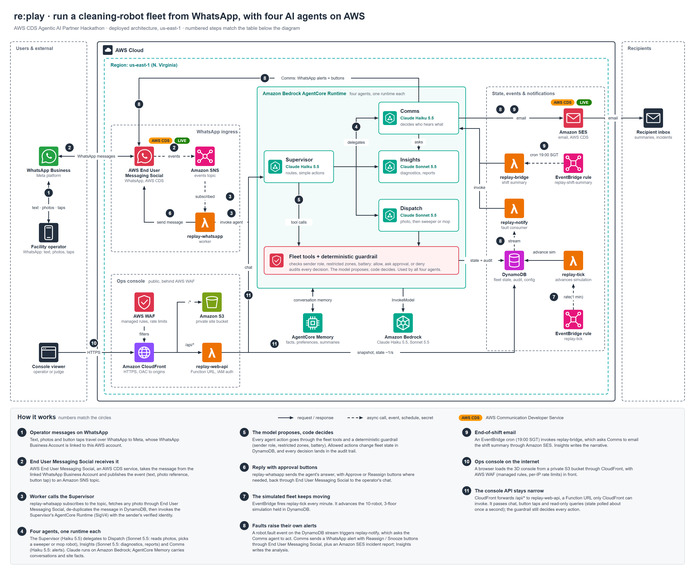
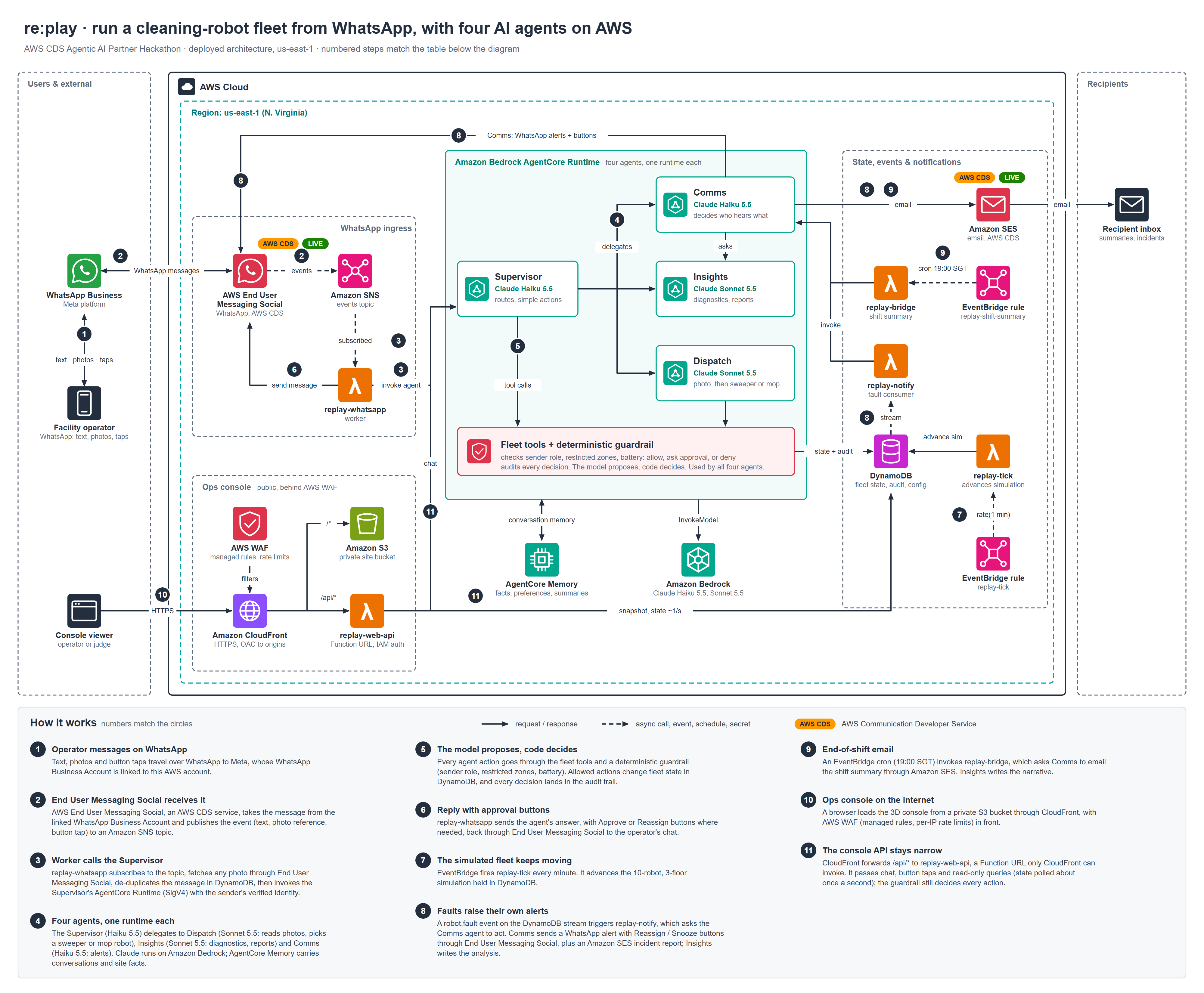
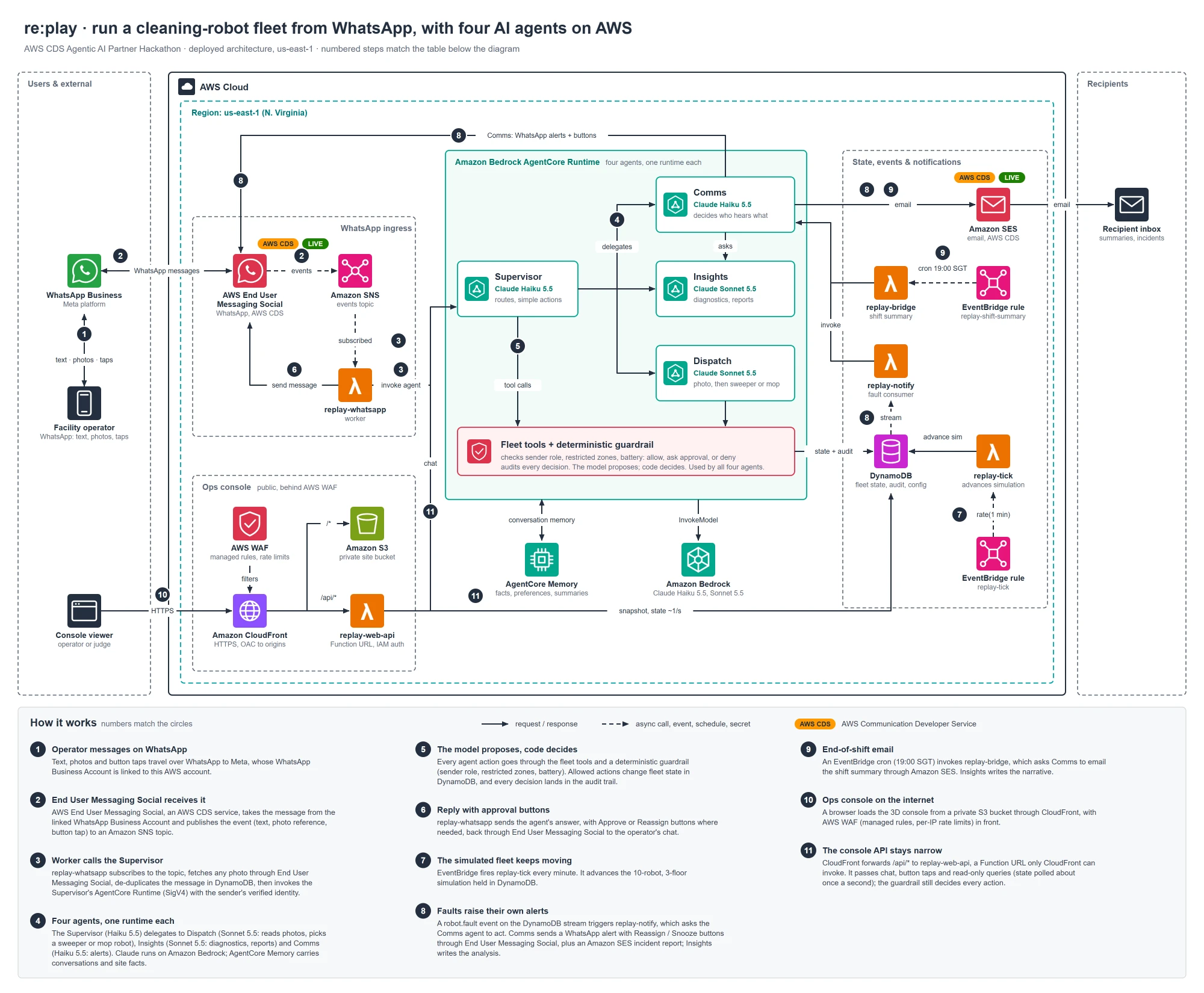
The backend runs on AWS Lambda inside a VPC, with fleet state and the audit trail in DynamoDB. A tick function advances the simulation every minute. Only one function, the bridge, can change fleet state. Every action goes through it, whether it came from an agent, a WhatsApp button or the console, and the bridge runs a deterministic guardrail before anything happens. The guardrail checks the sender's role, the robot's status and abilities, the route, and whether the battery will last, then allows or denies the action with a reason a person can read. The model proposes an action, and code decides whether it happens.
The agents run on Amazon Bedrock AgentCore, four of them, each on its own AgentCore Runtime:
- Supervisor (Claude Haiku 5.5) reads every message and either answers it or hands it on.
- Dispatch (Claude Sonnet 5.5) looks at photos and descriptions and matches the job to a robot that can do it.
- Insights (Claude Sonnet 5.5) handles diagnostics, incident analysis and the shift summary.
- Comms (Claude Haiku 5.5) writes and sends alerts and notices to people.
AgentCore Memory keeps conversation context and site facts for the Supervisor. The agents' tools all go through the bridge, so an agent cannot change the fleet without passing the guardrail.
WhatsApp is the main interaction channel, and it runs on AWS End User Messaging Social. We linked our WhatsApp Business account and number there. Incoming messages and button taps are published to an SNS topic, which triggers the Lambda that handles them. Everything the agent sends back includes interactive buttons for approvals, registration and common actions. Saying "hi" brings up the buttons that fit who you are. Amazon SES sends the incident reports and shift summaries. A DynamoDB stream feeds a notifier that turns new faults and new requests into WhatsApp messages and email, and an EventBridge schedule triggers the shift summary.
The console is Vite and Three.js. It is served from a private S3 bucket behind CloudFront, with AWS WAF managed rules and per-IP rate limits (tighter on sign-in and chat). The console's API is a Lambda that only CloudFront can call. It forwards a short list of supervisor operations and never exposes the bridge itself. Infrastructure is in AWS CDK.
Challenges we ran into
People don't describe places the way a building map does. "Level 1 cafe", "the coffee place downstairs" and "near the lifts on 1" can all mean Cafeteria (F1). Dispatch has to turn what someone typed, or wrote in a photo caption, into a zone a robot can route to.
Every task waits for a supervisor to say yes, which is safer but slower. A spill in a busy lobby shouldn't sit in a queue. Putting approvals on WhatsApp with one-tap buttons lets a supervisor approve from wherever they are, and the console queue is there for whoever is at a desk.
An alert is only useful if someone sees it. WhatsApp only lets a business send free-form messages and buttons within 24 hours of the person's last message, so a supervisor who went home yesterday may not get a fault alert today. Email covers part of that gap for now.
A robot's status changes all the time, so anything an agent remembers about it is soon out of date. Our agents' memory kept "task T-004 assigned to R-06" after a demo reset had cleared it, and the agents acted on it. The reset now ignores anything remembered before it, and the agents are told to trust live fleet data over memory.
Accomplishments that we're proud of
The guardrail. It is plain code with unit tests. It doesn't depend on the model behaving, and every refusal comes with a sentence a person can understand, like "R-02 is a sweeper and can't mop. Robots that can mop: R-01, R-03, R-05, R-07, R-08."
Photo dispatch that respects what each robot can do. Send a picture of spilled coffee and you get a mop-capable robot. Send a picture of broken glass and you get a person.
The whole loop works on the deployed system. A photo goes in on WhatsApp, the approval comes back on WhatsApp, the robot moves in the 3D view, the reporter hears that it is done, and the shift summary email mentions it that evening.
One simulator shared by the browser and the backend, so we never had to debug two versions of where a robot is.
What we learned
Keep the model away from the final decision. Once the guardrail owned every action, prompt changes stopped being risky, because the worst a confused agent could do was propose something that got refused.
Use different models for different jobs. Haiku is quick and cheap enough to read every incoming message. Sonnet earns its cost on photos and on the reports people actually read.
Messaging channels have rules that shape the design. WhatsApp only allows free-form replies and buttons for 24 hours after a person's last message, SES starts in a sandbox that only sends to verified addresses, and email deliverability depends on DNS records that have nothing to do with your code. We had to plan around all of this from the start.
Agent memory needs boundaries. Memory that records everything will also record things that stopped being true an hour ago.
What's next for Replay Fleet Robotics
Connect real robots. The bridge already speaks in tasks, routes and faults, so the next step is an adapter for a commercial cleaning robot's API in place of the simulator.
Add SMS escalation for critical faults after hours, when nobody is watching WhatsApp. AWS End User Messaging handles SMS as well as WhatsApp, so the notifier would get a second channel on a service we already use.
Get WhatsApp message templates approved, so fault alerts and approval requests can reach supervisors who haven't messaged in the last 24 hours.
Replace the demo sign-in with real authentication. Right now any email address can register a phone number as a supervisor, which is fine for judging and not much else.
Add warehouse robots and multiple sites. The building graph and the guardrail don't assume cleaning, so carrying a pallet is another kind of task with its own rules.
Built With
- agentcore
- amazon-web-services
- bedrock
- end-user-messaging-social
- ses
