-
-
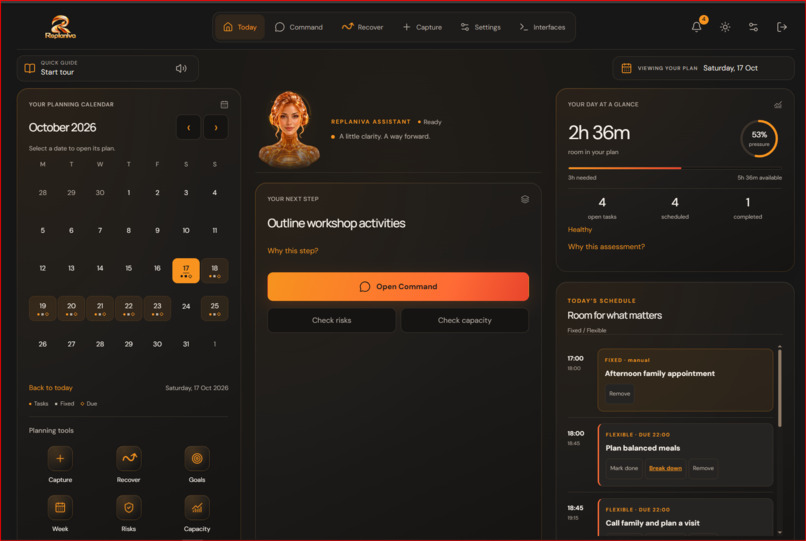
Dashboard
Replaniva
Plans that adapt when life changes.
Inspiration
A plan can make perfect sense in the morning and become impossible by lunchtime.
An unexpected meeting, urgent delivery, family responsibility, or missed appointment can disrupt an entire day. Traditional calendars and to-do lists help record responsibilities, but they often leave the hardest part to the user: figuring out what to move, what to protect, and what can realistically still get done.
That challenge inspired Replaniva, an intelligent personal planning secretary built to help people adapt when their schedules change.
Replaniva is designed for everyday planning across work, education, home, caregiving, and personal goals. Its guiding principle is simple:
AI proposes. Jac validates. You decide.
What it does
Replaniva combines intelligent scheduling, proactive planning assistance, and disruption recovery in one private workspace.
Today — Understand your day
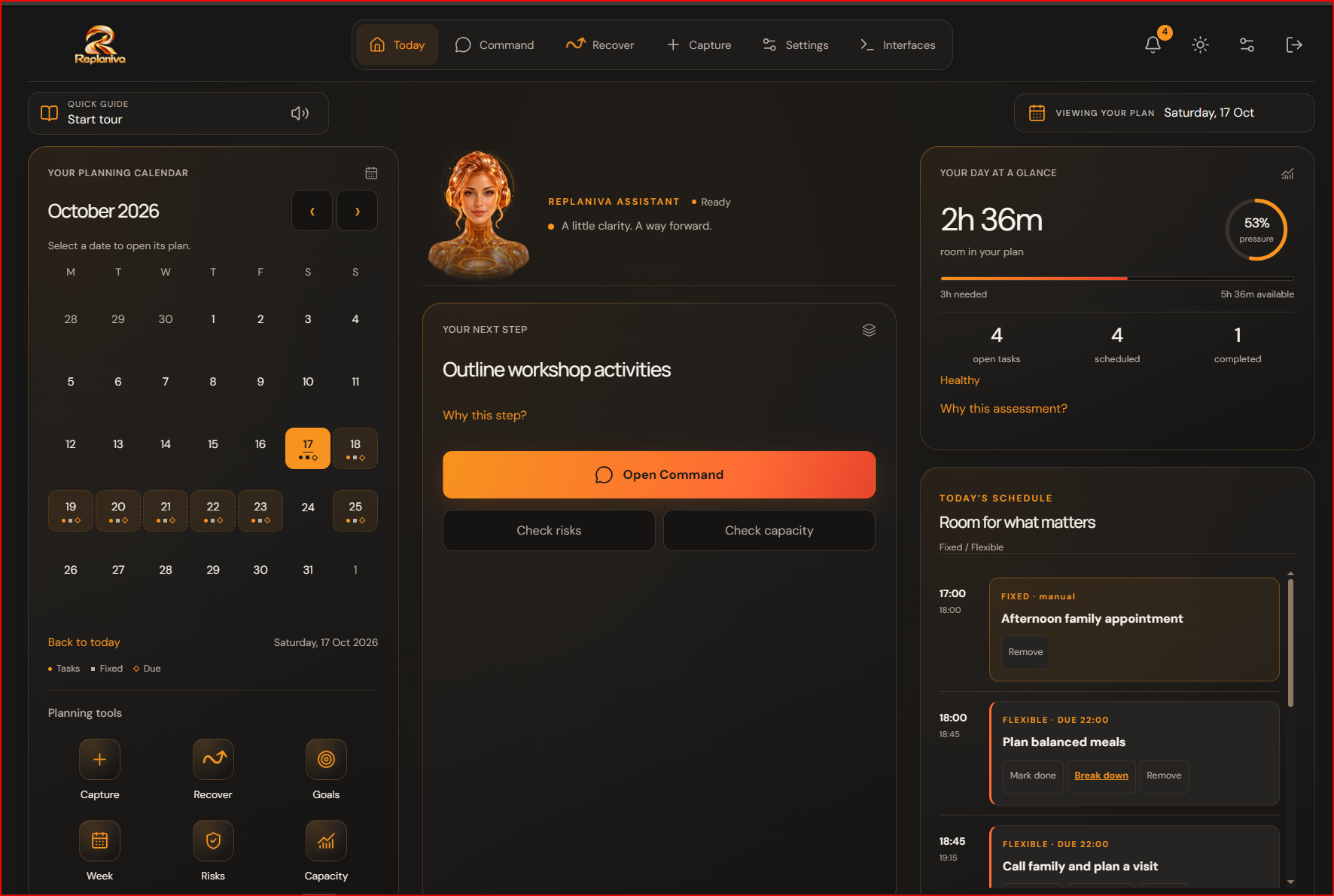
The Today dashboard brings together a planning calendar, scheduled tasks, fixed commitments, available capacity, deadlines, goals, risk indicators, and a seven-day outlook.
It recommends the next useful action and helps users recognize overloaded schedules before they become emergencies.
Capture — Organize responsibilities
Users can create flexible tasks with durations, priorities, deadlines, preferred times, and dependencies.
Fixed commitments, such as meetings and appointments, reserve time that cannot be moved automatically.
Replaniva's deterministic scheduler works within each user's planning hours to create a feasible schedule.
Recover — Adapt when plans change
Recovery Studio is the central feature of Replaniva.
When something unexpected happens, the user can describe a new commitment and preview how it affects the existing plan.
Replaniva offers two validated recovery strategies:
- Move as little as possible: Minimize disruption to the original schedule.
- Protect deadlines: Prioritize completing time-sensitive work.
Users can compare moved tasks, available time, potential risks, and work that cannot fit.
Nothing changes simply because a recovery was suggested. The user must explicitly approve the preferred option.
Eligible accepted recoveries can also be restored after validation.
Command — Your personal planning secretary
Replaniva's planning secretary helps users ask questions such as:
- What should I work on next?
- Am I at risk of missing a deadline?
- Which tasks depend on this one?
- What happens if I lose an hour tomorrow?
The assistant investigates the actual saved plan, including task dependencies, goals, and scheduling constraints.
Jac provides deterministic answers for supported planning questions, even when an external AI model is unavailable.
Optional language-model assistance supports natural-language interpretation and bounded investigation tools. Browser voice input is also available where supported, with an editable transcript before submission.
Interfaces — One plan, three ways to use it
Replaniva provides three interactive experiences connected to the same authenticated planning system:
- Web dashboard: The full planning and recovery workspace.
- Mobile preview: An interactive browser-rendered version of the mobile application.
- Command-line interface: A guided and typed planning terminal.
Users can access the same saved tasks, commitments, goals, and approved planning changes across these interfaces.
The embedded mobile experience is a browser preview, not a claimed physical Android installation. The browser terminal is a restricted planning console, not an unrestricted operating-system shell.
Google Calendar — Connect existing commitments
Replaniva supports an optional Google Calendar integration.
Users can select calendars to read, preview proposed imports over seven days, and approve how external commitments affect their plan.
Approved task exports are directed to a separate Replaniva calendar rather than modifying existing personal calendar events.
How I built it with Jac and Jaseci
Replaniva uses Jac 0.37.25 as the foundation for its planning logic, persistent graph, agentic behavior, and shared application services.
Graph-based planning
Tasks, goals, commitments, and planning settings belong to private account-owned graph structures.
Typed relationships represent task dependencies and connections between work and goals.
The SecretaryRun walker traverses relevant tasks, prerequisite relationships, dependent work, and goals to understand the user's planning context.
This gives the planning secretary a structured way to investigate how one responsibility affects others.
Deterministic scheduling and validation
planning.jac implements the scheduling and validation logic.
It checks task durations, planning hours, deadlines, fixed commitments, overlaps, and dependencies before accepting a proposed schedule.
intelligence.jac generates planning briefings, capacity assessments, risk indicators, and outlook information.
Authenticated Jac operations maintain private account data, while planning-version checks reject outdated proposals.
Optional AI integration
Jac's ByLLM integration supports structured interpretation, scheduling suggestions, and controlled investigation tools.
The assistant can read planning context, inspect dependencies, assess risk, and simulate unavailable time.
These tools cannot silently approve or apply planning changes.
Model usage is bounded by application-level allowances, caching, and provider cooldowns.
The architecture follows one consistent rule:
AI proposes → deterministic Jac validates → the user approves.
Unified deployment
The web application, React Native-compatible mobile interface, and planning terminal share the same Jac planning service.
Replaniva is deployed through Jac Hammer, making the working web experience available for demonstration.
Google Calendar authorization and encrypted credential handling remain separate from the planning engine.
Challenges I faced
Making AI suggestions reliable
A language model can suggest a schedule that sounds reasonable but violates real constraints.
I addressed this by separating AI-assisted interpretation from deterministic validation. The planner checks every candidate before presenting it as a valid recovery option.
Preventing unintended changes
An intelligent assistant should not rearrange someone's responsibilities without permission.
Replaniva separates simulation, review, and approval. Changes are validated again at acceptance, and stale proposals are rejected.
Sharing one plan across multiple interfaces
Keeping web, mobile, and terminal experiences consistent required centralizing authenticated operations and saved planning state rather than implementing separate schedulers.
Handling external service limitations
AI model quotas, browser capabilities, and Google OAuth restrictions can affect optional features.
I designed supported planning operations to remain available without model calls and kept integrations separate from the core planning workflow.
What I learned
Building Replaniva reinforced several lessons:
- An intelligent agent needs reliable tools, not just convincing responses. Graph traversal and deterministic checks make its findings more useful and trustworthy.
- Human approval is a product feature. Showing the consequences of a change before applying it gives users meaningful control.
- Graph relationships provide valuable planning context. Dependencies and goals help explain why moving one task may affect others.
- Shared architecture matters. One authenticated planning service makes web, mobile, and command-line experiences more consistent.
- Graceful fallback improves reliability. A useful planning system should not stop functioning simply because an external model reaches its quota.
Most importantly, I learned that an AI assistant is more valuable when it helps people make better decisions rather than making every decision for them.
Accomplishments and verification
The deployed demonstration shows a working end-to-end journey:
- Capturing a task.
- Viewing its scheduled placement and available capacity.
- Asking the planning secretary for next steps and risks.
- Reporting an unexpected interruption.
- Comparing validated recovery choices.
- Explicitly approving a new plan.
- Confirming the saved result persists after reloading.
- Restoring an eligible recovery.
- Viewing shared planning information through the mobile browser preview and interactive terminal.
Separate local tests verified task completion, reopening, deletion, shared interface behavior, and approved Google Calendar import and export.
A real Google Calendar appointment was successfully imported during testing and appeared in the web and mobile planning views.
Native Android installation and unrestricted public Google authorization have not been verified. Google OAuth remains subject to the configured testing and user-access restrictions.
The most recent direct Gemini request encountered a provider quota limit, so the recorded demonstration uses Replaniva's deterministic planning features.
What's next
Future improvements include more durable hosting and storage, wider Google Calendar authorization, reliable optional model availability, physical-device testing, and further accessibility improvements.
The long-term goal is to make Replaniva a dependable personal planning companion that helps people respond to change without losing control of their schedule.
Built with
Jac 0.37.25 · Jaseci graph and walker runtime · ByLLM · Jac Hammer · React · React Native Web · Google Calendar API · Google Gemini (optional) · CSS
