-
-
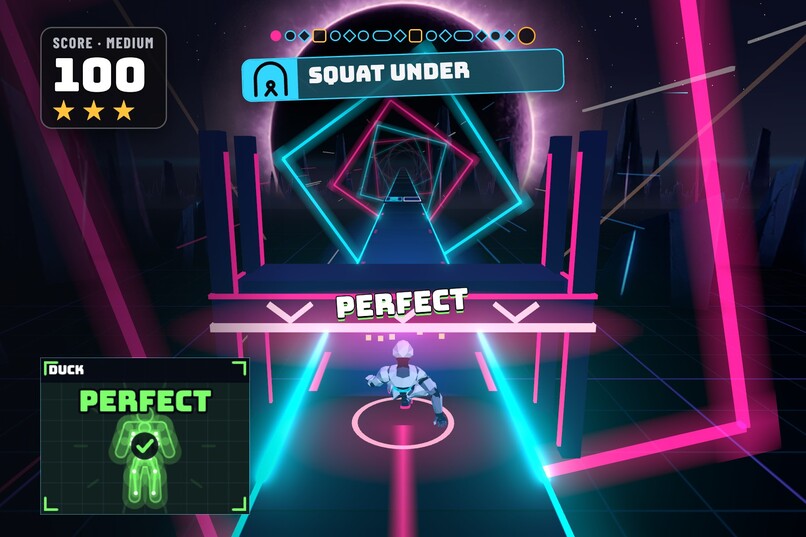
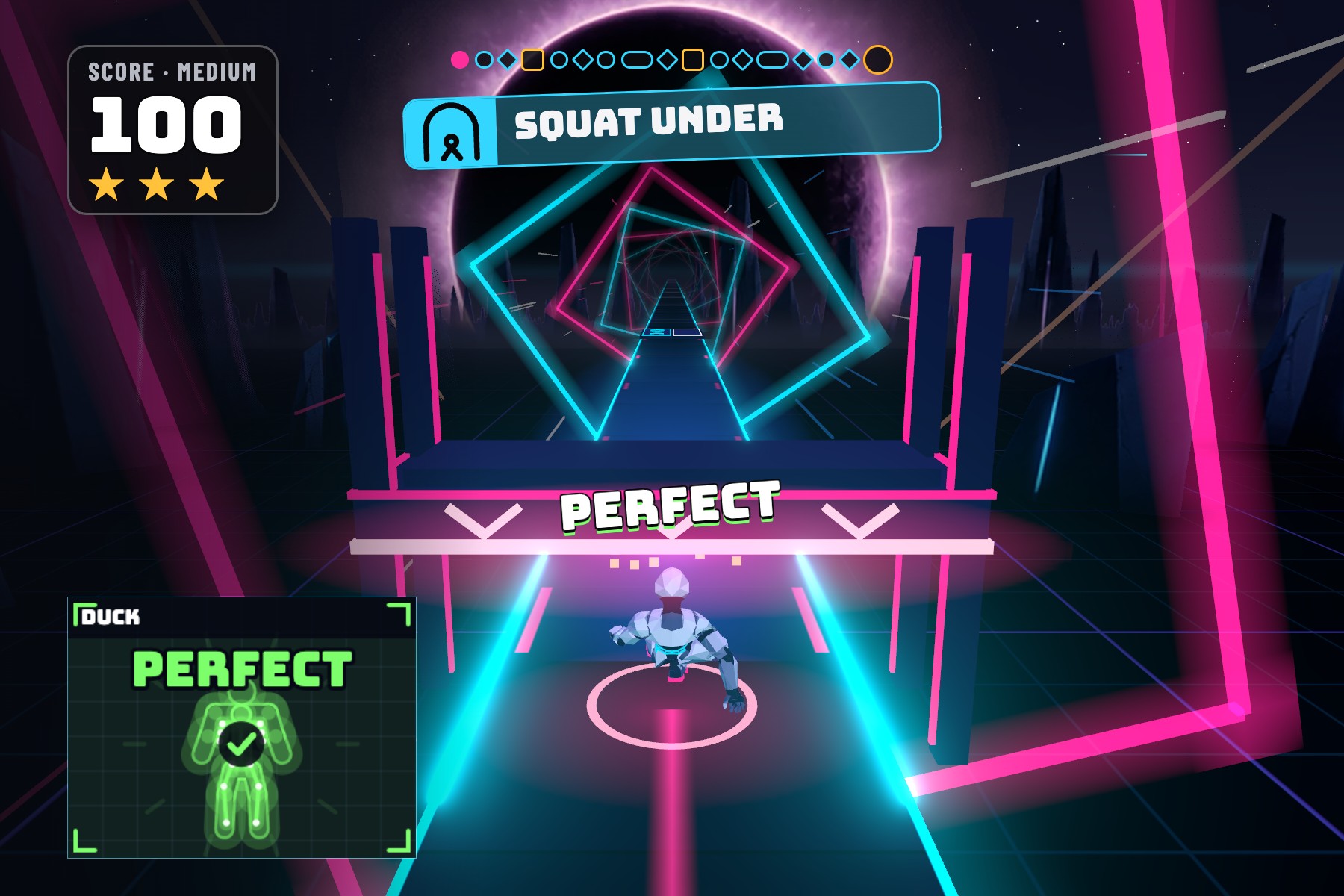
A sweeper comes down the track. Squat on the cue, and the runner slides under it on the beat for a Perfect.
-
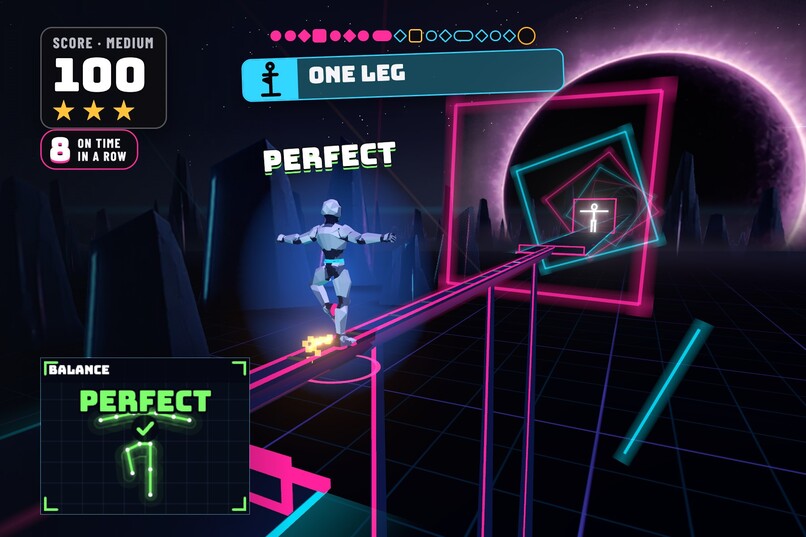
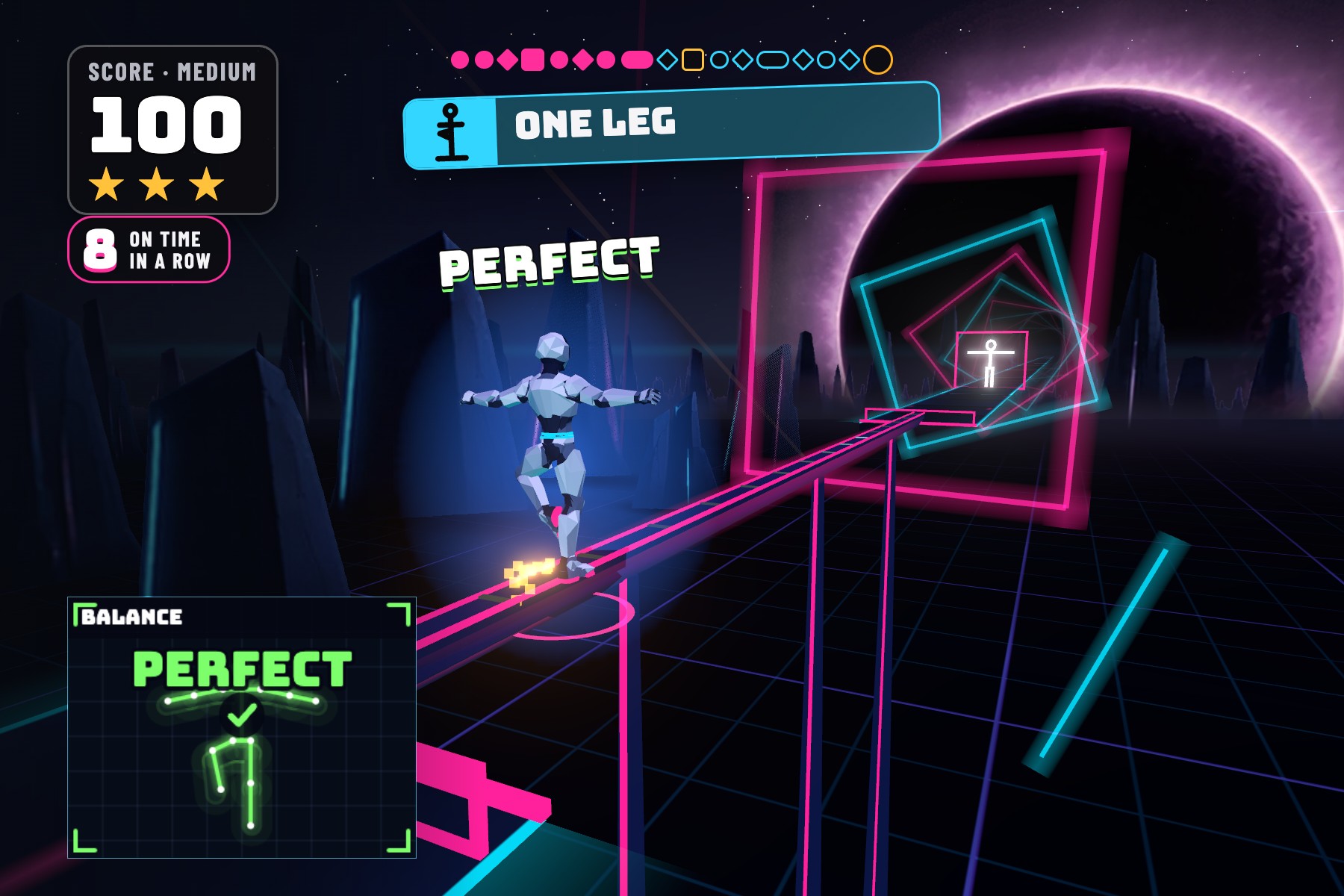
Hold one leg up to grind the rail. Your balance keeps the runner steady.
-
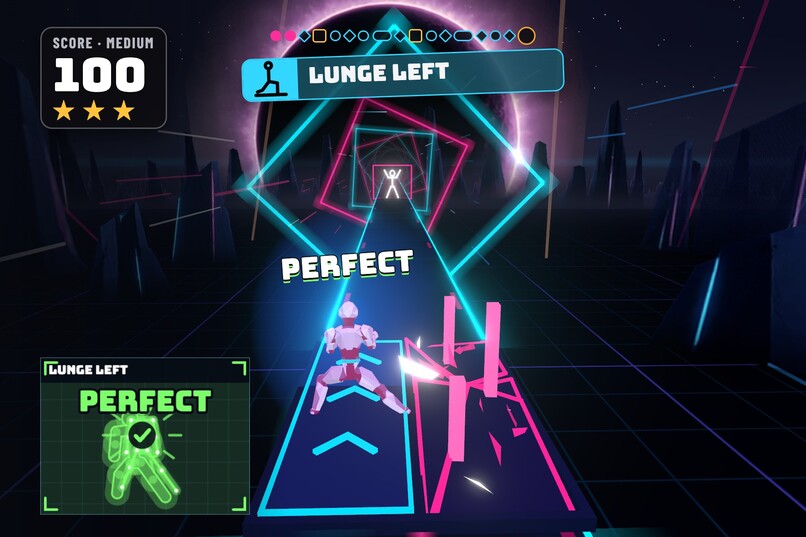
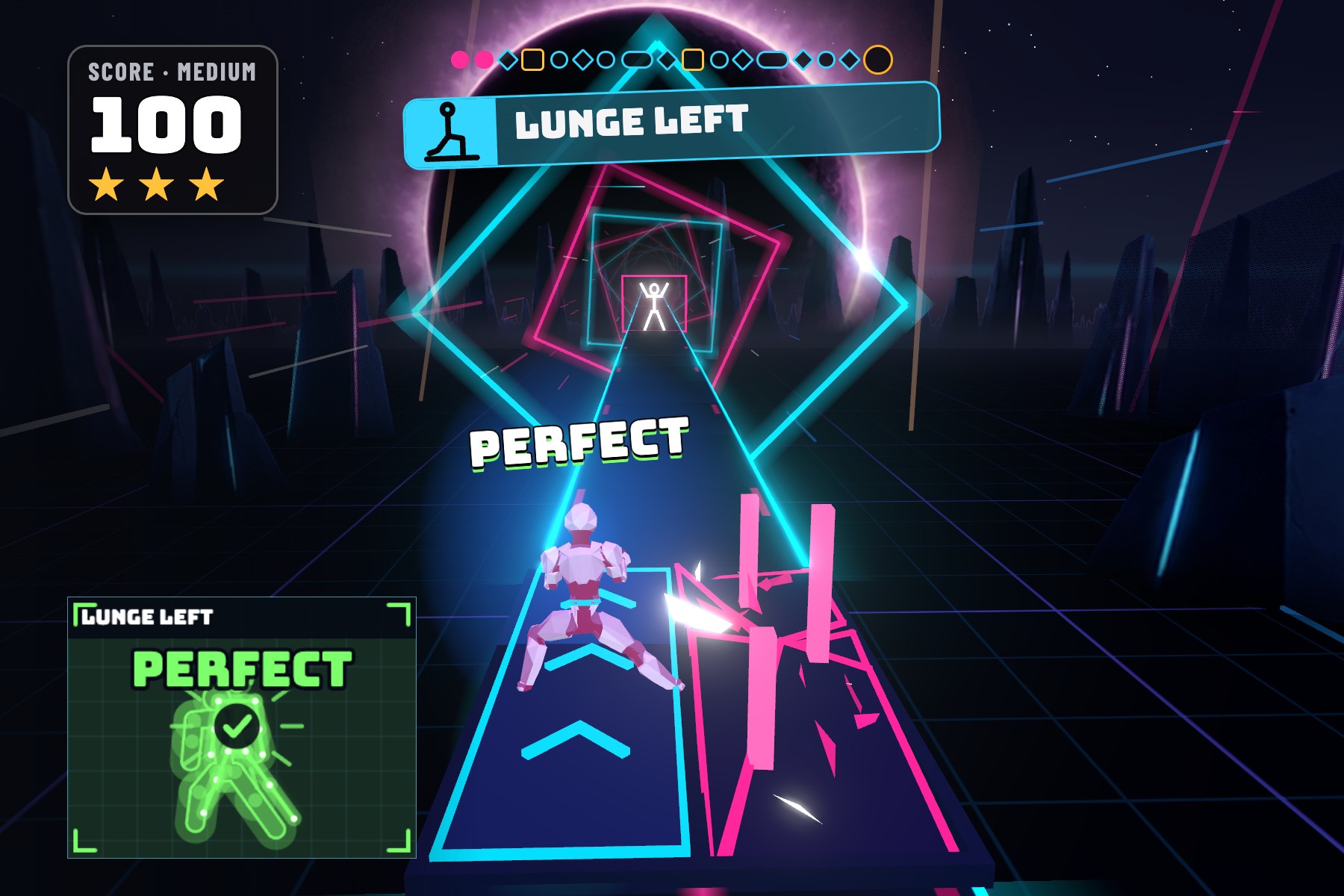
Lunge onto the safe pane. The blocked pane shatters beside you.
-
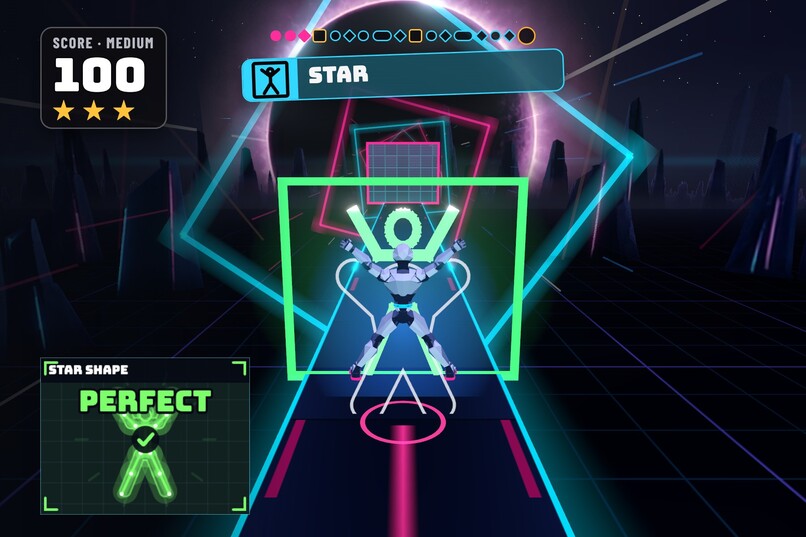
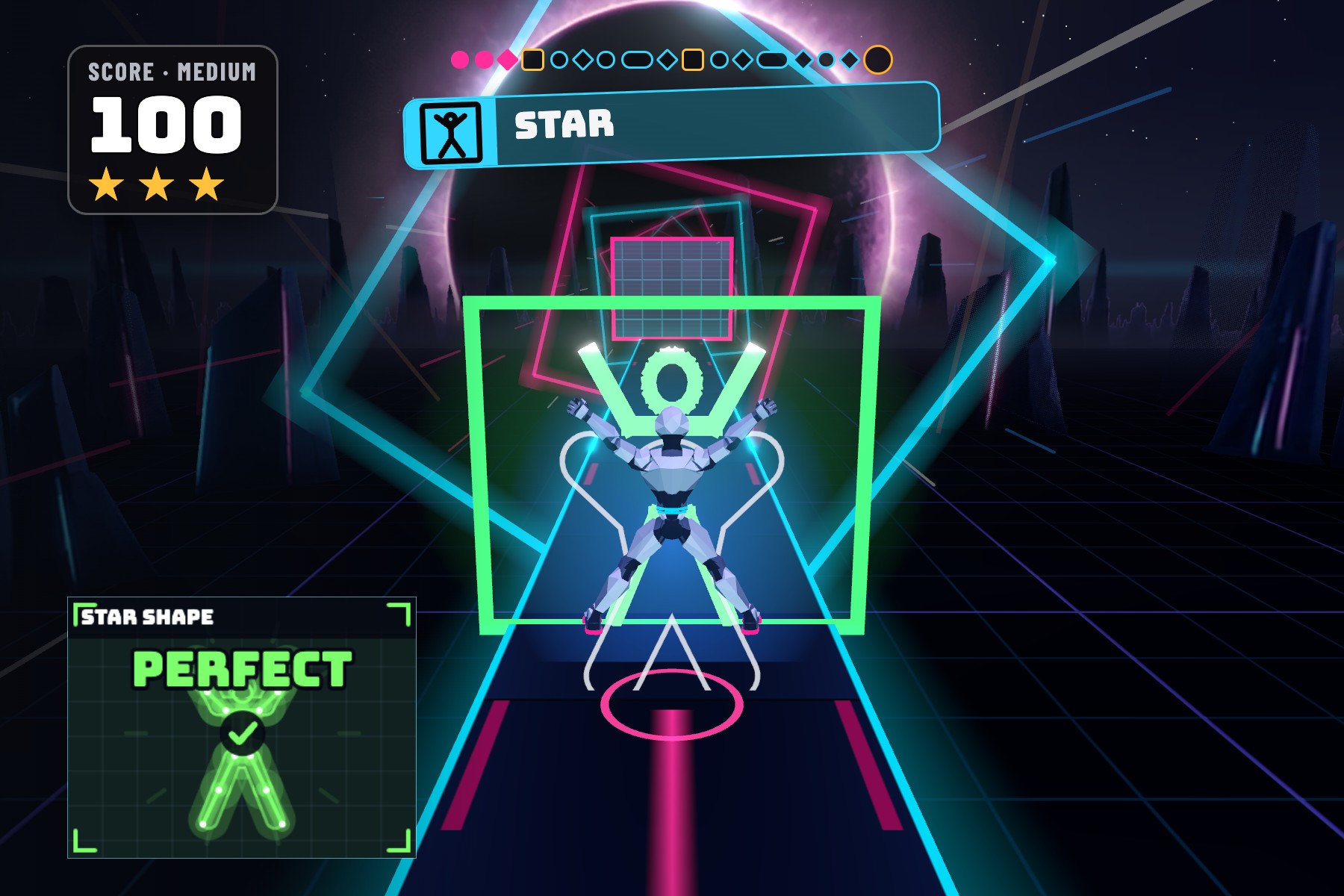
Make the star shape on time to pass the star wall.
-
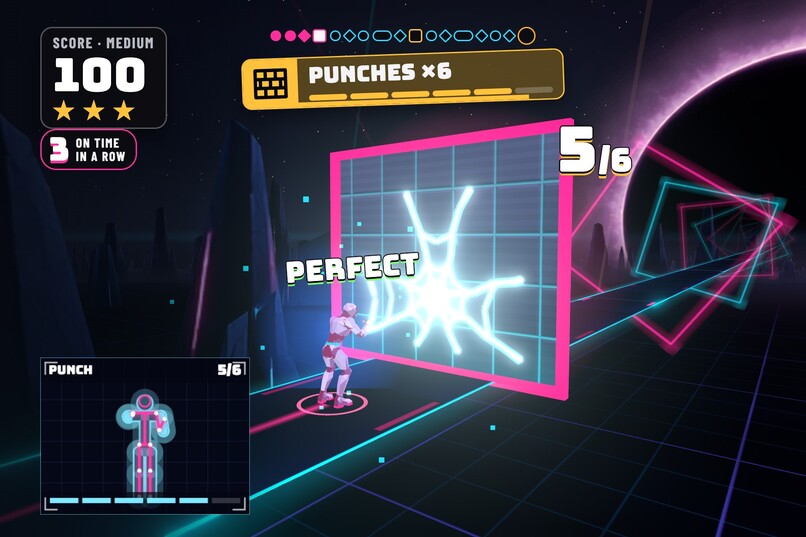
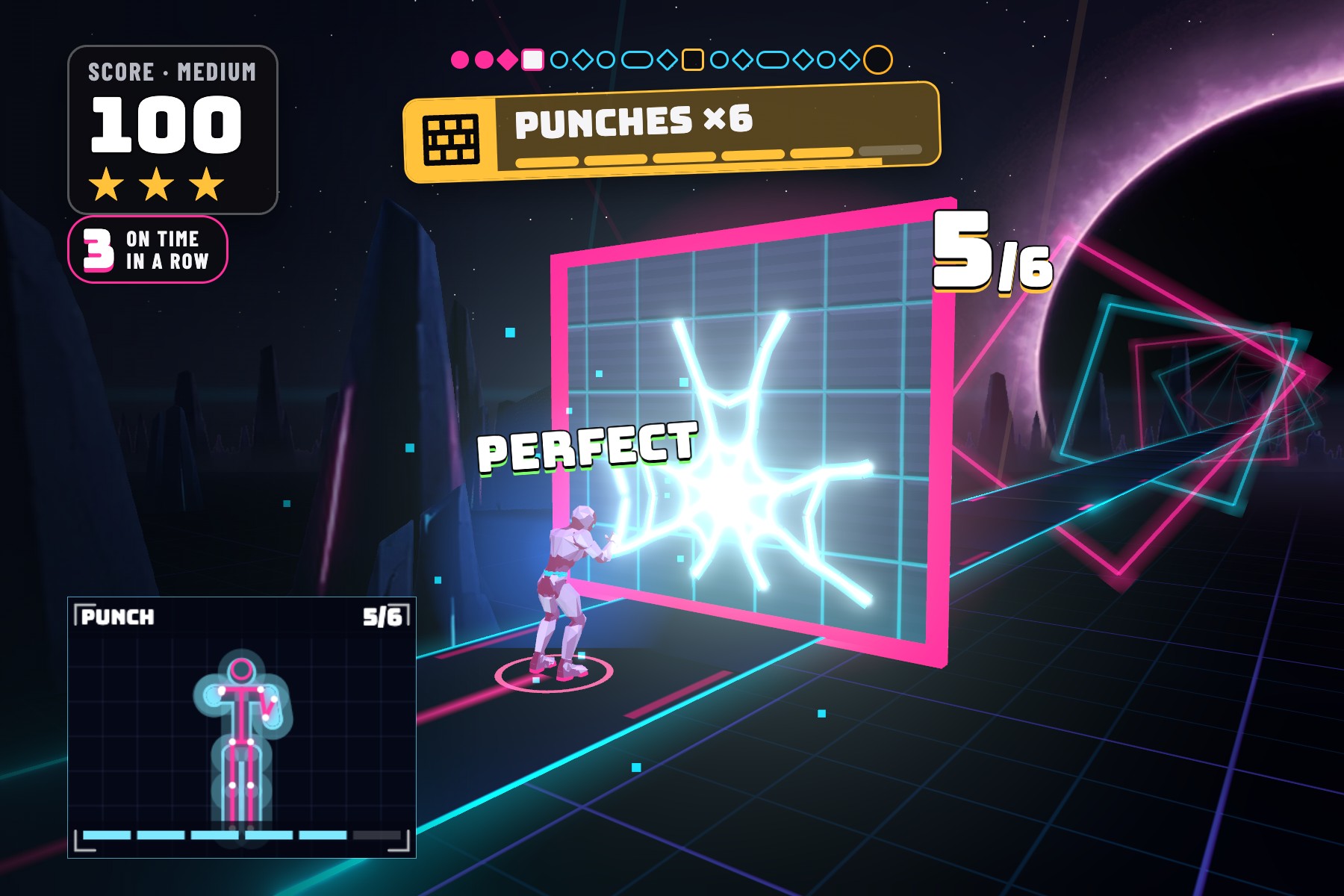
On Medium, six punches break the breach wall. Each counted punch spreads the cracks.
-
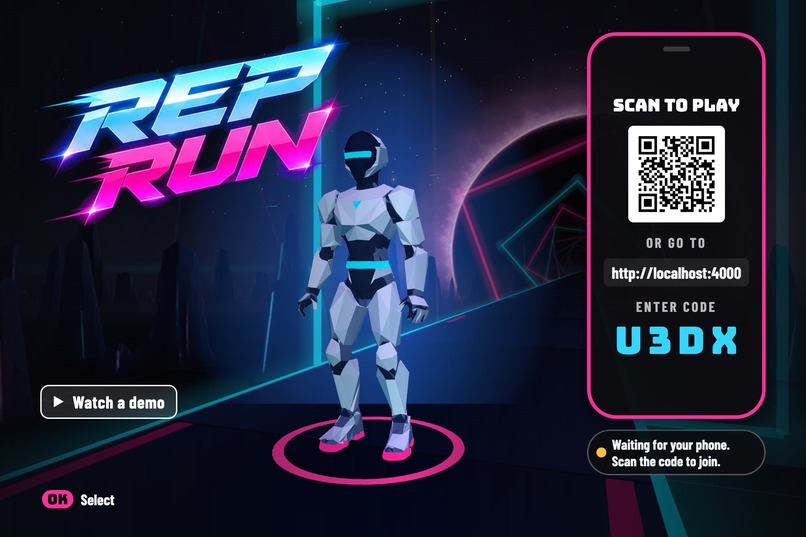
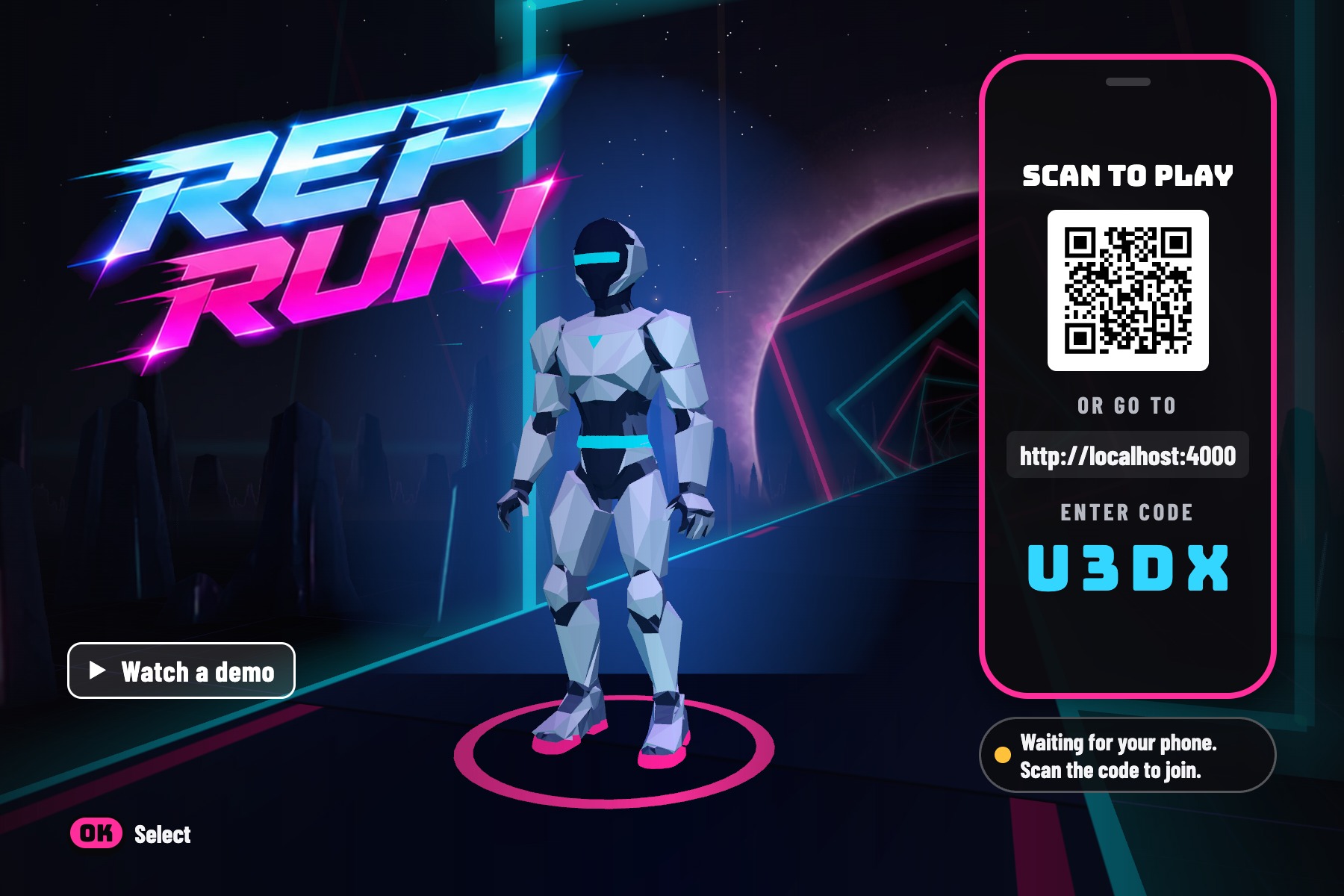
The home screen pairs your phone with the TV. Your body controls the game; the Fire TV remote controls the menus.
-
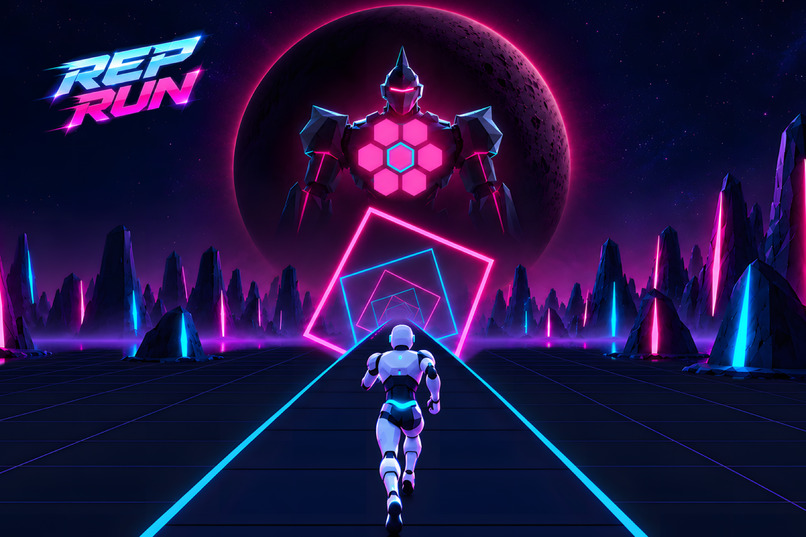
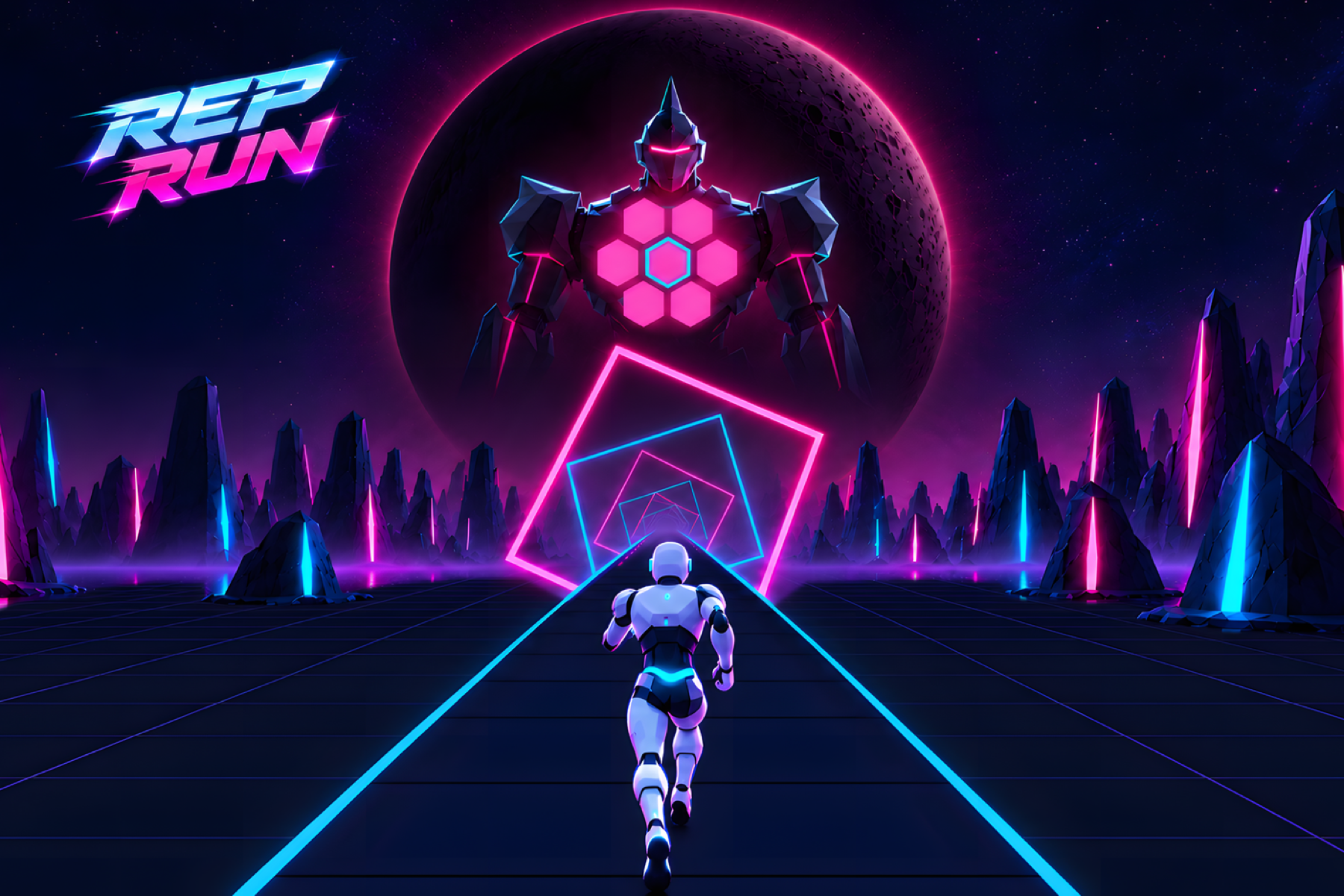
Rep Run key art. Your robot runner races down the neon track toward the Sentinel.
-
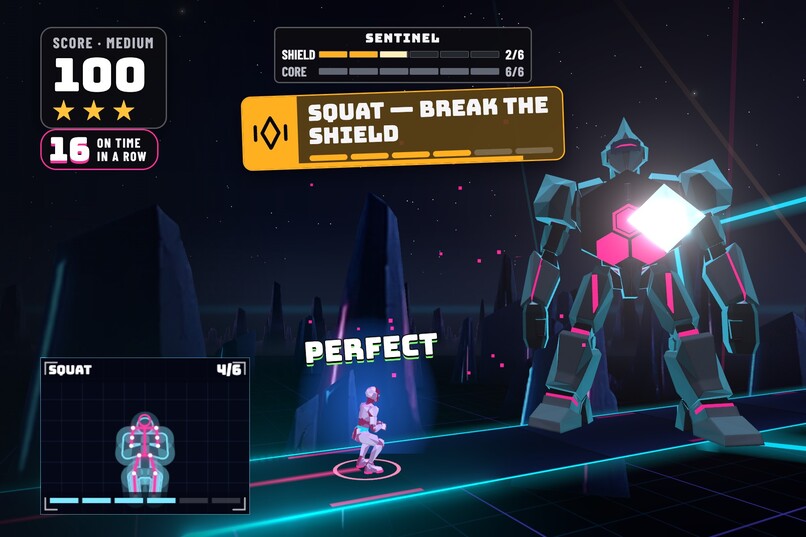
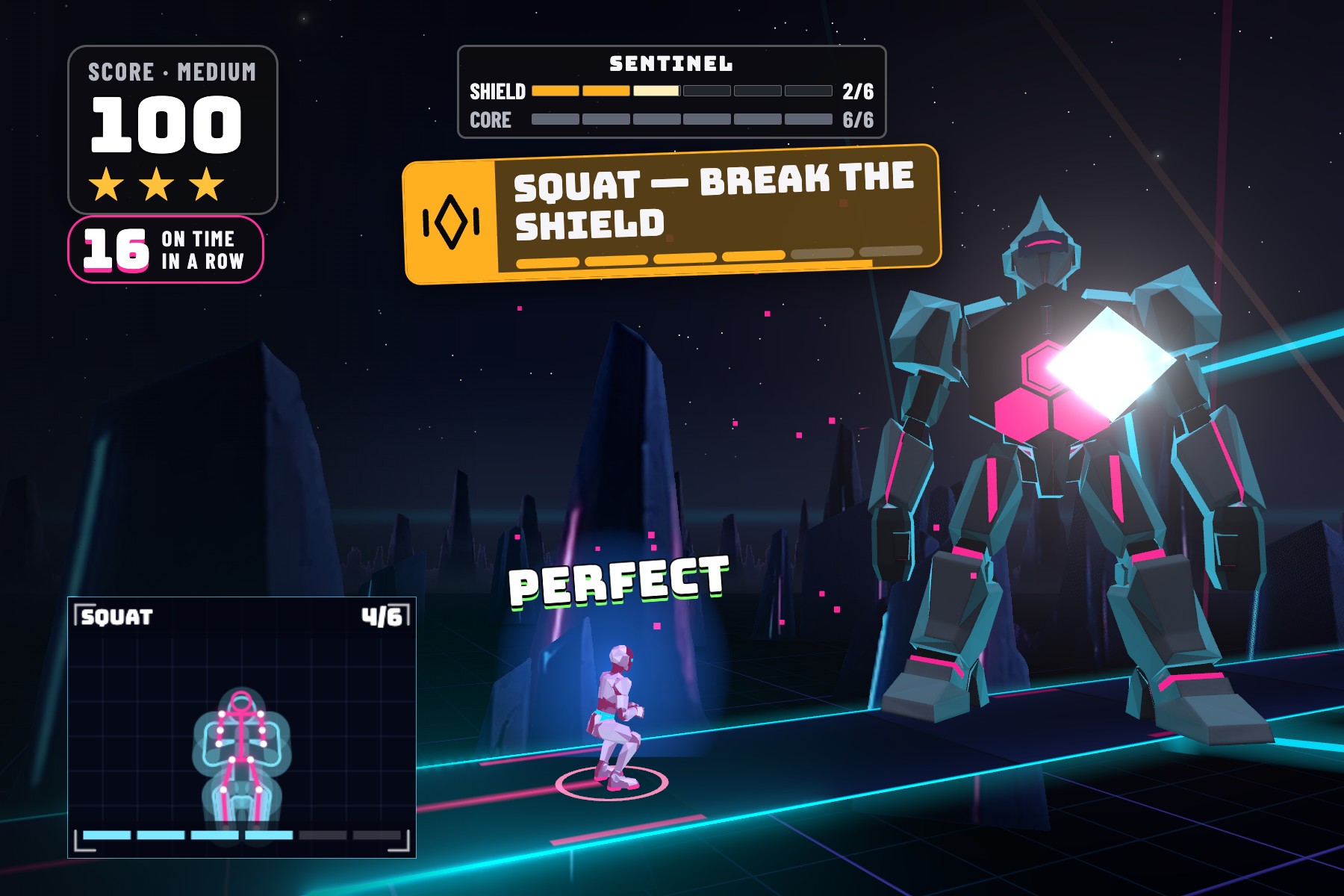
The Sentinel fight. Squat to break its six-plate shield.
-
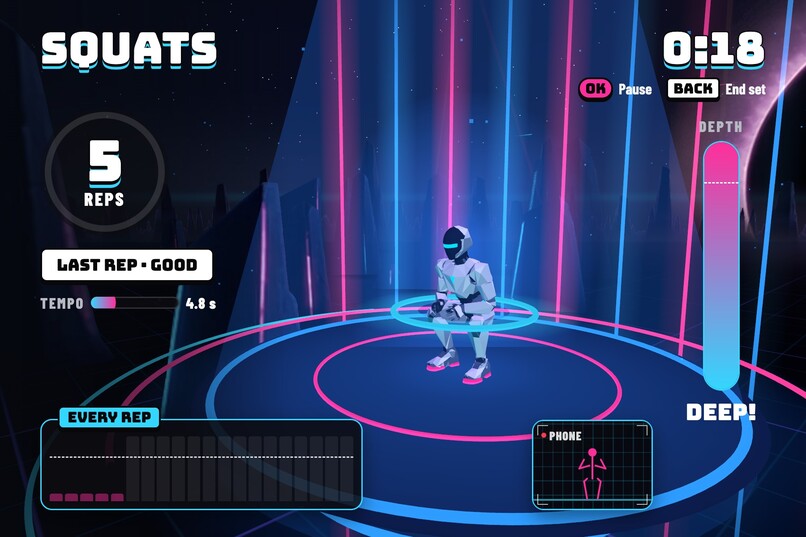
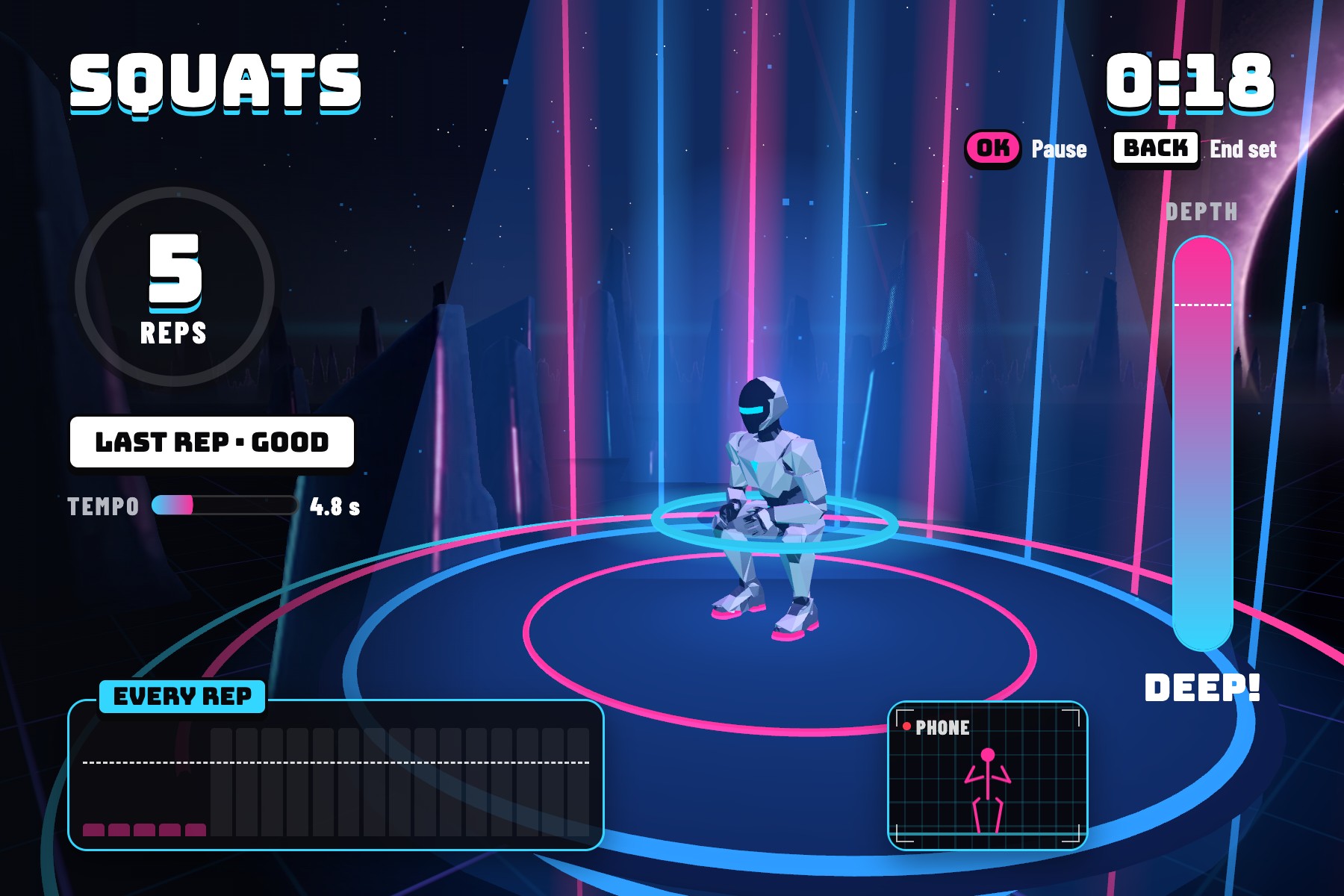
Free training. The depth meter follows every squat live from your phone's camera.
-
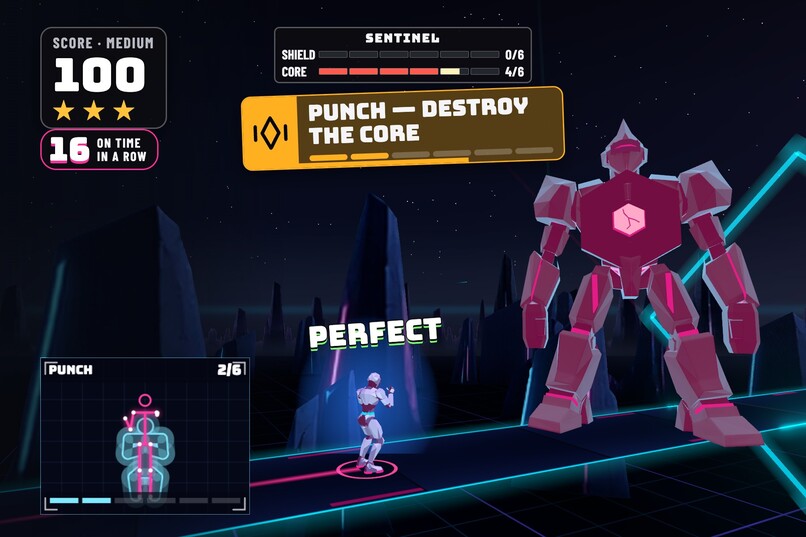
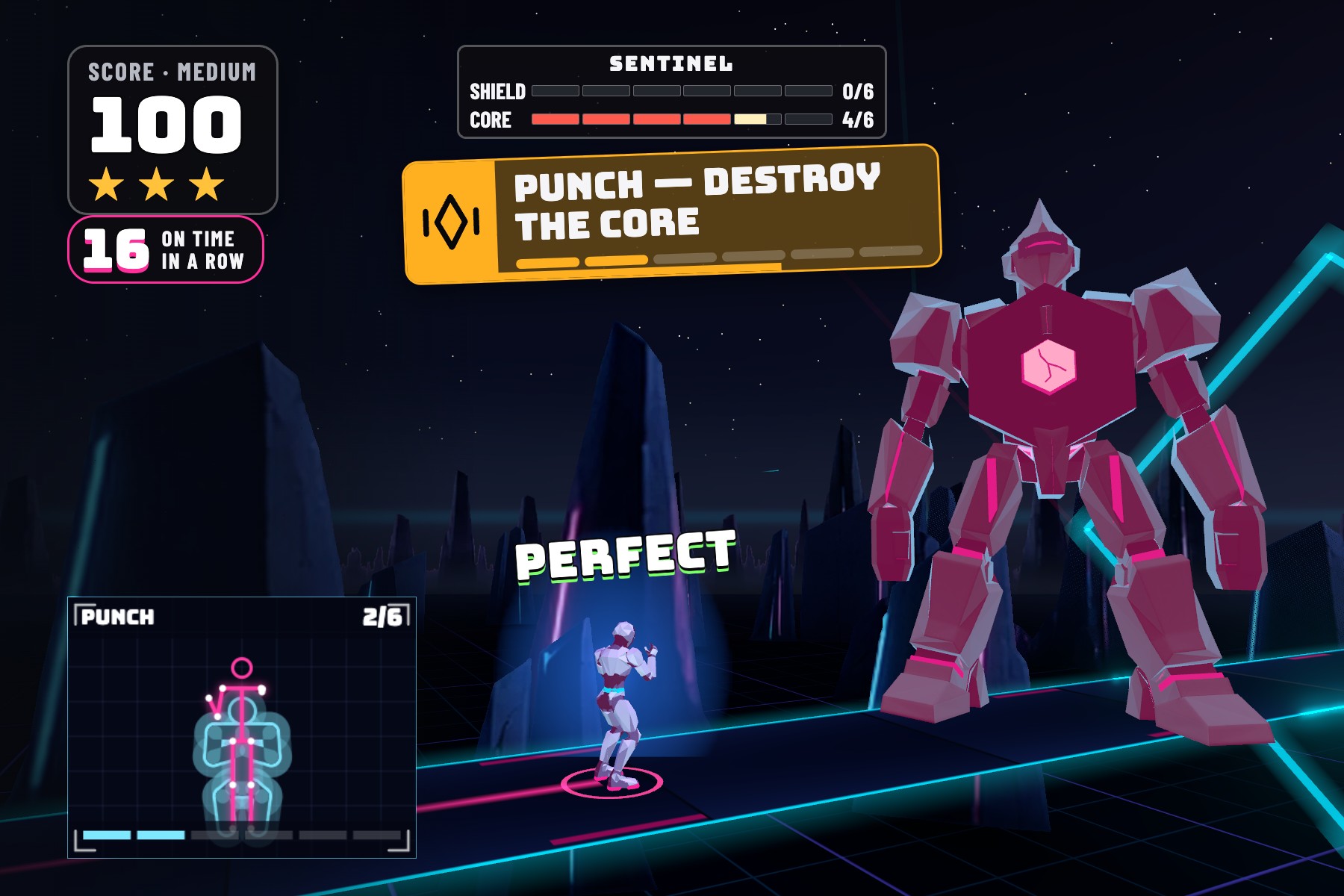
With the shield down, punch to destroy the core. Every counted punch flashes it pink.
-
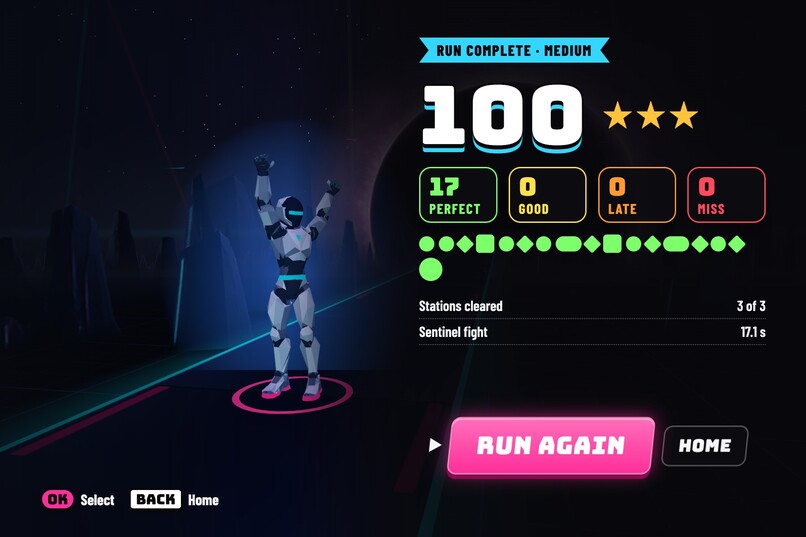
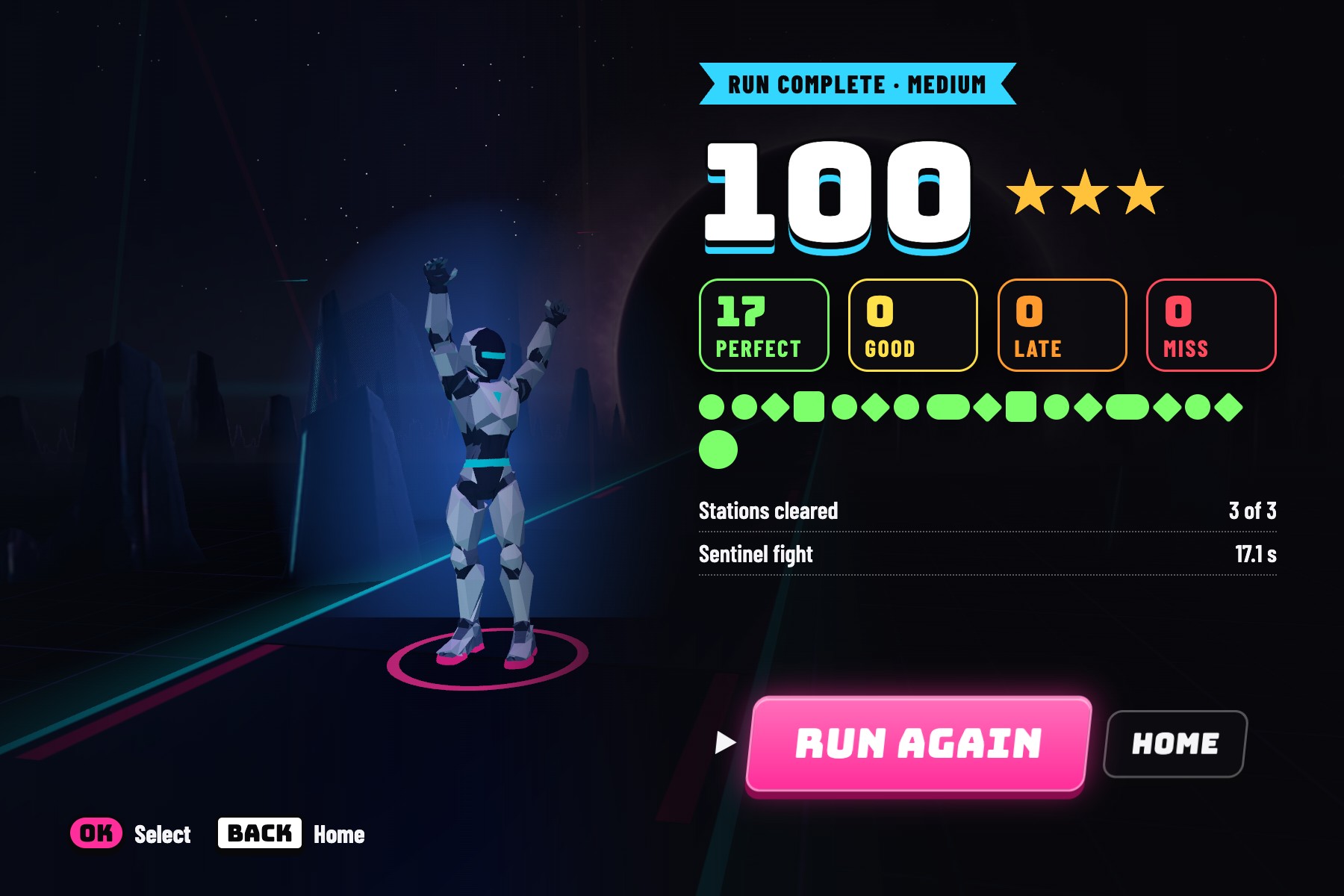
The run card shows your score, move grades, stations cleared and Sentinel time.
-
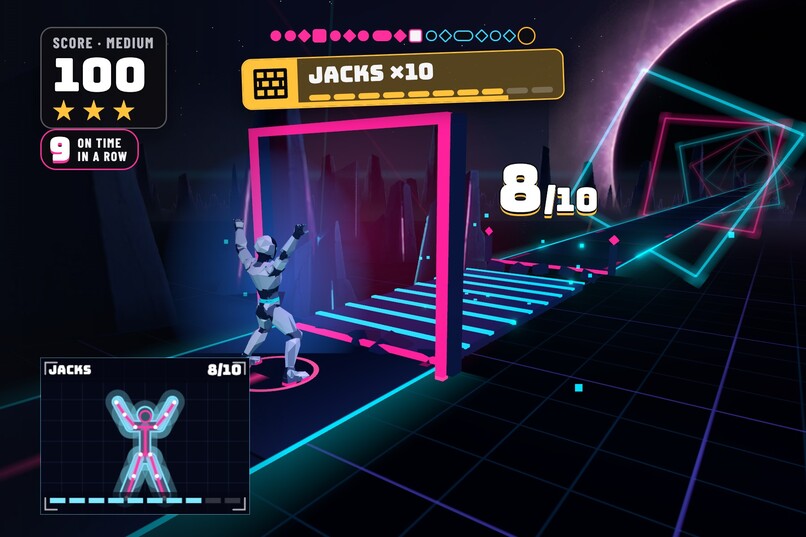
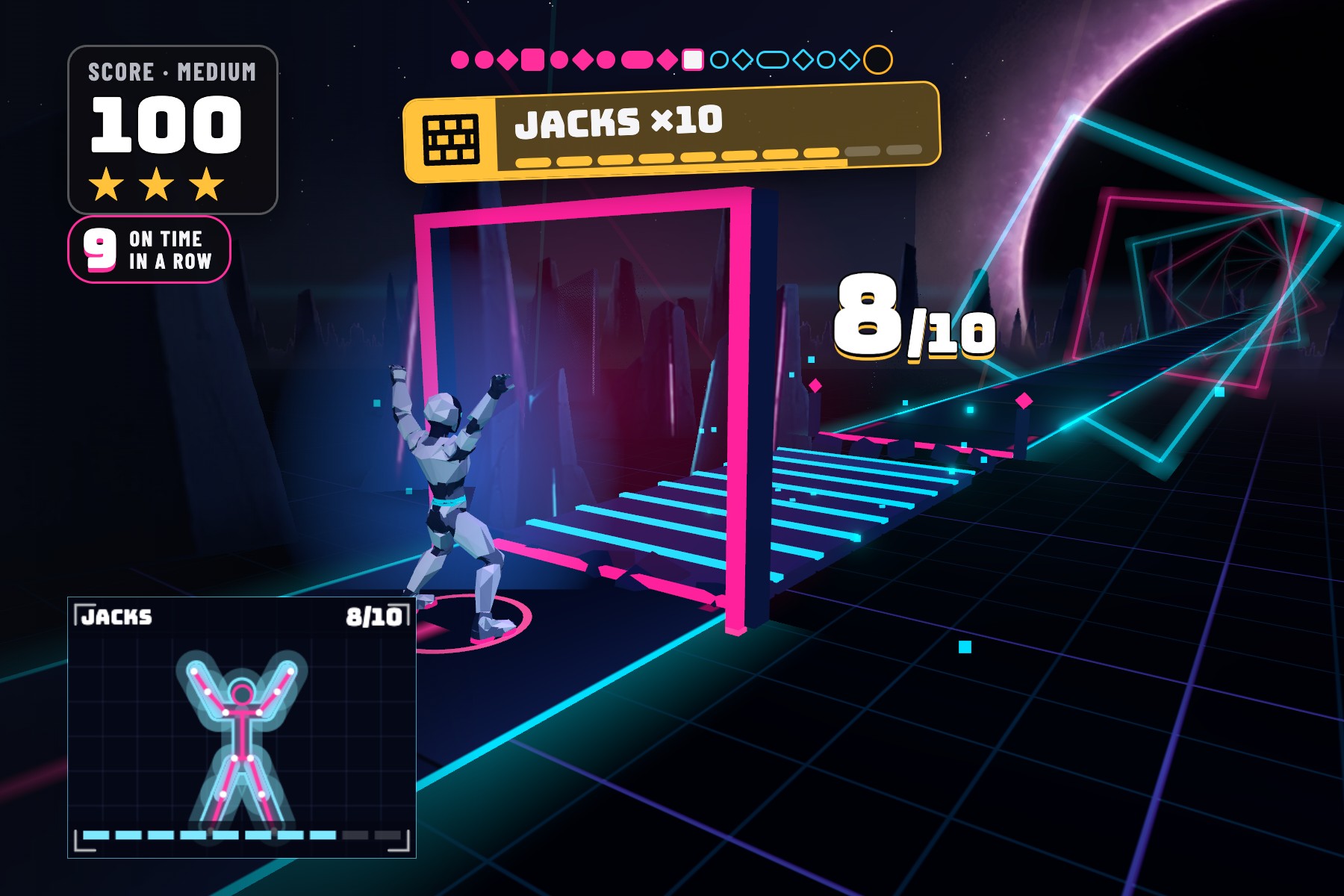
Every jumping jack lays another step of the bridge across the void.
-
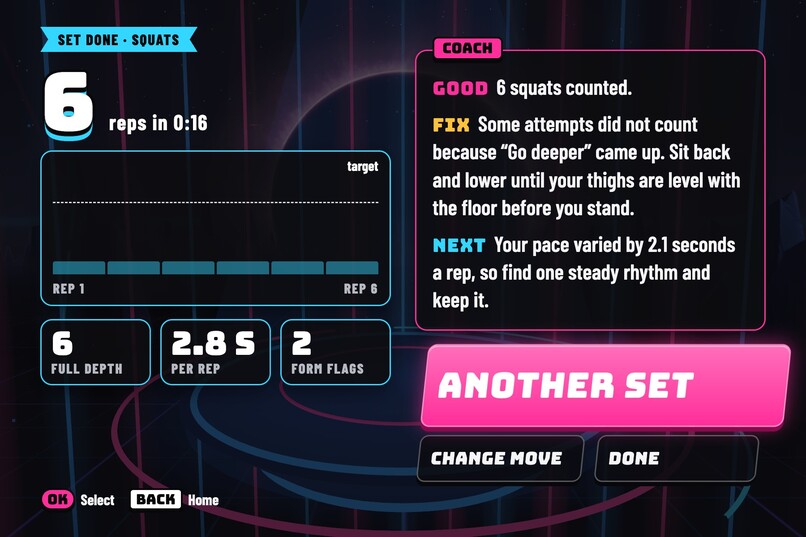
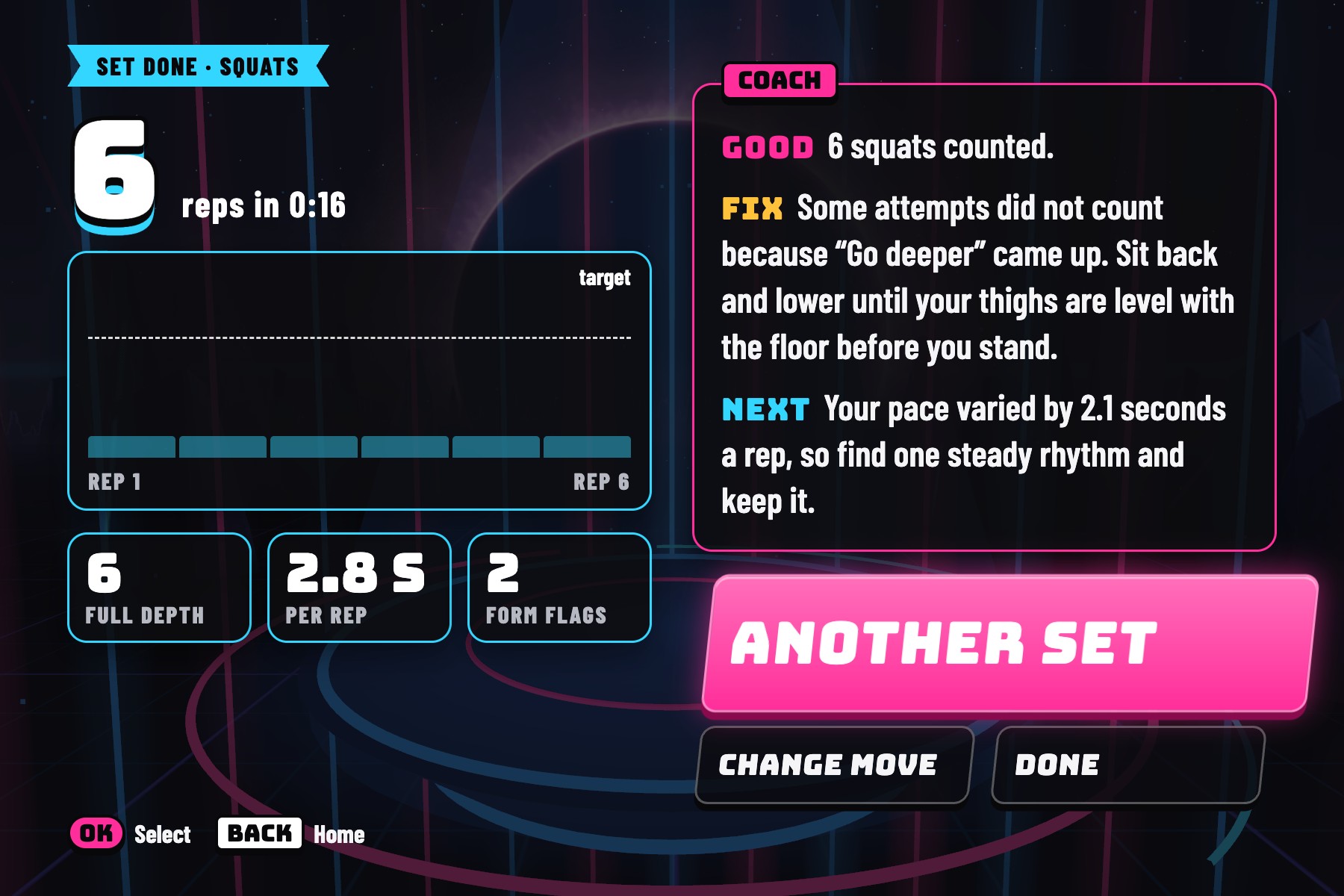
After every set, the coach screen names one thing that went well, one fix and what to do next set.
-
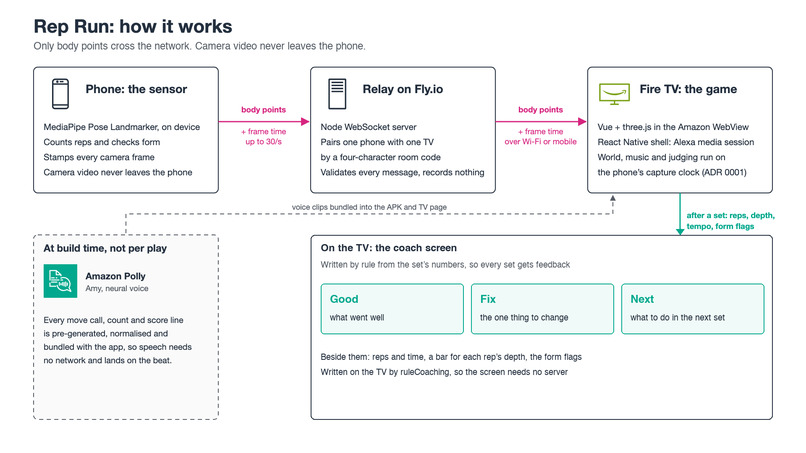
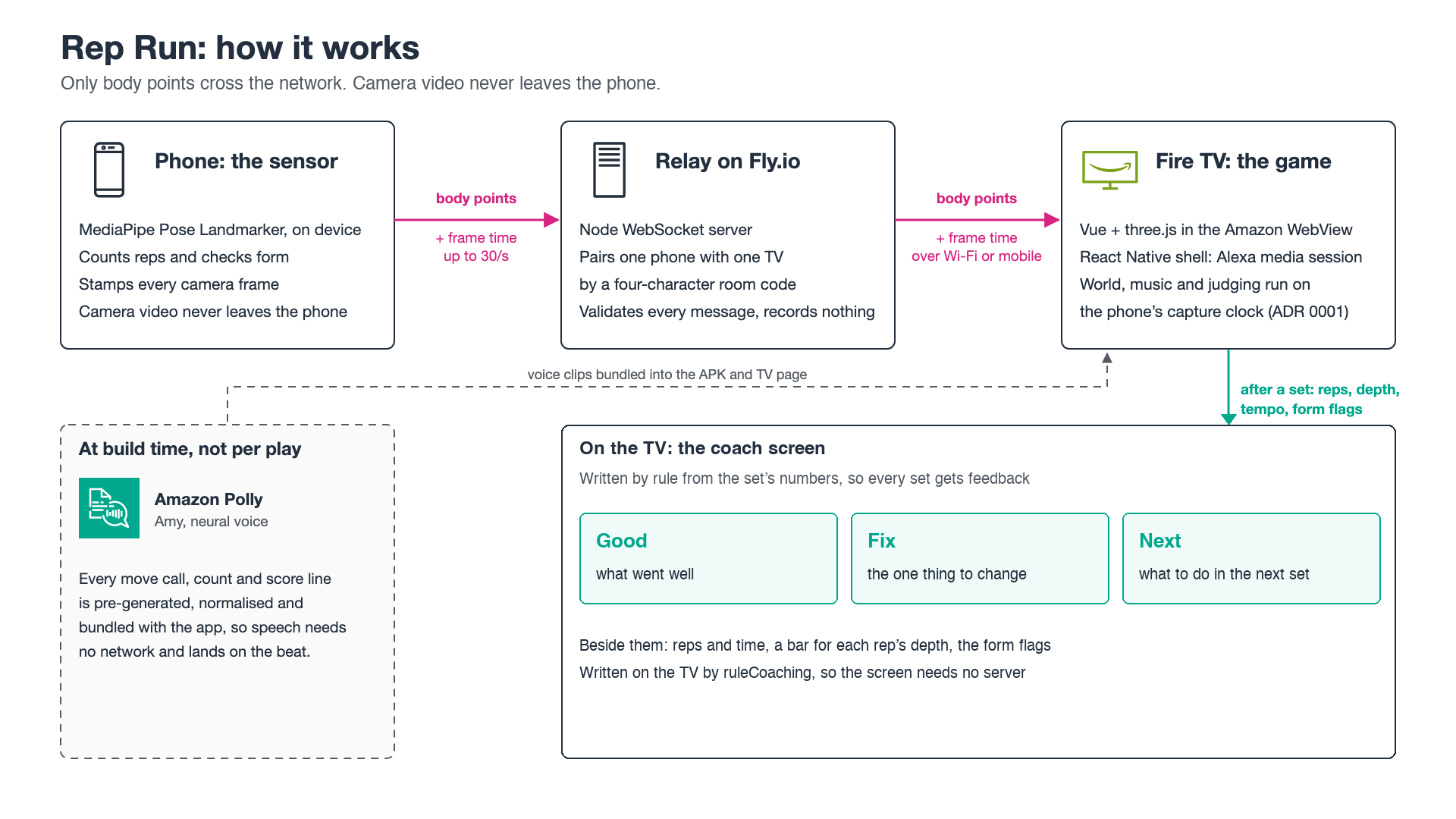
How it works: the phone sends only body points and their capture time through the relay to the Fire TV, which judges on that clock.
Inspiration
I wanted to make a fitness game that felt like an actual arcade game, rather than a list of exercises to follow. Something where squatting lets you duck an obstacle, punching breaks through a wall, and jumping jacks build a bridge. And at the end, there's a giant robot boss to beat.
I took inspiration from Kinect, Just Dance and Wii Fit for the idea of controlling a game with your body, and from Beat Saber, Pistol Whip and endless runners for the rhythm, pace and action. But I wanted to make something you could play on your own TV without buying a headset, motion controllers or a separate camera.
That's how Rep Run started. It's a neon rhythm runner for Fire TV, with your phone acting as the camera. You move, your robot moves, and every exercise is part of the game. My goal was to make something you could pick up for a couple of minutes in your living room, try to beat your best score, and come back to.
Why Rep Run
In England, 11.8 million adults do less than 30 minutes of physical activity a week (Sport England, April 2026). Research suggests active video games can help people move more (Moller et al., 2023), although I haven't tested whether Rep Run increases physical activity.
I wanted to lower the barrier to getting started. Rep Run only needs a Fire TV and a phone, and a Run takes a couple of minutes. It calls out every move before it arrives and shows you the target pose, so you don't need to know the exercises beforehand.
The idea is simple: make moving feel like playing a game, with obstacles to survive, a score to beat and a boss at the end.
What it does
Rep Run is a rhythm runner for Fire TV that you control with your whole body. Your phone's camera tracks your movements, and the game uses them to control a robot running down a neon track. Make the right move at the right time and you score.
The Run
On Medium difficulty, a scripted Run takes about two minutes. The game calls out each move before it reaches you, using voice lines generated with Amazon Polly.
There are four main types of obstacles:
- Sweepers: Squat under a slab that drops across the track.
- Glass walkways: Side-lunge onto the safe pane while the other shatters.
- Shape walls: Match a star, T-pose or arms-up shape to pass through the wall. A quick star jump counts too.
- Grind rail: Balance on one foot to keep your runner steady.
Between obstacles, you reach stations that stop the runner until you complete real reps. Punch through a breach wall, or do jumping jacks to build a bridge, one plank at a time. The game counts each rep out loud, with a final "Breach!" as the wall breaks apart.
Then comes the Sentinel, a giant robot boss that drops onto the track on its jets. Six squats break its six shield plates, followed by six punches to destroy its core.
Easy difficulty uses fewer station reps. All three difficulties end with the Sentinel fight.
Scoring and feedback
Every obstacle is graded Perfect, Good, Late or Miss, based on your timing and pose. Missing an obstacle makes the runner stumble, but the Run continues.
At the end, you get a score out of 100, stars, stations cleared and your Sentinel fight time. The score is also announced over the results music.
If you step out of the camera's view, the game pauses and shows STEP BACK IN. Once you're back in position, it resumes after a 3-2-1 countdown.
Your phone is the controller
The Fire TV home screen displays a QR code linking to the hosted phone page, alongside a four-character room code. In the release build, scan the QR code with your phone, allow camera access and prop it up around 2–3 metres away.
The phone runs body tracking locally and sends movement data to the TV. No camera video is uploaded.
Before starting, both screens check that your whole body is visible and the phone is steady. If you move out of position, the game tells you what to fix. The warning clears automatically once you're ready.
The phone also has on-screen controls for the TV and optional voice commands.
Free training
Alongside the main game, there's a Free training mode for squats, press-ups, lunges and jumping jacks.
Choose an exercise and a target of 5, 10 or 15 reps. The TV shows your count, rep progress, tempo and live form cues such as "Go deeper" or "Hips sagging". Squats and press-ups also have a depth meter.
After each set, a coach screen gives you three pieces of feedback: Good, Fix and Next. The game can generate these tips from the measurements collected during the set.
How I built it
This was my first Fire TV app. I built Rep Run with TypeScript across three parts: the phone, the TV and a small relay server connecting them.
- Phone: A Vue web app using Google's open-source MediaPipe for body tracking. It detects poses, counts reps, checks form and sends body points and movement events up to 30 times a second.
- Relay: A Node.js WebSocket server that pairs one phone with one TV using a four-character room code. It validates messages against a shared schema and passes movement data between the devices.
- TV: A Vue and Three.js game running inside the Amazon WebView, wrapped in a React Native (Expo) Fire TV app. The same game can also run in Chrome on a laptop.
The Fire TV shell handles the home-screen launcher, remote navigation, screen wake lock, Android media session and app lifecycle. It also requests low-latency display mode and confirms before exiting with the Back button.
Getting the timing right
One of the biggest technical challenges was synchronising a phone camera, a TV game and music over Wi-Fi.
If I judged a move based on when its message arrived at the TV, network delay could turn a perfectly timed squat into a miss.
Instead, the phone timestamps each pose frame when the camera captures it, using requestVideoFrameCallback capture timing where available. When the phone connects, and every 15 seconds afterwards, the devices exchange ping and pong messages to measure the difference between their clocks.
The TV then uses the camera's capture-time timeline for rendering, music and judging. That way, a movement isn't marked late simply because its message took longer to reach the TV.
There is a trade-off: the game world follows the player with some network delay. A Wi-Fi spike can briefly stall the world before it catches up and the music re-aligns. But it avoids adding artificial input buffers, delay calibration or a separate "checking" state.
I also built a latency test where the TV flashes and the phone camera detects the flashes to measure the delay. I haven't yet run that specific test with a real phone and Fire TV Stick, so I'm not quoting a latency figure.
Sound and music
I wanted Rep Run to sound like an arcade game, with a slightly over-the-top stadium announcer.
I generated the move calls, countdowns, station lines and results using Amazon Polly (Amy, neural). I processed the audio to give it an echoey stadium sound, levelled the loudness and bundled the files with the game.
Because the lines are generated ahead of time, there's no speech-generation request during play.
I also made five music tracks with Suno, covering the menus, Run, Sentinel fight, Free training and results. I used a paid plan with commercial-use rights. The Run and boss tracks are both at 128 BPM to give the gameplay a consistent rhythm.
The music streams from files rather than being decoded into full-length audio buffers, which helps keep memory use down on the Stick.
Building the 3D world
The game has a dark sci-fi world with a glowing cyan track, magenta obstacles, rotating frames, shattered glass and a giant robot waiting at the end.
The Sentinel started as a Meshy-generated 3D model. I then worked on it in Blender, reducing it to a low-poly mesh of about 1,800 triangles, with six separate shield plates and a reactor that responds to the fight.
I tried to make the effects feel satisfying without making the game too expensive to render. The unsafe glass pane shatters when you lunge, the breach wall explodes in slow motion, and the bridge rises out of the dark one plank at a time.
Making it run on Fire TV
I developed and profiled the game on a Fire TV Stick 4K Max (2nd generation), using the Amazon WebView's DevTools to measure performance.
Getting a Three.js game running smoothly on a streaming stick meant making quite a few compromises:
- Render the 3D scene below full 1080p and scale it up, rather than using expensive bloom and shadow maps.
- Batch repeated obstacle geometry, keep the runner low-poly and bake the Sentinel's lighting into its texture.
- Use flat images for distant rocks rather than rendering everything in 3D.
- Lower render resolution before reducing the target frame rate when performance drops.
- Run the menu scene at 30 fps and stop rendering after around a minute without input.
I also had to account for different WebView versions. Rather than assuming a modern Chromium engine, I hold the TV build to Chrome 87-compatible JavaScript syntax. A build check inspects every bundle chunk and fails if newer syntax slips through.
Performance measurements
I tested an earlier build on a Fire TV Stick 4K Max (AFTKRT), running Fire OS 8.1.8.2.
On 22 October, three complete Runs averaged 50.6, 51.2 and 54.8 fps. Two of them dropped to 30 fps for 14–20 seconds when the automatic quality system stepped down.
| Test | Result |
|---|---|
| Full Run including Sentinel, 22 Oct | 50.6, 51.2 and 54.8 fps average |
| Sentinel fight, 22 Oct | 55–56 fps |
| Free training squat set, 22 Oct | 53.4 fps average |
| Full Run with quality adjustment disabled, 19–20 Oct | 55–57 fps |
| Menus | 30 fps, then rendering stops after idle |
| App memory | 240–253 MB at Home, 296–306 MB mid-run |
| Three Runs and a Free training set, 22 Oct | No crashes, renderer restarts or page errors |
The 22 October tests used WebView 150, while the earlier quality-disabled tests used WebView 148. The game has changed since those measurements, so they aren't a final-build performance benchmark.
I measured on the Stick itself rather than relying on desktop browser performance.
Privacy
Camera video never leaves the phone. MediaPipe processes the camera feed in the phone's browser. Only body points, rep counts, form flags and control messages are passed through the relay to the TV.
The hosted relay stores rooms in memory and is configured not to record sessions or expose room listings. Rep Run doesn't require an account, name or email, and game scores are stored on the TV.
There are two optional online features worth distinguishing from the camera processing: phone voice commands use the browser's speech-recognition service, which may process audio online, and the hosted version can send a Free training set summary to an online coaching service. If that service isn't available, the TV generates the coaching tips itself.
Development and testing
The phone, TV and relay share a TypeScript repository.
I used Vitest for unit and integration tests, and Playwright for browser checks. Scripted players can complete whole courses automatically without a person in front of the camera, which also powers the Watch a demo mode.
I used Claude Code and Codex during development, with agents working in separate Git worktrees, alongside automated reviews, tests and CI.
Challenges I ran into
Keeping movements in sync with the game. I initially considered judging on the TV's clock and buffering late camera frames. That introduced more complexity around calibration, delayed feedback and network spikes. Using capture timestamps was a simpler approach, although it means accepting some visual delay.
Getting consistent performance on the Stick. The glowing track, breakable obstacles, effects and Sentinel all compete for limited rendering time. I profiled individual layers on the device, removing them one at a time to find what was expensive. I also found that the Stick's built-in screen recorder roughly halved the game's frame rate, so I filmed the TV screen with a camera instead.
The quality system dropping to 30 fps. An automatic fallback was treating normal uneven frame times as a reason to lower the frame rate. I changed it to look at missed display refreshes and lower resolution first. It improved things, but some measured Runs still stepped down, so this remains something to refine.
Unexpected WebView behaviour. The Stick's WebView changed from Chromium 148 to 150 during development, and I couldn't rely on a particular version being installed. I also had an early APK load a blank page because I was passing too much HTML as a string into the WebView. Moving the music into separate files fixed that build.
Tracking squats with one camera. A front-facing phone camera isn't very good at judging depth. A squat seen side-on could make the in-game runner look folded over. I kept the rep counting based on the phone's measured pose signal and used a separate animated squat for the runner during stations.
Handling the phone going to sleep. Mobile browsers can suspend the camera when the page goes into the background. I added recovery logic to restart tracking when the player returns, preserve the rep count, and show a Tap to resume button if the browser requires another interaction.
Accomplishments that I'm proud of
- A complete game loop. You start a Run, survive obstacles, clear stations using real exercises and finish with a boss fight. There's a result to aim for and a reason to try again.
- Running on real Fire TV hardware. I built, debugged and measured the game on a Fire TV Stick 4K Max rather than developing only for a desktop browser.
- Using a phone instead of dedicated tracking hardware. Pose detection runs locally in the phone's browser, with no camera video sent to the TV or relay.
- A full playable demo without a phone. The browser version has a Watch a demo option that plays through an entire Run using scripted movements, so people can see the gameplay without pairing a device.
- Automated testing. The tests cover rep counters, move grading, voice calls, coaching rules and scripted courses.
- First-hand feedback for Amazon's developer tools. I kept a friction log and documented issues, product feedback and feature requests from using Fire TV, Amazon WebView, Polly and the Amazon Devices Builder Tools.
What I learned
This was my first time building for Fire TV, and I learned a lot about working within the limitations of a streaming device. I had to figure out Android TV app packaging, remote controls, the Amazon WebView, debugging over ADB and profiling the game on real hardware.
I also learned how different game design is from simply tracking exercises. A squat counter might work in a fitness app, but in a game the timing, feedback and payoff matter just as much. Calling out a move before it reaches you, giving it a Perfect or Good grade, and having a wall actually break when you finish your punches makes it feel much more like something you're playing.
One of the biggest lessons was to measure things on the device they're meant to run on. A scene that looks fine in desktop Chrome can behave very differently on a Fire TV Stick. Small changes to rendering, audio or quality settings made a noticeable difference.
The phone-to-TV connection was another interesting problem. I hadn't built a game that needed to synchronise camera tracking, rendering, music and movement grading across two devices before. Getting the timing right involved more thought than I initially expected.
What's next for Rep Run
- Get it into the Amazon Appstore, and build a Vega OS version for newer Fire TV devices.
- Test with real players to see how well the instructions, camera placement and difficulty levels work outside my own setup.
- Improve performance consistency, particularly stopping the automatic quality system from dropping to 30 fps unnecessarily.
- Add mixed-exercise challenges, switching between standing and floor exercises with a camera-framing handoff.
- Explore seated upper-body challenges, designed and tested with players who can't do the standing movements.
- Add more reasons to replay, including a ghost of your best Run, daily courses and new attacks from the Sentinel.
Built With
- amazon-devices-builder-tools
- amazon-polly
- amazon-webview
- blender
- claude-code
- codex
- expo.io
- ffmpeg
- fire-tv
- fly.io
- mediapipe
- meshy
- node.js
- playwright
- pnpm
- react-native
- suno
- three.js
- typescript
- vite
- vitest
- vue
- websockets

Log in or sign up for Devpost to join the conversation.