-
-
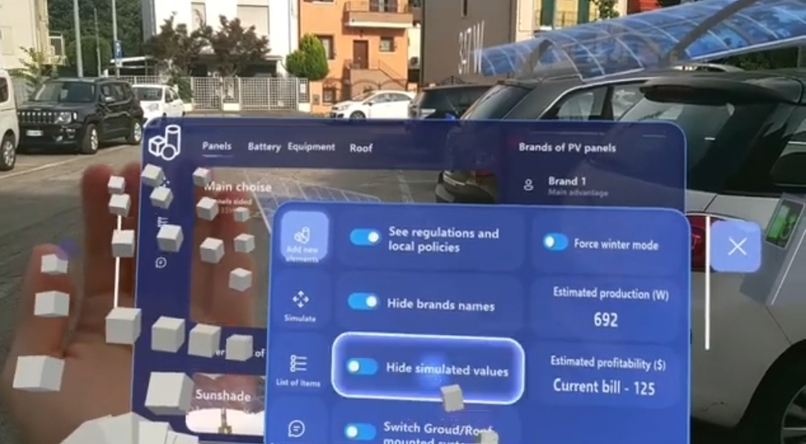
Decide parameters of the simulation and visualization of photovoltaics assets
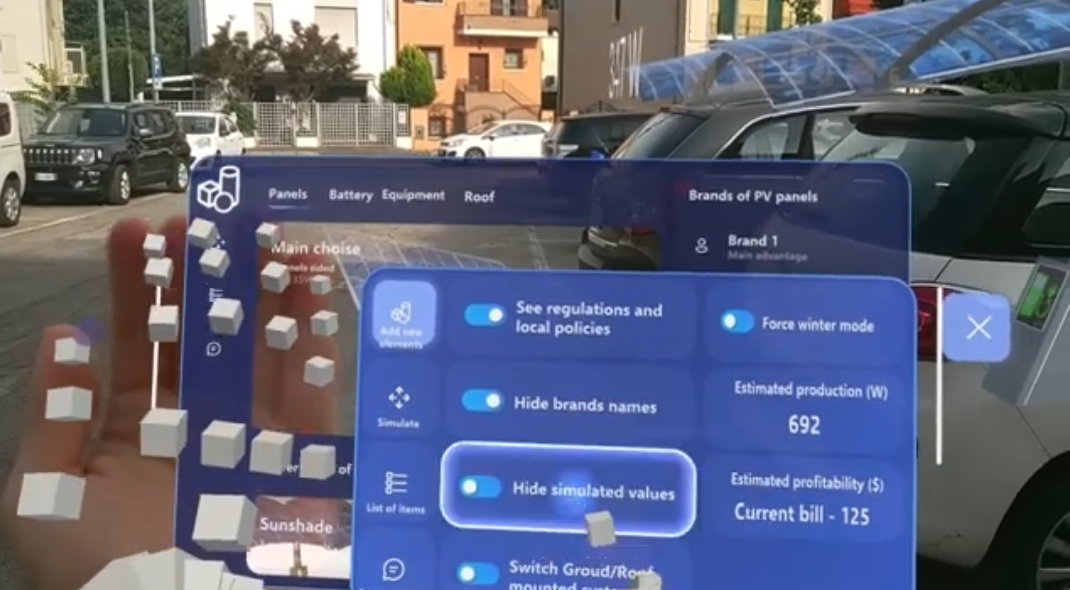
Inspiration
Unfortunately, many researches estimate that even a massive adoption of photovoltaics panels (PV) on roofs of houses won't be enough to have renewable power for the actual consumes. Fortunately, recent innovations in agrivoltaic systems and higher efficiency of cells modules enable the use of many terrains to be profitable both for food and energy production! The cooperation towards the limitations of negative effects on climate change can be achieved increasing the number of Energy Communities. So a shared and immersive experience (today possible using an AR Metaverse) of co-design that can also show the final result can be key.
So I decided to use Augmented Reality as a communication layer between a PV system's Digital Twin (PV power modeling simulation) and the decorative creativity of a household who could host that PV system in his garden. So it is an Advanced Human Machine Interface, (A-HMI) but also a Human-centred H2H (Human-to-Human) interface: for example between neighbors or between a professional renewable energy planner and his household prospect.
What it does
Aspiring Prosumers can simulate and estimate in few minutes how much energy and savings on electricity bills a photovoltaic system in their property could generate.
Even who now has a very low interest in PV systems could use it to plan or only to see what to expect!
They don't need to call immediately an expert, and who loves "DIY" (do it yourself) mindset don't need to learn to use PV modeling.
Secondly, PV experts/professionals could could hugely increase the possibilities to close their deals with households:
- they can show their proposal through a Mixed Reality engaging experience at the house of the prospect, a more convincing approach than 2D or 3D in a screen;
- they can receive upfront the 3D layout outcome that their prospect would love to see (and buy) through the export feature;
- the real-time simulation can help to reduce the times they have to physically meet a prospect, as they can plot with adequate precision the possible few changes made during the onsite visit without doing again all the calculations (especially integrating their API).
Lastly, it's also an educational tool about Digital Twin of domestic products. Visualizing superimposed 3D data (like brands names), showing automatic alerts in place or trigger spawn of additional assets thanks to a backend simulation environment that runs in parallel.
How we built it
MRTK3 can become a very powerful no-code framework, so I used some tricks to avoid the use of C# code to perform almost all the tasks. I see Mixed Reality as an intuitive interface that attracts many people, enabling them to be guided in actions and reflections they wouldn't start or perform otherwise.
This is the case for the adoption of renewable energy at home or the creation of Energy Communities. If people are given a tool that in minutes can show them the result they would get with state-of-the-art techniques and devices, they'll probably give it a try.
An example of simplicity of programming visually through MRTK3 framework is, instead of coding an array of GameObjects to change iteratively, to use the setActive(bool) function of the onClick (or Toggle) in a Button component, to make disappear itself and appear an other identical button that when pressed triggers an other event (like set active one element of that list).
Challenges we ran into
- Hololens in outdoor usage has visualization and sometimes interaction limitations, due to the higher sunlight interference that would have in indoor applications.
- Rotation of the wrist is usually interpreted as input by Hololens with a too high sensitivity, so while picking holograms they usually change orientation too fast
- Especially Prosumers users want extreme simplicity and order in the access to knowledge (local policies and regulations, tips, etc.) and functionalities in the UX
Accomplishments that we're proud of
- The iterative process (explained above) of adding elements with a smart series of activate and deactivate of similar buttons is unperceived by the user thanks to the fluidity and responsiveness of the adaptive container of UI boxes. This is also because hidden elements in the scene doesn't affect the rendering, so even with 50 hidden GameObjects and 4 active ones, app performances in spatial tracking are only related to the ones visible.
- The reality of interaction with objects and between objects itself is simply managed only with "Object Manipulator" and "Rigidbody" (with checkbox "Kinematic") components. Furthermore, for a shared outdoor experience like an AR Metaverse, the distance calculations of the proposed method is robust at many meters of distance
- I received positive feedback on usability and concept from workers in the sector and some "prosumers"
What we learned
- Sunlight affects a lot the SLAM capabilities of Hololens, so the use of Spatial Awareness to support gravity simulation doesn't work most of the times. Especially if the user continuously walk from inside and outside the house.
- For user journey, the simpler and less menu there are, the better. So I used the effective hand menu for fast actions and toggles, a floating panel with descriptive images of the GameObjects to set active and other dialog box to toggle.
- For now, I disabled scale manipulation of GameObjects in order to see exactly how the various elements fit in reality. A future more advanced feature will transform automatically the resized model into an existing bigger commercial alternative in the 3D models database.
What's next for Renew PlannAR
- Will connect the chat with professional Microsoft Teams backend
- Will create shared experiences with Azure Spatial Anchors, Azure Object Anchors and Azure Remote Rendering to create an "AR metaverse" to evaluate the planned systems, both with neighbors or experts
- Deploy the above in Android and iOS (I tested that singularily MRTK3 and Azure Spatial Anchors works), with some adaptation that leverage the onscreen canva
- Will connect gameobjects to Azure IoT Hub, will show values from it in text areas (done like for simulation text values) and use Azure Machine Learning to perform predictive maintenance
- It will be used for PV system management itself thanks to the overlay of the status of each asset, giving visual instructions for repair thanks to the Azure Mixed Reality Object Understanding or Azure Computer Vision (ProjectOxford), which can highlight the points where the Hololens scan of the real object differs greatly from the ideal one.
- Will truly integrate it with existing famous open source Power Modeling software tools through API, enhancing their actual UI with mouse through this intuitive and more direct MR interface.
- Will carefully listen to international feedbacks from prosumers and PV Systems Designers to improve their experiences respectively on this DIY process and on facilitating the closing of more deals with households (that became aware of their change-making power and interested on the topic after the trial of this app)
Built With
- mrtk3
- unity


Log in or sign up for Devpost to join the conversation.