-
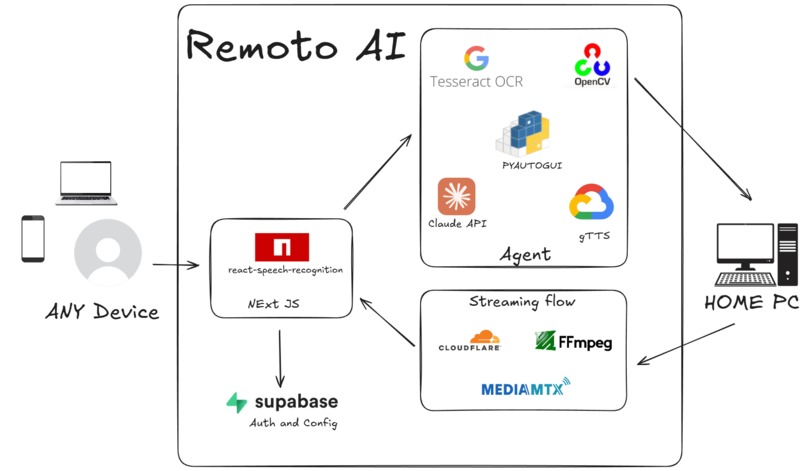
TechStack
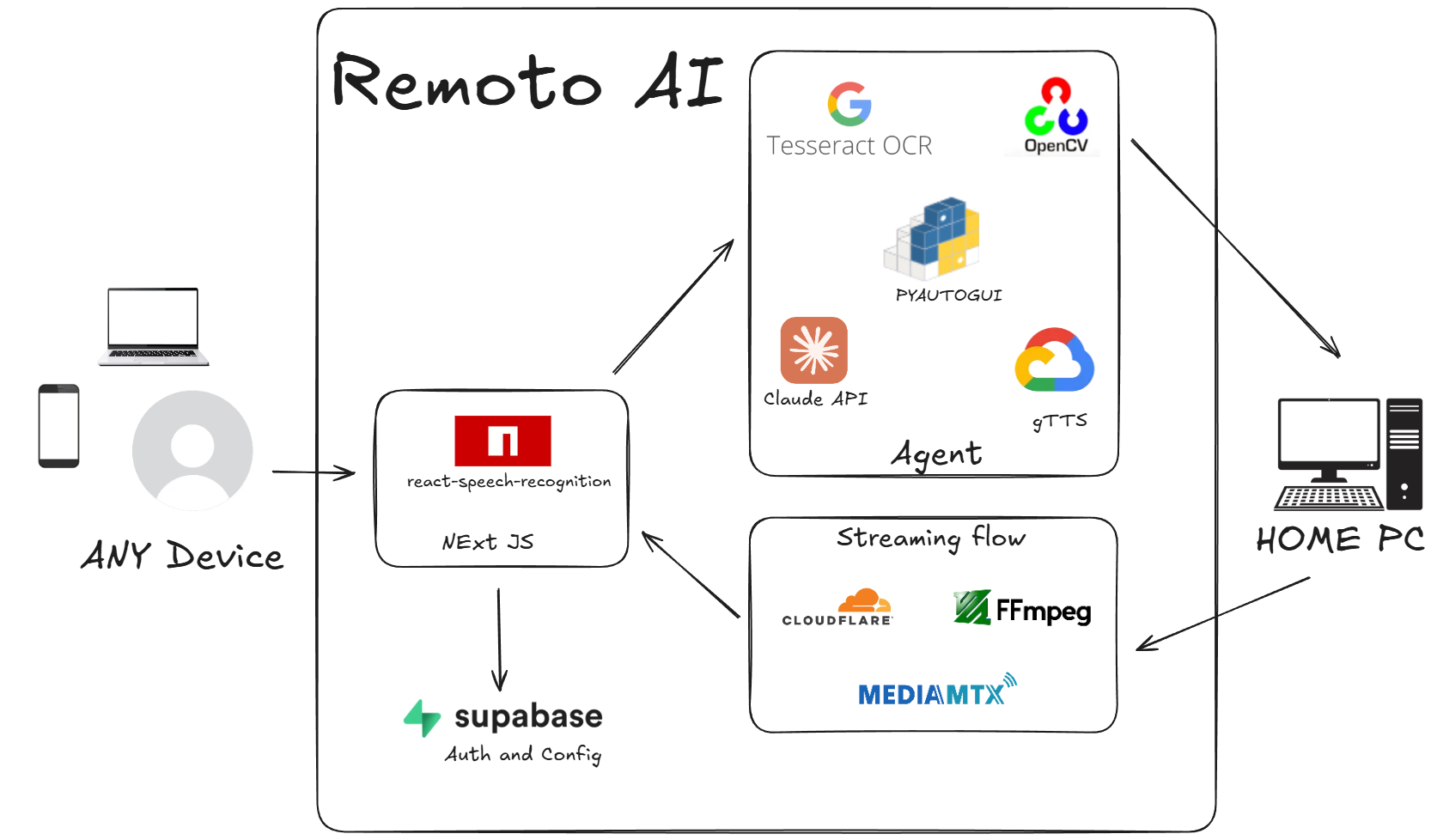
Remote AI - Remote Computer Control System
Project Overview
Remote AI enables secure remote access and control of home computer through voice commands from anywhere in the world. The system combines speech recognition, AI agent processing, and real-time streaming to allow users to interact with their remote computers from any location. Users authenticate via Supabase and communicate through a React-based interface that translates voice commands into executable actions on the target machine.
System Architecture
Frontend Interface
Built with React and react-speech-recognition for speech-to-text conversion. The interface handles user authentication through Supabase and provides real-time video streaming from the remote computer.
Backend Services
A Python service runs persistently on the local computer, managing authentication, command execution, and media streaming.
AI Agent Core
The custom AI agent processes user commands through multiple stages:
- Receives transcribed text from speech input
- Captures screen content using OpenCV for image processing
- Extracts textual context using Tesseract OCR
- Analyzes screen state and user intent to generate executable commands
- Executes actions via pyautogui for keyboard and mouse control
- Provides audio confirmation through Google Text-to-Speech
Media Streaming Pipeline
Live screen content is streamed using MediaMTX and FFmpeg for encoding, with global delivery handled through Cloudflare. This ensures low-latency visual feedback to users during remote sessions.
Workflow Process
Authentication & Connection Users securely login through Supabase authentication, establishing a connection to their home computer running the Python backend service.
Voice Command Processing Speech input is captured via the React interface and converted to text using speech recognition libraries.
Screen Analysis & Command Generation The AI agent captures the current screen state, resizes images using OpenCV, and extracts UI context with Tesseract OCR. This contextual information combined with the user's command enables the agent to generate precise keyboard and mouse actions.
Action Execution Generated commands are executed on the remote computer using pyautogui, performing the requested operations with screen-relative precision.
User Feedback Upon task completion, the system provides audio confirmation via Google Text-to-Speech, informing users of successful command execution while the live stream displays the updated screen state.
Technical Implementation
The system integrates multiple technologies including React for the user interface, Python for backend services, OpenCV and Tesseract for computer vision tasks, pyautogui for system control, and MediaMTX with Cloudflare for streaming delivery. Speech processing handles both input transcription and output audio responses, creating a seamless voice-controlled remote access experience.
Built With
- claude-api
- cloudflare
- ffmpeg
- gtts
- mediamtx
- nextjs
- open-cv
- pyautogui
- react-speech-recongition
- supabase
- tesseract-ocr


Log in or sign up for Devpost to join the conversation.