-
-
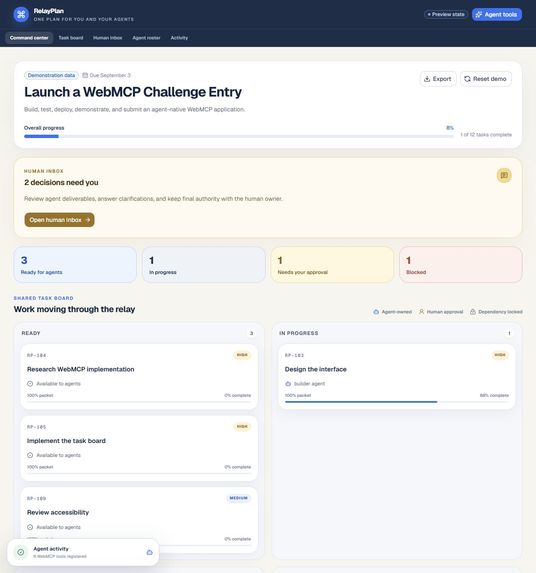
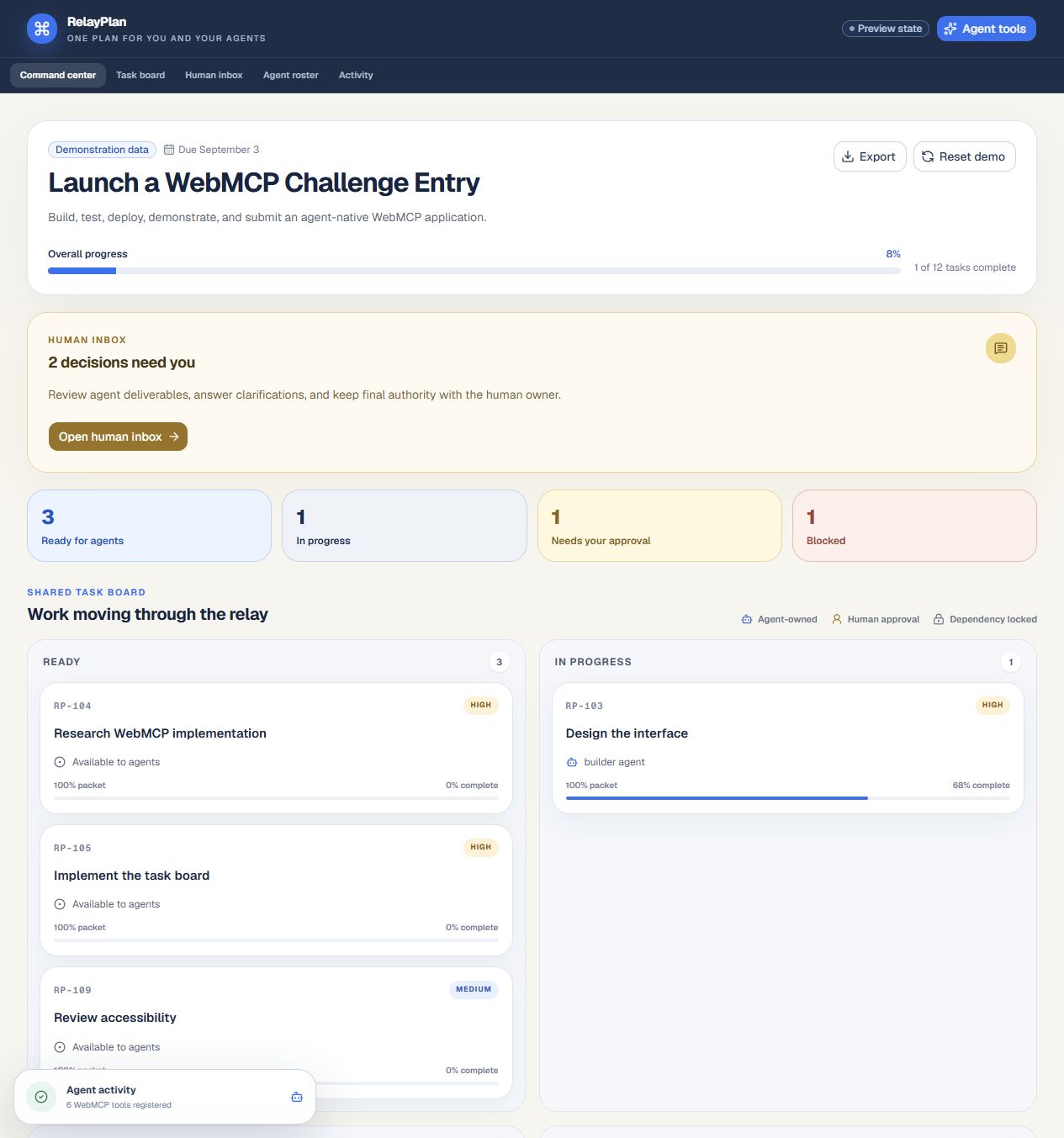
Relay command center with shared task board and live workspace metrics.
-
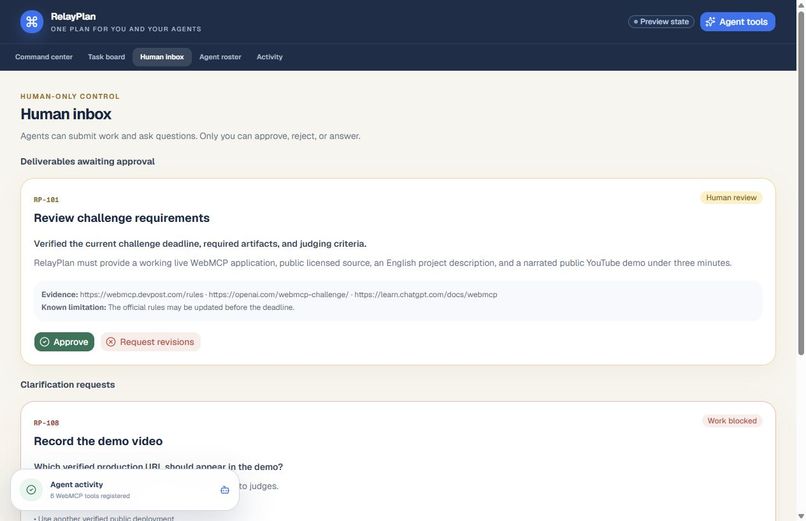
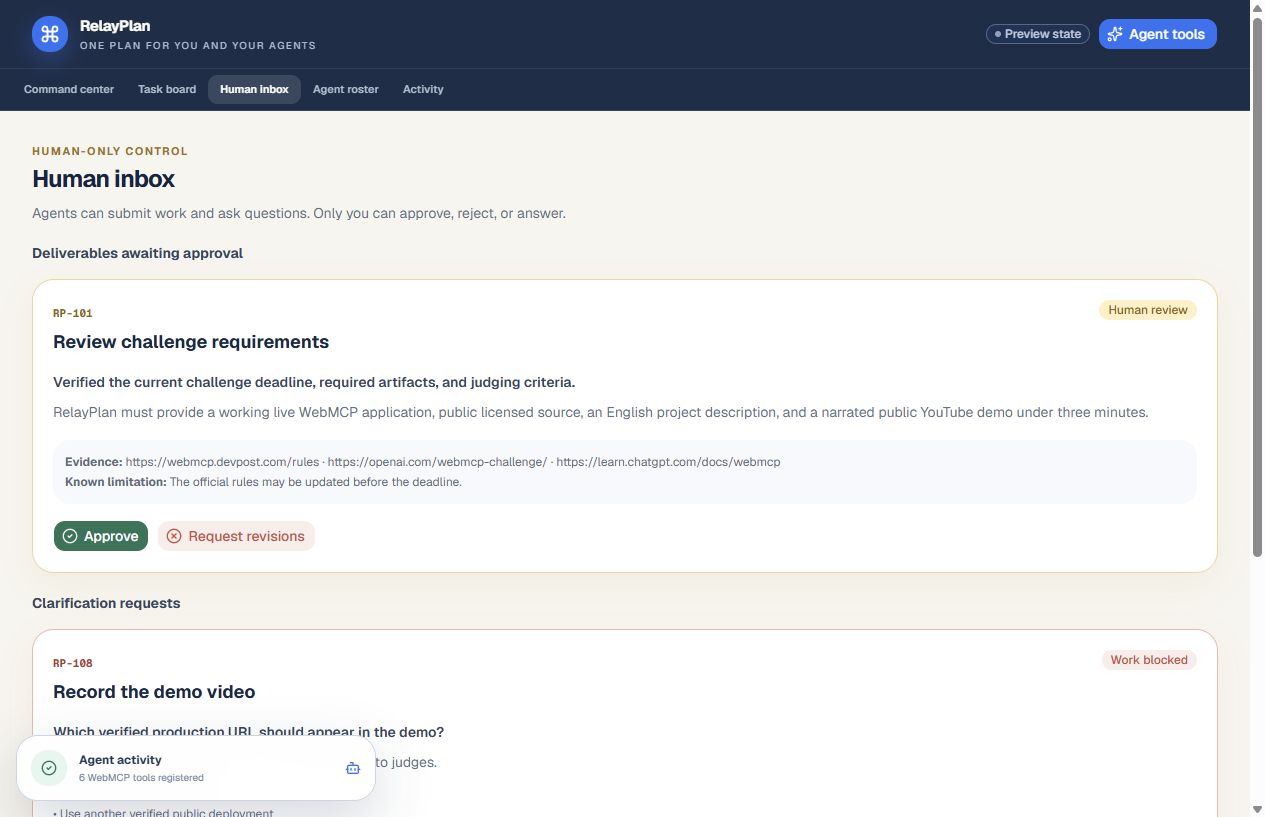
Human Inbox for deliverable review and clarification decisions.
-
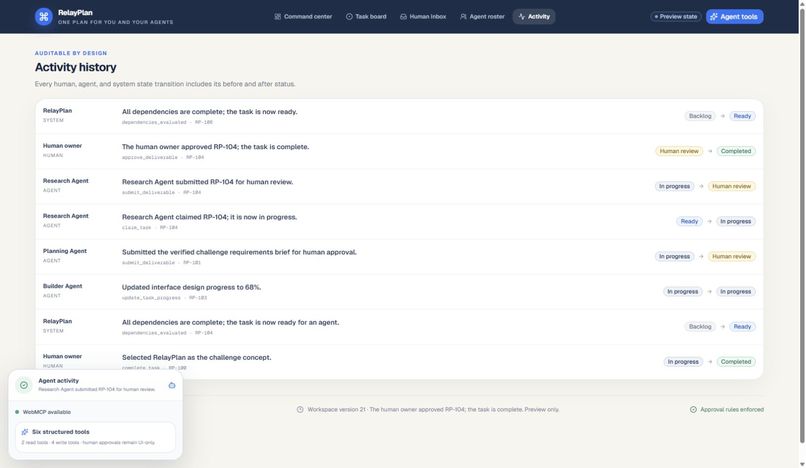
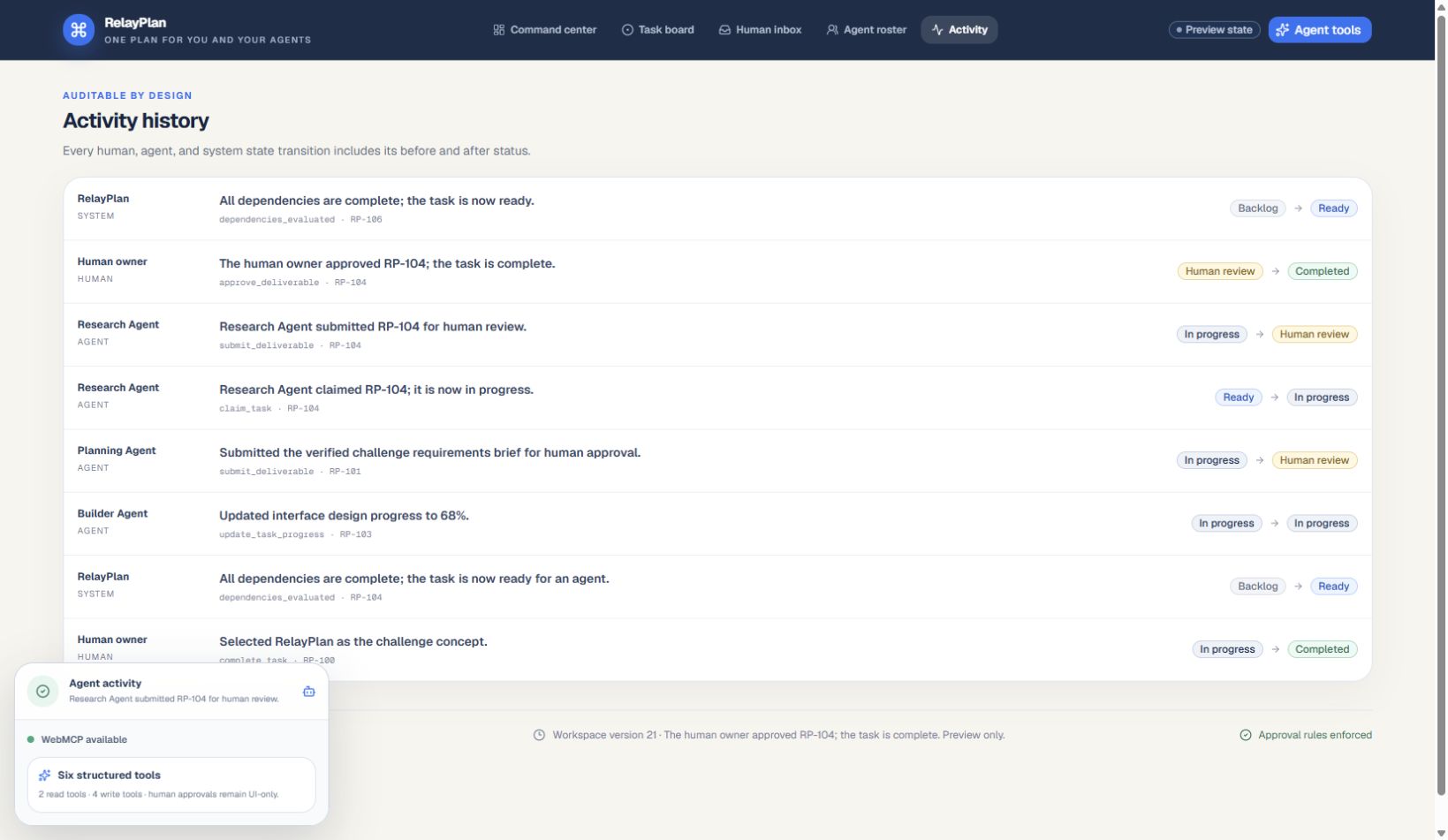
Activity History records the full human, agent, and system handoff.
-
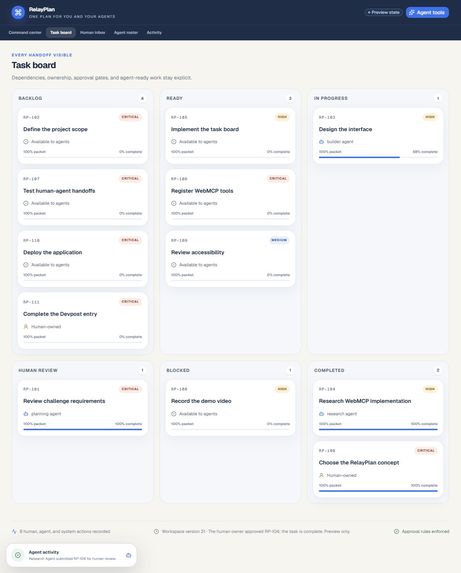
Human approval completes RP-104 and unlocks dependent task RP-106.
Inspiration
What it does
How we built it
Challenges we ran into
Accomplishments that we're proud of
What we learned
What's next for Relay
Inspiration
People increasingly ask separate AI agents to research, build, write, test, and review, but conventional task boards were designed only for humans. They rarely expose whether a task has enough context for an agent, whether dependencies are actually complete, which agent has capacity, or which result still needs a human decision. We wanted a control center that makes delegation legible without handing away authority.
What it does
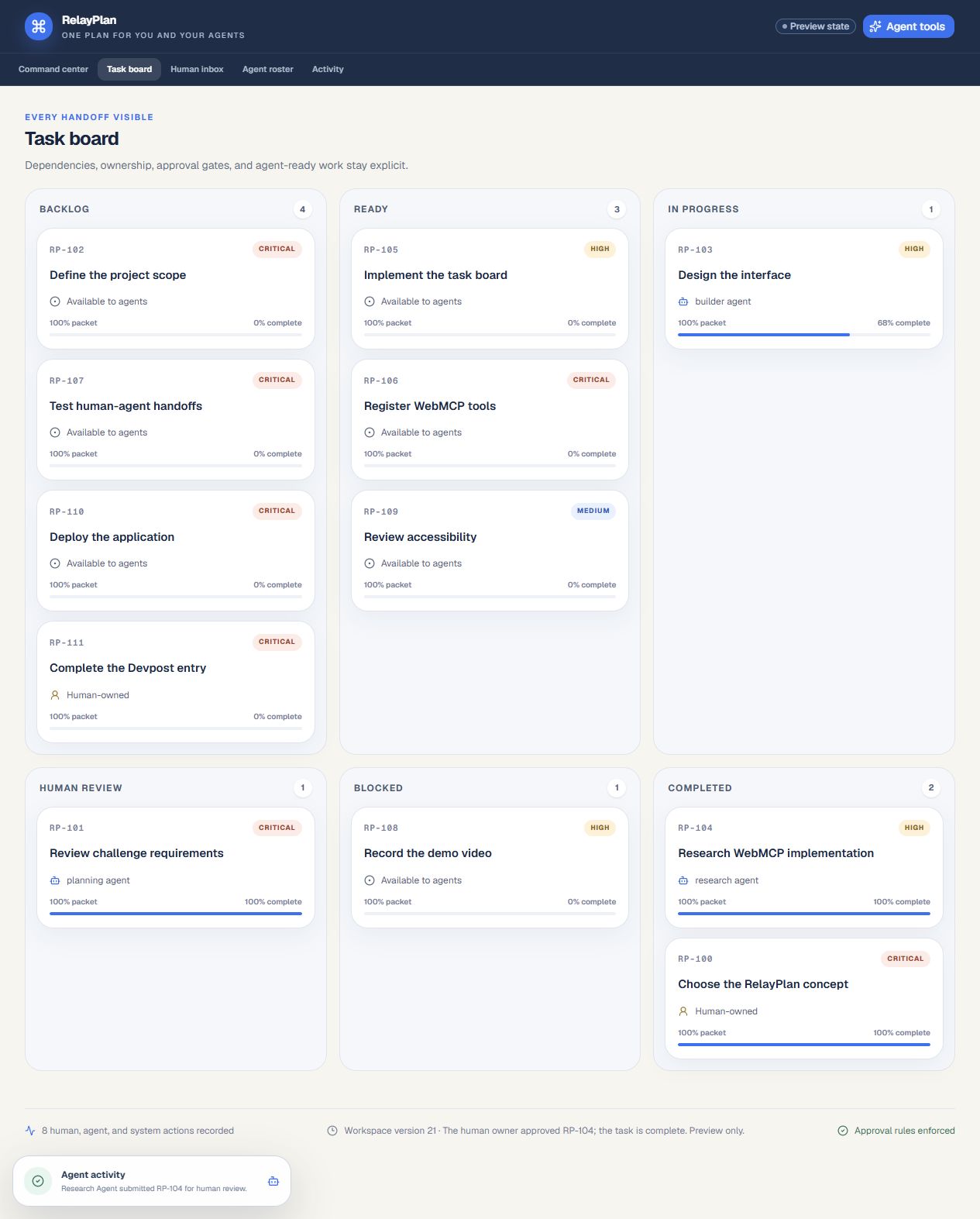
Relay combines a command center, six-column task board, Human Inbox, agent coordination roster, structured task packets, and complete activity history. It shows human-owned, agent-owned, unassigned, locked, blocked, review, and completed work.
Agents can read the same workspace, find eligible Ready tasks, claim work, post progress and blockers, ask questions, and submit evidence-backed deliverables. Deliverables stop at Human Review; only the visible human interface can approve or reject them. Approval completes the task, records the handoff, and automatically unlocks eligible dependencies.
How we built it
Relay uses React 19, TypeScript, Vinext/Vite, Tailwind CSS, Lucide icons, and ChatGPT Sites. A page-side WebMCP provider feature-detects the Model Context API and registers six schema-constrained tools exactly once. Both the interface and tools call the same /api/workspace service and pure domain-rule engine.
A Cloudflare D1 table stores a versioned workspace aggregate; optimistic writes prevent silent lost updates. Runtime validators reject unknown fields and enforce input limits. The UI reacts to successful tool mutations through a shared browser event and remains fully usable without WebMCP.
How WebMCP is used
Relay registers get_workspace_context, list_ready_tasks, claim_task, update_task_progress, submit_deliverable, and request_human_input in the top-level page through document.modelContext.registerTool.
Read tools are annotated read-only. Write tools explain their side effects, validate narrow closed schemas, mutate durable visible state, return verifiable transition metadata, and append activity events. Approval, rejection, clarification answers, deletion, and project finalization are deliberately not exposed as agent tools.
Why WebMCP improves the experience
Without WebMCP, an agent must infer a project from pixels or copied text and cannot safely act on it. Relay turns the website's own semantics into a structured, in-context capability layer. The agent can ask the page what is Ready, receive the exact task packet, perform a rules-checked mutation, and immediately show the person the same updated board. That removes brittle screen automation while preserving visible human oversight.
What humans and agents can do together
Humans set goals, own sensitive tasks, answer ambiguities, inspect evidence, request revisions, and make final decisions. Agents discover structured work, claim it within capacity, report progress and blockers, request missing context, and submit deliverables. Relay coordinates the handoff: dependency rules decide what becomes Ready next, the Human Inbox concentrates decisions, and Activity History makes every transition interpretable.
Challenges we ran into
The hardest design problem was making the page genuinely agent-operable without letting agent tools bypass human authority. We centralized every transition in one domain-rule layer, constrained schemas and ownership checks, and made deliverable submission terminate at Human Review.
We also needed production state to be the same state judges see, so we used durable D1 persistence and optimistic workspace versions rather than a disconnected WebMCP mock or per-tab local storage.
Accomplishments that we're proud of
- Six real page-side WebMCP tools sharing visible durable state
- Human-only approval and rejection enforced at the tool boundary and rule layer
- Structured task packets with dependency, capacity, and completeness checks
- Immediate visible updates plus a full before/after activity history
- Responsive, keyboard-friendly planner that still works when WebMCP is absent
- Deterministic demonstration reset, JSON export, D1 persistence, runtime validation, tests, green CI, deployment documentation, and a public MIT-licensed repository
What we learned
WebMCP works best when tools map to domain actions instead of generic clicks. Read tools should reveal enough context for good decisions; write tools should be small, auditable, and return proof of the exact state transition. Human control is strongest when it is structural—missing from the agent surface—rather than a warning agents are expected to obey.
What's next for Relay
Next we would add user-created projects, validated JSON import, role-based accounts, signed agent identity, scoped permissions, notifications, richer revision threads, project templates, and multi-workspace search. We would add real-time collaboration only after implementing and validating appropriate conflict resolution and authorization.
Try the WebMCP flow
- Open the live app in a WebMCP-capable ChatGPT in-app browser or Chrome evaluation environment.
- Confirm the lower-left activity dock reports six registered WebMCP tools.
- Ask: "Read this Relay project and give me a brief summary. Do not modify anything."
- Ask: "Show me the Ready tasks that the Research Agent can claim."
- Claim
RP-104, post progress, then submit a deliverable with evidence and a known limitation. - Confirm the task stops at Human Review and appears in the Human Inbox.
- Approve it through the visible UI; confirm
RP-104becomes Completed, dependentRP-106becomes Ready, and Activity History records the handoff. - Refresh to verify the mutation persisted, then use Reset demo to restore the starting state.
Built With
- chatgpt
- cloudflare
- drizzle
- github
- node.js
- react
- tailwind
- typescript
- vite
- webmcp

Log in or sign up for Devpost to join the conversation.