-
-
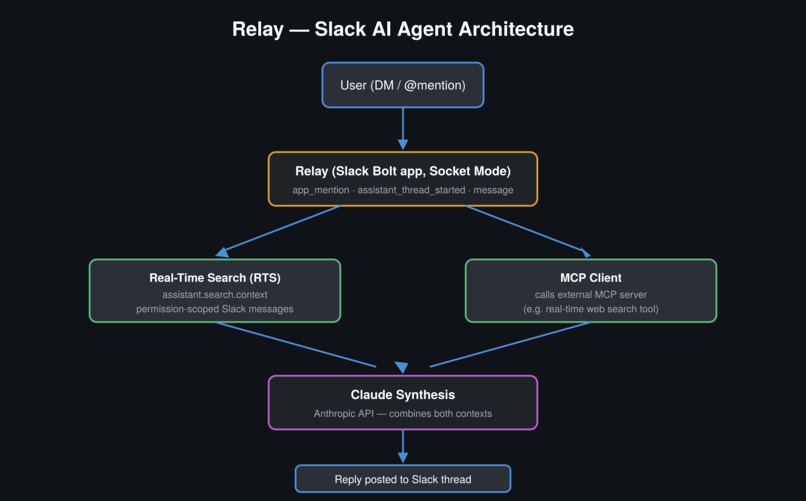
Relay is a Slack AI agent that grounds answers in live workspace search (RTS) + MCP-connected external context, synthesized by Claude.
Inspiration
I registered for this hackathon later than I should have, which meant I only had a handful of hours before the deadline — no time to overthink, only time to build something real. I started with a generic idea (an MCP server that posts web digests to Slack) before realizing I'd misread what Slack was actually asking for. The Real-Time Search API isn't about the open web — it's about giving agents secure, live access to the conversations already happening inside a team's own Slack workspace. That reframing became the actual inspiration: every team already has the answer to most of its own questions, buried in threads nobody can find again. Relay exists to surface that.
What it does
Relay is a Slack AI Assistant. You ask it a question — in the Assistant panel or by @-mentioning it in a channel — and it:
- Searches your live workspace via Slack's Real-Time Search API
(
assistant.search.context), pulling real messages and files, scoped to exactly what the asking user has permission to see. - Reaches outside the workspace by acting as an MCP client to a companion MCP server, for context Slack itself doesn't have.
- Synthesizes a short, cited answer with Claude, referencing the Slack messages it drew from, and posts it back with permalinks — so the answer is checkable, not just asserted.
A /relay-watch <topic> in #channel every Nh command turns any one-off
question into a recurring digest, so the same pipeline that answers "what's
the status of X" can also proactively keep a channel updated.
How we built it
The agent is a Slack Bolt app running in Socket Mode, listening for
assistant_thread_started, message, and app_mention events. On each
question, it calls assistant.search.context with the action_token Slack
attaches to the triggering event, gathers whatever workspace context comes
back, then calls out — over the Model Context Protocol — to a second,
purpose-built MCP server that exposes real-time search, digest synthesis,
and Slack-posting as standalone tools. Both context sources get handed to
Claude, which writes a short answer grounded in what was actually found,
citing Slack messages with [S1], [S2] style references. The final answer
goes back to the thread as a Block Kit message with linked sources.
I deliberately built graceful degradation into every external call — search, synthesis, and Slack delivery all fall back to clearly-labeled demo data if their API key isn't set — so the full pipeline is inspectable in minutes without any setup, and each piece can be lit up independently as real keys get added.
Challenges we ran into
The biggest challenge wasn't code, it was reading the brief correctly under time pressure. My first instinct was to treat "Real-Time Search API" as a synonym for general web search, which would have missed the entire point of the track — Slack's RTS API is specifically about grounding agents in a workspace's own permission-scoped data. Catching that mid-build meant re-architecting the project rather than polishing the wrong one.
The second challenge was building against a genuinely new part of the
platform. The Agents & AI Apps surface — the assistant_view manifest
feature, the action_token field on message events — is still evolving, and
documentation for it is thinner than for Slack's stable Web API. I wrote the
integration against the current public docs and flagged, explicitly, which
field names need to be re-verified against a live sandbox before demo day,
rather than pretending a beta surface was more settled than it is.
What we learned
Grounding matters more than fluency. It's easy to make an agent that sounds confident; it's harder to make one that only says things it can point back to. Wiring citations through from the RTS results all the way into the Block Kit reply — instead of bolting them on as an afterthought — changed how trustworthy the agent actually feels to use.
I also relearned a smaller lesson: verify the primitive before you build on top of it. A wrong assumption about one API early on costs far more time than the extra ten minutes of research would have.
What's next
/relay-watch currently registers a watch but doesn't yet run it on a
schedule — the natural next step is a background worker that replays the
search → synthesize → post pipeline per watch on its interval, turning Relay
from a question-answering assistant into a standing early-warning system for
a team. Longer term, I'd want per-channel tuning (which MCP tools are
relevant to this team) and a lightweight admin view so a workspace owner
can see what Relay has been asked and how it answered.
Built With
- ai-agents
- anthropic
- block-kit
- claude
- claude-sonnet
- css
- html
- javascript
- llm
- mcp
- mcp-server
- model-context-protocol
- node.js
- oauth
- real-time-search-api
- rest-api
- slack
- slack-api
- slack-bolt
- slack-cli
- socket-mode
- svg
- typescript
- zod


Log in or sign up for Devpost to join the conversation.