Build a Dev Environment with AWS and Terraform.
This project has guided me through Terraform basics as I utilized Visual Studio Code (On Windows) to deploy AWS resources and an EC2 instance that I can SSH into to have my own redeployable environment!
Given Below Is my Architecture Diagram for this project
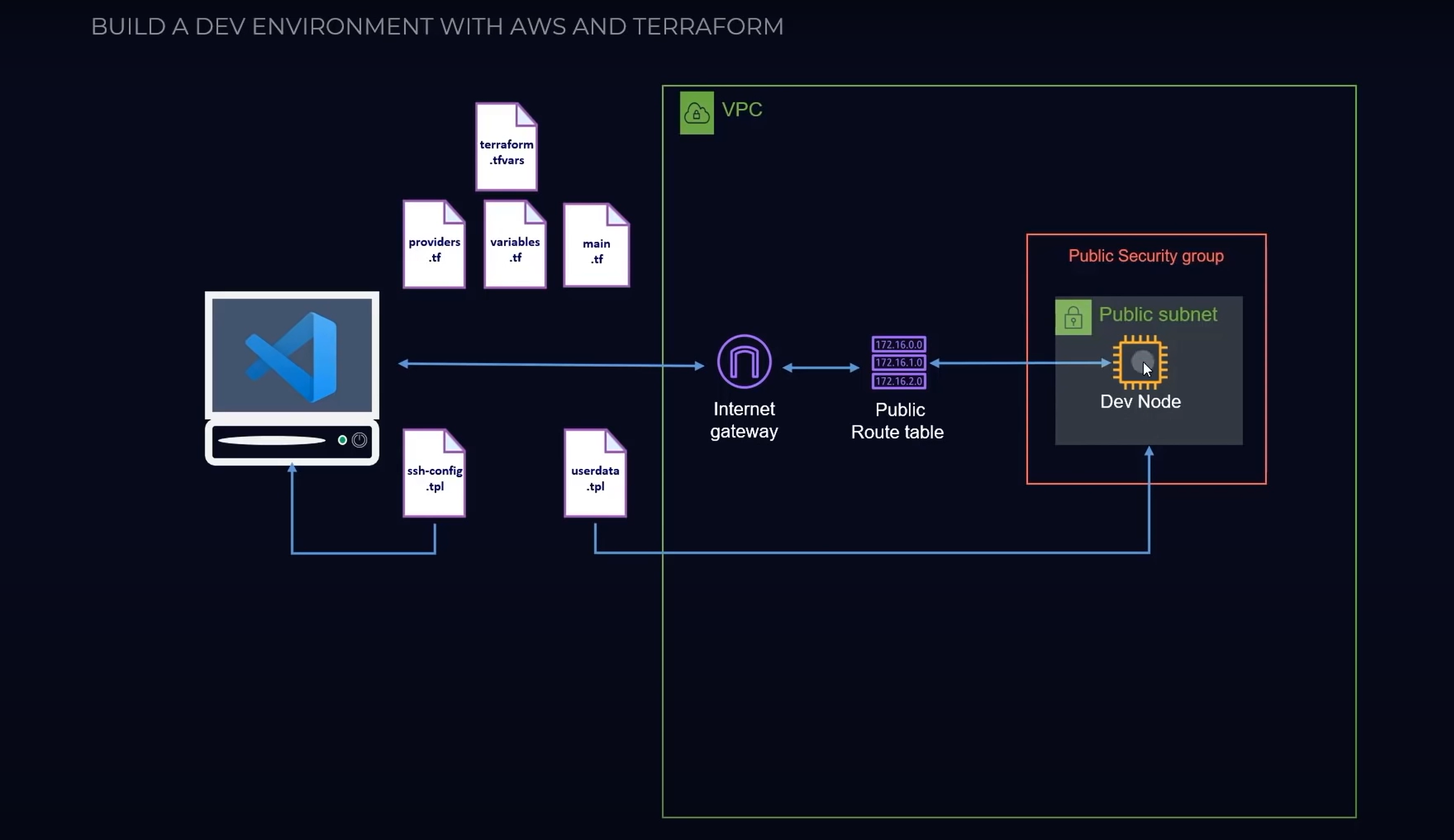
This repository provides a complete development environment setup using AWS and Terraform. It includes all necessary Terraform modules, scripts, and configurations to easily provision and manage the infrastructure required for a scalable and reliable development environment in AWS. With this setup, you can quickly spin up a secure and isolated environment that includes all the necessary tools and resources for your development needs. The repository also provides clear documentation on how to use and customize the environment to fit your specific requirements.
AWS Development Environment with Terraform
This repository provides a Terraform module that enables you to create an AWS-based development environment that is scalable, secure, and easy to customize. With this module, you can quickly and easily provision all the necessary resources and configurations for your development environment, including VPC, subnets, security groups, EC2 instances, and more.
Prerequisites
Before using this Terraform module, you will need to have the following:
- An AWS account with the necessary permissions to create resources
- Terraform installed on your local machine
Getting Started
To use this Terraform module, you can follow these steps:
Clone this repository to your local machine.
Create a new Terraform configuration file (
main.tf) with the following contents:javascript
module "aws_dev_environment" {
  source = "github.com/your-username/aws-dev-environment"
}
Replace
your-usernamewith your GitHub username.Run
terraform initto initialize the module and download any necessary dependencies.Run
terraform planto see the resources that will be created.Run
terraform applyto create the resources.
Customization
This Terraform module includes a number of variables that you can use to customize your development environment. For example, you can change the size and type of the EC2 instances, the number of availability zones in your VPC, and more.
To customize the module, you can create a variables.tf file in your Terraform project directory with the following contents:
php
variable "instance_type" {
  default = "t2.micro"
}

variable "availability_zones" {
  default = 2
}

# Add any other variables you want to customize
You can then reference these variables in your main.tf file, like so:
java
module "aws_dev_environment" {
  source = "github.com/your-username/aws-dev-environment"
  instance_type = var.instance_type
  availability_zones = var.availability_zones
}
Contributing
If you find a bug or have a feature request, please open an issue in the GitHub repository. If you would like to contribute code, please create a pull request with your changes.
License
This Terraform module is licensed under the MIT License. See the LICENSE file for more information.
Built With
- amazon-web-services
- hcl
- shell
- smarty
- terraform

Log in or sign up for Devpost to join the conversation.