-
-
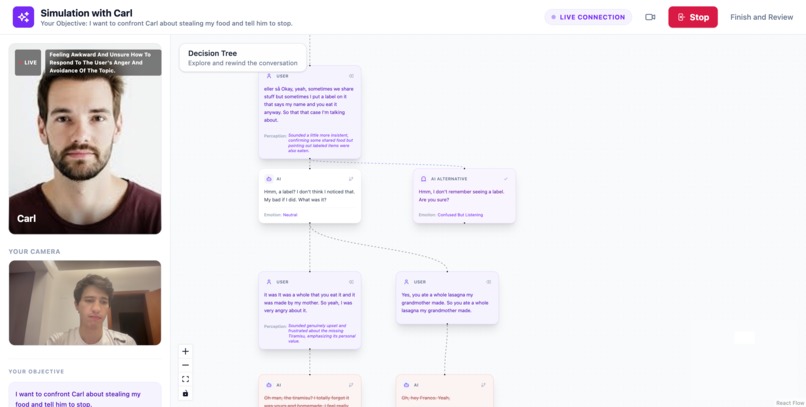
All the different conversation timelines
-
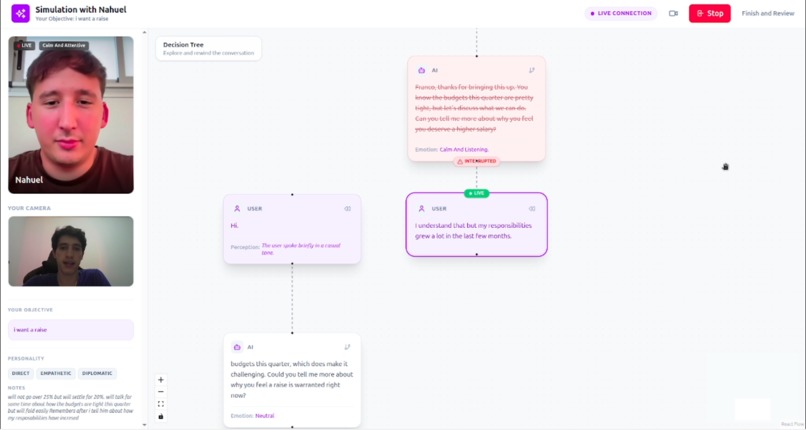
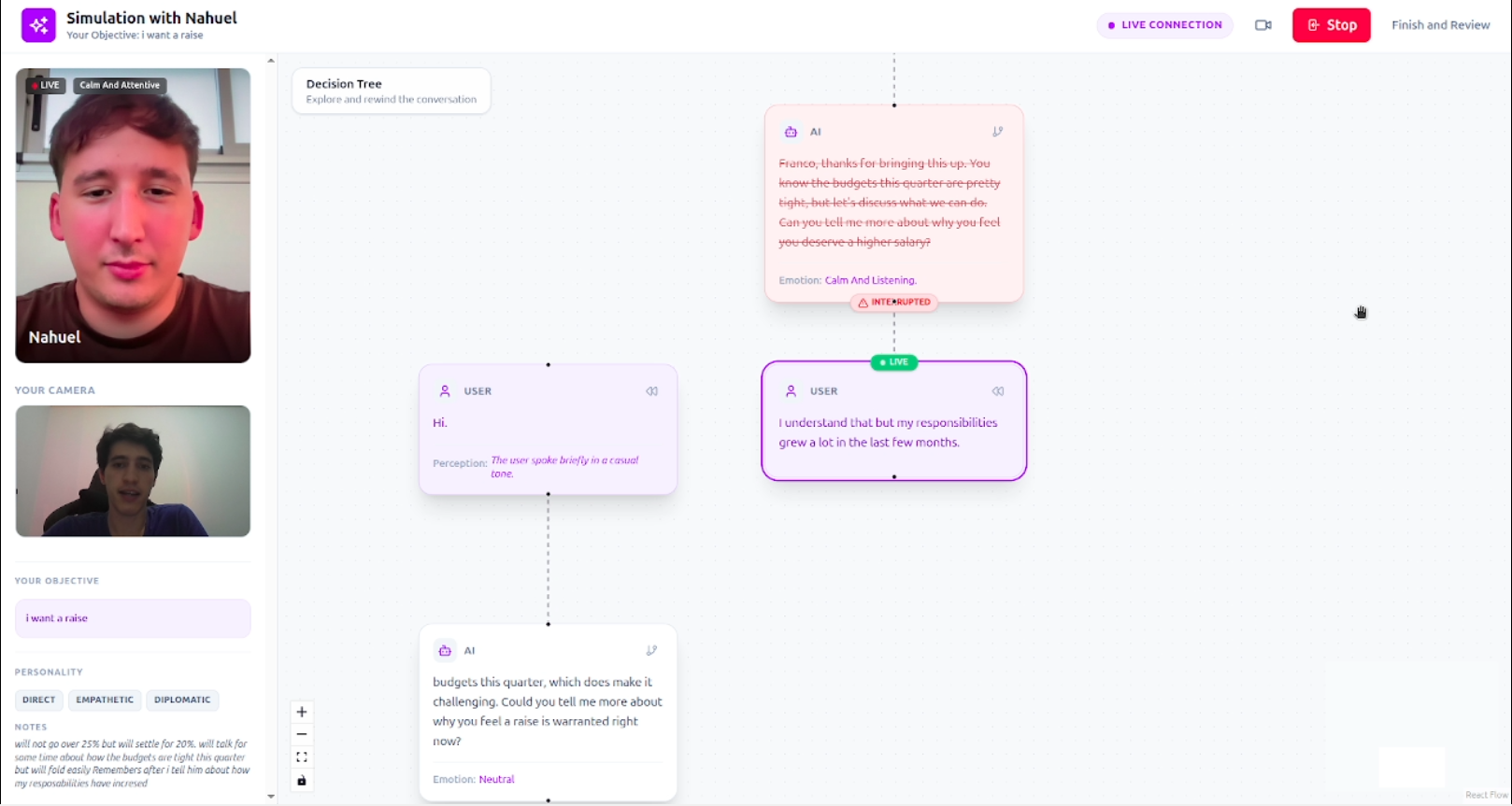
Interruptions
-
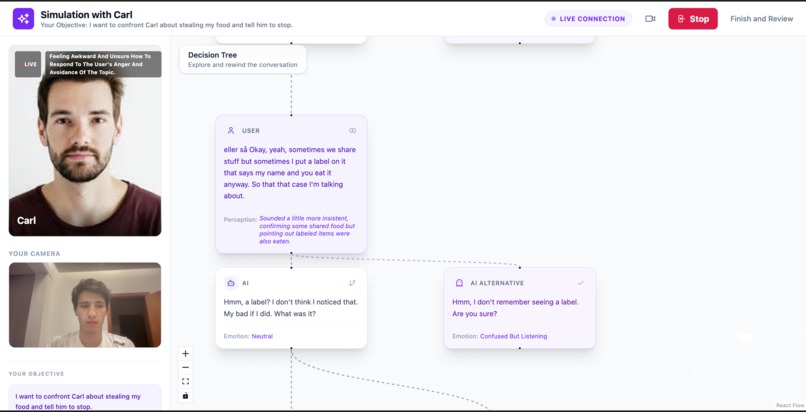
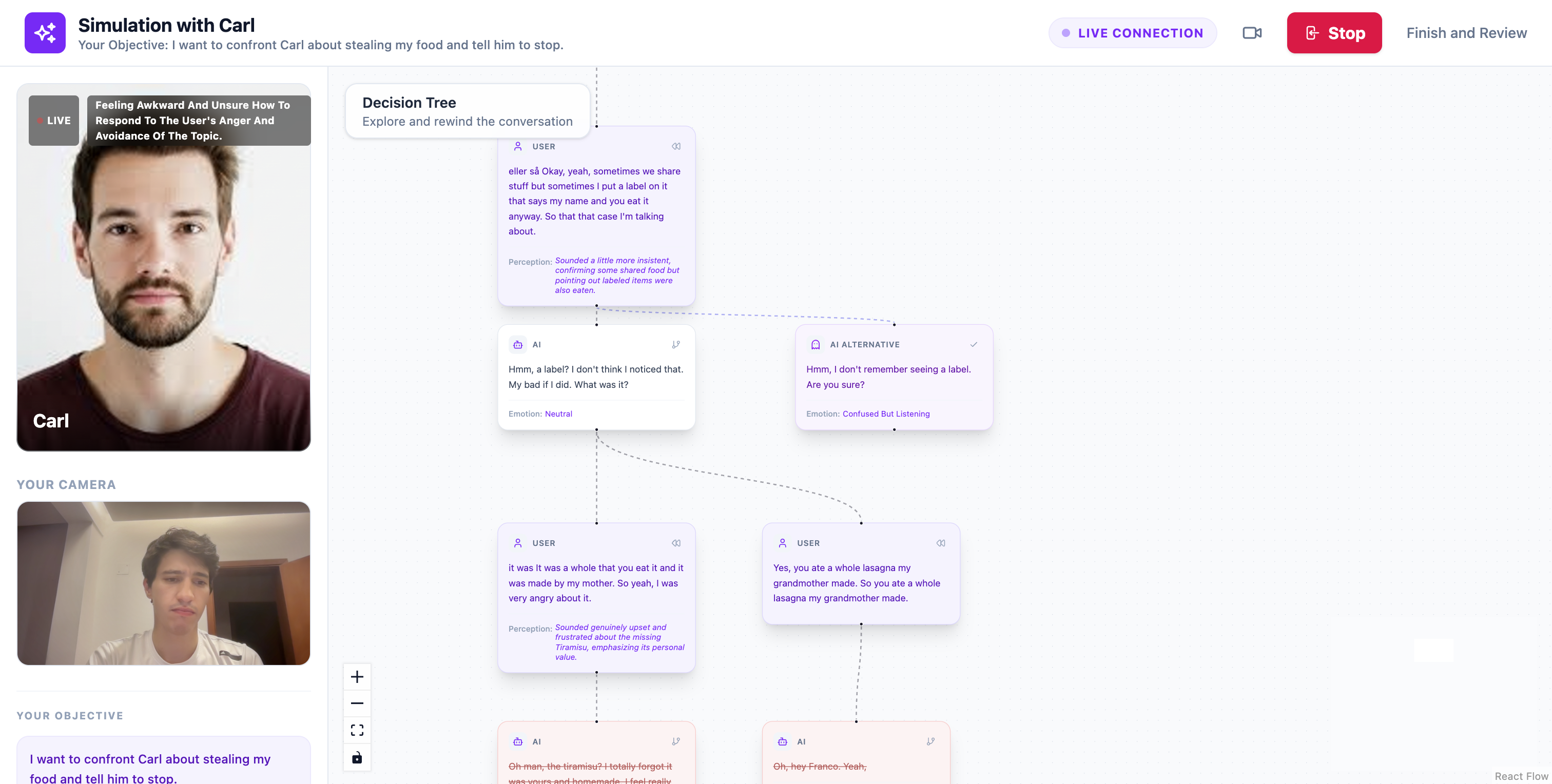
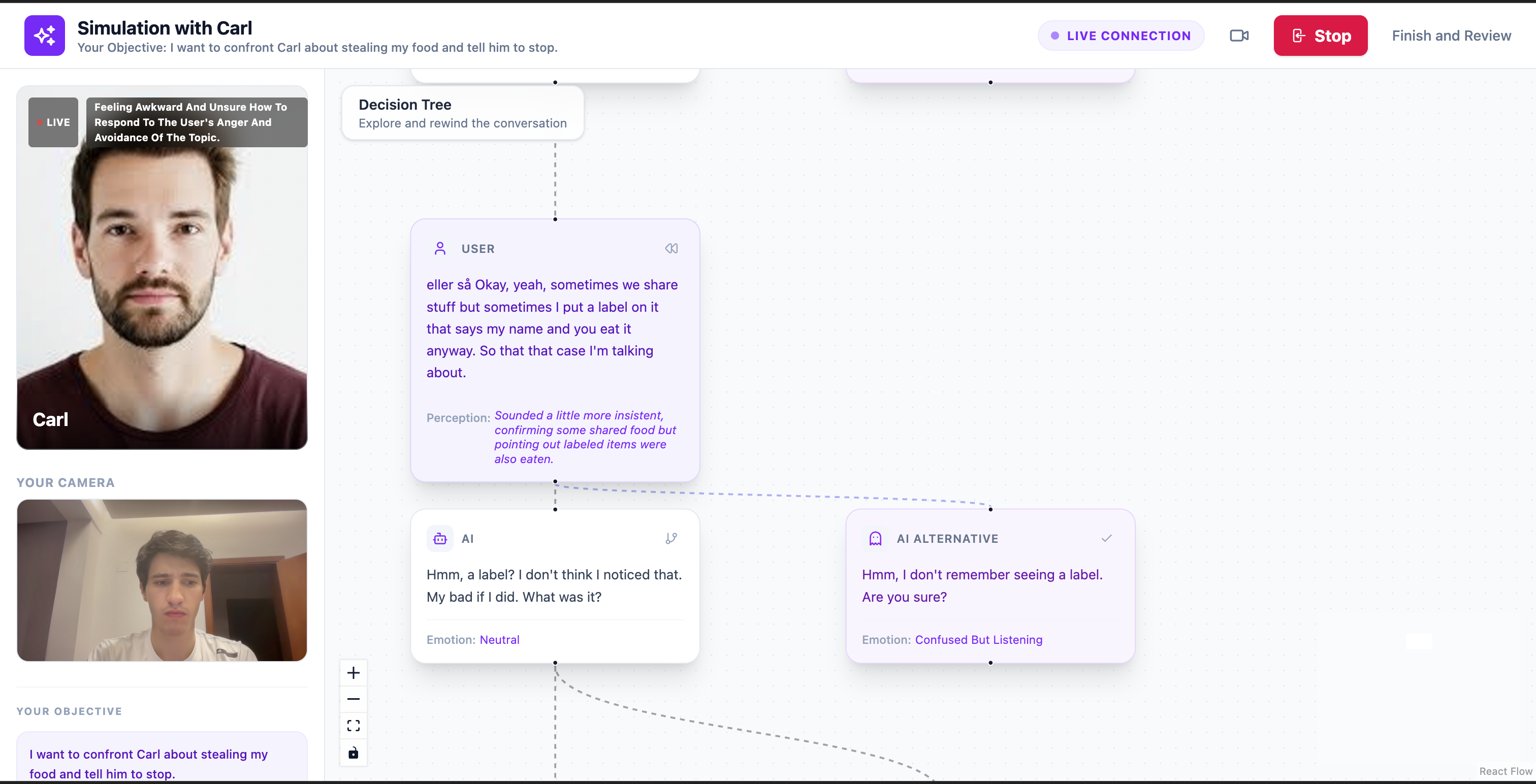
AI suggestions of different conversation paths (my roomate steals my food)
-
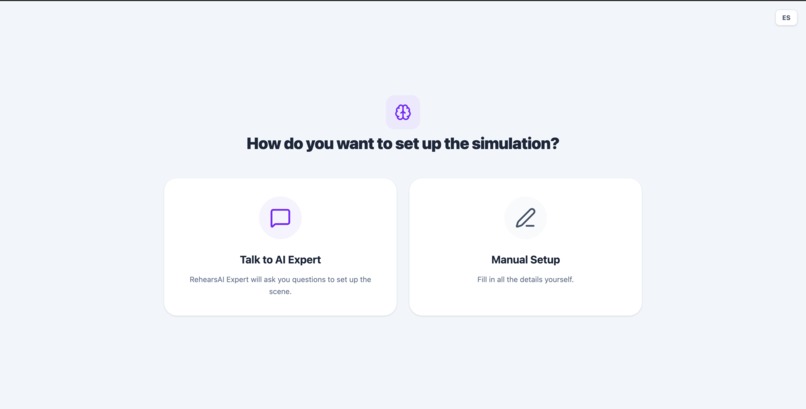
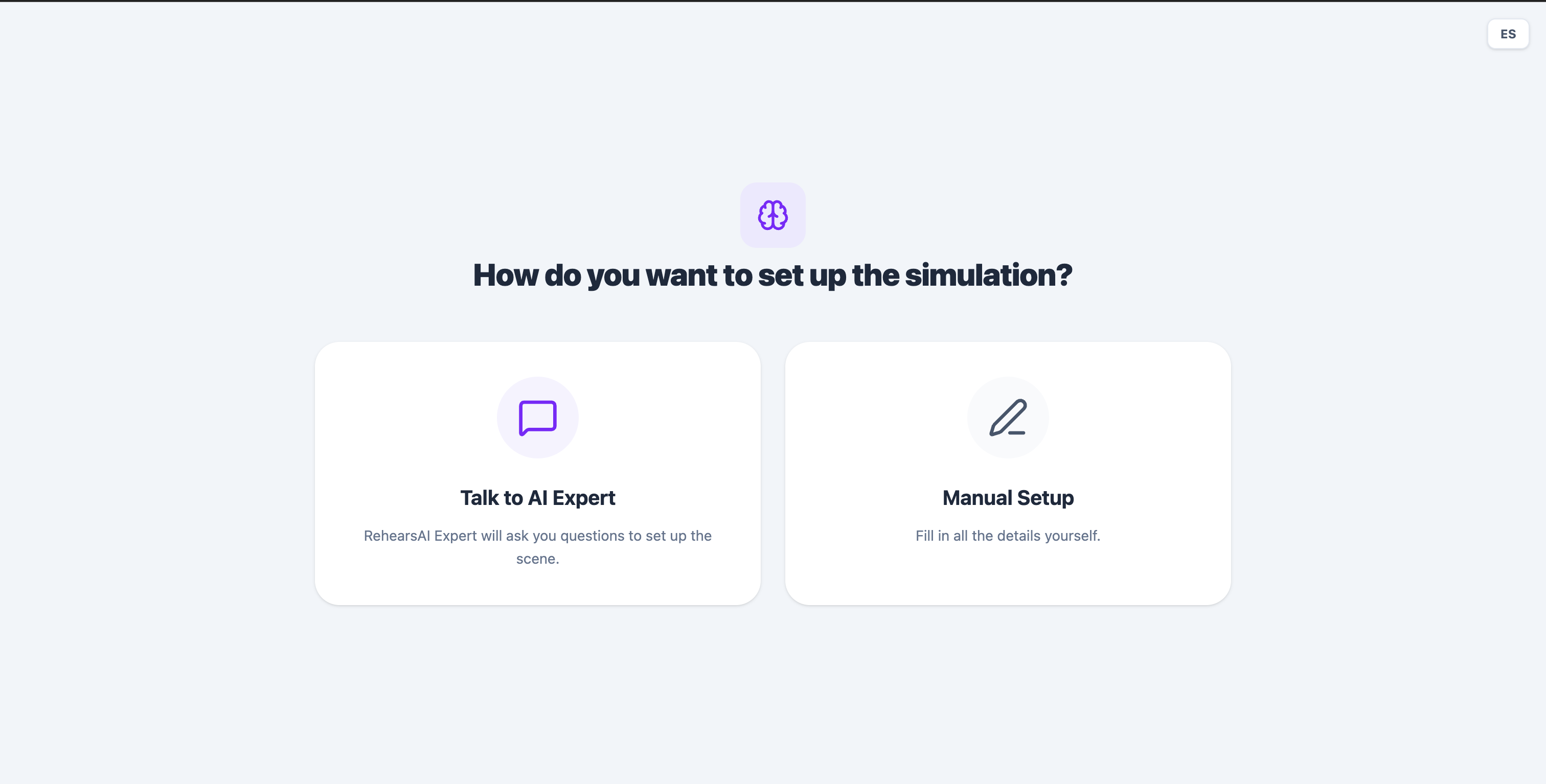
Manual set up o talk to Reharsal Expert
-
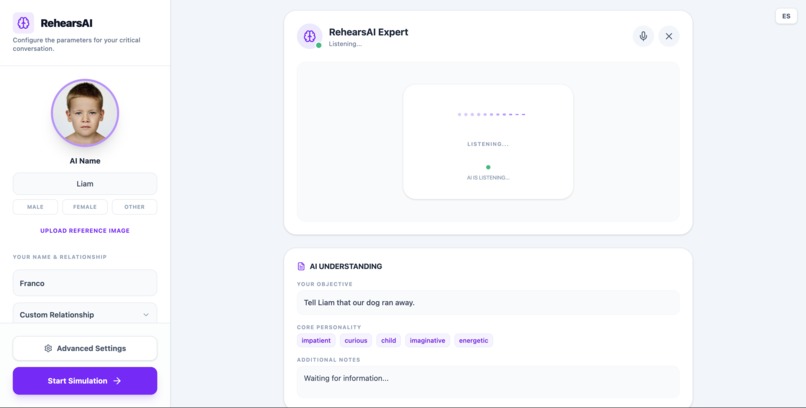
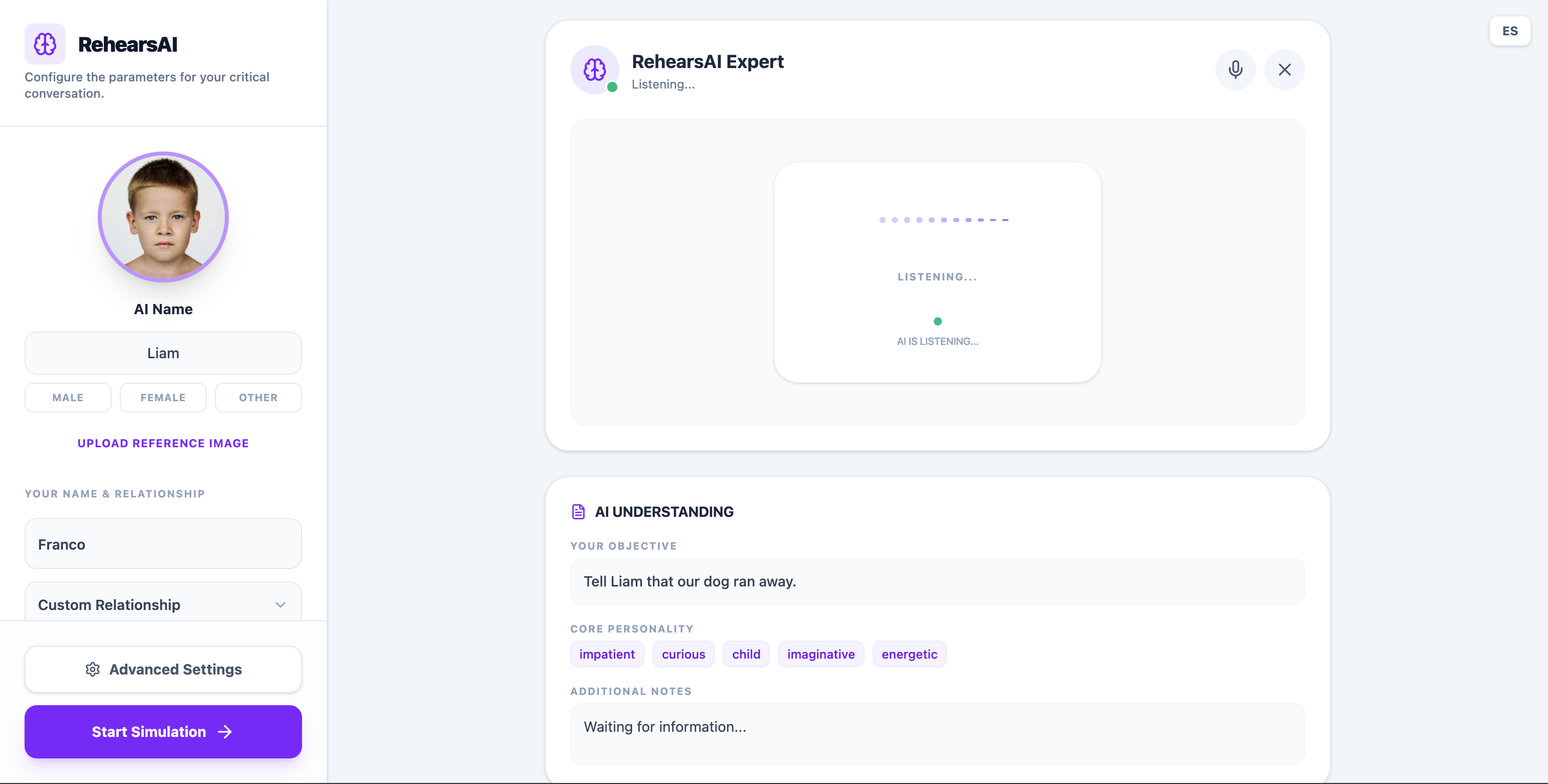
Rehersal Expert (telling my little brother our dog run away)
-
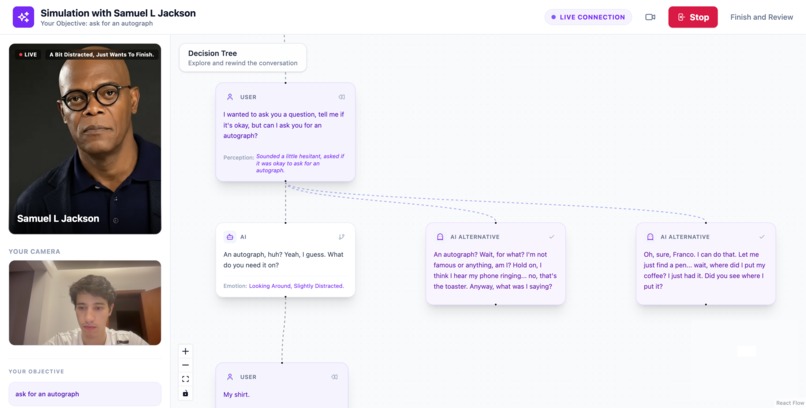
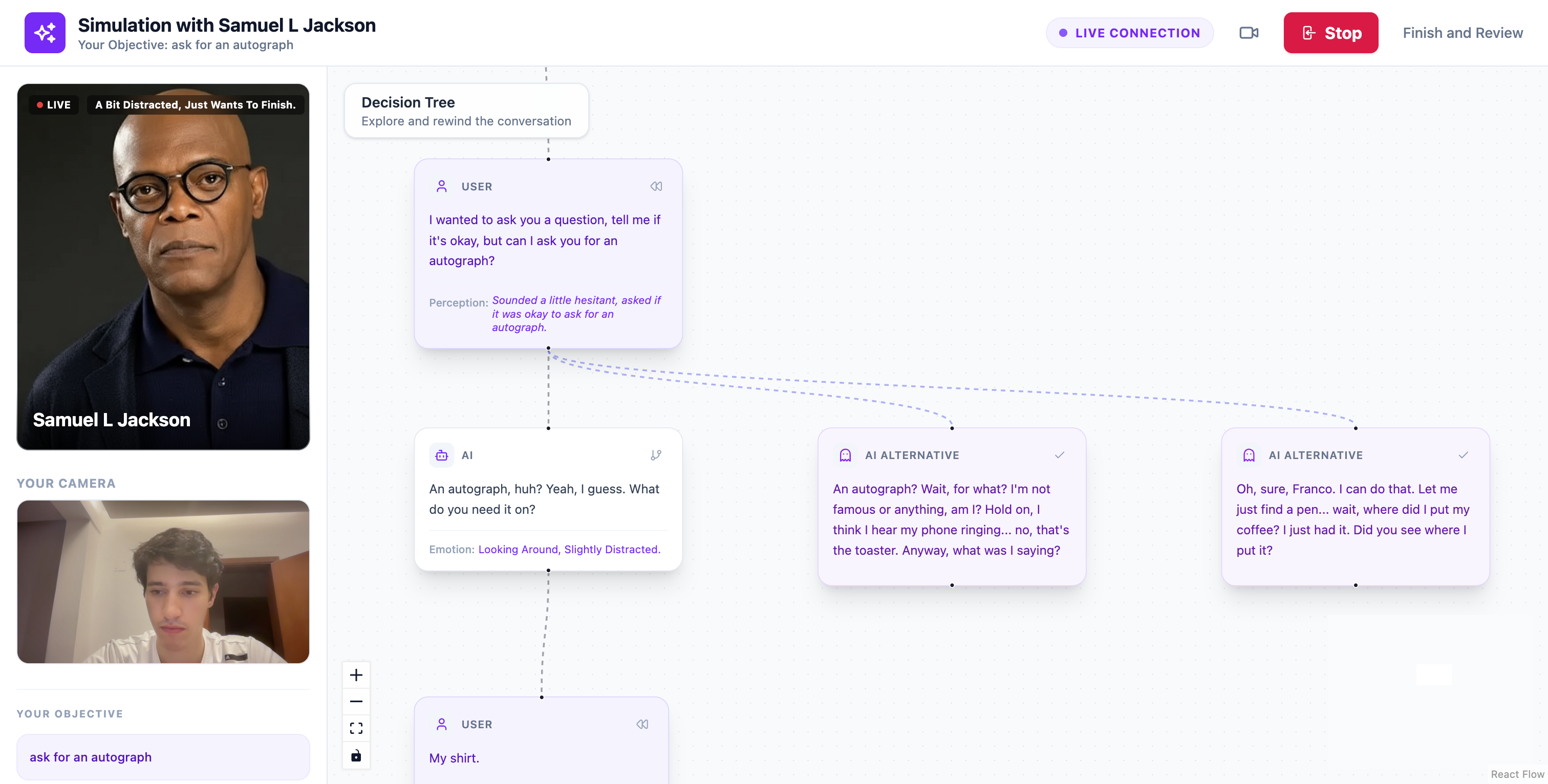
Ask the AI to change their answer (asking for an autograph)
-
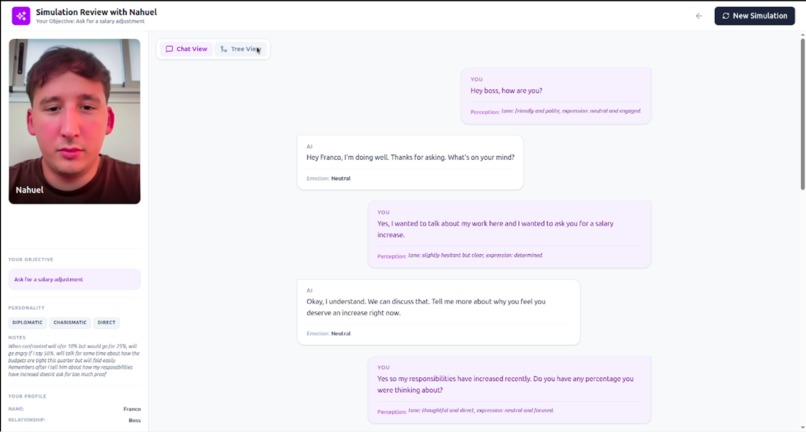
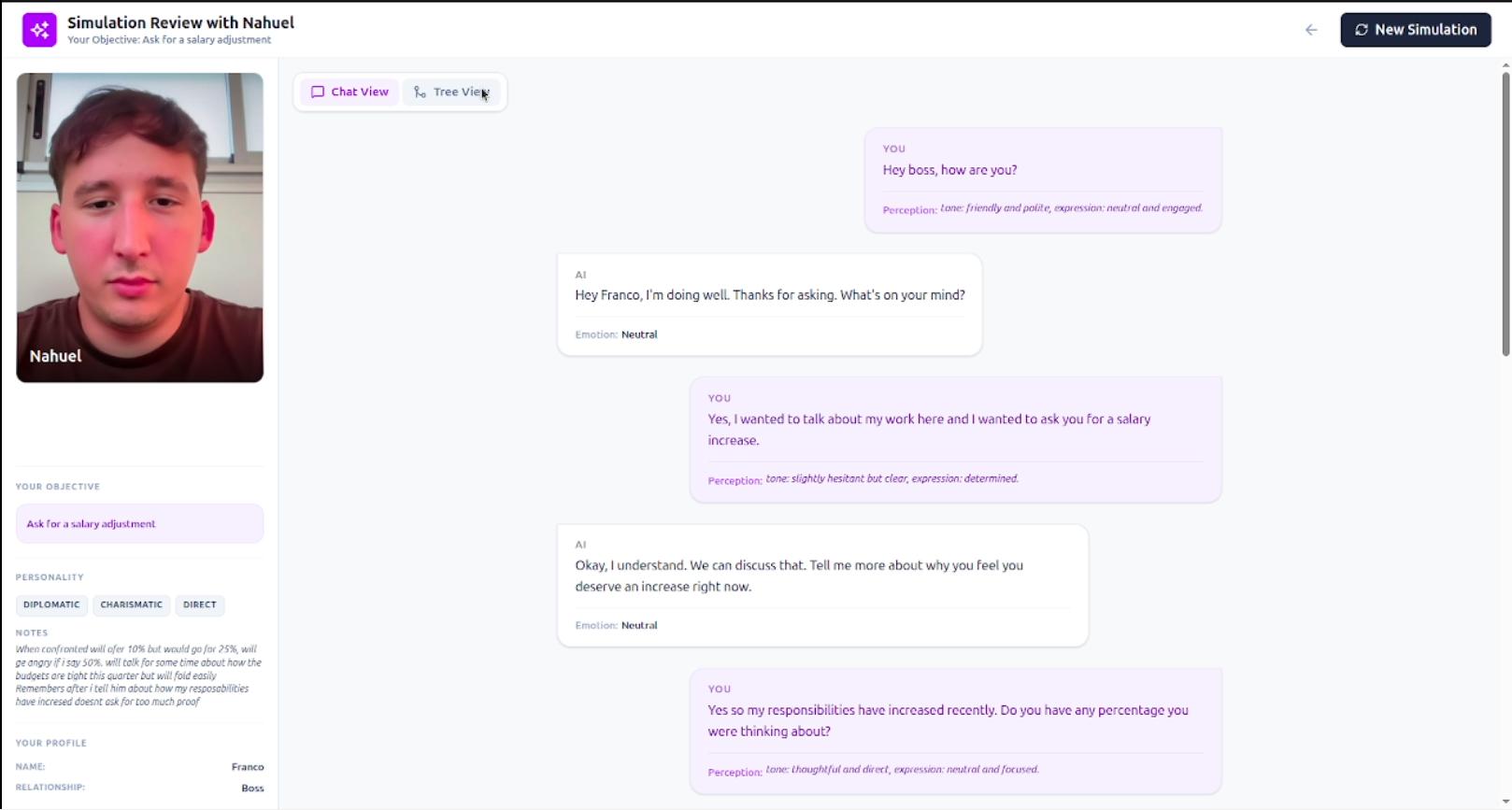
Read each timeline as a separate chat
-

Rehearsing

Inspiration
Many of the most important conversations in our lives are also the hardest ones.
Asking your boss for a raise. Giving difficult feedback to a teammate. Ending a relationship. Negotiating something that really matters.
People often rehearse these conversations in their heads — imagining different outcomes, different reactions, and different ways things might go wrong. But in reality, there is no safe place to practice them interactively.
Current AI assistants are mostly text chat interfaces. They don't capture the emotional signals that define real conversations: tone of voice, hesitation, facial expressions, interruptions, or body language.
We wanted to build something closer to a conversation simulator than a chatbot.
RehearsAI was inspired by the idea that people should be able to practice critical conversations in a safe environment, explore different outcomes, and learn from their communication patterns before the real moment happens.
What it does
RehearsAI is a multimodal conversation simulator that lets people practice difficult real-life conversations with an AI.
Instead of interacting through a text chat, users speak naturally with the system using voice and camera, allowing the AI to interpret signals like tone of voice, facial expressions, and body language to simulate a more realistic conversation.
Users begin by creating a conversation scenario. They can define details such as the relationship with the other person, the goal of the conversation, the personality of the simulated person, and the difficulty level of the interaction.
To make this easier, users can either configure the scenario manually or talk with a Rehearsal Expert, an AI that conducts a short guided interview. During this conversation, the system asks questions about the situation and automatically builds the full scenario profile.
Once the setup is complete, the user can start a real-time rehearsal where the AI plays the role of the other person.
1. Prepare the Scenario
The user begins by setting up the situation they want to practice.
They can configure key details of the interaction, including:
- their own name
- the name of the simulated person
- the relationship between them (boss, coworker, friend, partner, etc.)
- the goal of the conversation
- the personality of the simulated person
- the difficulty level of the conversation
To make this process more natural, users can also speak with a Rehearsal Expert, an AI that conducts a short interview about the situation.
During this conversation the system asks questions to understand the context and automatically generates the full scenario setup.
Users can also upload a photo of the person they want to simulate. Based on this image, the system generates an AI avatar and multiple emotional expressions (neutral, happy, angry, impatient, sad, surprised).
These expressions are later used during the rehearsal to visually reflect the emotional state of the simulated person.
2. Practice the Conversation
Once the scenario is ready, the user speaks with the AI in real time.
RehearsAI simulates the other person in the conversation, allowing the user to practice the interaction naturally using voice.
During the conversation, the system analyzes multiple behavioral signals from the user, including:
- voice tone and intensity
- facial expressions
- posture and body language
- communication style
These signals influence how the simulated person emotionally reacts and how the conversation evolves.
Users can interrupt the AI mid-sentence — when they start speaking, the AI stops immediately, making the interaction feel more natural and responsive.
To make the experience more human, the system displays an AI avatar whose facial expressions change dynamically based on the emotional state of the interaction.
3. Explore Different Conversation Paths
Instead of a simple chat history, the conversation is represented as a visual decision tree.
Each message becomes a node in the dialogue, allowing users to see how the conversation evolves over time.
At any point, users can select any node in the conversation and choose to:
- rewind and respond differently — restart the conversation from that moment with a new reply
- generate alternative responses — the AI can suggest different ways the simulated person might respond
Each alternative creates a new branch in the conversation, allowing users to explore how different choices might change the outcome.
The system can also detect key turning points in the conversation and automatically suggest alternative responses that might lead to different directions.
By the end of the session, users can review the full conversation tree and compare how different decisions led to different results.
Users can also explore each branch as an independent conversation path, making it easier to understand how different communication strategies influence the final outcome.
Challenges we ran into
The most difficult technical challenge was maintaining consistent conversation timelines while supporting rewinding and branching.
Traditional chat systems assume a linear conversation history. RehearsAI instead requires a graph-based conversation memory.
Every time the user rewinds and responds differently, a new branch must be created without affecting existing branches.
At the same time, the AI must only receive the exact path of nodes leading to that moment, ignoring all parallel timelines.
Ensuring that each branch behaved like a coherent independent conversation required careful management of conversation context reconstruction.
Accomplishments that we're proud of
We are especially proud of three things:
1. Turning conversations into explorable simulations
Instead of a chat history, users get a visual decision tree of their communication strategies.
2. A truly multimodal experience
RehearsAI goes beyond text by combining:
- voice interaction
- visual signals
- emotional avatars
- conversational memory
3. The time-machine interaction
The ability to rewind conversations and explore alternate realities transforms difficult conversations into something users can experiment with and learn from.
What we learned
Building RehearsAI taught us that multimodal AI becomes far more powerful when it is paired with structured interaction design.
The biggest insight was that users don't just want answers — they want exploration.
Giving users the ability to test different strategies, rewind decisions, and compare outcomes makes AI feel less like a tool and more like a practice environment.
How we built it
RehearsAI is designed as a multimodal AI agent architecture combining real-time interaction with structured conversation memory.
Frontend
- React 19 + TypeScript
- Vite (build tool)
- Tailwind CSS 4, React Router 7
- React Flow (@xyflow/react) for decision-tree visualization
- Motion for animations, Lucide React for icons
- Real-time voice interaction via Web Audio API
- Camera input for visual signals via MediaStream API
Conversation Engine
The conversation is stored as an in-memory graph structure in React state, where each message becomes a node.
This enables:
- branching conversation paths
- rewind functionality
- exploration of alternative outcomes
Multimodal Perception Layer
During interaction the system processes multiple signals:
- voice input
- camera input
- facial expression cues
- posture and tone signals
These signals influence how the AI agent responds and which emotional state the avatar displays.
AI Persona Generation
Users define the personality of the person they want to simulate and upload a photo. The system uses Gemini to generate emotion-based avatars (neutral, happy, angry, impatient, sad, surprised) and to detect gender from the photo for voice selection. This creates a consistent AI conversational persona that controls tone, style, and behavioral responses.
Tech Stack
- Frontend: React 19, TypeScript, Vite, Tailwind CSS 4, React Router 7, React Flow (@xyflow/react), Motion, Lucide React
- AI: Google Gemini API — Live voice (gemini-2.5-flash-native-audio-preview), image generation (gemini-3.1-flash-image-preview), text/voice detection (gemini-3-flash-preview)
- Real-time: Web Audio API (microphone + playback), MediaStream API (webcam), Gemini Live API for multimodal streaming
- State: In-memory conversation graph (React Context) — no backend persistence
What's next for RehearsAI
We see several directions for expanding RehearsAI:
Communication coaching
After a session, the system could analyze the entire decision tree and provide feedback on:
- negotiation strategies
- emotional signals
- moments where conversations escalated
Training simulations
RehearsAI could be used in:
- leadership training
- HR training
- negotiation workshops
- therapy preparation
More advanced emotional modeling
Future versions could simulate more complex behaviors such as:
- stress escalation
- persuasion dynamics
- long-term relationship context
Our long-term vision is to turn RehearsAI into a personal training environment for difficult human conversations.


Log in or sign up for Devpost to join the conversation.