-
-
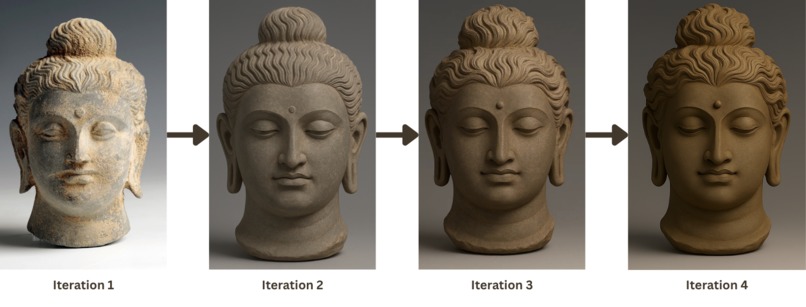
Buddhas of Bamiyan Statue's Head Iteration
-
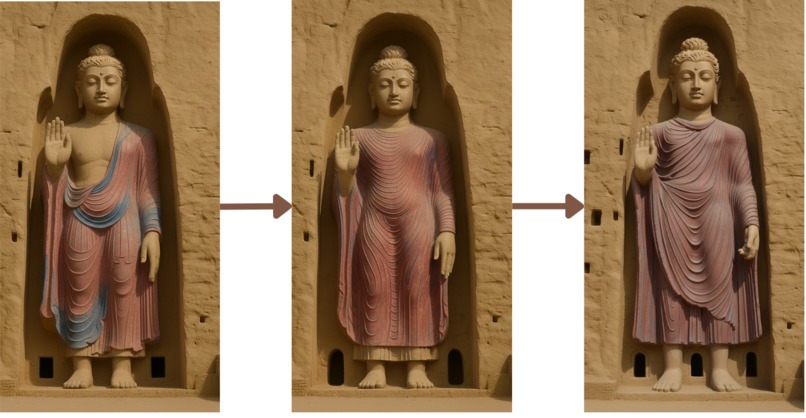
Buddhas of Bamiyan Statue's Drapery Iteration
-
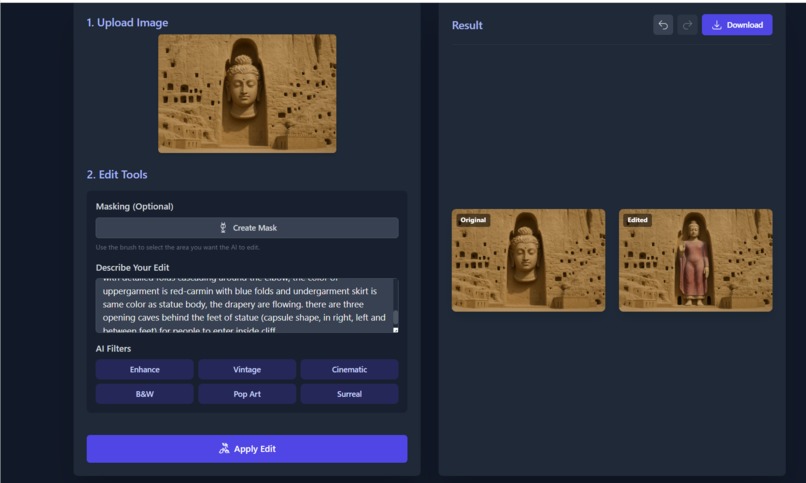
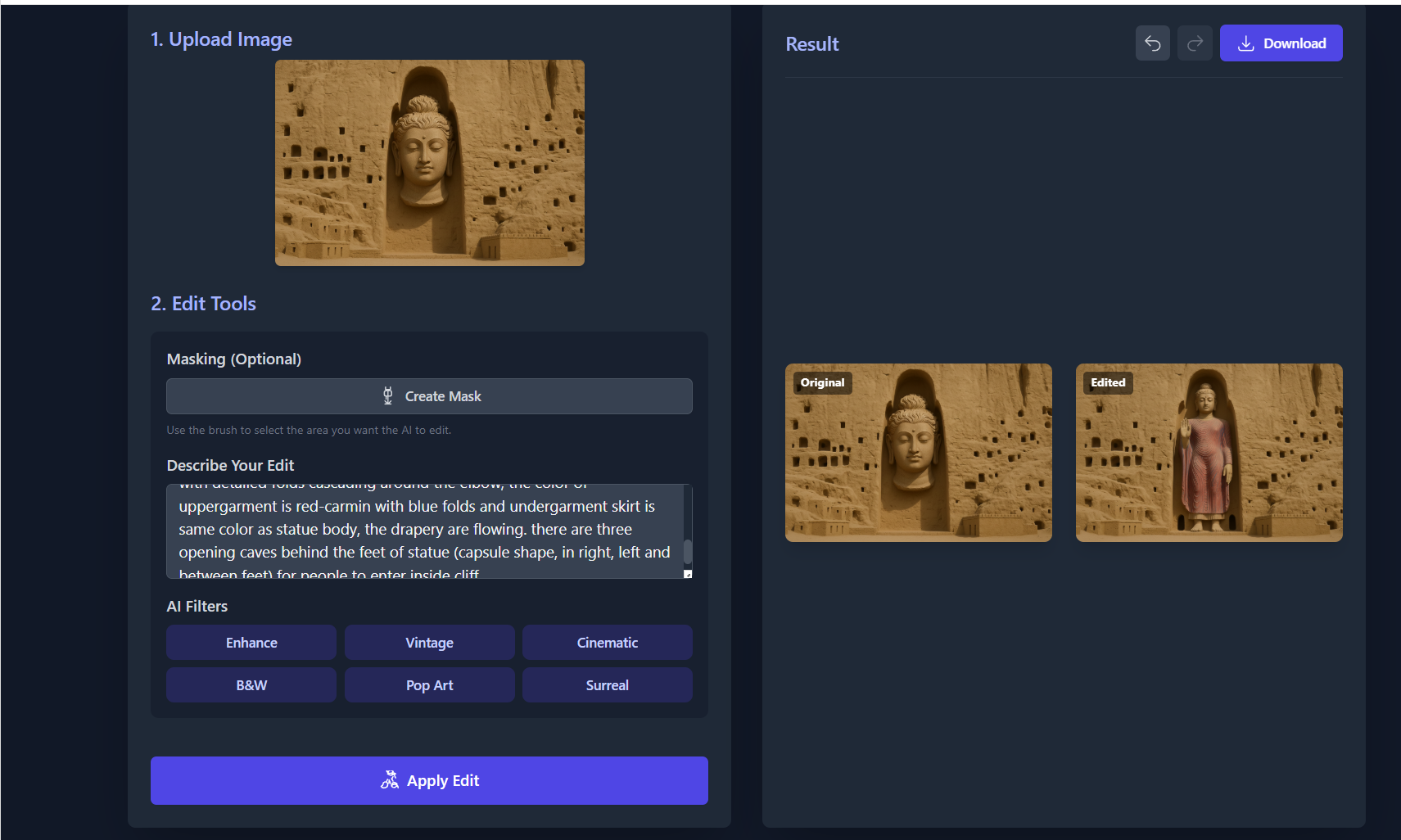
the API interface (image to image editing)
-
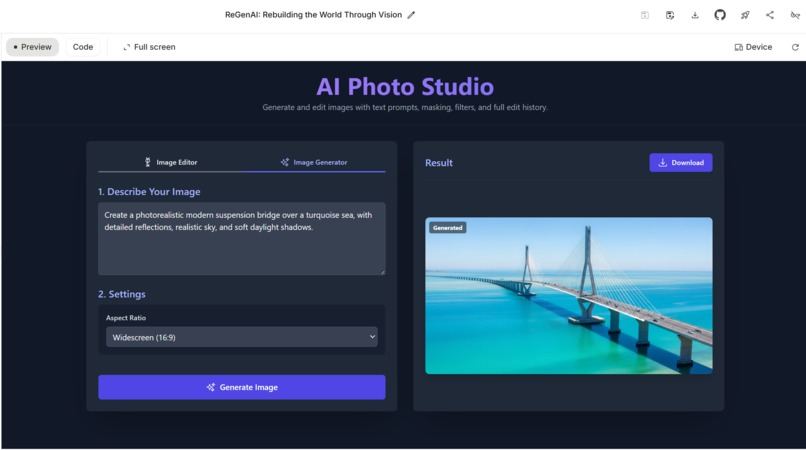
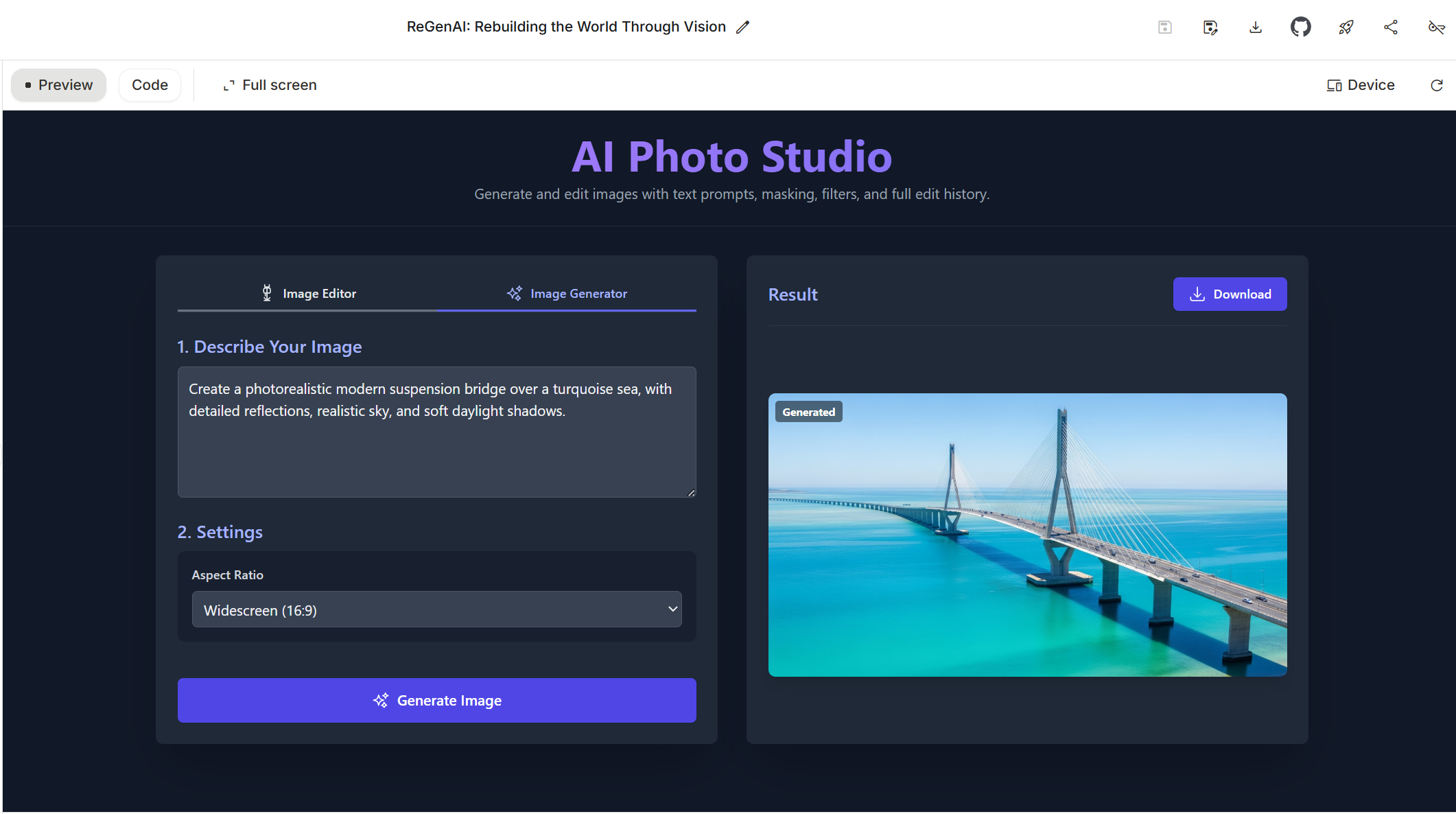
API interface with different example (text to image generation)
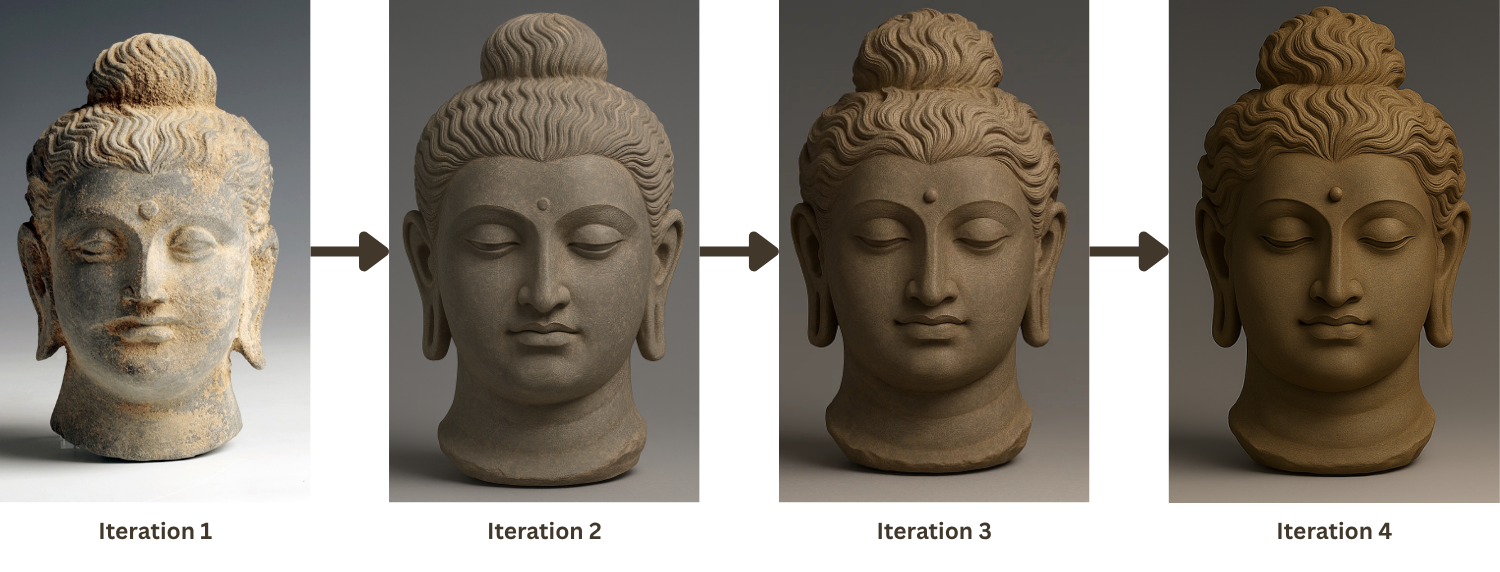
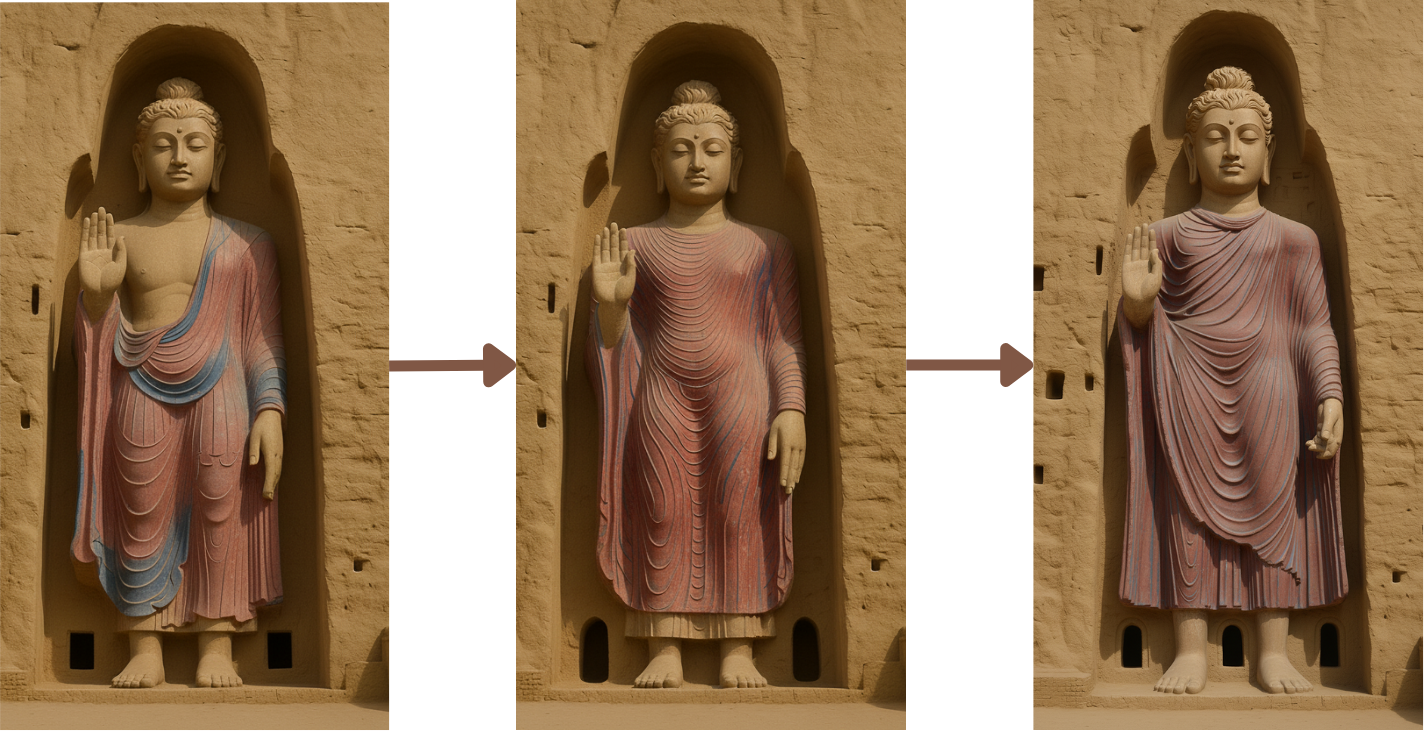
Inspiration: ReGenAI began from a deeply personal and intellectual challenge: how can artificial intelligence reconstruct the world’s destroyed or undocumented heritage when no complete image of the original exists? During my PhD research, I worked on reconstructing the Buddhas of Bamiyan and the Temple of Bel in Palmyra, monuments lost to conflict and time. These sites posed an almost insurmountable question for both historians and computer scientists: How do you reconstruct something that no longer exists in its original, full visual form? Traditional photogrammetry and 3D reconstruction depend on abundant visual data. But what if all we have are textual descriptions, sketches, or fragmentary photographs scattered across archives? That realization led to the core idea: “If humans can imagine the past through words, stories, and partial memories, then AI, too, should be able to reconstruct it through language.”
ReGenAI was first designed as an AI-driven visual reasoning engine capable of generating or restoring lost heritage imagery based on textual prompts and historical context. The goal was not only aesthetic restoration but also epistemic reconstruction, bridging history, imagination, and computational creativity. As I developed the system, I discovered that the underlying architecture, the multimodal prompt interface, masking logic, and reference-guided editing, was not limited to heritage. It could equally serve designers, artists, educators, scientists, and storytellers. That was the turning point. Heritage reconstruction became the origin, but the mission evolved:
- To create a universal AI photo studio where anyone could reimagine, build, or restore, whether a lost temple, a damaged photograph, or a futuristic world.
What It Does: ReGenAI is a multimodal AI image studio powered by Google’s Gemini models. It allows users to perform complex image generation and editing through natural language, making visual creativity accessible to everyone.
Users can:
- Generate new images from text alone, transforming abstract ideas into detailed visuals.
- Edit existing images by describing changes in plain English (“restore the missing columns,” “add a sunrise reflection,” “turn this into watercolor art”).
- Apply precision editing with a masking tool, painting over areas where the AI should focus its reconstruction.
- Upload a reference image to guide the AI in style, texture, or content, enabling realistic style transfer or comparative reconstruction.
- Experiment with filters like Cinematic, Vintage, Pop Art, or Surreal—powered by predefined prompt templates.
- Track edit history, use Undo/Redo, and compare before and after results side-by-side. Although originally trained for cultural heritage restoration, ReGenAI’s multimodal pipeline makes it equally suitable for:
- Creative industries (digital art, concept design, advertising)
- Education (interactive visual learning, historical illustration)
- Architecture & archaeology (visual hypothesis modeling)
- Photography & media (automatic retouching, enhancement, colorization) The app transforms AI from a passive assistant into an active visual collaborator, one that understands context, intent, and creative nuance.
How It Was Built: ReGenAI is built as a modern web application emphasizing performance, accessibility, and modularity.
Frontend stack:
- React + TypeScript for structured, maintainable code.
- Tailwind CSS for a responsive, minimal yet visually refined interface.
- Vite as the build tool for near-instant hot-reload and optimized production output.
AI layer
- Gemini API (@google/genai) powers text-to-image generation and contextual image editing.
- Advanced prompt engineering merges textual and visual input (base image + mask + reference image + edit instruction).
- Dynamic prompt fusion allows ReGenAI to generate context-aware “edit plans” before sending them to Gemini, improving fidelity and coherence.
Hybrid AI architecture
- The project includes compatibility with Chrome’s Built-in AI (Gemini Nano), allowing on-device inference for privacy and offline access.
- When window.ai.prompt.create() is unavailable, the system automatically falls back to cloud processing, ensuring consistent performance.
User experience
- Interactive canvas for masking.
- Real-time progress feedback with graceful error handling.
- Downloadable output with embedded metadata describing applied transformations.
Expert Collaboration: Throughout development, I worked with domain experts in archaeology, digital heritage, and AI ethics. Their feedback guided everything from prompt phrasing to the color reconstruction logic.
- Archaeologists provided contextual cues (“the column spacing was symmetrical; use limestone texture”).
- Historians validated aesthetic authenticity and cultural accuracy.
- AI engineers and visual artists evaluated the perceptual quality and coherence of outputs using expert-scoring sheets (Prompt Sufficiency Index and Dynamic Prompt Blueprint frameworks). This expert-in-the-loop process ensured that ReGenAI outputs are not only visually compelling but culturally and interpretively informed. It also shaped the ethical design principles embedded in the interface, transparency, reversibility, and attribution.
Challenges: Building ReGenAI involved solving several difficult problems:
- Data scarcity: Heritage datasets are limited, inconsistent, and often politically or culturally sensitive. Designing an AI that could infer missing details from textual input required custom prompt composition strategies.
- Visual-semantic alignment: Translating nuanced historical descriptions into accurate visual reconstructions demanded iterative multimodal prompting and reference weighting.
- Performance optimization: Image payloads can exceed tens of megabytes; implementing efficient base64 encoding, caching, and undo/redo mechanisms without degrading UX was critical.
- Ethical sensitivity: Heritage reconstruction raises questions of authenticity and authorship. I embedded transparency cues in the interface (e.g., “AI-assisted reconstruction”) to distinguish generated content from verified sources.
- Cross-domain adaptability: Extending the heritage-focused API to creative and educational contexts required modular prompt templates and flexible input structures.
Through ReGenAI, I learned that AI creativity is not bound by domain; it’s bound by imagination and accessibility. The project taught me how to:
- Engineer multimodal prompts that merge text, image, and reference data coherently.
- Design user experiences that make advanced AI tools intuitive for non-technical users.
- Balance precision (for restoration) with freedom (for creation).
- View AI not as a replacement for human creativity, but as an extension of it, a bridge between historical memory and future possibility.
- It reaffirmed my belief that a tool created to preserve the past can also empower people to shape the future.
Future Work:
- 3D and AR extensions: Convert generated imagery into 3D models for virtual reconstruction and educational use.
- Collaborative editing: Enable multi-user real-time sessions for shared creative workflows.
- Offline AI mode: Fully implement Gemini Nano integration once public, enabling true on-device multimodal inference.
- Dataset partnerships: Collaborate with museums, archives, and educational platforms to ethically expand training data for heritage and visual learning.
- Custom domain modes: “Archaeology Mode,” “Creative Design Mode,” “Photo Restoration Mode,” allowing specialized prompt tuning.
Vision ReGenAI started as a heritage experiment and became a philosophy:
- To empower humanity to create, restore, and reimagine the world through the language of AI. Whether reconstructing ancient temples or visualizing tomorrow’s innovations, ReGenAI proves that imagination, guided by responsible AI, can rebuild anything.
Built With
- canvas
- chrome-built-in-ai-(gemini-nano)
- cloud-deployment
- dynamic-prompt-blueprint-(dpb)
- google-gemini-api
- node.js
- npm
- prompt-suffeciency-blueprint(dpb)
- react
- tailwind-css
- typescript
- vite


Log in or sign up for Devpost to join the conversation.