Inspiration
Imagine a non tech-savvy, elderly lady trying to pay her electricity bill. She's overwhelmed by the amount of clutter on the website, confused by the unfamiliar UI, and doesn't know where to begin.
For most of us, this is a simple task. But for millions of older adults, it's a very frustrating barrier to independence. As more of our lives move online, struggling with technology restricts access to essential parts of our lives.
That's why we built Hold My Hand: an AI-powered tool that transforms confusing websites into simple, accessible experiences, just by talking to it.
It's quite literally like an AI holding your hand as you navigate the internet.
What it does
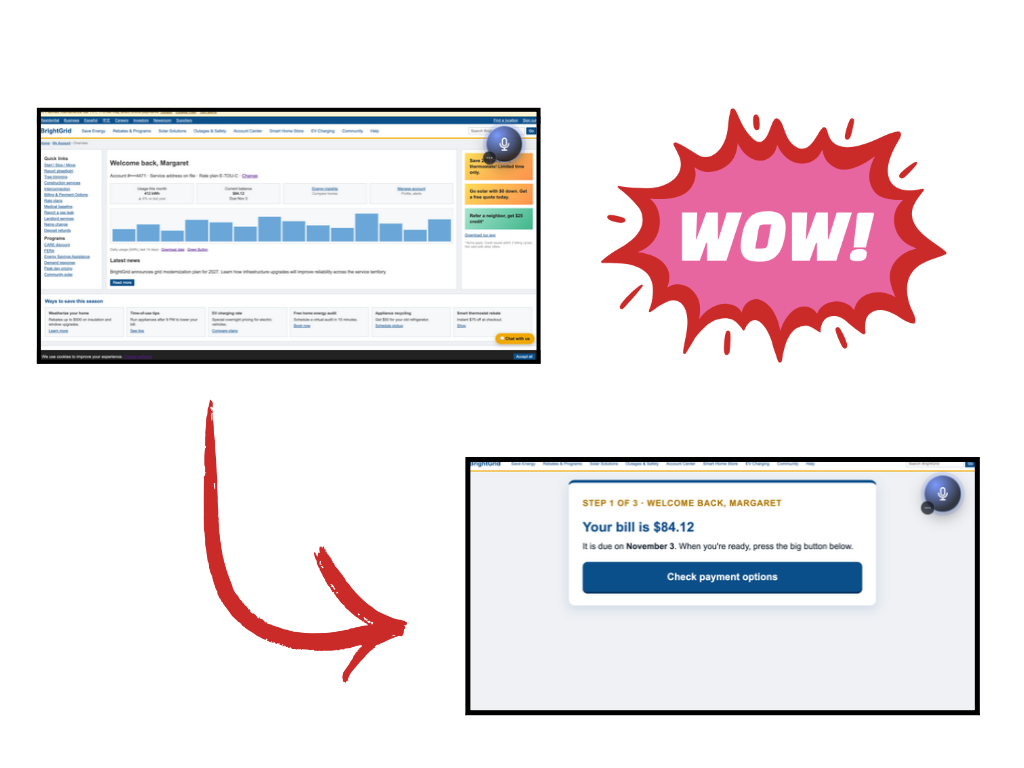
Hold My Hand is a Chrome extension that will redesign the web page to fit your needs as you speak to it.
For example, when paying your electricity bill, you're likely to be inundated by a consistently tiny font, too many options, promotional offers, etc. If you're confused, ask Hold My Hand what you need to do to pay your bill. It will take out all of the other options, shift the UI elements, and enlarge the options that you need to take action on.
In this case, the electricity website would exclusively show the large pay now button, as opposed to the clutter it used to have.
Then, Hold My Hand will talk back to you: giving you the steps to take after it's made the UI easier for you.
It's also designed for a trusted caretaker to be able to help the elderly user. The caretaker (could be a family member or a trusted person) would talk to the Caretaker agent, and not only learn about the elderly user's tech habits, but also provide input on how the agent should approach assisting the user.
How we built it
- Chrome extension (Manifest V3, plain JavaScript).
- A content script takes a snapshot of the page: visible controls, text blocks, and the theme (fonts, colours, and the classes used for buttons, cards and headers).
- A service worker handles sign-in, calls the backend, and tracks navigation.
- An offscreen document records audio for voice.
- FastAPI backend (Python 3.12). It handles auth (Argon2id passwords and JWTs) and
/reframe, plus voice endpoints for speech-to-text and text-to-speech. It also enforces per-user and per-IP rate limits. - Groq models.
gpt-oss-120bplans what to change, andgpt-oss-20bhandles automatic rebuilds and takes over when the main model runs out of budget. The model doesn't write code. It returns a fixed set of structured operations (render,hide,relabel,style,page_style,scroll_to,restore), which the backend validates. The extension then inserts sanitized HTML into the page itself, so the site's own CSS styles the new layout. - Cartesia for voice.
ink-whisperturns speech into text.sonicspeaks the replies and returns word timings and a loudness envelope, which drive the captions and waveform. - SpacetimeDB (Maincloud). It stores user accounts and the live tracker tables (
agent_run,agent_event,agent_alert). The caretaker's privatepatientandcaretaker_notetables are there too, and only the admin identity can write to them. - Fetch.ai uAgents and ASI:One. The caretaker agent uses the Chat Protocol, the format ASI:One talks in. It uses Groq to word its replies, but only from the stored record, and it gives no new medical advice. It also checks its own answers: if a reply leaves out the patient's city or medication, it adds them back.
- Cloudflare Pages. It hosts the tracker (React with SpacetimeDB subscriptions) and a demo utility-company site with a scripted bill-payment flow.
Challenges we ran into
- Keeping the site's look. Simplifying a page usually makes it look like a different site. We pulled the site's own fonts, colours and component classes into the snapshot and put our HTML inside the real page, so the site's CSS applies. We also had to force plain layout inside our panel so the site's own classes couldn't hide our content.
- Not running model-written code. We wanted the agent to actually operate the page without ever running JavaScript the model wrote. That led to a small, validated set of operations that only act on elements the content script had already tagged.
- Groq free-tier limits. We built a rate limiter for each model's requests and tokens per minute and per day. It saves usage across restarts, switches to the smaller model when the main one runs out, and skips rebuilding pages that haven't really changed.
- Malformed JSON from the model. Some replies weren't valid JSON. We retry without Groq's JSON mode and parse leniently.
- Voice that feels natural. We had to detect silence to stop recording, stream captions in sync with the audio, and keep speaking replies on later pages until the user types.
- Privacy for the caretaker agent. Patient records needed a gate. The agent asks a security question before opening a record for a session, and the tables are private to the admin identity.
Accomplishments that we're proud of
- Any site can be rebuilt into a calm, task-focused version that still looks like that site.
- The full voice loop works: you speak, the page changes, and the reply is read back with live captions.
- Passwords and card numbers never leave the browser, and no model-written code ever runs on the page.
- A family member can watch the live tracker and see exactly what the agent did and why.
- The caretaker agent uses the same Chat Protocol as ASI:One, and its records and notes live in the same SpacetimeDB database as the tracker.
- The whole thing runs on Groq's free tier because of the rate limiter, the model fallback and local quick commands.
What we learned
- Giving the model a fixed set of actions made it more reliable and safer than letting it write code.
- Accessibility depends on familiarity as much as size. Keeping the site's own styling matters.
- SpacetimeDB subscriptions make a live dashboard simple: the backend writes rows, and the tracker updates on its own.
- Fetch.ai's Chat Protocol lets one agent talk to people in a terminal, to other agents, and to ASI:One without changing its logic.
- Voice changes how you design the interface. Replies have to be short, and the screen has to show what's being said.
What's next for Hold My Hand :)
- Link caregivers safely. Pair a caregiver with a user through a code they redeem in ASI:One, store the caregiver's verified address, and let users revoke access at any time.
- Let caregivers offer help. The caretaker sees where someone is stuck on the tracker and sends a suggestion. The suggestion only appears in the extension, and the user has to accept it, so the caregiver never takes control.
- Give users more control. Add a pause-tracking switch, a delete-my-history option, and settings saved per user.
- Publish it. Put the extension on the Chrome Web Store and host the backend so it works without running anything locally.
Built With
- cartesia
- claude
- cloudflare
- fetchai
- groq
- javascript
- manifestv3
- openai
- python
- spacetimedb

Log in or sign up for Devpost to join the conversation.