-
-
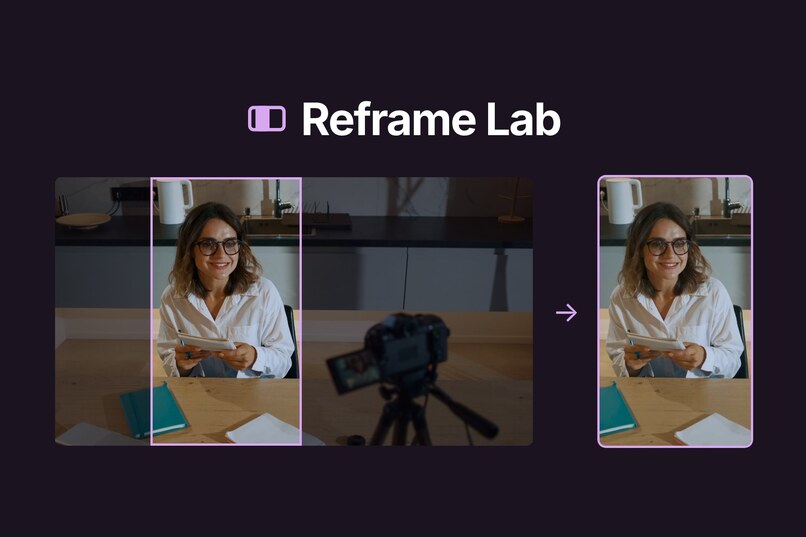
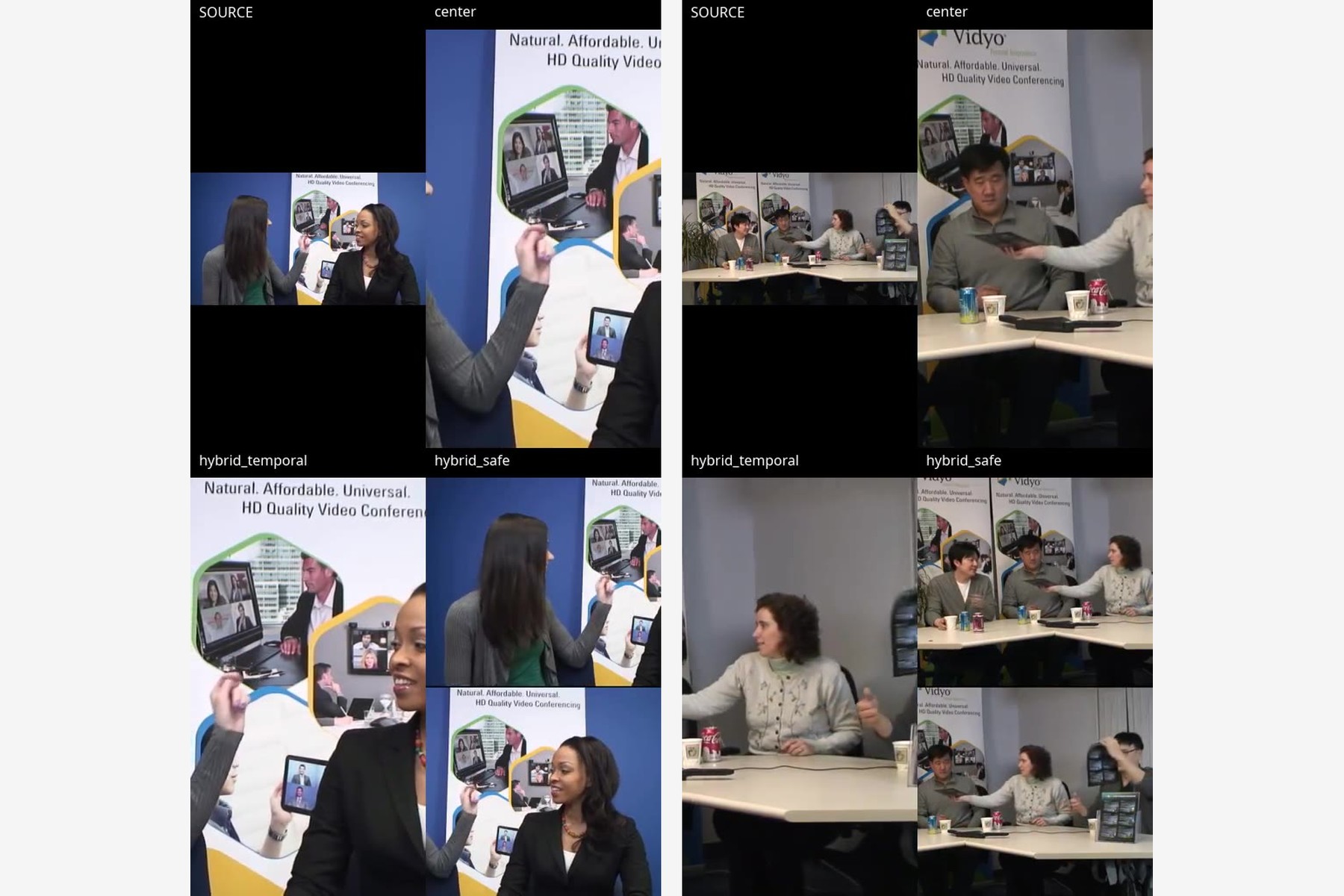
Centre crop, signal crop, and text-aware split on a screen recording
-
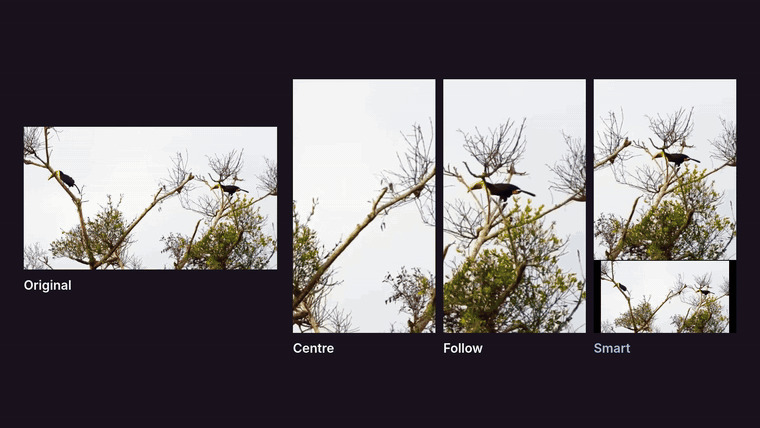 GIF
GIF
Cropping comparison
-
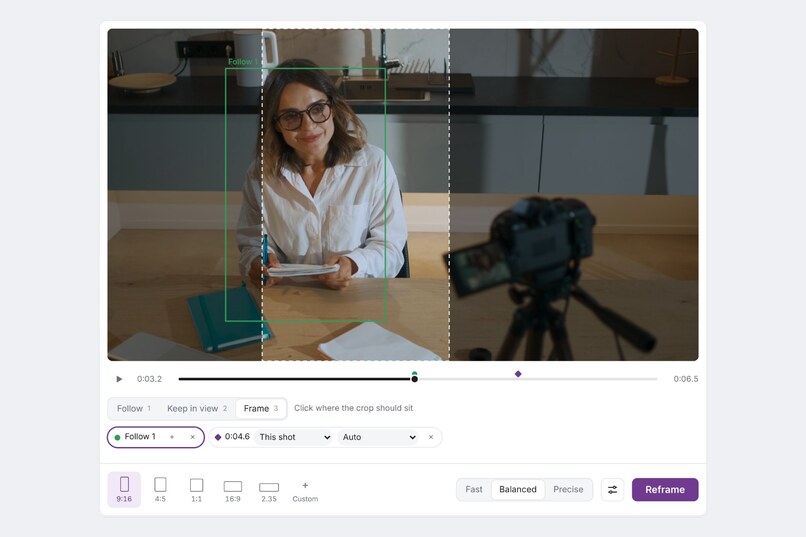
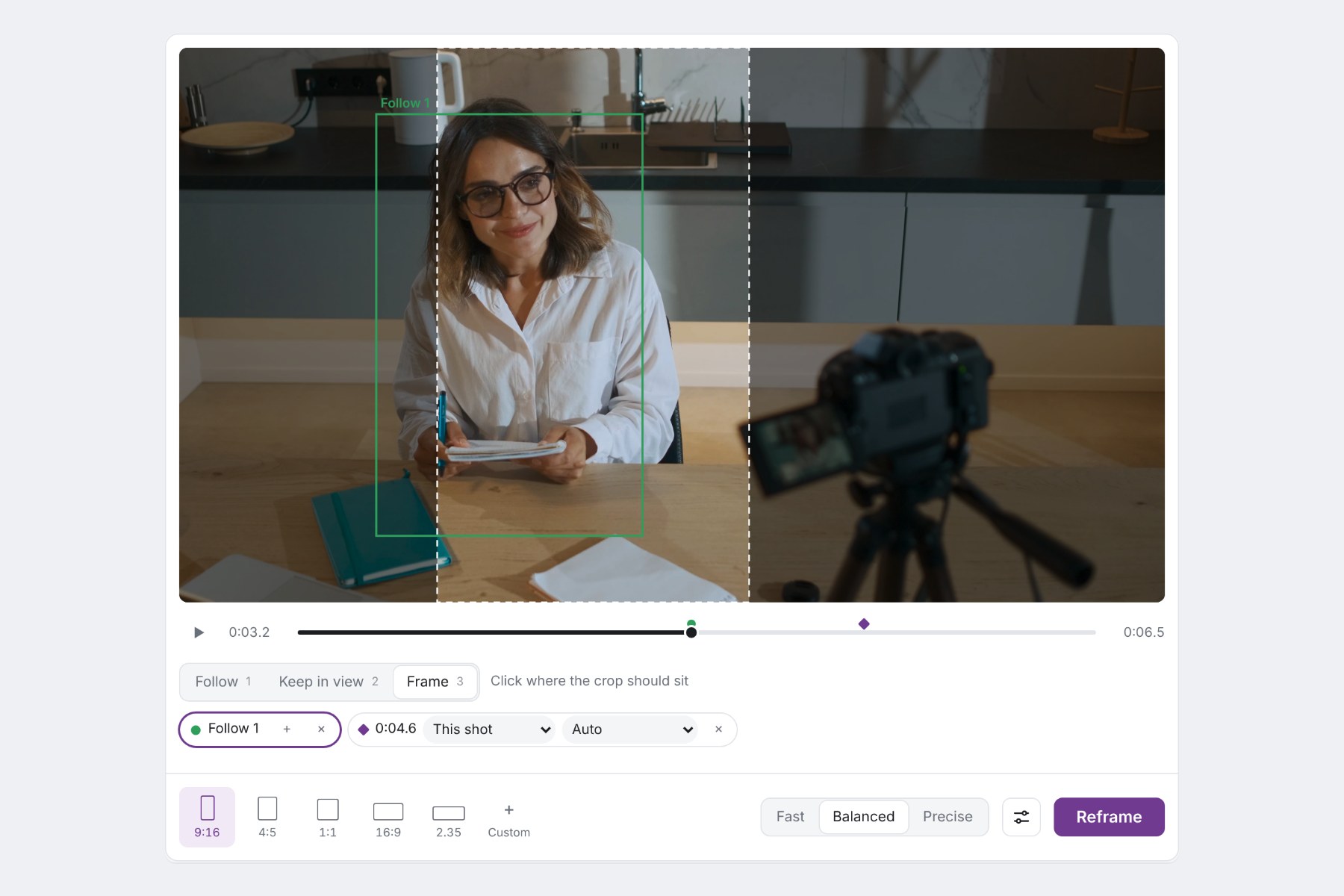
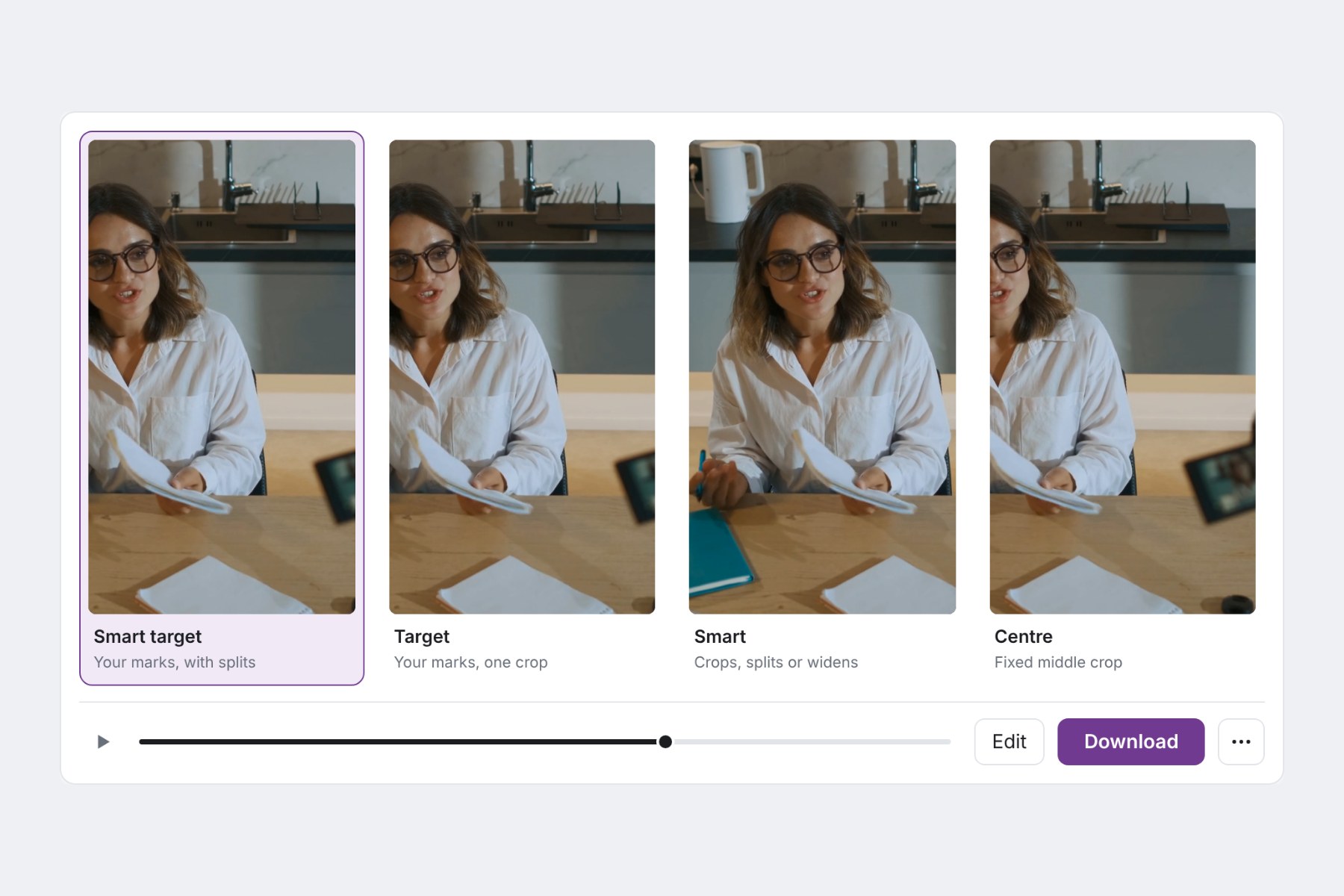
Follow mark, Frame crop preview, output shape, and quality setting
-
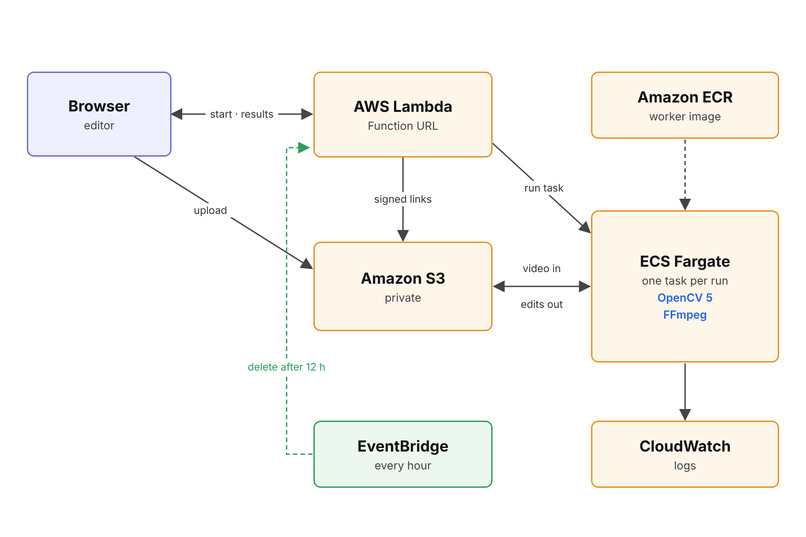
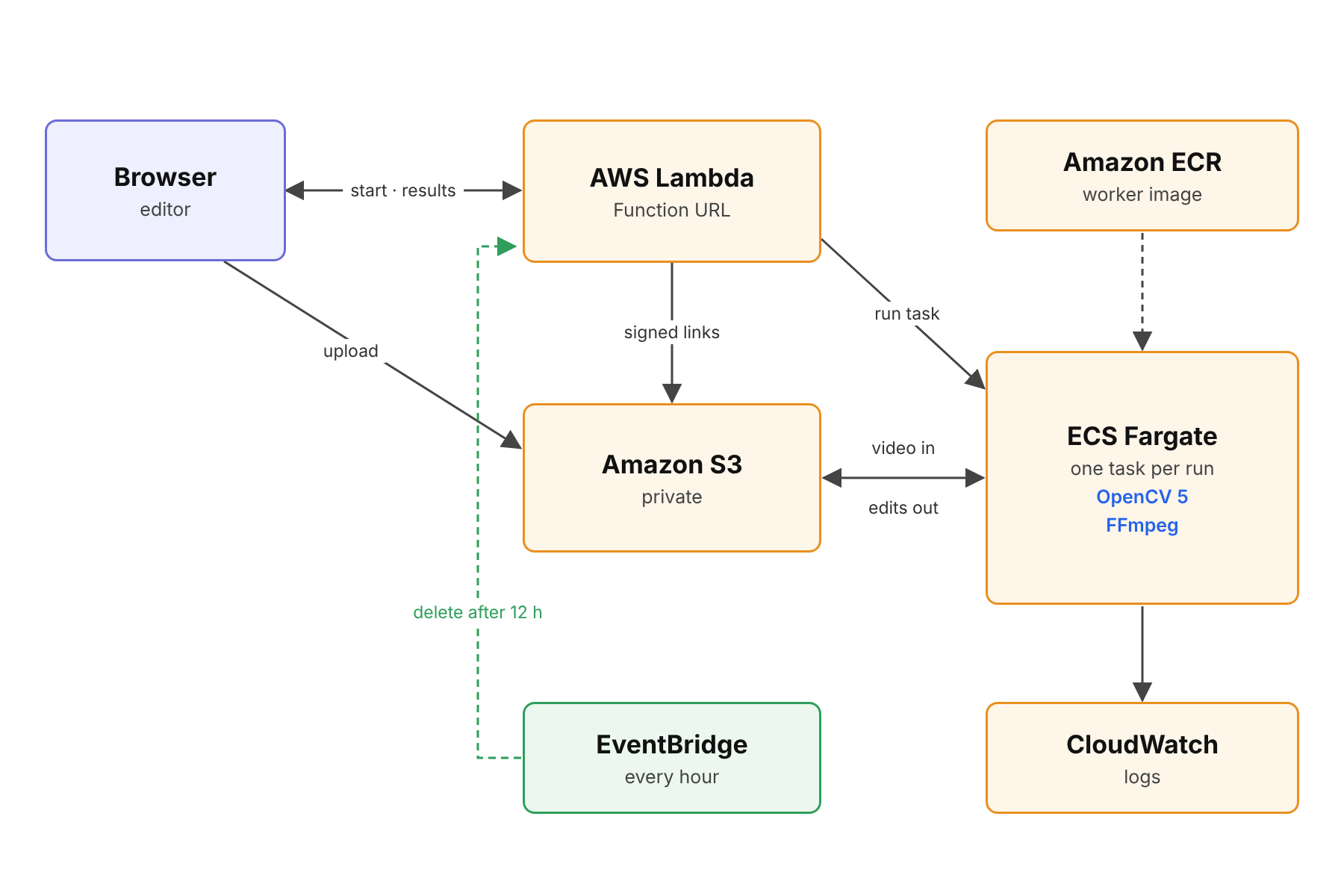
Lambda, private S3, one Fargate task per run, and hourly cleanup after 12 hours
-
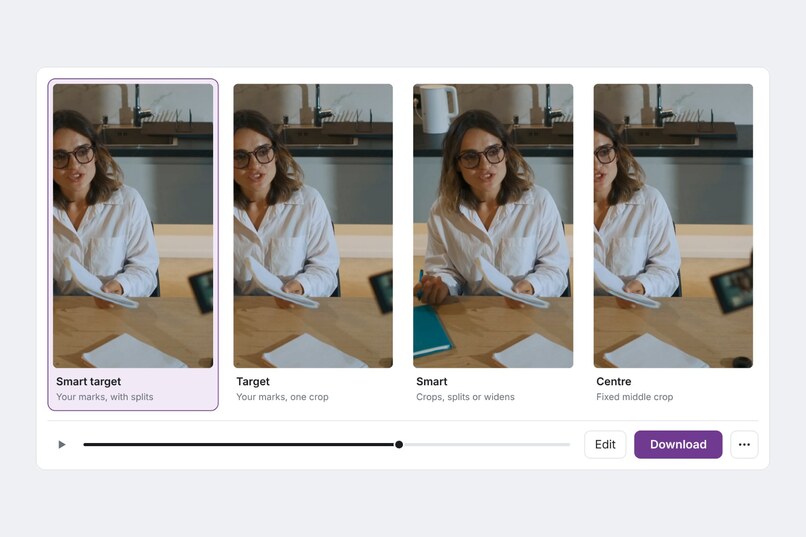
Centre crop, direct tracking, and a reduced full frame
-
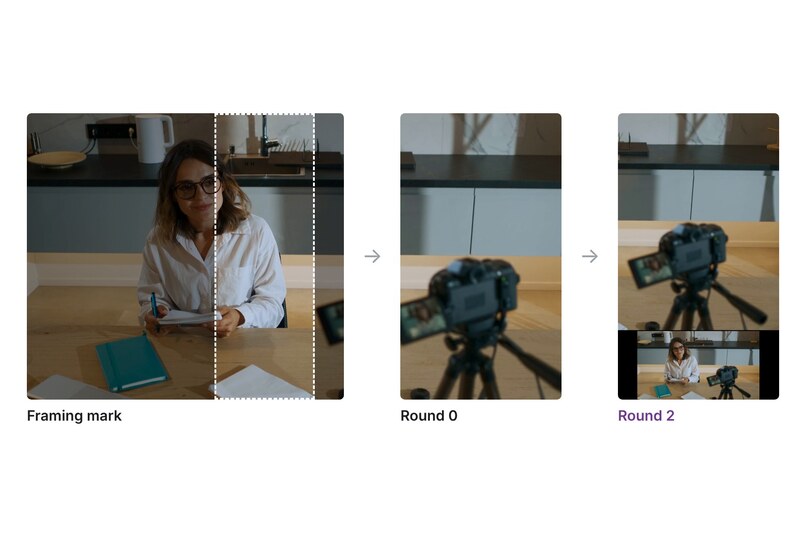
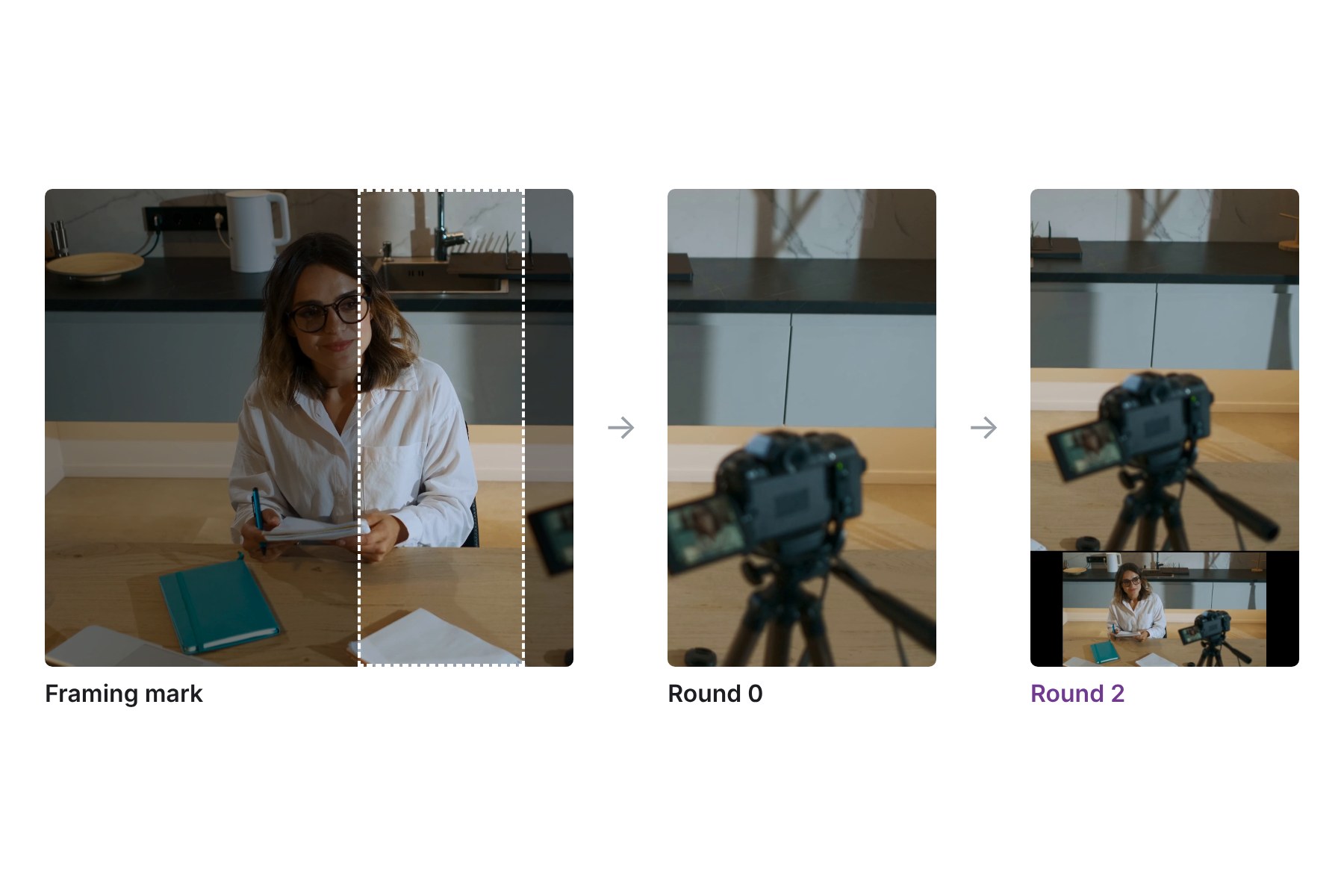
The review loop changes a failed crop to a split layout. Score: 42 to 74.
-
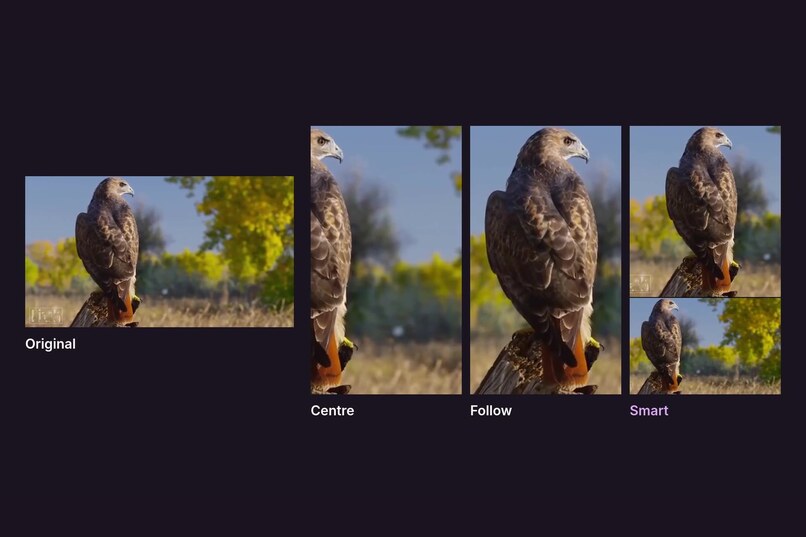
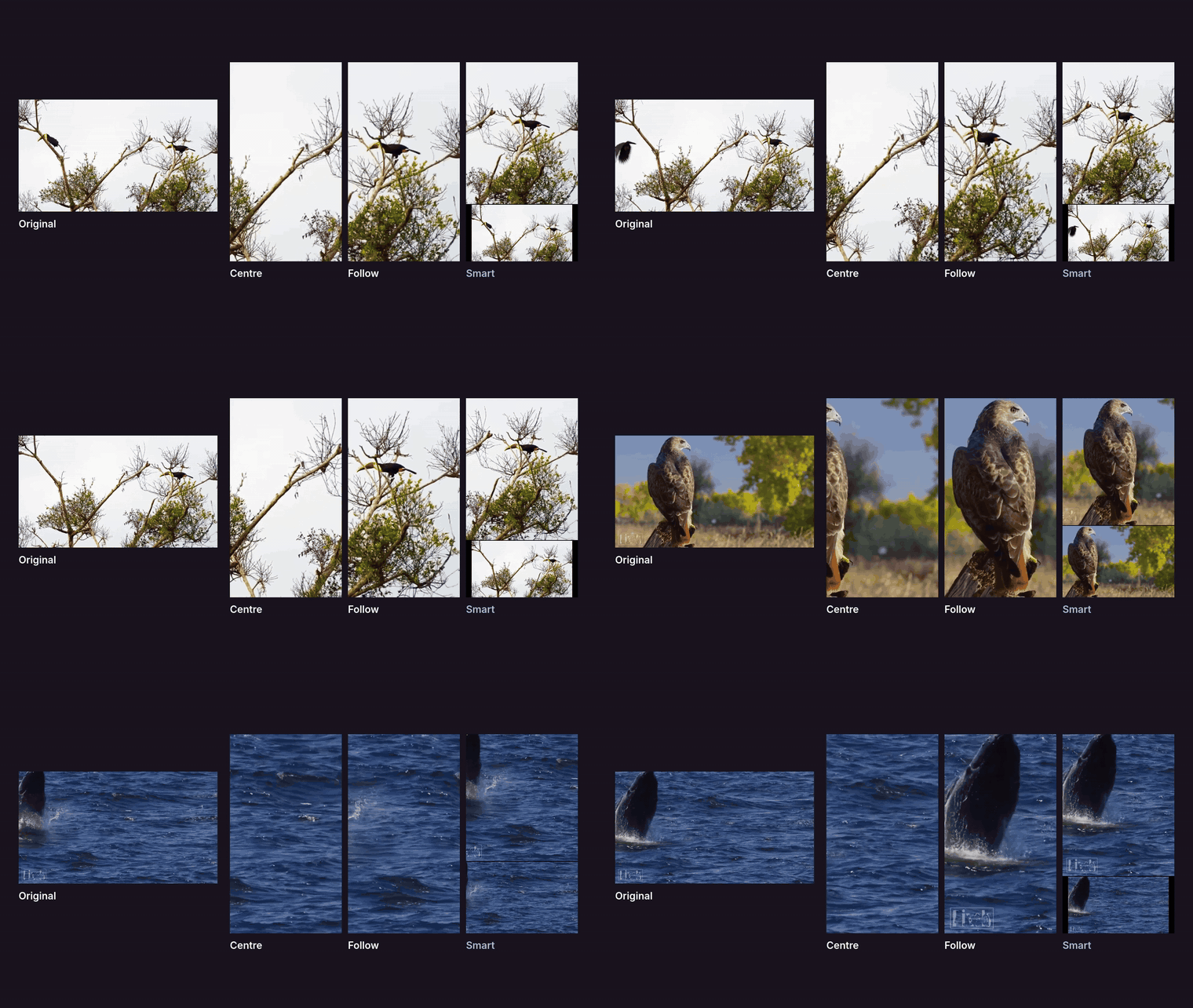
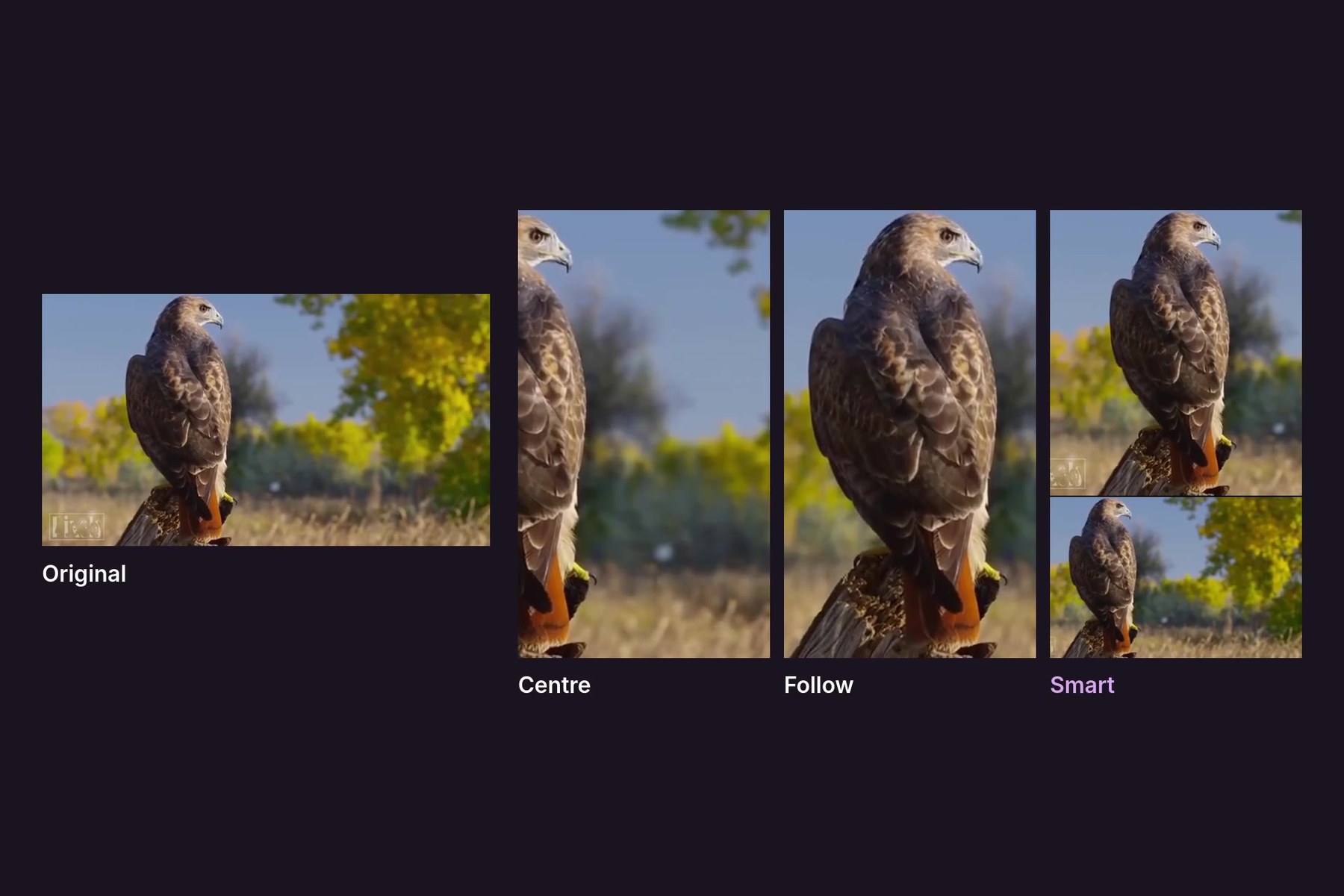
Wildlife clip with Original, Centre, Follow, and Smart edits in sync
-
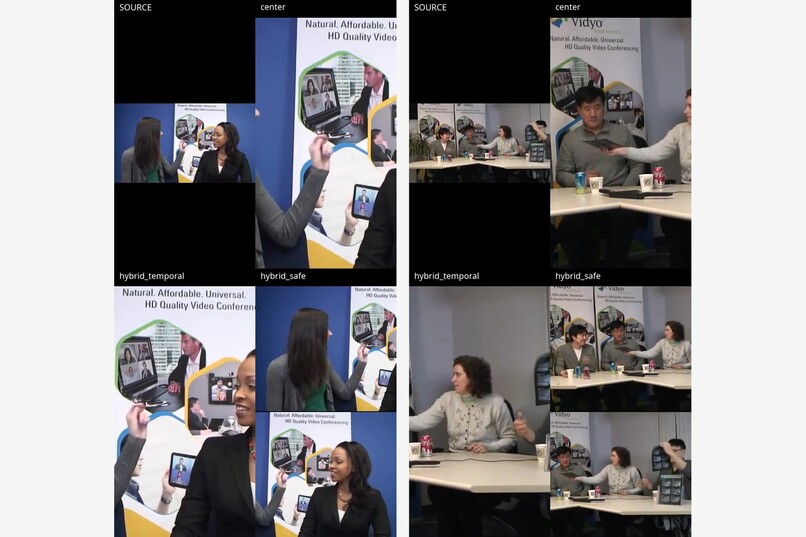
Different splits
-
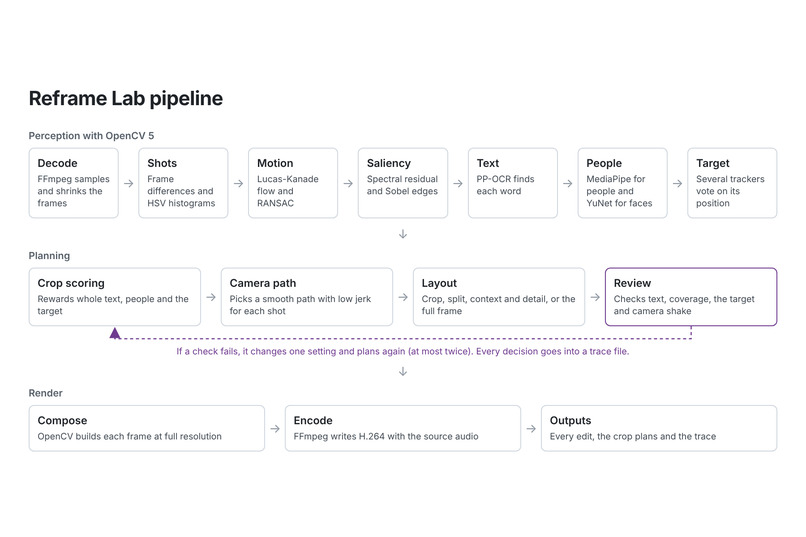
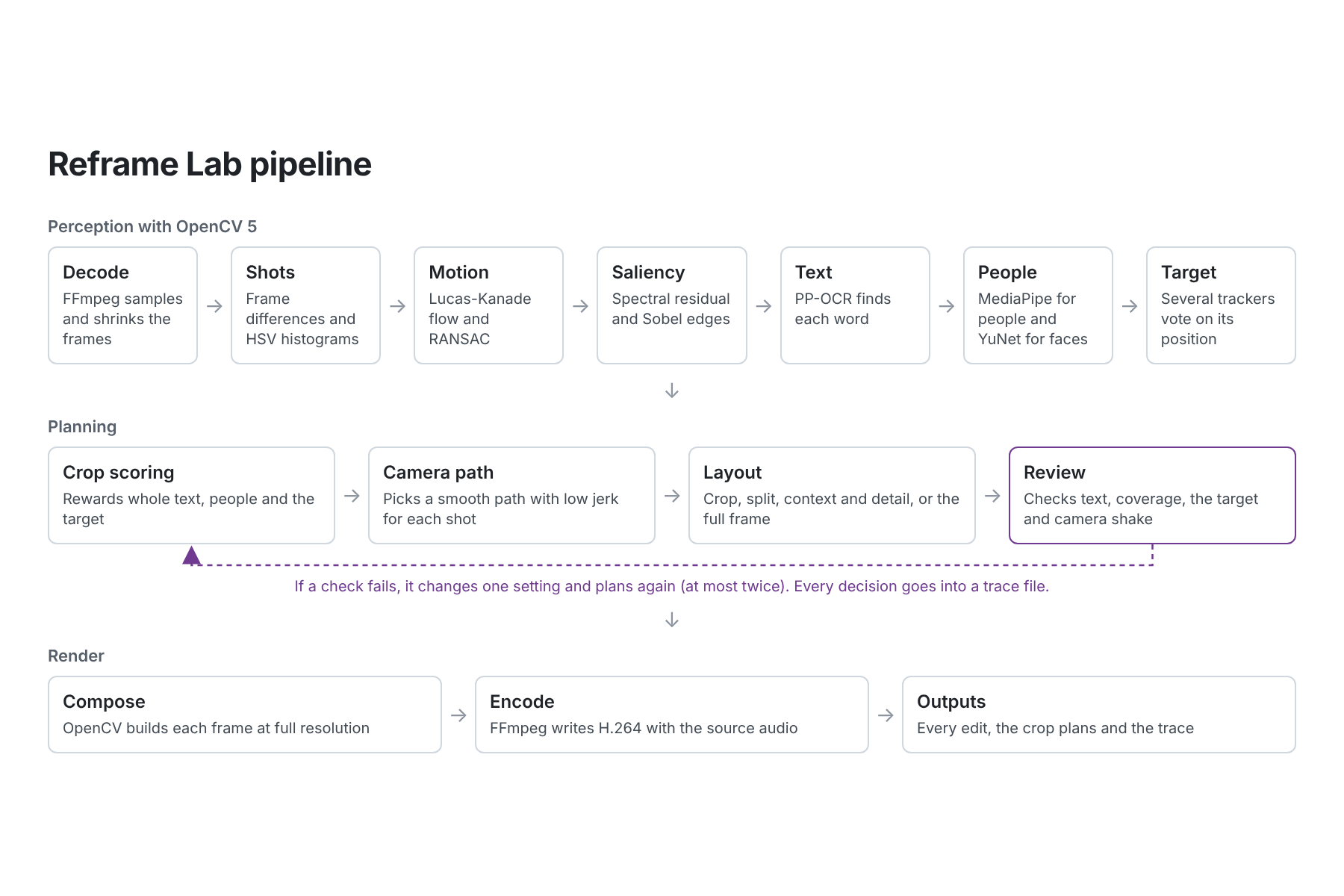
Reframe Lab pipeline
Inspiration
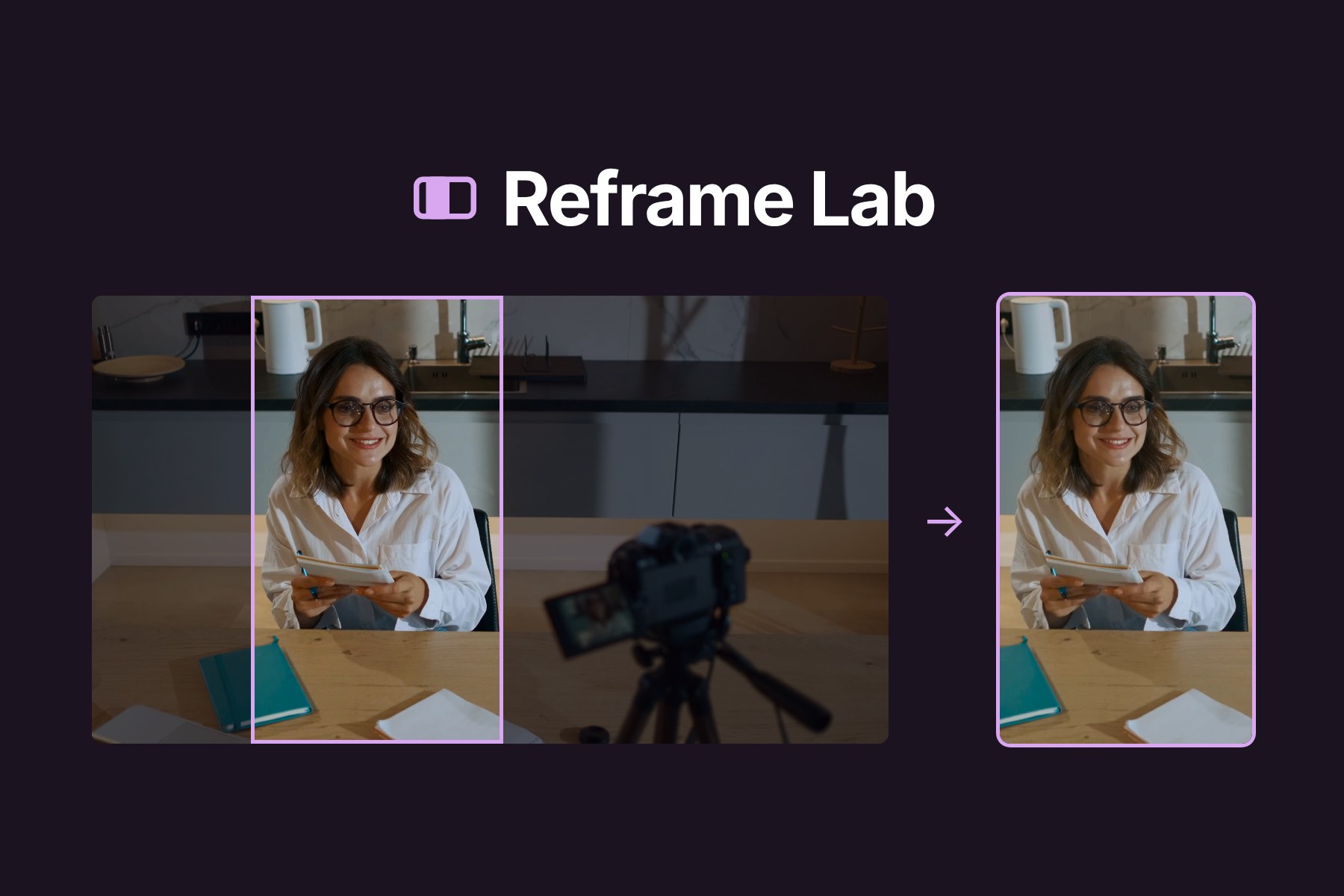
I recently started making YouTube videos. My main problem was turning my landscape videos into Shorts. A Short is 9:16, so a crop keeps about a third of the width. When I cropped the middle, I often cut off important pieces like my face. Like me, many people struggle with reframing their videos while retaining inportant parts.
Before building, I read forum threads and reviews about the existing clip tools that can already auto frame video. People had complaints about existing tools: the crop lost a face in a simple clip or lagged behind the action on long clips and other issues related to bad crops. Some tools also charge for every minute of video. I decided to build my own with OpenCV 5. I also wanted it to tell me why it framed each shot the way it did.
What it does
You give Reframe Lab a video and a prefered output shape/dimension. It handles 9:16, 4:5, 1:1, 16:9, ultrawide and custom sizes. Reframe Lab then inteligently finds the ideal reframe for that video. In the results, the original and various edit play side by side in sync, letting you download the one you like.
There are various types of edits. Smart can crop, split the frame into two views, or keep the whole picture next to a close-up. Follow is one moving crop. Centre is the plain middle crop, and it's there so you can compare. If you mark something to follow, you get two more edits built around your mark.
To mark the video, you can draw a box around something to follow or around an area that must stay visible. You can also click where the frame should sit for a shot. If a shot still looks wrong after a run, you press Edit, move the frame and then Update. Update reuses the analysis from the first run, so only plans and renders again. A fix can involve only one shot, every shot from the same camera angle, or the whole video.
The deployed site at https://xo26jazeeqi46n2gdzkjrjujhe0inszn.lambda-url.eu-north-1.on.aws/ has a sample clip with five animal shots where the animal sits away from the centre: . On that clip, the centre crop keeps about 30% of the important content in view while Smart keeps 90%.
How I built it
OpenCV 5 analyses the video and FFmpeg encodes the result. In between, I wrote a planner to decide where the crop goes in every frame. FFmpeg also shrinks and samples the frames before processing. The final render still reads every source frame at full resolution.
| What I needed | OpenCV 5 method |
|---|---|
| Shot cuts | Frame differences and HSV histogram distance |
| Camera movement | Shi-Tomasi corners, Lucas-Kanade flow, cv.estimateAffinePartial2D with RANSAC |
| Motion in flat scenes | Farneback dense flow when there are too few corners |
| What stands out | Spectral residual saliency on cv.dft, Sobel structure |
| Text | PP-OCR through the DNN module |
| People and faces | MediaPipe person detection and YuNet through the DNN module |
| Something the user picked | Template matching, Lucas-Kanade, ORB with RANSAC, CSRT and a Kalman filter voting together |
| Who is speaking | Farneback flow on the lower face, plus audio level |
| Repeated camera angles | cv.calcHist on HSV and Sobel edge profiles, compared by cosine similarity |
Text was very important for me, since text with letters missing is hard to read. So the planner treats each detected word as a box that should be kept whole as the video plays. On a dense screen recording, the share of text kept whole went from 0.289 with a Centre crop to 0.998 with a Smart corp.
My first version moved the camera straight to wherever the tracker put the car. This caused the frame to twitch at every small change in the tracker's box. Now, the tracker only reports positions. The planner scores candidate crops for each sampled frame and picks a path through each shot with dynamic programming. Then it smooths the crop centre $x_t$ by keeping jerk low:
$$ \min_{x} \sum_t w_t \left(x_t - d_t\right)^2 + \lambda_v \sum_t \left(\Delta x_t\right)^2 + \lambda_a \sum_t \left(\Delta^2 x_t\right)^2 + \lambda_j \sum_t \left(\Delta^3 x_t\right)^2 $$
$d_t$ is the centre the scorer wants, and jerk is how quickly the camera speeds up or slows down.
Edited videos often cut back to the same angle. Without any memory between shots, my crop opened in a slightly different place each time whcih caused a visible jump. Each shot is now has a fingerprint from its colour histogram and edge profile. Shots that have a matching fingerprints open with the same crop.
Three small ONNX models run inside OpenCV's DNN module. PP-OCR finds text, MediaPipe finds people and YuNet finds faces. OpenCV 5 has more than one DNN engine. My code tries each one on the machine and keeps the one that works fastest. Frames are give to the models in batches for faster processing. Also,, the models stay loaded between runs.
I like the review step a lot. Before rendering, the program checks the plan for cut text, people leaving the frame, a lost target and camera shakes. When a check fails, it changes the setting tied to that check and plans again from the cached analysis. It does this at most twice (to avoid looping forever, ofc) and writes every check and change to a json file. In one test (as shown in my youtube video), I put a framing mark on a camera instead of the woman next to it. The first plan scored 42 and kept only 0.20 of the important content at the 10th percentile. Two rounds later it had switched to a context and detail layout, and the score was 74. The loop runs on OpenCV measurements and fixed rules.
The early versions of Reframe Lab were slow. To speed it up, unchanged scenes reuse their earlier results. Also, the video is encoded just once. On a 45 second screen recording, when i ran locally, the run went from 17.11 to 11.99 seconds with the same output.
To save resources onn AWS, I didn't want anything running when noone is on the site. The page asks a Lambda function URL for a presigned link and uploads the video to a private S3 bucket. Lambda then starts one Fargate task for that video. The task's container has OpenCV 5, the three models and FFmpeg. Its image is pinned by digest in ECR, with a build that checks each model's file hash. The task writes the edits, plans and trace to S3. Meanwhile, the page polls Lambda and plays the results. Links expire after an hour. Once an hour, EventBridge runs a cleanup that deletes uploads and results older than twelve hours, since there's no reason to keep this stored and wasting resources. Logs are saved in CloudWatch. It's easy to deploy the project with one AWS SAM script.
Results
I ran the tests on some clips, which you can see in the sample clip on the website and on the youtube video. Also see them alongside some explanations at https://github.com/enjeck/reframe-lab/tree/main#results
| Test | Baseline | Reframe Lab |
|---|---|---|
| Important content in view, wildlife sample | 0.291 (centre crop) | 0.791 (Smart) |
| Text kept whole, dense screen recording | 0.289 (centre crop) | 0.998 |
| Text visible somewhere in the frame | 0.467 (centre crop) | 1.000 |
| Mean camera jerk, car clip | 1.961 (direct follow) | 0.178 |
| 95th percentile camera jerk, car clip | 5.136 | 0.288 |
| Largest single-frame crop jump, Big Buck Bunny | 0.417 viewports | 0.073 viewports |
| Opening crop spread, deer edit | 0.411 crop widths | 0.028 crop widths |
| Run time, 45 second screen recording | 17.11 s | 11.99 s |
Challenges I ran into
I expected large models to help a lot. In earleir versions, RAFT optical flow, Depth Anything V2, EfficientSAM and ViTTrack were all on by default. On my clips, RAFT read moving trees and road parallax as object motion and did worse than Lucas-Kanade on the car clip. I also tried instead of segmenting selected objects with a box, to rather use a mask, but the results were similar.
Initially, still crops and moving crops used to go through separate render code. This caused the picture to jump whenever the plan switched between them. I merged them into one viewport model with smooth interpolation.
Cursor tracking in screen recordings is still not very powerful. It would be nice if this could be useful for screen recordings as well. In a busy interface, the matcher can jump to a similar shape and report high confidence anyway. The app currently flags those frames for review, but it can't correct them by itself.
Accomplishments that I'm proud of
I'm proud of actually finishing this project! When I initially started, I was clueless about the power of computer vision models and eager to learn. I'm glad I built something I would actually use.
What I learned
- Lucas-Kanade flow beat a much bigger flow model on my clips.
- Simple maps from
cv.dftand Sobel can find a subject well. - A single tracker had drifts that cause poor results across various clips, so I learned that i can let several OpenCV methods vote.
- The DNN module made it easy to test each engine and keep the fastest.
- A histogram from
cv.calcHistwas enough to spot repeated shots without any other fancy algorithms.
What's next for Reframe Lab
It would be nice if we could better detect the current speaker using some sort of audio model. And to process videos even faster!

Log in or sign up for Devpost to join the conversation.