-
-
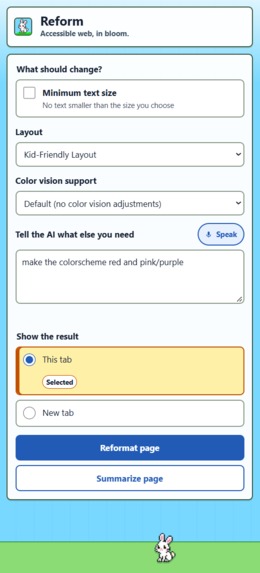
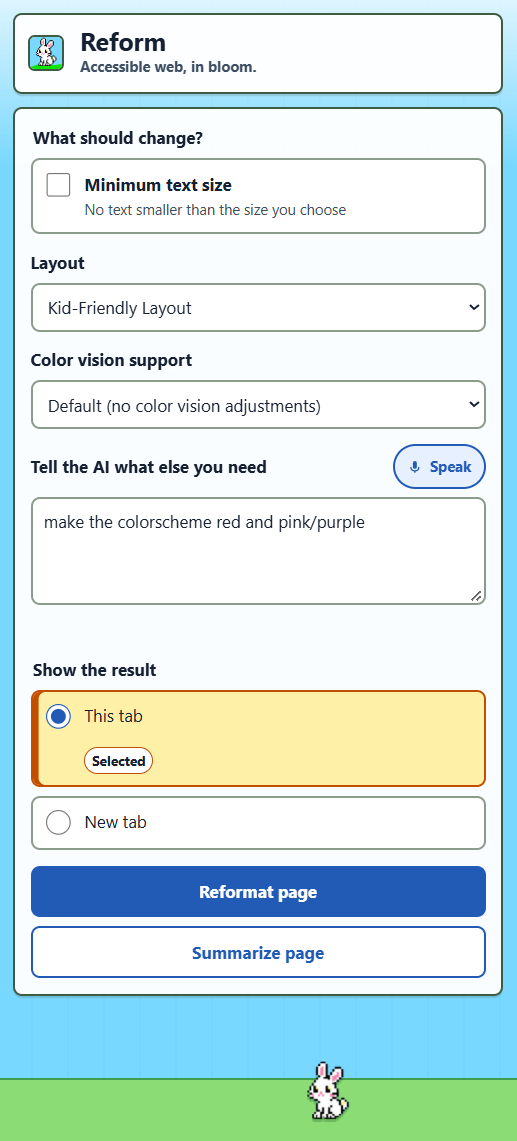
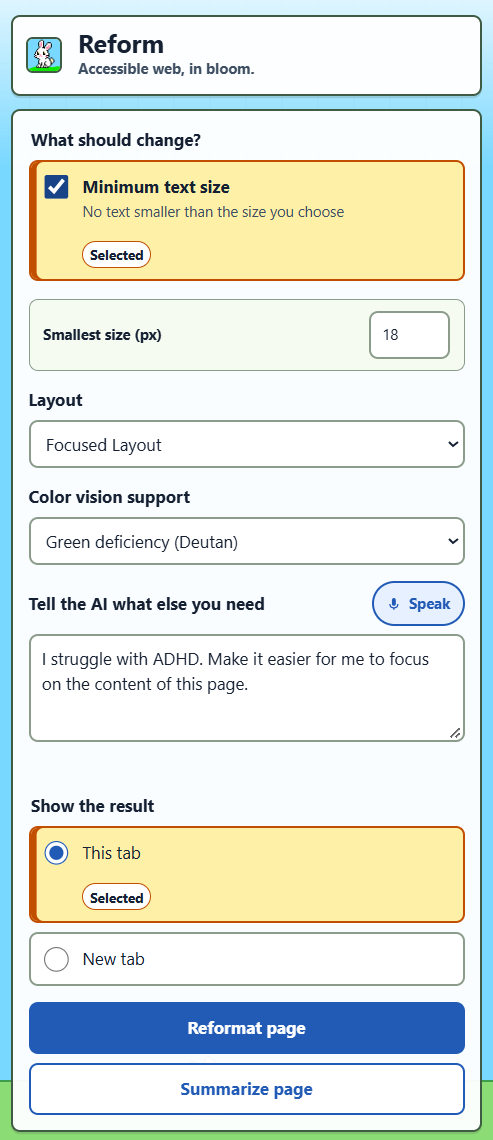
The primary UI of the extension
-
-
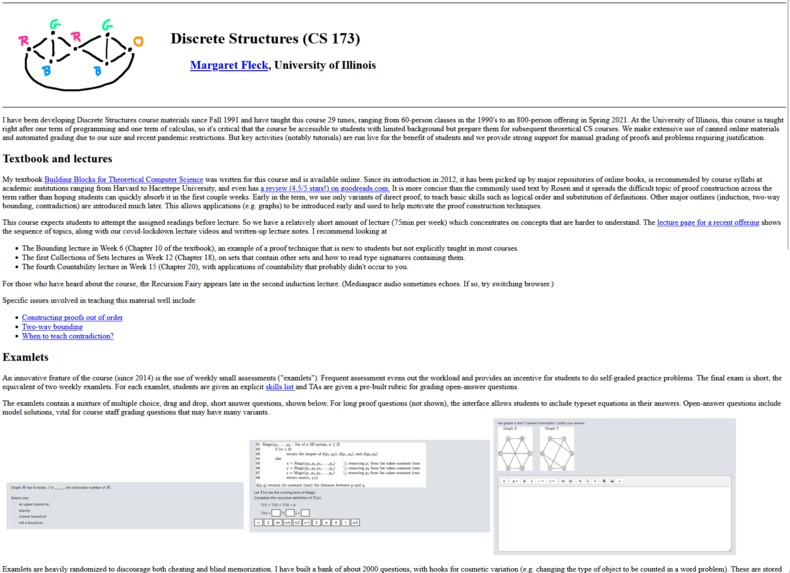
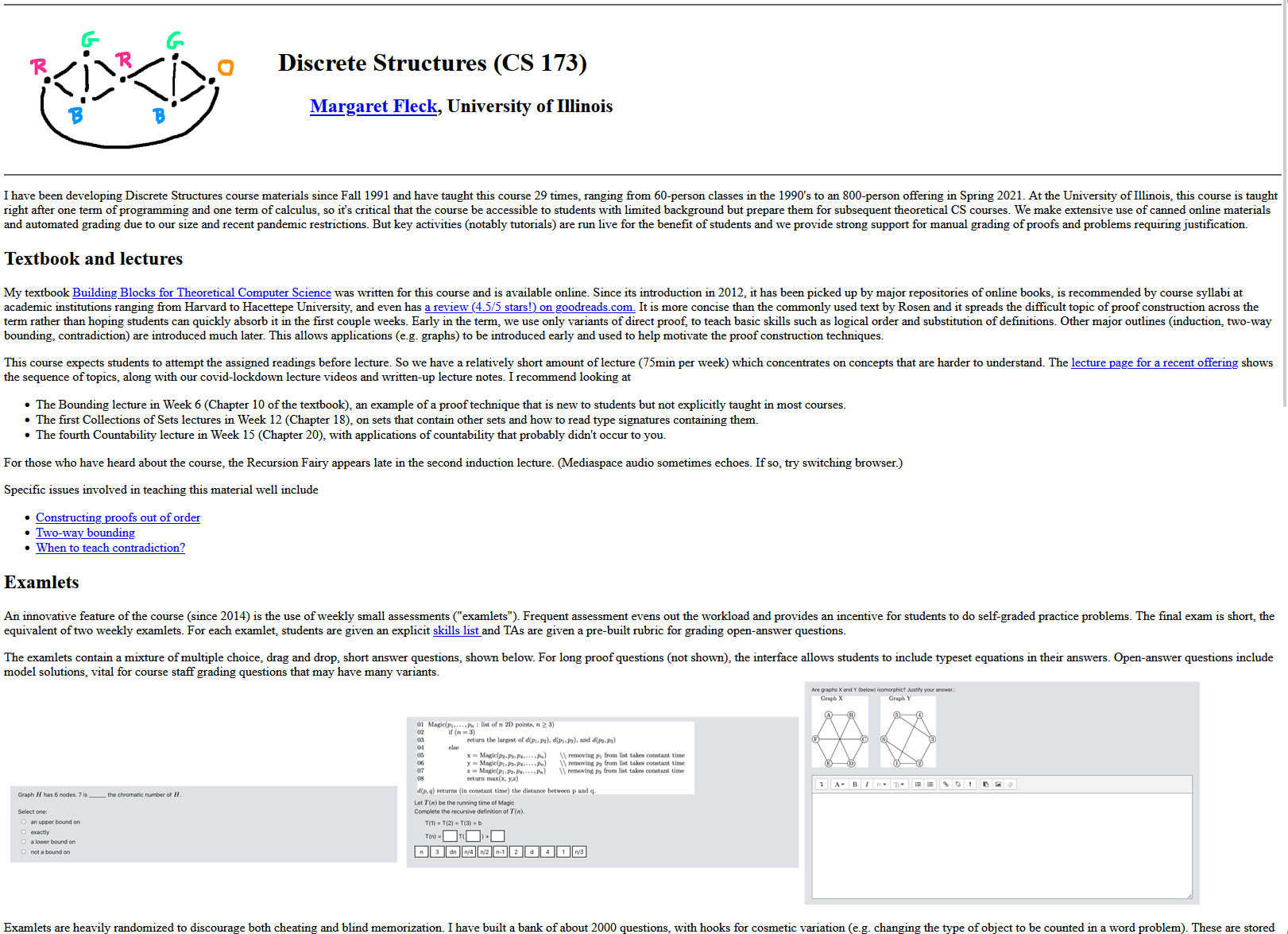
A course website before restructuring - hard to parse/skim, dated, and rather boring
-
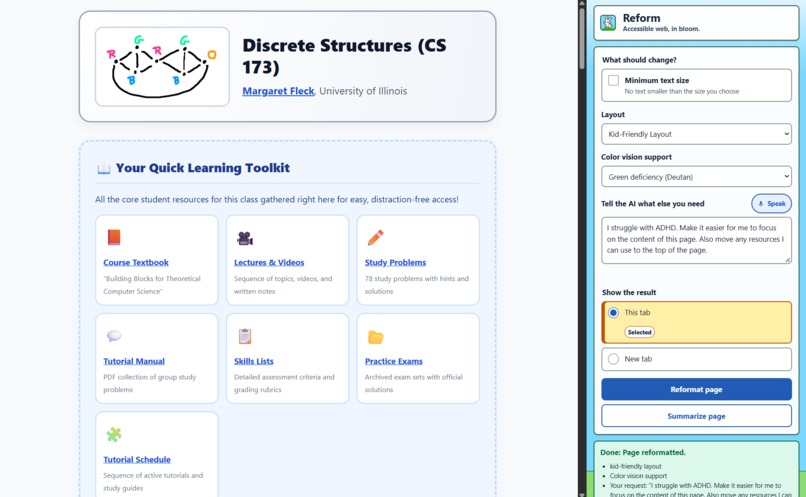
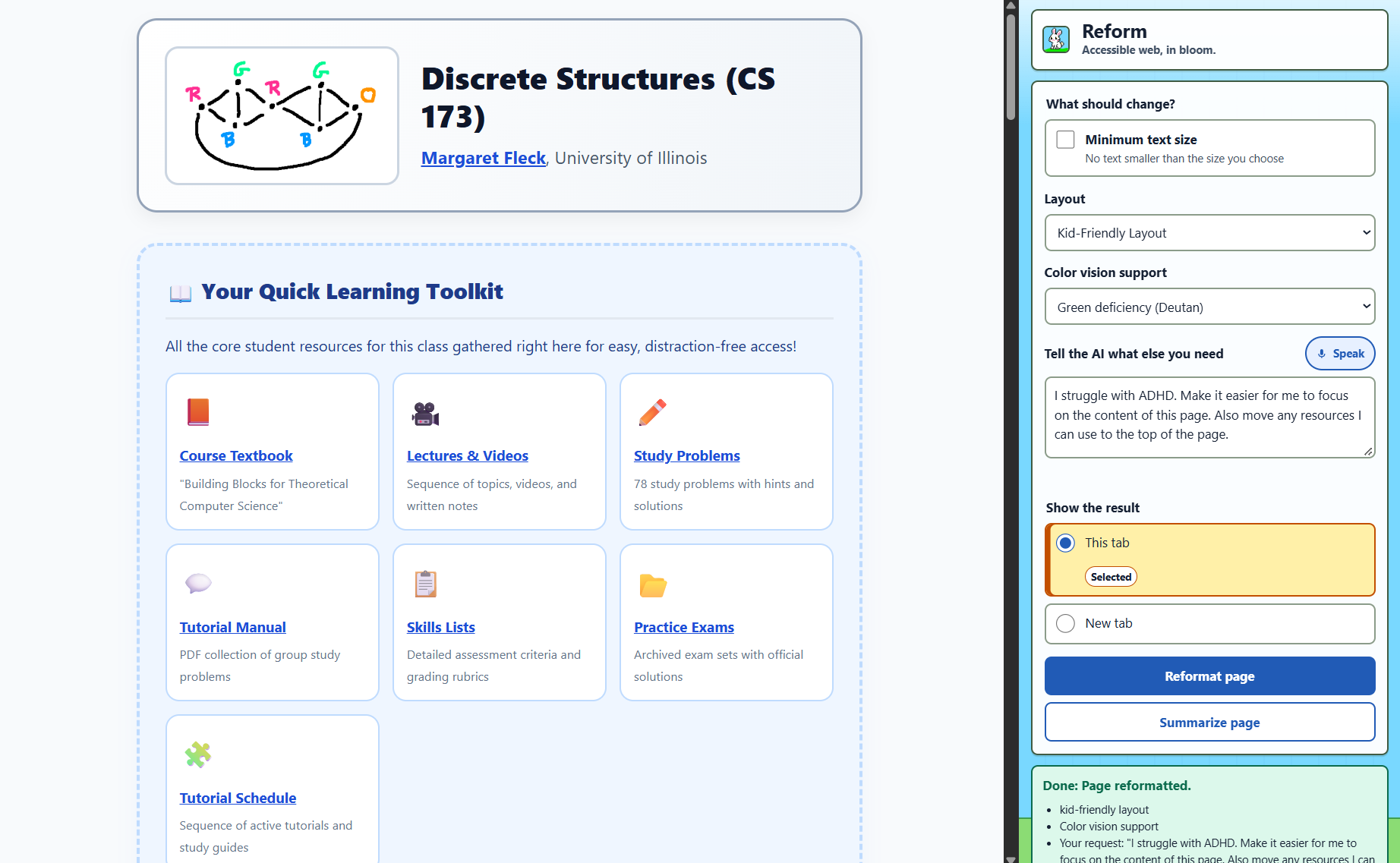
A course website after restructuring, surfacing important resources and boosting readability
Inspiration
Across the top 1,000,000 homepages, an astonishing 96% of top websites fail basic accessibility. For millions of people facing accessibility challenges, the web is something they're forced to struggle through, despite the technological advancements being made everyday.
We keep seeing the same problems. Gray text on white backgrounds, tiny text to fit large amounts of content on small screens, and pages crammed into multiple columns with sidebars. According to the CDC, roughly 7 to 9 million people Americans live with uncorrectable vision loss or serious difficulty seeing even with glasses. And it's not just disabled individuals. Children, the elderly, and anyone who may struggle with proficiently using a computer can benefit from this. Getting a single task done can become a real obstacle for those without others to guide them across navigating the web.
The usual answer is "website owners should fix their sites." They should, but the numbers show most never will. So imagine: what if you could bend any website on the internet to your will.
What it does
Reform is a browser extension that uses AI to rebuild any page around your needs: contrast, text font and size, layout, or just say what you need out loud.
- Click the Reform extension. A side panel opens next to the page instead of covering it.
- Choose what you need:
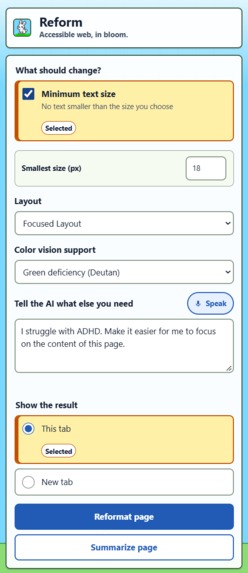
- Color Vision Support: makes text stand out clearly from its background.
- Minimum text size: you choose the smallest text allowed.
- Layouts: adapt the style of the website to your needs
- Describe anything else in your own words, by typing or by speaking. For example: "Make the menu buttons bigger and hide the sidebar. Also turn the list into a grid. Make it all dark mode. And make it cyberpunk style."
- Click Reformat page. Reform rewrites the page's code to match your needs and shows the result in the same tab or a new one.
- Click Restore original page at any time to bring the original back.
Here's some cool things you can do:
- You're planning a vacation itinerary using a website with long blocks of text and intrusive banner ads. Ask Reform to "surface every attraction and its information in central London to the top of the page. Below that put all the attractions in Paris."
- No hallucinations: Reform only rearranges/reformats existing content. It will never edit text.
- Usability: Bury everything you don't want to see, and look at what's relevant.
- You're reading dense documentation or instructions in a plain HTML page. It looks like it was built 20 years ago. Tell Reform "I have dyslexia and have trouble focusing on large blocks of text. Make this page more readable and modern."
- Accessibility as a priority: When website developers don't consider their users, Reform steps in.
- Engagement: Reformat websites however you want with Reform. Make it more fun/visually appealing to look at.
- You're handing a website to your child so they can read an article. Switch Reform's layout to "Kid-Friendly" and direct it to "hide content inappropriate for a 12 yo. and " in the custom prompt.
- Personalization: Reform adapts to your use case.
- Accessibility isn't limited to disabilities: Reform works for everyone. It's bigger than vision disabilities or ADHD.
How we built it
Browser extension (Chrome Manifest V3). The interface lives in the browser's side panel. When you click Reformat, a background service worker:
- captures the current page's HTML and strips out scripts and comments, so the AI only sees content and styling;
- turns your choices into clear instructions, such as specific WCAG contrast targets and an exact minimum font size;
- sends everything to our server and puts the rewritten page back into the browser.
Node.js + Express server with three endpoints:
/ask-geminisends the page and your needs to Google Gemini, which returns a rewritten HTML page. If one model is overloaded, the server automatically tries backup models./transcribereceives voice recorded in the browser, converts it with ffmpeg, and transcribes it with NVIDIA Parakeet V2. The text appears in the request box, ready to send./summarizesends the page to our API, cleans it up, and sends a stripped-down version to Gemini. Gemini's summary appears in the sidebar, right below the button. Safety first. We never trust AI output blindly. Before a rewritten page is shown, Reform removes every script, inline event handler, andjavascript:link, so the AI can never run code on your page.
Challenges we ran into
- Popups cover the page. A normal extension popup floats over the website, which defeats the purpose for someone who already struggles to see it. We moved the interface into the side panel so it sits beside the page instead.
- Undoing changes safely. Replacing a page's HTML can break its buttons and menus. Reform keeps the original page in memory and swaps it back on Restore.
- Unpredictable AI output. Gemini sometimes wraps its answer in Markdown or adds commentary. We wrote strict prompt rules and a parser that reliably pulls out just the HTML.
- Real webpages are large. Full pages can be hundreds of kilobytes, so we trimmed what we send and raised the server's request limit.
- Building in parallel. Four of us built the interface, the Gemini pipeline, and voice transcription on separate branches at the same time, then merged them into one product.
Accomplishments that we're proud of
- Voice input: people who find typing difficult can just say what they need.
- Fully reversible: users can experiment freely, because the original page is always one click away.
- Safe by design: AI-generated pages can't run code in the user's browser.
- Zero costs: Uses free APIs from Google Gemini and Nvidia Parakeet v2
- We held our own tool to the same standard: the panel has strong contrast, visible keyboard focus, large click targets, and labeled controls.
What we learned
- Accessibility is personal. Low vision, aging, and cognitive overload all call for different fixes. One "accessible mode" can't serve everyone, so Reform lets each person say what they need.
- AI works best with clear guardrails. Turning vague goals like "readable" into specific targets, such as a contrast ratio or an exact pixel size, made the output far more consistent.
- Browser extensions have strict rules. Service workers, side panels, script injection, and permissions each work differently, and we learned to build around them.
What's next for Reform
- Saved profiles: set your needs once and have every site reformatted automatically.
- More options: dyslexia-friendly text, plain-language rewriting, color-blind-safe palettes, and removing ads and animations.
- Faster results: cache reformatted pages and stream changes as they're generated.
- Feedback for developers: turn Reform's changes into reports that help website owners fix their sites for everyone.
- Chrome Web Store release so anyone can install Reform in one click.
Built With
- chatgpt
- chrome
- claude
- codex
- copilot
- css
- express.js
- gemini
- git
- github
- google-ai-studio
- handy
- html5
- javascript
- linux
- little-bird
- nvidia-parakeet
- voiceos


Log in or sign up for Devpost to join the conversation.