-
-
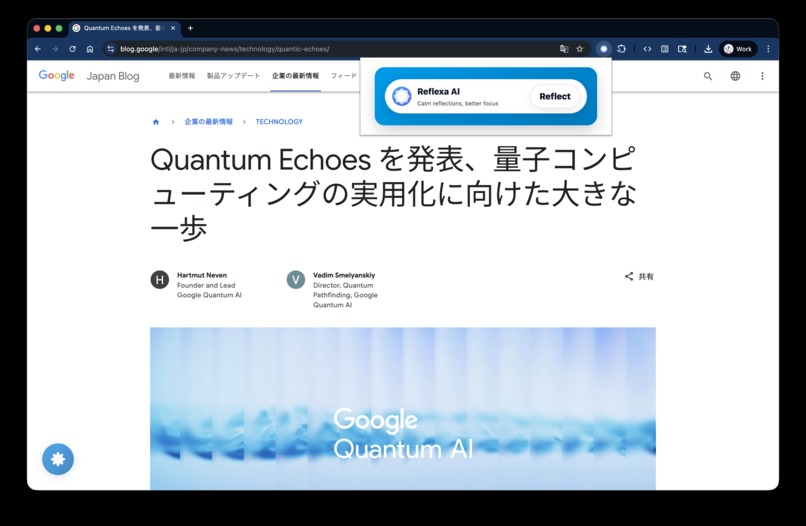
Reflexa AI popup: click "Reflect" to start your mindful reading session. Lotus nudge appears after active reading to guide your reflection
-

Reflexa AI lotus nudge: expands on hover to show "Reflect" button and quick actions for Dashboard, AI Status, and Settings
-
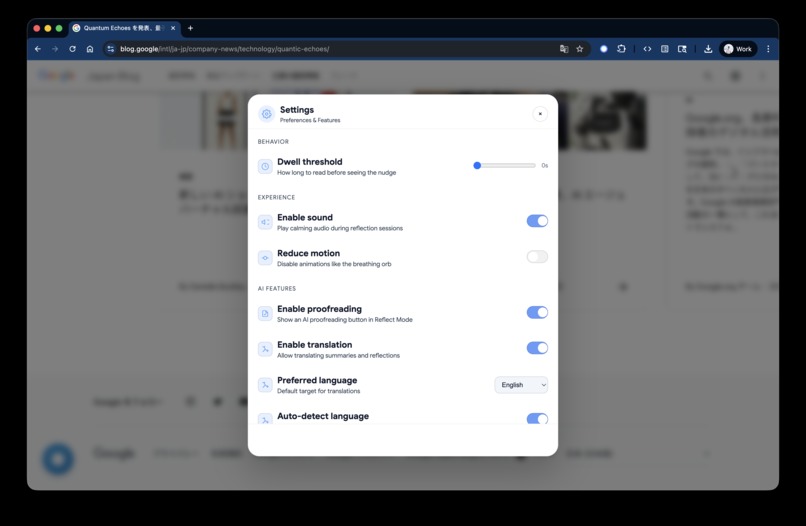
Reflexa AI settings: customize your mindful reading experience. Dwell threshold, ambient sound, AI features, multilingual support. All local
-
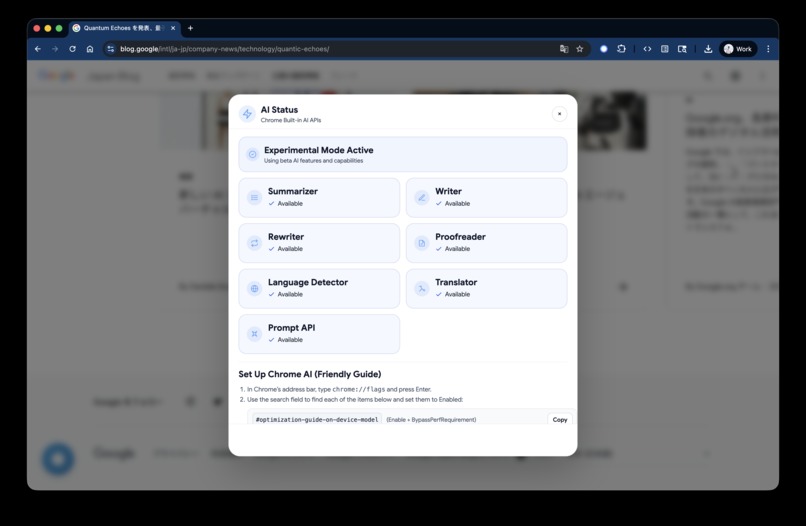
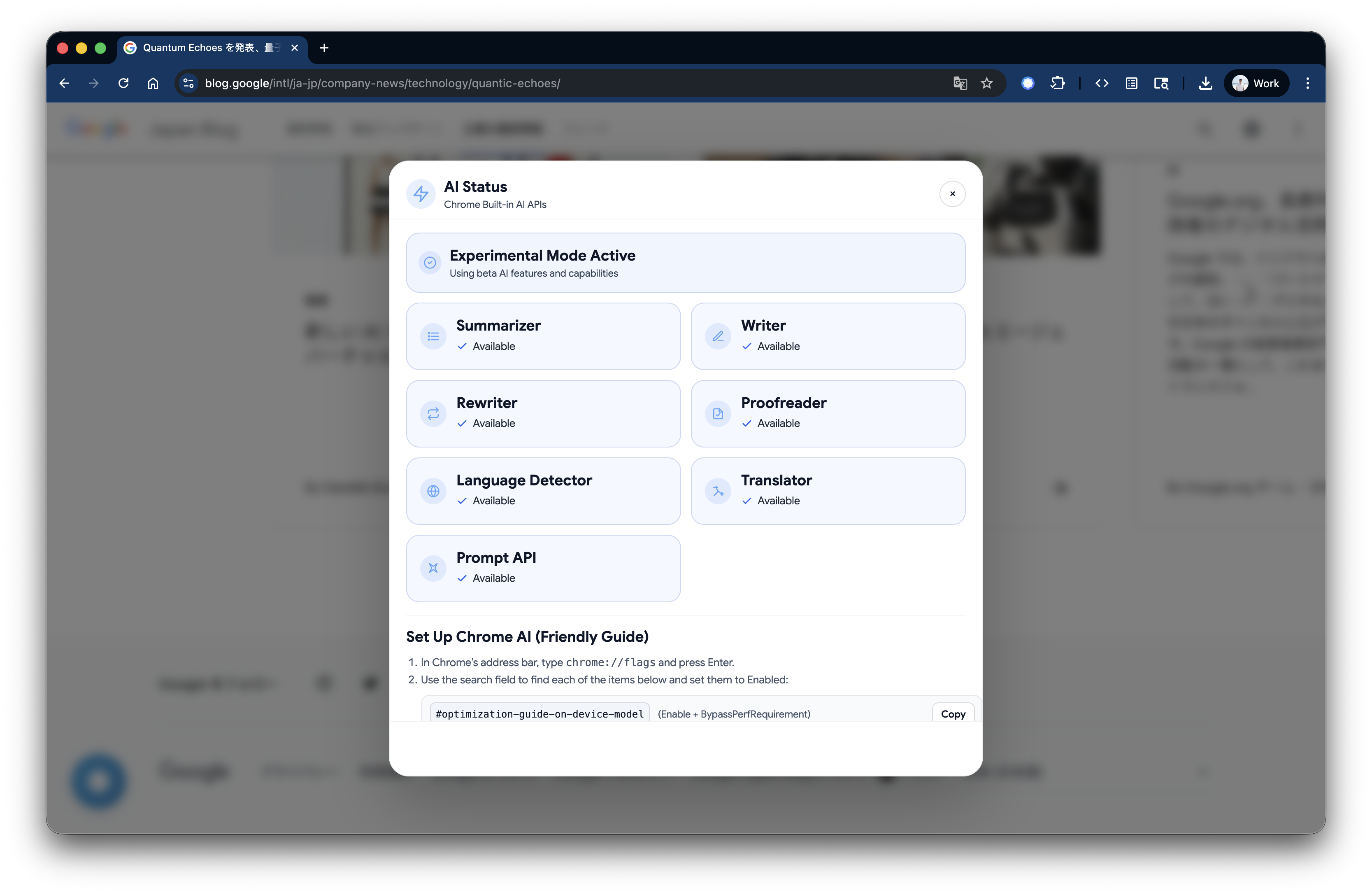
eflexa AI status: check which Chrome Built-in AI APIs are ready. Integrated with setup guide for enabling flags and downloading Gemini Nano
-
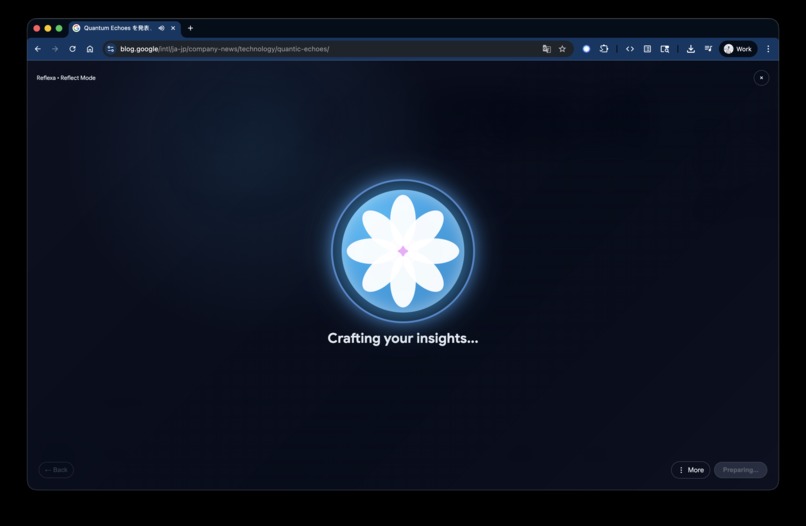
Reflexa AI meditation flow: breathing orb guides you through settling phase while AI processes the article locally. Calm, mindful transition
-
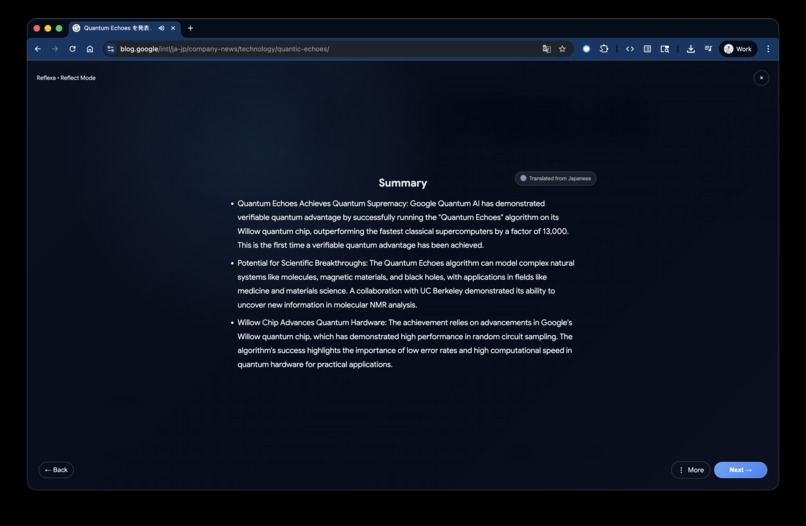
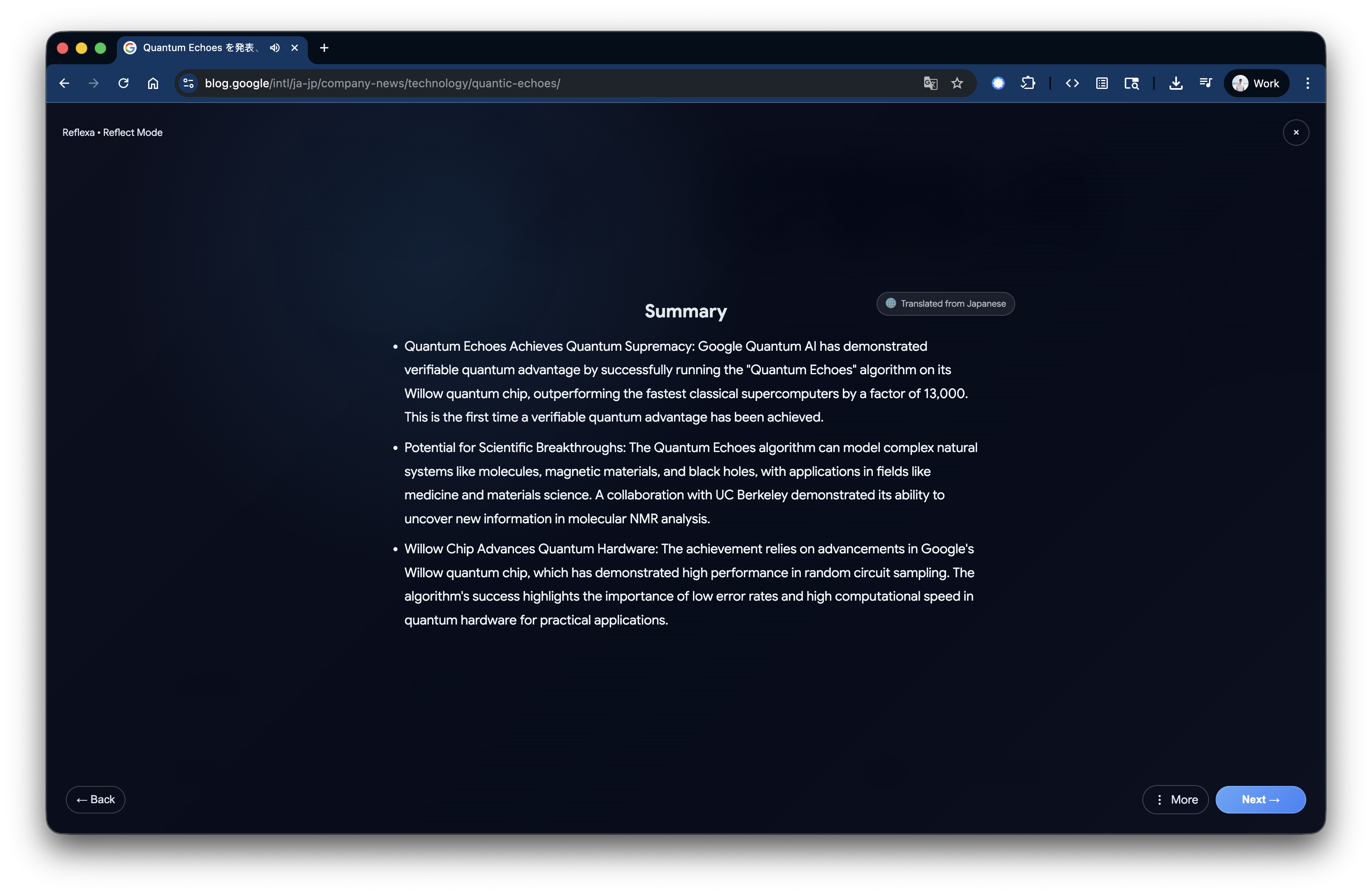
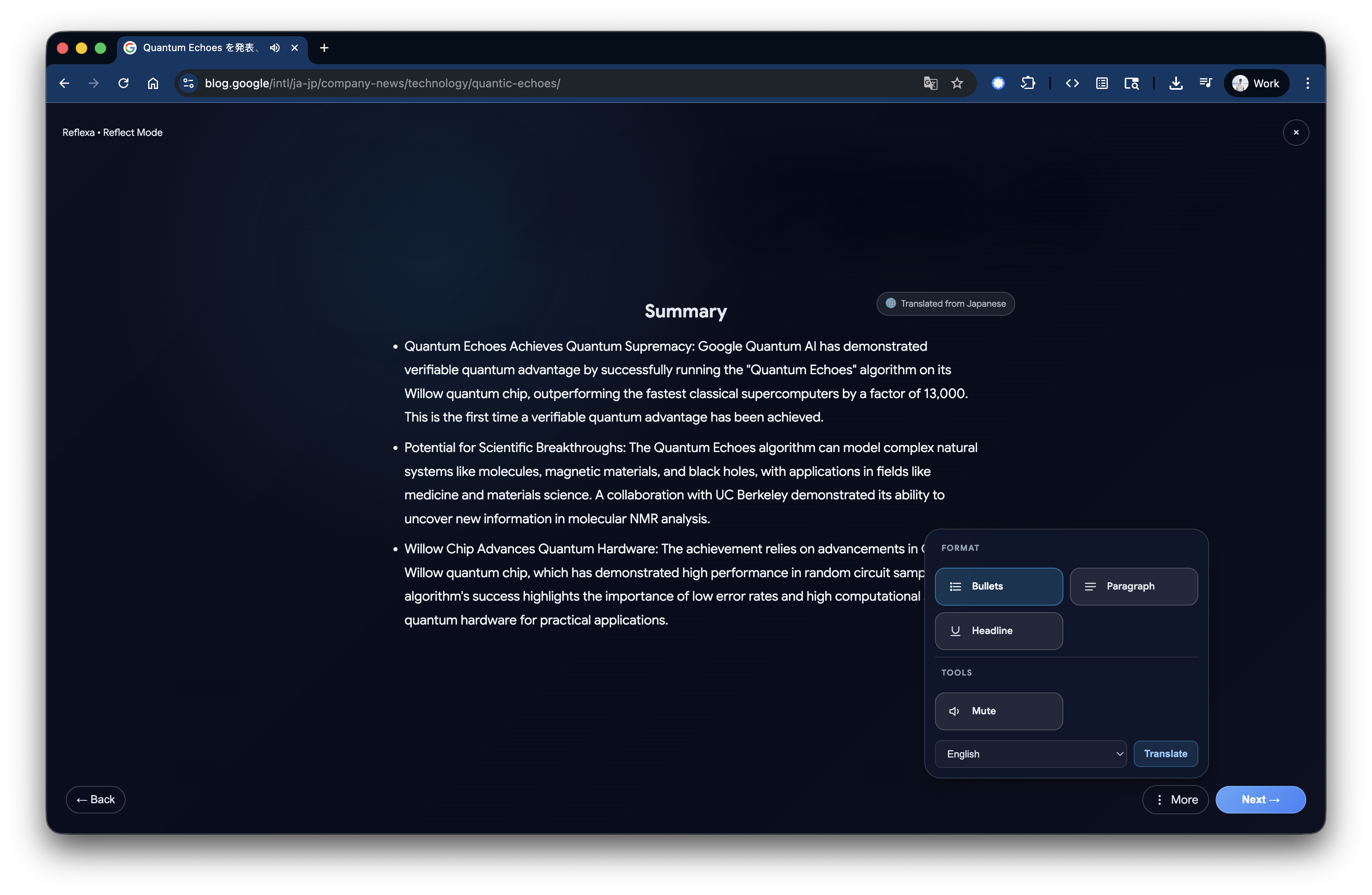
Reflexa AI summary: AI-generated insights with language detection. Three-bullet format highlights key takeaways from the article you read
-
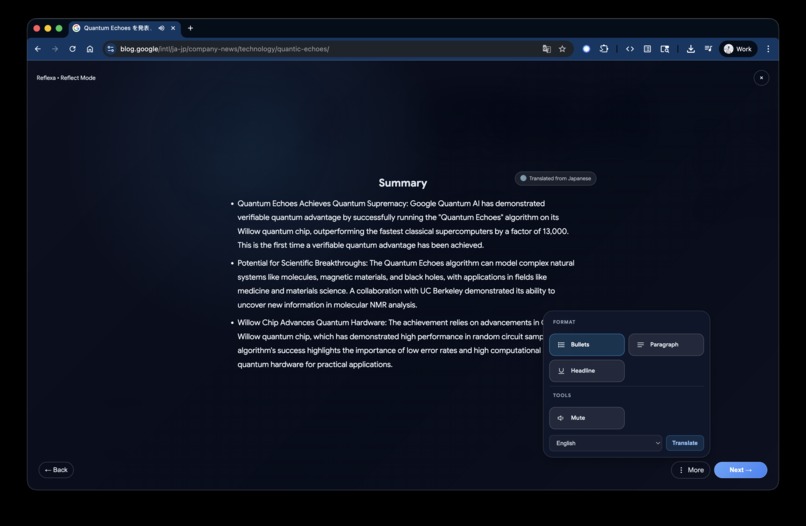
Reflexa AI tools menu: switch summary formats (bullets, paragraph, headline), translate to 10+ languages, or mute ambient sound
-
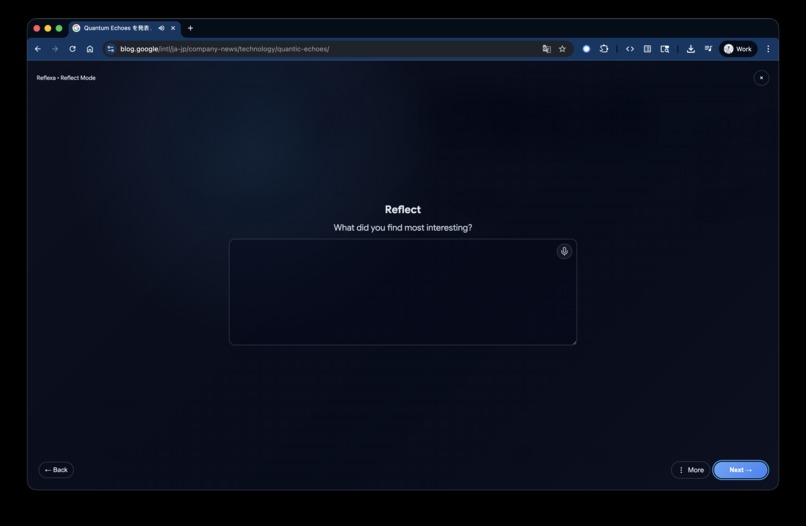
Reflexa AI reflection: thoughtful questions guide deeper engagement with what you read. Type or use voice input to capture your insights
-
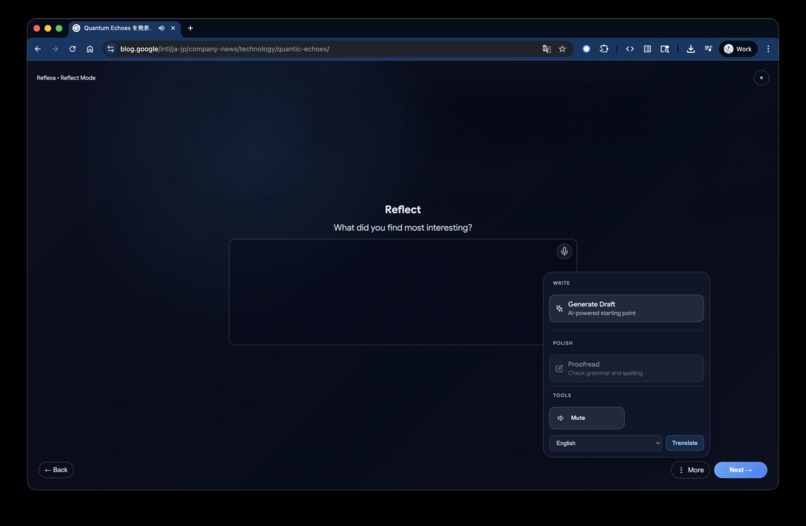
Reflexa AI tools: generate AI drafts for quick starts, proofread for grammar and spelling, translate reflections, or mute ambient sound
-
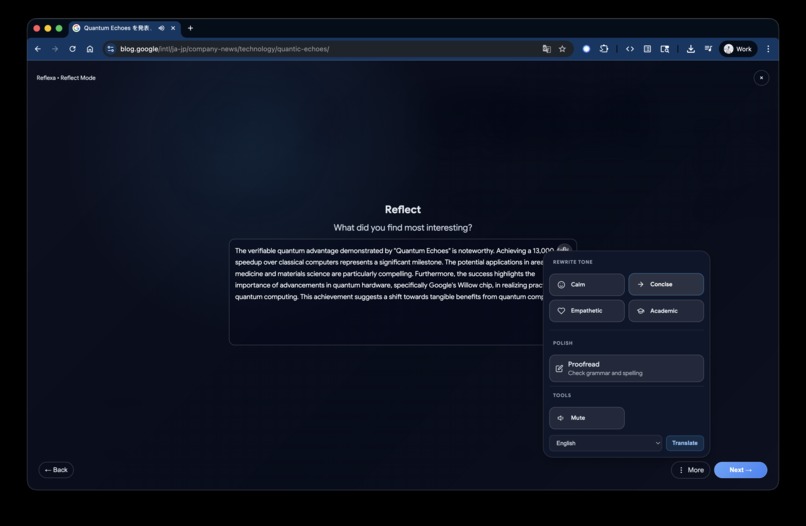
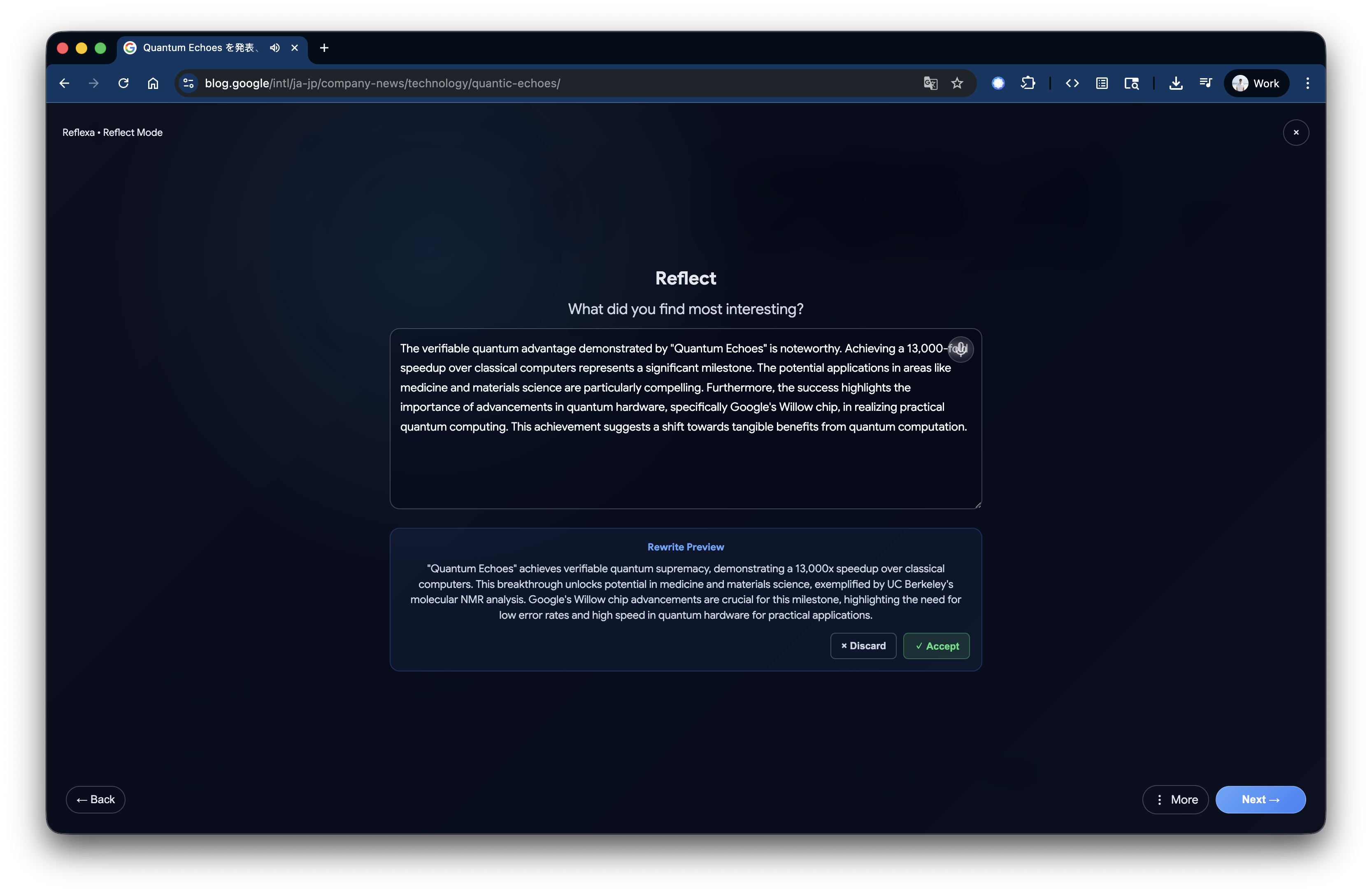
Reflexa AI tone rewriting: adjust your reflection with four presets (Calm, Concise, Empathetic, Academic). Powered by Chrome's Rewriter API
-
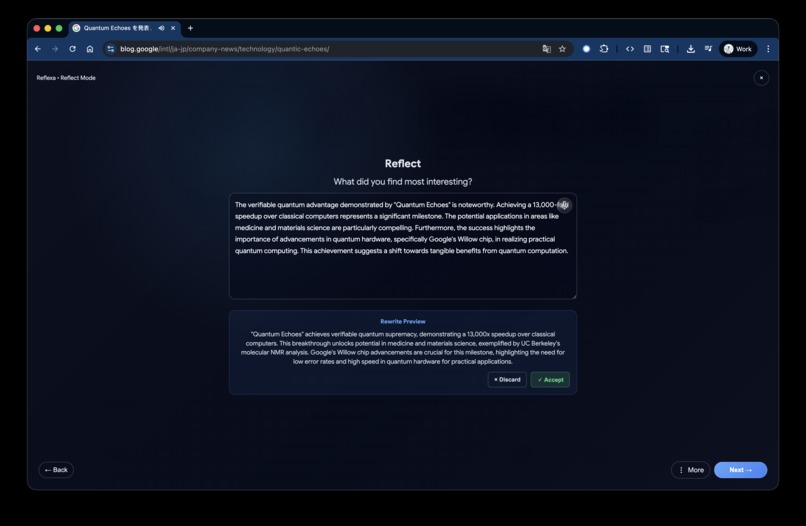
Reflexa AI rewrite preview: compare original vs rewritten text side-by-side. Accept to apply changes or discard to keep original
-
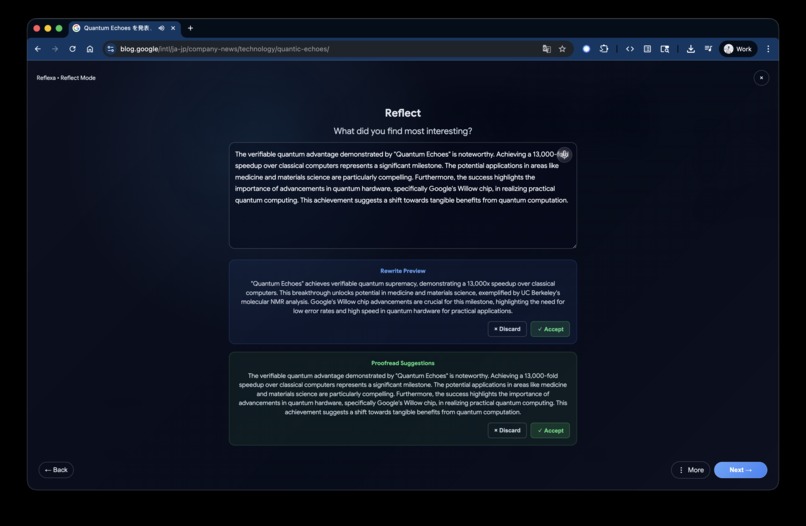
Reflexa AI proofread suggestions: grammar and spelling corrections with side-by-side comparison. Accept or discard changes
-
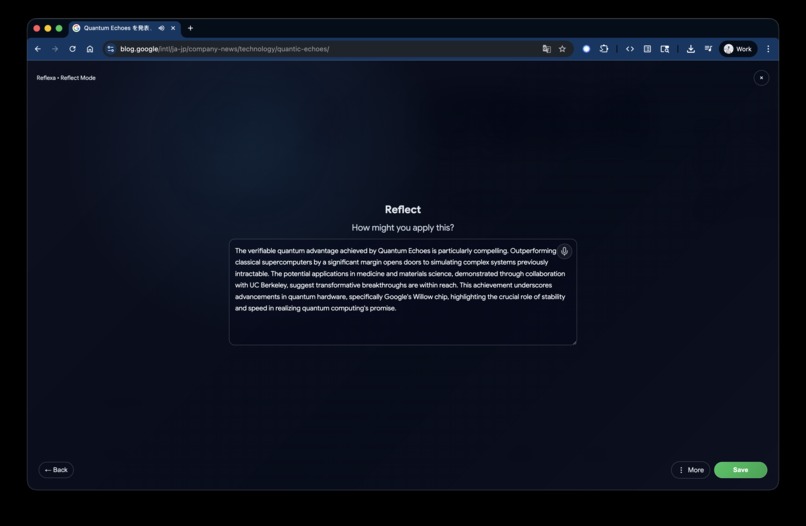
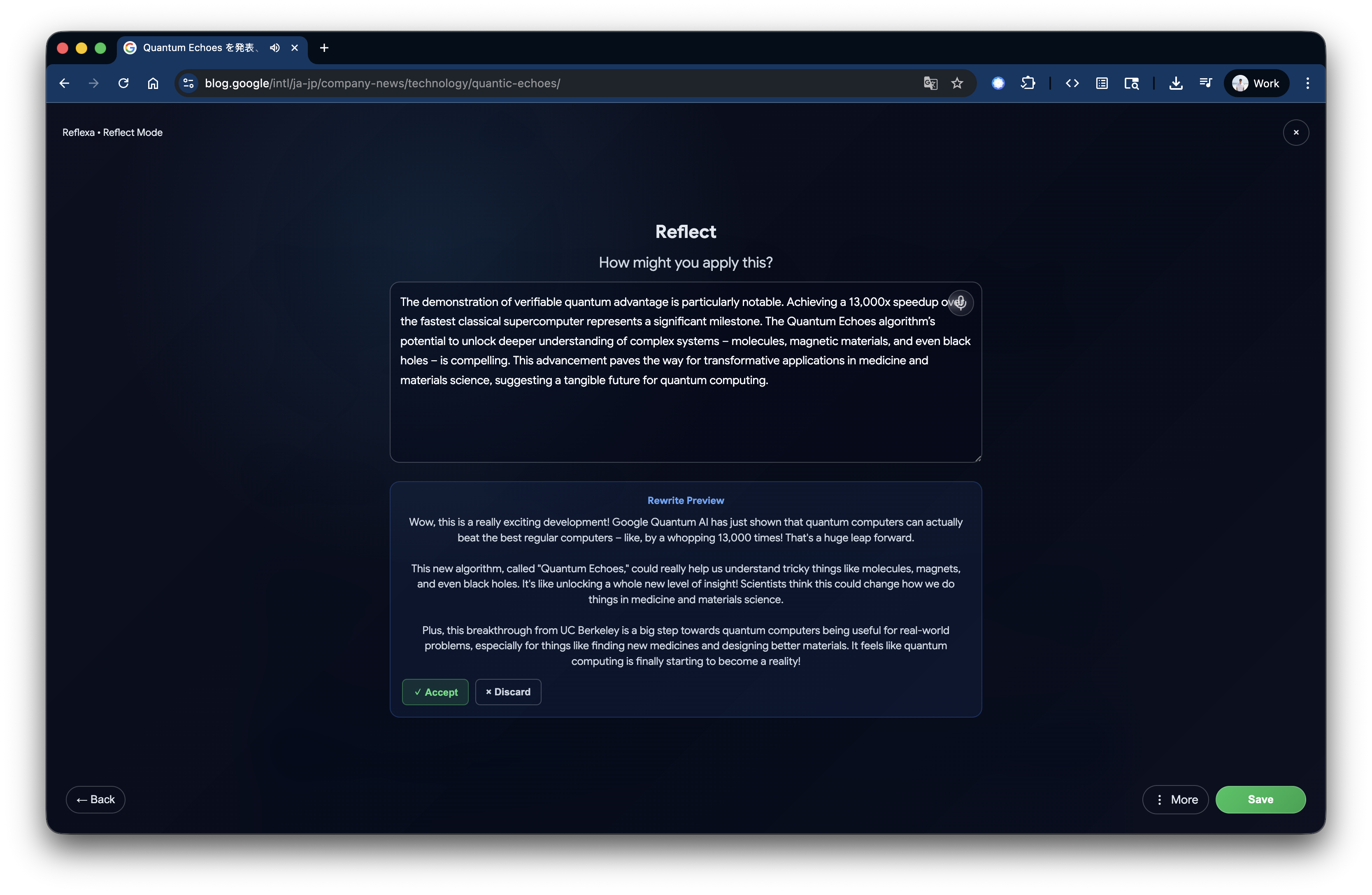
Reflexa AI final reflection: second question encourages practical application. Save your insights locally with voice metadata and timestamps
-
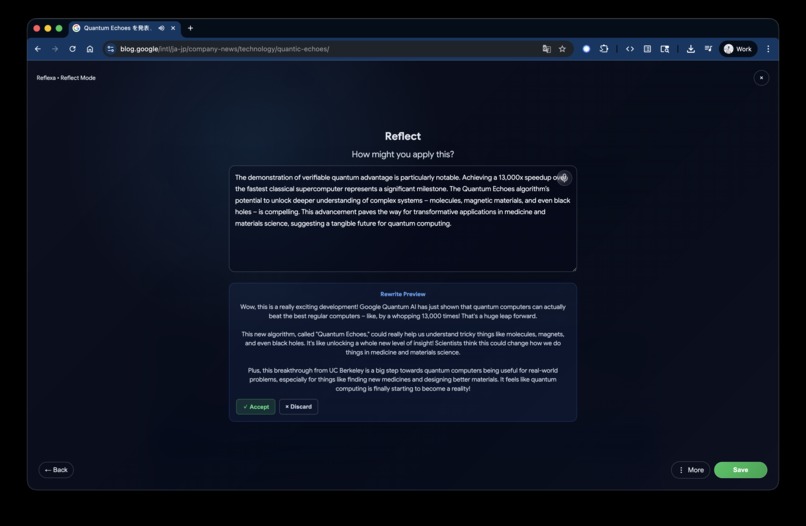
Reflexa AI rewrite preview: tone adjustment for your final reflection. Compare original vs rewritten text before saving. Accept or discard
-
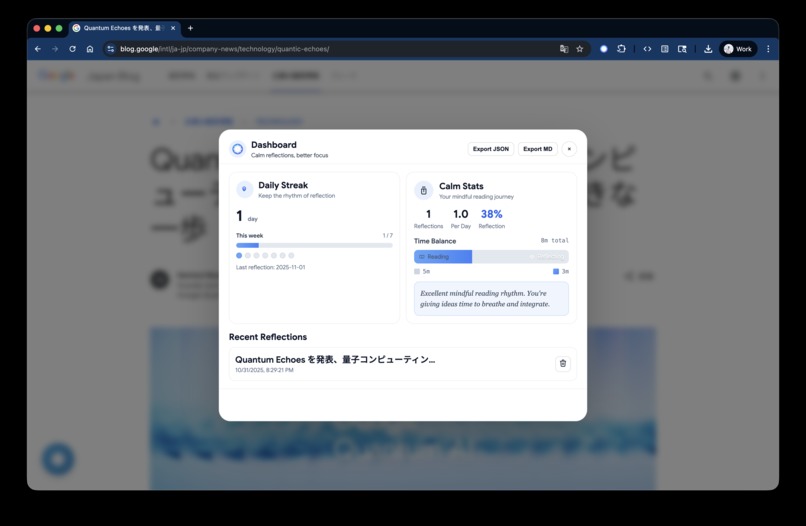
Reflexa AI dashboard: track your reflection streak, reading stats, and time balance. View history and export reflections in JSON or Markdown









Inspiration
You know that feeling when you close a browser tab after reading an article and immediately think, "Wait, what did I just read?" Yeah, we've all been there.
I found myself in this cycle constantly. I'd read dozens of articles every week—productivity tips, tech tutorials, thought-provoking essays but a week later, I couldn't remember a single insight. It felt like pouring water into a leaky bucket. The information was flowing in, but nothing was sticking.
One evening, after mindlessly scrolling through yet another "must-read" article, I paused. I was exhausted, overwhelmed, and honestly a bit frustrated with myself. That's when it hit me: I wasn't really reading anymore. I was just consuming.
Around the same time, I'd started practicing mindfulness meditation. Those few minutes of intentional breathing and reflection were transforming how I processed my day. And I thought...what if we could bring that same intentionality to reading? What if, instead of just moving on to the next article, we took a moment to actually think about what we just learned?
That's where Reflexa AI was born. Not from a desire to build another productivity tool, but from a genuine need to remember what matters and to help others do the same.
What it does
Reflexa AI is like having a mindful companion who gently reminds you to pause and reflect on what you're reading.
Here's how it works in practice:
The Gentle Nudge You're reading an article that resonates with you. After about 10 seconds of active reading (we track scrolling, cursor movement, real engagement, not just having a tab open), a small lotus icon appears in the corner. It's not intrusive, just a gentle invitation: "Hey, this seems meaningful. Want to reflect on it?"
Hover over the lotus and it expands to reveal quick actions:
- Reflect: Start your meditation flow
- Dashboard: View your reflection history and streaks
- AI Status: Check which Chrome AI APIs are available
- Settings: Adjust dwell threshold, sound, motion, and more
The Breathing Moment When you click "Reflect," you're greeted with a calming breathing orb. For 8-16 seconds, you just breathe. Inhale... exhale... While you're centering yourself, the AI (running entirely on your device) is working behind the scenes, reading the article, detecting the language, preparing a summary.
The Insight Once you're settled, you see three AI-generated bullets (powered by the Summarizer API):
- Insight: The main takeaway
- Surprise: Something unexpected or counterintuitive
- Apply: How you might use this practically
Don't like bullet points? You can switch to a flowing paragraph or a headline with supporting bullets...whatever helps you absorb the information best. The AI adapts to your preferred reading style.
It's not just a summary. It's a framework for deeper understanding.
The Reflection Then come two AI-generated reflection questions (powered by the Prompt API), tailored to the article you just read. They're designed to be thought-provoking and action-oriented. Not generic prompts, but questions that genuinely make you think about what you just learned.
And here's where it gets cool. You can:
- Type your thoughts (the traditional way)
- Speak them (voice transcription in real-time)
- Get AI help (generate a draft if you're stuck)
- Adjust the tone (make it more concise, empathetic, academic, or calm)
- Polish it (grammar checking with one-click fixes)
All of this happens in a zen-like interface with breathing animations and optional ambient audio. It's designed to feel like a meditation session, not a productivity task.
The Memory Your reflections are saved locally (complete privacy!), and you can track your journey with:
- Dashboard: View all your reflections, see your streak counter, track statistics (total reflections, average per day), and export everything to JSON or Markdown
- AI Status: Check which of the 7 Chrome AI APIs are available on your system, with helpful setup instructions if any are missing
- Settings: Customize your experience by adjusting the dwell threshold (how long before the nudge appears), enabling or disabling sound and animations, toggling experimental features, and controlling privacy settings
The magic is that by taking just 2-3 minutes to reflect, you transform passive reading into active learning. And you actually remember what you read.
How I built it
Building Reflexa AI was both a technical challenge and a labor of love. Let me walk you through the journey.
The Foundation I started with Chrome's Manifest V3 extension architecture. I chose React 18 with TypeScript because I wanted type safety and component reusability. Vite made the build process lightning-fast, which was crucial for rapid iteration.
The AI Integration (This was the fun part!) Chrome's Built-in AI APIs were game-changing. Instead of sending data to external servers, everything runs locally on Gemini Nano. But integrating all 7 Built-in AI APIs wasn't straightforward:
Summarizer API: This was our core. I spent days fine-tuning the prompts to get that perfect three-bullet format (Insight, Surprise, Apply). The trick was being specific enough to get consistent results but flexible enough to work across different content types.
Writer API: I built the infrastructure for streaming support (with progressive text display logic), but couldn't get the UI rendering to work in time. The batch mode fallback works reliably though, generating contextual drafts based on the summary and reflection prompts.
Rewriter API: Four tone presets with a preview system. Users can see the original vs. rewritten text side-by-side before accepting. This required careful state management to handle multiple reflection fields independently.
Proofreader API: Grammar checking with accept/discard previews. The challenge was making corrections feel helpful, not judgmental.
Language Detector API: This runs automatically and shows a subtle badge. It's fast (<10ms) and supports 100+ languages.
Translator API: Optional translation via the MoreToolsMenu. I implemented session caching by language pair for performance.
Prompt API: The universal fallback. When any specialized API fails, we gracefully fall back to the Prompt API with custom prompts. This ensures 100% reliability.
The Intelligent Fallback System This was crucial. I built a capability detector that checks API availability and automatically routes to the best available option. If Summarizer fails, try Prompt API. If that fails, allow manual input. Users never see errors, just graceful degradation.
The Voice Input Integrating Web Speech API for dual voice input was tricky. Each reflection field has its own independent voice instance. The smart part? When you start typing, voice auto-pauses. When you stop typing for 2 seconds, it resumes. This required careful event handling and debouncing.
The Meditation Flow The 4-step flow (Settle → Summary → Reflect → Reflect) was designed to feel like a meditation session. The breathing orb uses CSS animations for 60 FPS performance. The auto-advance logic detects when AI processing completes and smoothly transitions to the summary.
The Architecture I organized the code into clear layers:
- Content Script: Dwell tracking, DOM extraction, UI injection (lotus nudge, meditation flow)
- Background Service Worker: AI orchestration, storage management
- 7 AI Managers: One for each API, with consistent interfaces
- React Components: Modular, tested, accessible
- Popup Dashboard: Reflection history, streak counter, statistics, export functionality
- AI Status Panel: Real-time API availability checking with setup guidance
- Settings/Options Page: Comprehensive configuration for all features
The Dashboard & Management Tools Building a comprehensive dashboard with reflection history, streak tracking, and statistics. The AI Status panel that shows real-time availability of all 7 APIs. The Settings page with intuitive controls for every feature. These aren't flashy, but they're essential for a complete user experience.
The Polish The final 20% took 80% of the time. Smooth animations, keyboard shortcuts, ARIA labels, reduce motion support, audio cues, language fallback notifications. All the details that make it feel professional.
Challenges I ran into
Oh boy, where do I start? 😅
Challenge 1: The Gemini Nano Download Early on, I spent hours debugging why the AI APIs weren't working. Turns out, Gemini Nano needs to be explicitly downloaded. It's not automatic. I had to add clear instructions in the setup guide and create a capability detector to show helpful error messages.
Challenge 2: Streaming Writer API (Attempted)
I spent a lot of time trying to get streaming to work with the Writer API. The API supports streaming, and I implemented the infrastructure for it. I set up chrome.runtime.connect() for persistent connections, built progressive text display logic, added proper cleanup on unmount. But I couldn't get the UI to actually show the text appearing progressively. The streaming connection works in the background, but displaying it character-by-character in React proved trickier than expected. For now, it falls back to batch mode, which still works great. This is definitely something I want to revisit post-hackathon.
Challenge 3: Dual Voice Input Having two independent voice inputs (one per reflection field) was harder than expected. The Web Speech API isn't designed for multiple instances. I had to:
- Create separate
useVoiceInputhooks for each field - Handle interim vs. final transcriptions differently
- Implement smart text merging (append with space, not replace)
- Detect typing and auto-pause voice
- Manage cleanup when switching between fields
The typing detection was particularly tricky. I used a 2-second debounce timer that resets on every keystroke.
Challenge 4: Context-Aware MoreToolsMenu The MoreToolsMenu shows different tools based on:
- Current step (summary vs. reflection)
- Content state (empty vs. has text)
- Text length (>20 chars for tone/proofread)
- API availability
Getting all these conditions right and keeping the UI responsive required careful state management and memoization.
Challenge 5: Performance Keeping the bundle under 50KB while including React, animations, and all the AI logic was tough. I used:
- Code splitting with dynamic imports
- Tree shaking with Vite
- Lazy loading for heavy components
- Session caching for AI APIs
Challenge 6: The Dwell Tracker Detecting "active reading" is harder than it sounds. I track:
- Scrolling (but not accidental scrolls)
- Mouse movement (but not just hovering)
- Keyboard activity (but not just Cmd+Tab)
- Page visibility (pause when tab is hidden)
It took a lot of testing to get the thresholds right. Too sensitive and it triggers on every page. Too strict and it never triggers.
Challenge 7: Solo Development Building this alone meant wearing all the hats. Architect, developer, designer, tester, technical writer. Some features I wanted to implement (like the streaming UI) didn't make it in time. But working solo also meant I could move fast, make decisions quickly, and maintain a consistent vision throughout. Every line of code, every design decision, every word of documentation. It's all mine, for better or worse.
Accomplishments that I'm proud of
All 7 Chrome Built-in AI APIs Integrated This is the big one. I didn't just use one or two APIs—I integrated all seven and made them work together seamlessly. The intelligent fallback system ensures 100% reliability even when APIs are unavailable.
The Meditation Flow I'm really proud of how the 4-step flow feels. The breathing phase isn't just a loading screen. It's an intentional moment of calm. The auto-advance when AI completes feels magical. Users have told me it's the most peaceful reflection experience they've had.
Writer API Integration Successfully integrated the Writer API for draft generation with proper fallback handling. While I built the infrastructure for streaming (which I'm proud of architecturally), the progressive text display in the UI didn't quite work out in time. The batch mode works reliably though, and the drafts are contextual and helpful.
Dual Voice Input with Smart Typing Detection This was technically challenging, but the UX is seamless. You can speak, then type to correct something, and voice automatically pauses. It just works.
100% Local Processing Zero network calls. Complete privacy. All AI runs on-device. In an age of cloud everything, this feels important. Users own their data.
The Zen Aesthetic The breathing orb, the muted colors, the ambient audio, the smooth animations. It all comes together to create an experience that feels calm and intentional. That's rare in productivity tools.
The Dashboard & Management Tools Building a comprehensive dashboard with reflection history, streak tracking, and statistics. The AI Status panel that shows real-time availability of all 7 APIs. The Settings page with intuitive controls for every feature. These aren't flashy, but they're essential for a complete user experience.
What I learned
Technical Lessons
Chrome's Built-in AI APIs are powerful but require careful handling
- Session management is crucial (create once, reuse, destroy on cleanup)
- Fallback strategies are essential (APIs can be unavailable)
- Streaming is great for UX but needs robust error handling
- Local AI is fast (under 100ms) but has token limits
State management in React is an art
- Dual voice input taught me about independent state management
- Context-aware UI requires careful condition checking
- Memoization and useCallback are your friends
- Refs are perfect for values that don't need re-renders
Performance matters
- Bundle size affects load time (I got it down to 48KB)
- CSS animations are faster than JS animations
- Session caching dramatically improves perceived performance
- Lazy loading keeps initial load fast
Design Lessons
Less is more
- The MoreToolsMenu cleaned up the UI dramatically
- Hiding complexity until needed reduces cognitive load
- White space and breathing room matter
- Animations should enhance, not distract
Mindfulness and technology can coexist
- The breathing phase transforms the experience
- Calm colors and smooth animations reduce stress
- Intentional pauses create space for thought
- Technology should serve human needs, not vice versa
Product Lessons
Solve your own problem
- I built this because I needed it
- That authenticity shows in the design decisions
- User empathy is easier when you are the user
Privacy matters
- 100% local processing isn't just a feature. It's a value
- Users care deeply about data privacy
- On-device AI is the future
Personal Lessons
Scope creep is real
- I wanted to add so many features
- Focusing on core value was crucial
- "Done is better than perfect" (but polish matters)
- Some features (like streaming UI) had to be deprioritized
The last 20% takes 80% of the time
- Smooth animations, error handling, edge cases
- Keyboard shortcuts, audio cues, notifications
- All the polish that makes it feel professional
Solo development is both liberating and limiting
- Freedom to make quick decisions and maintain vision
- But also means some ambitious features don't make the deadline
- Learning to prioritize ruthlessly is essential
What's next for Reflexa AI
Short Term (Next 3 Months)
1. Chrome Web Store Launch Get Reflexa AI into users' hands. Real feedback will be invaluable.
2. User Onboarding Flow A gentle tutorial that walks new users through their first reflection. Show, don't tell.
3. Spaced Repetition Reminders Remind users to revisit past reflections. Research shows spaced repetition dramatically improves retention.
4. Analytics Dashboard Privacy-preserving analytics to help users see their reflection patterns. Which topics do they reflect on most? What times of day? What's their streak?
Medium Term (6-12 Months)
5. Mobile App React Native app for iOS and Android. Reflection shouldn't be limited to desktop.
6. Integration with Note-Taking Apps Export to Notion, Obsidian, Roam Research. Let reflections live where users already work.
7. Social Features Optional sharing of reflections (with privacy controls). Learning is better together.
8. Custom AI Prompts Let users define their own reflection questions. Different contexts need different prompts.
Long Term (1-2 Years)
9. Knowledge Graph Connect related reflections. Show how ideas build on each other over time.
10. Team/Enterprise Version Shared reflection spaces for teams. Collective learning and knowledge building.
11. Educational Partnerships Work with schools and universities. Teach students to read actively, not passively.
12. API for Third-Party Integrations Let other apps integrate Reflexa AI's reflection engine.
The Vision
Ultimately, I want Reflexa AI to help people build a personal knowledge base that actually reflects how they think. Not just a collection of highlights and notes, but a living record of insights, connections, and growth.
I imagine a future where:
- Reading is active, not passive
- Learning is reflective, not just consumptive
- Knowledge is connected, not siloed
- Technology supports mindfulness, not distraction
That's the world I want to help create.
Why This Matters
We're drowning in information but starving for wisdom. We read more than ever but remember less. We're constantly connected but rarely present.
Reflexa AI is my small attempt to change that. Not by adding more features or making things faster, but by creating space for thought. By encouraging pause. By making reflection feel natural, even delightful.
If even one person reads an article, takes a moment to reflect, and actually remembers what they learned? That's a win. If a thousand people build a habit of mindful reading? That's transformative.
This isn't just a Chrome extension. It's a philosophy: Pause. Reflect. Remember.
And I genuinely believe that if we can help people remember what matters, we can help them become who they want to be.
Thank You
Thank you for taking the time to understand Reflexa AI. Whether you're a judge, a potential user, or just someone curious about mindful technology—I appreciate you being here.
This project represents tens of hours of work, but more importantly, it represents a belief that technology can serve human flourishing. That AI can enhance our humanity rather than replace it. That we can build tools that make us more thoughtful, not just more productive.
If you'd like to try Reflexa AI, contribute to the code, or just chat about mindful technology, I'd love to hear from you.
Let's build a more thoughtful internet together.
With gratitude, Jayvic San Antonio Solo Developer
Built with ❤️ for the Google Chrome Built-in AI Challenge October 31, 2025
P.S. If you made it this far, you're exactly the kind of person who would benefit from Reflexa AI. You took the time to read, to understand, to engage. That's rare and beautiful. Thank you.
Built With
- chrome
- css
- html
- language-detector-api
- prompt-api
- proofreader-api
- react
- rewriter-api
- summary-api
- translator-api
- typescript
- writer-api

Log in or sign up for Devpost to join the conversation.