-
-
Featured in regional editorial
-
Simulate without hardware
-
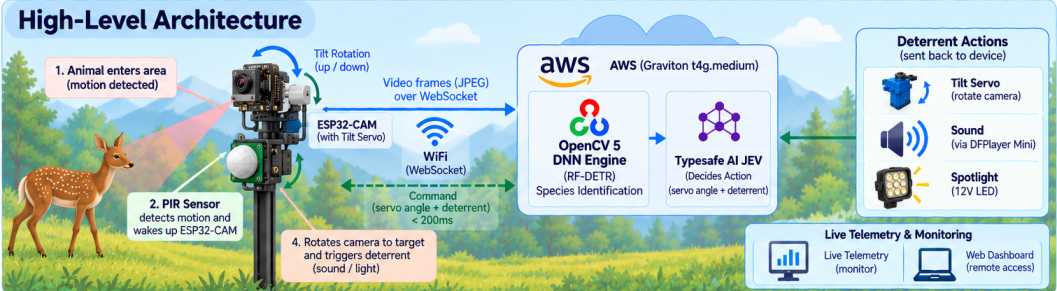
High level architecture
-
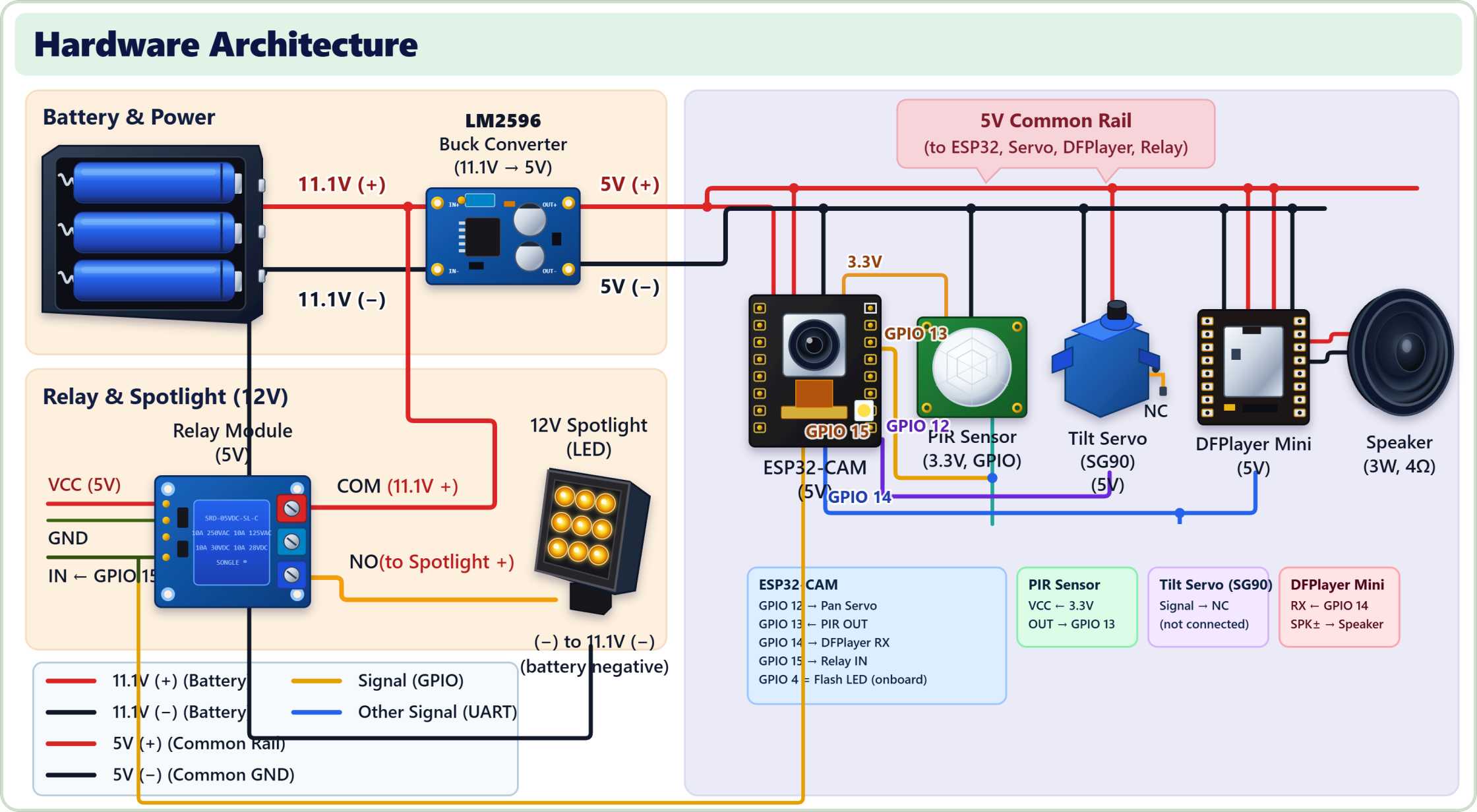
Hardware architecture
-
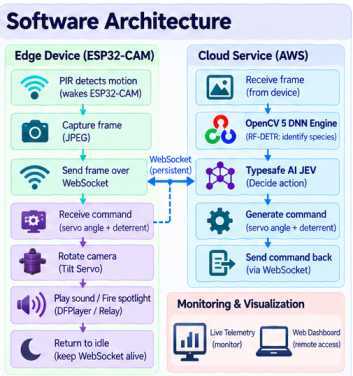
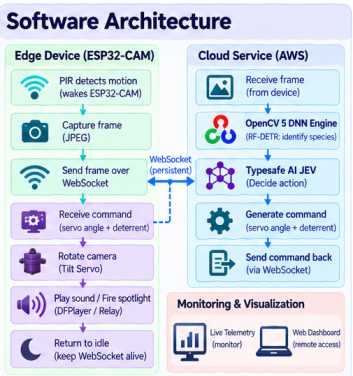
Software architecture
A note before you read: This is not written by AI. Everything below is based on my own experiences. Grammar polished using AI only — so I think you will feel something real reading this.
Reekh — AI Wildlife Deterrent for the Himalayan Region
Inspiration
From my childhood, I mostly lived outdoors for my studies. After graduating in 2025, I started working from home as a backend developer in my hometown in Uttarakhand, India. In just one year, I realized how much the menace of wild animal attacks had grown.
If you search "wild animal attacks in Uttarakhand" on Google, you will find a large volume of coverage from regional, national, and international publishers about the terror caused by wild animals. A total of 6,441 domestic cattle — including cows, buffaloes, and goats — were killed by apex predators like tigers and leopards in 2025 alone. And this is only a very small slice of the full picture. In reality, several other wild animals attacked and not only killed domestic cattle but also destroyed agricultural land on a massive scale.
The government and private sector are already working on this issue, because it has become one of the major drivers of out-migration from Uttarakhand. This problem inspired me to build a device that can help people across the entire Himalayan region — to protect themselves as well as their crops. My goal is to create something affordable and effective: a device that drives wild animals away from human settlements without doing any harm to them.
What It Does
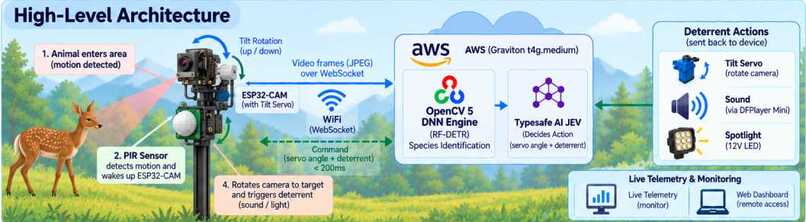
Reekh is an electronic device that continuously monitors for motion. When motion is detected, it wakes the camera and light, rotates the camera in different directions to search for wild animals, and if an animal is detected, it takes a deterrent action based on the species identified.
The deterrent actions available are:
- Turning on a flash light for a few seconds
- Playing animal sounds — dog bark, wolf howl, raptor screech, or human shout — selected based on the species' natural predators and hardwired fear responses
- Sending an alert message to a human in the most dangerous situations
The action is determined by our agentic decision system powered by TypeSafe AI JEV (via OpenRouter). Because wild animals can habituate to repeated stimuli over time — and since we never want to harm them — the same action every time would eventually stop working. That is why we use AI to vary the response based on the situation. In the worst case, when the animal persists, it escalates to alerting a human.
The escalation logic per species:
AmurTiger, Leopard → Primary: Human shout | Also: Flash light + owner alert
BlackBear, WildBoar → Primary: Dog bark pack | Also: Flash light
LeopardCat, RedFox, RaccoonDog → Primary: Dog bark
SikaDeer, RoeDeer, MuskDeer → Primary: Wolf howl
Badger, Sable, Weasel, Marten, Hare → Primary: Raptor screech
Dog, Cow → Primary: Calm friendly voice
Live System & Interactive Digital Twin
Our production service is live on AWS Graviton and accessible for evaluation:
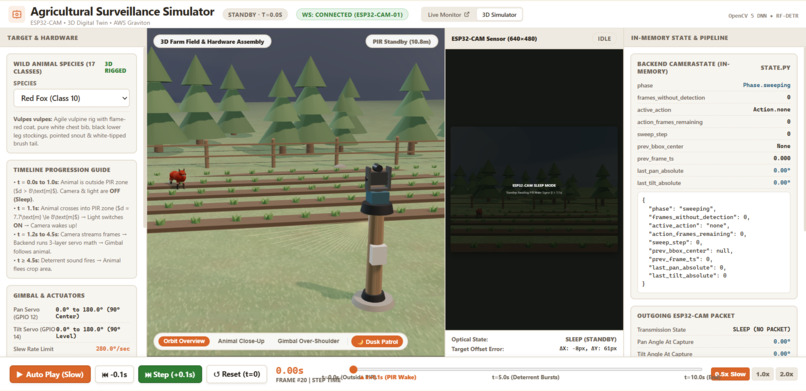
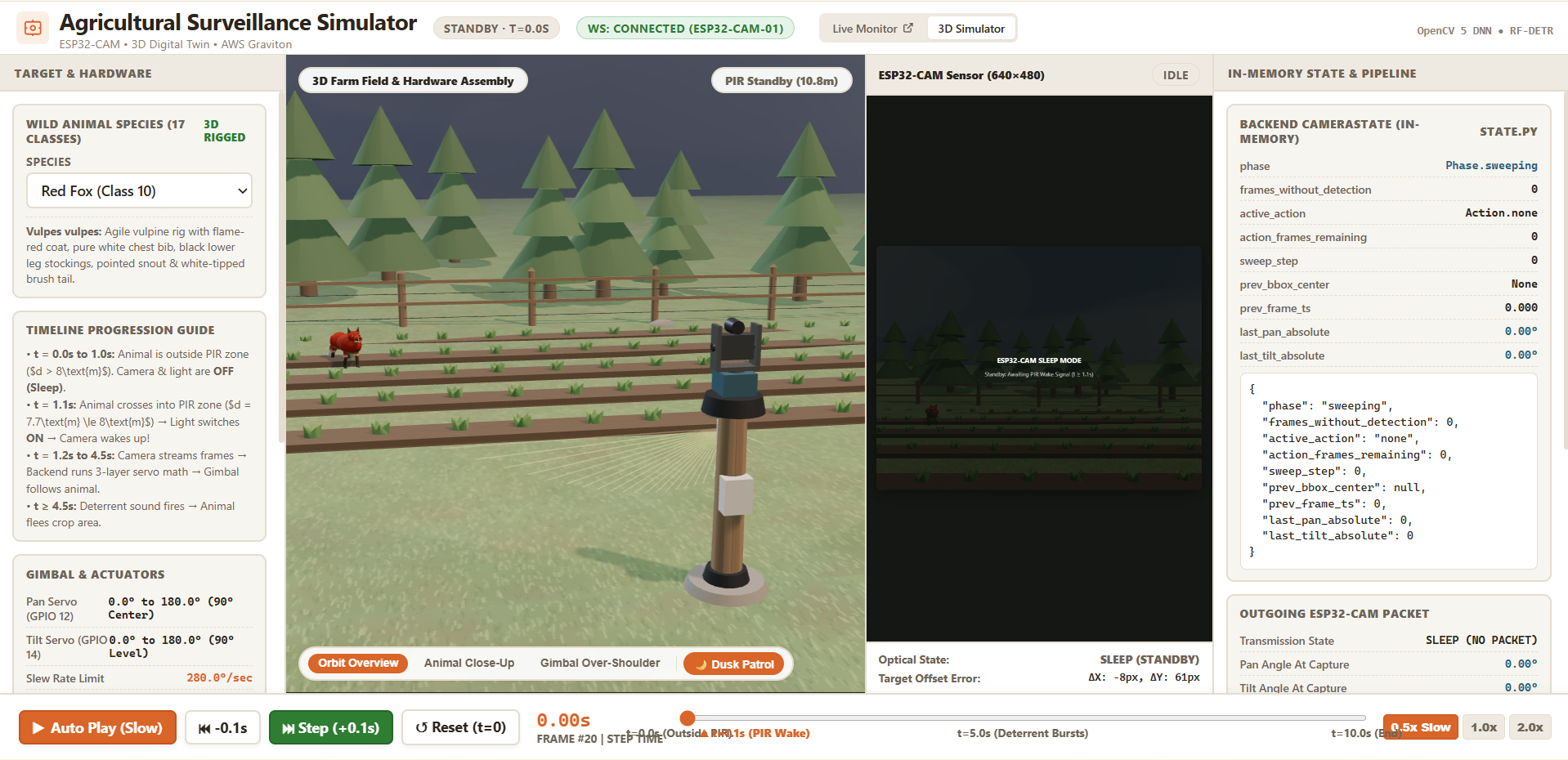
- 3D Digital Twin Simulator: https://reekh.deepaksingh.site/simulate
Interactive 3D simulation with biomechanical animal rigs, real-time servo kinematics, and live backend inference. - Live Observability Telemetry: https://reekh.deepaksingh.site/monitor
Real-time SSE telemetry dashboard streaming frame detections, latency metrics, and hardware health. - Service Health Check: https://reekh.deepaksingh.site/health
Direct JSON verification of the active OpenCV 5 DNN engine on AWS Graviton.
How We Built It
Our system is divided into two parts: software and hardware.
The Detection Challenge
We needed a software service that could detect wild animals and send actions to hardware very quickly. The detection part was the hard part. Simple pre-trained models were not sufficient for our use case — the animals we needed to detect are specific to the Himalayan region, so standard pre-trained models could not identify them reliably.
Fine-Tuning on Custom Wildlife Data
We started by fine-tuning RF-DETR Medium on the NTLNP Wildlife dataset, training it to recognize 17 Himalayan wildlife species:
AmurTiger, AmurLeopard, Badger, BlackBear, Cow, Dog, Hare, Leopard, LeopardCat, MuskDeer, RaccoonDog, RedFox, RoeDeer, Sable, SikaDeer, Weasel, Y-T-Marten
We used an AWS SageMaker notebook instance (ml.g4dn.xlarge) for fine-tuning. AWS helped enormously here — we did not have to configure GPUs or any infrastructure ourselves, and we got a very quick self-hosted platform for training. We exported the trained weights as an ONNX file for production inference.
Why RF-DETR Instead of YOLO
We chose RF-DETR (a transformer-based detection model) because it delivered better detection performance on our dataset. However, transformer-based models historically had poor support in OpenCV's DNN module — which brings us to the most important technical decision in this project.
OpenCV 5 DNN — The Key Technical Innovation
We built our inference service using Python + FastAPI + OpenCV 5 DNN, deployed on AWS Graviton (t4g.medium ARM64).
Before version 5, OpenCV had only ~22% ONNX coverage and struggled significantly with transformer-based models. OpenCV 5 changed this completely, bringing native, first-class ONNX support. We were able to run RF-DETR Medium at 576×576 input resolution in ~80–150ms on a single Graviton vCPU — no GPU required.
The key OpenCV 5 DNN patterns we implemented:
# Explicit engine binding (required in OpenCV 5 — never use ENGINE_DEFAULT)
if hasattr(cv2.dnn, "ENGINE_OPENCV"):
    DNN_ENGINE = cv2.dnn.ENGINE_OPENCV   # OpenCV 5.x mainline
elif hasattr(cv2.dnn, "ENGINE_NEW"):
    DNN_ENGINE = cv2.dnn.ENGINE_NEW      # OpenCV 5.0.0 wheel

# Named multi-output forward pass
detections, logits = net.forward(["dets", "labels"])
We also implemented zero-copy in-memory JPEG decoding — frames streamed over WebSocket are decoded directly from raw memory buffers without any disk I/O:
bgr = cv2.imdecode(np.frombuffer(raw_bytes, np.uint8), cv2.IMREAD_COLOR)
We measured our runtime with a dedicated benchmark script (benchmark_opencv5.py), which runs 50 forward passes and reports mean latency, p95, p99, and throughput in FPS.
Mathematical Formulation — Servo Tracking
The 4-layer servo math is the core of how the camera physically follows a detected animal. Here is what the backend actually computes on every frame.
Layer 2 — Velocity Compensation
To account for the ~220ms end-to-end hardware latency (capture → network → inference → ESP32 poll → execution), we predict where the animal will be at the time the servo command is actually executed.
Let \(v_x\) be the pixel velocity of the bounding box centre between frames:
$$v_x = \frac{x_c - x_{prev}}{\Delta t}$$
The predicted centre is then:
$$\hat{x}_c = x_c + \text{clip}(v_x \cdot L, \ -150, \ 150)$$
where \(L = 220 \text{ ms}\) is the total command latency and the clip prevents overcorrection on sudden large jumps.
Layer 3 — Absolute Pan Target
The pixel error after velocity compensation is converted to a degree correction using a proportional gain \(K_p = 0.05\) degrees per pixel:
$$\delta = \text{clip}\big((\hat{x}_c - W/2) \cdot K_p, \ -15°, \ 15°\big)$$
This correction is accumulated into an absolute angle and clamped to the physical servo range:
$$\theta_{pan} = \text{clip}(\theta_{prev} + \delta, \ -90°, \ 90°)$$
Commands are always absolute angles, never relative deltas — this eliminates cumulative drift regardless of prior position.
Layer 4 — Angular Deadband
To suppress per-frame bounding-box jitter, a final guard discards sub-threshold corrections:
$$\theta_{final} = \begin{cases} \theta_{pan} & \text{if } |\theta_{pan} - \theta_{prev}| \geq 1.5° \ \theta_{prev} & \text{otherwise} \end{cases}$$
AWS Graviton Deployment
We deployed the inference service on AWS Graviton (t4g.medium) — a 2 vCPU ARM64 instance. OpenCV 5 leverages ARM NEON SIMD vectorization natively on Graviton, giving very good CPU inference performance at low cost (~$28/month including data transfer). The service handles multiple ESP32-CAM devices simultaneously, so the cloud cost is shared across all deployed units.
Hardware
For the hardware node, we used an AI-Thinker ESP32-CAM as the microcontroller, programmed in C++ using Arduino IDE. The firmware runs a custom FreeRTOS multi-task architecture:
Core 0: WiFi / lwIP (SDK-managed)
Core 1:
  pirTask      (priority 5)  — PIR interrupt → state machine
  cameraTask   (priority 4)  — JPEG capture + WebSocket stream
  servoTask    (priority 3)  — Servo angle commands
  wsManageTask (priority 2)  — WebSocket loop + heartbeats
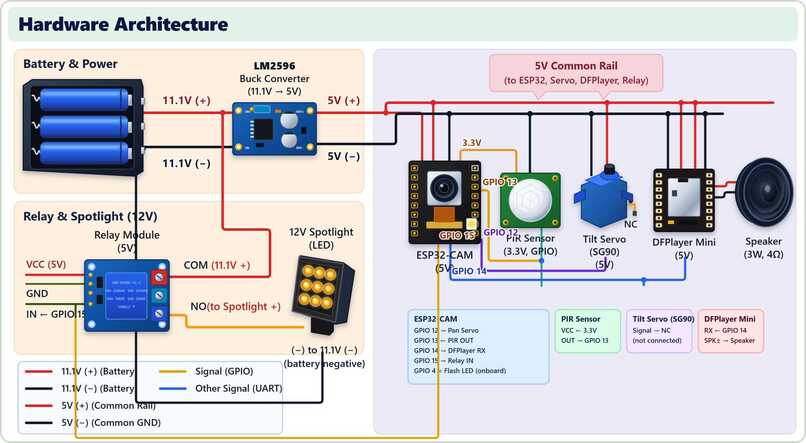
The ESP32 wakes on a PIR motion interrupt (zero power draw while idle), streams JPEG frames to the backend over a persistent WebSocket, receives servo angle and deterrent action commands back, and actuates the physical deterrents — servos, flash LED, DFPlayer audio module, and a 12V spotlight.
Complete hardware component list:
Microcontroller: AI-Thinker ESP32-CAM — Compute + camera + WiFi
Motion sensor: SmartElex BX604 PIR — Low-power wake trigger
Pan servo: TowerPro SG90 — Horizontal animal tracking
Tilt servo: TowerPro SG90 — Bracket mount (V2 will enable tilt)
Audio: Mini DFPlayer MP3 + 3W speaker — Sound deterrents
Spotlight: AutoKraftZ 12V 9-LED + relay — Visual deterrent
Power: 3× 18650 → LM2596 buck → 5V — Field battery pack
Total hardware cost per device: ~$24 (~₹2,270)
All components are connected without soldering for now — we plan to print a custom PCB in the next version.
Challenges We Ran Into
1. The FB-OVF (Frame Buffer Overflow) Error
I thought programming the ESP32 would be easy since I already come from a software development background. But I was stuck on a FB-OVF (frame buffer overflow) error for more than 24 hours — and it was the very first part of hardware development.
The error occurred while initializing the camera and streaming frames to the backend. The root cause: the ESP32-CAM has only 512 KB of internal RAM, and we were using it simultaneously for WiFi, the WebSocket connection, and the image frame buffer — all three together exceeded available memory.
Solving this single error was not enough. I knew more errors like this would come, so I picked up my engineering Operating Systems textbook again and started studying core and memory management from scratch. With that knowledge and some additional research, I was able to architect the FreeRTOS task system with proper stack budgets and memory zones for each task.
2. I Lost My Servo (and My Mind)
It was my first time working with hardware. When the servo motors were delivered, I was very excited and immediately started rotating one by hand — and I did not know these were 180-degree motors with physical internal stops to prevent over-rotation. I snapped the internal mechanism.
Fortunately, by some miracle, 3 motors were delivered instead of the 2 I ordered. If I had broken one more, I would have been completely out, because components take 7–8 days to deliver to my home.
3. Hardware Complexity
Since this was my first time doing hardware, and I had never studied electronics in depth, even using a multimeter, relay module, or buck converter was challenging. A single wrong power connection or short circuit was enough to destroy the entire project. I had to approach every wiring step with extreme care — calibrating the LM2596 buck converter output to exactly 5.00V before connecting a single component, verifying polarity on every wire, and always maintaining a common ground across the entire circuit.
Accomplishments We're Proud Of
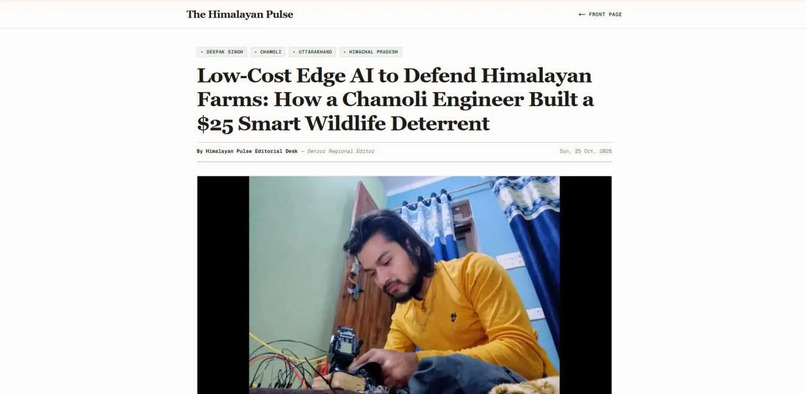
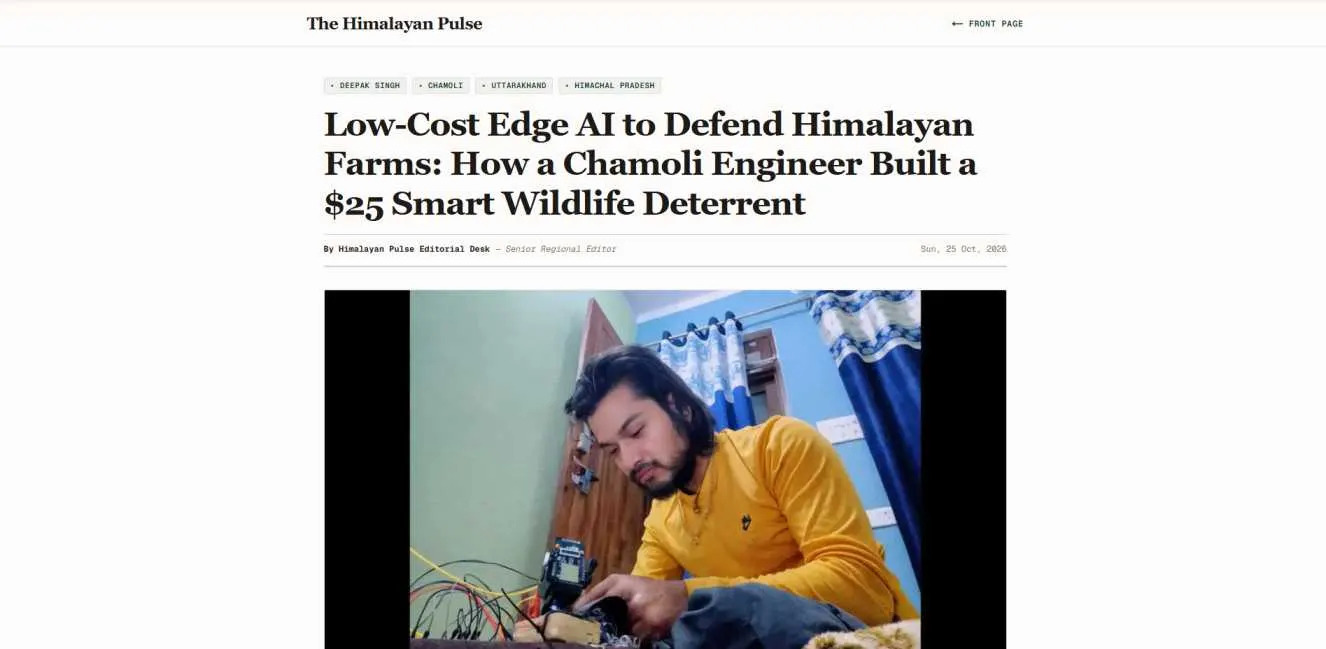
Featured in a regional publication: We are genuinely proud and happy to share that our work was recognized by The Himalayan Pulse, a regional publication. They appreciated the vision, work, and efforts we are putting into saving the lives and livelihoods of people in the Himalayan region. They also urged national and international organizations to support us — financially or technically — to help us ship this device affordably to the people who need it.
What We Learned
The most significant learning was OpenCV 5's DNN engine and IoT development.
OpenCV 5 opens genuinely new paths for AI and computer vision. The native, first-class ONNX support changes how we can deploy AI inference outside of heavy frameworks like PyTorch or ONNX Runtime. Running a fine-tuned transformer-based detection model on a low-cost ARM CPU instance — without a GPU, with sub-second latency — was something that simply was not practical in OpenCV 4. I am very happy to have learned and implemented the OpenCV 5 DNN engine.
IoT was equally rewarding. It was something I always wanted to learn, but procrastination always got in the way. In this hackathon, I challenged myself — and I even started a building-in-public series on X to hold myself accountable and document the journey.
What's Next for Reekh
This device is not just a proof of concept — we have already started deploying it in our nearby area. But it is not yet ready for broad distribution. Our immediate next steps are:
- Custom PCB — replace the breadboard and jumper wires with a proper printed circuit board
- 3D-printed enclosure — weatherproof body for field deployment
- GSM module — for areas without WiFi, enabling the device to send alerts over cellular
- Village entry point deployment — install at one of the entry paths into our village and monitor performance for several weeks before deciding to scale or iterate
One of the most important next steps is also securing government or NGO support. We are not building this to sell as a commercial product — we are building this to protect the Himalayan region. And indirectly, this device helps the whole world: the Himalayan ecosystem plays a critical role in global climate stability, and reducing human-wildlife conflict is essential to its preservation.
We want Reekh to be either free or extremely affordable for the people of the Himalayan region. That will require meaningful financial and government backing — and we are actively working toward it.
The estimated total cost of one deployed unit is ~$24 in hardware and ~$28/month in cloud infrastructure (AWS Graviton + data transfer), shared across all deployed devices.


Log in or sign up for Devpost to join the conversation.