Inspiration
Every student has gotten a math test back with a red ✗ next to the final answer and no idea where things went wrong. The mistake is almost always one line: a dropped negative, a missing chain-rule factor, an inequality that should have flipped. Teachers don't have time to read every line of everyone's work, and AI chatbots just hand you the answer.
We wanted a notebook that reads your actual handwriting, finds the exact line where your thinking broke, and helps you fix it yourself, the way a good tutor would: by pointing and asking a question, not by giving away the fix.
What it does
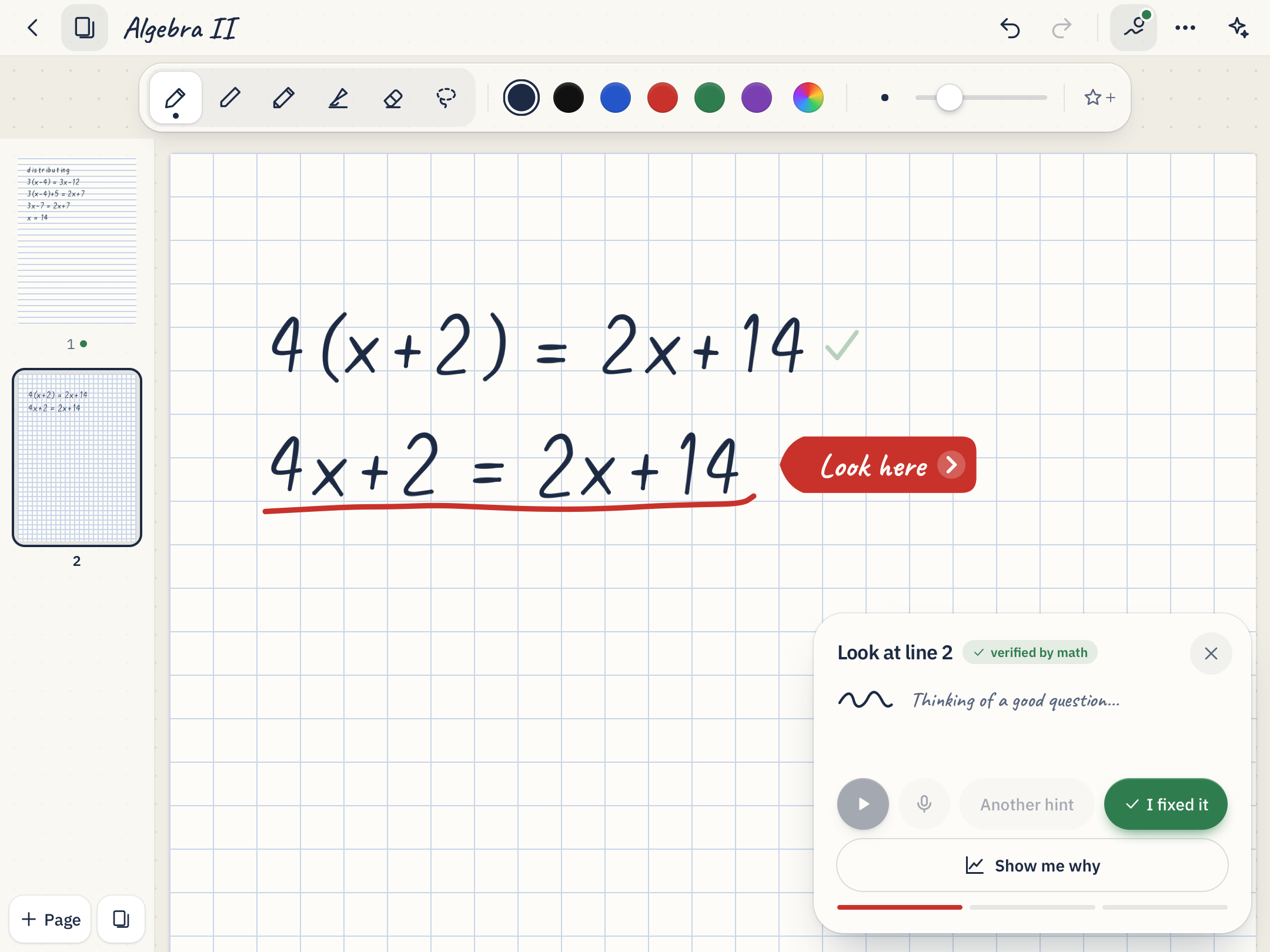
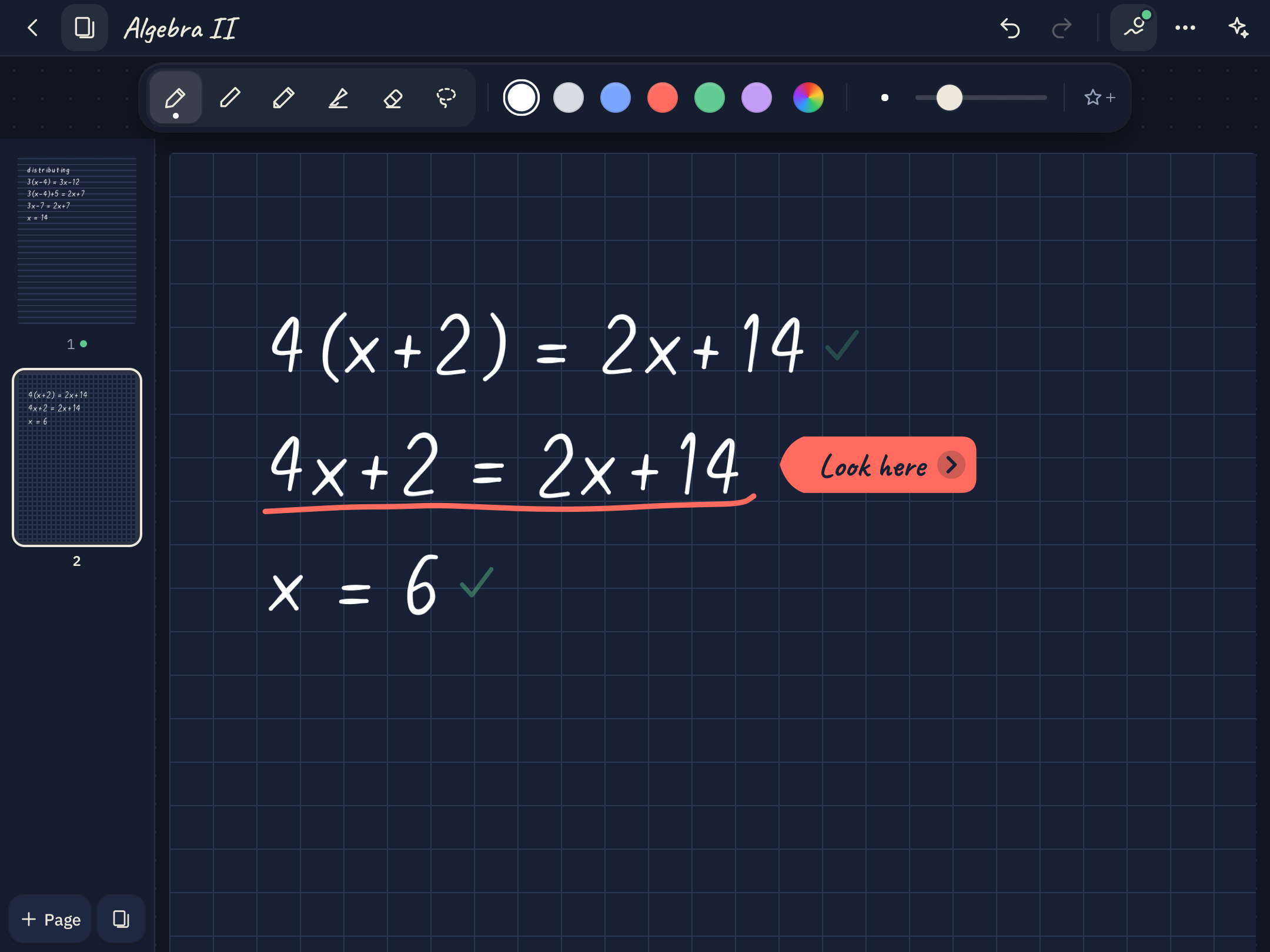
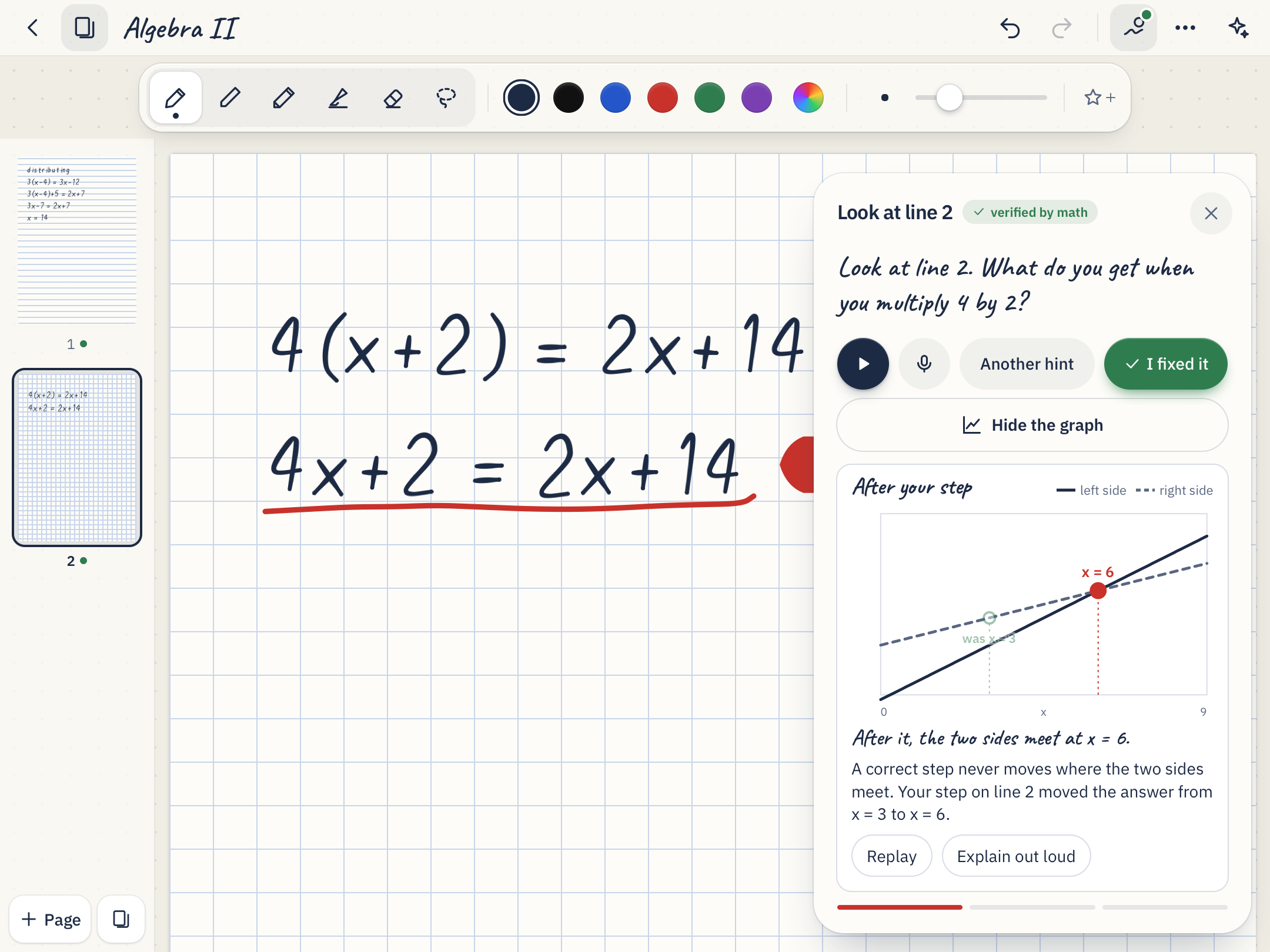
RedLine is a notebook for the iPad and Apple Pencil (it also runs in any browser, with any stylus or a mouse). Turn on Tutor mode and just write math. When you start the next line, RedLine reads your handwriting, checks every step, and draws a red line under the first step that goes wrong.
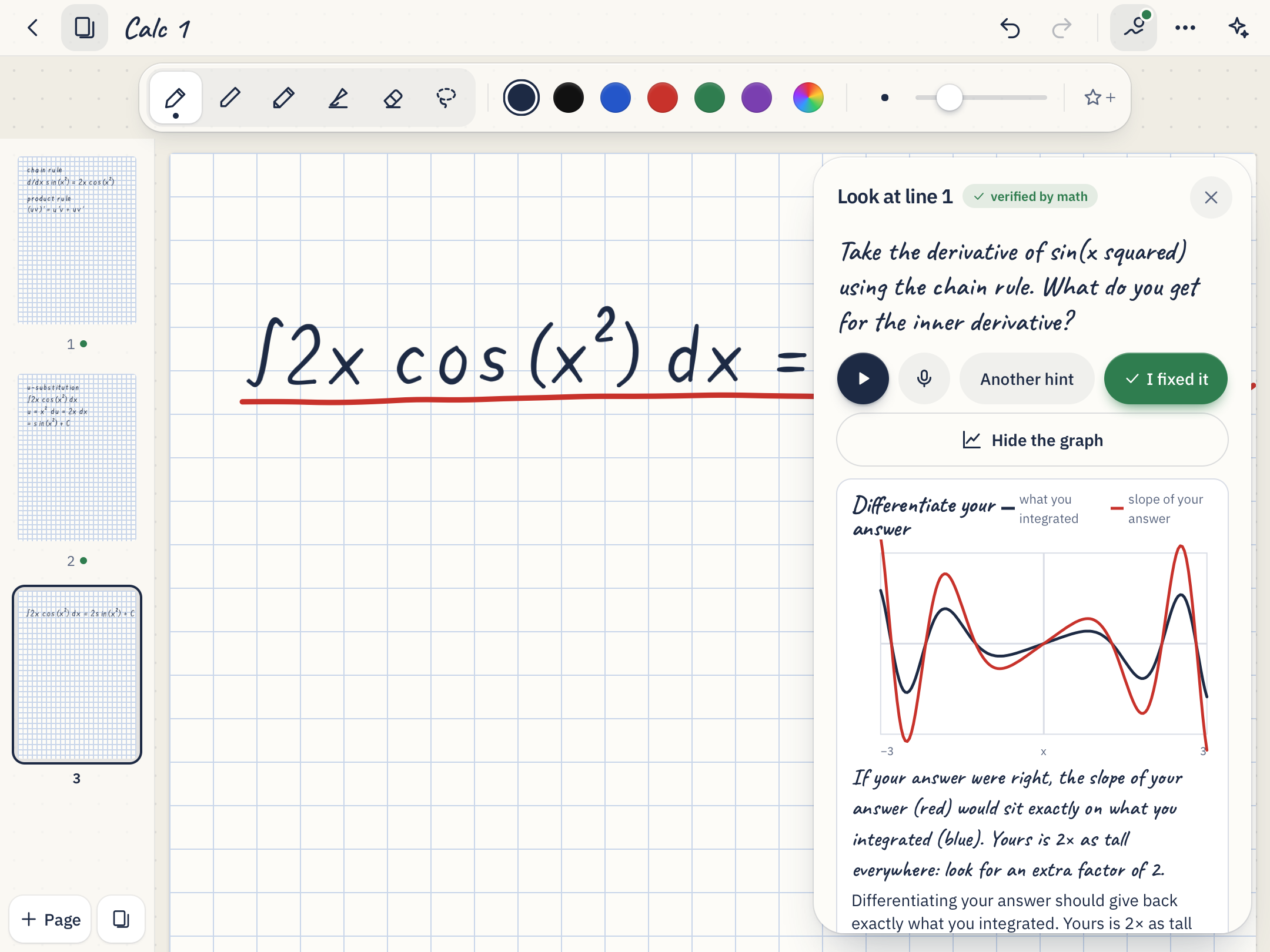
Look here: a tutor asks you a question out loud that points at the mistake. Up to three hints get more specific, but they never show the corrected line.
Show me why: a graph of what your step did to the equation.
Honest labels: every verdict says verified by math or AI judgement, so you always know what you can trust.
Ask: questions about your notes, answered with links to the exact page.
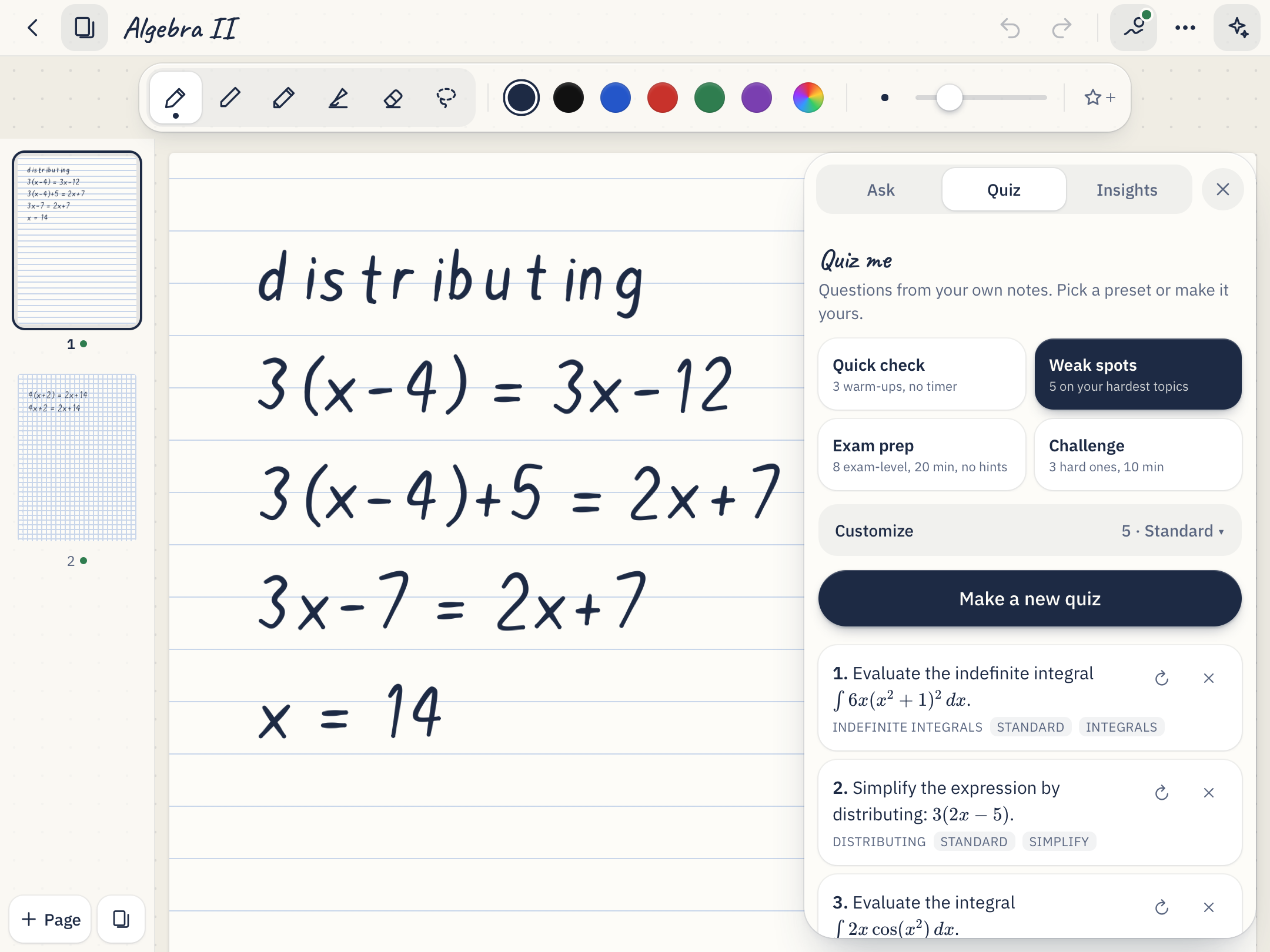
Quiz me: practice built from the topics you get wrong, answered by hand.
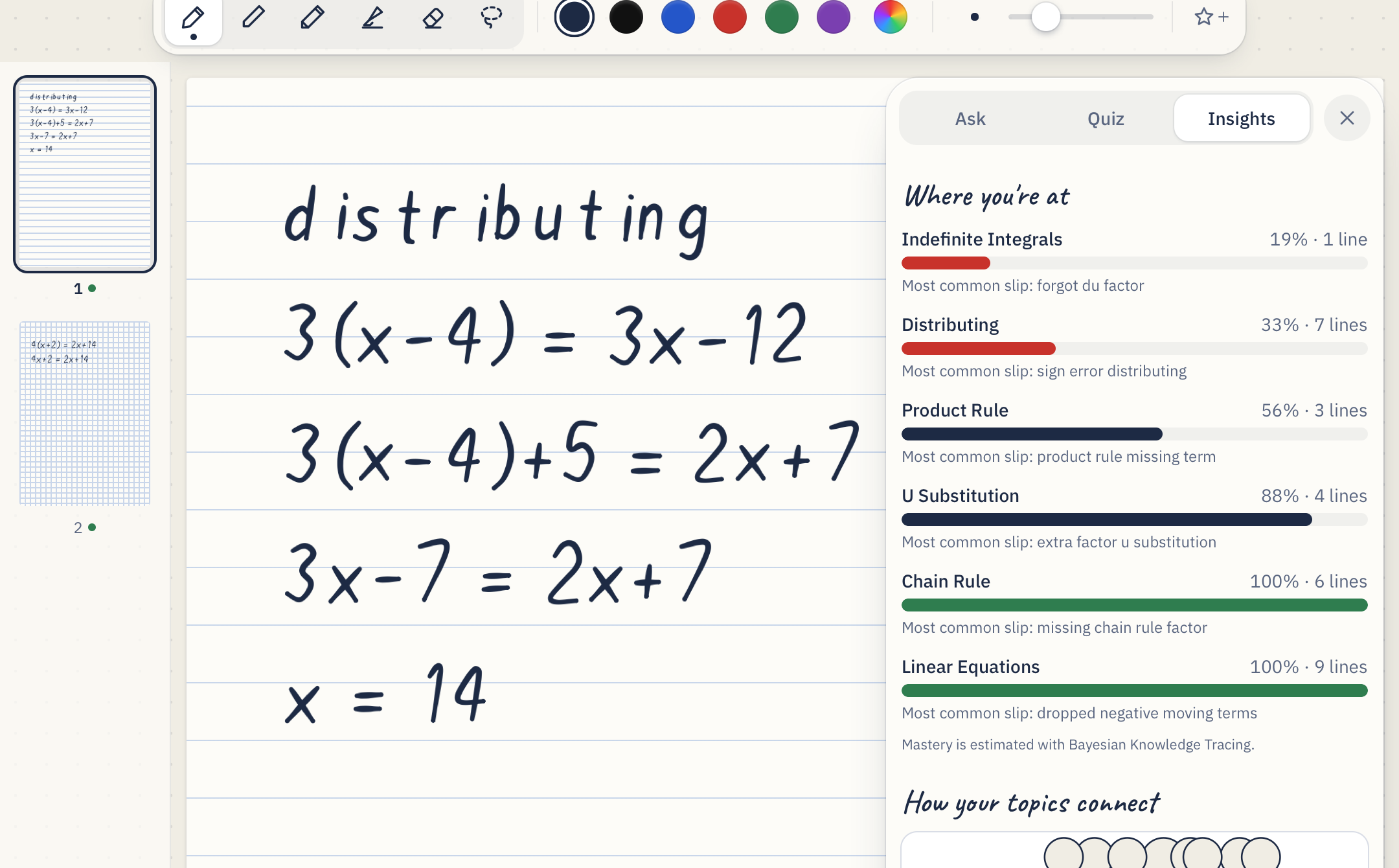
Insights: your mastery of each topic and a map of how they connect.
How we built it
The core idea: Gemini only reads. Our own math engine decides.
Step 1, finding lines. We group the pen strokes into handwritten lines ourselves, split problems written side by side into columns, and group lines into problems at blank space. Each line is labeled L1, L2, L3, … in the image we send.
Step 2, reading. Gemini transcribes each labeled line exactly as written, mistakes included. It's told never to fix anything, because a "corrected" transcription would hide the student's error.
Step 3, proving. A deterministic engine built on mathjs checks each step against the line above it.
Equations
We write each line as F(x) = left side − right side. If one line is a constant multiple of the other,
$$F_{\text{new}}(x) = k \cdot F_{\text{old}}(x) \quad \text{for all sampled } x,$$
the step is correct. Otherwise we compare the real solution sets. Going from x² = 5x to x = 5 loses the solution x = 0, so that's an error. Squaring √(x + 2) = x into x + 2 = x² adds a solution but is a valid step, so it passes with a reminder to check your answers.
Inequalities
Both lines must be true for exactly the same values of x. If going from −3x > 6 to x > −2 fails, and flipping the sign would make it pass, the diagnosis is "forgot to flip the inequality."
Derivatives and integrals
For a derivative, we compare the student's answer with a numerical derivative of the original function:
$$f'(x) \approx \frac{f(x+h) - f(x-h)}{2h}, \qquad h = 10^{-4}$$
For an integral, we differentiate the student's answer and check that it gives back what they integrated:
$$\int f(x)\,dx = F(x) + C \quad \text{is correct when} \quad F'(x) \approx f(x)$$
That accepts any method (u-substitution, integration by parts, tables). Definite integrals use Simpson's rule. Writing ∫ 2x·cos(x²) dx = 2·sin(x²) + C gets caught because the derivative of that answer is twice the integrand.
Limits
We sample closer and closer to the point from both sides and check that the function approaches the stated value. Writing that sin(3x)/x approaches 1 as x → 0 gets a red line, because it approaches 3.
When the math can't decide
For things like a substitution or words mixed in, the AI's verdict is used and labeled AI judgement, and a red line from the AI alone gets a second, focused AI check first. If the handwriting was hard to read, RedLine asks "Did you write …?" instead of marking you wrong. Lines that haven't changed are never re-read, which keeps checks fast.
Everything else
Mastery uses Bayesian Knowledge Tracing: each checked line updates the probability that you've learned that topic. Quiz answer keys are checked by the math engine, and math is typeset with KaTeX.
Stack: Next.js, React, TypeScript, Tailwind, perfect-freehand for the ink, IndexedDB so notes stay on the device, Gemini, ElevenLabs for the voice, mathjs, KaTeX, and Vitest with 140 automated tests, including one for every problem in our demo. We used AI coding assistants (Claude) while building.
Challenges we ran into
AI that corrects you. Language models "helpfully" fix the sign they're supposed to catch. We had to separate reading from judging completely.
Correct steps that change the answers. Squaring both sides adds solutions and is fine; dividing by x removes one and is wrong. A simple "are these the same?" test gets both wrong, so we compare solution sets.
Knowing what a line is. Exponents, fraction bars, integral limits and side-by-side problems all break naive line detection, so we wrote our own, backed by tests.
Knowing when you're done writing. Checking too early marked half-written lines wrong, so errors on the line you're still writing are held back until you move on.
The iPad. Palm rejection, Pencil pressure, and audio that only plays inside a tap, all within Safari's rules.
Accomplishments that we're proud of
A red line you can trust: when it says verified by math, it's a check, not a guess.
Hints that make you think instead of handing you the answer.
It feels like a real notes app, not a demo.
What we learned
Use AI for what it's good at (reading messy handwriting) and plain math for what has to be correct. Test on the real device early. Small timing decisions, like when to check, matter more to how an app feels than big features.
What's next for RedLine
A teacher view showing which mistakes a whole class makes.
A native iPad app with PencilKit.
Calc 2, linear algebra, chemistry and physics.


Log in or sign up for Devpost to join the conversation.