-
-
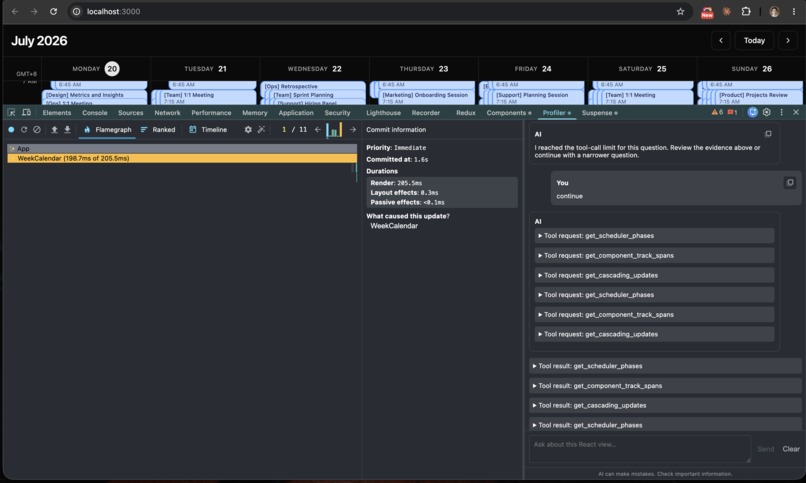
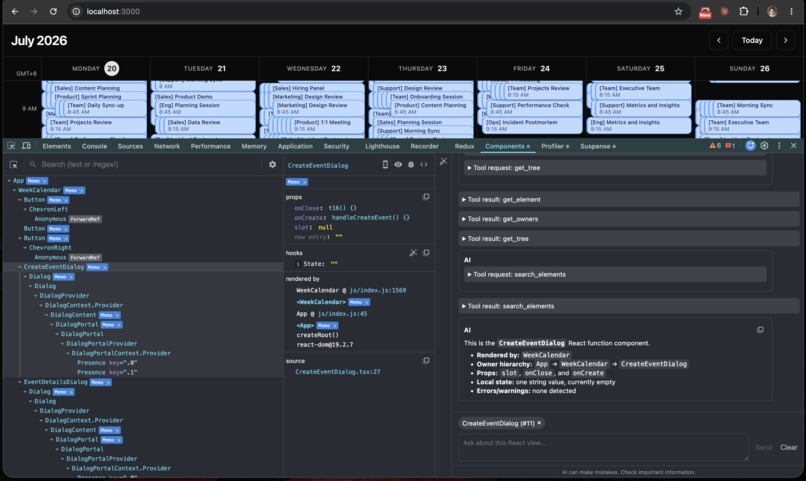
Components tab with AI Assistance
-
Components tab with AI Assistance
-
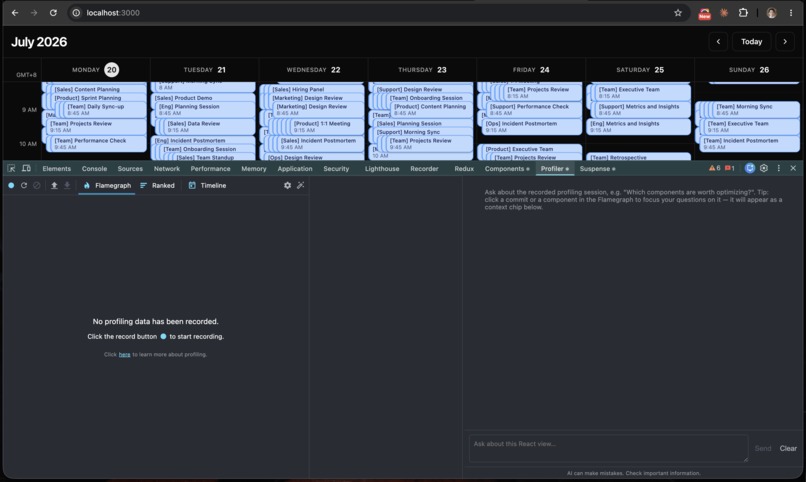
Profiler tab with AI Assistance
-
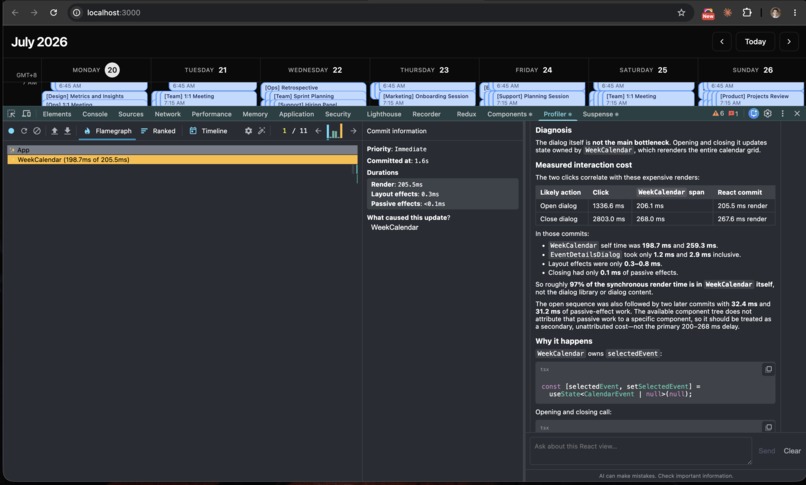
Profiler tab with AI Assistance
-
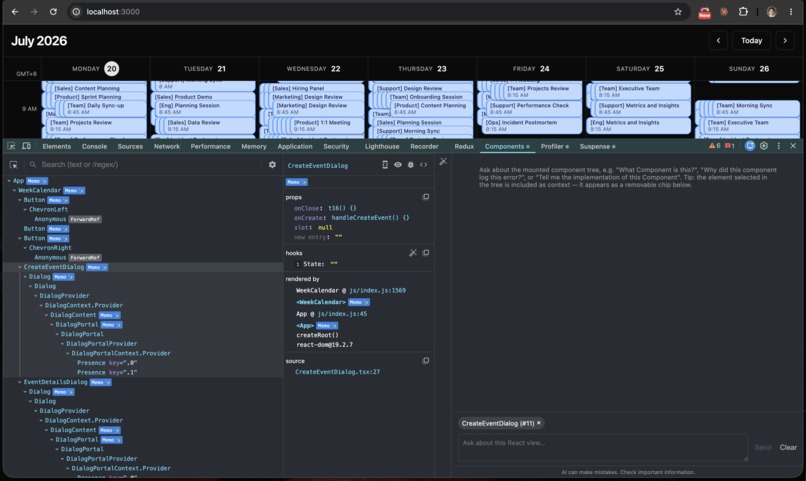
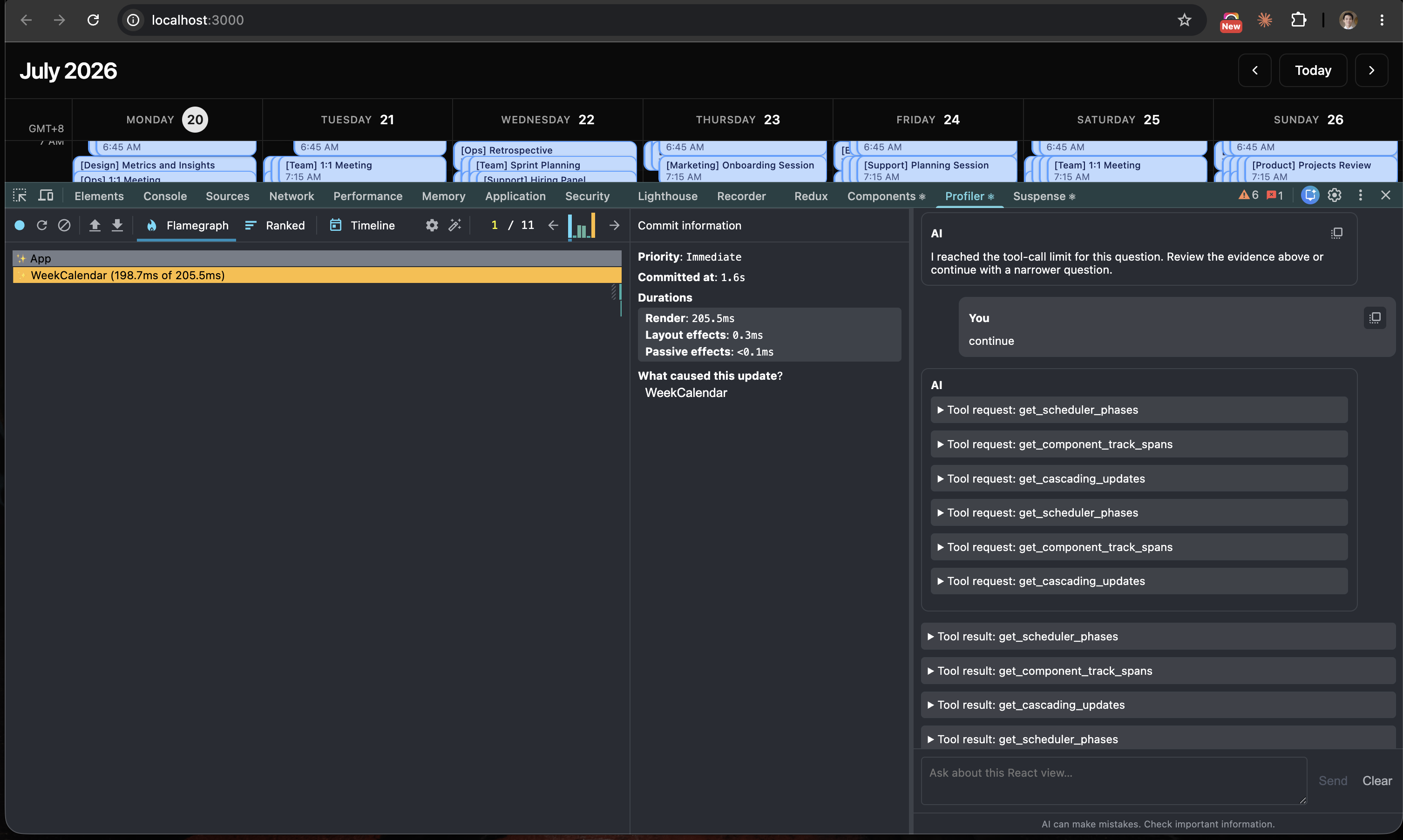
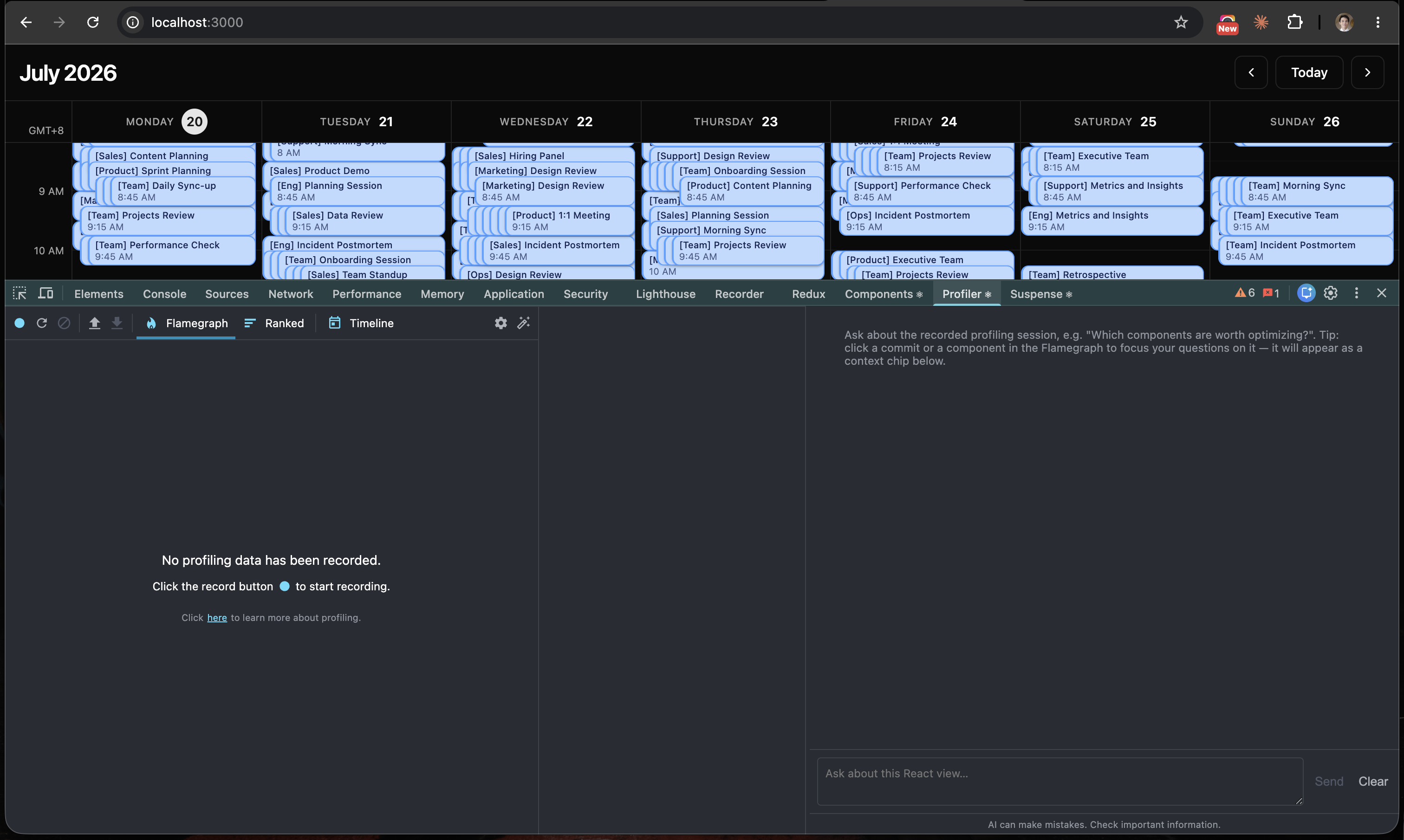
Profiler tab with AI Assistance
-
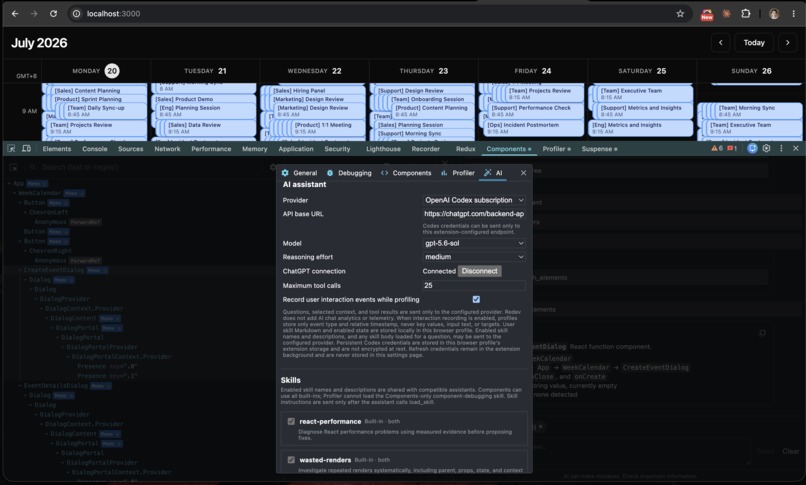
AI Assistance Settings
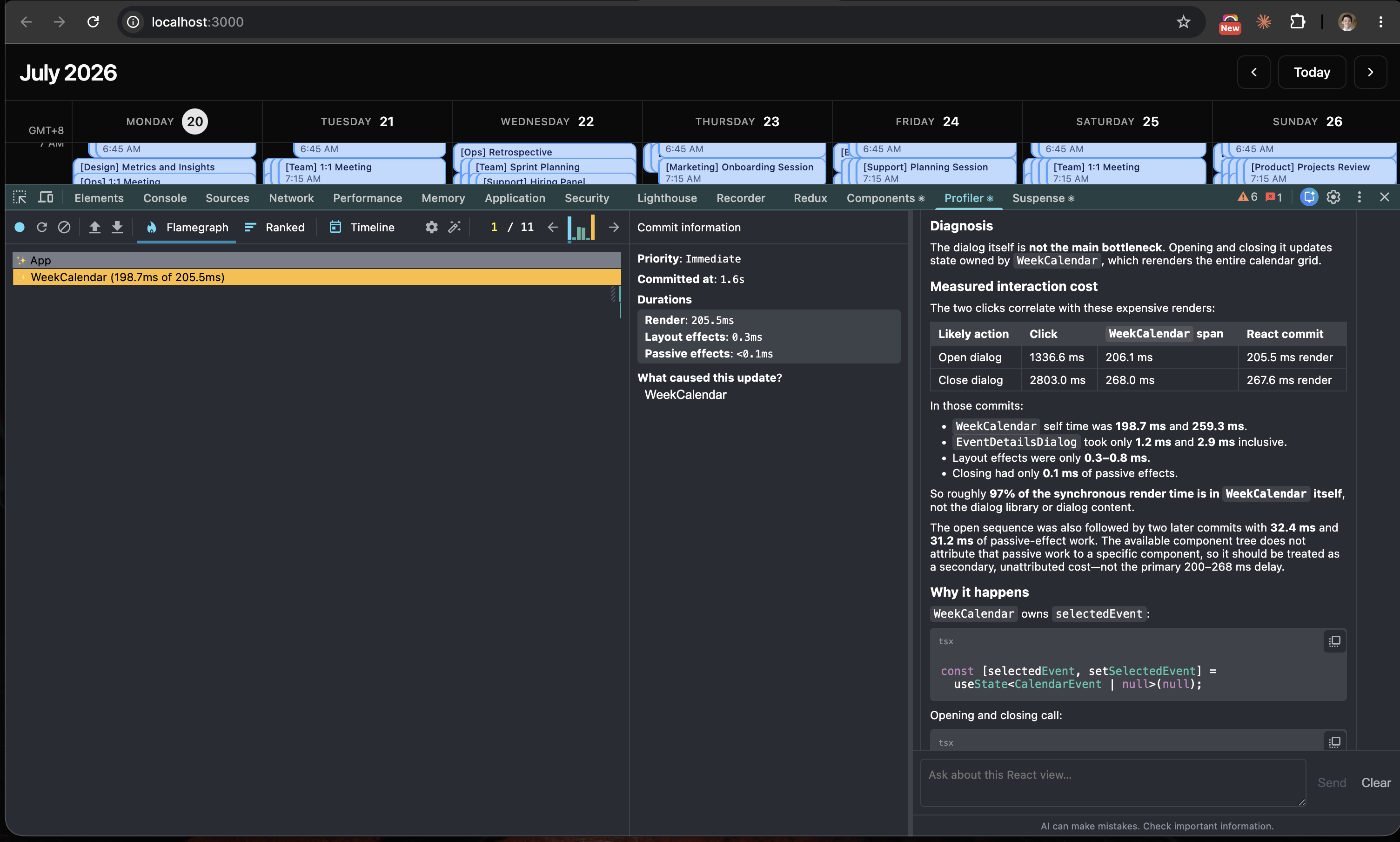
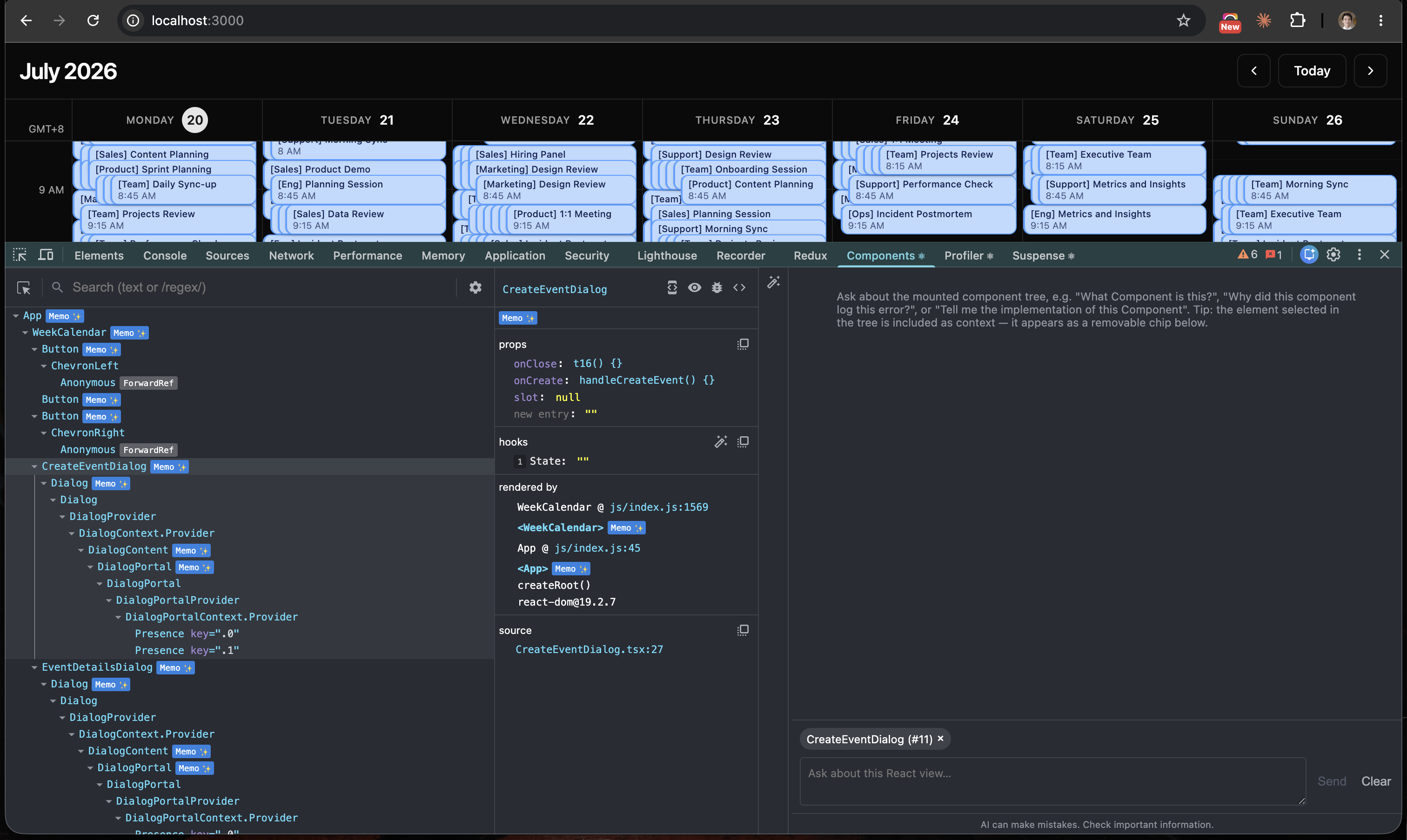
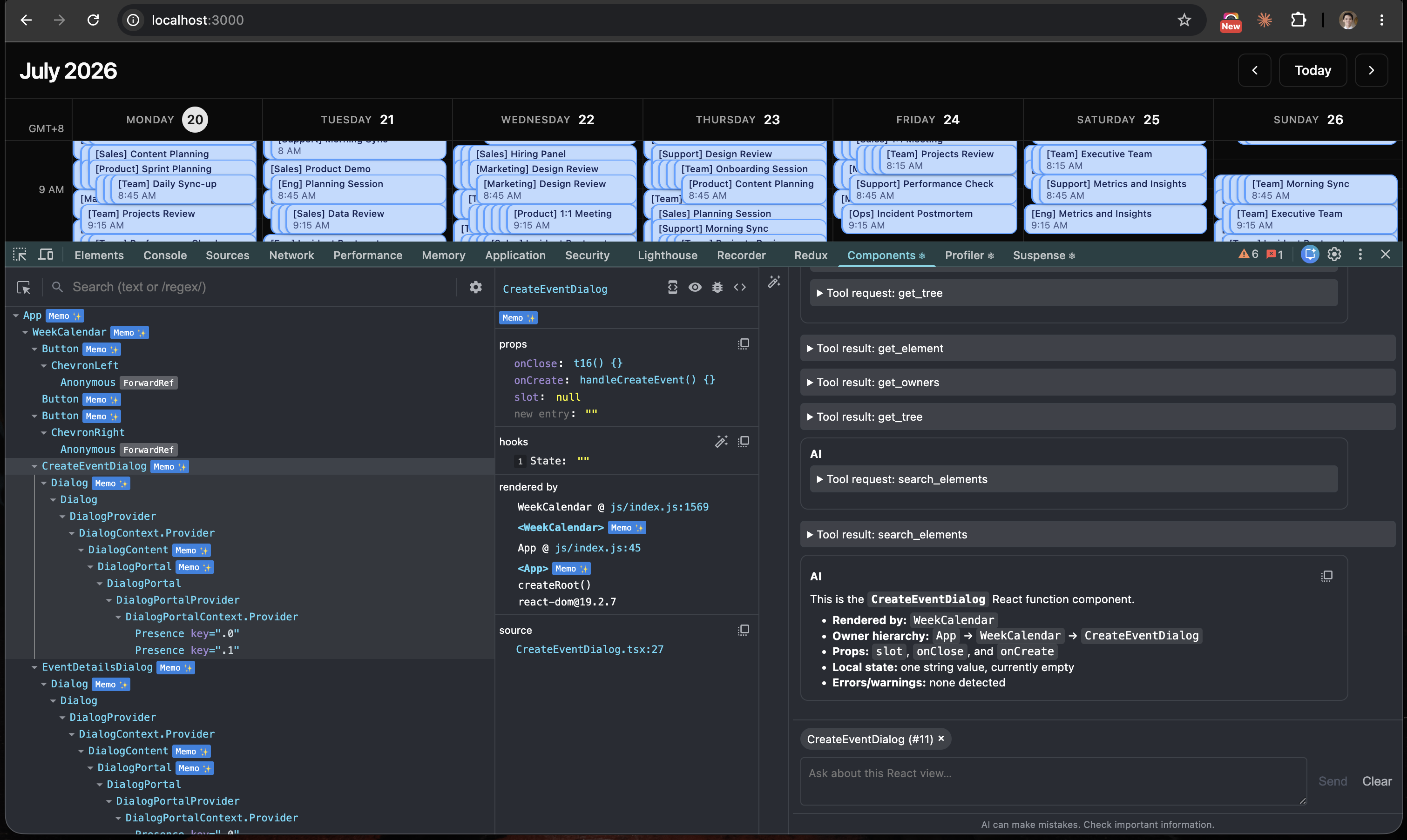
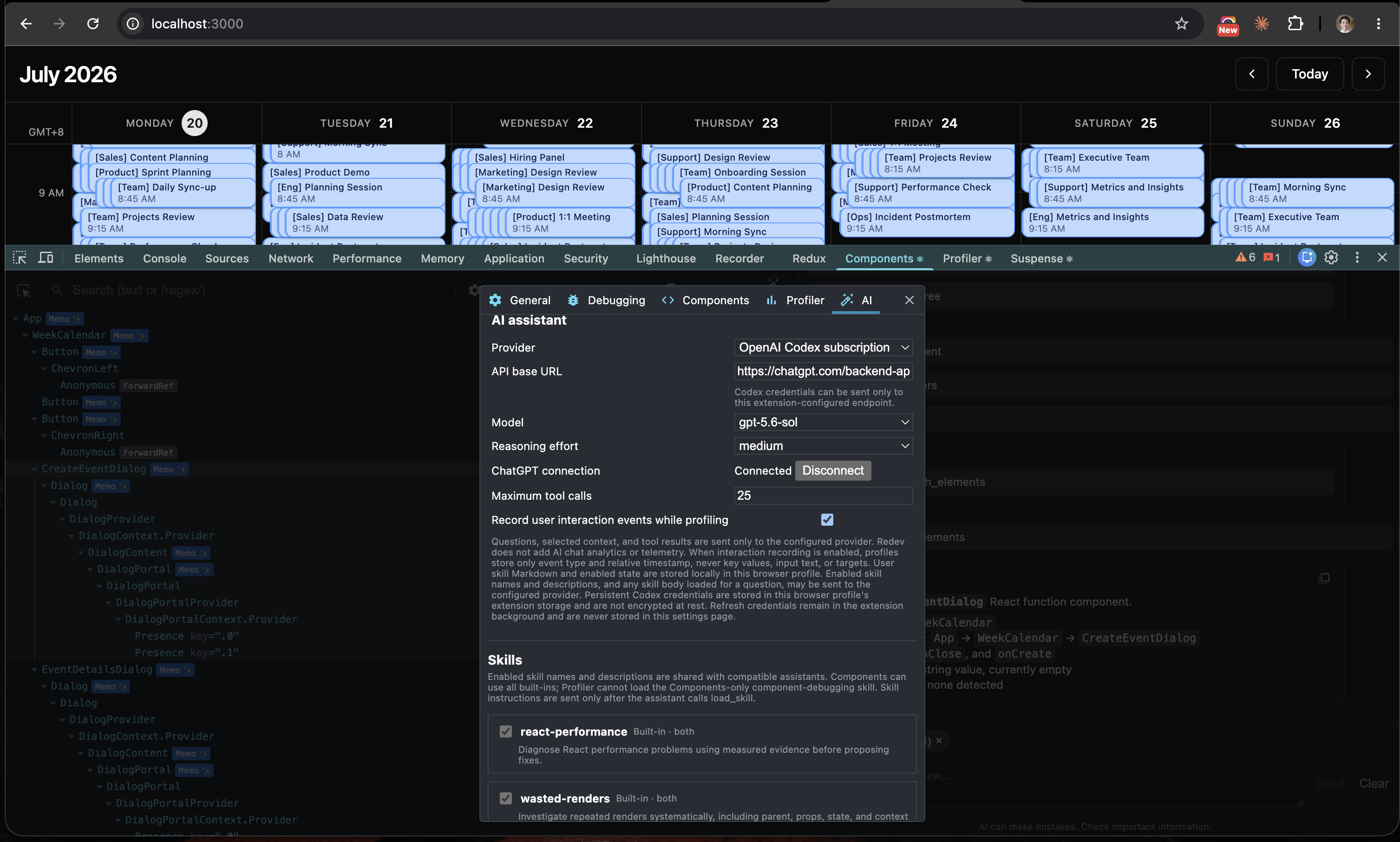
Inspiration
Debugging performance bottlenecks in a React application is one of the things I love to do most. The feeling I get when fixing a performance issue is satisfying. Seeing the application speed up and knowing the user is happy makes it all worth it. In my 10-year career, web performance optimization has consistently been one of the most complex tasks in web development. You need to lear a lot of concepts, including the rendering pipeline, how the main thread works under the hood, and performance best practices. React adds another layer of complexity to performance debugging because of its complex reconciliation algorithm and custom scheduling mechanisms designed to cooperate with the main thread. In my experience, understanding these React internals, at least high-level concepts, is crucial for effective optimization.
While I love investigating performance issues, it is definitely not easy. Current tools like React DevTools and the Chrome Performance panel are fantastic and help us analyze performance deeply, but their user interfaces can be overwhelming, especially for beginners. When I speak with colleagues about their experiences, many say they rarely use these tools simply because the UI is confusing. If you are new to this and open a flamegraph, your first instinct is often to just close the panel. Honestly, there are still features in the Chrome Performance panel that confuse me. Indeed, its a complex tool!
Everything changed when AI assistance was added to the Chrome Performance panel. This is revolutionary. Having a chat interface right inside the performance panel, allowing you to interact with an AI agent to analyze what is happening in the call tree is amazing. Of course, you still need a basic understanding of the Chrome profiler to use it effectively, but the chat agent dramatically speeds up the analysis by providing clear summaries. This is incredibly helpful not just in development, but also in production because the AI can actually understand obfuscated, minified code.
You can watch some of my videos below where I use the Chrome profiler to analyze performance issues in production products like Claude and Sentry. You will see firsthand how the chat interface helps me debug production code:
- Learn How I Analyze and Fix Slow Pages in Production (Sentry Error Monitoring Case Study)
- Debugging Claude's Slow Chat UI
This experience made me realize how much I want AI assistance inside React DevTools (RDT). Imagine having a chat panel in the React profiler to summarize a recording session and suggest specific optimization strategies. That would be a game-changer. You might wonder, why do we need this in RDT if the Chrome profiler already exists? RDT is superior when you need to focus specifically on React-centric data like render timings. While React Performance Tracks were recently added to the Chrome profiler, those tracks are unfortunately not captured by Chrome's AI agent yet. Even if they were, the massive volume of data generated by the profiler poses a challenge for context windows and processing. Adding this chat capability directly into RDT feels like the perfect solution. I also prefer extending RDT over building a completely new tool from scratch because RDT is already excellent and has brought me a lot of success. Adding AI assistance would enhance the tool without disrupting the existing user experience.
Here's my first attempt to create a React performance monitoring tool. Although I achieved what i want in this tool, but in practice, its not easy to embed it into a project and also I dont like the experience its slow. And what i want is RDT extension.
Earlier this year, I added a note to my Notion to attempt extending RDT with a chat interface. With the agentic AI tools like GPT 5.6 available today, this feels like the perfect time to build it. Of course, bringing this feature to life in RDT is no easy feat. But let’s see how AI can help me build it!
What it does
Redev extends the React Devtools through adding chat interface. It does the following:
- Context-Aware Insights: Answers complex questions about your React performance data, offering deep insights into rendering, commits, scheduling, and more.
- Source Code Bridging: Connects your raw source code directly to live runtime outputs like the Fiber tree. Its built-in tool calling allows the AI agent to inspect component source code. This is crucial. E.g React provides a way to compose through passing children. In the source codes, you dont know these children. But inRDT, its determined because its shows the runtime output. Knowing the Components output + the source codes could give better contexts to your agents.
- Automated Optimization: Suggests specific code changes and automatically generates prompts packed with performance insights, ready for your coding agent to execute.
- Deep Component Inspection: Delivers detailed technical information about any component in your application hierarchy
How we built it
Since the AI chat capability needed to integrate directly with React DevTools, I cloned the React repository and renamed the project Redev. This allowed us to build it as a different RDT extension. Adding a chat interface into RDT is a complex task, so I utilized Codex through the new ChatGPT app and leveraged the new GPT 5.6 Sol. I started by creating a markdown file outlining the technical design details of this AI chat. I mapped out the features I wanted and how they would integrate with the existing RDT layout such as adding the chat panel to both the Components and Profiler tabs, defining the user flow, selecting the model providers to support for the MVP, and drafting the initial architecture. A key focus includes ensuring the chat components were modular and reusable across both tabs.
After finalizing the design markdown, I used the Codex to create a comprehensive "Plan" file. This acted as a technical blueprint for building the chat functionality based on our initial specifications. The plan broke the development down into distinct milestones. I also prepared two separate convention files: DevTools Shared Conventions and React Review Conventions. These documents were used during the review phase to guarantee that all new code strictly adhered to existing project standards.
With the plan finalized, I asked Codex to establish a detailed automated workflow to implement the chat. Below is the actual prompt I used:
Please analyze this redev-plan.md . This is for extending the react devtools to add ai chat interface in both Components and Profiler tabs. After analyzing then lets go work. Here's the workflow i want. spin an agents to analyze the plan another agents which will implement the work based on the plan.This implementer other than will do the implementation, it will validate the changes. Check the lint and typecheck that we can use here. If there are related tests, make sure to pass thoses tests. If there's a UI changes, make sure to validate the tests in the browser. I think for devtools, it runs in localhost:8080. after implementation, lets do spin agent to the reviewer. Ther reviwer will check the correctness of the implemented solution. And also check the 2 conventions we have- devtools-shared-conventions.md and react-review-conventions.md . if the reviewer find any issues, pass this to the implementer and implementer will refine it. And then implementer will ask again a review Security is imporant. If there are edge cases, or risks, just write in the md file. If everythings are good, then move to next task.
Based on this prompt, Codex created a complex multi-agent workflow that became the driving engine of the implementation. With the design details documented, the plan in place, and the workflow configured, Codex kicked off the development. It was an intensive session. Codex spun up a total of 64 sub-agents and systematically executed the steps for each milestone. As each milestone was reached, I stepped in to review the code, refactor where necessary, and run manual tests. The beauty of Codex is that it could test the AI chat dynamically using the React development shell hosted on localhost:8080, performing browser testing directly within the ChatGPT app environment. This capability was incredibly powerful. My workflow- delegating implementation tasks to Codex while I acted as the manual reviewer and quality assurance tester until the final milestone was successfully completed.
I can say gpt 5.6sol is a monster. Its not only its a good model for generating the output I want, but its quite efficient model. I do have Codex plus subscription. Kudos to the team!
Challenges we ran into
Building a chat interface by extending RDT was a massive challenge. Even though the manual coding was delegated to Codex, the testing process still required significant manual effort. For every complex task, I had to thoroughly test the changes inside the RDT development shell to ensure compatibility. Would it crash the DevTools? Would the features actually work? There were so many open questions. Fortunately, gpt-5.6sol proved to be an exceptionally capable model that consistently delivered the exact outputs I needed.
Another major hurdle was determining how to test the chat functionality itself. While supporting a Codex subscription was a core feature I wanted to include, that integration was scheduled near the final milestone, and configuring the subscription workflow wasn't exactly straightforward. To unblock development, I decided to use Ollama to run local models. Fortunately, Codex integrated with it seamlessly.
The final big challenge was ensuring that the new code remained as isolated as possible. I wanted to avoid polluting the repository by modifying existing files. If the implementation aggressively touched core React modules, reviewing the changes would become a nightmare, and syncing with future upstream React updates would be incredibly difficult. Because of this, the workflow strictly enforced that changes must be isolated. Minimal, targeted modifications to existing modules were acceptable and often necessary but avoiding unnecessary edits to the original codebase was a top priority.
Accomplishments that we're proud of
Below is the list of features I successfully implemented in this project, and I am incredibly proud of the results:
- AI chat is now fully available in both the Components and Profiler tabs, allowing you to seamlessly analyze component structures and debug performance bottlenecks.
- The chat is completely configurable via a settings panel. For this MVP, it supports both local models via Ollama and cloud-based models via a Codex subscription.
- It supports custom "skills," which is highly beneficial if you or your team have specific coding conventions, architectures, or performance best practices you want the agent to enforce.
- The chat is a completely non-breaking feature integrated into React DevTools as a secondary extension. Your RDT user experience remains exactly the same.
- It works on both local development servers and live production applications. If you want to understand how a company built a specific Component, the chat will analyze the production React app using the available Fiber tree and bundled code.
- Redev will always be free to use.
What we learned
I learned a lot from this project. First, thorough planning is incredibly important. Having strict convention files is important as well. AI agents can be nondeterministic when generating code, so spinning up a dedicated reviewer agent for every implementation, and then testing the changes against those convention files, is essential. Spinning sub-agents sometimes is unncessary, it makes the development slow and of course will eat your usage limit. You need to make sure sub-agents is needed. And of course, manual review and testing remain the most critical part!
Normally, my entire agentic workflow lives in the terminal; I love working with tmux, lazygit, neovim, and Codex right there. However, this new ChatGPT app completely changed my perspective on AI-driven workflows. It is really impressive. Of course, there are still features I would love the ChatGPT team to add, such as customizable keybindings, but my initial experience has been highly engaging and fun.
What's next for Redev
Here the plans for Redev:
- Publish Redev as chrome extension. And then later, support other browsers like Firefox.
- Support react-native.
- Sometimes, agents write sloppy React code, which can lead issues like defining bad effects, poor performance, and more. To fix this, improve detection for code correctness such as adhering with React Best Practices.
- Currently, the model providers only support Ollama local and Codex. Planning to support more model providers like GPT API key, Anthropic models through API key, and more.
Built With
- ai
- codex
- devtools
- frontend
- frontend-development
- javascript
- react

Log in or sign up for Devpost to join the conversation.