-
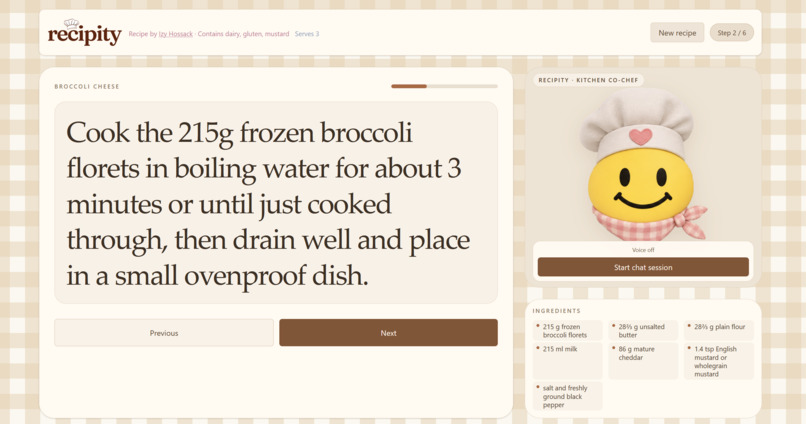
UI
Inspiration
Online recipes are buried under 2,000-word life stories, pop-up ads, and cramped layouts. Worse, when you're actually in the middle of cooking, interacting with a recipe means unlocking your smartphone with your elbows, washing your hands every two minutes, or touching your screen with raw-meat hands—ruining your device and risking foodborne cross-contamination. Not to mention when you need to search for measurement conversions, do serving size maths or find substitution ingredients. Everyone treats this messy juggling act as "just the way cooking works." We built Recipity for DurHack to replace static, cluttered recipe webpages with a completely hands-free, voice-controlled kitchen co-pilot; particularly assisting the visually impaired and neurodivergent.
We felt cooking and recipes both reflect the theme of composition as a recipe is composed of ingredients and quantities and we created Recipity to have more control over both, seamlessly adapting ingredients to allergy requirements/available ingredients and changing servings on availability constraints.
What it does
Recipity transforms any cluttered recipe URL into a clean, high-contrast kitchen display built to be read from 10 feet away and controlled entirely by voice:
- Zero-Fluff Recipe Extraction: Paste any recipe link and Recipity strips away ads and blog filler, extracting only the structured ingredients, steps, and exact timings.
- Giant Kitchen-First UI: Displays one active step at a time in large text with inline ingredient quantities embedded directly into each instruction so you never have to scroll back and forth.
- Hands-Free Voice Navigation & Timers: Using natural speech, cooks can advance steps ("Next step"), go back ("Previous step"), or trigger built-in step countdown timers ("Start the timer") without ever touching the screen.
- Real-Time Mid-Cook Adaptation: Missing an ingredient or need to scale servings mid-way? Ask Recipity out loud (e.g., "I'm out of heavy cream, what can I use?"), and it dynamically rewrites the remaining steps on screen.
How we built it
We split our architecture across a three-person team connecting a React frontend, a FastAPI + Gemini backend, and an ElevenLabs Conversational AI agent:
- Frontend (React + Vite + Tailwind CSS): Built a warm homely interface tracking
steps,currentStepIndex,ingredients, and activetimers, paired with a reactive corner voice avatar driven by live audio output levels (isSpeakingandgetOutputVolume()). Backend & AI Parsing (Python FastAPI, BeautifulSoup, Gemini): Built/api/parse-recipe/and/api/adapt-recipe/. Recipe pages are parsed from embedded Recipe JSON-LD when available, with BeautifulSoup cleaning visible-page text as a fallback. Gemini, viagoogle-genaiand Pydantic structured outputs, turns recipe content into validated data with ingredient amounts, step instructions, and timer durations. Serving-size scaling is calculated in Python, while Gemini supports substitutions and other recipe adaptations. - Voice Co-Pilot (ElevenLabs Conversational AI &
@elevenlabs/react): Configured a custom Recipity voice agent in ElevenAgents with a concise kitchen co-pilot system prompt and low-latency WebRTC audio. We wireduseConversationanduseConversationClientToolin React to bind four custom client tools (next_step,previous_step,start_timer, andadapt_recipe) directly to our React state setters.
Challenges we ran into
- Matching Client Tool Schemas & State Closures: Getting ElevenLabs' dashboard tool definitions to line up cleanly with React state updates took careful iteration. Initially, passing raw JSON into tool parameter descriptions and over-complicating
start_timerparameters caused friction, which we solved by keeping navigation and timer triggers parameter-free (relying on the active step's parsed duration) and scopingadapt_recipeto a single{ request: string }parameter with blocking tool responses enabled. - Synchronizing Voice Confirmations with UI State: If the voice agent spoke before the screen updated or before Gemini finished rewriting a recipe, the experience felt disconnected. Enabling "Wait for response" on our ElevenLabs client tools ensured the agent waited for React state updates and backend adaptations to complete before confirming out loud.
- Taming Messy Recipe HTML: Recipe blogs vary wildly in structure. Pairing aggressive BeautifulSoup tag stripping with strict Pydantic validation prevented hallucinated cooking temperatures or missing measurements.
Accomplishments that we're proud of
- True Hands-Free Loop: Watching a voice command like "I'm out of butter, adapt the recipe" trigger an ElevenLabs tool call, hit our Gemini backend, update the giant step text on screen, and deliver a concise spoken confirmation all in one seamless flow.
- Deterministic Guardrails in the Kitchen: Enforcing strict Pydantic schemas on Gemini outputs so the AI never invents unsafe cooking times or temperatures while still allowing flexible mid-cook adaptations.
- Accessible, Purpose-Built Design: Designing an interface that doesn't just solve greasy hands, but also makes cooking genuinely more accessible for people with visual impairments or mobility limitations.
What we learned
- Voice UX Needs Brevity: In a loud, fast-paced kitchen, long AI monologues are frustrating. Prompting our ElevenLabs agent to keep responses under two sentences and act immediately via client tools made it feel like a real sous-chef rather than a chatbot.
- Clean Architecture Beats Fragile Hardware: Relying on WebRTC voice commands and deterministic JSON schemas proved far more reliable—and easier to demo live
- Layered Testing Saves Hackathon Hours: Testing UI state buttons first, validating tool call payloads in the ElevenLabs dashboard simulator second, and running live voice sessions last saved us from debugging audio and state bugs at the same time.
Built With
- css
- elevenlabs
- entire
- fastapi
- geminiapi
- javascript
- python
- react

