Recap
Inspiration
Every streamer knows the moment: a raid lands, twenty newcomers flood in, and chat fills with "what did I miss?" The streamer either stops the show to re-explain or ignores them — either way, someone loses. We wanted a bot that answers that question from what actually happened on stream, not from a hallucinated summary, and speaks the answer in the streamer's own voice.
What it does
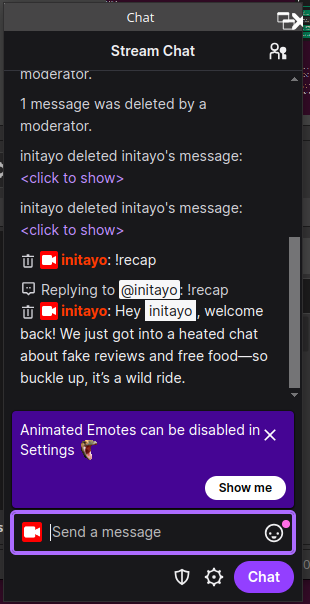
Recap listens to the stream through OBS, transcribes speech in rolling 10-second chunks, and keeps a 5-minute rolling transcript in memory. Anyone who just arrived types !recap in Twitch chat and gets a threaded 1–3 sentence catch-up written from the real transcript. !recap chat summarizes chat instead of audio, the broadcaster can pin trusted context with !note, and !recap voice speaks the recap aloud in the streamer's cloned ElevenLabs voice, routed back into the broadcast through a dedicated OBS sink. A 20-second per-user cooldown plus a 30-second global voice throttle keep TTS costs bounded.
How we built it
- Capture:
ffmpegpipes 16 kHz mono PCM from the OBS monitor source (recap.monitor) in 10-second chunks with a 1-second overlap; a bounded queue drops stale chunks to stay near the live edge. - Transcription: Groq
whisper-large-v3-turboper chunk, with word-level overlap dedup so the 1-second seam never repeats itself. - Summaries: Groq
openai/gpt-oss-120b, strictly grounded — the prompt forbids inventing events, and streamer!notes are injected as labeled trusted context. - Chat: Twitch EventSub over WebSocket for incoming messages, Helix for threaded replies; broadcaster-scoped token with
user:read:chat+user:write:chat. - Voice: a stdlib-only ElevenLabs client (no SDK dependency) — instant voice cloning via
/voices/add, TTS with automatic stock-voice fallback when no voice ID is set, playback throughffplayinto a dedicatedrecap_ttssink that OBS re-ingests without feedback into the transcription monitor.
Challenges we ran into
- The three-word recap. Live on a real channel, the bot replied "The streamer has" — and stopped. The summary model is a reasoning model, and its hidden reasoning eats the same
max_completion_tokensbudget (120), starving the visible answer. We raised the budget to 512 and moved length enforcement client-side: sentence-boundary truncation with an explicit…. - Twitch's 500-character ceiling. Chat replies are capped at ~490 chars, cut at sentence boundaries so a summary never ends mid-thought.
- Free-tier voice cloning doesn't exist. ElevenLabs gates Instant Voice Cloning behind paid plans, so a missing
ELEVENLABS_VOICE_IDauto-selects a stock voice instead of disabling the feature — voice recaps work on the free plan, just not in your own voice. - Feedback loops. Speaking a recap into the same monitor being transcribed would poison the transcript; the separate
recap_ttssink keeps speech on the broadcast without re-entering the STT pipeline.
Accomplishments that we're proud of
- A real threaded
!recapreply in a live production channel, generated from actual stream audio. - Voice recaps spoken in a cloned voice and heard on the broadcast — with zero new Python dependencies.
- A graceful degradation ladder: no API key → clear message; no voice ID → stock voice; no transcript yet → honest "not enough context" instead of a hallucination.
- A full stage demo (interactive Twitch sim, production popout rebuild, screenshots) that runs without touching a live channel.
What we learned
- Reasoning models bill their thinking against your completion budget — size
max_completion_tokensfor thought plus answer. - Grounding instructions ("use only the transcript; do not invent") work surprisingly well when the context window is small and honest — and saying "I don't have enough context" is a feature, not a failure.
- Cost control is a product feature: cooldowns and throttles aren't just anti-spam, they're what make per-request-priced voice AI shippable on a streamer budget.
- Separating audio paths (monitor vs. broadcast sink) matters as much as any code.
What's next for Recap
- Persistence: carry transcript, notes, and per-stream summaries across restarts (SQLite) so
!recapsurvives a crash mid-raid. - Auto-recaps: detect raids/hosts and post a catch-up unprompted for the wave of newcomers.
- Dashboard + OAuth: replace
.envtokens with a proper Twitch OAuth flow and a streamer control panel (voice on/off, window length, cost meter). - More voices, more languages: per-user voice selection, multilingual transcription/summaries, and highlight clips (
!clip) built from the timestamped transcript.
How we used Codex (technology requirement)
Codex was the pair programmer for the whole build. It scaffolded the project from a one-line brief ("transcribe my OBS audio and recap it"), then wired the hard parts end to end: the ffmpeg PulseAudio capture loop with overlap dedup in recap_audio.py, the full Twitch EventSub WebSocket client plus Helix chat calls in twitch_chat.py, and the dependency-free ElevenLabs REST client in elevenlabs_tts.py. When live testing surfaced the cut-off "The streamer has" reply, Codex diagnosed the reasoning-token budget problem and implemented the fix (larger completion budget, sentence-boundary truncation, terminal echo of every sent reply). It also wrote the stage demo sim, the README, and this submission write-up. Every file in the repo was written or reviewed in a Codex session.
How Recap connects to Twitch
| Twitch product | What it does in Recap |
|---|---|
Twitch CLI (twitch token) |
Issues the broadcaster user access token with user:read:chat + user:write:chat scopes |
| OAuth validate endpoint + Helix Get Users | Validates the token on startup and resolves TWITCH_CHANNEL to a broadcaster ID (the MVP requires token owner = broadcaster) |
EventSub WebSocket, channel.chat.message |
Streams every chat message in real time; Recap parses !recap, !recap chat, !recap voice, !note, !voice from it, with reconnect and dedup handling |
| Helix Send Chat Message API | Posts the recap back as a threaded reply (reply_parent_message_id) so the answer stays attached to the question |
Groq (Whisper + chat model) and ElevenLabs (TTS/voice cloning) do the AI work, but every input Recap reacts to and every answer it gives flows through Twitch.
How streamers and their community use Recap
- Setup (once): the streamer creates the
recap+recap_ttssinks, points OBS monitoring at them, fills in.env, and starts Recap with--twitch --speak. - Viewers: newcomers type
!recapfor a threaded catch-up drawn from the last 5 minutes of actual stream audio,!recap chatfor a chat summary, or!recap voiceto hear the recap spoken on stream in the streamer's cloned voice. A 20-second per-user cooldown (plus a 30-second global voice throttle) keeps chat clean and TTS spend capped. - Streamers:
!notepins trusted context mid-stream ("we're switching to ranked now") that shapes every later recap, and!voice <text>speaks anything on demand — intros, shout-outs, or a quick mic check of the clone. The terminal mirror (!recap,!recap voice) gives the streamer the same answers privately.
