-
-
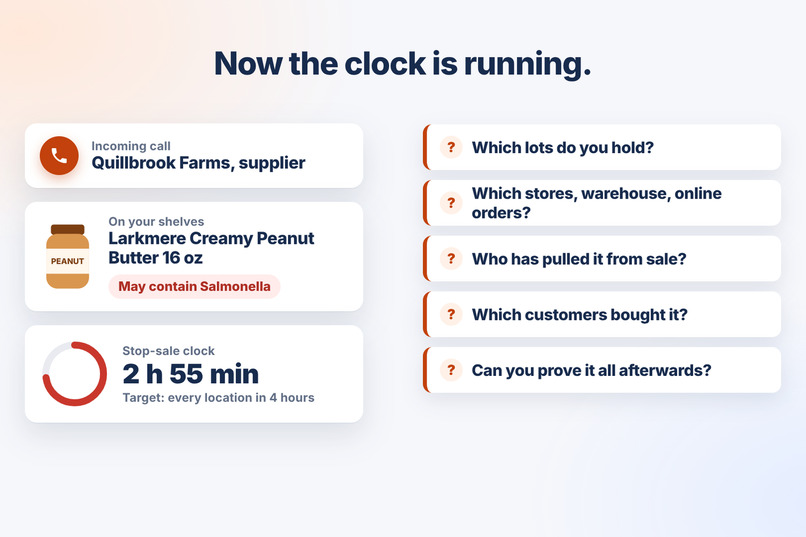
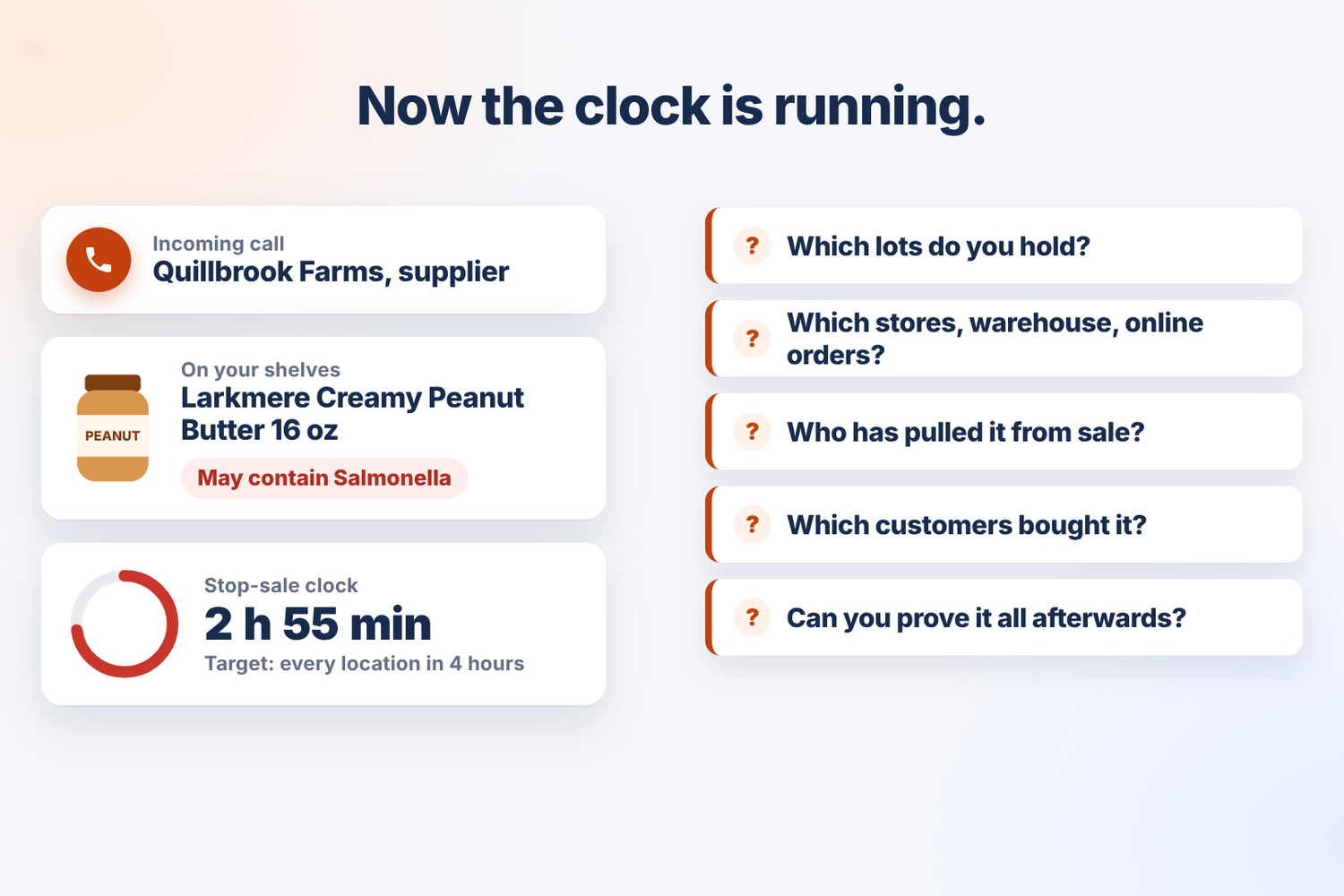
The problem: a recall is a race against the clock, and the answers usually live in spreadsheets and email threads.
-
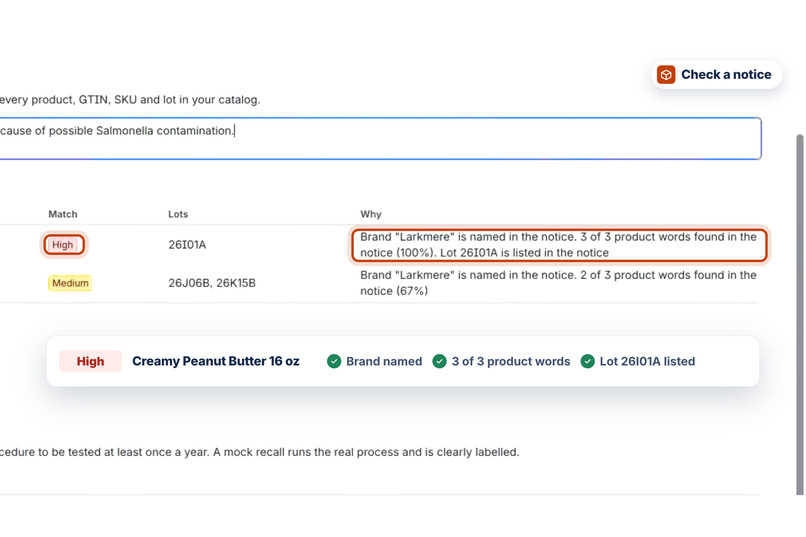
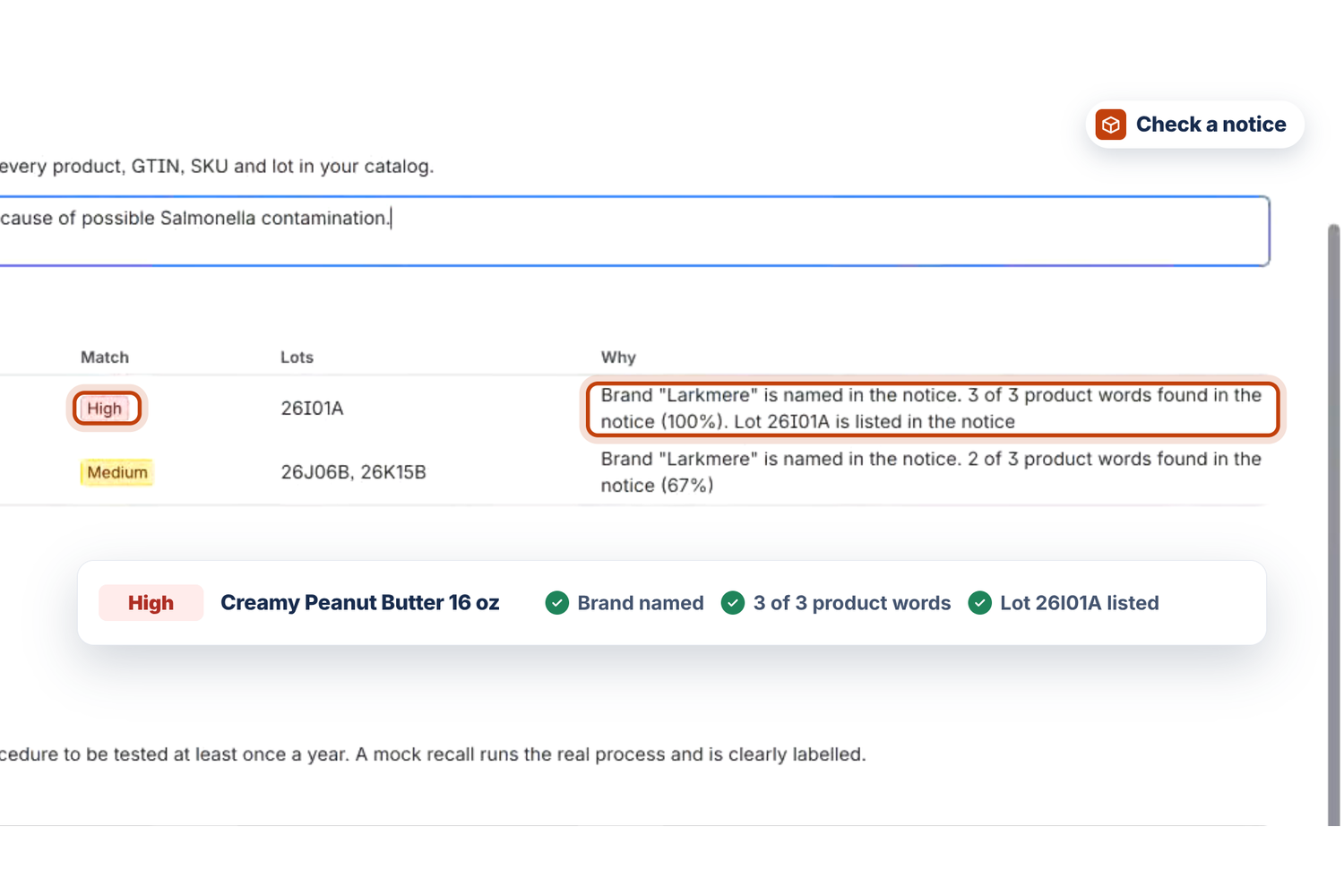
Check a notice: every match explains itself. Brand named, 3 of 3 product words, lot listed: High.
-
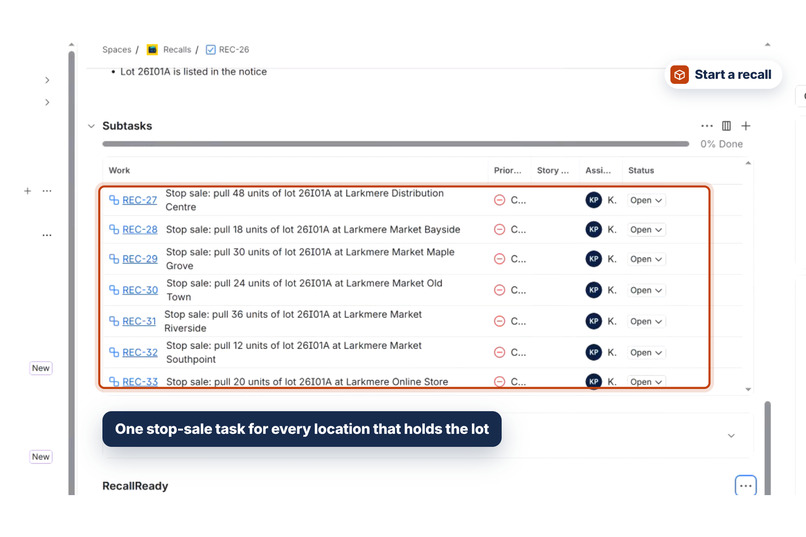
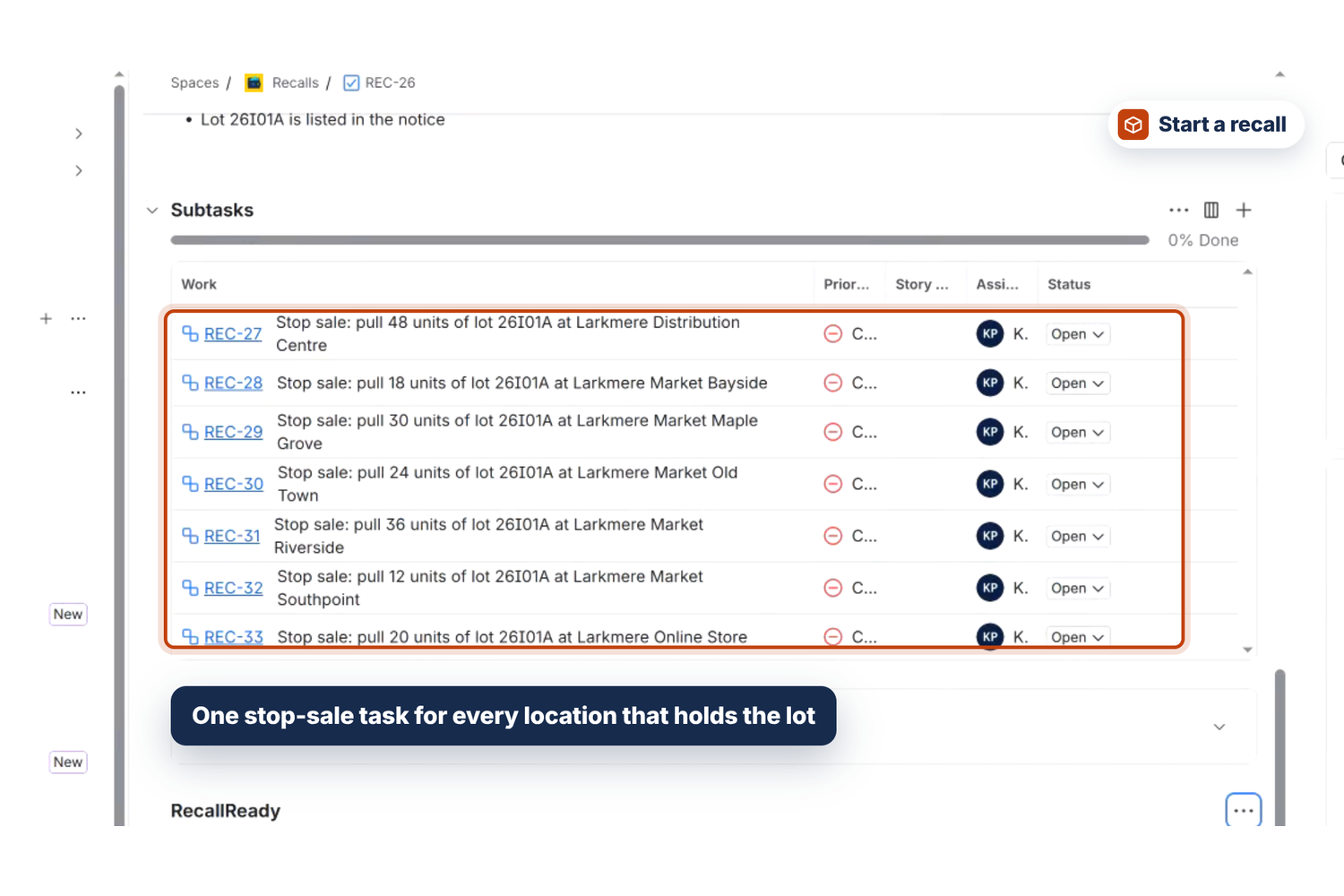
Start the recall: one case with a stop-sale task for every location that holds the lot, and the units to pull.
-
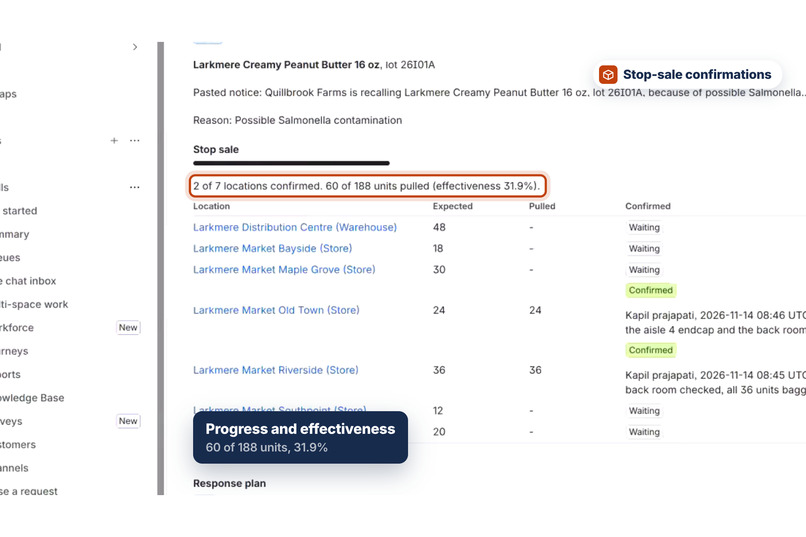
The case panel: progress and effectiveness as each store confirms on its own task.
-
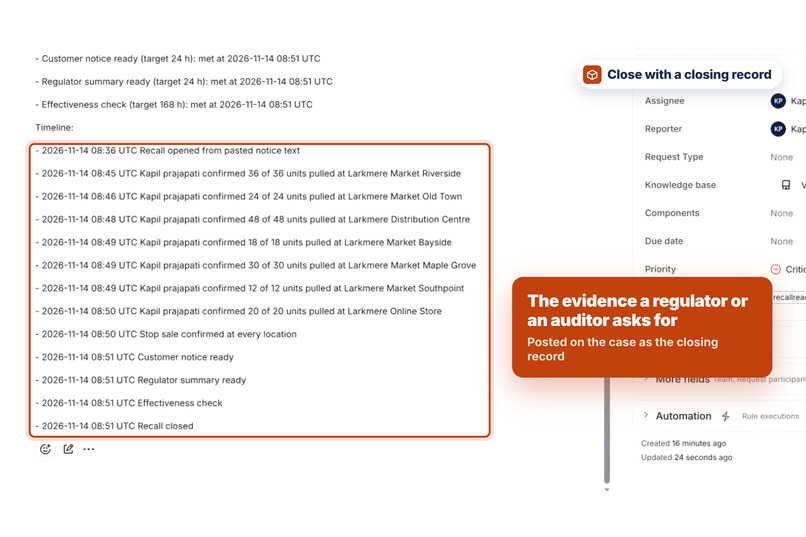
Close with a closing record: units recovered against units expected, every clock and a full timeline.
-
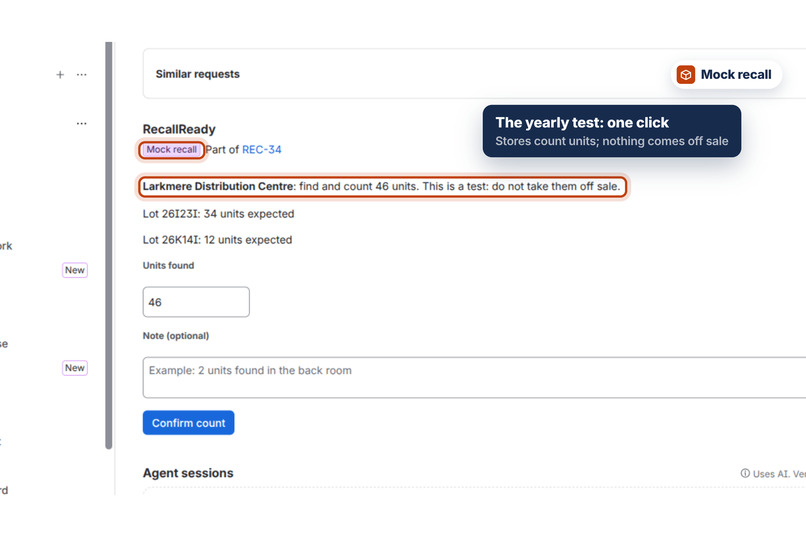
Mock recall: the real process on any product and lot, clearly labelled; locations count the units and nothing comes off sale.
-
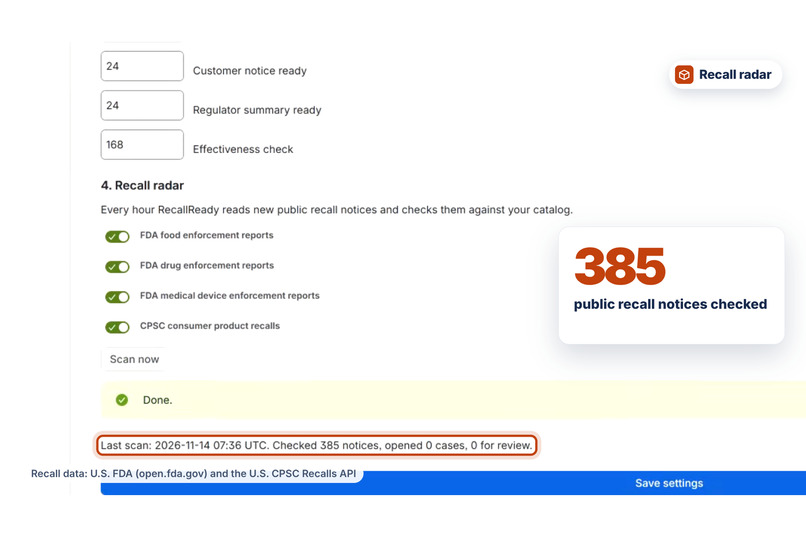
Recall radar: every hour it checks the FDA and CPSC recall notices of the last 30 days against the catalog.
-
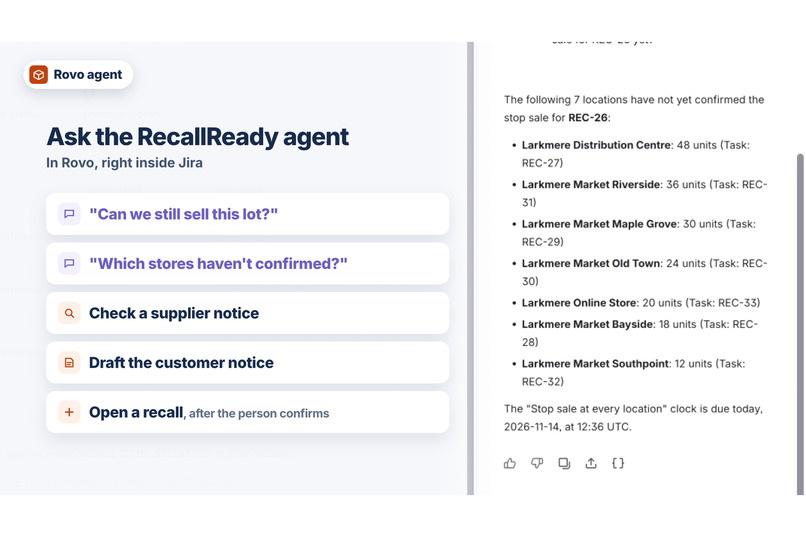
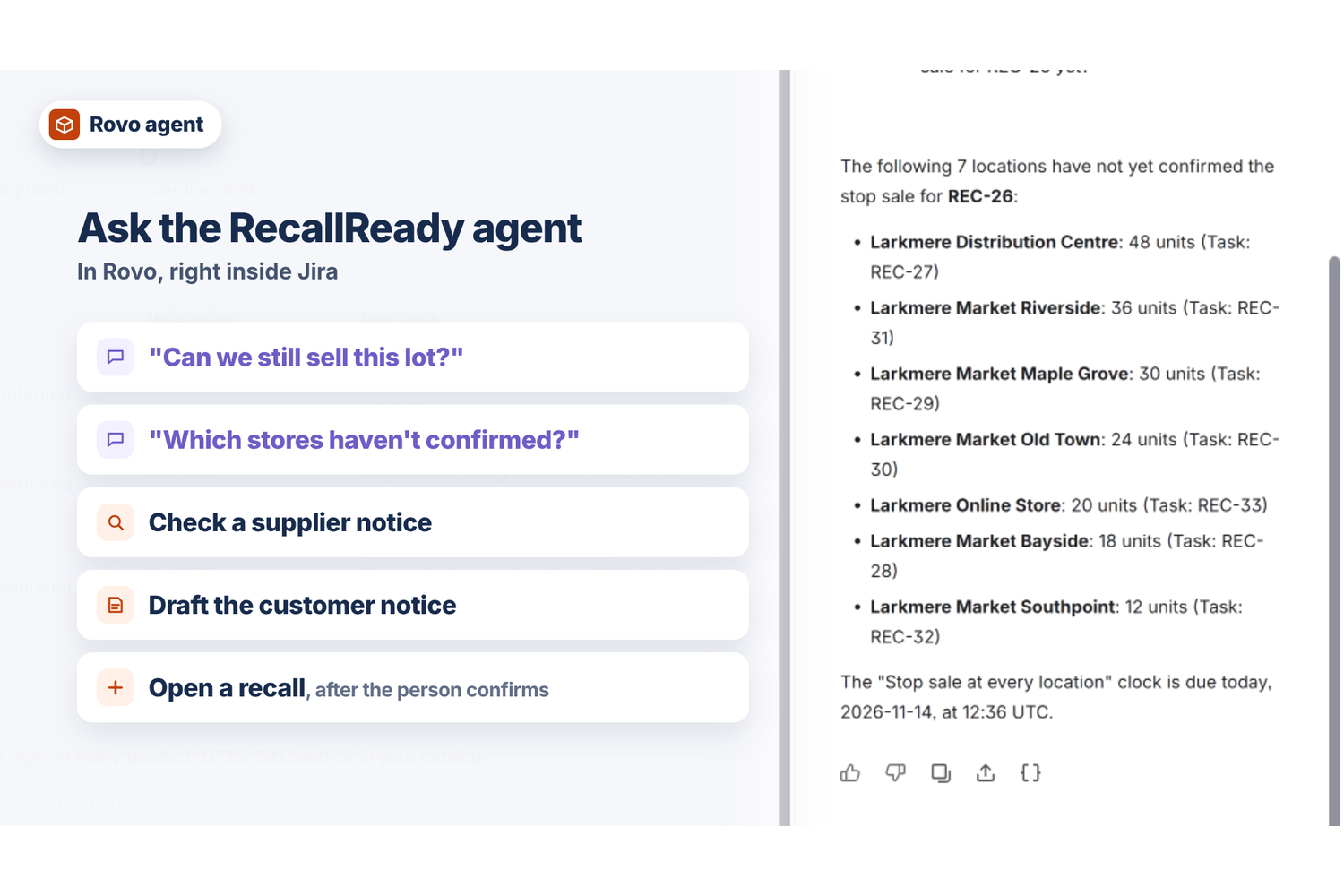
The RecallReady agent in Rovo answers "Can we still sell this lot?" and lists the stores that haven't confirmed.
-
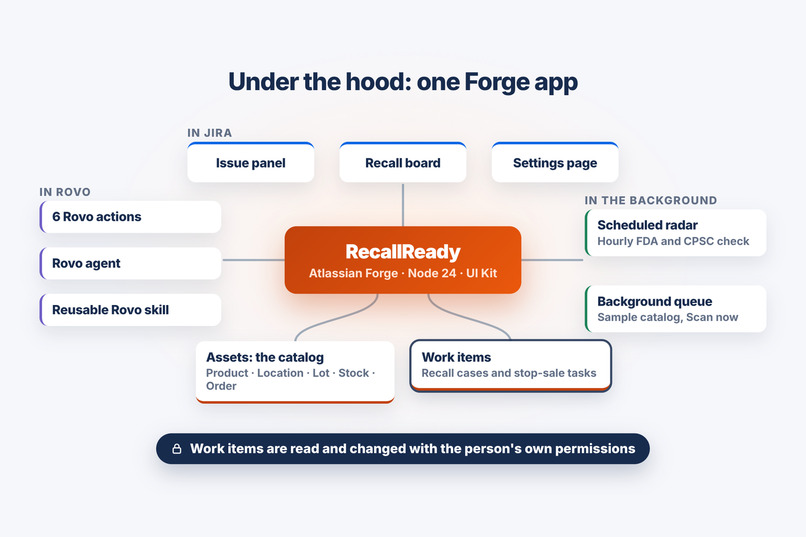
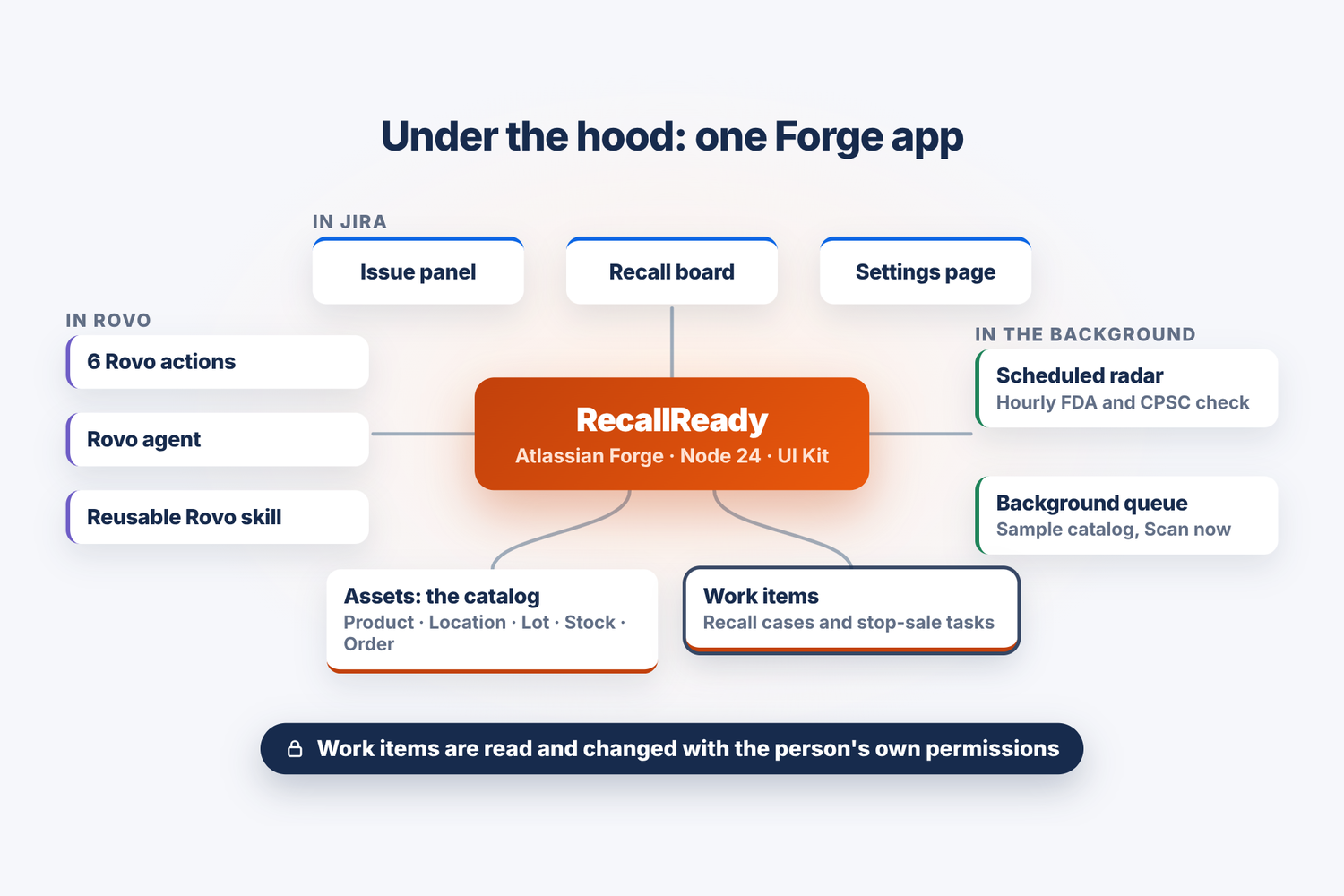
One Forge app: the catalog in Assets, cases in Jira, UI Kit screens, six Rovo actions, an agent, a skill, a scheduled radar and a queue.
Inspiration
A product recall is a race against the clock with real people at the end of it. When a supplier or a regulator recalls a peanut butter, a baby food or an air fryer, a retailer has to answer at once: which of our products and lots are affected, at which stores, warehouses and online orders is the stock, who has confirmed it is off the shelf, which customers bought it, and can we prove all of that afterwards? Too often the answers live in spreadsheets and email threads. Jira Service Management is built for operations teams and Assets can hold product master data, so we built the recall command center inside them.
What it does
RecallReady runs every product recall as a tracked case in Jira Service Management, with the catalog in Assets and a Rovo agent on the team.
- A notice arrives. Paste a supplier email or regulator alert into Check a notice on the recall board, give it to the Rovo agent, or let the hourly recall radar find it in the public FDA and CPSC feeds.
- RecallReady reads barcodes (GTIN, UPC, EAN, checked with the GS1 check digit), model numbers and lot codes, and matches them against every product in the catalog. Every match explains itself, for example "GTIN 02000000000237 appears in the notice" or "Lot 26J10A is listed in the notice".
- High: a GTIN on the notice equals the product's GTIN; or the brand is named and a model number equals the SKU; or the brand is named, at least 60% of the product name's words appear and one of its lot codes is listed.
- Medium: the brand is named and at least 60% of the product name's words appear; or a model number equals the SKU but the brand is not named; or the notice lists lots and none of them belongs to the product. Shown for review, never opened automatically.
- Low: the brand is named but fewer of the product name's words appear. Matches with no product word at all are folded under "Show brand-only matches".
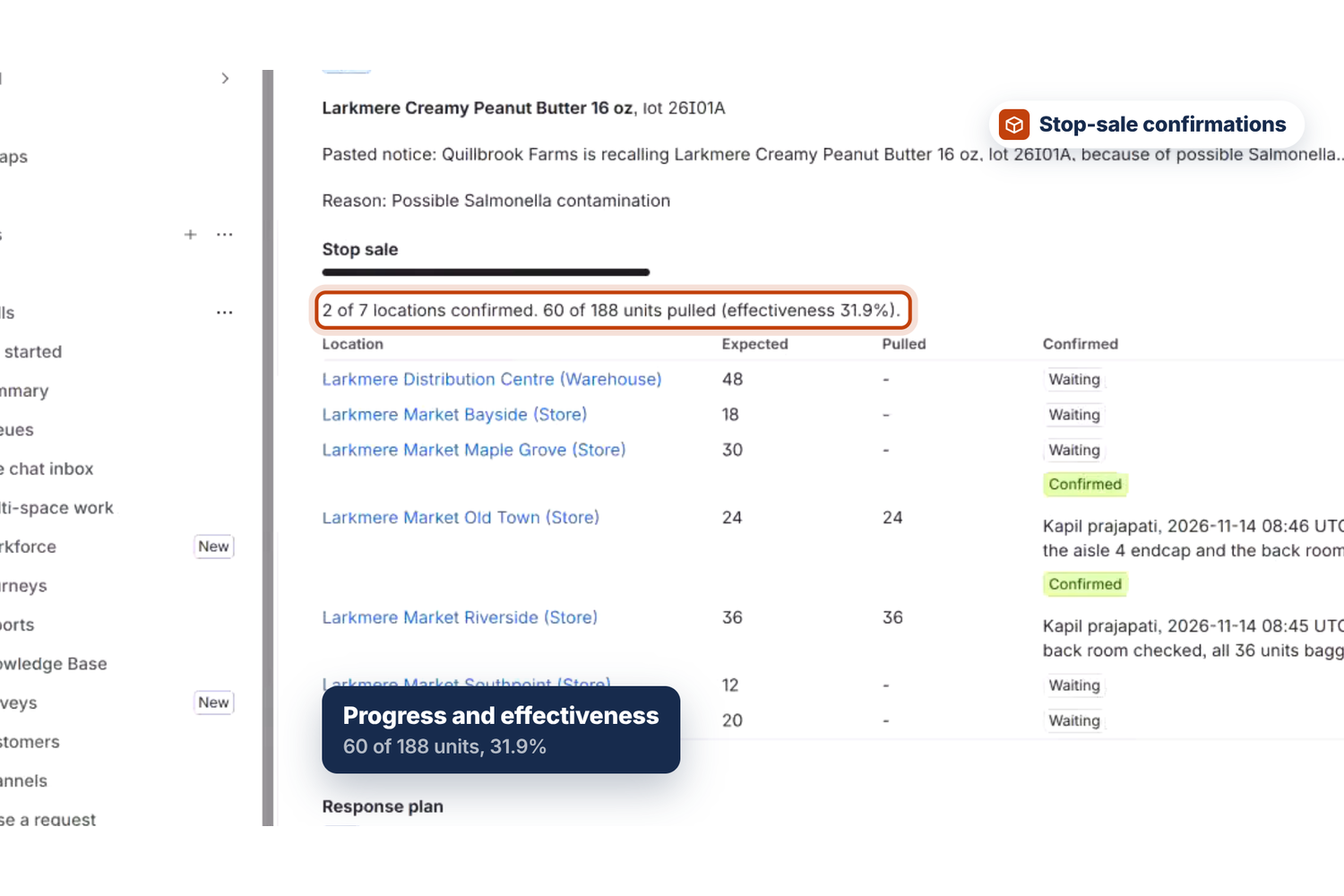
- Starting the recall creates a case work item and one stop-sale sub-task per location that holds affected stock, with the exact units to pull per lot. Several products from one notice go into one case, and a lot that is already under an open recall is not opened twice.
- Each store or warehouse manager confirms the units pulled on their task, with a note. When the last location confirms, the stop-sale clock is met.
- The case panel shows progress, effectiveness (units recovered against units expected), four response-plan clocks (stop sale 4 h, customer notice 24 h, regulator summary 24 h, effectiveness check 168 h by default, all configurable), the online orders that contain affected lots, a customer notice and a regulator summary ready to copy. RecallReady never sends anything to customers or regulators itself; people decide.
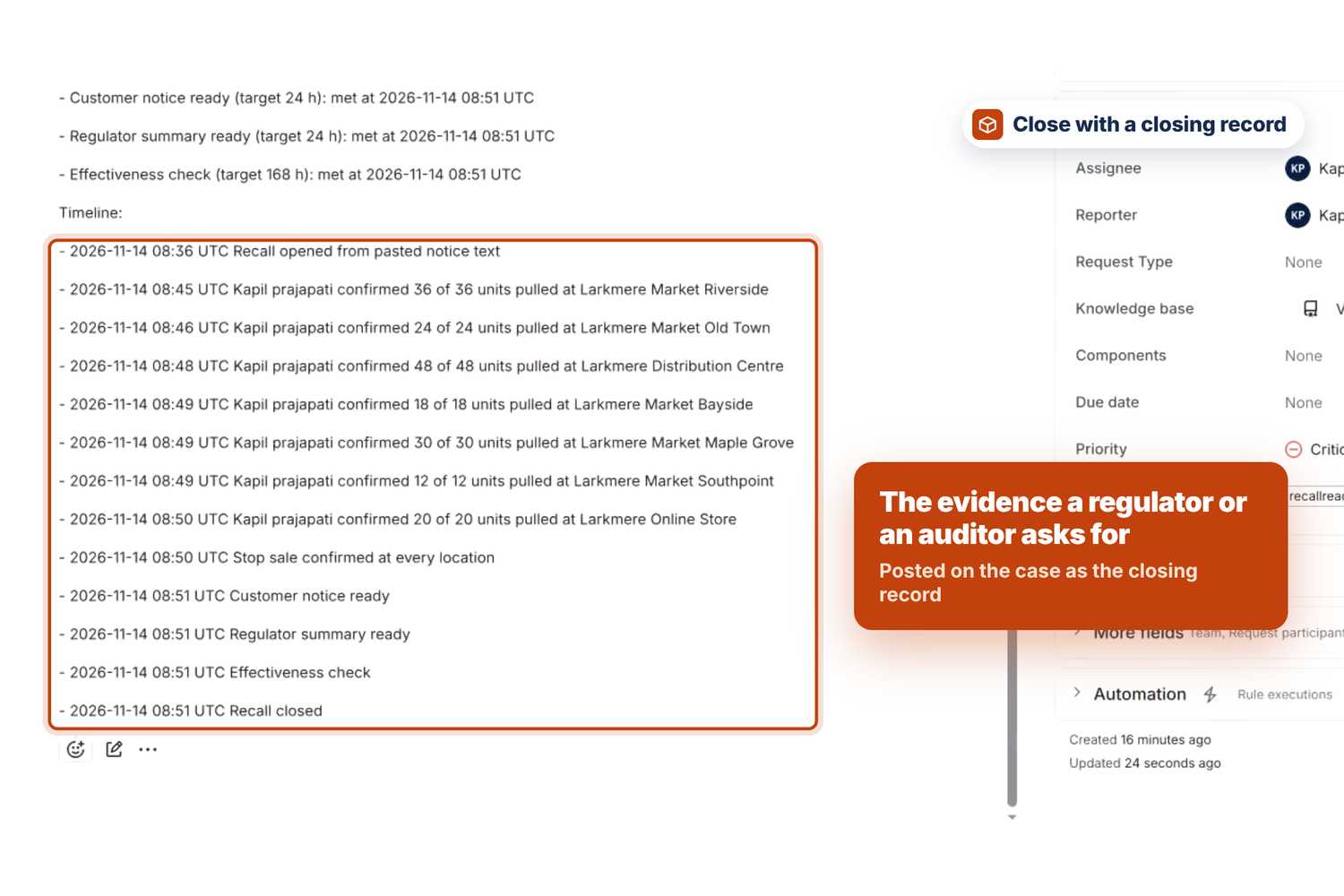
- When every location has confirmed, Close writes a closing record: units recovered against units expected, every clock and a full timeline. A closed case is frozen as it was closed.
It also covers the work around a recall:
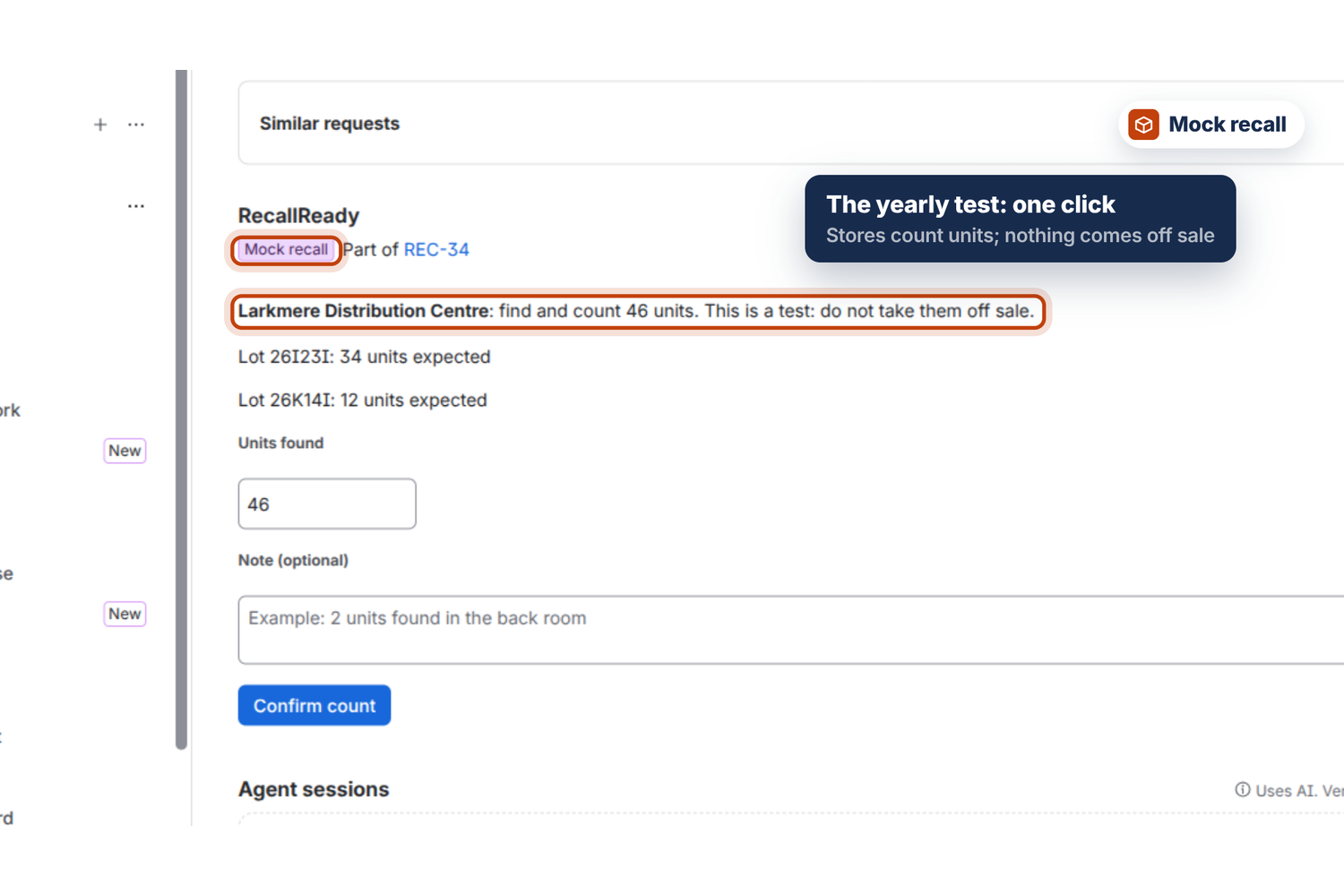
- Mock recalls. Food-safety schemes expect the recall procedure to be tested; the SQF Code requires the withdrawal and recall procedure to be reviewed and tested at least once a year. A mock recall runs the real process on any product and lots: each location gets a task to find and count the units, not to take them off sale. It is labelled "Mock recall" everywhere, its customer notice starts "Mock recall test: do not send this notice to customers.", and "Can we still sell this lot?" never answers no because of a test.
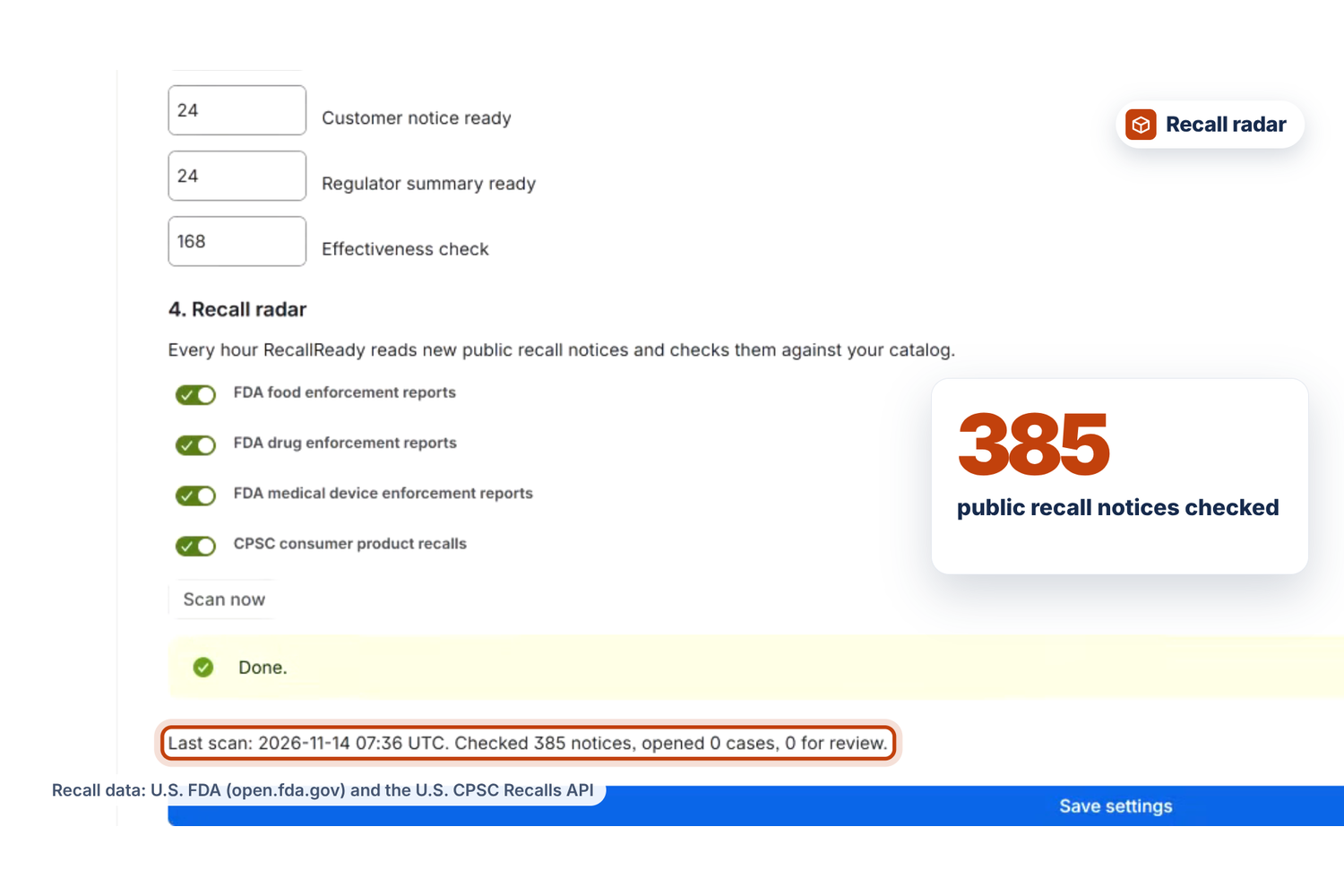
- Recall radar. Every hour it reads the last 30 days of openFDA enforcement reports (food, drug, device) and CPSC recalls. A High match opens a case by itself; each notice is claimed before its case opens, so two scans never open it twice. Anything weaker waits in a review queue on the board, one item per notice with its possible products. Its first scan on our test site read 385 notices.
- Rovo agent "RecallReady" with six actions (check-product, get-recall-status, list-recalls, check-notice, get-customer-notice, start-recall) and a reusable Rovo skill, recall-response. Ask "Can we still sell this lot?", "Which locations haven't confirmed?", paste a notice, ask for the customer notice, or ask it to open the recall; Rovo asks the person to confirm before the recall is created. "Can we still sell this lot?" reads every open recall in the site and never gives an all-clear it could not check.
- Settings for Jira admins: one click creates the Assets schema "RecallReady catalog" with five object types (Product, Location, Lot, Stock, Order) and, optionally, a fictional retailer to try everything with: Larkmere Market, with 24 products, 59 lots, 10 locations, 302 stock rows and 40 online orders.
How we built it
- Forge app on the Node 24 runtime, UI Kit for every screen.
- Modules: jira:globalPage (recall board), jira:issuePanel (case and stop-sale panel), jira:adminPage (settings), six action modules, rovo:agent, rovo:skill, scheduledTrigger (hourly radar) and a queue consumer (sample catalog loader and Scan now).
- Assets REST API for the catalog. Creating the schema, object types and attributes runs as the admin who sets it up; reading the catalog and creating sample objects runs as the app.
- Jira REST API for cases, sub-tasks (created in bulk, 50 per call), work item properties, comments and transitions. Everything the team does runs as the current user, so nobody sees or changes a case they could not open in Jira. The radar has no user and runs as the app.
- Each confirmation is stored on its own sub-task and merged when the case is read, so two managers confirming at the same moment never lose each other's work.
- The case property stays small: the list of affected orders, with customer names, is read from Assets when it is needed, so the case stores only how many there are.
- Forge Key-Value Storage for settings and radar state, plus short-lived lot claims that stop two people opening the same recall at once. External fetch goes only to api.fda.gov and www.saferproducts.gov and sends nothing but a date range.
- Pure logic (identifier parsing, notice adapters, matching, catalog lookup, case model, clocks, radar planning, answers) is covered by 91 unit tests with Node's built-in test runner, using real FDA and CPSC records as fixtures.
Challenges we ran into
- Assets setup: creating a schema as the app returns 403, so setup runs as the admin, and reference attributes are rejected (400) unless they name a reference type.
- User consent: a blanket error handler swallowed Forge's consent error, so the "Allow access" prompt never appeared until the error was passed back to the platform.
- The CPSC API reports some errors as HTTP 200 with a placeholder row, and openFDA answers "no results" with a 404; both had to become ordinary empty results instead of failures.
- 435 sample objects take longer than a page request may run, so the loader moved to a Forge queue consumer that reports progress on the settings page.
- Jira search shows a new case about 30 seconds after it is created, so two people starting the same recall a few seconds apart could both see no open case. Lot claims in Forge storage, which expire after a few minutes, now stop the second one and name the case that holds the lot.
- Text typed quickly into UI Kit fields could lose characters, so the free-text fields became uncontrolled inputs.
Accomplishments that we're proud of
- The whole recall runs end to end in Jira: notice, match, case, stop-sale tasks, confirmations, clocks, notices and the closing record, verified live on a real site.
- Every match explains itself, and nothing below High ever opens a case on its own.
- The Rovo agent answers the questions a recall team actually asks, from the same data the board and panels use.
What we learned
- Assets is a strong home for product master data, and pairing it with Jira Service Management turns a recall into ordinary, auditable work.
- Testing every flow live surfaced issues no unit test would have caught, such as unlabelled toggles, timelines out of order and the delay before a new case is searchable, and each one became a fix and, where possible, a test.
What's next
- Importers for common product master data formats, and lot data from warehouse systems.
- Notifications to store managers when a stop-sale task is assigned or overdue.
- More public sources, such as USDA FSIS recalls.
Bonus prize: Best Agents
RecallReady includes a rovo:agent ("RecallReady"), six rovo action modules and a reusable rovo:skill ("recall-response").
- The agent answers the questions a recall team asks: "Can we still sell this lot?" (check-product), "Which locations haven't confirmed?" (get-recall-status), "What recalls are open?" (list-recalls), "Check this supplier notice" (check-notice), "Draft the customer notice" (get-customer-notice), and "Start the recall" (start-recall).
- The five read actions are GET actions. start-recall is a CREATE action, so Rovo shows a review card and the person confirms before the case is created; it only opens a recall for High matches.
- The actions return the same data the board and panels use, from Assets and Jira, so the agent's answers come from the real catalog and the real cases, not from guesses.
- The recall-response skill is the recall workflow as reusable instructions with the same six tools, so any other Rovo agent in the site can run a recall the same way.
Built With
- atlassian-assets
- atlassian-forge
- cpsc
- forge
- javascript
- jira
- jira-service-management
- node.js
- openfda
- react
- rovo
