-
-
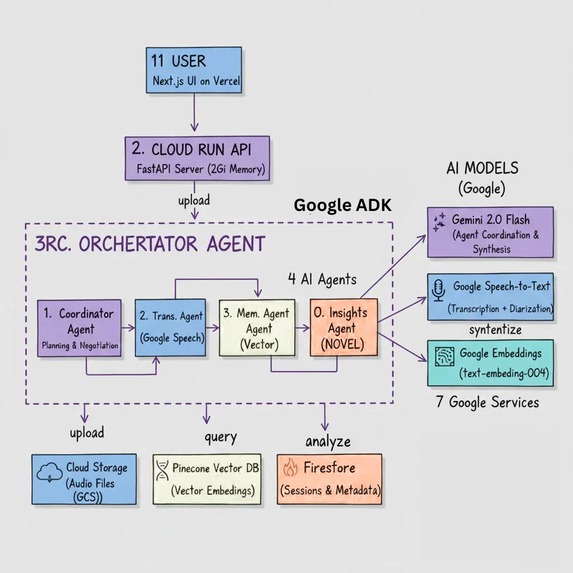
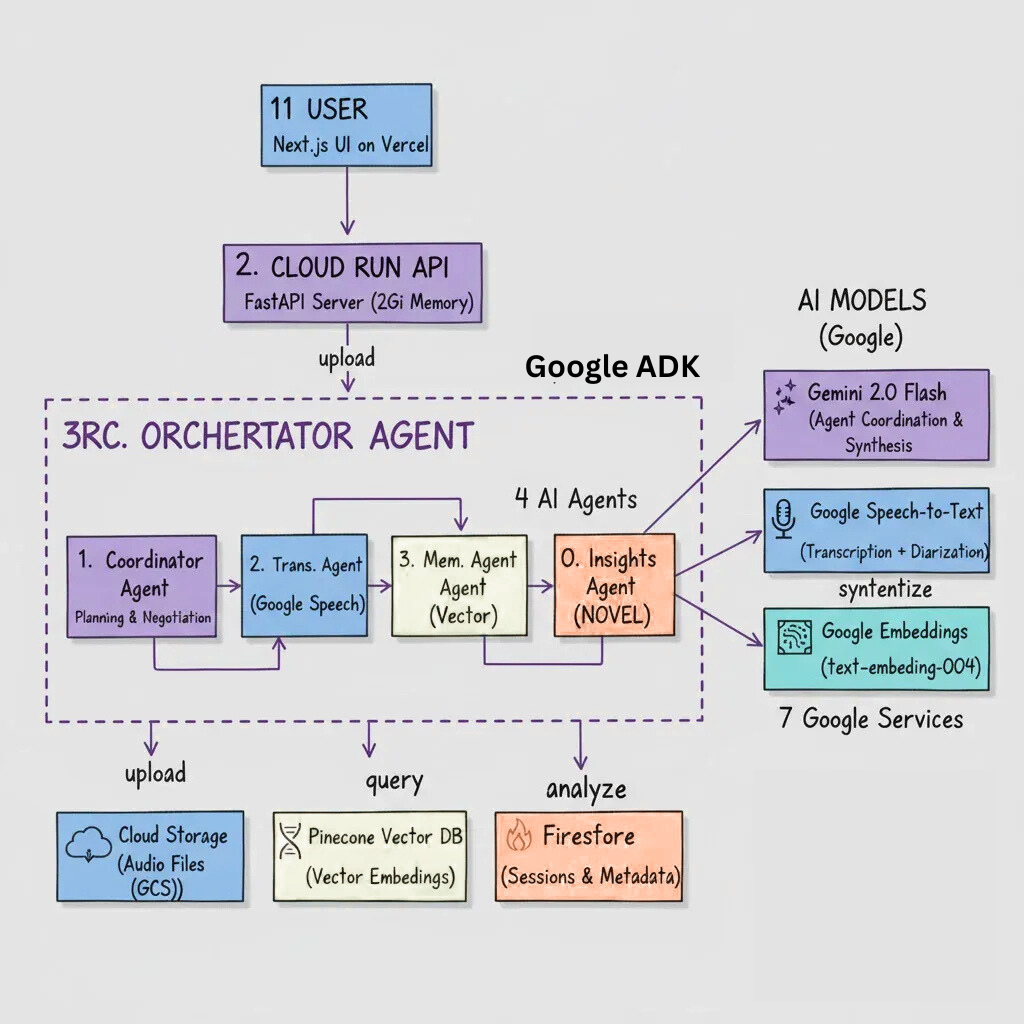
Architecture Design
-
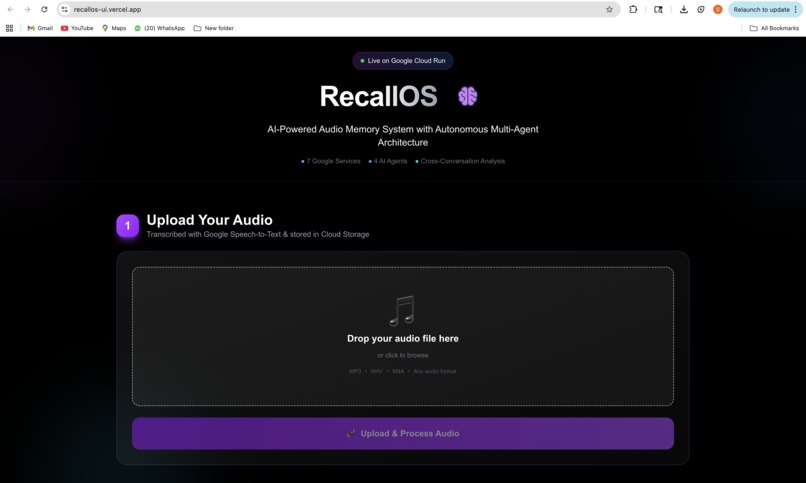
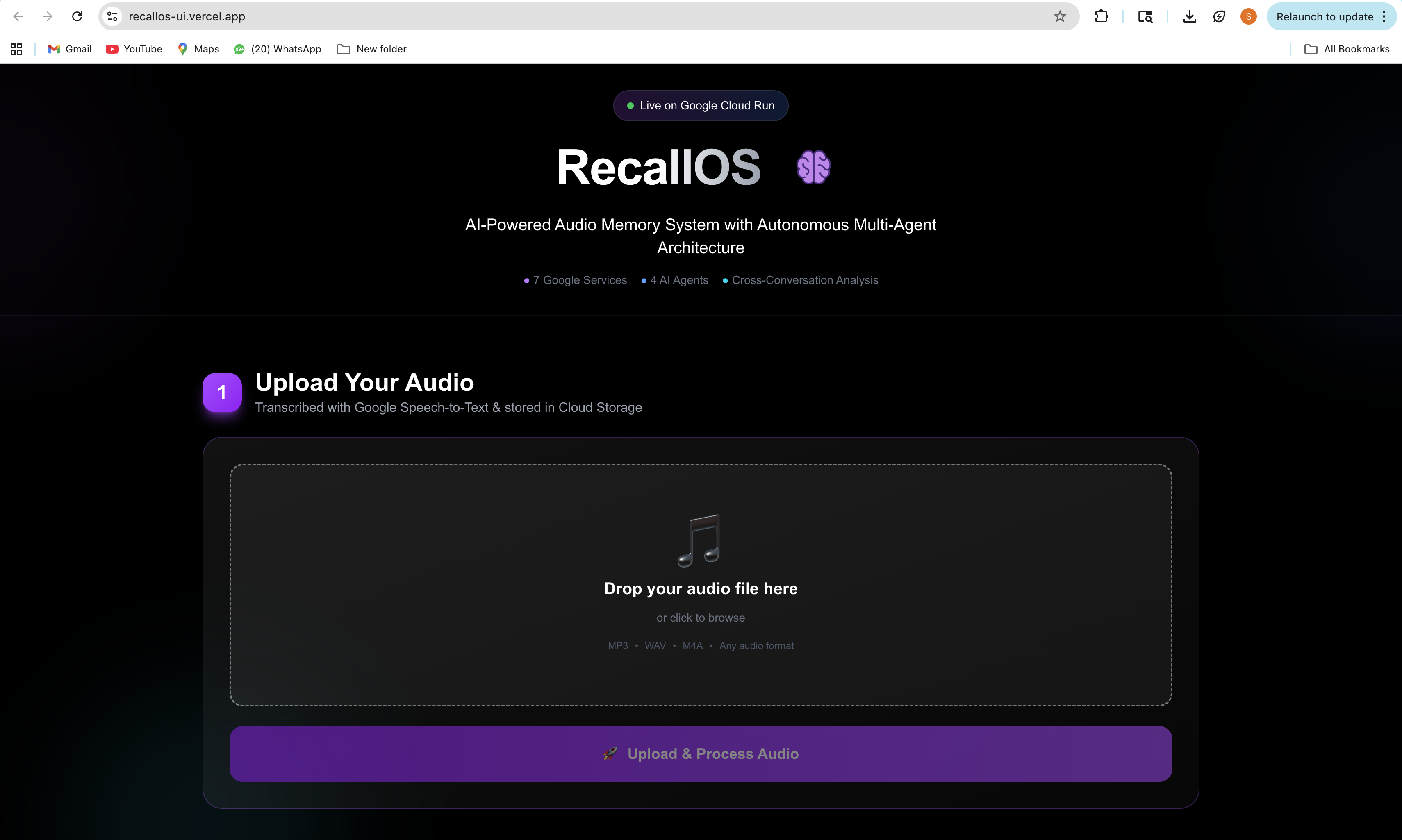
Screenshot of hosted website (part 1)
-
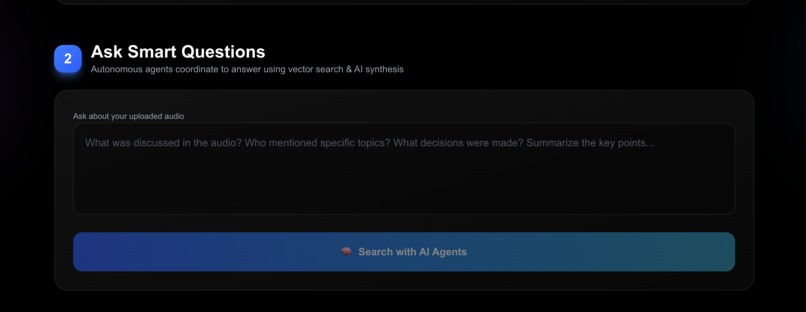
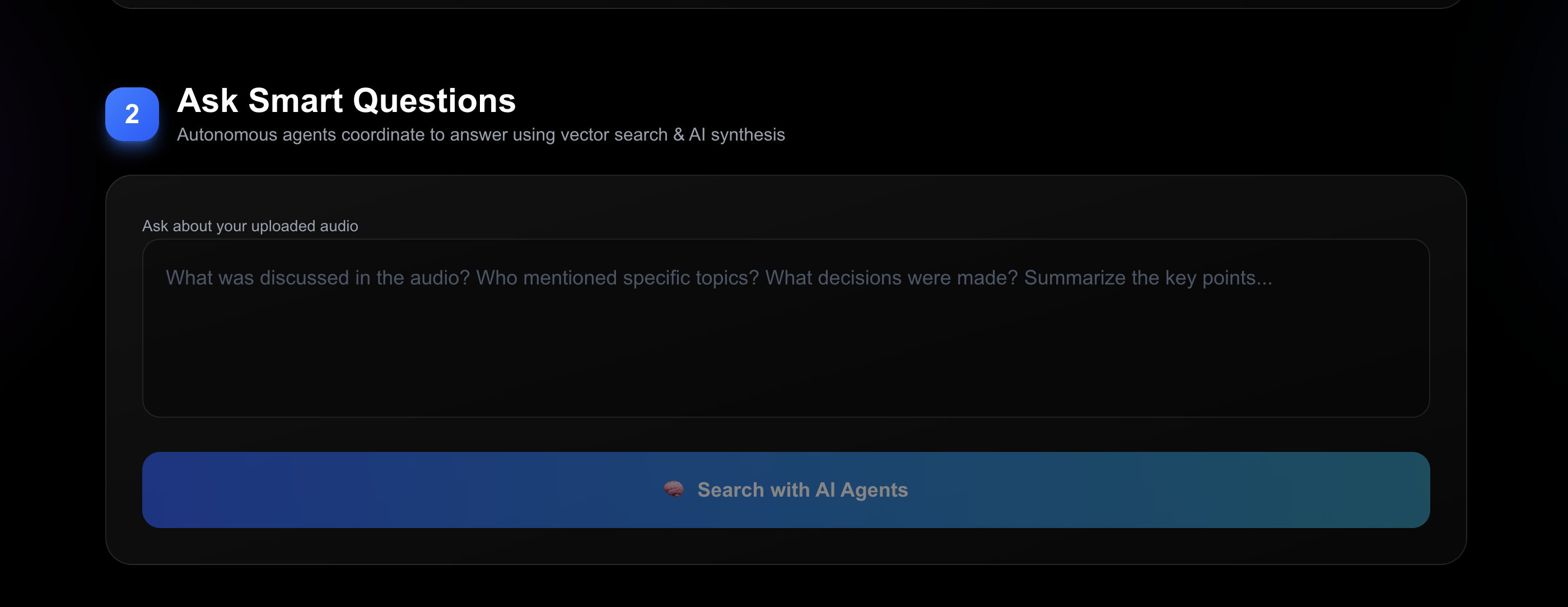
Screenshot of hosted website (part 2)
-
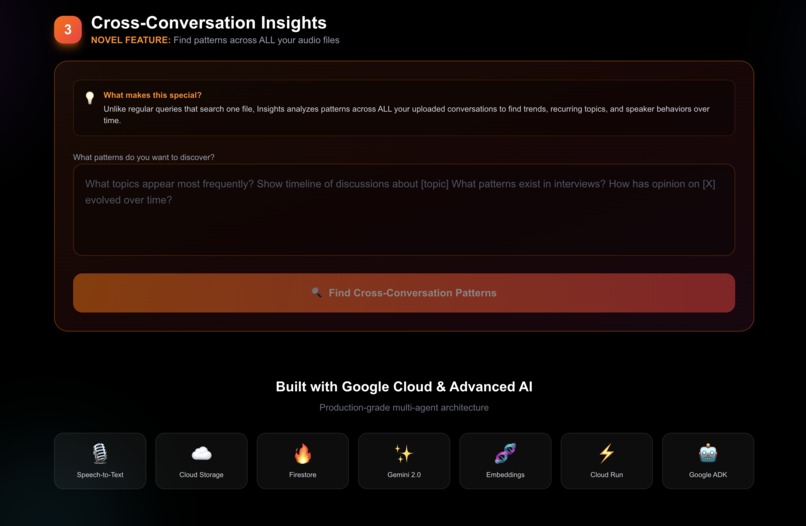
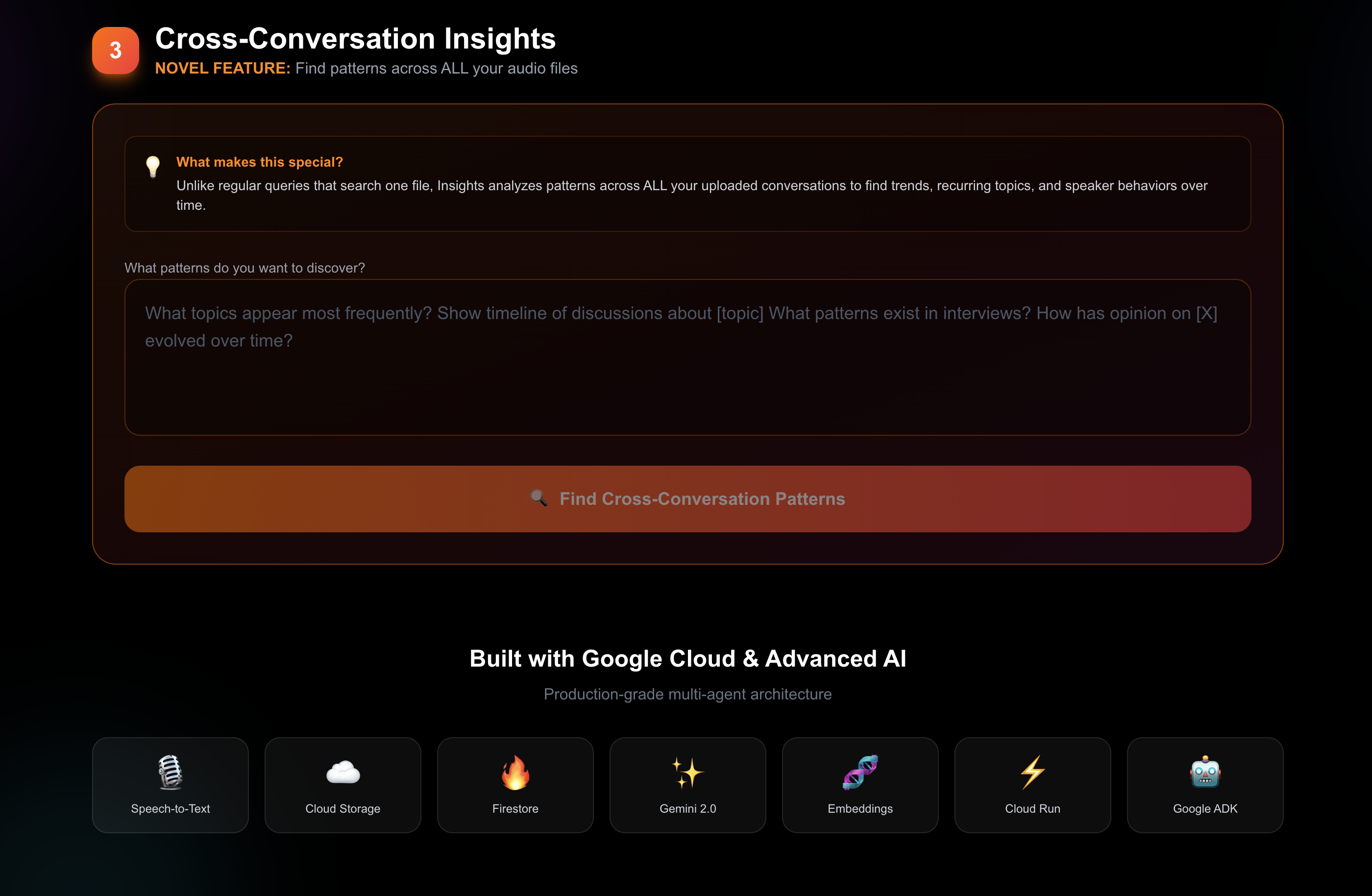
Screenshot of hosted website (part 3)
Inspiration
We've all been in situations where we need to recall information from past conversations - whether it's remembering what was discussed in a meeting, tracking decisions over multiple calls, or finding patterns in interview feedback. Traditional transcription services only handle one file at a time, and searching through hours of audio is tedious.
I wanted to build something that doesn't just transcribe - it remembers, understands, and connects the dots across all your conversations. That's how RecallOS was born.
What it does
RecallOS is an AI-powered audio memory system with autonomous multi-agent coordination that provides three key capabilities:
1. Intelligent Audio Processing
- Upload any audio file (interviews, meetings, podcasts, lectures)
- Transcribed with Google Speech-to-Text with speaker diarization
- Automatically stored in Cloud Storage and indexed in Firestore
2. Smart Contextual Queries
- Ask questions about your uploaded audio using natural language
- Autonomous agents dynamically plan execution strategy based on query complexity
- Agents negotiate resources and coordinate to provide intelligent answers
- Cites specific segments with speaker attribution
3. Cross-Conversation Insights (NOVEL)
- This is what makes RecallOS unique: Analyze patterns across ALL your audio files
- Discover recurring topics, speaker engagement patterns, and decision evolution over time
- See timeline visualizations of how discussions evolved
- Get actionable insights like "Speaker A dominated 88% of discussions about project timeline"
Unlike traditional transcription services that treat each file in isolation, RecallOS creates a searchable memory across your entire audio library.
How we built it
Multi-Agent Architecture (Google ADK)
RecallOS uses 4 AI agents that coordinate autonomously:
Coordinator Agent - Plans tasks and negotiates resources using Gemini 2.0 Flash
- Analyzes query complexity (low/medium/high)
- Decides execution strategy (sequential/parallel)
- Allocates resources to other agents
Transcription Agent - Processes audio with Google Speech-to-Text
- Long-running recognition for large files via Cloud Storage URIs
- Speaker diarization (who said what)
- Automatic punctuation and timestamps
Memory Agent - Manages vector embeddings with Pinecone
- Stores conversation segments as vectors using Google Embeddings (text-embedding-004)
- Semantic search across all memories
- Metadata filtering by session, speaker, time
Insights Agent - Cross-conversation pattern analysis (NOVEL FEATURE)
- Analyzes 50+ segments across multiple files simultaneously
- Groups by speaker, topic, and timeline
- Uses Gemini to generate actionable insights
Google Cloud Stack (7 Services)
- Cloud Run: Serverless deployment with 2Gi memory, 300s timeout
- Google Speech-to-Text: Transcription with speaker diarization
- Cloud Storage: Stores audio files for processing
- Firestore: Session tracking and metadata
- Gemini 2.0 Flash: Agent coordination and answer synthesis
- Google Embeddings: Vector generation for semantic search
- Google ADK: Multi-agent framework enabling autonomous coordination
Tech Stack
- Backend: Python 3.12, FastAPI, Google ADK
- Frontend: Next.js 14, TailwindCSS, deployed on Vercel
- Database: Pinecone (vector DB) + Firestore (sessions)
- Infrastructure: Docker, Cloud Run
Production Features
- Retry logic with exponential backoff for API calls
- Error handling at every layer
- Session tracking across uploads and queries
- Request validation and rate limiting
- Structured logging for debugging
Challenges we ran into
1. Google Speech-to-Text 10MB Limit
Initial approach used direct audio content upload, but hit the 10MB size limit. Solution: Upload to Cloud Storage first, then use GCS URI with long-running recognition. This unlocked processing of any size audio file.
2. Multi-Agent Import Conflicts
Python's module system caused conflicts when importing multiple agent files named agent.py. Solution: Used importlib.util to dynamically load modules with unique identifiers, allowing clean separation of agent code.
3. Cross-Platform Docker Builds
Developing on Mac (ARM) while deploying to Cloud Run (AMD64) caused architecture mismatches. Solution: Used docker build --platform linux/amd64 to ensure correct architecture.
4. Agent Coordination Complexity
Initial design had agents as simple function wrappers. Implementing true autonomous coordination required:
- Planning layer to analyze queries before execution
- Negotiation protocol for resource allocation
- Dynamic agent selection based on task type
- State management across agent interactions
5. Real-time Pattern Analysis
Cross-conversation insights required analyzing 50+ vector matches simultaneously while maintaining performance. Solution: Efficient grouping algorithms and parallel processing of metadata.
Accomplishments that we're proud of
✅ True Multi-Agent System: Not just wrapped functions - agents actually plan, negotiate, and coordinate autonomously
✅ Novel Feature: Cross-conversation insights don't exist in any commercial transcription service we know of
✅ 7 Google Services Integrated: Full Google Cloud ecosystem working together seamlessly
✅ Production-Ready: Error handling, retry logic, session tracking, and monitoring throughout
✅ Beautiful UX: Clean, intuitive 3-step flow that guides users through the experience
✅ Speaker Diarization: Automatically identifies who said what in multi-speaker audio
✅ Scalable Architecture: Ready to handle thousands of users with Cloud Run's autoscaling
What we learned
Technical Learning
- Deep dive into Google ADK and multi-agent coordination patterns
- Mastering Google Speech-to-Text's long-running operations
- Vector search optimization with Pinecone
- Serverless deployment best practices with Cloud Run
- Docker multi-platform builds for production
Design Learning
- Importance of visual hierarchy in complex AI applications
- How to make autonomous agent behavior transparent to users
- Balancing power features with simple UX
Google Cloud Ecosystem
- How different Google services complement each other
- Cloud Run's flexibility for AI workloads
- Firestore's power for real-time session tracking
- The elegance of Gemini 2.0's multimodal capabilities
What's next for RecallOS
Immediate Features
- Real-time streaming transcription and query
- Timeline visualization showing conversation flow over time
- Export insights as reports (PDF/Markdown)
- Mobile app for on-the-go recording
Advanced Features
- Multi-language support with automatic language detection
- Sentiment analysis across conversations
- Topic clustering and automatic tagging
- Integration with Calendar/Meet for automatic meeting transcription
Enterprise Features
- Team workspaces with shared memories
- Access controls and privacy settings
- Custom embedding models for domain-specific terminology
- API for programmatic access
Scale & Performance
- Caching layer for frequently accessed memories
- Background processing queue for large uploads
- Real-time collaboration on insights
- Advanced analytics dashboard
RecallOS represents the future of audio memory - where AI doesn't just transcribe, but truly remembers, connects, and provides insights across all your conversations.
Built with ❤️ using Google Cloud Run, ADK, and the full Google Cloud ecosystem
🚀 Live Demo: recallos-ui.vercel.app
Built With
- docker
- fastapi
- gemini-2.0-flash
- google-adk-(agent-development-kit)
- google-cloud
- google-cloud-run
- google-embeddings-(text-embedding-004)
- google-firestore
- google-speech-to-text
- javascript
- next.js
- pinecone-vector-database
- python
- tailwindcss
- vercel

Log in or sign up for Devpost to join the conversation.