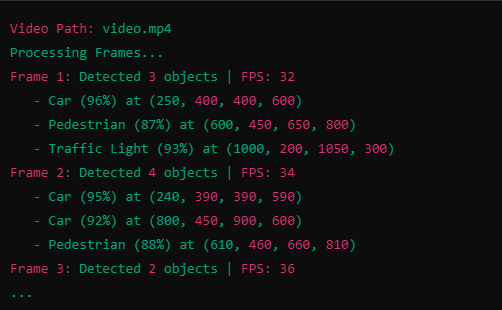
OUTPUT:
This project demonstrates real-time video processing using CUDA and OpenCV. It performs the following operations on a video file:
Converts each frame to grayscale using a custom CUDA kernel.
Simulates object detection using a threshold-based CUDA kernel.
Displays the processed frame with "detected" objects highlighted.
📸 Sample Use Case Ideal for beginners and intermediate CUDA programmers looking to:
Learn how to interface OpenCV with CUDA.
Implement GPU-accelerated image processing.
Simulate parallel object detection logic.
🧠 Features 🔄 Real-time frame processing.
🧮 Grayscale conversion using a CUDA kernel.
🎯 Dummy object detection using intensity thresholding.
🖼️ Live frame visualization using OpenCV.
🧰 Requirements CUDA Toolkit (>= 10.0 recommended)
OpenCV (>= 4.0)
CMake (optional, if building with CMakeLists)
g++ / nvcc (for compiling CUDA code)
🔧 Setup & Build
- Install Dependencies Make sure you have CUDA and OpenCV installed.
For Ubuntu:
bash Copy Edit sudo apt-get install libopencv-dev For Windows:
Install OpenCV via official build or vcpkg
Make sure your system recognizes nvcc (NVIDIA compiler)
- Build & Run
Option 1: Compile using g++ and nvcc
bash
Copy
Edit
nvcc main.cu -o video_processor
pkg-config --cflags --libs opencv4./video_processor ⚠️ Replace opencv4 with opencv if you're using OpenCV 2 or 3.
Option 2: Use CMake (Optional) You can add a CMakeLists.txt if you'd prefer to manage builds easily.
📂 Project Structure graphql Copy Edit ├── main.cu # Main file containing CUDA kernels and OpenCV logic ├── video.mp4 # Sample video file to test the pipeline └── README.md # Project documentation 🧪 How It Works
- Grayscale Conversion CUDA kernel computes grayscale using the formula:
ini Copy Edit Gray = 0.299 * R + 0.587 * G + 0.114 * B
- Dummy Object Detection A simulated detection logic marks pixels with intensity > 128 as detected.
cpp Copy Edit detectionMap[idx] = (grayImage[idx] > 128) ? 1 : 0;
- Visualization Green rectangles are drawn over "detected" areas in each frame using OpenCV.
📈 Performance ✅ GPU acceleration via CUDA ensures fast per-frame computation.
🧵 Block size: 16 x 16, optimized for typical GPU warp sizes.
🎞️ Suitable for real-time video processing on modern GPUs.
🧠 Future Improvements Replace dummy detection logic with a real ML model.
Add GPU-accelerated video encoding/decoding.
Add frame saving or recording functionality.
💡 Author Uxair Bachelor of Computer Science | CUDA C | OpenCV Enthusiast Feel free to reach out or contribute!

Log in or sign up for Devpost to join the conversation.