-
-
Calibration Results
-
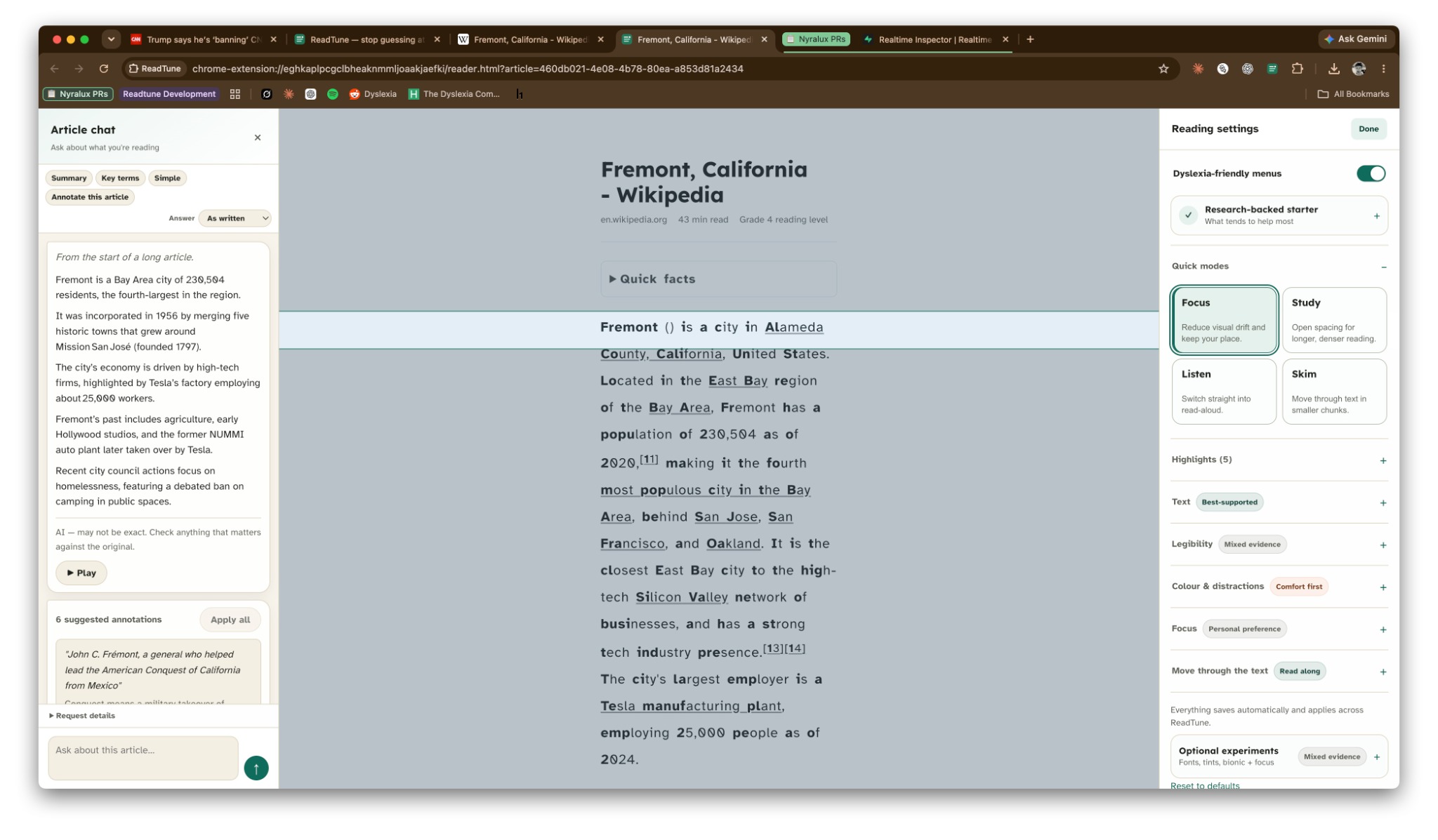
ReadTune in use
-
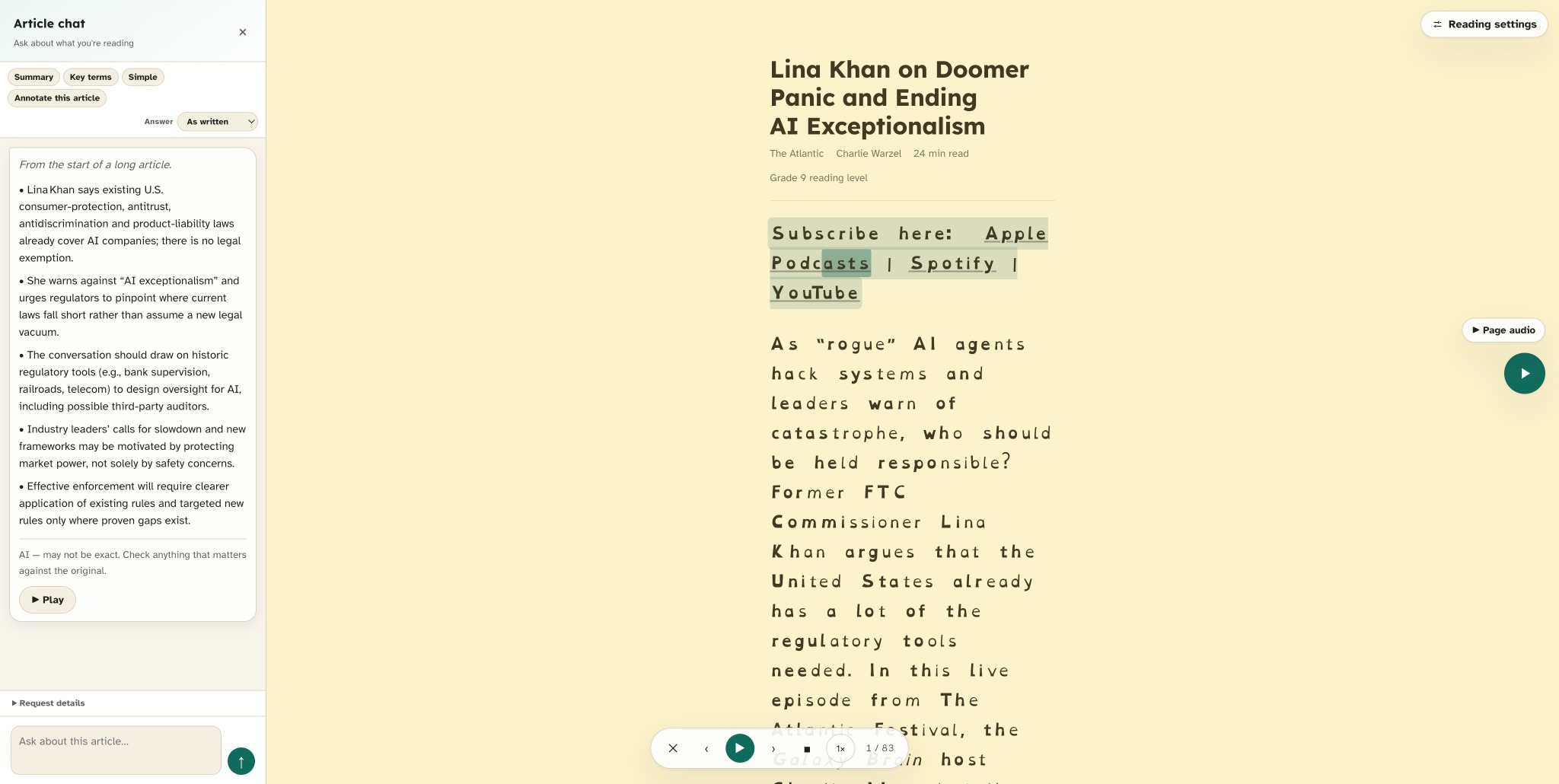
ReadTune in use with AI mode
Inspiration
Most reading tools give you a giant settings panel and expect you to somehow know whether a different font, spacing, tint, or reading mode will help.
We wanted to reverse that.
ReadTune starts with the reader instead of the settings. It uses a short preference check to help someone find a reading setup worth trying, then carries that profile across the places they actually read.
Our goal was to build something that is useful immediately, privacy-first, and free — without locking accessibility features, AI, or basic text-to-speech behind a subscription.
What it does
ReadTune is a free, open-source Chrome extension that helps personalize the way you read online.
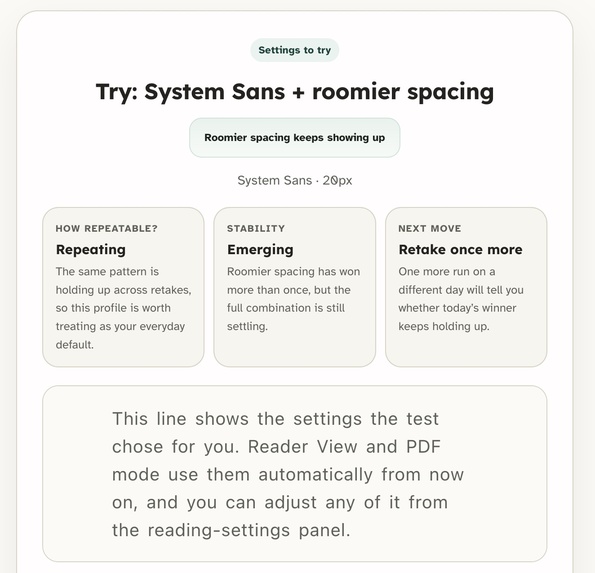
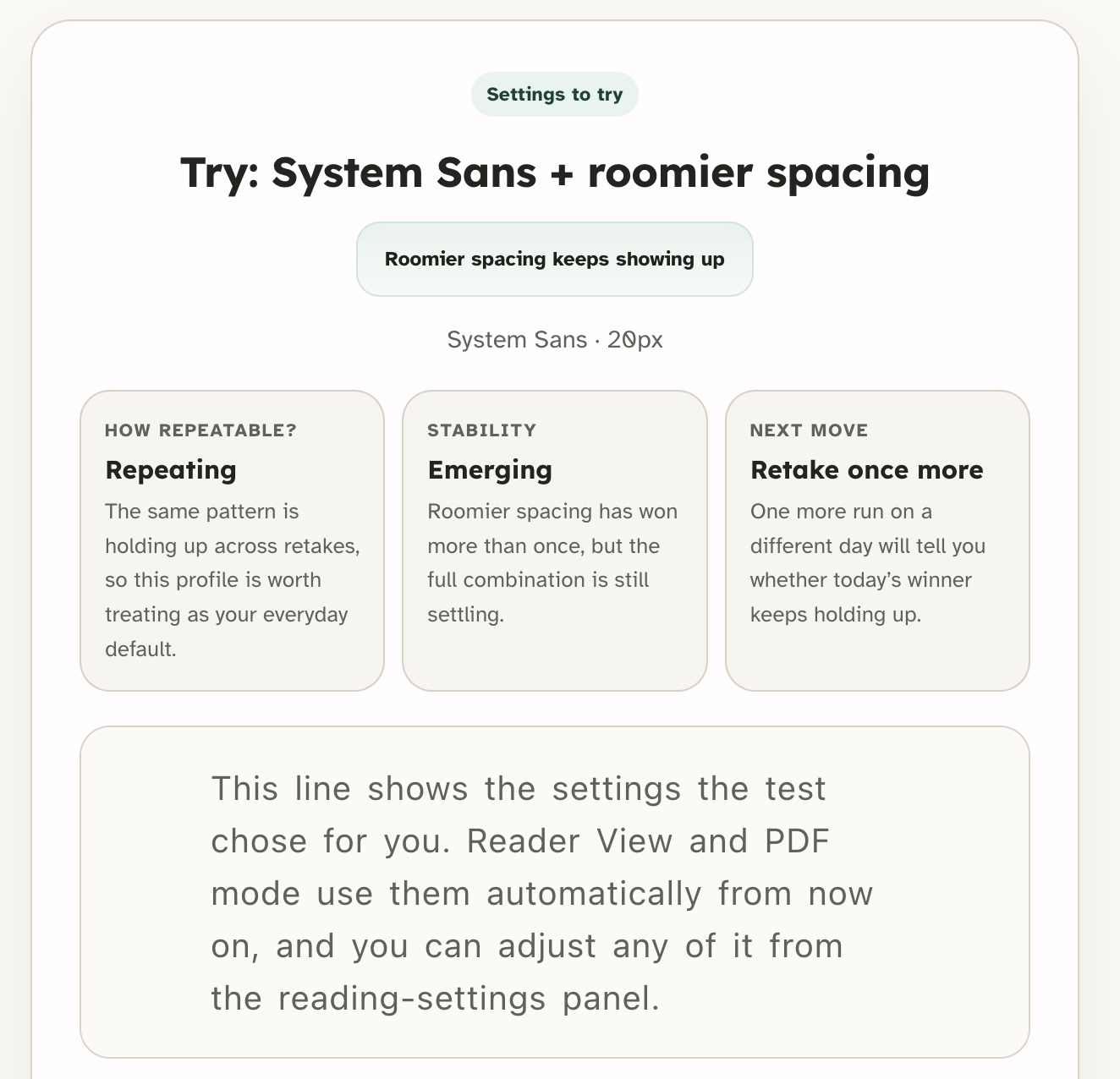
It starts with a ~4 minute preference check. Instead of changing twenty settings at once, ReadTune tests individual reading conditions and looks at reading pace, comprehension, and comfort to create a provisional reading profile.
That profile can then follow you across:
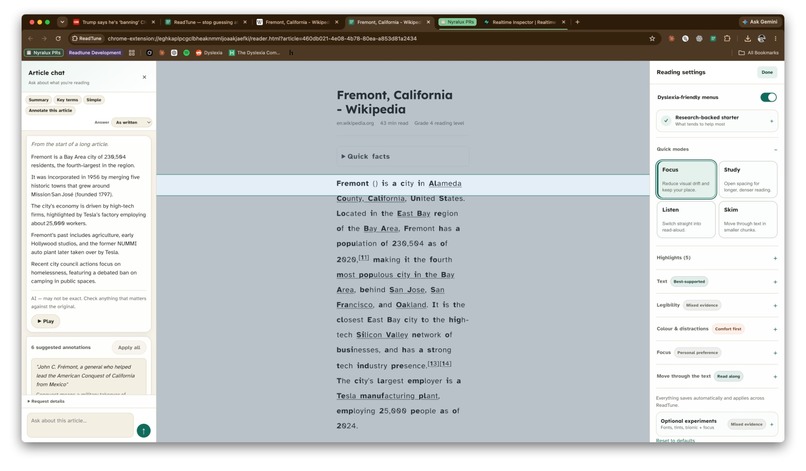
- Reader View — turns articles into a cleaner reading surface
- PDFs — renders selectable PDF text using your reading profile
- Live webpages — restyles the page you're already viewing
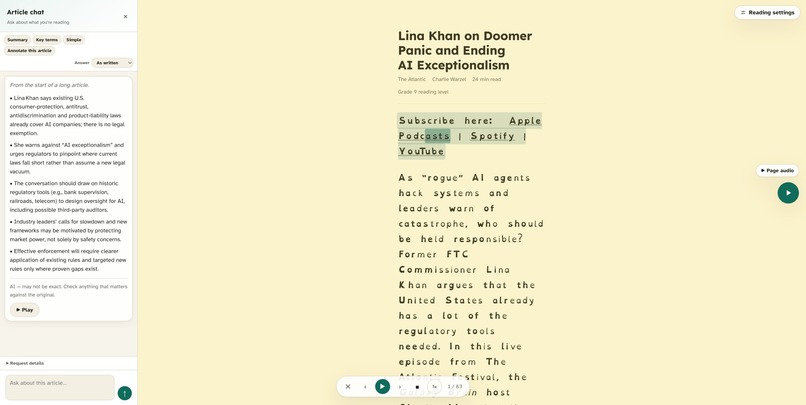
- AI Mode — ask questions, simplify passages, define words, explain sections, and save useful answers beside the text
- Read Aloud — on-device text-to-speech with sentence and word follow-along
- Focus tools — reading ruler, paragraph focus, sentence stepping, RSVP, and auto-scroll
ReadTune also supports typography, spacing, reading tints, highlights, notes, bionic emphasis, syllable support, and other reading controls.
The important part is that ReadTune doesn't claim there is one perfect setting for everyone. Your profile is a starting point, and Reading Lab lets you repeat the check over time to see which preferences actually keep showing up.
Privacy first
We wanted the extension to work without requiring users to give us an account or their reading history.
Core features such as the reading profile, calibration history, highlights, Reader View, PDF processing, and the default Piper voice run locally.
There is:
- No ReadTune account
- No subscription
- No extension analytics or telemetry
- No persistent access to every website
- No remote executable code
Opening AI Mode alone doesn't send article data anywhere. ReadTune first attempts supported on-device AI, and external AI is only used when the user explicitly requests an AI action.
How we built it
ReadTune is a Chrome Manifest V3 extension built primarily with vanilla JavaScript modules.
Some of the major pieces include:
- Mozilla Readability for extracting articles
- pdf.js for text-based PDF reading
- Piper + ONNX Runtime Web for neural text-to-speech that can run on-device
- Chrome's on-device AI capabilities where available
- A controlled AI fallback system so AI Mode can remain free
- Local browser storage for profiles, history, highlights, and preferences
- A shared formatting engine used across Reader View, PDFs, and live webpages
- Automated tests and CI to verify extension behavior
A major design goal was making these systems feel like one product rather than a collection of accessibility toggles.
Challenges we ran into
Making personalization honest
Reading accessibility is complicated. Some techniques have stronger evidence than others, and there is no universal font or color that works for every reader.
Instead of pretending the extension can diagnose a user, we designed the preference check as a small experiment. It changes one condition at a time and keeps uncertainty visible when there isn't a clear result.
One profile across completely different surfaces
An article, a PDF, and an existing webpage are technically very different environments.
We had to build the formatting system so the same reading profile could work across all three while still preserving the important content and structure of each page.
Keeping AI and TTS free
We didn't want ReadTune's most useful features to disappear behind a subscription.
For voice, the default Piper model runs on-device.
For AI, ReadTune can use on-device capabilities first and combine available free model capacity through our fallback system. Usage is limited fairly so the available capacity can be shared between users.
Privacy
Features like AI and text-to-speech can easily result in entire articles being uploaded to third parties.
We designed ReadTune around local processing first, with cloud paths only being used when the user deliberately chooses a feature that needs them.
Accomplishments that we're proud of
We're especially proud that ReadTune became a real working browser extension rather than just a prototype or landing page.
It combines:
- Reading calibration
- Personalized formatting
- Reader View
- PDF support
- Live-page restyling
- AI assistance
- On-device neural TTS
- Follow-along highlighting
- Focus and pacing tools
- Highlights and notes
- Local reading history
while keeping the core product free and privacy-first.
We're also proud that the interface doesn't present accessibility preferences as medical conclusions. ReadTune helps users experiment and find what works for them rather than claiming one setting is universally better.
What we learned
The biggest thing we learned is that accessibility is not just about adding more settings.
Giving someone twenty toggles can create another problem: they still have to figure out which combination actually helps.
Personalization, good defaults, clear explanations, and respecting uncertainty can be just as important as adding another feature.
We also learned how difficult it is to combine browser extensions, article extraction, PDFs, local AI, neural text-to-speech, and dynamic webpage modification while keeping the experience consistent.
What's next for ReadTune
The Chrome extension is now public.
I’m going to share ReadTune in relevant Reddit communities and Facebook groups around dyslexia, accessibility, studying, and reading, then use real user feedback to improve the calibration and decide what we build next.
We're also interested in:
- Better multilingual reading support
- More on-device voices
- Improved AI grounding and annotations
- More detailed Reading Lab insights
- Better support for difficult PDFs and educational material
- Additional accessibility experiments that users can test instead of simply being told they work
The long-term goal is simple:
Your reading. Your rules. readme.md is present on Github
Built With
- ai
- apis
- chrome
- css
- extensions
- html
- javascript
- local
- mozilla
- onnx
- pdf.js
- piper
- readability
- runtime
- tts
- web


Log in or sign up for Devpost to join the conversation.