Inspiration
When we learned about IMC's partnership with Room to Read, we researched the charity's mission and some of the core problems around reading and speaking English for young children in foreign countries such as Tanzania. Reading can be difficult and mispronouncing words can be discouraging. For children and teenagers, existing reading apps can sometimes feel like more work rather than a fun challenge.
What it does
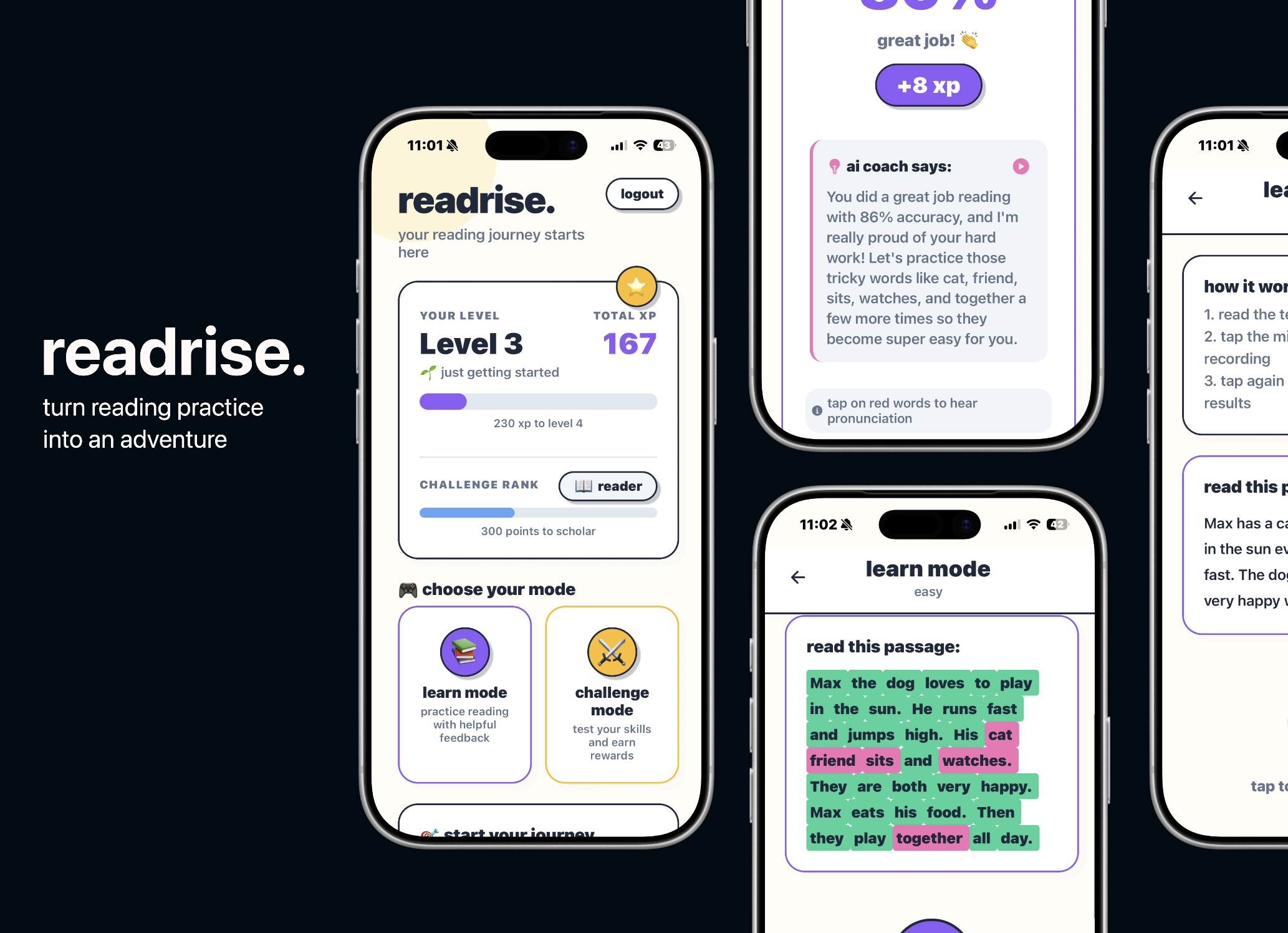
Our app allows users to improve their reading and speaking through chapters of books of varying difficulty. The user can record their speech, and our app will transcribe their pronunciation and compare it against the correct answer. Then the user can earn experience points (XP), receive feedback and hear the correct pronunciation back to them for each word they mispronounced. After completing some learning chapters and levelling up their character, they will unlock the Challenge mode which tests reading by tracking metrics like accuracy, words per minute and where to improve.
How we built it
We divided the project into four parallel work streams to maximise efficiency and minimise merge conflicts:
Dev 1 handled Onboarding flow, UI shell, navigation, global design system. Dev 2 worked on Book selection, chapter display, reading interface. Dev 3 implemented Speech-to-text integration, reading analysis engine, TTS feedback with ElevenLabs. Dev 4 managed Backend API, database schema, authentication, user progress tracking.
Tech Stack Frontend: React Native (Expo) — enables cross-platform deployment to iOS and Android from a single codebase Backend: Firebase (Firestore for database, Firebase Auth for authentication) Speech-to-Text: Deepgram API for real-time transcription Text-to-Speech: ElevenLabs API for personalised, natural-sounding feedback
Technical Implementation We chose React Native with Expo Go to build once and deploy to both iOS and Android. This ensures if the app was pushed to production it would be accessible, removing barriers for a much wider audience and range of mobile devices.
Firebase has been used for our backend authentication, real-time database, and user progress tracking.
// firebaseConfig.js
  import { initializeApp } from 'firebase/app';
  import { getAuth } from 'firebase/auth';
  import { getDatabase } from 'firebase/database';

  const firebaseConfig = {
    apiKey: "your-api-key",
    authDomain: "your-project.firebaseapp.com",
    databaseURL: "https://your-project.firebasedatabase.app",
    projectId: "your-project",
  };

  const app = initializeApp(firebaseConfig);
  export const auth = getAuth(app);
  export const db = getDatabase(app);

 // Reading Data

  import { ref, get, onValue } from 'firebase/database';
  import { db } from './firebaseConfig';

  // One-time read (async/await)
  const readOnce = async () => {
    const booksRef = ref(db, 'books');
    const snapshot = await get(booksRef);

    if (snapshot.exists()) {
      const data = snapshot.val();
      console.log(data);
    } else {
      console.log('No data found');
    }
  };

  // Real-time listener (updates automatically)
  const listenToUser = (userId) => {
    const userRef = ref(db, 'users/' + userId);

    const unsubscribe = onValue(userRef, (snapshot) => {
      const userData = snapshot.val();
      console.log('User data updated:', userData);
    });

    // Call unsubscribe() when done to stop listening
    return unsubscribe;
  };

  //Writing Data

  import { ref, set, update } from 'firebase/database';
  import { db } from './firebaseConfig';

  // Write/overwrite entire data at a path
  const writeData = async () => {
    const booksRef = ref(db, 'books');
    await set(booksRef, {
      book1: { title: 'Sample Book', author: 'John Doe' },
      book2: { title: 'Another Book', author: 'Jane Smith' }
    });
    console.log('Data written successfully');
  };

  // Update specific fields (keeps other fields intact)
  const updateUserScore = async (userId) => {
    const userRef = ref(db, 'users/' + userId);
    await update(userRef, {
      score: 100,
      level: 5,
      lastUpdated: Date.now()
    });
    console.log('User updated successfully');
  };
Challenges we ran into
A certain problem we ran into was that when receiving feedback it needed to be helpful and not generic. The way we did this was to call a Claude AI API to give specific feedback based on how the user did on this extract. We did encounter another issue being the feedback could be sometimes a bit hard to understand and read for the user. So we implemented ElevenLabs to read out feedback to allow them to have an easier time reading. Overall, the feedback given is friendly and easy to understand for our readers.
2. Voice Activation - Text-to-Speech (ElevenLabs API)

  // From elevenLabsService.js - Lines 19-119
  export const speakText = async (text) => {
    try {
      console.log('Generating speech for:', text);

      // Reset shouldStop flag for new playback
      shouldStop = false;

      // Call ElevenLabs API
      const response = await fetch(
        `${ELEVENLABS_API_URL}/${DEFAULT_VOICE_ID}`,
        {
          method: 'POST',
          headers: {
            'Accept': 'audio/mpeg',
            'Content-Type': 'application/json',
            'xi-api-key': ELEVENLABS_API_KEY,
          },
          body: JSON.stringify({
            text: text,
            model_id: 'eleven_monolingual_v1',
            voice_settings: {
              stability: 0.5,
              similarity_boost: 0.75,
            },
          }),
        }
      );

      if (!response.ok) {
        throw new Error(`ElevenLabs API error: ${response.status}`);
      }

      // Get audio blob and convert to base64 for React Native
      const audioBlob = await response.blob();
      const reader = new FileReader();
      reader.readAsDataURL(audioBlob);

      return new Promise((resolve, reject) => {
        reader.onloadend = async () => {
          try {
            const base64Audio = reader.result;

            // Configure audio mode for playback
            await Audio.setAudioModeAsync({
              allowsRecordingIOS: false,
              playsInSilentModeIOS: true,
              shouldDuckAndroid: true,
              playThroughEarpieceAndroid: false,
            });

            // Create and play sound
            const { sound } = await Audio.Sound.createAsync(
              { uri: base64Audio },
              { shouldPlay: true }
            );

            // Track this sound
            currentSounds.push(sound);
            currentSound = sound;

            // Clean up after playback
            sound.setOnPlaybackStatusUpdate((status) => {
              if (status.didJustFinish) {
                currentSounds = currentSounds.filter(s => s !== sound);
                if (currentSound === sound) {
                  currentSound = null;
                  isPaused = false;
                }
                sound.unloadAsync();
                resolve();
              }
            });
          } catch (error) {
            console.error('Audio playback error:', error);
            reject(error);
          }
        };
      });
    } catch (error) {
      console.error('ElevenLabs speech generation error:', error);
      throw error;
    }
  };
Accomplishments that we're proud of
We're incredibly proud of successfully integrating three different AI APIs (Claude, Deepgram, and ElevenLabs) alongside Firebase to create a seamless learning experience—especially considering this was our first time working with Deepgram and ElevenLabs. Our collaborative ideation phase helped us align on a shared vision, and our parallel work stream approach allowed each team member to focus on different features that came together smoothly into a cohesive product. We're particularly happy with the user experience and gamification elements we built, as we genuinely believe they will motivate young learners to improve their literacy skills in an engaging way. Most importantly, what makes us proudest is the potential for readrise to improve literacy rates at scale, especially for children from lower socioeconomic backgrounds who have limited access to quality learning facilities and personalized educational support.
What we learned
Strong foundations are most important when building as a team, we began by ideating for a few hours and this proved crucial in ensuring we were aligned on both the technical aspects and the features. We hadn't used Eleven Labs prior to this project and this meant reviewing how and where to use the API for the Speech capabilities of our app.
Additionally, we came across interesting challenges when building this for mobile platforms, including testing across simulators and mobile devices using Expo Go. Through seeking feedback with other each other, as well as other hackers throughout the hackathon our ideas morphed from our original MVP and we refactored based on our goals and the core problems we'd identified in our strong ideation phase.
What's next for readrise: mobile ai coach for reading and speech
We plan on expanding beyond English to support local languages in countries where Room to Read operates (e.g., Swahili, Hindi, Vietnamese) allowing children to build literacy skills in their native language before transitioning to English. We also hope to establish partnerships with both publishers and authors to integrate popular, culturally relevant stories that resonate with young readers in different regions, making the learning experience more engaging and relatable. Additionally, we aim to implement comprehensive accessibility features including dyslexia-friendly fonts, adjustable text sizes, and high-contrast modes to ensure our app is inclusive and supports learners with diverse needs. Finally, we also plan to enhance our gamification features with reading streaks and community challenges to keep learners motivated and connected with peers around the world.
Built With
- claude
- deepgram
- elevenlabs
- expo.io
- firebase
- javascript
- react-native

Log in or sign up for Devpost to join the conversation.