Inspiration
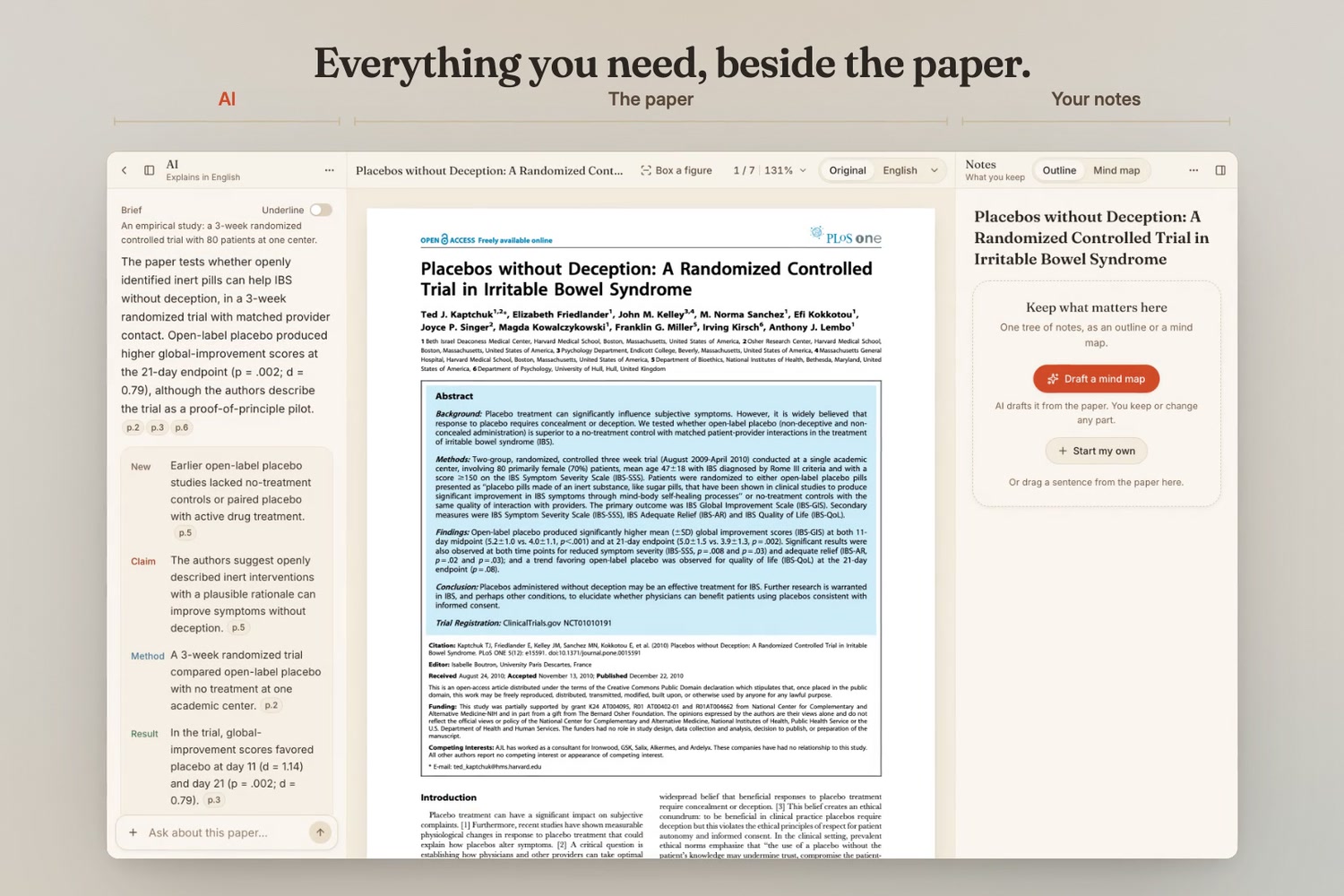
Reading a research paper well can take hours, and most of us do it across four windows: the PDF in one, a translator in another, a chatbot in a third, notes in a fourth. Every switch loses your place. Copied text loses its layout, the figure is somewhere else, and the chatbot's answer can't be checked against the page. ReadLit puts all of it beside the paper.
What it does
ReadLit is a reader for research papers. Paste an arXiv or PDF link, or drop a PDF. One screen, three columns: the AI on the left, the paper in the middle, your notes on the right.
- Brief. A first pass before your first read: the main point, then the claim, method, result and limit, and which figure to look at first. Every point carries page tags; point at one to see the sentence it came from. The same points can be underlined in the paper.
- Ask. Ask anything about the paper. Answers cite the pages they rely on, so you can check them against the text.
- Select. Select a passage to translate it in place, have it explained, ask about it, or keep it as a note.
- Figures. Box a figure, table or formula and ask what it shows. The AI receives an image of the area, not just the caption. Labels inside a figure can be translated in place too.
- Go deeper. The questions researchers ask: walk through the paper, its weak points (what the authors admit, what a reviewer would ask, what can't be checked from the paper), connections, what it means for your work, and ideas. Later work comes from real citation data (OpenAlex) and is labelled as such; anything from the AI's general knowledge is labelled "Beyond the paper".
- Notes. One tree of notes, as an outline or a mind map: write your own, keep a passage with its page, drag a sentence in, or let the AI draft a mind map of the paper's argument. AI drafts stay drafts until you keep them, and your own notes stay as they are.
- Your language. English by default, eleven other languages one click away. The whole paper is translated in place, keeping its layout (hold ⌥ for the original), and the AI writes in your language with English under each paragraph.
How we built it
- Next.js 16, React 19 and TypeScript; pdf.js for rendering and the text layer; React Flow for the mind map; Tailwind CSS; Zustand.
- A page text model turns pdf.js text runs into lines, paragraphs (with roles such as caption, equation and reference) and sentences with stable ids. The brief, citations, underlines, translations and notes all point at those ids, which is what makes every answer checkable.
- In-place translation: a patch sampled from the page's own colour, with the translated text fitted to the original sentence's box and baselines.
- OpenAI GPT-6 Luna through the Responses API: structured outputs validated with Zod for the brief, translations, figure text and mind maps, and streaming for answers. A boxed area is sent to the model as an image.
- OpenAlex for the papers that cite the one you are reading.
- Local-first: papers, notes and answers stay in your browser (IndexedDB). A deployed copy is gated by an access code and stays shut without one; linked PDFs are streamed, so large papers still open.
Challenges we ran into
- Recovering sentences from PDFs, which only contain positioned text fragments, across two-column layouts, hyphenation and running headers.
- Making a translated sentence sit exactly where the original was, inside a paragraph that otherwise stays in English.
- Keeping the AI honest. Models recall titles, authors and years least reliably, so later work comes only from real citation data, and every claim about the paper has to cite its sentences.
- Keeping a three-column screen calm: tools appear where they act, and only when they are needed.
Accomplishments that we're proud of
- Sentence-level translation in place, on the page you are reading.
- A brief, answers and notes that can all be checked, because each points back to its sentences.
- A reviewer's questions (weak points, connections) grounded in the paper and in real citation data.
What we learned
- Traceability matters more than fluency. Once every answer had to point at sentences, mistakes became easy to catch.
- Small wording in a prompt changes behaviour. A loose rule like "keep names as written" made the model leave ordinary words untranslated; precise rules fixed it.
- Most of the reliability work in a PDF reader is rebuilding structure the file doesn't contain.
What's next for ReadLit
- A map across a whole library of papers.
- Scanned PDFs (OCR), and formulas kept as images inside translated text.
- More citation sources, and sync across devices.
Built With
- gpt-6-luna
- indexeddb
- next.js
- openai-api
- openalex
- pdf.js
- react
- react-flow
- tailwind-css
- typescript
- zod
- zustand

