-
-
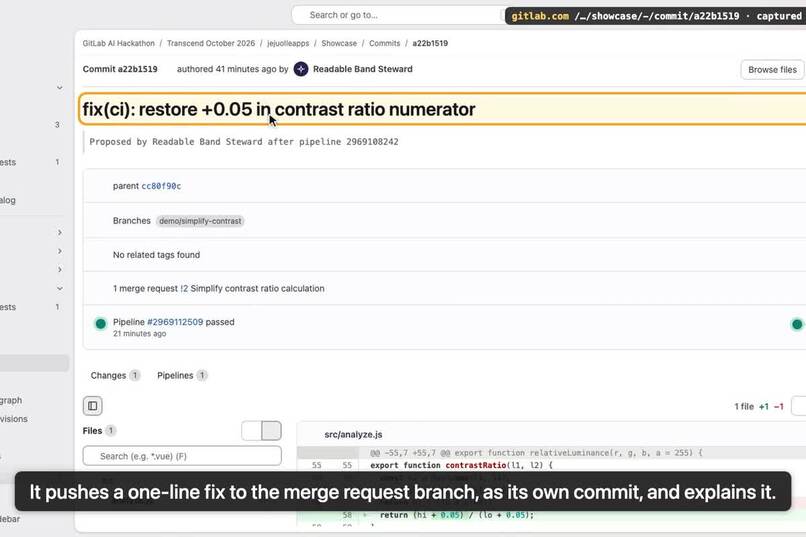
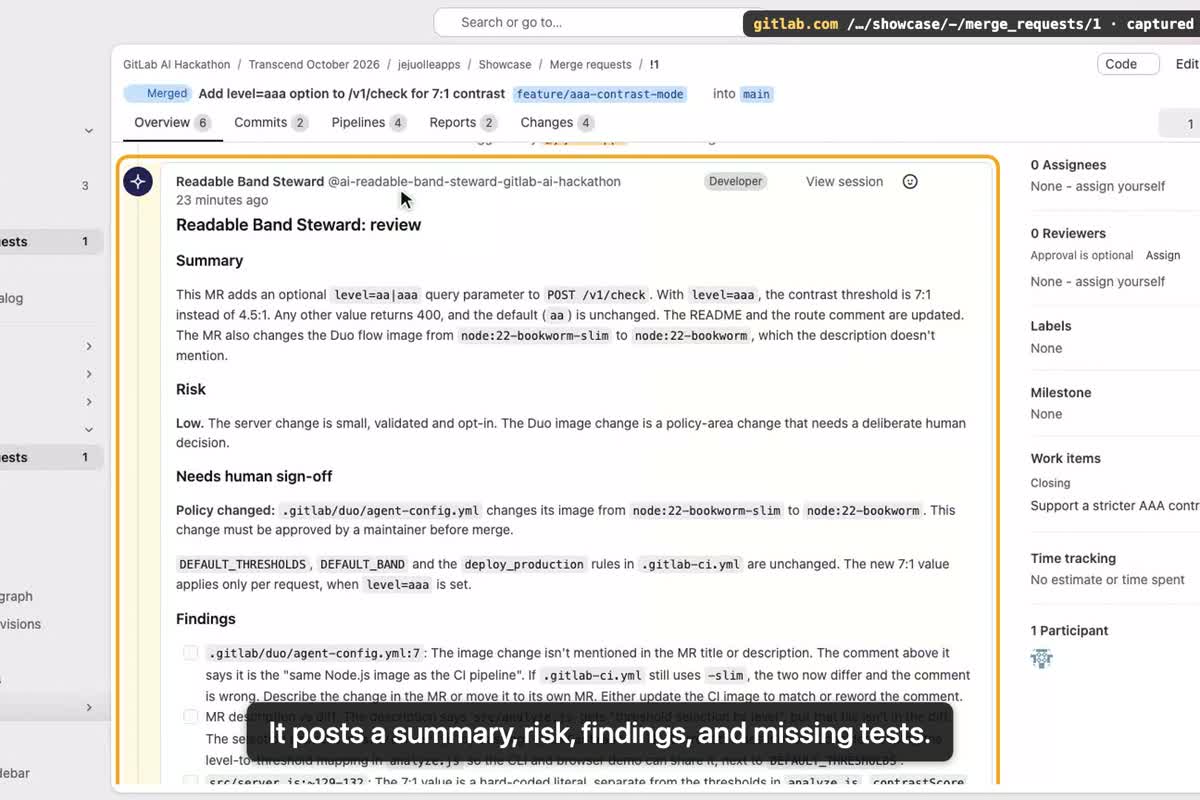
MR !1: the Readable Band Steward posts a review (summary, risk, findings, missing tests) and flags a policy change for human sign-off.
-
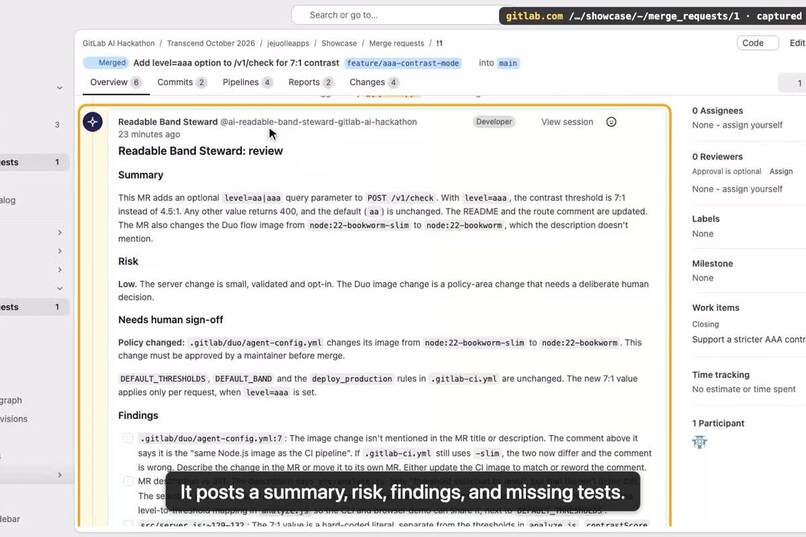
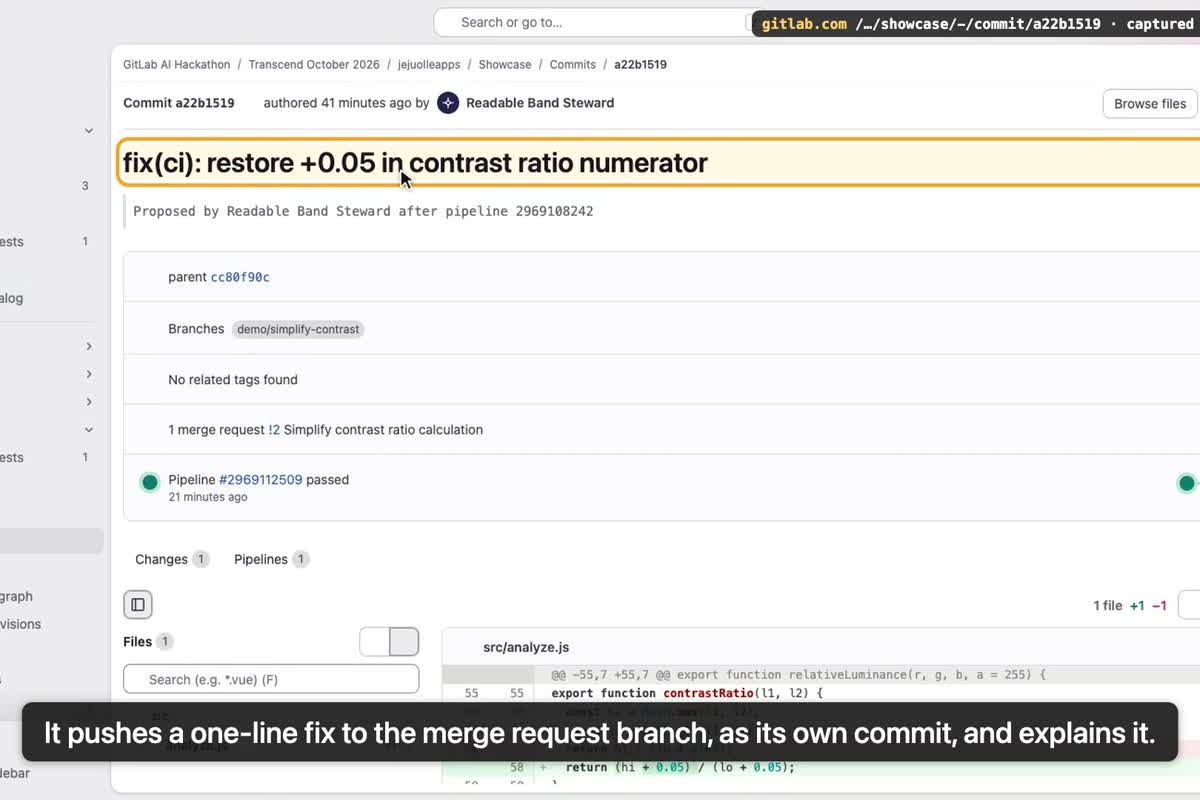
MR !2: after two unit tests failed, the Steward pushed a one-line fix commit to the MR branch and explained the root cause.
-
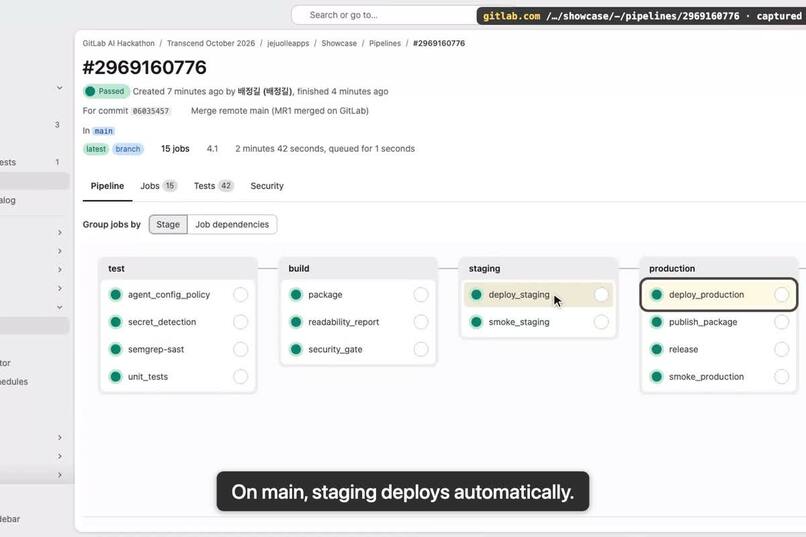
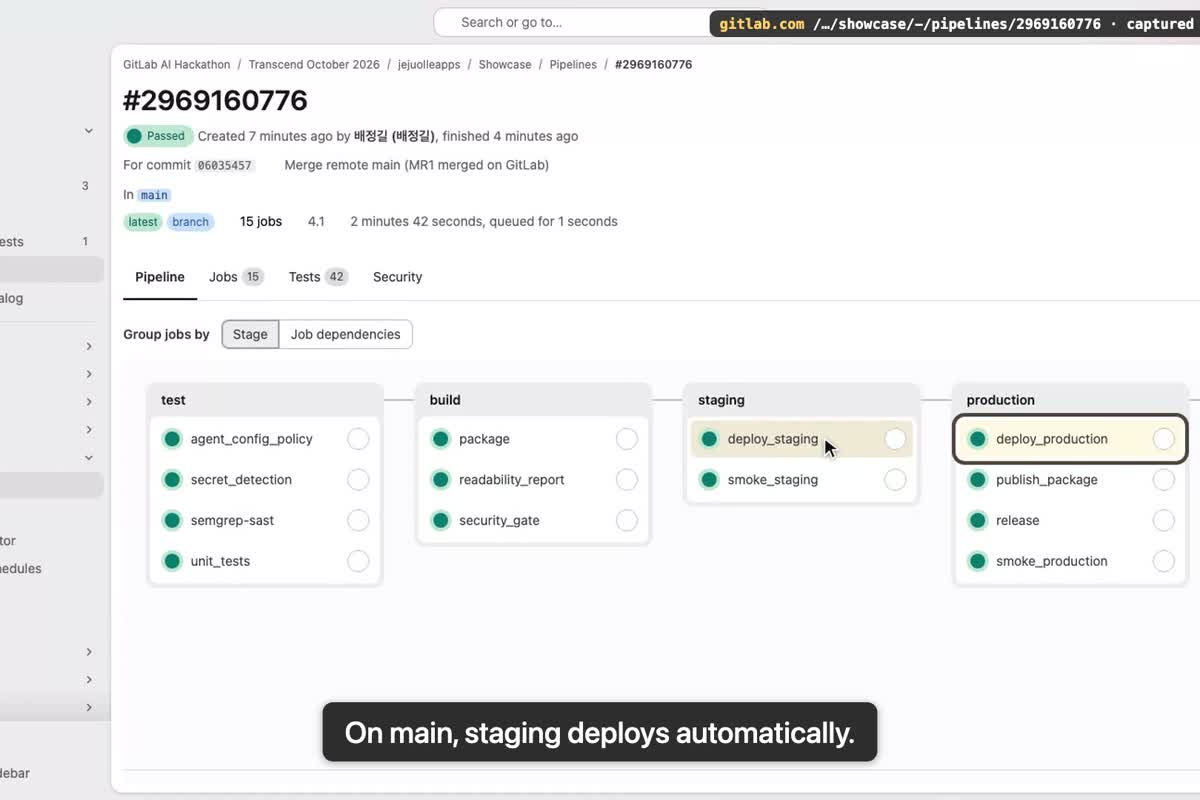
Main pipeline: test, build, staging and a manual production deploy, then smoke test, package and release.
Inspiration
I run a one-person software company in Korea, and one of my products makes illustrated story books. The story text sits in a band on top of the picture, and the picture changes on every page. A band that looks fine on one page can be unreadable on the next: beige text on a cream band, text too small for a child, or the picture showing through the letters. I check pages by eye and I miss some. I wanted that check to be a number, and I wanted the work after the code (review, tests, security, deployment) to happen without me watching every step.
What it does
Readable Band is a small service. You send a page image (PNG) and it measures the caption band: the WCAG contrast between text and background, the height of the tallest text line, and how much the picture shows through. It answers easy, hard or no_text, with the numbers and what to change. There is an HTTP API (/v1/check, /healthz, /metrics), a command line tool, and a demo page on GitLab Pages that runs the same code in the browser.
Around it, a GitLab pipeline and a GitLab Duo custom flow handle the post-code lifecycle. When I open a merge request, the Readable Band Steward flow reviews it and posts a summary, risks, findings and missing tests, and warns when a change touches product policy (thresholds) or the automation itself. The pipeline runs 42 tests, SAST, Secret Detection, a security gate, a readability check on five sample pages, builds an npm package and deploys a staging copy to GitLab Pages, then smoke-tests it. When the pipeline fails, the flow reads the failing job logs, finds the cause and, if the fix is small and inside src/ or test/, pushes it to the merge request branch; otherwise it explains what a person has to do. When the pipeline passes, the flow reports the staging URL and the results on the merge request. Production is a manual job: I approve the outcome, not each step.
How we built it
Node.js with no npm dependencies: a small PNG decoder on node:zlib, the analysis in plain JavaScript (Otsu split of luminance into text and background, WCAG relative luminance, row runs for text lines), and node:test for 42 tests. Sample pages are drawn in code, so the repository contains no third-party images.
The pipeline (.gitlab-ci.yml) has four stages: test (unit tests with a JUnit report, an agent-configuration policy check, the SAST and Secret Detection templates), build (a security gate that blocks High and Critical findings, the readability regression report, npm pack), staging (GitLab Pages parallel deployment per merge request, smoke test) and production (manual deploy, smoke test, upload to the generic package registry, GitLab Release).
The Duo flow is written in the flow registry v1 YAML: a classifier routes each trigger (merge request created or marked ready, pipeline passed or failed, mention) to one of three paths. Agents that read untrusted text (diffs, comments, job logs) have read-only tools; agents that write get only the processed result and the minimum write tools (a note, a commit to the MR branch, an issue). A CI job checks the flow files against a tool policy, so giving a reading agent a write tool fails the pipeline. Two project skills tell Duo how to run the tests and how to check a page. I wanted to turn on GitLab's own Code Review and Fix CI/CD Pipeline flows next to it, but in the hackathon workspace my role is Developer and enabling them is refused, so every automated step in this project is done by the one custom flow.
Challenges we ran into
Three things only showed up on gitlab.com. The flow validator rejected my YAML twice: it does not allow HTML comments inside prompts (I used one as a duplicate-comment marker) and it does not know a max_cycles key, so both went. Then every session failed to start: the flow job runs git before anything else, and my node:22-bookworm-slim image has no git. Switching to node:22-bookworm fixed it. And a test of mine that patched the flow text still looked for the removed max_cycles line, which failed the first main pipeline after the merge; the steward caught that one too, but on the default branch it only reports, by design.
Locally, the hardest part was making "no text" honest. A plain sky gradient splits into two groups of pixels just like text does, so the first version called an empty band "hard to read". The analyzer now says no_text when the two groups differ by less than 1.25:1.
Accomplishments that we're proud of
- The fix loop: in MR !2 I "simplified" the contrast formula by dropping a
+ 0.05. Two tests failed. The steward read the job log, named the two failing tests, explained that the WCAG formula needs the offset in the numerator, pushed a one-linefix(ci)commit to the MR branch with a note, and the next pipeline passed. On MR !1 it also noticed that I had changed the Duo runtime image without saying so in the description and flagged it for human sign-off. - The guard rails are code, not just prompt text: a CI job fails if an agent that reads untrusted input gets a write tool.
- All nine lifecycle stages are touched, each by a file or a job you can open (table in the README).
What we learned
Splitting reading and acting into separate agents makes the flow easier to trust: the agent that touches the repository never sees the raw merge request text. And a person approving only the production step is enough control for a small team when every agent action leaves a note, a commit or an issue behind.
What's next for Readable Band
Run the check on every page of our real books before they are published, suggest a band colour that passes, and add Korean text samples.
Built With
- gitlab
- gitlab-ci
- gitlab-duo-agent-platform
- gitlab-pages
- javascript
- node.js

Log in or sign up for Devpost to join the conversation.