-
-
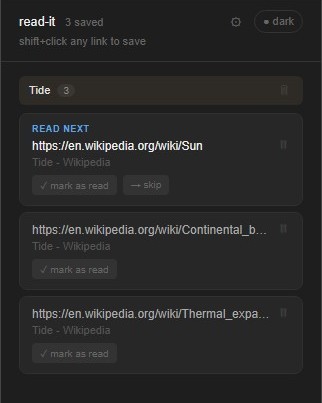
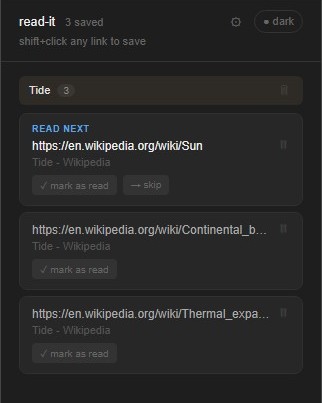
read-it UI interface
-
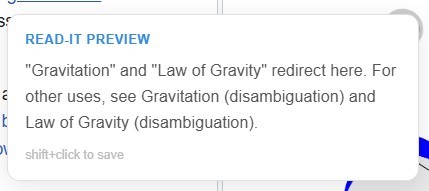
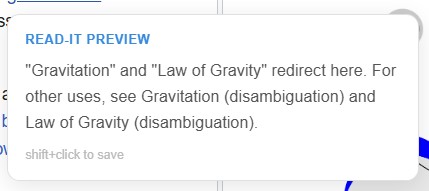
AI-generated preview on hovering over a link
-

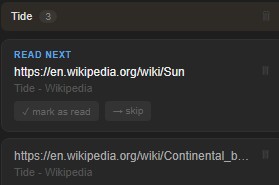
Marking a topic as read, skipping to the next topic
-

Manual dark & light mode toggle switch
-
Removing a topic from the queue
-
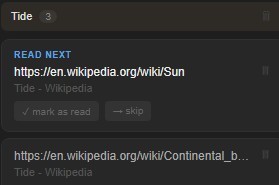
Automatically generated groups for particular topics


Inspiration
I love reading random wikipedia articles and blogs on the internet however, one common problem I always encountered was having to open a new tab everytime I had to read a related article or subtopic which completely ruined my flow, so my choices were to open a pile of different tabs where context got lost or just forget it and move on with the main article which kept me confused and clueless.
What it does
read-it is a Chrome extension that turns your scattered reading habits into an organized queue — without ever breaking your flow.
shift+click any link to instantly save it to your queue.
ai-powered hover previews — pause on any link for 0.3 seconds and get a 2-3 sentence summary of the page before deciding if it's worth saving.
auto-groups links by topic — links are automatically organized into named threads based on the page title, so your "coping mechanisms" rabbit hole stays separate from your "sleep science" one.
read next — the first unread link in each group is always highlighted so you always know where to pick up.
skip — not feeling a link right now? skip it and it moves to the back of the queue without getting lost.
mark as read — satisfying one-click cleanup when you're done with a link.
delete threads — remove an entire topic group at once when you're done with it.
dark and light mode — syncs with your system theme automatically with a manual toggle too.
fully local — everything lives in your browser, no account, no server, no tracking.
How I built it
read-it is built as a vanilla JavaScript Chrome extension using Manifest V3. The extension has three main parts ; a content script that runs on every webpage and listens for shift+clicks and hover events, a background service worker that handles page fetching and summarization without CORS restrictions, and a popup UI for managing the queue. Links are stored locally using the Chrome Storage API. For the AI hover previews, I used the Jina.ai Reader API which extracts clean readable text from any webpage and returns a summary.
Challenges I ran into
The biggest challenge was the hover preview feature. Our first approach fetched pages directly from the content script which got blocked by CORS on almost every site. I solved this by routing all fetches through the background service worker instead. I also went through several summarization approaches, I tried the Gemini API but hit free tier quota limits almost instantly since hovering over links fired too many requests. I eventually settled on Jina.ai which handles both content extraction and summarization in a single call with no quota issues. Getting the toast notification to blend into any webpage by sampling the page's background color was another fun challenge.
Accomplishments that I'm proud of
I'm proud that the core experience feels invisible; shift+clicking a link and seeing "added to queue" in a matching toast that blends into the page is exactly the frictionless interaction I set out to build. The hover preview feature turned out better than expected — pausing on a link and getting a real summary in under a second without any setup feels like magic. I'm also proud that the whole thing works with zero accounts, zero tracking, and zero API keys.
What I learned
I learned a lot about the Chrome Extension architecture, the separation between content scripts, background service workers, and the popup, and why that separation exists. I also learned the hard way about CORS restrictions and why network requests in extensions need to go through the background worker. On the product side, I learned that the best features are the ones that get out of the way — every design decision came back to "does this interrupt the reading flow?"
What's next for read-it
- publishing on the Chrome Web Store so anyone can install it in one click
- Firefox support
- exporting your queue as markdown or a reading list
- syncing your queue across devices using Chrome sync storage
- letting users manually rename or merge topic groups
- a "reading history" view to see everything you've marked as read
- AI-powered group naming using the hover summary to assign smarter topic labels

Log in or sign up for Devpost to join the conversation.