-
-
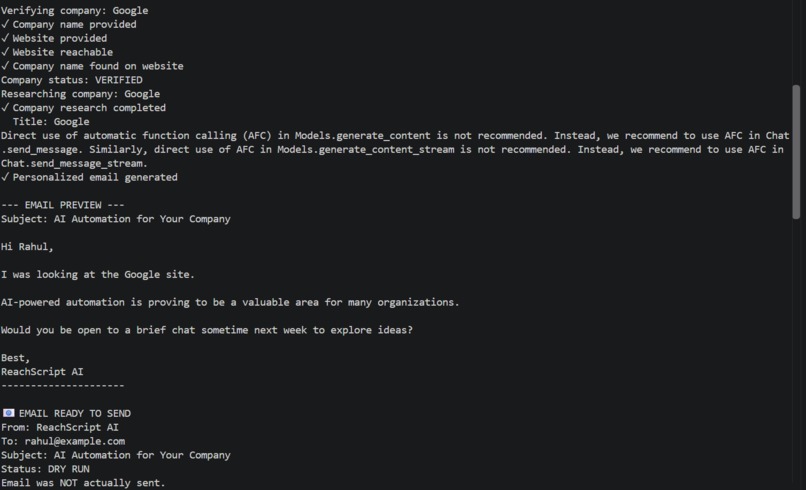
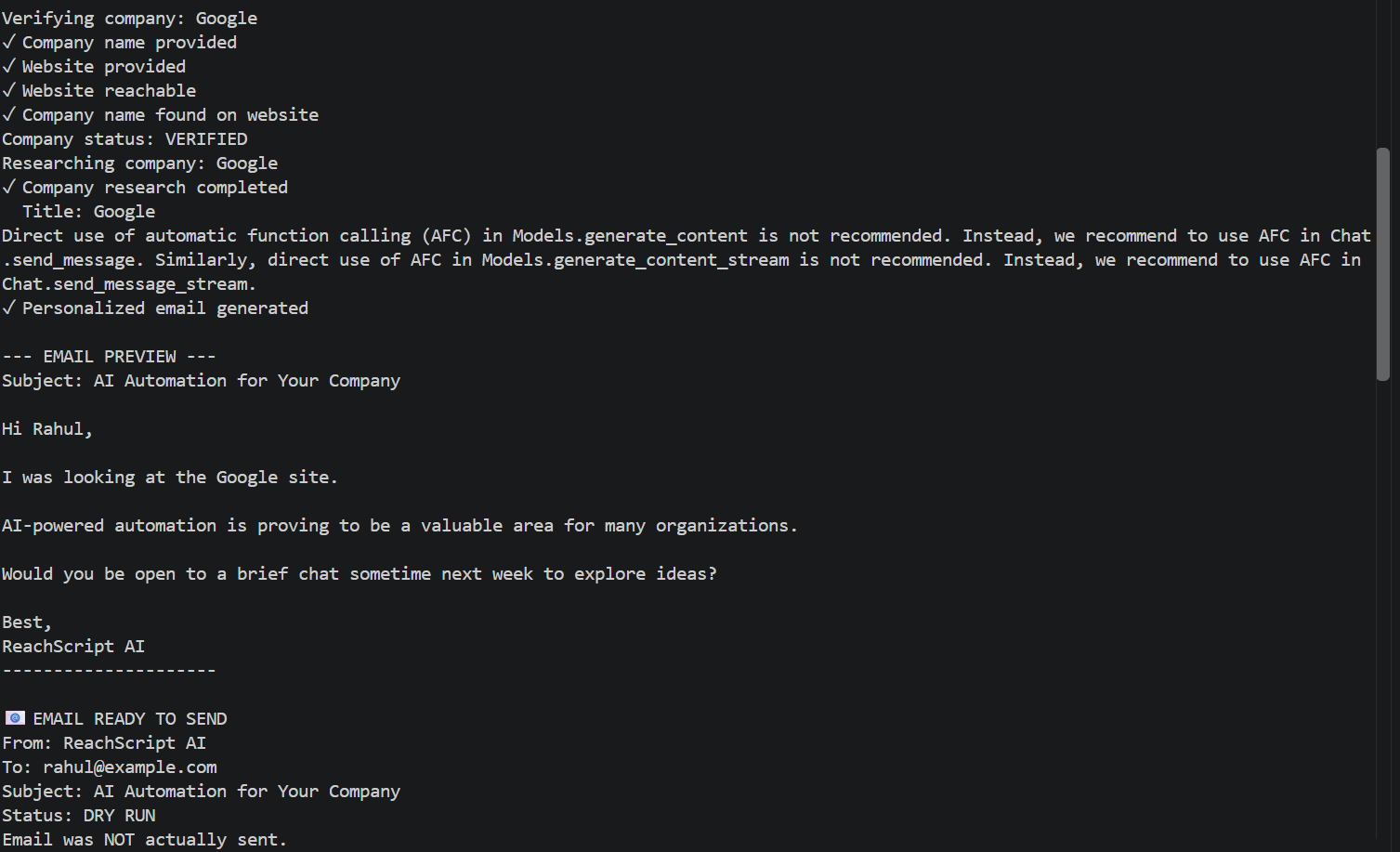
how the email generated andexecution of it
-
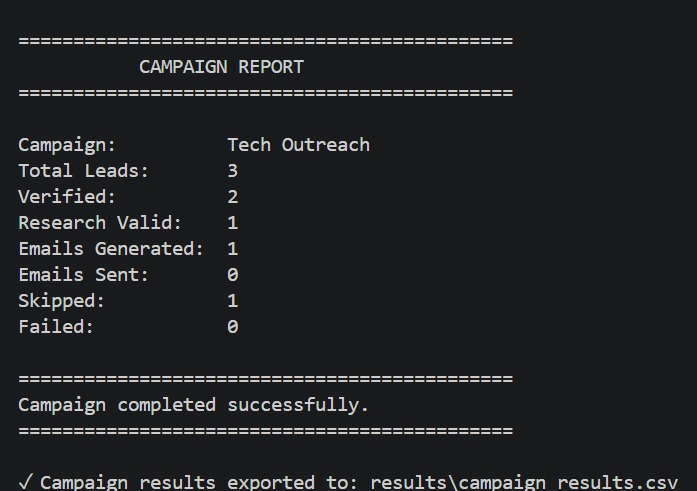
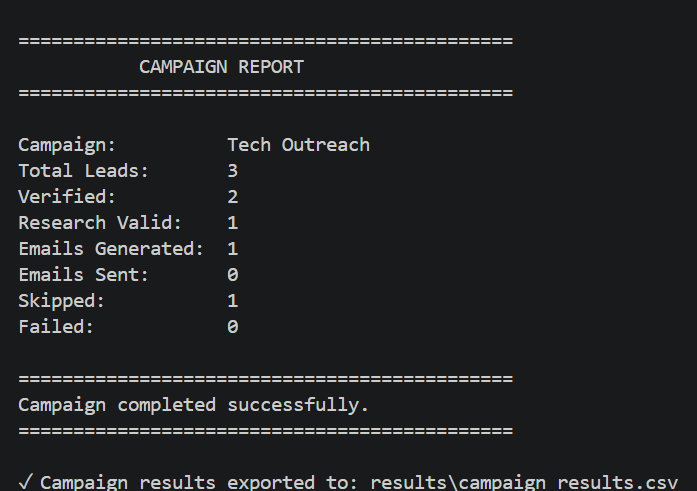
the report of all leads
-
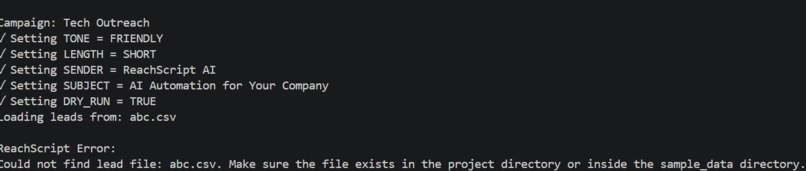
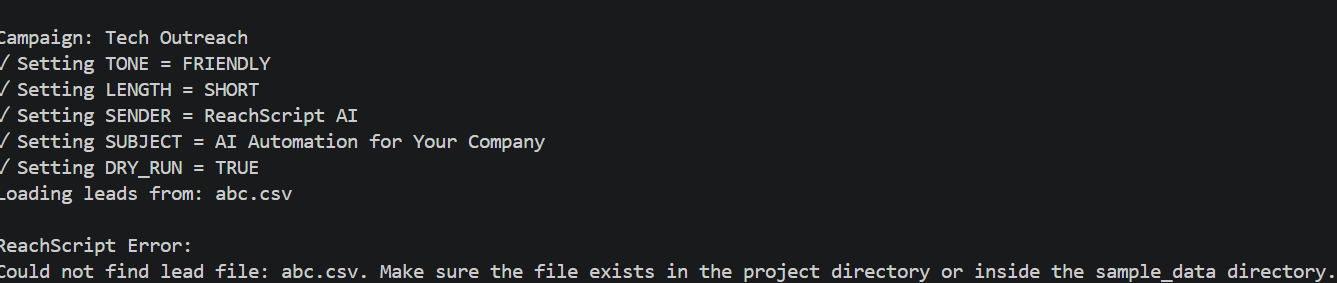
how error has been handled
-
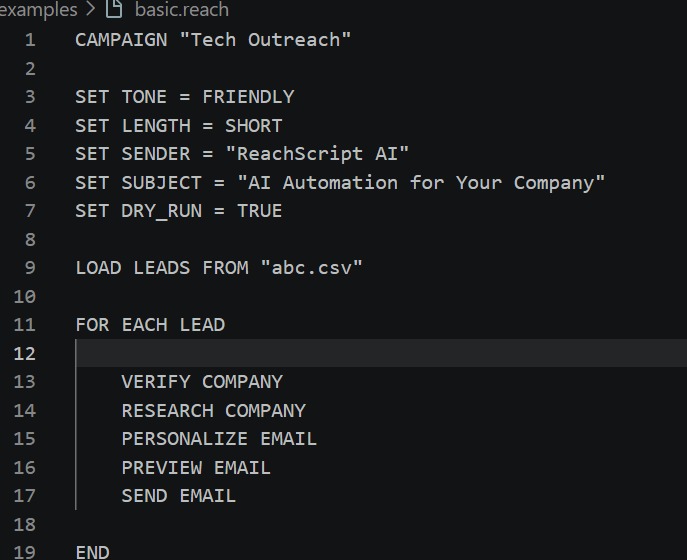
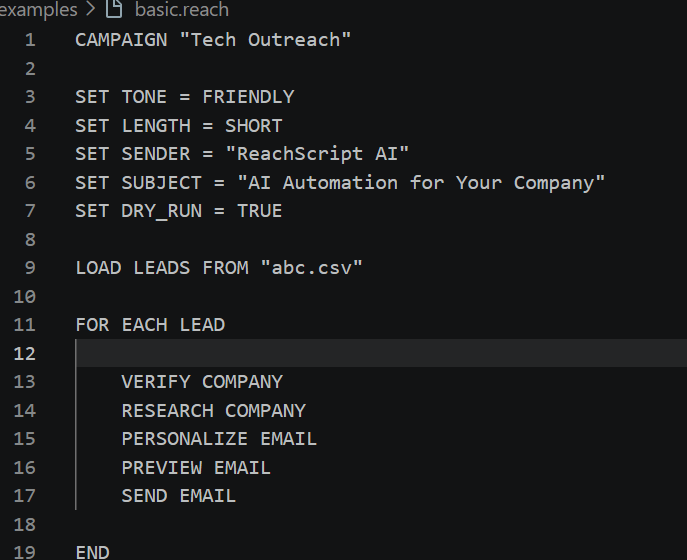
basic reachscript program
-
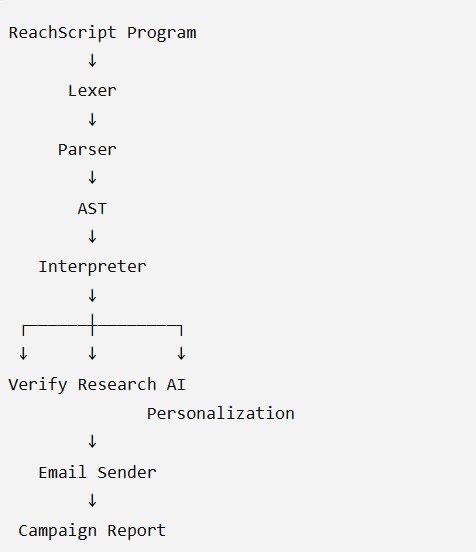
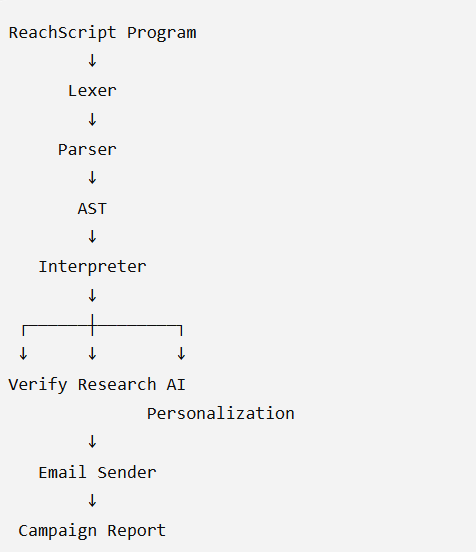
how the core architecture works
ReachScript
Inspiration
Sales outreach automation usually requires connecting multiple tools: lead databases, company research, verification services, AI models, email systems, and automation platforms. While these tools are powerful, building a complete workflow often requires writing and maintaining a lot of code.
We wanted to explore a different approach:
What if sales outreach automation could be expressed as a programming language designed specifically for that problem?
That idea led to ReachScript, a Domain-Specific Language (DSL) for AI-powered sales outreach.
Instead of writing a large Python automation script, a user can describe the workflow using simple, readable ReachScript commands:
CAMPAIGN "Tech Outreach"

SET TONE = FRIENDLY
SET LENGTH = SHORT
SET SENDER = "ReachScript AI"
SET SUBJECT = "AI Automation for Your Company"
SET DRY_RUN = TRUE

LOAD LEADS FROM "leads.csv"

FOR EACH LEAD
    VERIFY COMPANY
    RESEARCH COMPANY
    PERSONALIZE EMAIL
    PREVIEW EMAIL
    SEND EMAIL
END
The goal was to make a complex AI-powered workflow feel like a small, purpose-built programming language.
What We Built
ReachScript is implemented in Python and has its own language-processing pipeline:
ReachScript Source
       ↓
     Lexer
       ↓
     Tokens
       ↓
     Parser
       ↓
      AST
       ↓
   Interpreter
       ↓
Business Automation
The lexer converts ReachScript source code into tokens.
The parser validates the syntax and constructs an Abstract Syntax Tree (AST).
The interpreter then executes the AST and connects the language instructions to real-world operations.
ReachScript currently supports:
- Campaign definitions
- Configuration with
SET - CSV lead loading
- Lead iteration
- Company verification
- Company research
- AI-powered email personalization
- Email preview
- SMTP email delivery
- Dry-run mode
IF / ELSEconditionsAND / OR / NOTlogic- Runtime error handling
- Campaign execution reports
- CSV result export
This means ReachScript is not simply a collection of Python functions with a different interface. It has its own syntax, lexical analysis, parsing, AST representation, execution model, and domain-specific semantics.
How It Works
A typical campaign moves through several stages.
1. Load leads
ReachScript reads lead information from a CSV file.
LOAD LEADS FROM "leads.csv"
2. Verify companies
The interpreter checks whether the provided company information is valid and whether the website is reachable and matches the company.
VERIFY COMPANY
3. Research companies
For verified leads, ReachScript gathers available company information from the web.
RESEARCH COMPANY
4. Generate personalized emails
The research information is passed to an AI model to generate a personalized message.
PERSONALIZE EMAIL
Users can control parameters such as tone and length:
SET TONE = FRIENDLY
SET LENGTH = SHORT
5. Preview or send
The generated email can be previewed before sending:
PREVIEW EMAIL
ReachScript also supports a safe dry-run mode:
SET DRY_RUN = TRUE
This allows the complete workflow to be demonstrated without actually sending emails.
Conditional Logic
We also wanted ReachScript to behave like a real programming language rather than a fixed sequence of commands.
For example:
IF VERIFIED AND RESEARCH_VALID
    PERSONALIZE EMAIL
ELSE
    LOAD LEADS FROM "failed.csv"
END
ReachScript also supports conditions such as:
IF VERIFIED OR RESEARCH_VALID
    PERSONALIZE EMAIL
END
and:
IF NOT VERIFIED
    LOAD LEADS FROM "leads.csv"
END
This allows users to build workflows that react to the state of each lead.
AI Integration
AI is used where it provides the most value: personalization.
Instead of generating the same generic email for every lead, ReachScript uses company research and lead information as context for generating an individualized message.
For example, a successful execution can produce:
--- EMAIL PREVIEW ---

Subject: AI Automation for Your Company

Hi Rahul,

Hope you're having a good week at Google.

We're exploring how AI-powered automation can streamline
various processes, and I thought it might be worth connecting.

Would you be open to a quick conversation to see if there's
any potential alignment?

Best,
ReachScript AI
The important part is that the AI generation is inside the language's execution workflow, rather than being a separate chatbot feature.
Error Handling
Real-world automation cannot assume that every lead will work.
During development, we deliberately tested situations such as:
- Missing CSV files
- Missing email addresses
- Unreachable websites
- Blocked or insufficient research
- Failed AI personalization
- Unverified companies
- Invalid configuration values
Instead of exposing Python tracebacks to the user, ReachScript provides domain-specific runtime errors.
For example:
ReachScript Error:
Could not find lead file: abc.csv.
Make sure the file exists in the project directory
or inside the sample_data directory.
This makes failures easier for a ReachScript user to understand.
Challenges We Faced
One of the biggest challenges was building the language itself.
Implementing a lexer and parser required carefully defining the syntax and deciding how commands should be represented internally.
Another challenge was implementing conditional logic. We had to make sure expressions such as:
VERIFIED AND RESEARCH_VALID
and:
VERIFIED OR RESEARCH_VALID
were correctly tokenized, parsed, represented in the AST, and evaluated by the interpreter.
Integrating external systems was another challenge. Website research can fail because of unreachable websites, blocked pages, or insufficient information. AI services can also temporarily become unavailable or experience high demand.
Email delivery introduced another layer of complexity because SMTP authentication and secure app-password configuration must be handled correctly.
These challenges pushed us to design ReachScript so that individual failures do not necessarily terminate the entire campaign.
What We Learned
Building ReachScript taught us that creating a programming language is much more than defining a few commands.
We learned how the pieces of a language work together:
Source Code
    ↓
Lexical Analysis
    ↓
Parsing
    ↓
Abstract Syntax Tree
    ↓
Interpretation
    ↓
Execution
We also learned how language design decisions affect usability. A DSL should hide unnecessary implementation complexity while exposing the concepts that matter to its users.
Most importantly, we learned how to combine traditional programming-language concepts with modern AI and automation.
Why ReachScript?
ReachScript explores the intersection of:
Programming Languages + AI + Business Automation
The vision is to make complex automation workflows easier to express, understand, modify, and execute.
Instead of asking a user to understand APIs, web requests, AI prompts, SMTP configuration, and automation code separately, ReachScript provides a domain-specific layer where those operations can be expressed through a consistent language.
The project demonstrates how a DSL can turn a complex multi-step workflow into a readable and executable program.
What's Next
ReachScript currently focuses on sales outreach, but the underlying idea can be extended.
Future versions could support:
- More CRM integrations
- Additional communication channels
- More advanced lead conditions
- Pluggable AI models
- Scheduling and campaign management
- More sophisticated research tools
- Additional DSL constructs
- A dedicated ReachScript command-line interface
- Editor syntax highlighting and developer tooling
Our long-term goal is to explohore how specialized programming languages can make AI-powered business automation more accessible without hiding the power of programming underneath.
Final Result
ReachScript started as an idea for making outreach automation easier to express.
It became a working Domain-Specific Language with:
Lexer → Parser → AST → Interpreter → AI → Real-world automation
The result is a language where a user can describe an entire outreach workflow in a small, readable program and have ReachScript execute it.
Built With
- apis
- artificial
- automation
- backend
- compiler
- csv
- domain-specific
- gemini
- generative
- intelligence
- language
- languages
- learning
- machine
- natural
- parser
- processing
- programming
- python
- scraping
- smtp
- web

Log in or sign up for Devpost to join the conversation.