Inspiration
We were appalled by the terrible user interface offered by our university's student portal. After some research we realized that tools such as "userscripts" would allow us to edit these sites, but they had a high coding knowledge barrier to entry. There just had to be a better way for the average person, or even the visually impaired!
What it does
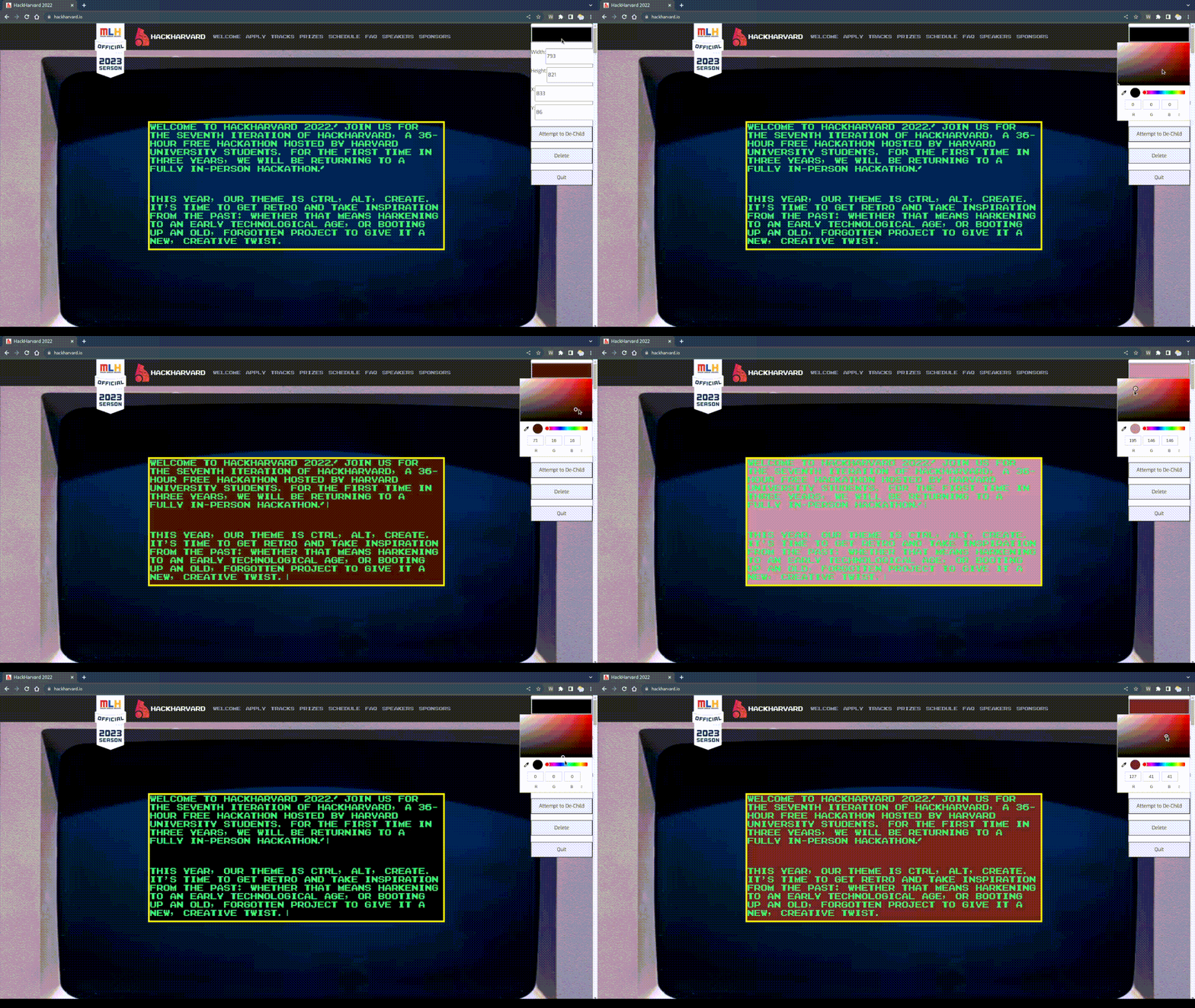
Re:Arrange combines the powerful and simplistic tools of visual website editors, with the existing content on the internet. The upside is the freedom to have any website content you want, presented in the exact way you wish! Such tools have significant meaning for those who may have difficulty seeing the elements and text on some websites, or simply those looking for an easy and quick life-hack to make their online experience easier, prettier, and more fun!
How we built it
The application was built from scratch without any frameworks, using json, js, css, and html. We tap into the power of the chrome API's to enable easy and fast editing of web elements, and even enable conversion between positional styles of elements and basic restructuring of the html element hierarchy.
What's next for Re:Arrange
Next up is smoothing out of some of the UX interface, and making the persistent storage of edited websites more reliable. All in all this seems like an extremely useful application, that we will be looking to roll out to the chrome and firefox webstores. We hope our project can legitimately help people that need it in the real world!


Log in or sign up for Devpost to join the conversation.