-
-
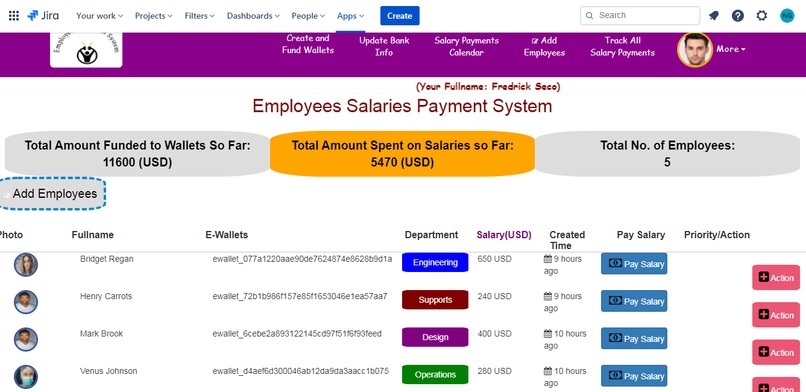
Employees Salary Payments Managements System Dashboard on Atlasian Jira Cloud
-
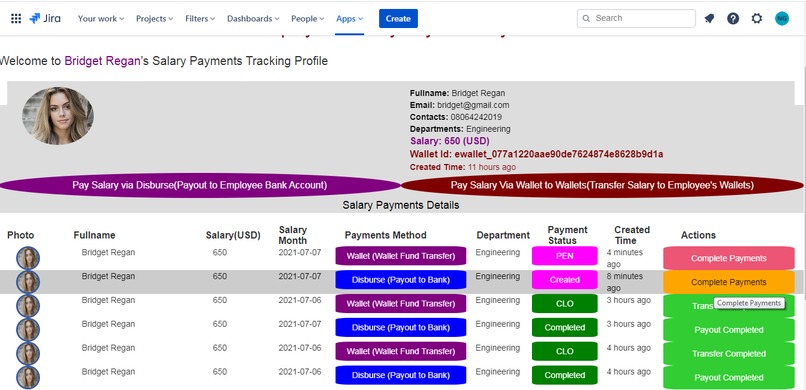
Employees Profile Salary Payments Mangements System
-
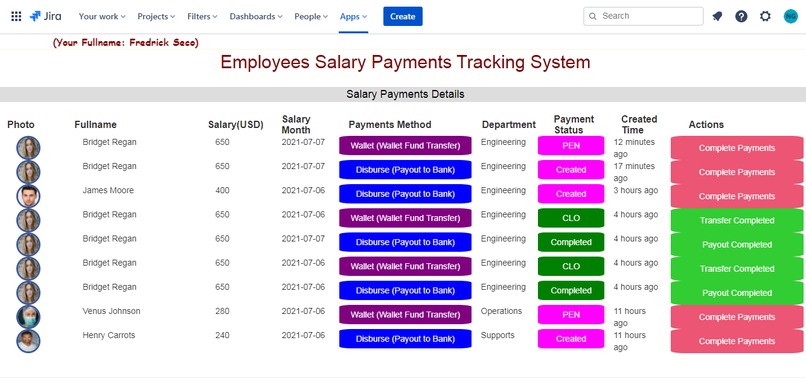
Overall Employees Salary Payments Status Tracking System
-
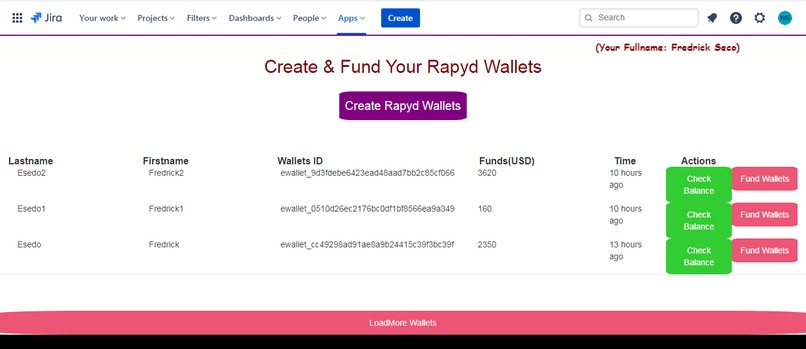
Rapyd Wallets Balance Checking and Wallets Funding System
-
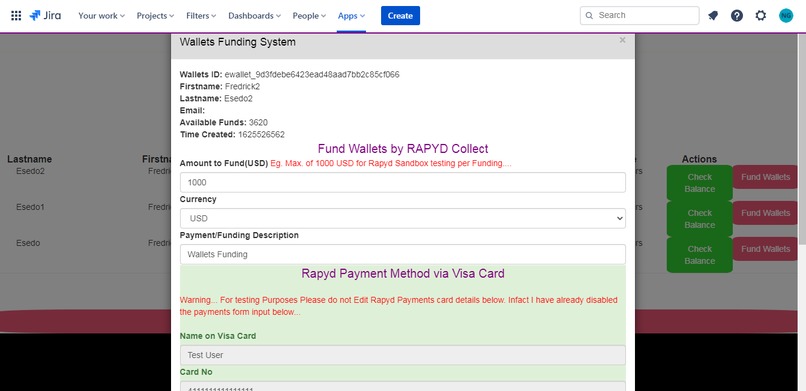
Wallets Funding System at Atlassian Jira Cloud
-
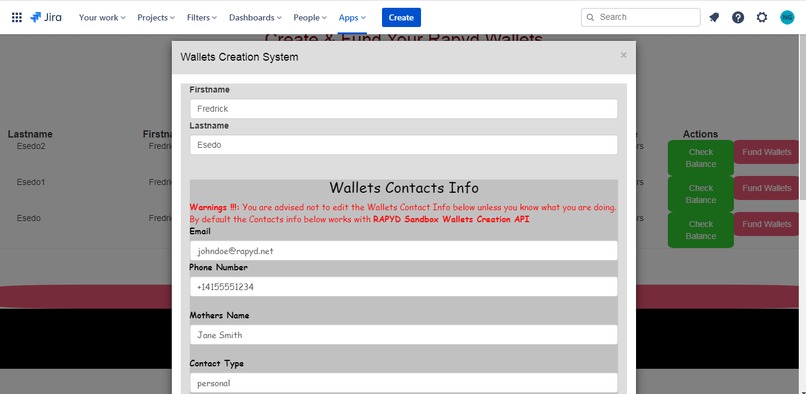
Rapyd Wallets creation System
-
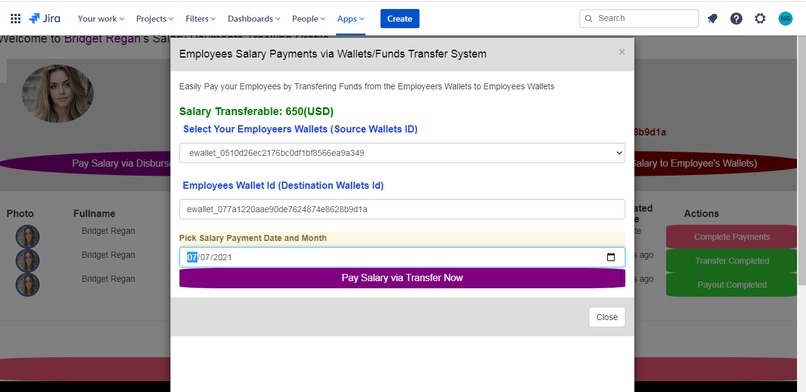
Employees Salary payments by Wallets Transfer
-
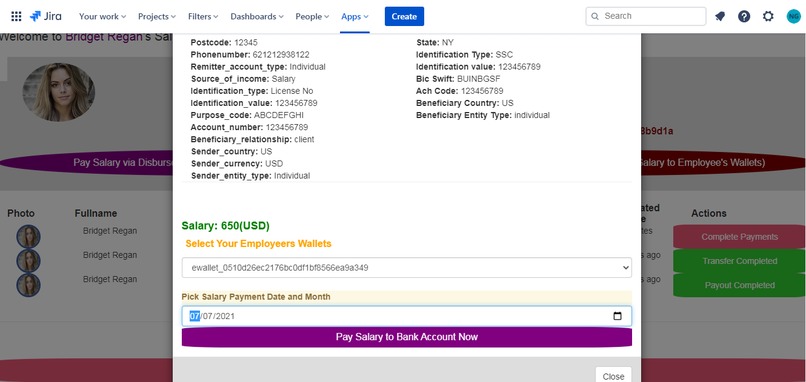
Employees Slary payments by Payout to Bank Accounts
-
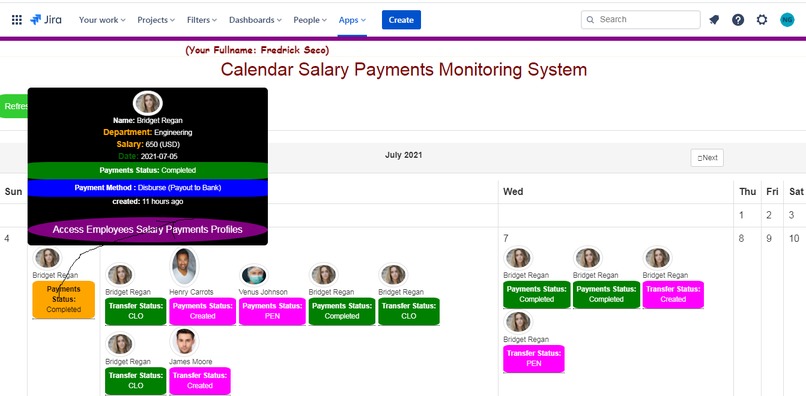
Employees Salary Payments Status Calendar Tracking Monitoring Systsem


Inspiration
Over + 500 Millions Users around the globe uses Atlassian Jira Cloud for Business Services, Team Collaborations, Issues Solving, Tasks Managements, Projects Managements and Reportings and more.
https://www.atlassian.com/software/jira
Atlassian Jira Cloud has over 25 million unique users a monthly visitors. Source: https://www.atlassian.com/customers/the-telegraph
Over Thousands of Plugins/Addons runs on Atlassian Jira Cloud to help facilitates Business Activities, Teams Collaborations thus keeping all business activities in just one place within Jira Cloud. See Jira Cloud Plugins/Addons Market places
https://marketplace.atlassian.com/
https://marketplace.atlassian.com/addons/app/jira
Realistically, the purpose of every business is to ensure Customers satisfactions and to make profits. To this effects, I built an Employees/Teams Members Salary Payments for Atlassian Jira Cloud Plugins to enable Employers/Team Members to easily Manage and Pay Salaries, Wages, Pensions etc, to their Staffs, Employees, Workers, Members etc without leaving Jira Cloud powered by Rapyd Payments API
Rapyd Payments API Used
Note that Both Employers and Employees needs to signup within the App to
get their Registered Email Address and create at-least minimum of one Rapyd Wallets ID from their own end.
The Employers Pays Salaries and Employees, Staff, Workers receives it from Its own ends
Summary of What it Does
1.) Allow Employers/Salary Payers to create Rapyd Wallets leveraging Rapyd Wallets Creation API.
2.) Allow Employers/Salary Payers to Fund their various Rapyd Wallets leveraging Funding Wallets API via Rapyd Collect Visa Card Payments System .
3.) Allow Employers/Salary Payers to check and updates their various Rapyd Wallets Fund Balance leveraging Rapyd Wallets Balance Checking API.
4.) Allow Employers/Salary Payers to updates their Employees Personal, Wallets andPayments Banking Information's.
5.) Allow Employers/Salary Payers to pay Salaries to their Employees Bank Accounts and Wallets Id respectively via Rapyd Disburse and Rapyd Wallet leveraging Payout to Bank Account API and Wallet to Wallet Transfer API.
6.) Allow Employers and Employees to track and monitor all Salaries Payout Payments and Transfer status Eg.(PEN, CLO, Created, Completed etc.)
7.) Fully integrated Calendar Salary Payments Monitoring System: to track and monitor all salaries payments and transfer status (PEN, CLO, Created, Completed etc.) to and from the Employers and their Employees.
8.) Allows the Employees, Staffs, Workers etc to track and monitor all salaries payments and transfer status (PEN, CLO, Created, Completed etc.) made to them to and from their Employers.
9.) Allow Employers to calculates the Total amount of Money already Funded to various Wallets, Calculate the total amount of fund already spent on employees Salary payments and total number of employees in the Employers Payrolls and much more..
How to Install Application Plugin on Atlassian Jira Cloud
NB:
You can follow the Tutorial link below to learn, build and install Atlassian Jira Cloud Plugins/Addons. https://developer.atlassian.com/cloud/jira/platform/getting-started-with-connect/Now you must refresh/reload that Jira Page so that you will see Upload App button at the middle of the page right. It is a must at this point to refresh the Jira Page so that you will see the Upload App button at middle of the page right
click on the Upload App button and it will ask you to Enter the app descriptor URL to upload the app and install. here just enter the our Atlassian Jira Cloud Plugin Url https://qbtut.com/employeeci_jira_app/atlassian-connect.json and click upload button. Jira Cloud will then download our Plugins and install it for you. You will then see our Plugins name as Employees Salary Payments Apps by Rapyd API
You will see Our Plugins running on Atlassian Jira Cloud.
Alternatively, You can watch this Youtube Video to see how you can Install our Plugins on Atlassian Jira Cloud
How to Install Our Employees Salary Plugins by Rapyd on Jira Cloud
Optionally, In the event that you also want to access the app directly from Web, you can try the web version of the app directly from
https://qbtut.com/employeeci_jira_app/index.html
How to use the Application Plugin on Jira Cloud
To Fund Wallets, the applications leverages Rapyd Collects via Visa Card Payments
Both Employers and Employees should have account on the platform and they should be able to create their various Rapyd Wallets ID.
For testing purposes, we have configured the Sender/Payer Banking Detail based on available code sample information's from Rapyd Payout to Bank Account API. All the Employers needs to do now is to click on Update Banking Info button to update data within the App.
4.)Employers/Salary Payers will need to add both Personal and Banking Information's,Wallets Id etc. of all their respective employees, workers, staffs etc so that they can be able to receive salaries, wages etc via 2 major means
A.)Salary Payout to Employees/Workers Bank Account
A.)Salary Payment Wallets Transfer (From Employers Wallets to Employees Wallets
For testing purposes, we have configured the Beneficiary/Employees Banking Detail based on available code sample information's from Rapyd Payout to Bank Account API.
For every Transaction or Salary payments from the Employers to Employees, the Applications tracks and monitors all the Payments Status:
Payment status PEN and CLO for all Salary Payments via Wallets Transfer.
Payment status Created and Completed for all Salary Payments via Payout to Employees Bank Accounts.
Additional Bonus
How we built it
Built with Rapyd Collect, Rapyd Disburse, Rapyd Wallets, Jira Cloud, Php, Mysql etc.
