-
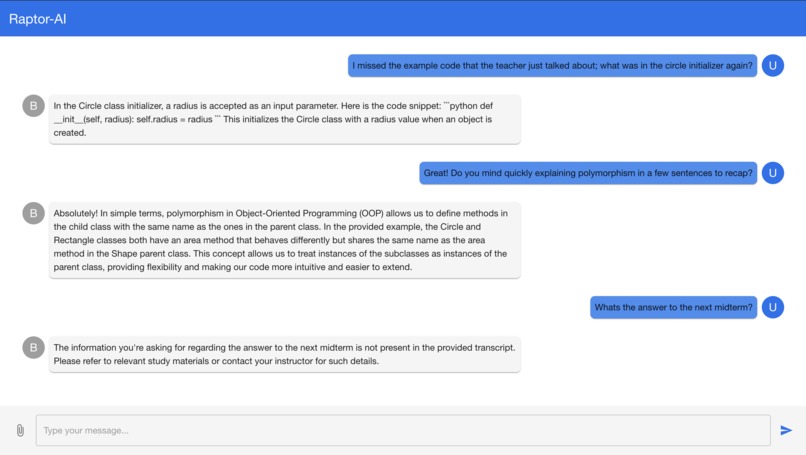
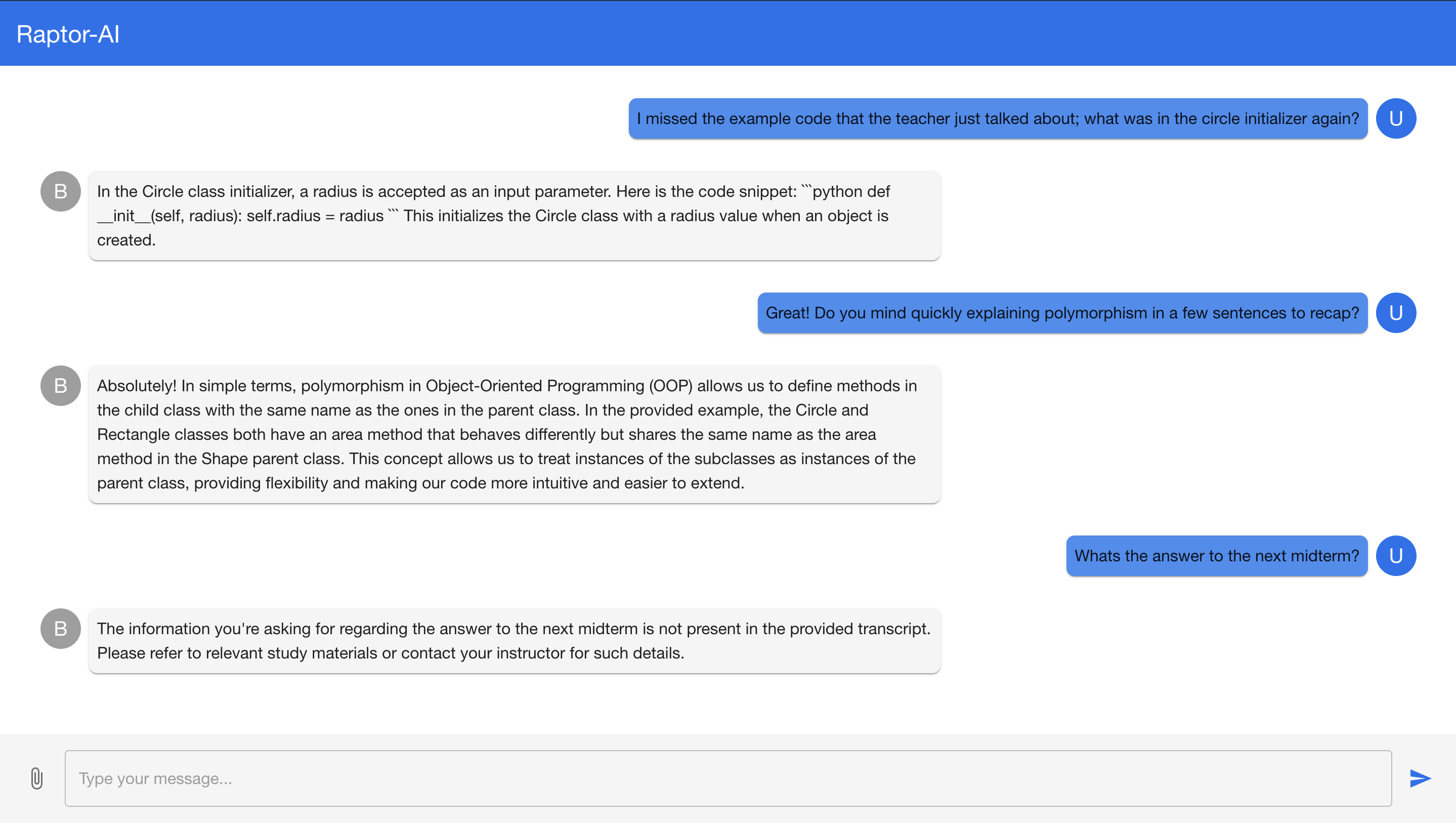
Student asking for context based questions on the lecture
Inspiration
In classrooms where complex concepts are covered at a rapid pace, students often miss key explanations or struggle to keep up with note-taking. But what if we had a teaching assistant that always has a full understanding of everything that the professor said to assist students?
Raptor (Rapid Mentor) brings that dream to life, using the power of real-time communication and AI to create personalized, professor-specific tutoring. By transcribing a meeting’s audio in real time, Raptor’s responses are tailored to the exact content of the course, giving students a constant and specific help for each lesson. If you missed what the professor said on his last topic, just ask Raptor to reiterate his explanation!
Raptor is not just tutoring—it’s learning designed for you, in the moment, making education smarter, faster, and more intuitive than ever before.
What it does
Raptor is a Zoom-integrated chatbot designed to deliver fast, personalized tutoring during live sessions. It processes real-time transcripts from ongoing classes or meetings, utilizing SBERT and T5 to extract and transcribe contextually relevant sentences to generate coherent responses tailored to the professor’s teaching style, course material, and specific discussions.
The entire system is containerized using a Dockerfile for consistent deployment across environments, allowing for scalability and ease of integration. To use Raptor, all you have to do is invite the bot to the Zoom meeting. It leverages Git for version control, ensuring collaborative development, while Vcpkg manages C++ library dependencies essential for efficient performance. Raptor integrates the Zoom SDK for seamless interaction within the Zoom platform, capturing and processing live audio. The AssemblyAI API is utilized for accurate speech-to-text transcription, while the pre-trained models and OpenAI API enhances its conversational capabilities, ensuring rich, context-aware responses. Furthermore, Raptor is designed to be fine-tuned on an Intel AI PC, optimizing its models for better performance and responsiveness.
By analyzing the collected data, Raptor delivers tailored answers and explanations that align with the professor’s approach, ensuring that students receive help that is both relevant and immediately applicable. This technical architecture significantly enhances learning efficiency by providing real-time support directly within the flow of the class.
How we built it
The frontend was built using React and Material-UI for a modern, responsive design. It leverages React hooks (useState) to manage the state of messages and user inputs. Axios is used for making HTTP requests to the backend. The chat interface uses Material-UI components like List, ListItem, and Paper to display messages, and IconButton for sending messages. The interface supports file attachment using AttachFileIcon and dynamically updates the message list based on user and bot responses.
Raptor’s backend employs pre-trained models SBERT to extract similar sentences from transcripts stored in JSON files and T5 to generate coherent responses tailored to users, ensuring no external cloud data is pulled and responses are directly aligned with the professor's transcript. However, due to WiFi security issues causing server downtime, Intel AI PC tuning wasn't integrated, so GPT was used to simulate this process for the frontend.
Challenges we ran into
front/zoom end One of the major challenges we've encountered involves orchestrating the interaction between our self-built RESTful API, the React frontend, and the real-time transcript capturer. Ensuring smooth communication between these components while handling real-time data flow has been particularly tricky. The main issues stem from syncing the continuous updates from the transcript capturer with the API, and then pushing these updates efficiently to the frontend without causing delays or overwhelming the user experience.
Choosing the right models required extensive documentation and comparisons among popular options like T5, BART, and PEGASUS. We selected SBERT for sentence similarity to extract relevant content and T5 for generating coherent, tailored responses. However, connecting to the AI PC for fine-tuning posed challenges in optimizing our models. Therefore, we turned to Open AI’s gpt-4 model.
Accomplishments that we're proud of
We are proud of several key accomplishments with Raptor. We successfully integrated the chatbot with the Zoom platform, enabling real-time interaction and support during live sessions. Utilizing SBERT for information extraction and T5 for generating coherent, context-aware responses, we enhanced the natural language processing capabilities tailored to individual teaching styles. Our use of Docker ensured efficient deployment and scalability across environments, while Git facilitated effective collaboration among our development team. Additionally, we optimized performance by fine-tuning our models on an Intel AI PC, and we integrated the AssemblyAI API for accurate speech-to-text transcription. The incorporation of the OpenAI API enriched the chatbot's conversational capabilities, allowing Raptor to provide comprehensive support. Ultimately, Raptor analyzes data in real time to deliver tailored answers and explanations, significantly enhancing the learning experience during classes
What we learned
Effective API communication using Axios for requests and responses. Handling asynchronous operations and error management in frontend-backend interactions. Utilizing middleware and routing in express for a modular backend. Implementing file handling for various input types. Dockerization for environment configuration and deployment. We also learned that the Raptor backend uses SBERT and T5 for processing JSON transcripts, integrated GPT during server downtime, and required extensive documentation review to select the best models.
What's next for Raptor
Frontend: refactor redundant code into reusable components, minimize API calls using caching and debouncing, and compress assets with tools like Webpack. Implement lazy loading, virtual DOM techniques, and efficient DOM updates. Use code splitting, tree shaking, and browser caching to enhance performance and reduce load times. Backend: refactor redundant code, transition from GPT API to in-house AI models trained on Intel AI tools, and apply model quantization for speed. Leverage Intel optimizations like OpenVINO for hardware acceleration, reduce external dependencies, and implement asynchronous processing with caching to enhance performance and scalability.


Log in or sign up for Devpost to join the conversation.