-
-

ClipIn: the easy way to check in!
-
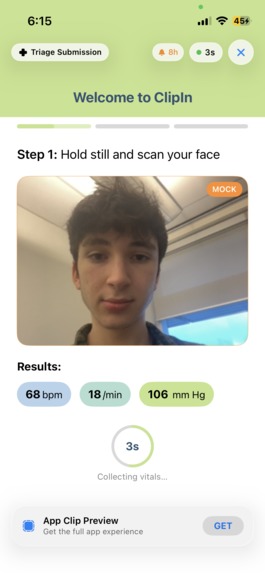
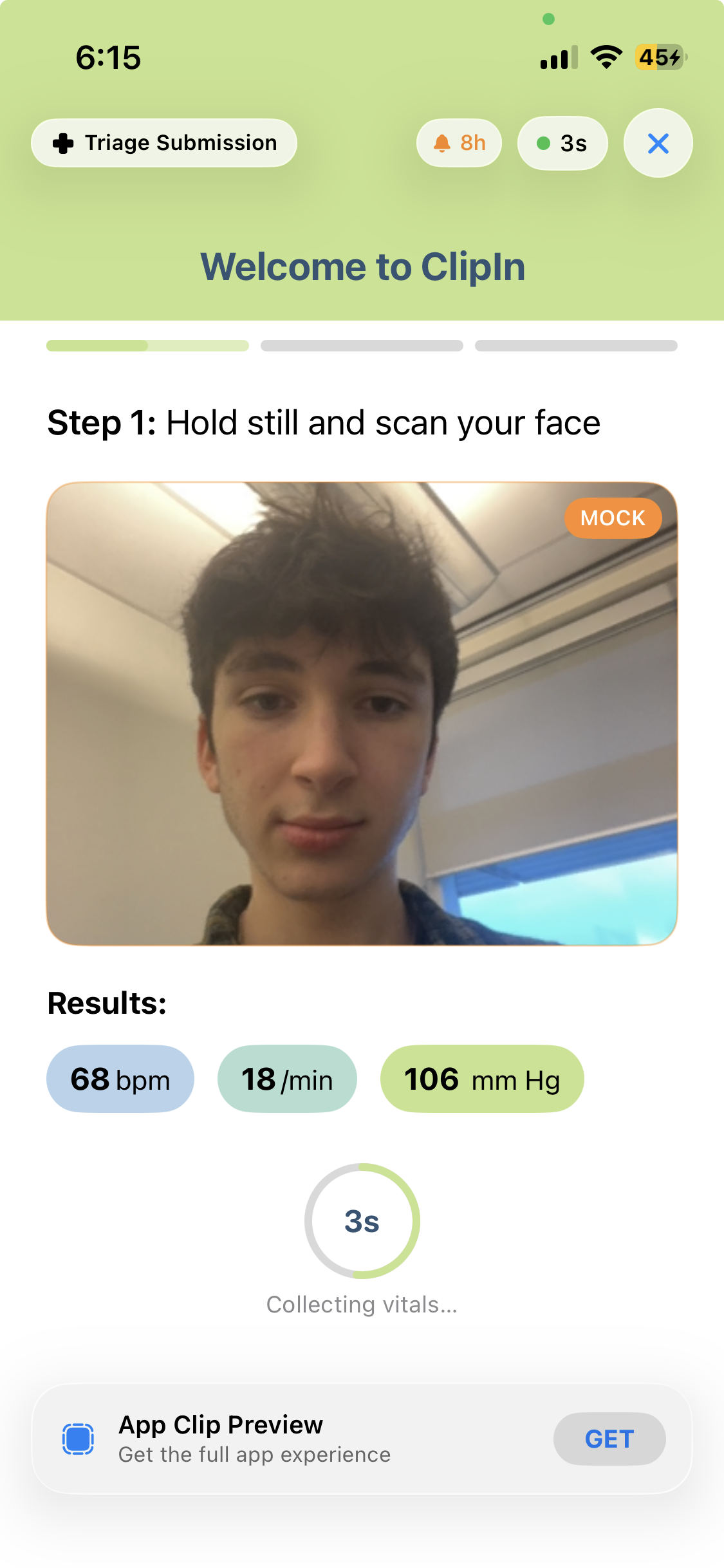
Step 1: Presage scans your vital signs with just a camera
-
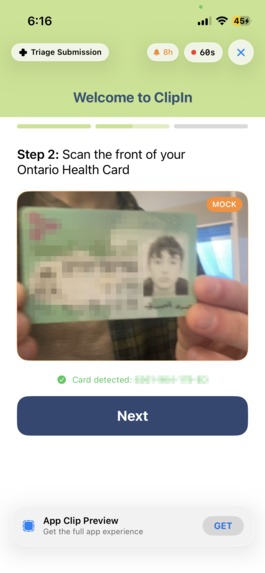
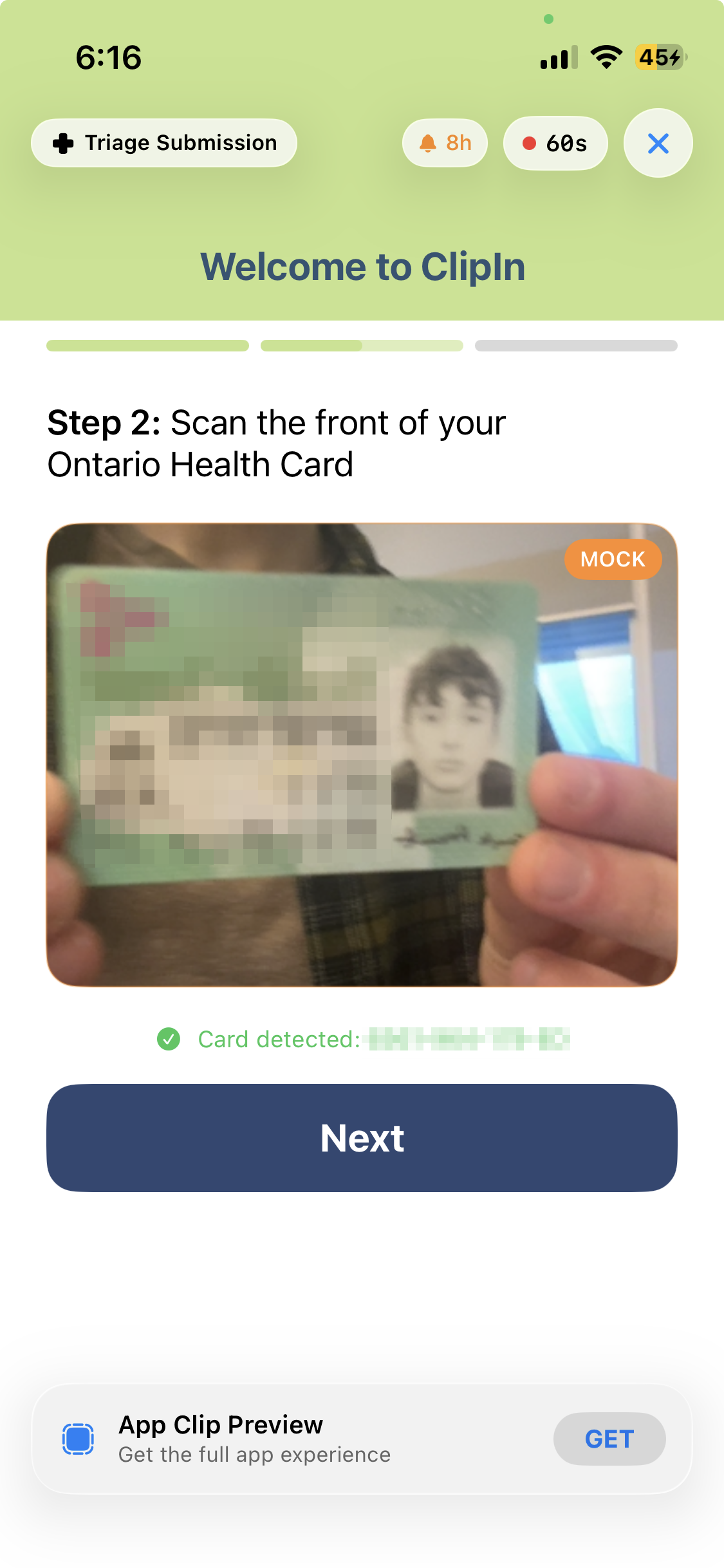
Step 2: Optionally, scan your health card so the dashboard can display personal health information
-
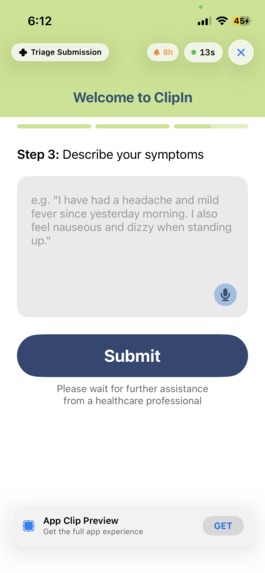
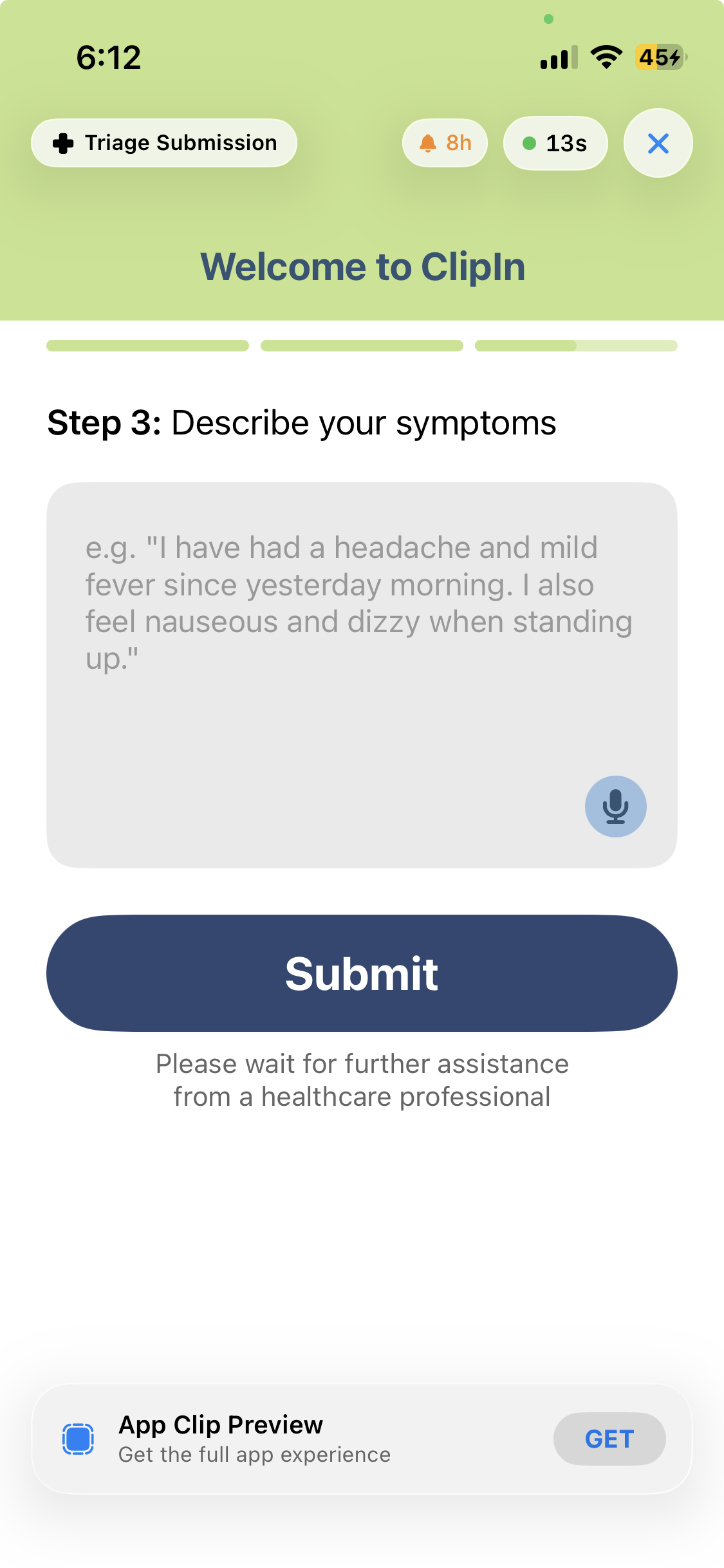
Step 3: Submit your symptoms
-
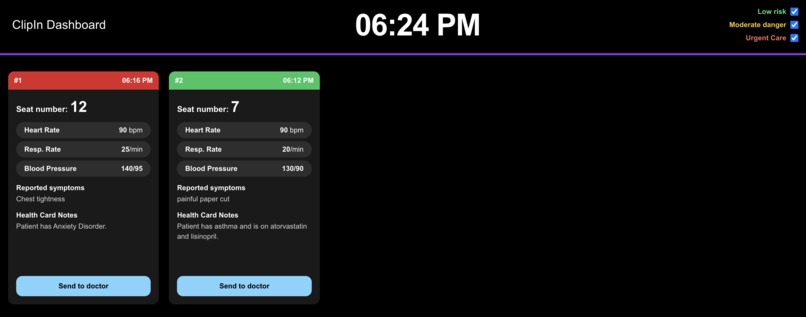
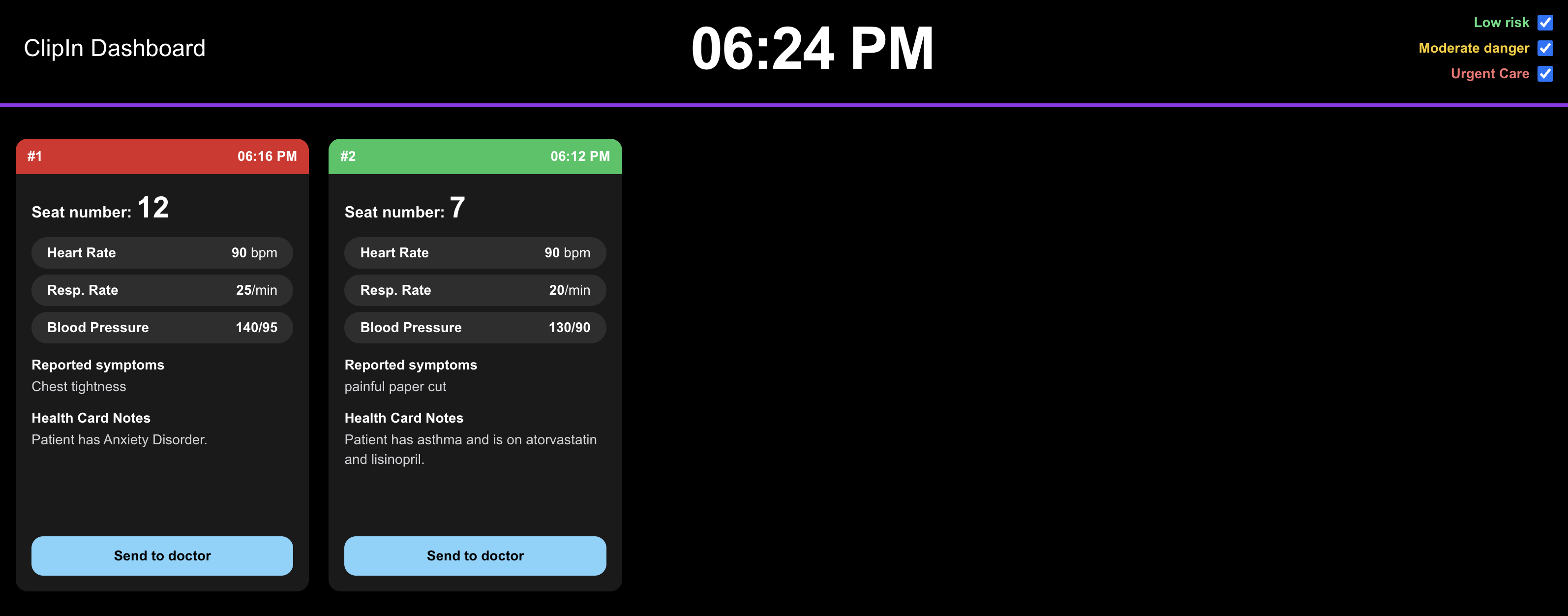
Triage Dashboard: Orders patients by severity and displays vitals, symptoms and health record summary

Inspiration
Waiting is something that we seem to be doing all the time, it has integrated itself into every aspect of our modern existence. ClipIn was born out of this realisation as we waited in traffic on the long drive to Waterloo for this very hackathon. While waiting in traffic is a mild inconvenience at most, it made us think about how in some situations waiting a few more hours or even minutes could be the difference between the possibility of recovery and long-term damage to someone’s life. Keeping this in mind; while Canadians are proud of not having a two-tiered healthcare system, we certainly think it has its flaws. One of the main issues is very long wait times at the ER, with the average patient waiting for 20 (!) hours before being admitted to a hospital bed. We wanted to help streamline one of the key processes in the emergency room; Triage. Triage is the term for how hospitals prioritize patients by need, rather than order. So, a patient with severe injuries would get care before a patient with minor ones, even if the second patient had been waiting for longer.
What it does
ClipIn allows patients to submit information about their vitals and symptoms to an online dashboard for nurses to prioritize. By simply scanning a QR code on their seat, patients can immediately access ClipIn with no download or sign-in. Then, patients are guided through a simple three-step process:
- Using Presage, we are able to measure the patient's heart rate and breathing rate
- If available, the patient can scan their health card to allow nurses to access information about their medical history on the dashboard.
- Patients can type or dictate their symptoms, and submit them to the dashboard.
Patients' seat number is encoded into the QR code, reducing friction and allowing nurses to easily locate them. On the dashboard, patients are automatically sorted by severity using Gemini AI, which uses their vital signs, symptoms and past medical history (if available) to produce a short summary for easy processing by the nurses.
With ClipIn, patients are also able to re-submit their vital signs and symptoms if they worsen and Gemini will re-triage them taking into account their new symptoms, which is significantly more difficult in a traditional triage method.
How we built it
ClipIn is a combination of many different technologies and a passion for the idea. We used Reactiv as one of the main pillars of the project, allowing us to reduce any friction in an emergency situation. Someone in the ER might not have the time or the cognitive clarity to type in a web address or download an app, and certainly will not want to make an account or accept cookies. Scanning a QR code directly on their seat and opening a mini app is revolutionary and makes both the patients and the nurses lives. Another main pillar of the project was Presage, which allowed us to get objective biometric data. The main problem the ER faces is symptom bias, where someone might be thinking they are having a heart attack when they have anxiety, or if a patient thinks their arm being chopped off doesn’t actually hurt too bad. Being able to immediately obtain data through the camera such as heart rate, respiratory rate, and blood pressure is amazing given the alternatives of hooking patients up to devices to figure out the data, and works with Reactiv to reduce friction in coming to the ER. Next, we used the Gemini API to process the tickets. Gemini is not given any information linking a patient’s data to them, and because the information is fragmented across the AI’s, we preserve and protect patient privacy. We use Gemini’s flash model, which again, works with the other technologies to reduce friction and speed up the process of triage. It ranks the patient in danger, relative priority, and summarizes their condition to speed up the time it takes to read. The many options for Gemini’s model were amazing, because we were able to fine tune the exact requirements for a situation like being in the ER, and it was very easy to end up with the flash model. The hospital is also a community organization, and the improved efficiency using Gemini is revolutionary to the environment. Apple’s OCR Framework was also used, and you are not going to believe how it works with the other technologies. It was chosen due to its speed and frictionless implementation, where instead of having to press a button to scan the health card, Apple’s OCR Framework is able to continuously search for text in a constantly updating image. We used Antigravity to generate almost all of the front end code, for both the dashboard and the app clip, allowing us to focus fully on the back end code and work with sensitive information with, well, sensitivity. We were surprised by its competence at generating Swift code, since we usually thought of AI generated code being best for web platforms. With the Google AI Pro trial, we had plenty of usage for the whole weekend on frontier models (even non-Google). We also used it to provide feedback for our project submissions, even this one. The website itself uses NextJS, and is designed to be as optimized as possible. This means simple animations for a smoother user experience, vibrant colors for a contrasting user interface allowing nurses to read with ease, and quick code to host the backend on. The backend can be fully local, however we used Vercel in our demonstration. This doesn’t change much, as the memory is still soft, and will not store any sensitive user information.
Challenges we ran into
Around halfway through our project, we had started running low on API credits for Presage. To remedy this, we added a mock mode, which randomly generates health information which could be used when testing other features of the app. This had knock-on effects, as we relied on the camera feed from Presage to run OCR for scanning health cards, which made fixing this more complicated than anticipated.
What we learned
We learned how to use many different technologies, but above all, the importance of user experience. Having a frictionless experience is vital, and refining every single button press is fundamental in simplifying the user experience and maximizing the beneficial impact the app has on improving Canadian's lives. On the commerce front we gained valuable insight into the legal procedures involving how a private company can work with the provincial and federal government in order to form public-private partnerships and what steps we would need to take to scale the project into a full on start-up.
Accomplishments that we're proud of
This might have been the smoothest hackathon project we have worked on! Through efficient product management and team organization we had gotten the basic technology working in under 2 hours and an MVP in under a third of the time in the hackathon. This allowed us the opportunity to spend a lot of time polishing the final product and pitch as well as working on the design of the app clip and nurse dashboard to align with the Ontario Health branding. We were also able to connect with many of the other hackers and are proud of the fact that we could create a supportive environment to provide guidance and advice to others!
What's next for ClipIn
Scaling ClipIn from a startup project to a Public-Private Partnership with the Government of Ontario would involve proving to the provincial government that our product provides an innovative solution, aligns with their service goals and infrastructure, and has operational maturity. ClipIn already conforms with two of these three conditions as this product is not currently in use anywhere in Canada making it a new innovative solution and aligns directly with Ontario's service goals for hospital emergency departments focused on reducing patient wait times and improving flow. Due to the fact that ClipIn is newly developed it lacks operational maturity. As next steps this is the element that we would focus on in order to ensure our long-term goals are achievable. To gain the necessary maturity and experience we would request funding and mentorship from our sponsors to continue developing the product and design a feasible business plan around it. ClipIn is already a nearly finished product! On a physical product level what we would continue to work on is adding a feature that allows the healthcare professionals to print the information collected to add to the rest of the patients’ documentation for their hospital stay as well as ensuring that the data from the provincial Heath Card database flows seamlessly with the Apple OCR Framework. Upon the completion of the product development we would work on creating a lesson style workshop to teach the healthcare professionals how to use the new system and place the QR codes in the emergency rooms. When the time comes we would apply to the Ontario Together Trade Fund which would provide financial support in helping us scale our business interprovincially in order to reach not only the Ontario market but other provincial markets as well. Working with the Government of Ontario would also give us access to the Registered Persons Database, meaning health card scanning would work fully.


Log in or sign up for Devpost to join the conversation.