-
-
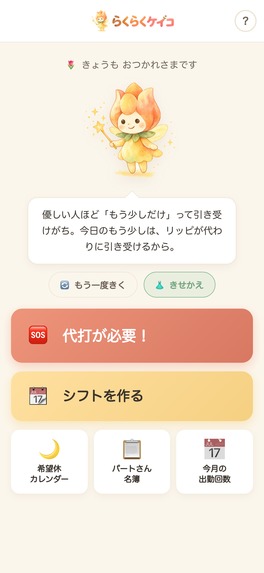
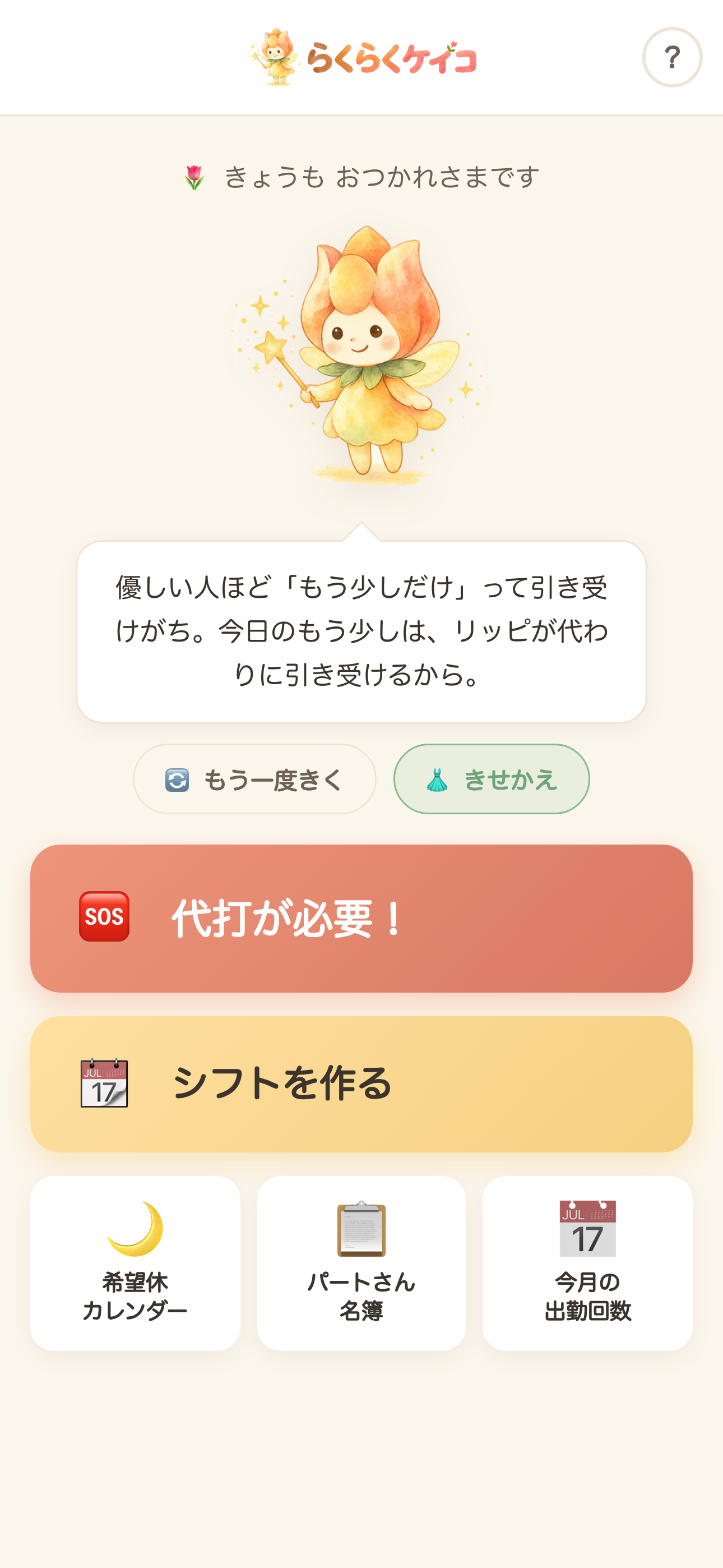
Home screen. Everything is one tap away: make a schedule, find a substitute, day-off calendar, staff roster. No account and no login.
-
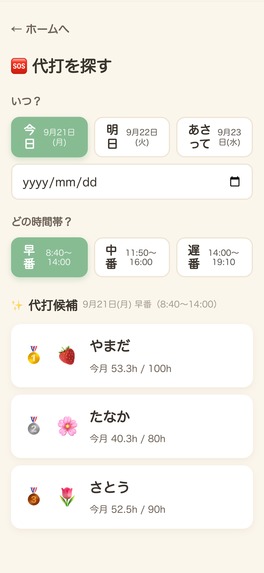
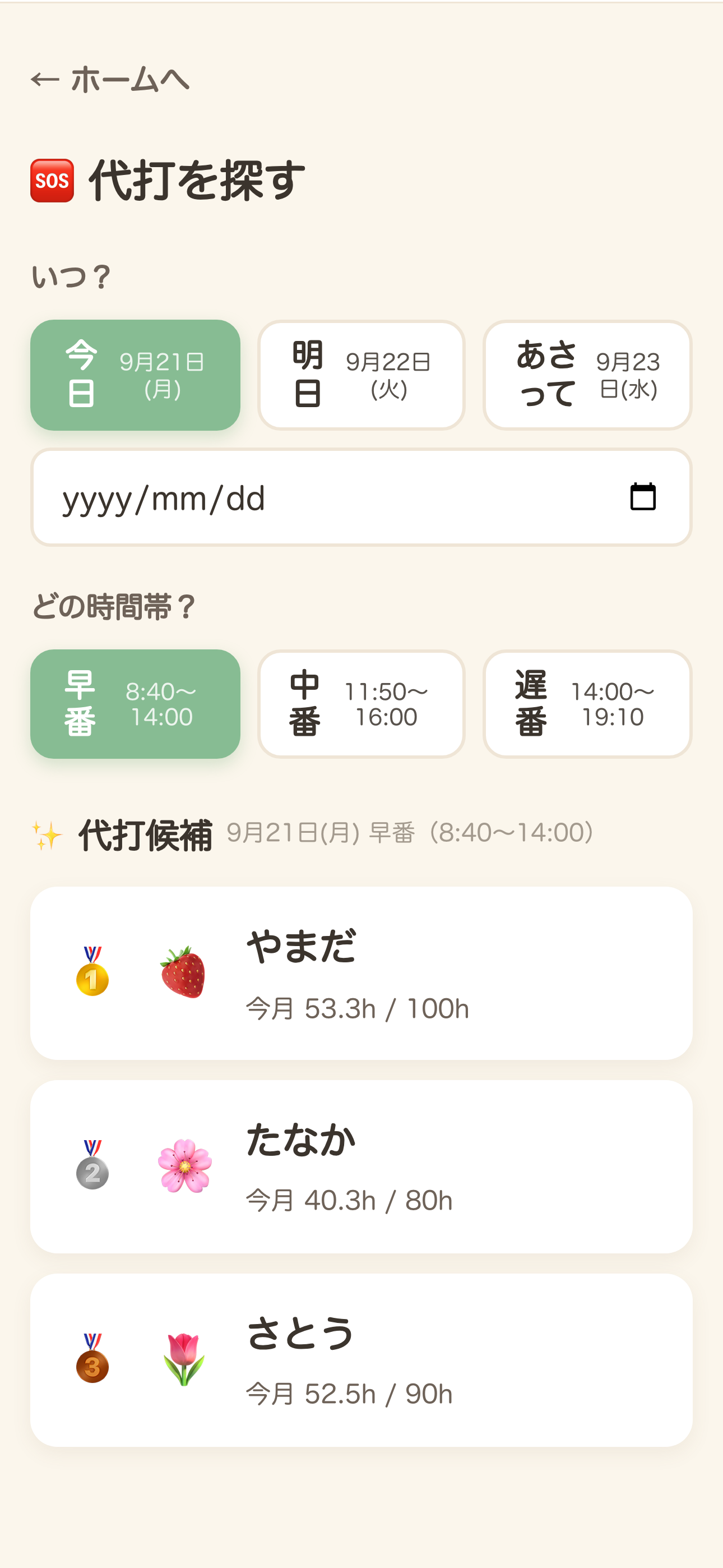
Someone called in sick. The app names the three people most likely to say yes, ranked by who is furthest below their monthly hours.
-
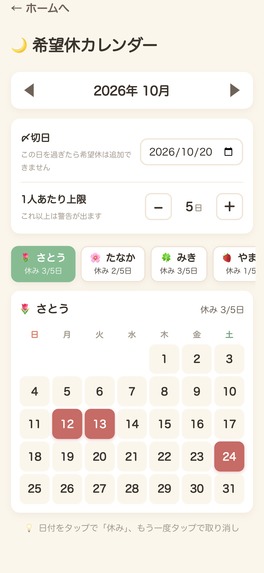
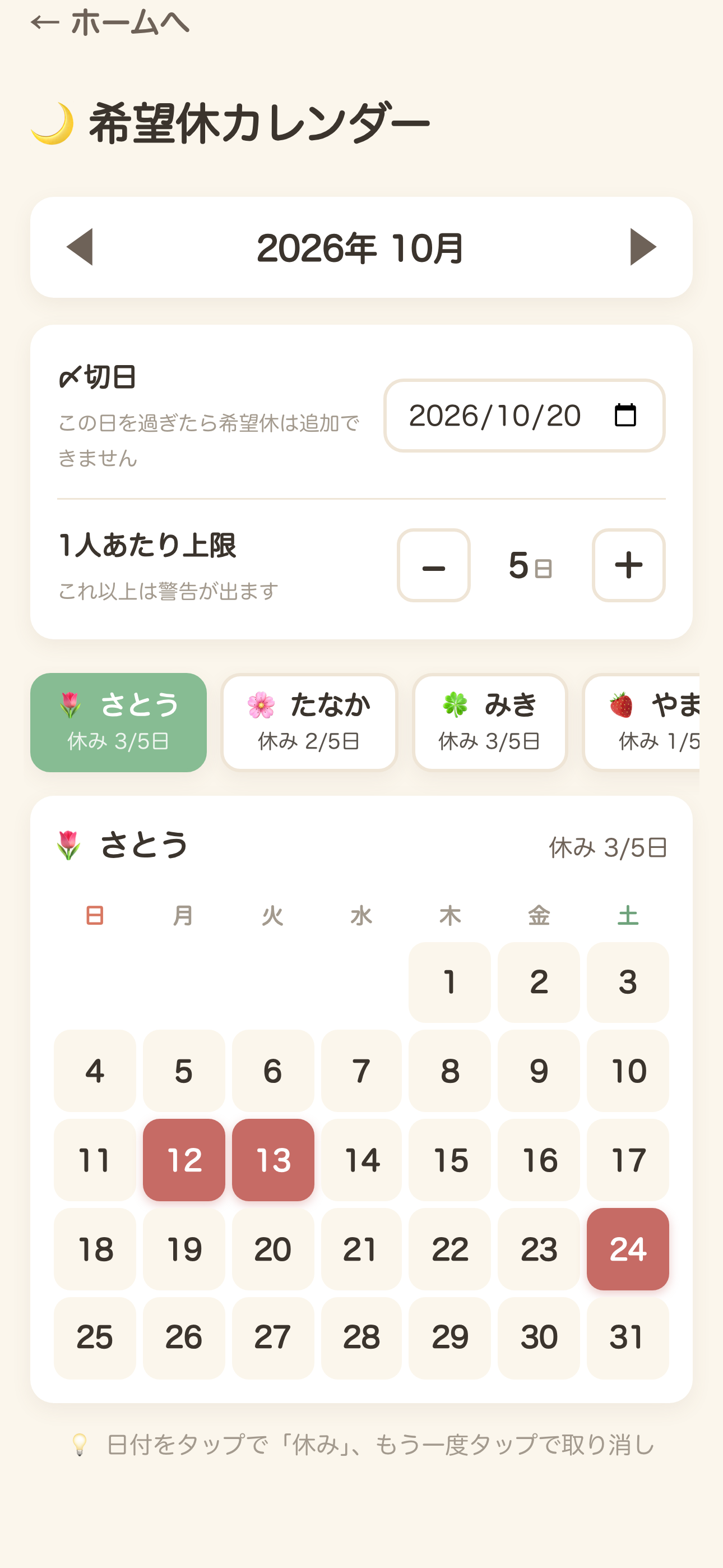
Day-off requests, with a submission deadline and a per-person limit so they do not all land on the same Saturday.
-
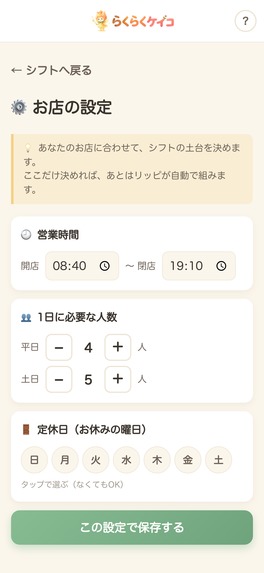
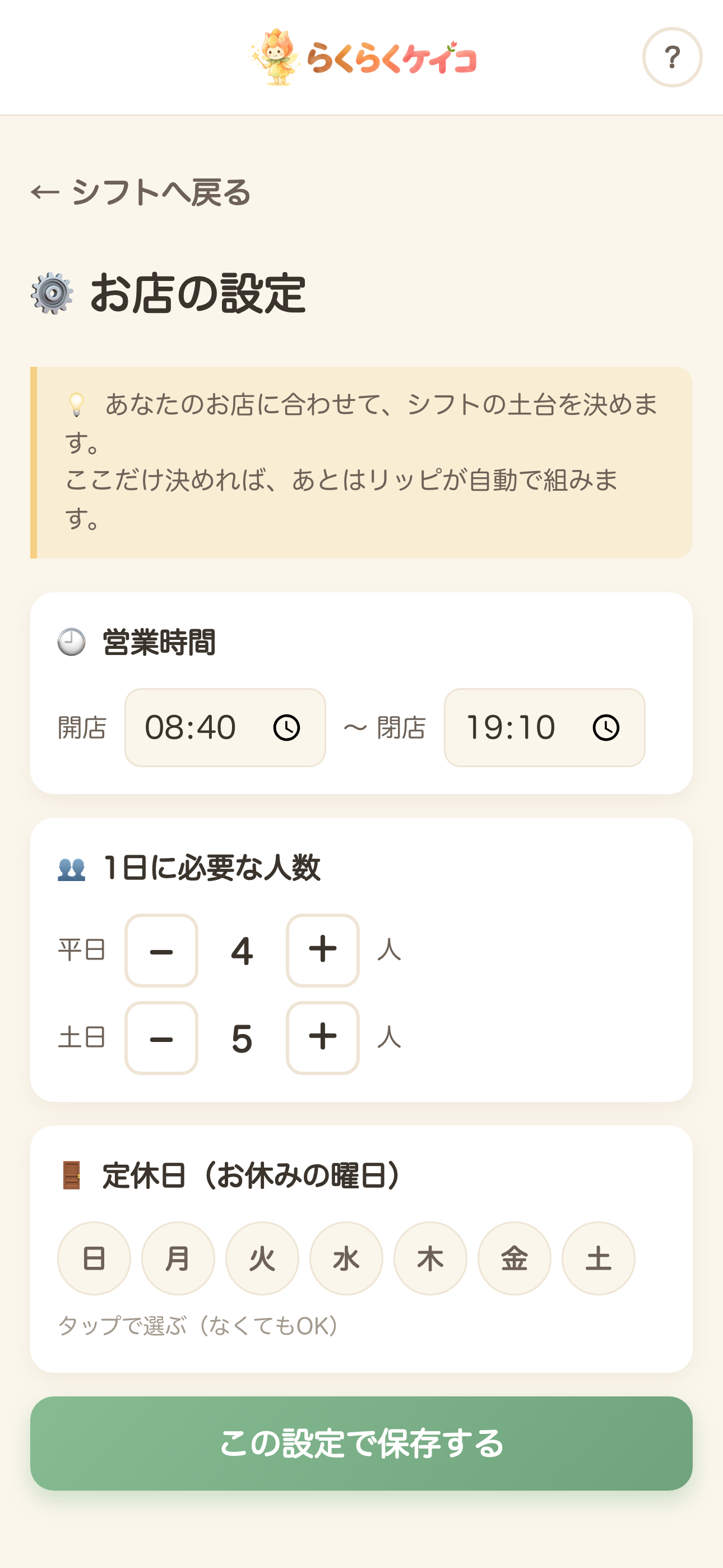
Shop settings: opening and closing time, how many people are needed on weekdays and weekends, and closing days.
-
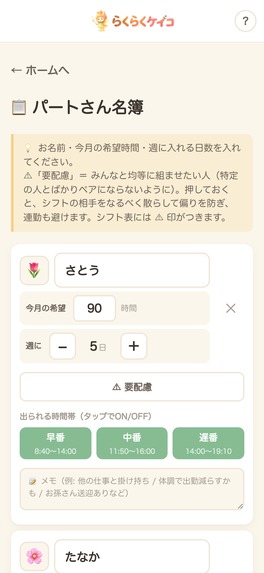
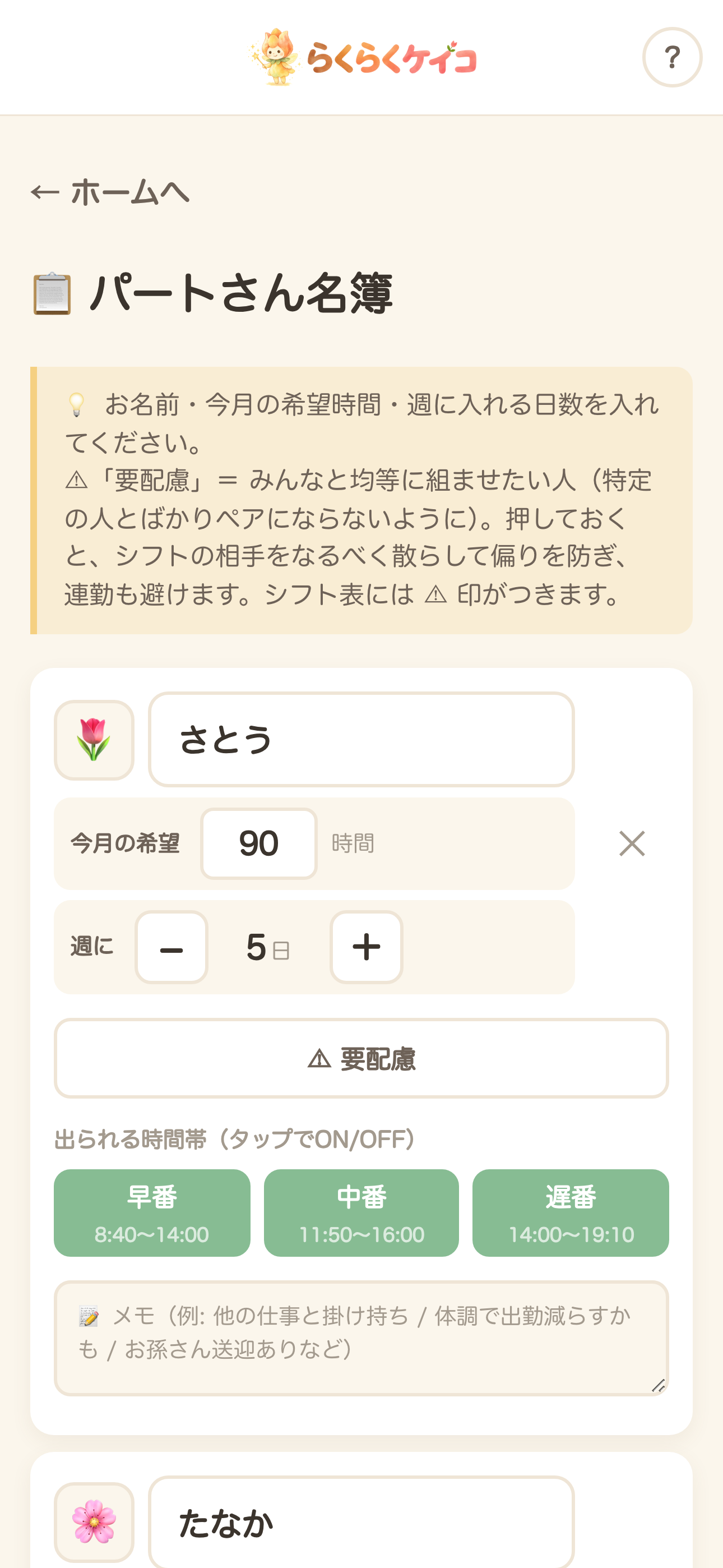
Staff roster: hours each person wants this month, days per week, and the time slots they can actually cover.
-
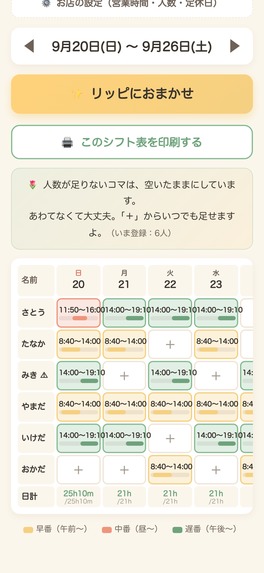
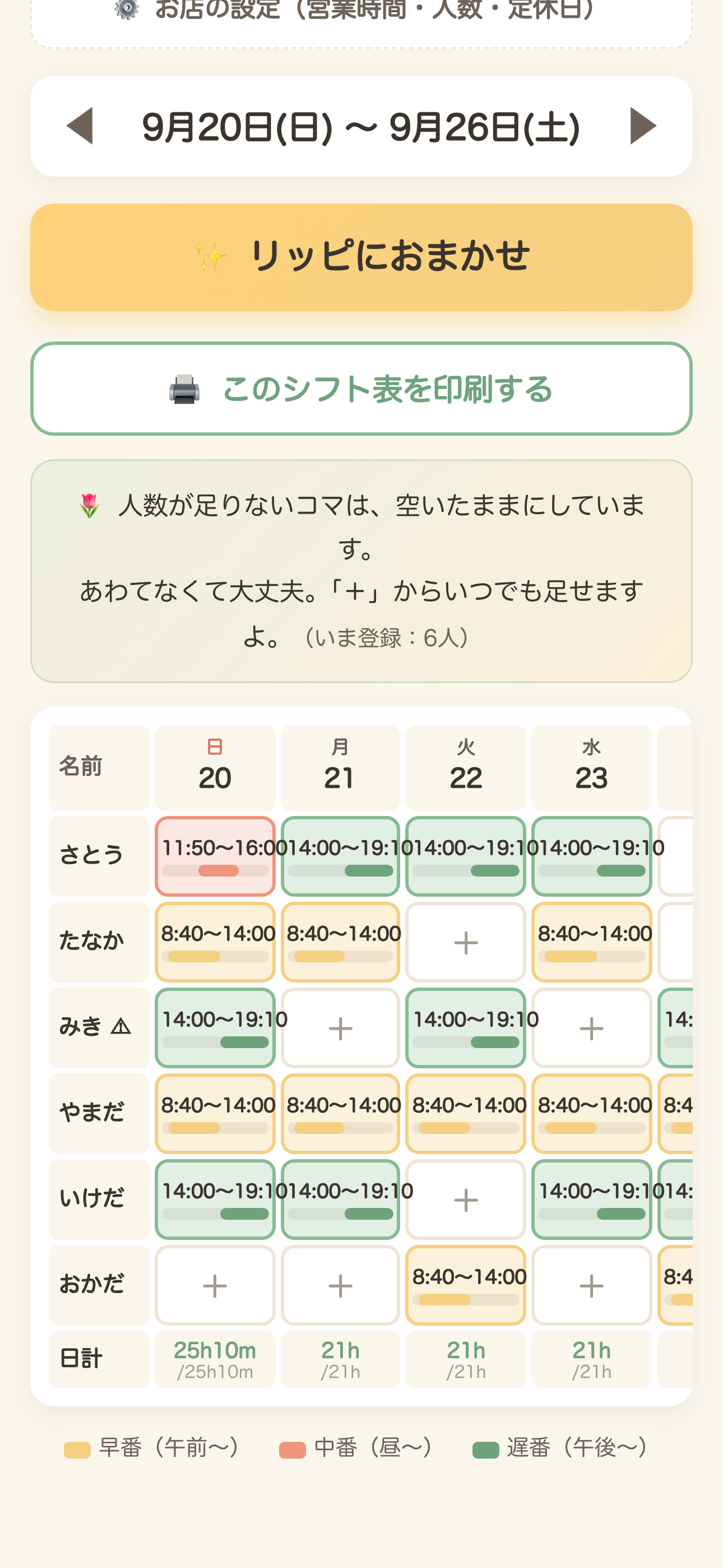
A whole week, built automatically. Tap "Leave it to Rippi" and the roster fills itself in, avoiding the same pairings every time.
-

App icon, 1024 x 1024, uncropped.

Inspiration
This app was built for one person: my mother. She is in her sixties, and the assistant manager at a small shop.
Every month, on her own time at home, she sat at the table with the paper day-off request sheets, a blank roster, a pencil and a calculator — writing, erasing, and writing again. She was balancing how many hours each part-timer wanted, which days they could come, which time slots they could cover, and who had asked for which day off. It took her about two hours, every month, and it was the kind of tired that does not look like work to anyone watching.
But when I actually sat down and asked, the hours were not the worst part.
The worst part was waiting for the phone to ring. When someone calls in sick at 7 a.m., the manager has to start phoning people one by one, guessing who might be free, apologising each time someone says no. She was never fully off duty, because that call could come on any day. That standing-by is the real cost, and it does not show up on any timesheet.
So the app has two jobs, not one. Build the roster, and — on the bad morning — answer the question "who do I call?" before she has to think about it.
The mascot is Rippi, a small flower fairy. She is there because a tool that says "No eligible candidates found" is a different experience from a companion who says "take a breath — I'll find someone."
What it does
- Register your staff. Name, hours they want this month, days per week, and which time slots they can cover.
- Set up the shop. Opening and closing time, how many people are needed on weekdays and weekends, and closing days.
- Build a week automatically. One tap — "Leave it to Rippi" — and the whole week is filled in, while trying not to pair the same two people every single time.
- Find a substitute in seconds. Pick the date and the time slot. The app removes everyone already working that day, everyone who cannot cover that slot, and everyone who requested the day off — then ranks who is left by how far below their requested monthly hours they are. The person most short of hours is the person most likely to want the shift. Top three, with their hours so far.
- Day-off request calendar, with a deadline and a per-person limit so requests do not all land on the same Saturday.
- This month's attendance per person.
- Print the roster through the iOS print sheet, A4 landscape, one page — because the roster still goes up on the wall of the break room.
No account. No login. No sign-up. You install it and it works.
Why this matters
Small-shop managers are the people least likely to get software built for them. Rostering tools are sold to chains with an HR department, priced per seat, and designed for someone who already knows what a "shift template" is. A shop with five part-timers and an assistant manager in her sixties gets nothing, so they use paper.
What this app gives back is not hours. It's attention.
- It ends the standby. The "who do I call?" problem had no tool before. It had a phone and a knot in the stomach.
- It is fair by construction. The substitute ranking is based on who is furthest below the hours they asked for — so the shift goes to the person who wants it, rather than to whoever answers first or is hardest to say no to. Staff marked as needing extra care are ranked lower on purpose. The weekly builder also avoids always pairing the same two people.
- It takes nothing from the user. No account, no email, no analytics, no ads, no notifications, no streaks, no "come back" nudges. There is nothing to lose by not opening it for a week.
- The data never leaves the phone. Staff names, day-off requests and rosters live only in local storage on the device. There is no server and no backend. The app asks for no permissions at all — no camera, no photos, no location, no contacts.
We are honest about the size of this: it is one app for one kind of very small shop. It helps one tired manager at a time. That is the whole claim.
Design
The design brief was a single sentence: she must be able to use it without asking me anything.
That constraint removed most of the usual app vocabulary.
- Words before pixels. Every label is plain Japanese, and the loanwords that normally fill this category — optimise, efficiency, AI, algorithm, smart, intuitive, one-tap — appear nowhere in the app or the store listing. A button says "I need a substitute!", not "Shift replacement".
- Large type, large targets. Sized for a reader in her sixties holding the phone at arm's length, not for information density. Fewer things per screen, bigger.
- No account wall. The first screen is the app, not a sign-up form. This is a design decision before it is a privacy decision: the single most common place an older user gives up is a login they have to create and remember.
- A companion, not a console. Rippi speaks in short, warm lines at the moments that are actually stressful — the sick-call screen, and the moment the roster finishes. The app never scolds and never reports failure coldly.
- Paper is still part of the workflow. The roster gets printed and pinned up. Supporting real printing properly — correct A4 landscape, one page, no blank trailing page — took a custom native plugin, and we think that matters more here than an animation would.
- The purchase looks like the app. The wardrobe screen is the same colours and the same soft shapes as everything else. It is a room, not a store.
Monetization — powered by RevenueCat
Every feature is free. Nothing is locked, ever. Building rosters, finding substitutes, the day-off calendar, attendance, printing — all of it, with no trial, no paywall, no limits and no ads.
The purchases are tips, and the thing you receive is that Rippi puts on what you bought.
- com.honirakuraku.app.costume1 — Ribbon — ¥120
- com.honirakuraku.app.costume5 — Straw hat — ¥160
- com.honirakuraku.app.costume7 — Flower crown — ¥300
All three are non-consumable and restorable, and prices outside Japan are read from the store at runtime — no price is written in the code.
Why this shape:
- A ladder, not a price. Three tiers instead of one lets the user choose the size of the thank-you. ¥120 is a vending-machine coffee; ¥300 is a real one. The lowest rung matters most: it makes the first purchase a small, comfortable decision.
- It is visible, and that is the product. A tip button that just says "thanks!" gives the buyer nothing to see. Here the mascot who has been helping you all month is suddenly wearing your ribbon, on the home screen, every time you open the app. The reward is the reminder.
- It cannot become a paywall by accident. Because what is sold is cosmetic, there is no pressure later to move a feature behind it. The promise "everything is free" stays true as the app grows.
- It is honest about what it is. The wardrobe screen says plainly that this changes the look only and nothing else. We would rather have a smaller conversion rate than a confused buyer.
- Restore is on the same screen, not buried in settings — because the person most likely to change phones is also the person least likely to go hunting for it.
Five more outfits (spring, apron, winter coat, yukata, Santa) are already written in the code behind a flag, to be released as seasonal updates.
RevenueCat's Capacitor SDK handles product loading, local pricing, the purchase, restoring, and checking ownership at launch. Because the app addresses products by ID directly (getProducts then purchaseStoreProduct), no offerings or entitlements were needed.
Numbers, honestly: the app is shipping inside the Shipaton window, so there is no revenue data and no conversion rate to show yet. What we can say is that a user can run their shop on this app for a year and never be asked for money.
How we built it
- Built by one person in Claude Code — the design, the code, the mascot's lines, the store listing.
- One file, no framework. index.html is 6,254 lines of plain HTML, CSS and JavaScript. All state is localStorage. There is no build step for the app itself.
- Capacitor 8.5.2 wraps it as an iOS app, with the RevenueCat Capacitor SDK 13.6.0 (StoreKit 2).
- A custom Swift plugin for printing, because the roster has to reach paper.
- A sync script rebuilds the web bundle, bundles the RevenueCat entry point with esbuild, and fails the build if any referenced image is missing — a small guard that caught real mistakes.
- Screenshots for the store were captured with Playwright at exact device pixel sizes, against seeded demo data.
Challenges we ran into
- window.print() does nothing in a Capacitor app. It works in Safari, so the web build looked fine; the button was simply dead on the device, and we only found out through TestFlight. The fix took three layers: a custom plugin, registering it in capacitorDidLoad, and replacing the root view controller that Capacitor's SceneDelegate creates in code — without that last step the first two never run. Then UIMarkupTextPrintFormatter produced a blank second page, so the final version loads the HTML into an offscreen WKWebView and uses its print formatter instead. One page, every time.
- Guideline 2.1 — a new developer account. Apple asked for a full walkthrough of the app before reviewing it. We answered with a recording made on a real iPhone and a seven-point written breakdown.
- Everything the judges see must be seeded, not real. All screenshots and the demo video use invented staff — no real person's name or hours appear anywhere.
- Designing for someone who will not report bugs. The intended user will assume a problem is her fault and stop using the app rather than complain. That pushed us toward fewer features and much plainer wording.
Accomplishments that we're proud of
- It cut her rostering from about two hours a month to about one. That is her own report, not a benchmark we ran — she has been using the app at the real shop where she works while we built it. Half of a recurring two-hour chore, for one person, is the number we care about most.
- The substitute finder actually answers the hard question. Not "here is a list of your staff" — three names, ranked, in the order most likely to get a yes.
- The whole app is free and stays free. We shipped monetization without taking anything away.
- It prints. It would have been easy to drop that and call it a mobile app.
- It was built for one specific person, and she is the reason every design argument got settled quickly.
What we learned
- Ask what the pain actually is. We started out building a faster roster editor. The interview changed the product: the roster was the visible work, but the waiting was the suffering.
- Verify on the device, not in the browser. Printing, fonts, date pickers and the purchase sheet all behaved differently on a real iPhone than in the simulator or in Safari.
- Writing for older users is a real design discipline, not a font-size setting.
What's next
- Export and backup. Right now data cannot be moved to a new phone, and we say so plainly in the App Store description and on the support page rather than hiding it. This is the top of the list.
- The five seasonal outfits already written in the code.
- Sharing the finished roster with staff, if it can be done without adding an account.
It still happens every month. It just takes about an hour now, instead of two. And on the morning the phone rings, there are already up to three names on her screen before she has to start guessing who to call.
That is all this app is for: one person, a little less alone with it.
Built With
- capacitor
- claude-code
- css
- html
- ios
- javascript
- localstorage
- playwright
- revenuecat
- swift

Log in or sign up for Devpost to join the conversation.