-
-
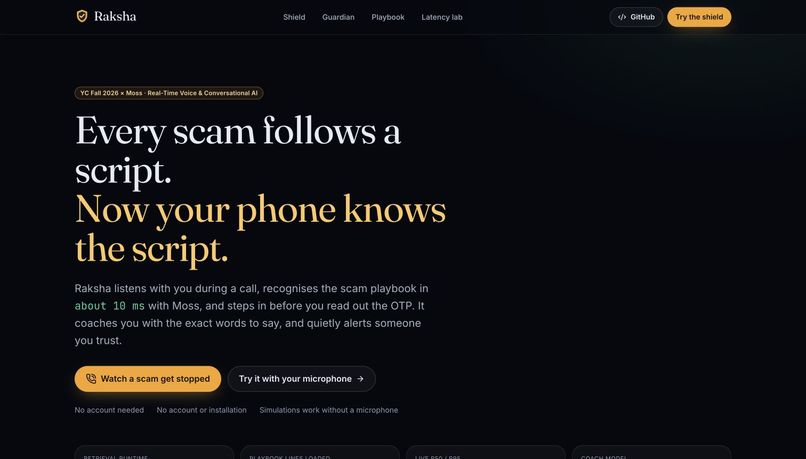
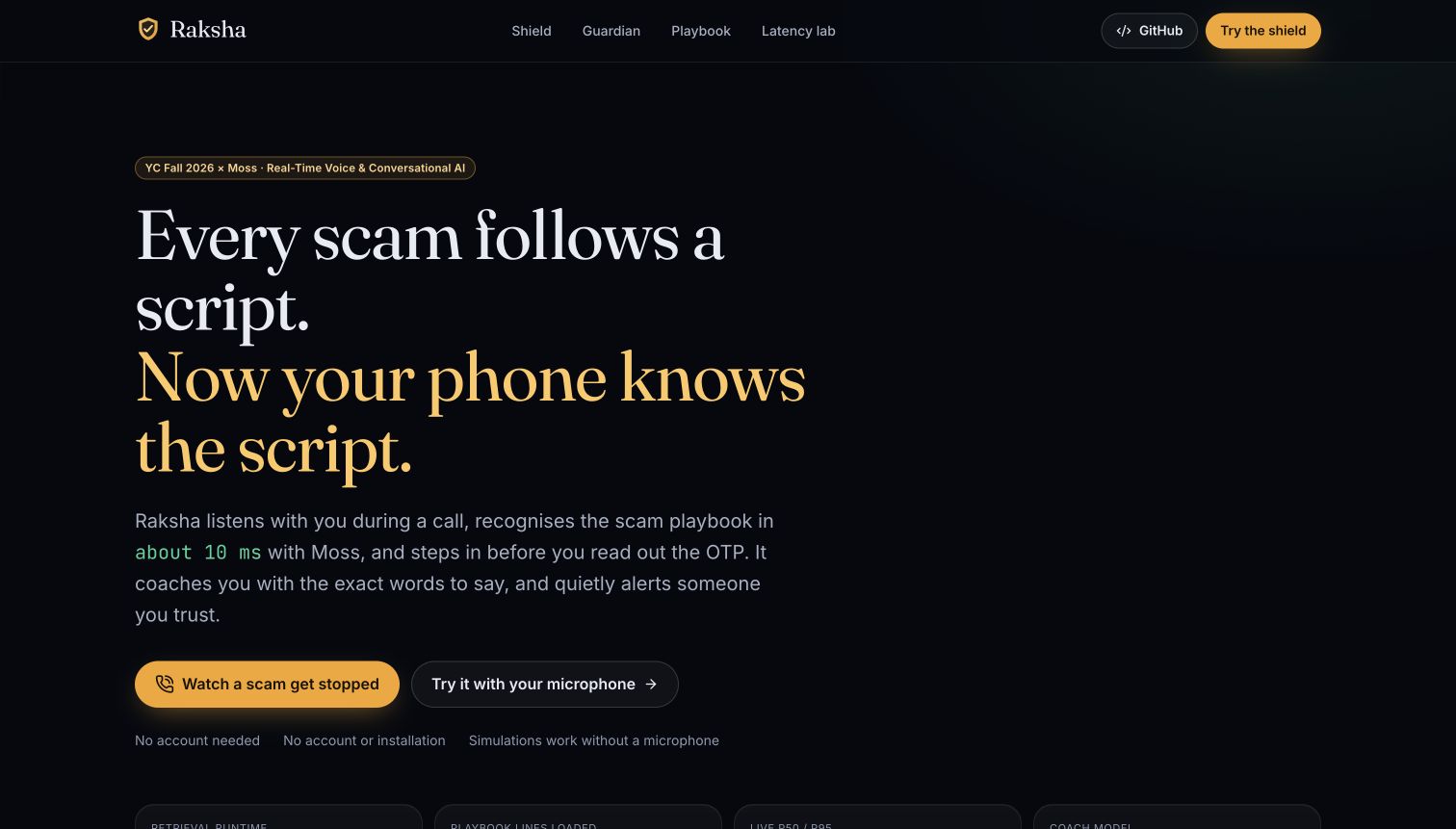
Raksha: a second listener for scam calls, with 18 guided scenarios and no account required.
-
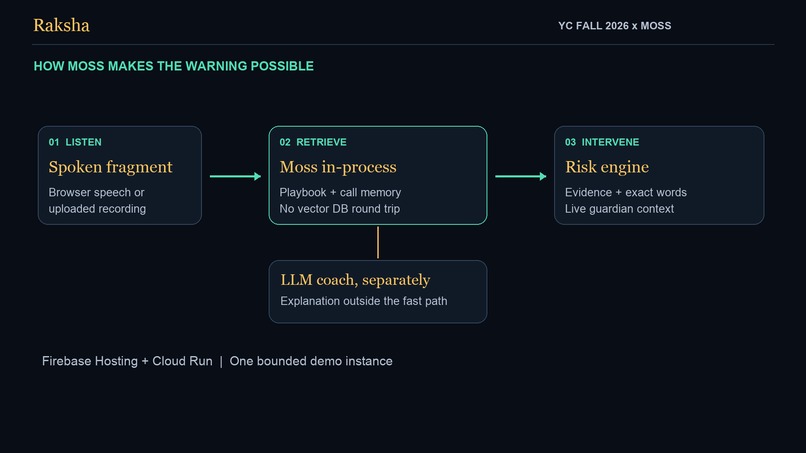
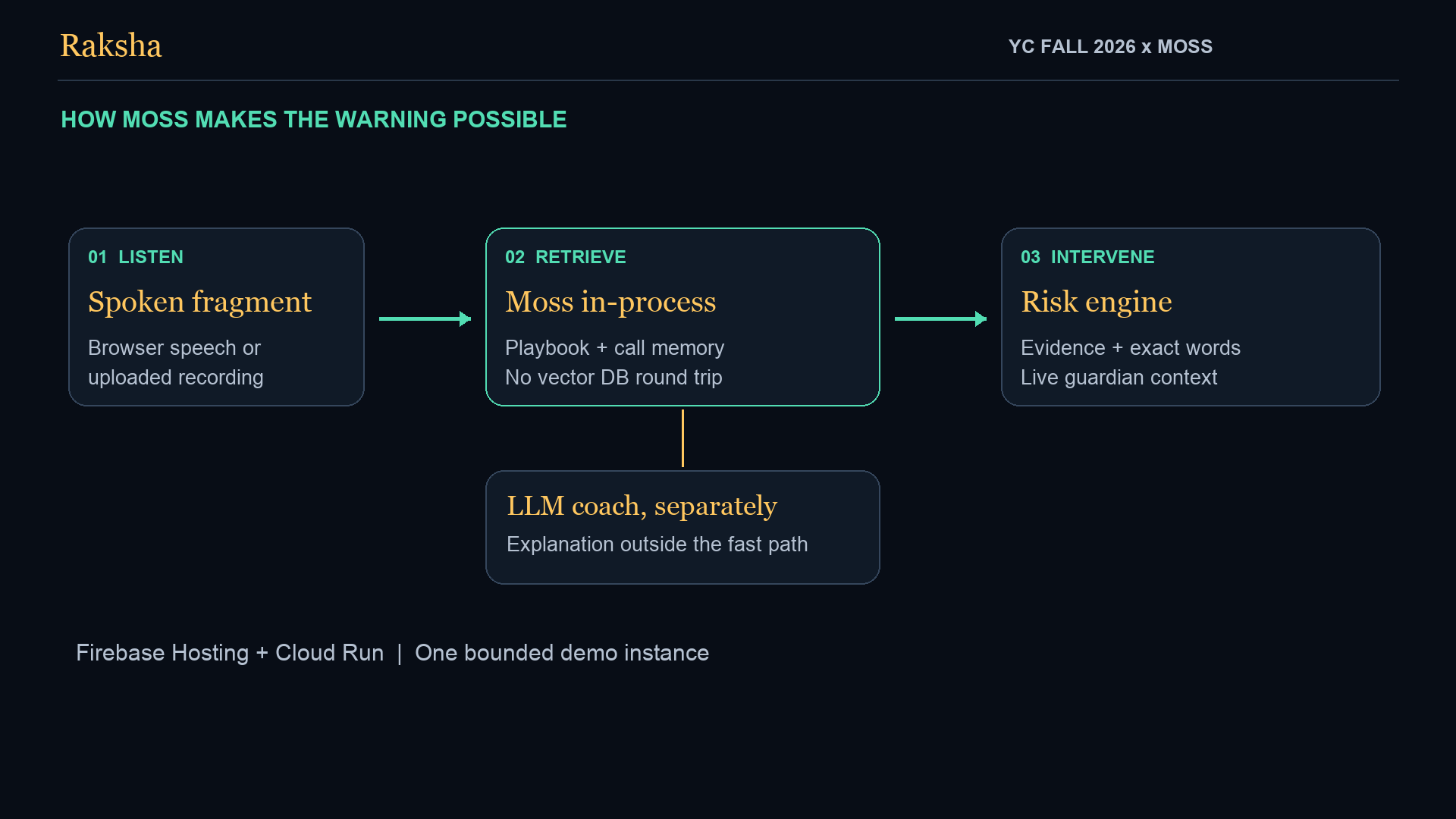
Architecture: Moss retrieval and deterministic risk scoring run before optional language-model coaching.
-
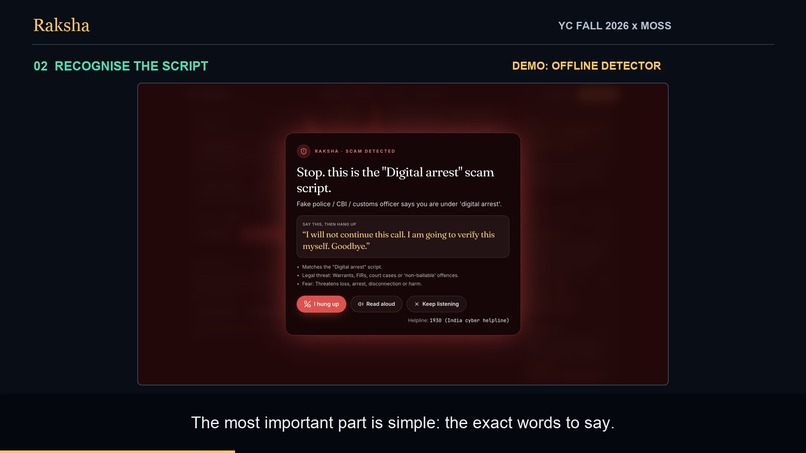
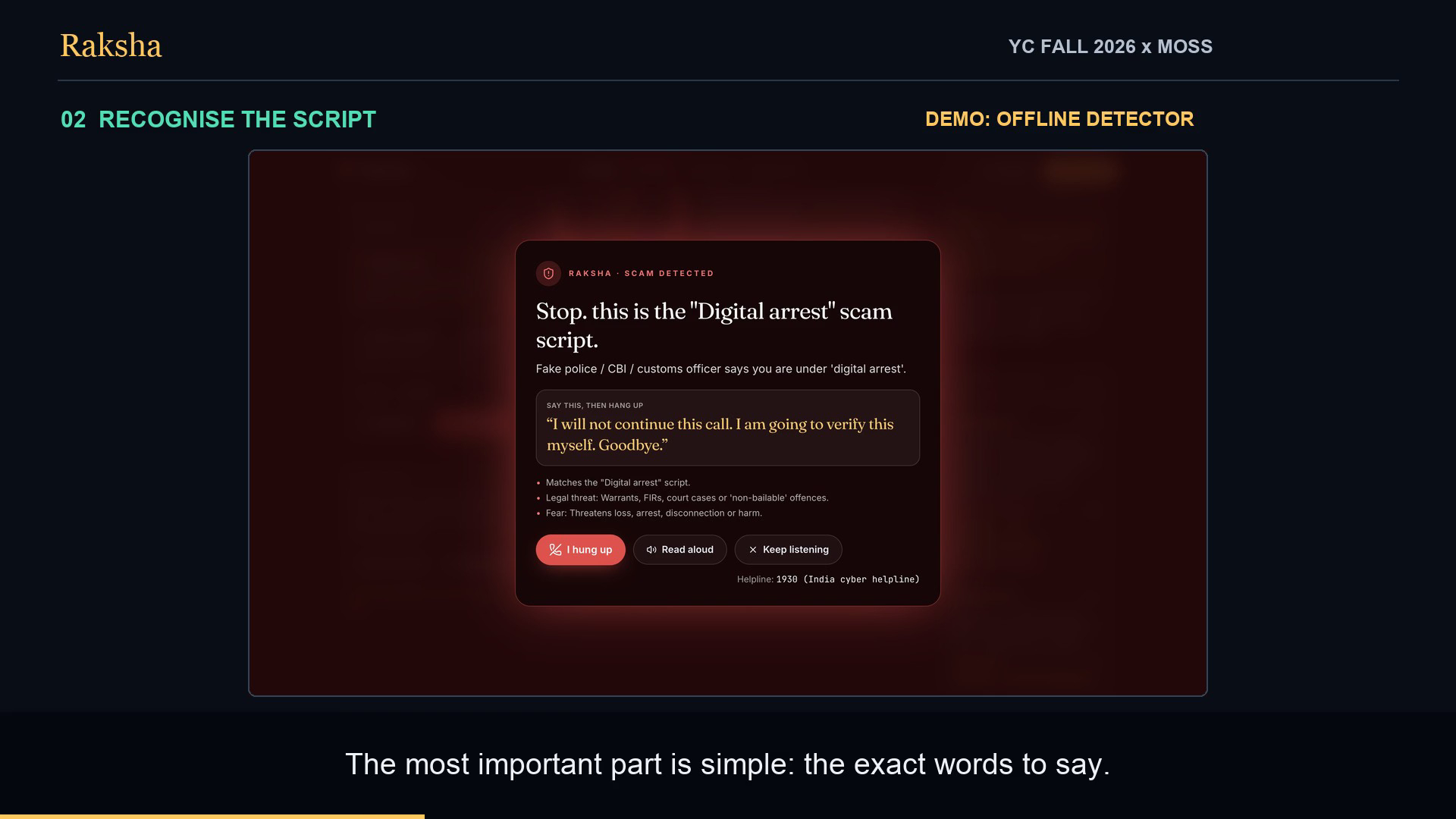
A warning explains the pressure tactic and gives the person clear words to end the call. Offline detector shown.
-
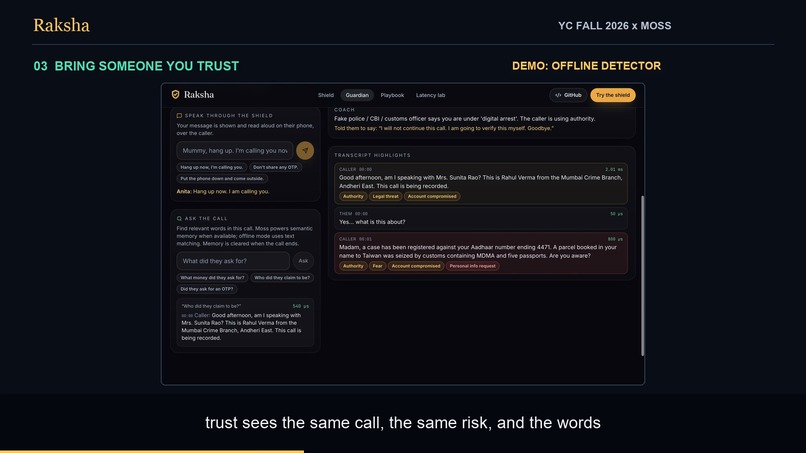
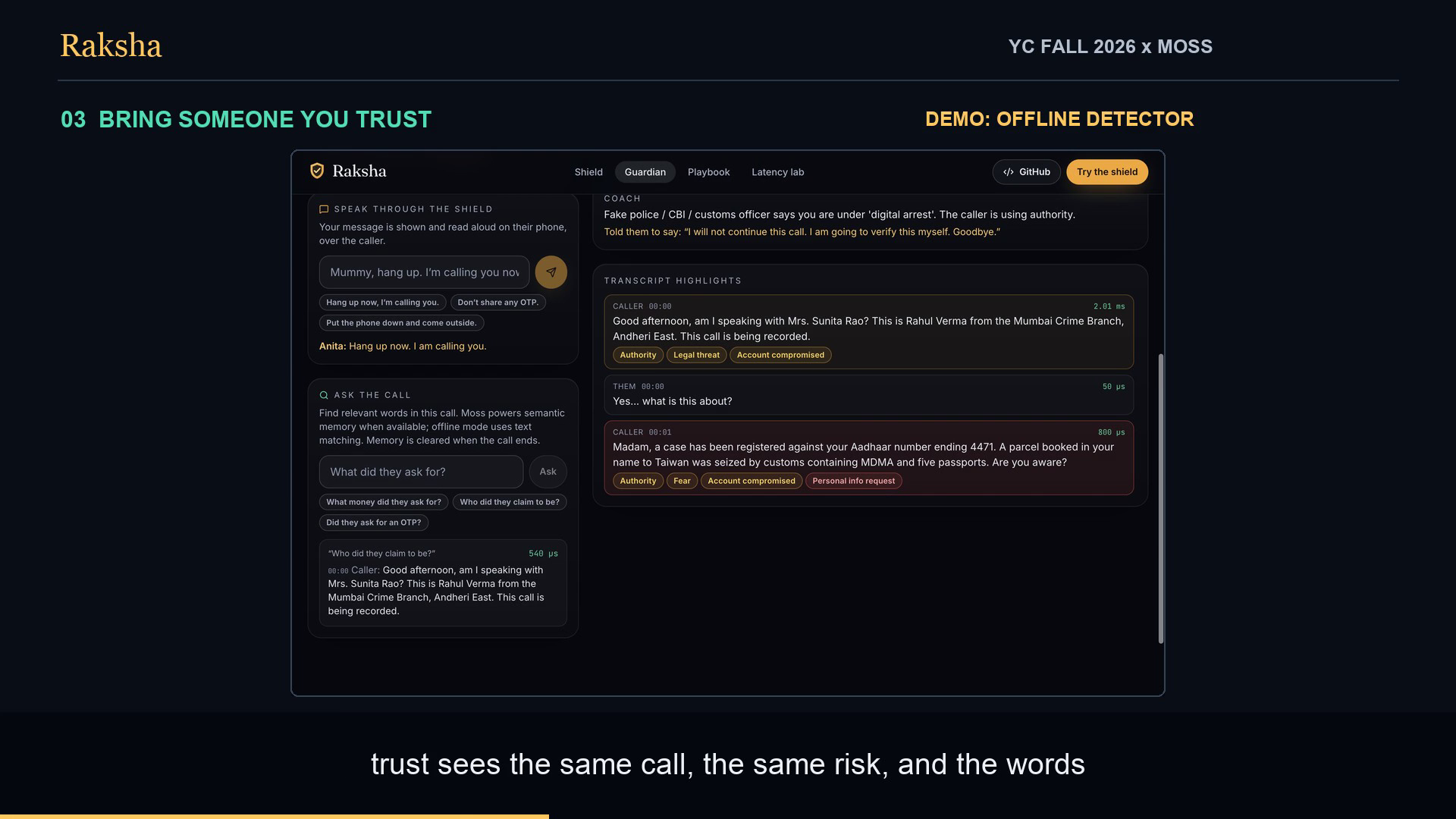
A trusted guardian follows the same call, searches the transcript and sends a reassuring message. Offline detector shown.
-
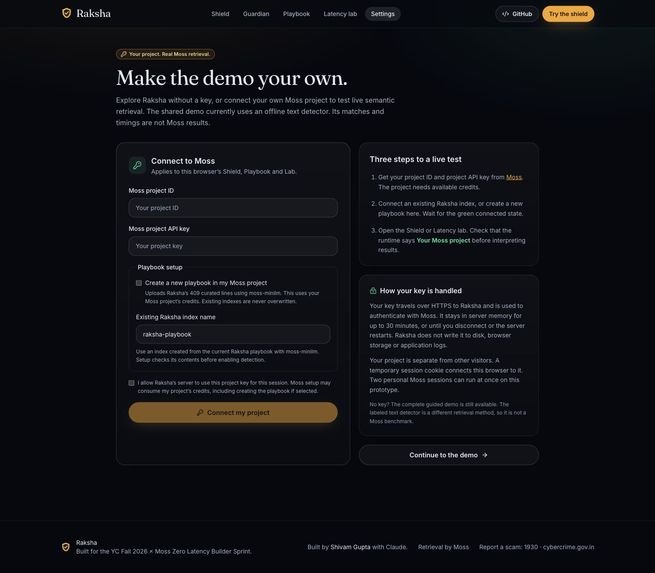
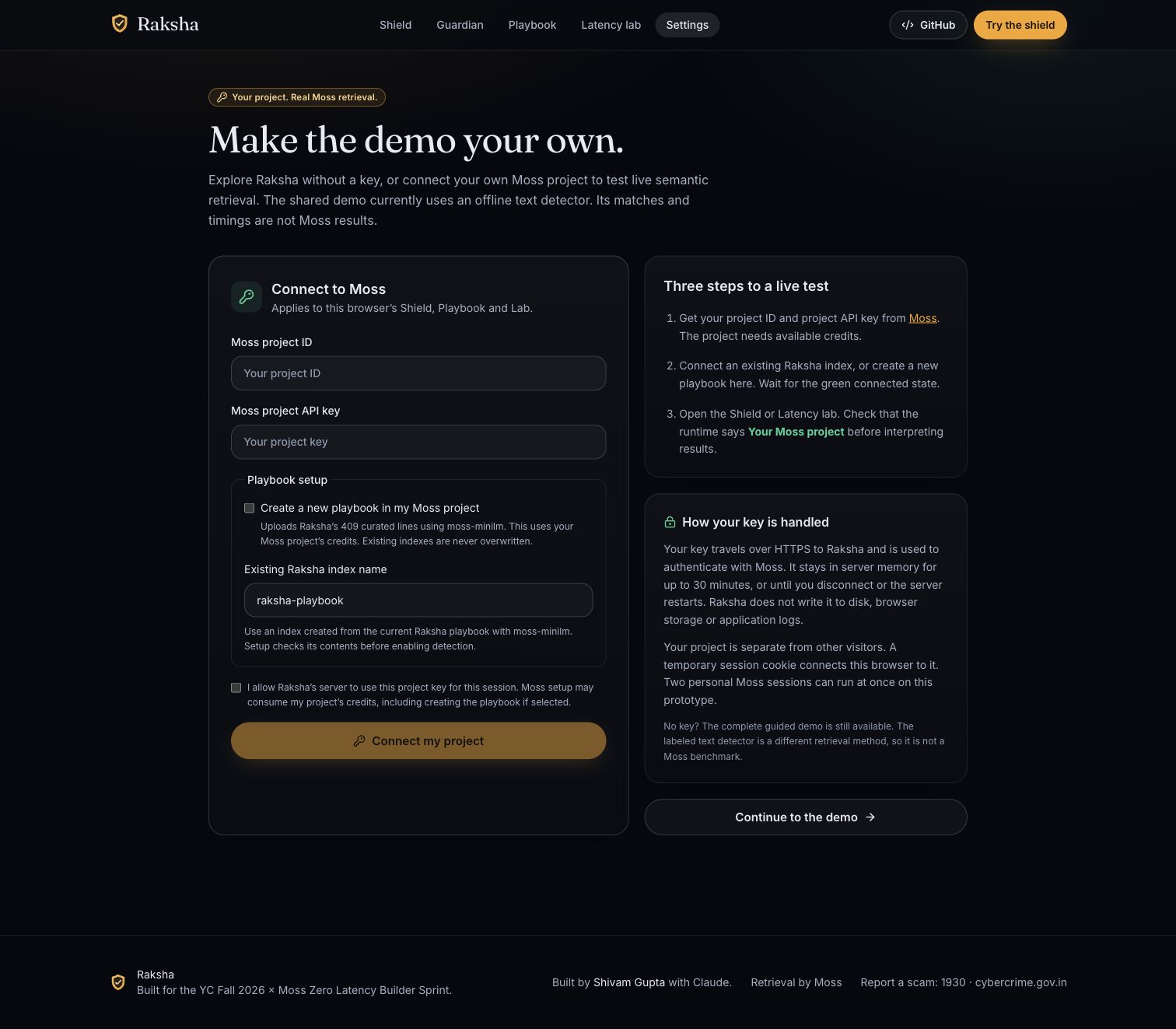
Settings lets visitors connect their own funded Moss project, with clear consent, temporary key handling and a labeled key-free demo.
Inspiration
A scam call does not need to sound suspicious at first. It needs to keep someone frightened, isolated and talking long enough to make one irreversible mistake.
We wanted to help at that moment. Raksha means protection. It is a second listener that recognises familiar pressure tactics and helps a person pause, verify and reach someone they trust.
The YC Fall 2026 themes of real-time voice, collaborative agents and agent reliability shaped the idea. Moss made a useful design possible: check each spoken fragment locally inside the server process, without waiting for a remote vector database or an LLM verdict.
What it does
Raksha is a browser-based scam-call shield. Try one of 18 scripted calls, listen through a supported browser microphone, or upload a recording for transcription.
As the conversation unfolds, Raksha compares its words with a 409-line playbook. The risk engine looks for combinations such as claimed authority, urgency, secrecy and a request for money, codes or remote access. It shows the evidence behind the warning and gives the person a short sentence to end the call.
A trusted guardian can open a shared family link, follow the same call, send a message to the shield and search the current conversation. A separate latency lab lets anyone measure the running retrieval layer and distinguish server analysis time from browser network time. Settings lets visitors connect their own Moss project ID and project API key, create the curated playbook if needed, and test real semantic retrieval in a private session. The key-free demo is clearly labeled as an offline text detector.
Raksha is a working prototype and a decision aid. It does not intercept mobile calls or hang up for you. A safe score means no recognised pattern was found, not that a caller has been verified.
How we built it
The app uses Next.js, React and TypeScript with a custom Node.js WebSocket server. Firebase Hosting provides the clean public URL. Google Cloud Run runs the app, the call manager and the Moss runtime in one process.
Moss loads the curated scam playbook into memory. Each fragment is embedded and retrieved in-process. A deterministic risk engine combines the detected tactics and checks legitimate look-alikes before raising an intervention. A Groq-hosted language model provides plain-language coaching outside the critical detection path.
Moss sessions hold current-call context with call-specific metadata filters for guardian questions. When the shared Moss runtime is enabled, optional community reports add flagged caller lines to a second index. Personal sessions use their own verified playbook and do not publish reports. Multi-index retrieval and automatic refresh let that knowledge become available without rebuilding the application.
The public demo uses one bounded Cloud Run instance because the guardian connections and call state are in process memory. A distributed production deployment would require shared routing and state. Browser speech recognition powers live microphone mode, and Groq Whisper transcribes uploaded recordings.
Challenges we ran into
The hard problem was avoiding a warning every time someone said “OTP” or “payment.” A legitimate bank might say it will never ask for an OTP. A real courier might ask for a delivery code at the door. We added benign look-alikes and tested entire conversations, not just suspicious keywords.
Keeping the experience responsive also meant separating detection from explanation. Retrieval and the deterministic warning run first. Coaching arrives independently.
Final rollout exhausted the shared Moss project's cloud credits. We kept the guided demo available with a clearly labeled offline detector, then added a bring-your-own-project flow so judges can test real Moss with their own funded project. Keys stay in server memory for a temporary session. Creating a playbook requires explicit consent, and personal sessions cannot publish community reports. Earlier hosted verification had already exercised the real Moss runtime; fallback timings are never presented as Moss benchmarks.
Deployment exposed practical problems too. Firebase Hosting does not proxy the app's WebSocket connection, so the browser resolves the Cloud Run socket endpoint separately. We also fixed startup races, interrupted speech playback, post-call reporting, reconnect behaviour, input validation and mobile overflow.
Accomplishments that we're proud of
- A complete phone-and-guardian workflow with a live risk dial, transcript evidence and specific next steps.
- Meaningful use of Moss for playbook retrieval, filtered call memory, multi-index search and refreshed community knowledge.
- A committed scripted evaluation covering 18 calls and 264 utterances. It detected all ten scripted scam calls and raised no danger alert on the eight genuine calls. These are fixture results, not a claim of real-world accuracy.
- A public latency lab that shows measurements from the running server rather than presenting a fixed animation as a benchmark.
- An accessible, responsive demo with no account required, clear error recovery and private Moss project settings.
What we learned
Speed matters when the product needs to interrupt before someone acts. But a fast warning only helps if it is understandable and supported by evidence.
We also learned that a trusted person belongs in the product. A guardian saying “hang up, I am calling you” can be more useful than another risk score.
Finally, privacy claims must match the implementation. Live mode sends transcript text to Raksha; browser speech services may process audio. Uploaded recordings pass through Raksha to Groq. Completed call records remain in RAM for up to ten minutes, and sharing flagged caller lines is an explicit action.
What's next for Raksha
Next we want to evaluate with consented conversations outside our scripted set, measure false alarms across accents and languages, add Hindi and other Indian languages, and test the experience with older adults and their families.
Before broader use, we would add signed guardian invitations, moderation for community reports, stronger abuse controls, shared session routing and an on-device speech option. Native calling integration remains a separate future step.
Our goal is simple: give someone a moment to pause before a scam becomes a loss.
Test Raksha
Live app: https://raksha-app.web.app No account or key is required for the guided demo. Live Moss retrieval requires your own Moss project ID, project API key and available credits.
- Open https://raksha-app.web.app/shield?scenario=digital-arrest&silent=1&fast=1.
- Wait for Connected, then select Start the call. A scripted scam should raise an intervention. The warning explains the pattern and supplies words to say. Choose I hung up to end the simulation.
- Before starting another call, open the guardian link from Circle of trust in a second tab. Start the digital-arrest scenario. The guardian should receive the same risk and transcript. Send a message and ask “what did they ask for?” while the call is active.
- Use the Genuine calls filter and choose Genuine hospital call. Let it finish. It should stay Safe.
- Open Playbook and search “read me the six digit code quickly.” Inspect matching tactics and measured retrieval time.
- Open Latency lab, choose 1 x 10 queries and Run. Compare engine search, embedding plus search, and browser round-trip time.
- For live microphone testing, use a supported Chrome, Edge or Safari speech service and allow microphone access. Use a second device on speaker or read a sample phrase aloud. The app cannot directly intercept a cellular call.
- For recording testing, upload a short, non-sensitive MP3, M4A, WAV or WebM file smaller than 25 MB. It goes to Groq for transcription. Empty files and unsupported file types return actionable errors.
Community reporting shares flagged caller text to a Moss index. Avoid personal information. A family code grants access to that phone's current calls, so share it only with someone you trust.
The committed evaluation uses scripted conversations. Its results do not establish real-world detection accuracy. Speech recognition and LLM providers can fail; the interface reports errors rather than promising continuous protection.
Test live Moss retrieval with your own project
- Open https://raksha-app.web.app/settings.
- Enter your Moss project ID and project API key. If you do not already have the current Raksha playbook, select Create a new playbook in my Moss project. This uploads the 409 curated lines with
moss-minilmand may consume your project's credits. Existing indexes are not overwritten. - Confirm the connection consent and connect. Setup runs in the background and checks the dataset before enabling detection. Wait for Your Moss project is connected.
- Open the Shield from Settings and repeat the guided call. Then run Playbook search and a small Lab benchmark. The banner must say Your Moss project; these queries use your selected project. Guardians use the protected call's runtime automatically and do not need its key.
- Choose Disconnect and use demo to remove your server session. Reload any open Shield tab before starting another call. Created cloud indexes remain in your Moss project.
Keys are sent over HTTPS to Raksha and used to authenticate with Moss. Raksha holds them in server memory for up to 30 minutes, until disconnect or a server restart. It does not save them in browser storage, application logs or files. A temporary session cookie identifies this browser. The prototype permits two private Moss sessions at once; if both are busy, use the guided demo or try later. Community publishing is disabled for personal sessions.
Demo mode and evidence
The shared public deployment intentionally uses its labeled offline TF-IDF detector. Its text matches and timings are not Moss benchmarks. You do not need to restore the developer's shared Moss credits: connect your own funded project to test the real retrieval path.
The existing video shows the offline demo before Settings was added. Earlier hosted evaluation used real Moss. Current settings validation includes SDK-isolated unit tests and browser tests; a successful live connection with a newly funded visitor project has not been verified in this release because no such credentials were available. This limit is separate from the earlier real-Moss evidence.
Built With
- firebase
- firebase-hosting
- google-cloud-run
- groq
- moss
- next.js
- node.js
- react
- tailwind-css
- typescript
- websockets
- zod

Log in or sign up for Devpost to join the conversation.