About the Project (LLM Shortcuts)
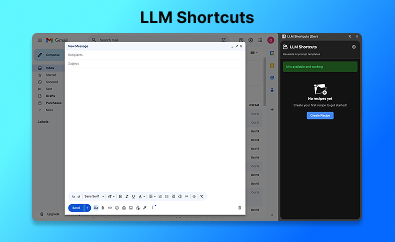
LLM shortcuts is a Chrome extension that allows professionals to get quick access to an LLM for common use cases that they have. For example, a salesperson can use the extension to quickly refine a draft email using a pre-saved, high-quality prompt without having to open their favourite LLM.
Inspiration
I was inspired to build this project because I was annoyed by how often I had to open the Gemini and ChatGPT websites to do small but frequent things like refining an email draft or generating Jira tickets from customer emails. These are things that Gemini can do in one try, but every time I opened the Gemini website for a quick task, it opened a new chat, and I had to type my prompt all over again.
I thought there may be a better way to get quick access and usage of LLMs for my common work use cases.
🎯 Features Overview
LLM Shortcuts provides a powerful set of features to streamline your AI workflow. Here's what you can do:
📝 Recipe Creation
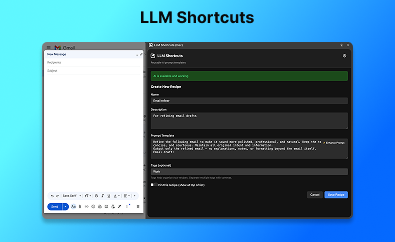
What are Recipes? Recipes are reusable AI prompt templates that you create once and use repeatedly. Instead of typing the same prompts over and over, you create a "recipe" with placeholders for dynamic content.

🔍 Recipe Management
You can create, edit, delete and execute a recipe. Executing a recipe means you want to run the prompt with some input. E.g If I had a recipe for turning customer emails to Jira tickets, I would click on the recipe, paste the email, and it would generate a Jira ticket draft for me.
📘 Guides Feature
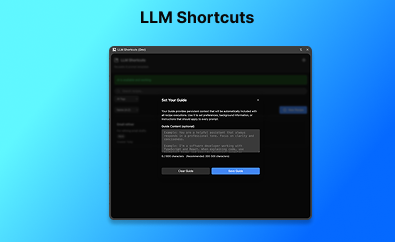
What are Guides? Guides are persistent context that gets automatically added to every recipe execution. Think of it as your personal AI assistant preferences that apply to all your recipes.

How I built the project
I started by writing down my idea and features for an MVP then I used Gemini to review and enhance the document.
I wrote some of the code and used AI via Cursor to build parts of the project and debug. These are the major technologies used on the project:
- Languages: HTML, CSS, Typescript & vanilla Javascript
- APIs: Chrome Built-in AI Prompt API
- Model: Chrome's on-device Gemini Nano model
- Icons: Noun Project
- Others: NodeJS for builds
Challenges I faced
I faced a few challenges while building the project. Some of the main ones include
- Bulky documentation: When I first started the project, it was sometimes challenging to find what I needed in the “AI on Chrome” documentation as it is. There was a lot of information to go through but I caught on later.
- Storage and memory management: My extension kept downloading the model every time there was an update and this means that I frequently ran out of memory over time. I resolved this by managing the model lifecycle separate from the extension itself.
- Ease of testing with other users: I planned to. However, this is because the APIs are still in trial/beta
What I learnt
This project was quite eye-opening for me. These are a few things I learnt
- I learnt about AI in Chrome for the first time and the possibilities it brings. I also learnt about the various APIs and how to use them.
- I deepened my knowledge in Typescript and learnt new syntax (This only my second Chrome extension).
- I learnt how to really leverage community. The discord channel had so many helpful people who were always happy to support
Final feelings
I really enjoyed working on this project, and I plan to launch it as a paid product. I’m excited that I got to solve a problem that I personally had, but also excited that I got to learn about the amazing world of AI in Chrome (which I wasn’t aware of before). I’ve got some more ideas for things to build!
Built With
- css
- html
- javascript
- node.js
- prompt-api
- typescript

Log in or sign up for Devpost to join the conversation.