Inspiration
Most of us have stood in front of a full wardrobe and felt we had nothing to wear, or opened a shopping app and given up after scrolling through hundreds of options. Wanting to change your style is easy. Knowing where to start is hard. There are thousands of brands, endless haircuts and a new trend every week, and it’s hard to tell what would actually suit you.
We noticed that most AI style tools don’t really solve this. They guess at what looks good, so everyone ends up with the same generic “smart casual” advice. What we wanted was a stylist grounded in what real people love: the style icons and brands that are popular with people your age, in your country, who share your taste.
That’s exactly what Qloo’s taste graph knows. So we set out to build Qurator, an AI stylist that turns Qloo’s cultural taste data into complete Outfits you can see on yourself and buy straight away.
What it does
Qurator is an AI stylist. Take one photo of yourself and it builds complete Outfits: a hairstyle, a top, a bottom and shoes. Each Outfit is inspired by a real Style Icon, made from real Products you can buy within your budget, and shown on you in an AI-generated Preview.
How we built it
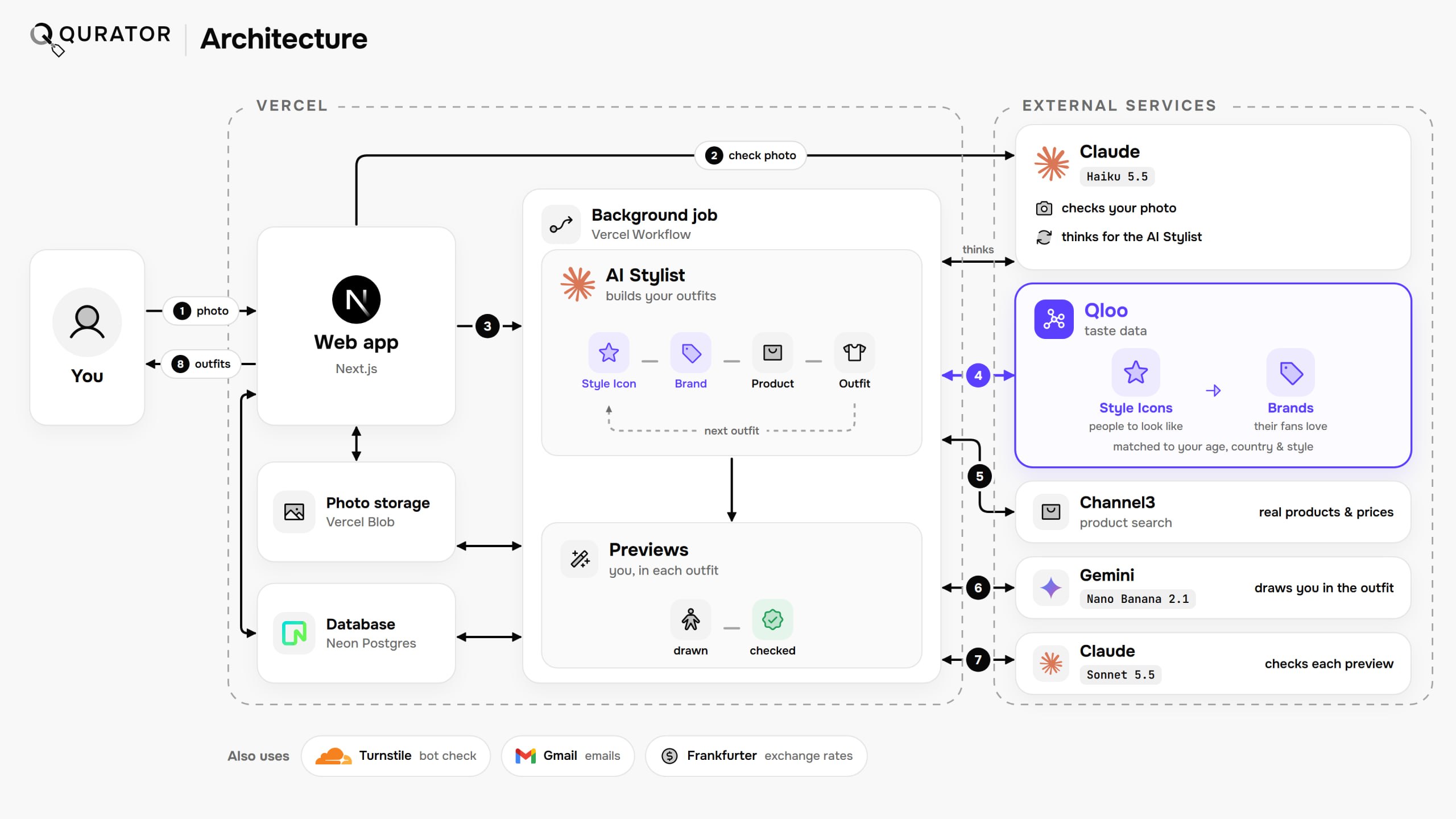
Qurator is built with Next.js on Vercel, with Neon Postgres, Vercel Blob storage and Better Auth. Each Styling runs as a Vercel Workflow, so every model call and tool call is a durable step that survives a restart. Qloo is called only from our server, so the API key never reaches the browser, and Channel3 provides the product search.
Every AI model sits behind our own interface, so any of them can be swapped. Claude Haiku 5.5 checks each photo, reads its Photo Style and runs the AI Stylist through the AI SDK’s Workflow agent. Gemini Nano Banana 2.1 draws each Preview from the user’s photo and the sellers’ product images. Claude Sonnet 5.5 then checks each Preview for the wrong garment, a changed face, or a face invented on a Body-Only Photo. A faulty Preview is redrawn once with Sonnet’s correction, and our code, not a model, decides which image to keep. Users see the Stylist’s notes and tool calls, never its internal reasoning.
Challenges we ran into
Qloo’s taste graph knows people and brands, but it has no data on individual clothes or haircuts. We wanted every recommendation to be something you can actually buy, not something an AI made up. So we connected Qloo to Channel3, a product search. For each brand Qloo picks, it finds real products from that brand, in stock, within the brand’s usual price range. Our AI Stylist then builds your Outfit only from Qloo’s top-ranked brands for you, picking the real product from each that best fits your look.
The second challenge was trusting the AI-generated Previews. Early versions sometimes changed a person’s face, invented a face on a photo that didn’t show one, or drew the wrong garment. We added a second AI that checks every Preview against the real product photos and has it redrawn when something is wrong.
Finally, image generation is expensive, and a public app is an easy target for bots. We protected it with rate limits per user, per Styling and across the whole app, plus a Cloudflare bot check at sign-up and sign-in.
Accomplishments that we're proud of
We’re proud that Qurator turns Qloo’s taste data into something you can see. Instead of a list of brand names, you get a picture of yourself wearing a complete Outfit, inspired by a Style Icon that people like you love. Every piece is a real product with a price in your own currency and a link straight to a store that sells it, so you can go from inspiration to checkout in one click. The experience adapts to each user. Your budget, menswear or womenswear preference, Country and the style of the photo you upload all change which Style Icons and brands Qloo picks. While you wait, the AI Stylist’s notes explain each choice, so the recommendations never feel like a black box.
What we learned
We learned to think the way Qloo’s taste graph does. It has no data on clothes or haircuts, so we expressed fashion through people and brands, combining Qloo’s signals with its tag filters for age, income and price. We also learned to connect Qloo with other services while keeping it in charge. Qloo picks the style icons and brands, Channel3 finds real products from them, and our code makes sure the AI Stylist can only choose from Qloo’s top picks. Finally, we learned to run AI safely in a public app, with rate limiting, bot protection and a second AI that checks every generated image.
What's next for Qurator
Right now, each Preview shows a complete Outfit at once. With more funding to cover image generation, we’d like to let users generate many more Previews and mix and match single pieces. You could keep the Outfit you like and swap only the shirt, or only the pants, then see how each new combination looks on you. Every swap would still come from Qloo’s top-ranked brands for that Style Icon, so users could build their own Outfits piece by piece while staying grounded in real taste data.
Footnote
No account needed: anyone can press "Try it as a Guest" on the landing page to open the Guest Page. It runs the same steps as the full app: take or upload a photo, choose a Budget Tier, then enter a date of birth, Style Preference and Country. Guests get one Guest Consultation, which produces two complete Outfits with their Previews and shoppable Products. Guests have no saved history. Their photo, Outfits and Previews are kept for about an hour so they can return to their results, then deleted automatically, always within 24 hours. Each internet connection gets one Guest Consultation every 24 hours, and guests can’t ask for more Outfits or change their Budget Tier or Photo Style afterwards. Creating a free account lifts these limits: users can make up to 10 Outfits in any 24 hours, two at a time, and keep their past Consultations. Guest results don’t carry over to a new account.
Built With
- channel3
- claude
- cloudflare
- gemini
- neon
- next.js
- node.js
- postgresql
- qloo
- react
- typescript
- vercel

Log in or sign up for Devpost to join the conversation.