-
-
Architecture
-
Sample run
Inspiration
While preparing the lecture slides on agentic AI to be delivered at an upcoming summer school, I introduced a few slides with short quizzes to make the content more engaging and interactive for the students. This made me think -- what if AI can automatically generate a quiz based on the materials that I already have? Thus, the idea behind QuizAlchemy was born.
What it does
Alchemy was a mystical branch of study that aimed to transmute lead into gold. QuizAlchemy aims to transform vast amounts of text into knowledge. Quizzes and other forms of assessments can help reinforce learning. Accordingly, QuizAlchemy aims to provide a technique for reinforcing and assessing a learner's understanding.
At a high level, QuizAlchemy:
- Extracts text from a Web page and creates a question bank out of the text
- Creates a quiz by randomly selecting questions from the question bank
- Displays the quiz and evaluates the submitted results
QuizAlchemy can be useful if you are:
- A teacher who has to generate a quiz for their class
- An AI engineer/researcher who wants to have a different view of existing data for model training
- Hosting a fun event
How we built it
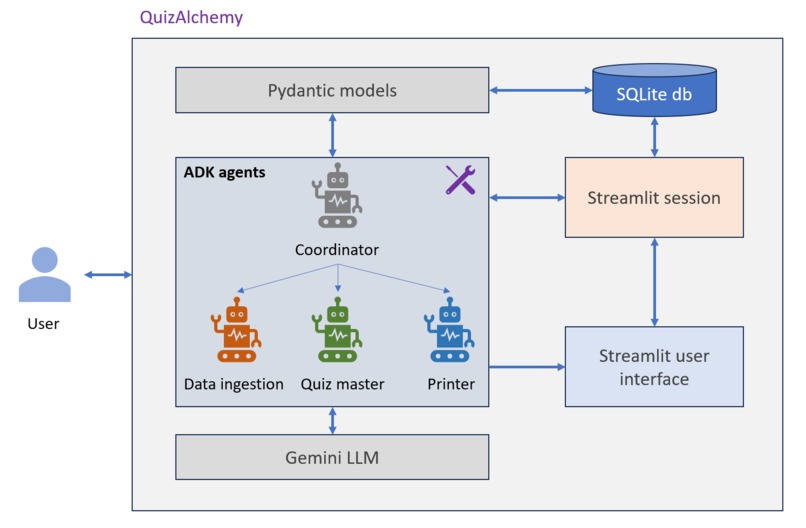
QuizAlchemy is a multi-agent system (MAS) built using Google's Agent Development Kit (ADK). In particular, QuizAlchemy uses three agents, powered by Gemini 2.0 Flash Lite:
DataIngestionAgent: For extracting content from web pages or files. This agent is equipped with the following tools:- The
extract_as_markdowntool extracts contents from any document type, e.g., PDF and DOCX, in Markdown format using theMarkItDownlibrary. The tool (the library, rather) can work with both URLs and local file paths. - The
create_question_banktool creates a question bank based on the text extracted from the given document. A question bank is a collection of a set of questions and four multiple-choice type answers for each question, where only one choice is correct. The questions have a 4:3:3 ratio of easy:medium:hard difficulty levels. Finally, this tool stores the question bank in an SQLite database (in-memory).
- The
QuizMasterAgent: For generating quizzes based on the extracted content. This agent has two tools:- The
create_quiztool selects a subset of questions (and answers) from the question bank based on a given mix of the difficulty levels. - The
display_quizis somewhat like a proxy tool that does nothing on its own but assists with a key functionality. At times agents would complain that they cannot display something. To mitigate this challenge, agents use this proxy tool. In particular,display_quiztakes a quiz and input and returns the same quiz as the output. As a consequence, the agent's event logs find a call to this function. At this point the quiz is saved in Streamlit's session. Subsequently, by invokingst.rerun(), the app is made to display the quiz on the user interface.
- The
CoordinationAgent: For coordinating the workflow and managing the question generation process using the above two agents.
Appropriate instructions are provided to the agents, suggesting when to use what tool. In the course of development, a PrinterAgent was also considered. However, given that printing a quiz into a PDF file is perhaps a requirement for all the quizzes, a print button was provided with every quiz instead.
To interact with, QuizAlchemy provides a Graphical User Interface built using Streamlit. The Web application, when accessed by a user, creates the agents and stores them in the user's session. Some other data, such as the quiz, is also stored in the session for easy access. In addition, QuizAlchemy also uses a SQLite database to store the question bank (all question-answer pairs) created based on the given document.
Challenges we ran into
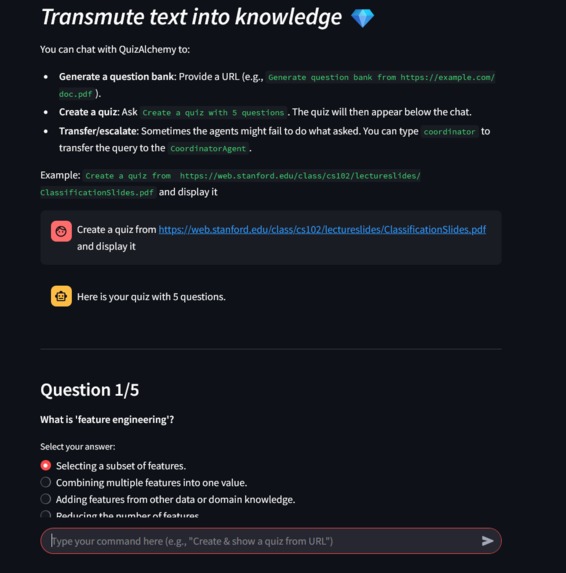
Although the initial version of the QuizAlchemy multi-agent system worked in principle, perhaps the biggest challenge was how to visually display a quiz to the user. This was addressed in two parts. First, the agents update the session state of Streamlit by storing relevant information. Second, Streamlit displays necessary UI elements based on information stored in the session. For example, the question texts and radio are only displayed when the current_quiz session variable is not None.
Another challenge that still exists is faced by the agents. Although the CoordinationAgent has been set as the root, sometimes, queries related to displaying the quiz go to the DataIngestion agent, which expresses its inability to do so. A quick hack to solve this problem is to ask to transfer the duty to the CoordinationAgent, e.g., by simply typing "coordinator." Perhaps a more robust behavior can be ensured by updating the instructions of the agents.
Accomplishments that we're proud of
It was fun to turn the idea of creating a quiz out of any PDF file almost instantly into reality. The prototype allows for tangibly verifying the idea. Also, using AI agents and building an MAS to power this solution is a milestone.
What we learned
This was my first time using ADK. It was interesting to create a working MAS. I liked the idea of having sub_agents. ADK seems to have several in-built, useful tools, e.g., search and RAG, that I hope to use in the future.
The challenge with displaying on the GUI was also an interesting learning experience. Rather than directly displaying an agent's textual output, store and update the state -- this sounds like a very useful concept to bank on.
What's next for QuizAlchemy
Quizzes are everywhere -- from classroom learning to customer surveys to recreation. With the current state of AI and digital technologies, creating a quiz should not be a burden. QuizAlchmey is a baby step toward that direction.
In the future, the scope of QuizAlchemy can be improved in different ways, such as:
- Supporting local file uploads
- Adapting the difficulty levels of new quizzes based on the past evaluation scores
- Use different modalities for answers aside from multiple choices, e.g., free-text and checkboxes
- Allow users to share their quizzes
- Make the agents more robust

Log in or sign up for Devpost to join the conversation.