Inspiration
Students and educators face information overload, complex texts, and language barriers. Existing AI tools often require cloud processing, raising privacy concerns in classrooms. I built QuietClass Notes to provide on-device AI-powered summarization, simplification, translation, and proofreading directly in the browse with no data leaving the user's device.
What it does
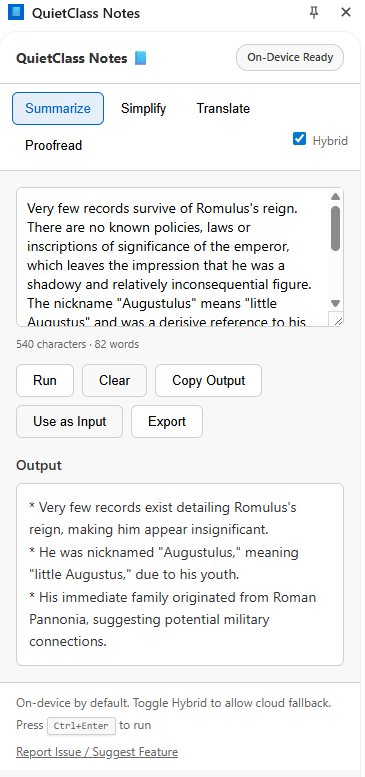
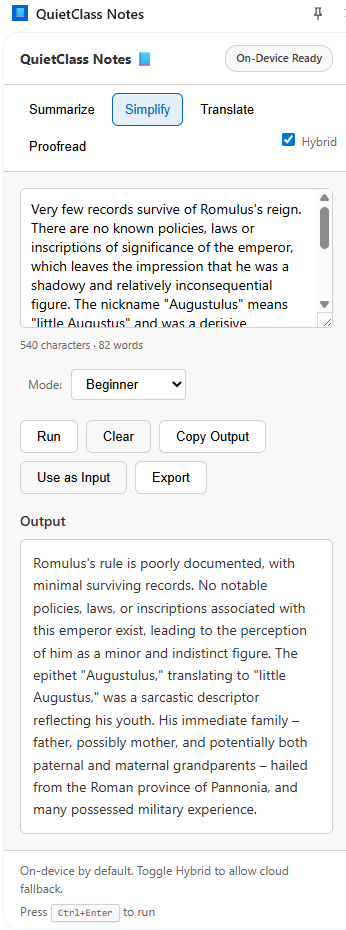
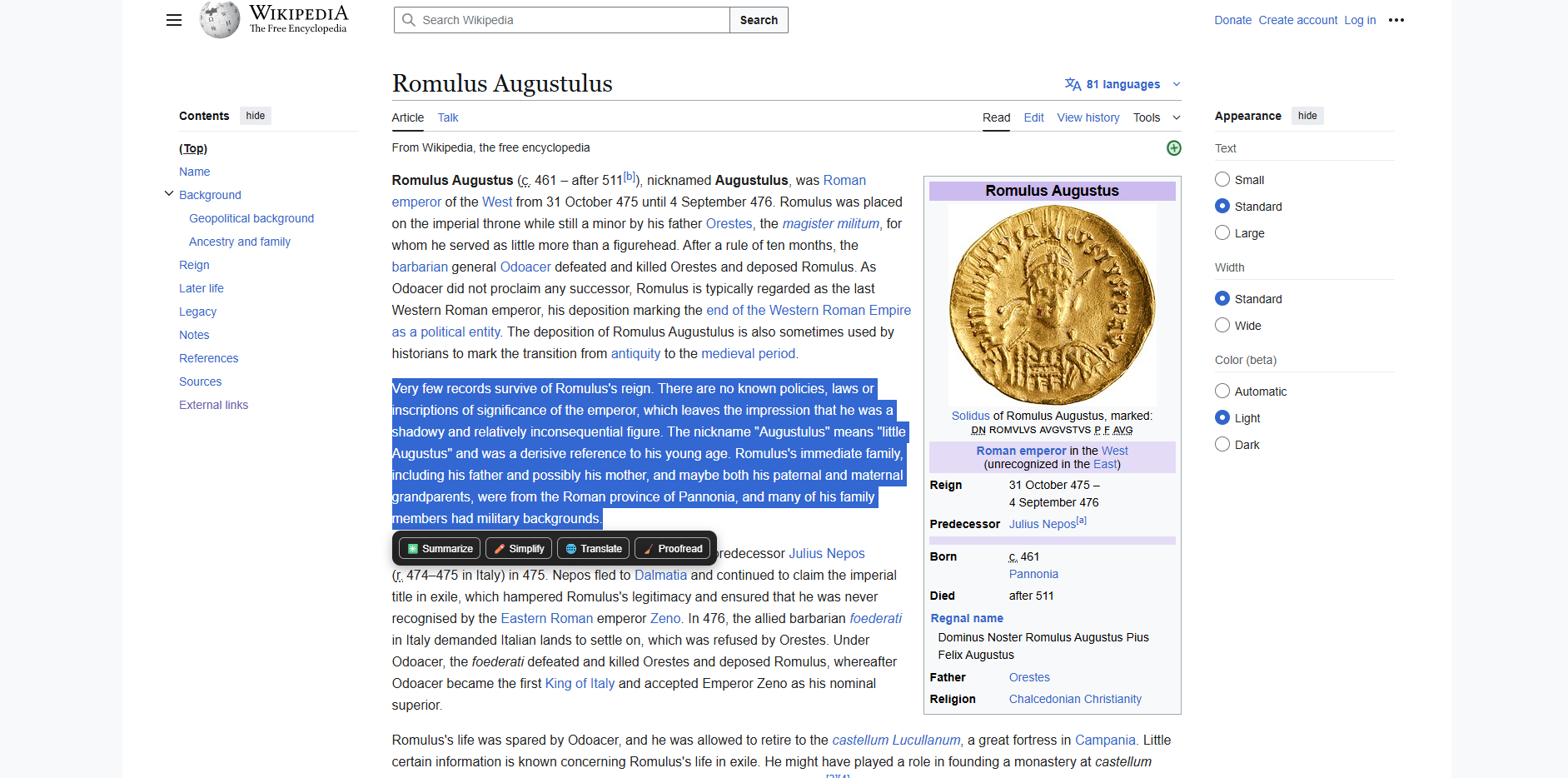
QuietClass Notes is a privacy-first Chrome extension that helps students and educators process web content on-device. It provides four AI features: Summarize: Converts long articles and lecture notes into concise bullet points Simplify: Rewrites complex text at beginner/intermediate levels or in formal/casual tones Translate: Supports 10+ languages with auto-detection Proofread: Fixes grammar and clarity with explanations The extension shows floating action chips when you select text on any webpage. Clicking a chip opens the side panel with processed text. Features include keyboard shortcuts (Ctrl+Enter), input statistics, preference persistence, export to JSON/Markdown, dark mode, and hybrid mode for cloud fallback when on-device APIs are unavailable.
How I built it
I used Chrome Extension Manifest V3 with: Service Worker: Background script for message routing and side panel management Content Script: Injects floating chips and captures text selection Side Panel API: Main UI with tabbed interface Chrome Built-in AI APIs: Summarizer, Rewriter, Translator, and Proofreader (powered by Gemini Nano) for on-device processing I designed a modular architecture with separate AI wrapper modules for each feature, utility modules for availability checks and storage, and a hybrid module for cloud fallback. I implemented a two-layer timeout system (API-level and UI-level) to prevent indefinite hangs, robust error handling with user-friendly messages, and preference persistence using Chrome's local storage.
Challenges I ran into
Extension context invalidation: Reloading the extension caused disconnects. I added checks for chrome.runtime availability and user alerts to reload pages. Rewriter API enum mismatch: The API expected specific enum values (e.g., 'simplify', 'formalize') while my UI used friendly names (e.g., 'beginner', 'formal'). I mapped UI values to API enums and added fallback logic to try alternatives on enum errors. Proofreader hanging: Some calls never resolved or rejected. I implemented a two-layer timeout (10s API-level, 60s UI-level) with explicit timeout promises that always fire, even if the API call hangs. Translator API availability: The Translator API isn't available in all Chrome builds. I enhanced detection to check multiple paths (navigator.translator, window.translator, globalThis.translator) and provided clear error messages suggesting Chrome Canary/Dev builds. Defensive timeout interference: The 15s UI timeout was too short for legitimate API calls. I increased it to 60s so it only fires for catastrophic failures, not normal operations.
Accomplishments that I am proud of
Privacy-first design: On-device processing by default, with no data leaving the user's machine unless hybrid mode is enabled. Robust error handling: Multi-layer timeouts and clear error messages with actionable suggestions. Accessibility: ARIA labels, keyboard shortcuts, and screen reader support. User experience: Floating action chips, auto-tab selection, input statistics, preference persistence, export options, and toast notifications. Modular architecture: Clear separation of concerns with reusable AI wrapper modules and utility functions. Hybrid mode: Graceful cloud fallback when on-device APIs are unavailable, maintaining functionality while preserving privacy when possible.
What I learned
Chrome Extension development: Manifest V3 architecture, service workers, content scripts, side panels, and message passing between components. Chrome Built-in AI APIs: How Summarizer, Rewriter, Translator, and Proofreader work, their availability patterns, enum values, and timeout behaviors. Robust timeout design: Timeouts that always fire, even when promises never resolve, require wrapper promises with explicit timeout handlers. Extension context lifecycle: Extension reloads invalidate content script contexts, requiring defensive checks and user guidance for reconnection. Privacy-first UX: Balancing on-device capabilities with user control (hybrid mode) to maintain privacy while ensuring reliability.
What's next for QuietClass Notes
Enhanced features: Batch processing for multiple selections Custom prompt templates for different use cases History of processed texts with search Collaboration features for sharing summaries Improved AI integration: Better hybrid mode with multiple cloud providers Advanced proofreading with style suggestions Multi-language summarization Educational tools: Study mode with flashcards generation Quiz generation from summaries Citation extraction and bibliography generation Performance and reliability: Caching processed results Background processing for long texts Progressive enhancement for offline use Community and accessibility: Open-source contributions Multi-language UI Integration with note-taking apps (Notion, Obsidian, etc.)

Log in or sign up for Devpost to join the conversation.