-
-
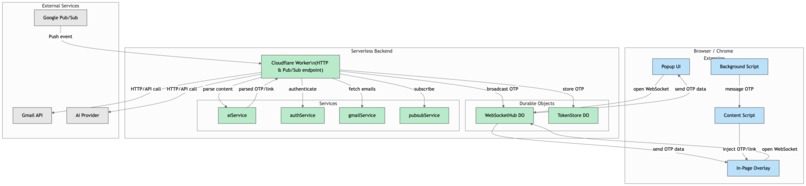
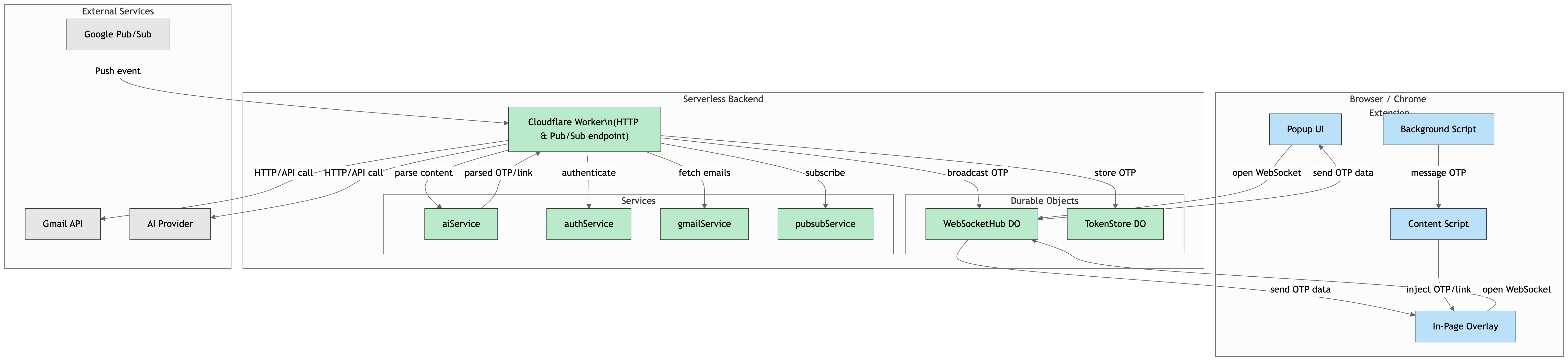
Architecture Diagram
Inspiration
In today's digital age, we spend a significant amount of our time in web browsers, whether for work, socializing, or online shopping. It’s common to encounter login processes that require one-time passwords (OTPs) sent to our email, which can disrupt the flow of our online activities.
This realization sparked our inspiration to create an OTP filler. We noticed how cumbersome it can be to switch back and forth between tabs to retrieve these OTPs, leading to frustration and wasted time. We aimed to streamline this experience by developing a tool that would allow users to seamlessly access their OTPs without the hassle of tab-switching. By creating QuickOTP, we sought to enhance the efficiency of online logins and provide a smoother experience for users navigating the web.
This idea not only addresses a common pain point but also reflects our commitment to improving the overall user experience in an increasingly digital world.
What it does
QuickOTP is a Chrome extension that simplifies the authentication process by minimizing user interaction. When you log in to a website and request an OTP (One-Time Password), our extension extracts the OTP from your newly received Gmail email and displays it instantly for you to copy with just a single click.
No more switching tabs, refreshing your inbox, or manually typing codes. QuickOTP does it all for you, seamlessly and securely.
How we built it
Google Authentication: The extension authenticates your Google account and monitors a custom label (e.g., "OTP") in Gmail for relevant emails.
Real-Time Email Monitoring: Google Pub/Sub tracks changes in the labeled emails and sends a push notification to a webhook(backend server) when a new email arrives and push the email data(historyid) to websocket.
Instant Notifications via WebSockets: Chrome extension establish connection with websocket and recieves email history id instantly.
### ---> client side
Email Retrieval & AI Processing: The extension pulls the new email content, then sends it to an AI model (Gemini/OpenAI) to extract OTPs or verification links.
Popup & Autofill: The extracted OTP or link is displayed in a popup. OTPs are automatically filled, and verification links can be opened in a new tab.
Client-Side Privacy: Google auth tokens are handled entirely in the browser, ensuring they are not shared with the backend.
Challenges we ran into
Email Filtering: Ensuring only relevant emails with OTPs were accessed without breaching user privacy was a significant challenge. We designed a filtering system that only monitors incoming OTP emails. Efficient OTP Extraction: Extracting the OTP from various email formats was tricky due to different layouts and styles.
Accomplishments that we're proud of
Created a system that reduces manual user input to just a couple clicks. Implemented secure integration with Gmail API that respects user privacy. Successfully handled multiple formats of OTP emails.
What we learned
Integration with external APIs like Gmail API requires careful handling of permissions and scopes to avoid privacy concerns. Designing a Chrome extension that interacts with real-time data involves understanding how background scripts and content scripts communicate within Chrome’s architecture.
What's next for QuickOTP
Add support for OTP extraction from multiple email providers. Provide integration with popular password managers for automatic OTP filling.
Built With
- gmail-api
- google-cloud
- openai
- typescript
- websockets


Log in or sign up for Devpost to join the conversation.