Inspiration
I’ve always loved AI and the power of large language models like Gemini Pro. They're amazing for solving daily tasks, but there’s one problem: the process isn’t seamless. Every time I need to use AI, I have to open a new tab, visit a website, copy the content, paste it into the site, get a summary, and then return to my original page. It’s not quick, and it certainly isn’t intuitive. AI should be invisible—there when you need it, without disrupting your flow. It should integrate directly into any webpage, anywhere on the page, whenever the user wants it. Making AI available at users' fingertips while they browse. That’s the vision we set out to solve with QuickIntuit: AI that’s always there, ready to assist in the background without breaking the user’s experience.
What it does
QuickIntuit: AI Browser Extension
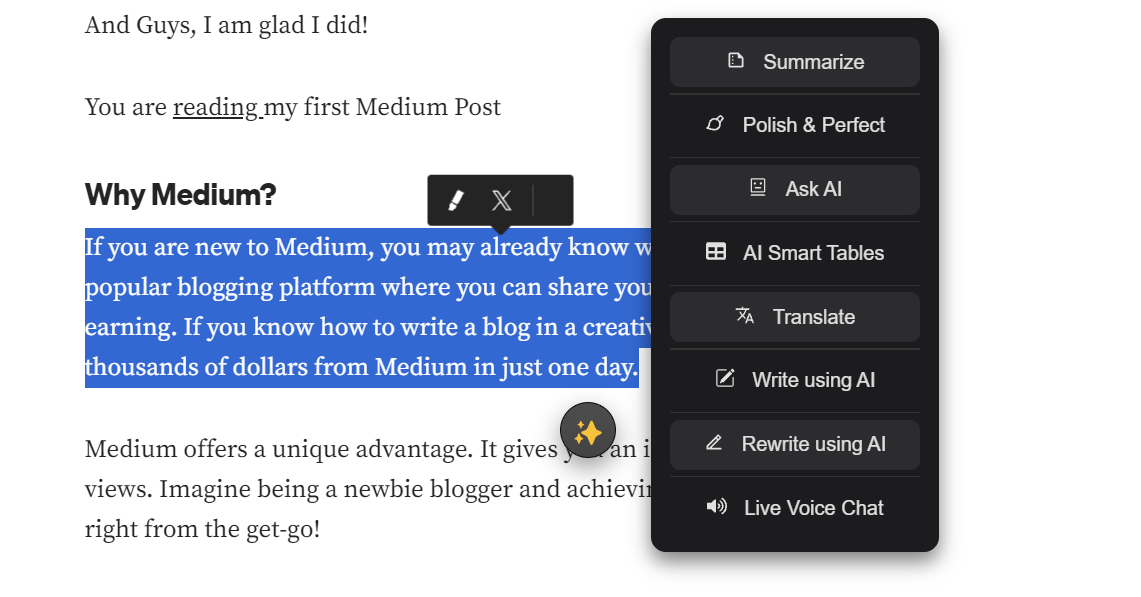
QuickIntuit is a powerful AI browser extension that brings advanced AI capabilities directly to your fingertips while you browse. Here's a breakdown of its key features:
Flagship Features:
- AI Smart Tables:
- Includes features like Pros and Cons, Key Takeaways, Relationship Mapping, and more.
- Provides structured, actionable insights instantly from the content you're engaging with.
- Versatile tables that allow you to organize and digest information in various ways for different needs, such as decision-making, summarizing complex topics, or mapping key relationships.
- Ideal for everyday users: Quickly digest important information and make better decisions while browsing, whether you're shopping, reading news, or browsing social media.
- Grammarly-Inspired Writing Assistance:
- Helps users with grammar correction, spelling mistakes, rephrasing sentences, and adjusting tone or confidence levels.
- Offers on-the-fly writing refinement, making your content more polished as you browse.
- Perfect for anyone writing online: Whether you're drafting emails, social media posts, or comments, get quick improvements to your writing.
- AI-Powered Live Voice Chat:
- Real-time voice interaction with AI for immediate assistance.
- Enables users to chat live with the AI to get answers or help with tasks directly within the webpage.
- For users seeking quick solutions: Instant answers or assistance, right when you need it.
- AI Chat Interface Integrated into Website:
- Seamlessly integrates with the website for live chat and AI support, offering users immediate answers and guidance.
- Ideal for casual and professional users: Get help with tasks, queries, or navigating content without leaving the page.
Typical Features:
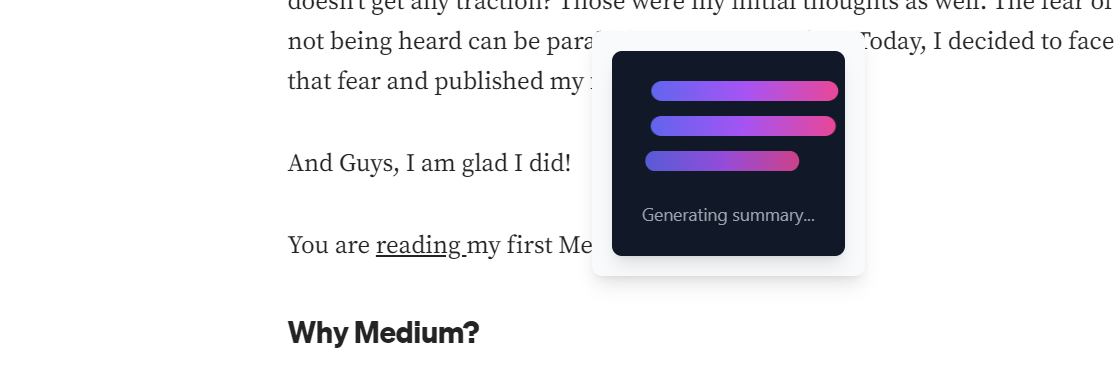
- Summarization:
- Provides concise summaries of lengthy articles, helping you quickly understand the key points.
- For users on the go: Save time and get the essence of any content without reading every word.
- Translation:
- Translate content between languages effortlessly, breaking down language barriers as you browse.
- For global users: Make the web accessible, no matter what language you're browsing in.
- Writing and Rewriting Capabilities:
- Generate original content or rewrite existing text to suit your needs, all within your browsing experience.
- For anyone looking to refine their writing: Improve your content instantly, whether it's for work, school, or social interactions.
Key Advantage:
The best part? All of this happens without interrupting the user’s experience. By simply selecting text, the AI provides relevant insights or corrections in the form of interactive UI components that appear directly on the webpage. Once the user reads the information, the UI disappears, leaving no trace behind. It’s invisible and unobtrusive, only showing up when needed. And for real-time help, users can also interact with an AI-powered live voice chat for additional assistance.
Ideal for Professionals, Students, Researchers, and More:
- AI Smart Tables and other features provide extra value for professionals, students, researchers, and content creators who need to make informed decisions, analyze complex data, or manage information quickly.
- Summarization, writing assistance, and translation help users in these fields streamline their workflow and improve productivity in their daily tasks.
How we built it
1. Chrome Extension:
- The entire extension is built using React and Tailwind CSS for fast, dynamic interactions.
- React handles the dynamic content and UI updates, ensuring users have a smooth, real-time experience without needing to refresh or leave the page.
- Tailwind CSS allows us to quickly customize and scale the user interface while keeping it clean and modern.
2. AI Smart Tables:
- For AI Smart Tables (including Pros and Cons, Key Takeaways, Relationship Mapping, etc.), we use the Prompt API to generate structured content.
- The Prompt API helps transform raw text into organized tables, which can be parsed and rendered dynamically in the extension. These tables allow users to extract actionable insights quickly, whether for decision-making, summarizing, or mapping relationships.
3. Real-Time AI Chat:
- The AI-powered live chat interface is also powered by the Prompt API, enabling users to ask questions and receive instant responses in real-time.
- The chat interface is designed to be intuitive and unobtrusive, showing up only when the user selects text or activates the chat.
4. Live Voice Chat:
- For real-time voice chat, we utilize both the Prompt API and Web Speech API (native voice-to-text API).
- The Web Speech API handles speech recognition and synthesis, allowing users to interact with the AI using voice commands and receive voice responses.
5. Writing Assistance (Grammarly-Inspired):
- The Prompt API is also used to enhance writing, offering features like grammar and spelling corrections, rephrasing, and tone adjustments.
- This helps users refine their writing while browsing without needing to leave the page or open a separate tool.
6. Summarization:
- We use the Summarization API to condense lengthy text into easy-to-digest summaries, allowing users to quickly understand key points from large articles or reports.
7. Translation:
- For translation, we use a combination of two APIs:
- Language Detection API: Detects the language of selected text.
- Translation API: Once the language is detected, the Translation API provides accurate translations into the user's desired language.
- This feature enables seamless translation of foreign-language content directly within the browser.
8. Write and Rewrite API:
- For writing tasks, we utilize the Write and Rewrite API to assist users in creating or modifying text. Whether it’s generating new content or rephrasing existing content, the API makes it easy for users to refine their writing on the fly.
Challenges we ran into
While building QuickIntuit, we encountered several challenges, mainly related to integrating AI features into a browser extension while ensuring smooth and seamless user experience. Here are the main challenges we faced:
1. CSS Overriding by Websites:
- One of the biggest hurdles was handling the CSS styles being overridden by websites. Since our extension injects UI elements directly onto webpages, we had to ensure that our styling didn’t conflict with or get overridden by the existing styles on the website. Achieving consistent UI visibility across various sites while maintaining a responsive and clean design was a challenge.
2. Parsing and Constructing AI Smart Tables:
- Parsing text and converting it into structured tables, like Pros and Cons or Key Takeaways, was a tricky task. The Prompt API returned the raw information in various formats, and we had to build a reliable parsing logic to correctly construct tables based on that data. Ensuring accuracy and consistency in the AI-generated content was an ongoing challenge.
3. Managing Real-Time Voice Chat Flow:
- The real-time voice chat feature posed significant challenges in managing the flow of interaction. Handling voice input and output while maintaining a smooth conversation loop was a difficult task. Ensuring that the system could listen to user input, process the query, and provide an accurate response in real-time without delay or interruptions was tricky, especially when integrating with speech recognition.
4. Balancing Performance and Responsiveness:
- Ensuring good performance while processing multiple APIs (for summarization, translation, and other tasks) in real time without slowing down the browser or interfering with user activities was an ongoing challenge.
Accomplishments That We're Proud Of
Building QuickIntuit was an exciting journey, and along the way, we achieved several milestones that we're incredibly proud of. Here are some key accomplishments that stand out:
1. Seamless Browser Extension Integration:
- Successfully integrating advanced AI capabilities into a browser extension was no small feat. We created a user-friendly, invisible AI assistant that appears only when needed, ensuring a smooth, non-intrusive experience. The ability to provide powerful tools like AI Smart Tables, real-time voice chat, and Grammarly-inspired features directly on the webpage is a significant accomplishment. It feels natural and effortless, making AI truly accessible at the user's fingertips.
2. Real-Time Voice Chat with AI:
- We managed to implement real-time voice chat, which enables users to interact with AI through a conversational interface. Achieving smooth, uninterrupted communication between the user and the AI, especially with speech recognition, was a major accomplishment. This feature is pushing the boundaries of what AI can do in real-time interactions, offering users an entirely new way to engage with content.
3. Creating a Functional Extension Using React and Tailwind:
- The technical challenge of building a fully functional Chrome extension using React and Tailwind CSS was something we’re particularly proud of. This allowed us to ensure that the extension was not only powerful but also aesthetically appealing and responsive. With seamless performance and easy-to-understand UI, we made sure the user experience remained at the forefront of our design.
4. Multiple API Integrations for Various Use Cases:
- Integrating multiple APIs for summarization, translation, grammar correction, and content rewriting was a challenge, but we managed to do it in a way that provided value to users. The intelligent orchestration of these APIs ensures users have everything they need—whether it's summarizing an article, translating a piece of text, or enhancing their writing—all without leaving the page.
5. Building Smart Tables That Deliver Actionable Insights:
- Our AI Smart Tables (Pros and Cons, Key Takeaways, Relationship Mapping, and more) have become a game-changer for users. We’re proud of how versatile and practical these tables are, allowing users to digest complex information quickly. Whether for decision-making, summarizing content, or mapping key relationships, the tables make it easy to visualize and act on information—something that can save time and improve productivity across various use cases.
6. Zero-Interruption, Contextual AI Assistance:
- One of the features we’re most proud of is the zero-interruption, contextual AI assistance. The ability to inject relevant insights and corrections into a webpage without disrupting the user’s experience was a major technical hurdle, but we made it work. This level of seamless interaction allows AI to be helpful without being intrusive.
In the end, QuickIntuit is not just about building a tool—it’s about making AI work effortlessly in the background, empowering users to make smarter decisions and get things done faster, without the hassle of switching tabs or opening new windows. We're proud of how we've managed to bring all of these advanced features together in one easy-to-use package.
What we learned
Building QuickIntuit highlighted several key insights. Integrating real-time AI features, like voice chat and Smart Tables, taught me the complexities of managing low-latency interactions and processing multiple tasks simultaneously. The use of Shadow DOM was crucial in solving the issue of CSS overrides from different websites, ensuring that our UI remained consistent and responsive. The integration of various APIs, such as summarization, translation, and grammar correction, revealed the importance of efficient API orchestration and careful performance optimization. Most importantly, I learned the value of providing AI at the user’s fingertips—delivering seamless and unobtrusive assistance that enhances the browsing experience without disrupting it.
What's next for QuickIntuit
The next steps for QuickIntuit involve integrating more powerful models like Gemini Pro for even deeper AI capabilities. We also plan to enhance the voice mode for better hands-free use, allowing for smoother and more intuitive interactions. Additionally, we aim to improve performance and expand the range of supported tasks, making QuickIntuit even more versatile and indispensable for users.
Built With
- css
- gemini-nano
- javascript
- react
- tailwind
- vite


Log in or sign up for Devpost to join the conversation.