-
-
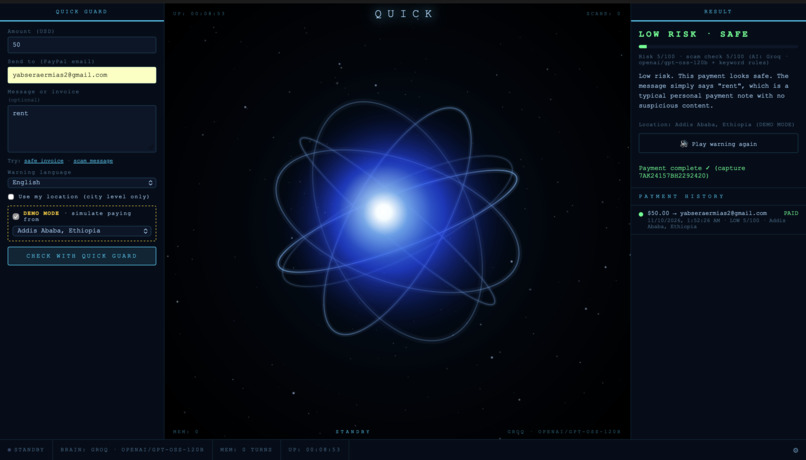
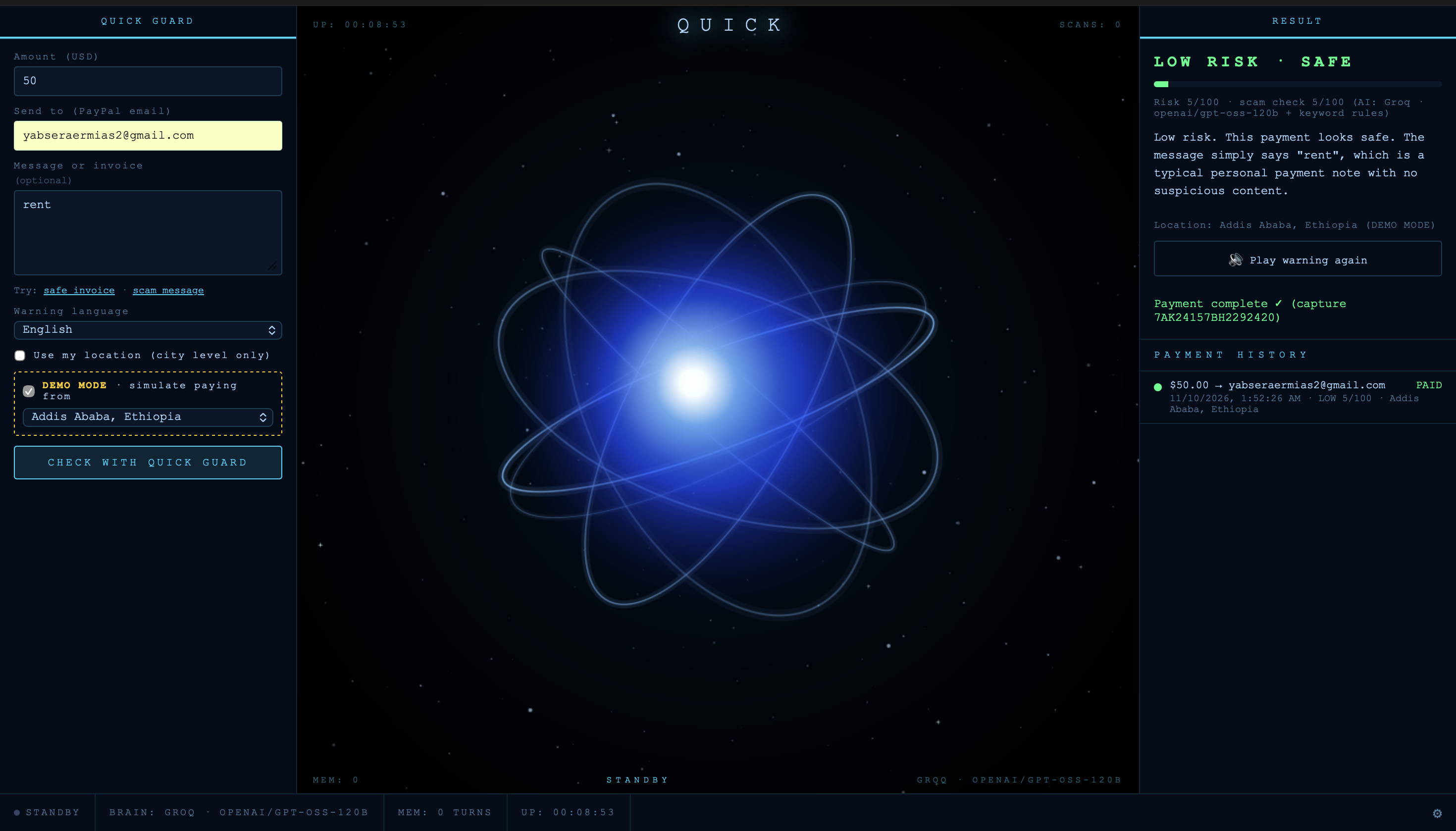
QUICK Guard dashboard, live on Render: payment form, AI orb, and result panel
Inspiration
I'm from Ethiopia. Back home, and in Ethiopian families abroad, a lot of people are paying digitally for the first time. They're careful with money, but they've never seen a fake invoice, a "your account has been limited" message, or a "support agent" asking for gift-card codes. Many of them don't read English comfortably, so the warning signs are easy to miss.
Growing up, I was the kid asking how a phone connects to Wi-Fi, how computers talk to each other, how AI works, and what "the cloud" even was. But to the best of my knowledge, very few schools or colleges in Ethiopia teach cybersecurity, so most people never learn how these attacks work. That's why I'm studying cybersecurity today, and why I built QUICK, my own AI assistant, to help people like me who never got that exposure. QUICK Guard is QUICK pointed at one of the most common ways people lose money.
PayPal's systems are secure. Scammers go after the person, and the victim sends the money themselves, so the payment looks legitimate. I wanted something that sits in front of the Pay button, checks the payment first, and explains the danger simply, out loud, and in the user's own language.
What it does
You enter an amount, the PayPal email you're paying, and (optionally) the message or invoice you received. QUICK Guard then:
- Checks the message for scams with an AI model plus keyword rules. Every red flag has to quote the exact words that gave the scam away, e.g. Pressure to pay right away: "within 24 hours".
- Checks where the payment is coming from. If you paid from Addis Ababa a few minutes ago and now a payment comes from Tokyo, that's impossible travel, and someone else may be using your account.
- Decides LOW, MEDIUM or HIGH. The orb turns green, yellow or red, and the warning is spoken aloud, in English or Amharic, plus Spanish, French, Mandarin, Hindi and Nepali.
- Controls the PayPal button. LOW shows the PayPal Sandbox buttons. MEDIUM asks "Is this really you?" first. HIGH is blocked, and the server refuses to create a PayPal order even if someone calls the API directly.
How I built it
- Backend: Python and Flask, served by Gunicorn on Render (free plan, Blueprint in
render.yaml). - Payments: PayPal Orders API v2 and the PayPal JavaScript SDK, Sandbox only. The server creates and captures orders only after QUICK Guard approves, with idempotency keys so a payment can't be captured twice.
- AI: Groq running OpenAI's open-weight gpt-oss-120b, with gpt-oss-20b as an automatic backup when the free tier's rate limit is hit, and keyword rules that always run, so Guard still protects users if the AI is down. Locally it can run Llama 3 on Ollama instead.
- Location: city-level browser location or an IP fallback, rounded to about 11 km, plus a haversine speed check. Demo Mode lets anyone simulate paying from Addis Ababa, New York, London or Tokyo.
- Voice: Microsoft Edge neural voices through
edge-tts, includingam-ET-MekdesNeuralfor Amharic. - Frontend: plain HTML, CSS and JavaScript with a canvas orb, reused from my original QUICK dashboard.
- Testing: pytest, with 243 automated tests, including attack tests (prompt injection, XSS, double-capture races, spoofed IP headers).
- How I worked: I built QUICK Guard solo, using Claude Code as my AI coding assistant to write code and tests, review changes, and debug the live deployment. I made the design decisions, tested everything on the live site, and merged every change myself.
Challenges I ran into
- False positives on everyday words. Short, harmless payment notes like "grocery" and "ቡና" (coffee) were being flagged; a confused local model even scored "ቡና" 80/100. I added an evidence rule: every red flag must quote words that are really in the message, and the AI can only push a payment to MEDIUM or HIGH if one of its quotes checks out.
- The wrong local model. On my laptop, QUICK was picking Mistral instead of llama3 because it grabbed the first model Ollama had installed. I made the model explicit.
- Llama 3 wasn't available on the Groq free key. I switched to gpt-oss-120b with gpt-oss-20b as a fallback, low reasoning effort, and a 10-minute answer cache to stay inside the free tier.
- The Render proxy IP bug. On the live site, location showed "unknown" whenever the browser didn't share its location. My code took the last
X-Forwarded-Forentry, which on Render is Render's own internal proxy, so the IP lookup was skipped and every visitor shared one rate limit. Now it uses Cloudflare'sCF-Connecting-IP, or the rightmost entry that isn't a Render or Cloudflare hop, and ignores values a visitor could fake. - The wrong PayPal Client ID in Render. The PayPal buttons failed with "Could not load PayPal" because I had pasted an email address into
PAYPAL_CLIENT_ID. I fixed the value and made the server catch that mistake without ever showing the value. - Broken AI Amharic. The AI sometimes wrote Amharic that was simply wrong; it once called gift cards "ገፅታ የሆነ ገበታ ካርዶች" instead of "የስጦታ ካርድ". For a warning meant to protect people, that isn't acceptable. Now the AI only decides the score and quotes the evidence, and the Amharic warning is built only from pre-written sentences instead of free-form AI Amharic.
Accomplishments that I'm proud of
- It runs live, end to end: real PayPal Sandbox orders are created and captured only after QUICK Guard approves.
- On 40 test messages through the live AI, it got 20/20 normal payments LOW and 20/20 scams HIGH, with every red flag quoting the message.
- The warning is spoken in Amharic for the people I built this for.
- The server is the gate. A blocked payment can't be paid, even by calling the API directly.
- Prompt injection doesn't work: a message that tries to talk the AI into "safe" gets more risk, not less.
What I learned
- Scams are a human problem. The hard part isn't detecting "gift cards", it's explaining the danger simply enough that someone stops before they pay.
- AI output has to be checked. Requiring quoted evidence fixed most of my false positives.
- Deploying teaches things local testing can't: proxies, environment variables, cold starts and free-tier rate limits.
- How to work well with an AI coding assistant: give clear rules, review every change, and verify on the live site.
What's next
- Recipient check (already in progress): look up the recipient's email domain (does it exist, how new is it, is it a throwaway inbox or a PayPal look-alike) and give those facts to the AI.
- Native-speaker review of every language, and more Ethiopian languages such as Afaan Oromo and Tigrinya.
- A database for trusted locations and history, so a restart doesn't clear them.
- A browser extension or mobile flow that checks a payment right where people pay.
