-
-
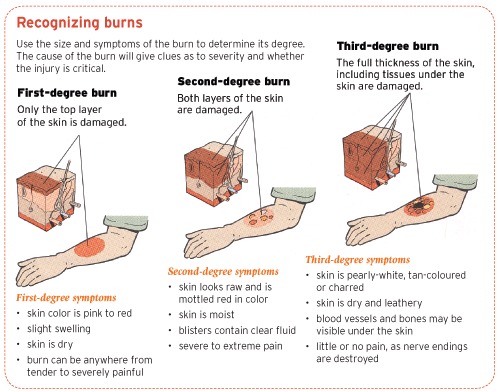
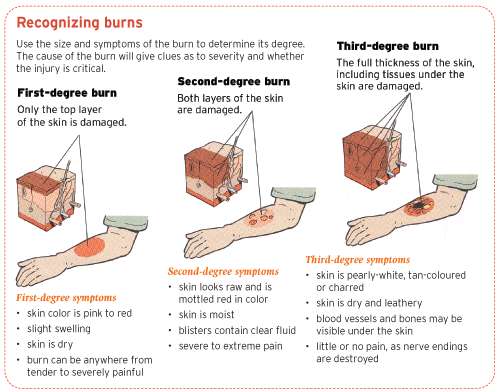
Degree of burn
-
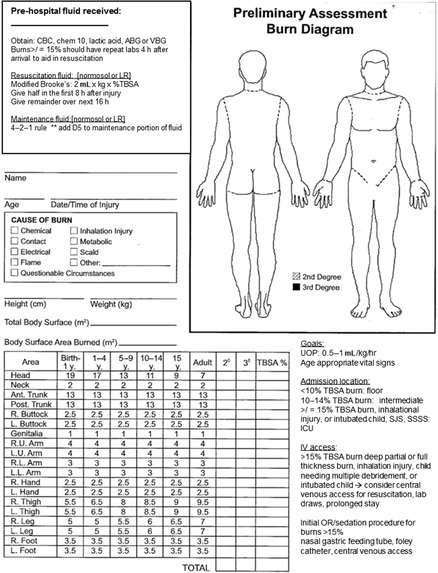
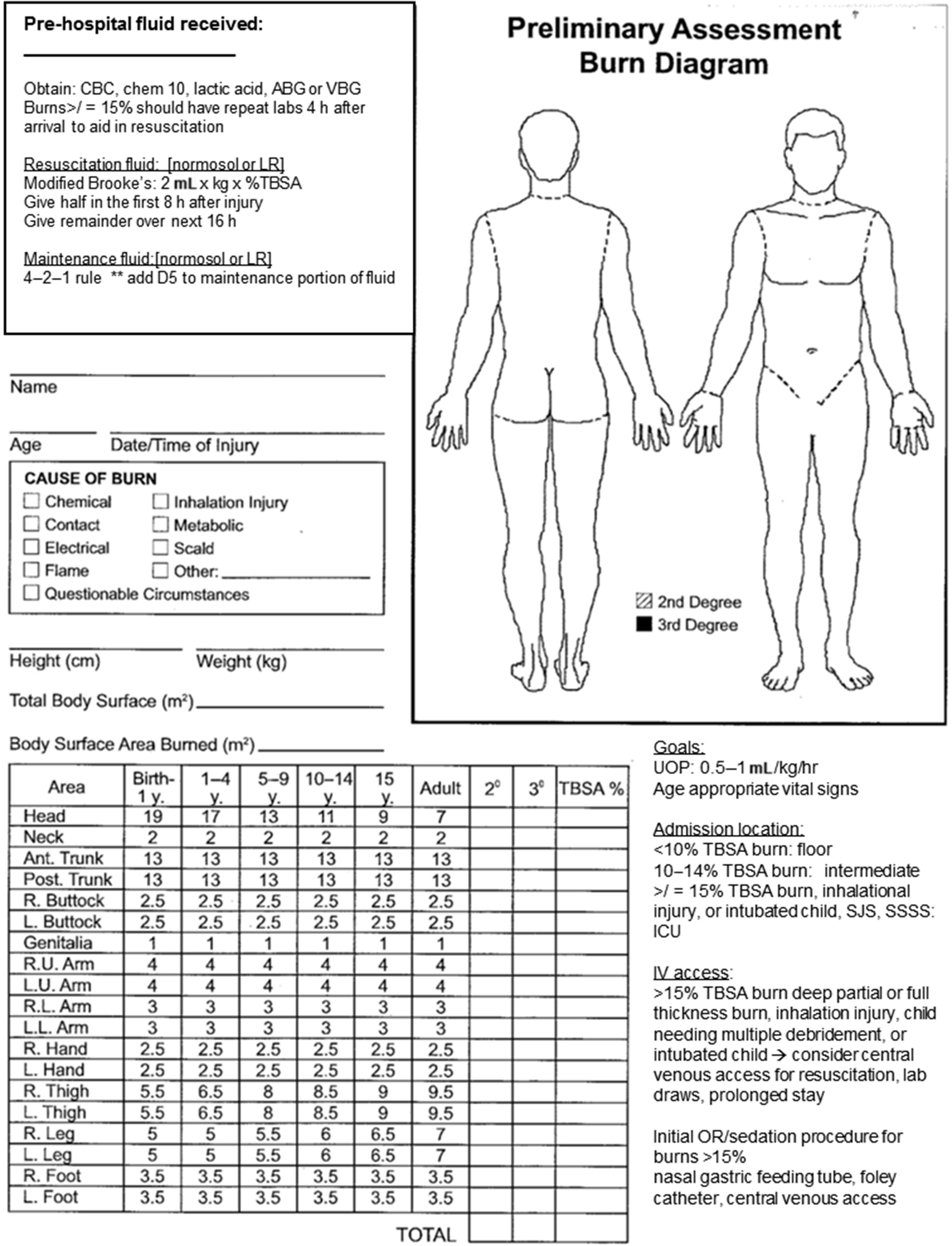
Lund and Browder Chart
-
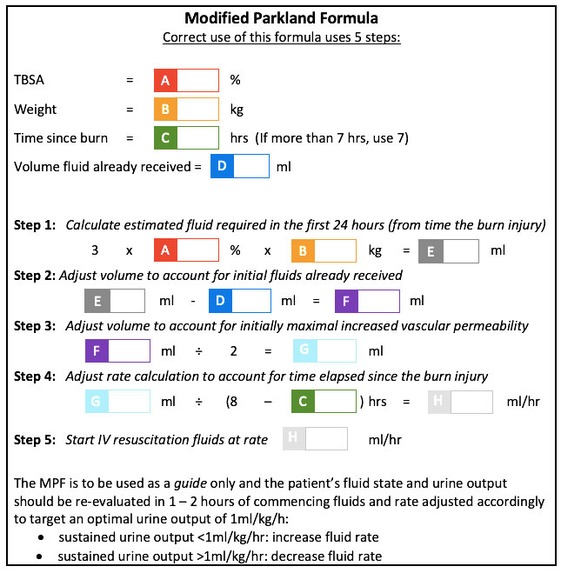
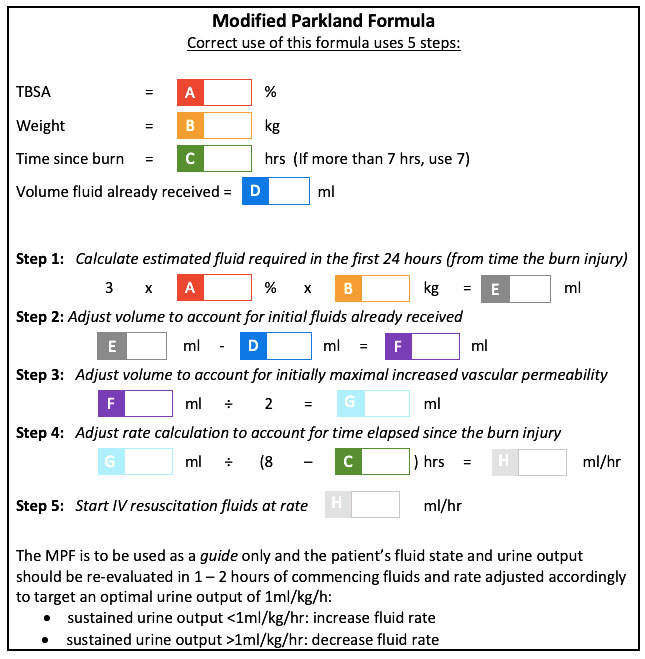
Modified Parkland Formula
-
Inspiration
While training as an EMT and responding to a call, Aryan saw his fellow EMTs struggle to calculate burn percentages and the amount of resuscitation fluids to be administered. The calculation was complex and took precious time. At the hospital, there was no easy way to transfer the information collected by the first responder EMTs to the team at the hospital that included doctors and other support staff. Aryan reached out to Sidharth who is also on The Community Heartbeat (www.TheCommunityHeartbeat.org) team with Aryan. They were inspired by this experience to create an easy and intuitive solution using existing technology and easily available mobile phones.
What it does
The Burns Assessment app is an intuitive and easy to use tool for first responders to quickly calculate burn percentages and the resuscitation fluids to be administered and then provide efficient documentation for other hospital staff and doctors. First, responders have to download the app to their smartphone and launch it when needed. The app allows EMTs to indicate the parts of the body affected using the simple touch interface of the smartphone. The app automatically calculates the Total Body Surface Area percentage (TBSA%) using the Lund and Browder Rule to calculate burns. The app also allows to calculate the required Lactated Ringer’s fluid using a modified Parkland formula. Finally, the calculations and the documented burns on the parts of the body can be securely emailed or texted to the hospital triage team in advance before the patient arrives at the hospital, providing convenience to systems that are increasingly becoming digital.
How we built it
We used the documentation and charts associated with the Lund and Browder Rule to calculate burns. We used a modified Parkland formula to calculate the amount of resuscitation fluid to be administered. We decided to use Flutter to build our app as Flutter supports multi platform development. We used Testflight to have our app tested out by EMTs and other first responders.
Challenges we ran into
There are many methods to calculate burns including the Rule of Nines and the Lund and Browder Method. Both calculation methods have their benefits and downsides. In the end, we decided to go with the Lund and Browder method as it is more acceptable globally. We also had a number of technologies and platforms available to design and build apps. We settled with building with Flutter SDK as it supports multiple platforms for deployment including web, mobile and desktop devices.
Accomplishments that we are proud of
We designed and developed a valuable resource tool and put it in the hands of first responders. Being a health worker, Aryan knows the stress that responders feel working in high pressure situations. This is an attempt to take one complexity out while responding to an emergency call. We designed an easy to use, functional app and deployed it to the apple store. This is now available free, for use anywhere in the world.
What we learned
The hardest part for us was designing the app in such a way that it would be simple and intuitive. The goal was to remove the tedious process of having to perform complex calculations by first responders and to make this information readily available to the triage care team at the hospital while the burns victim was being transported.
What's next for Quick Burns Assessment app
We are working on enhancing the application to allow EMTs to use their phone camera to automatically diagnose the burn area and calculate the burn percentages. The current app requires the first responders to estimate the burn. We are going through a large control dataset of burns photos and working on creating an Artificial Intelligence (AI) routine to accurately diagnose and calculate the burns.
Built With
• Flutter • TestFlight


Log in or sign up for Devpost to join the conversation.