-
-
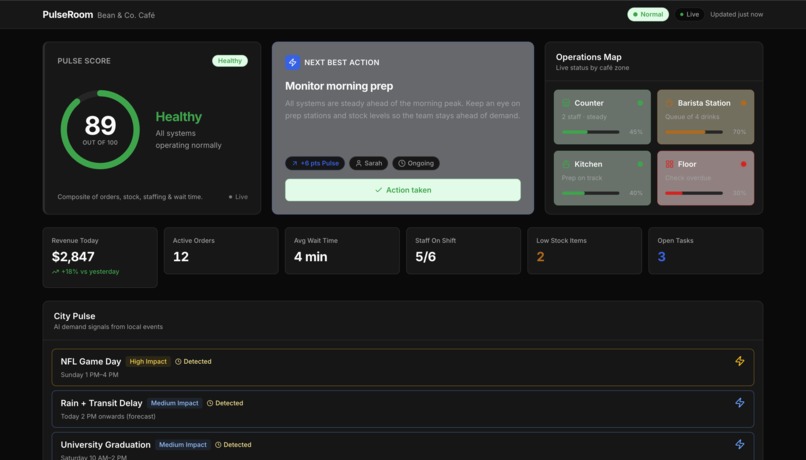
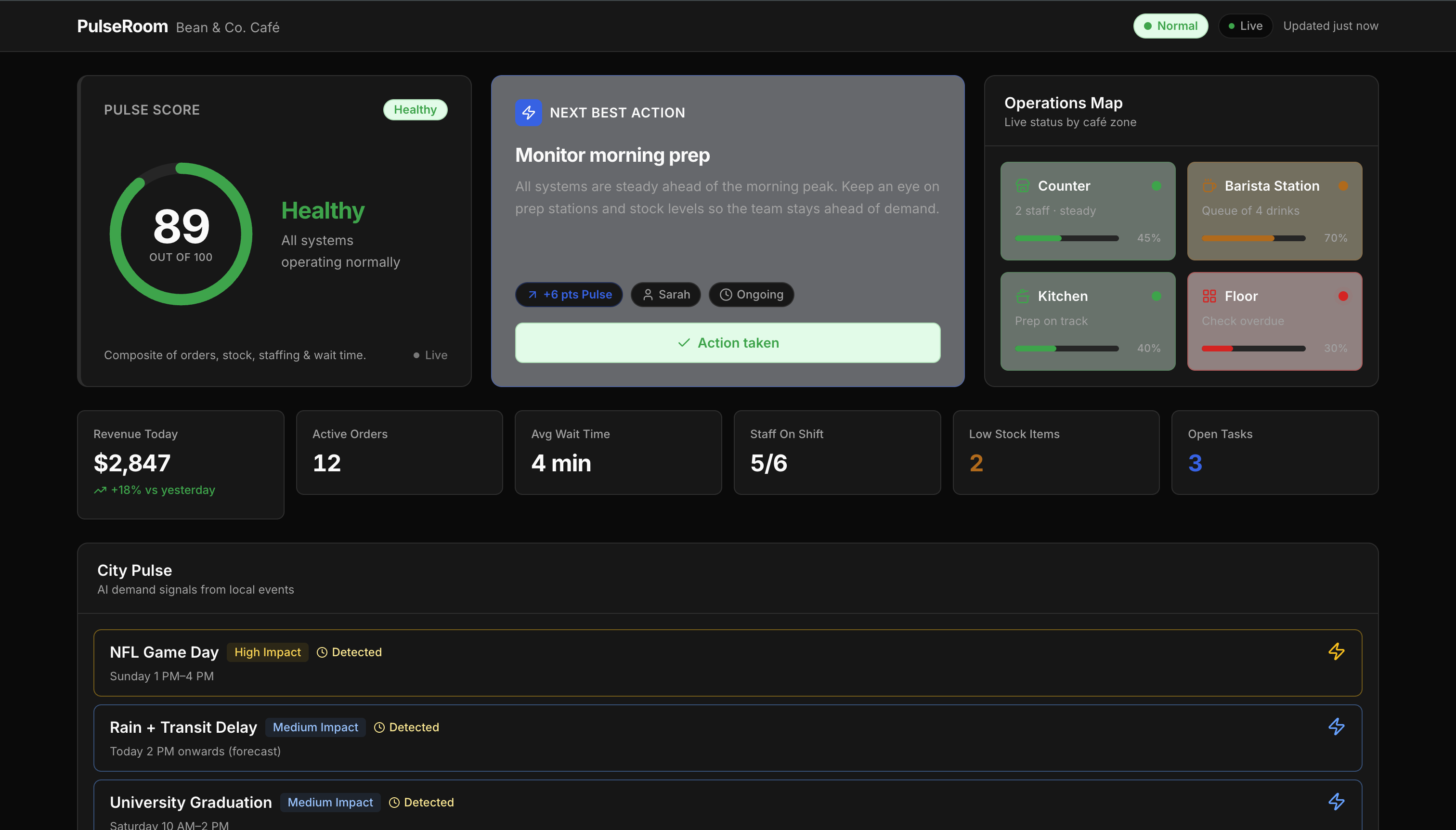
Normal Dashboard: One live screen for the entire shift.
-
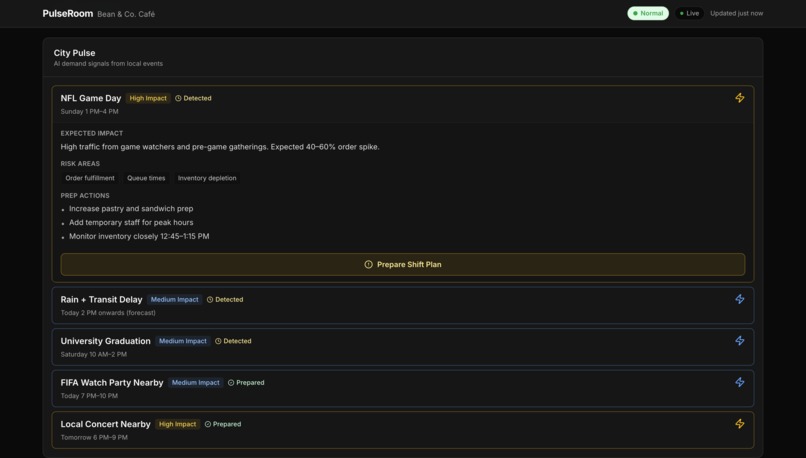
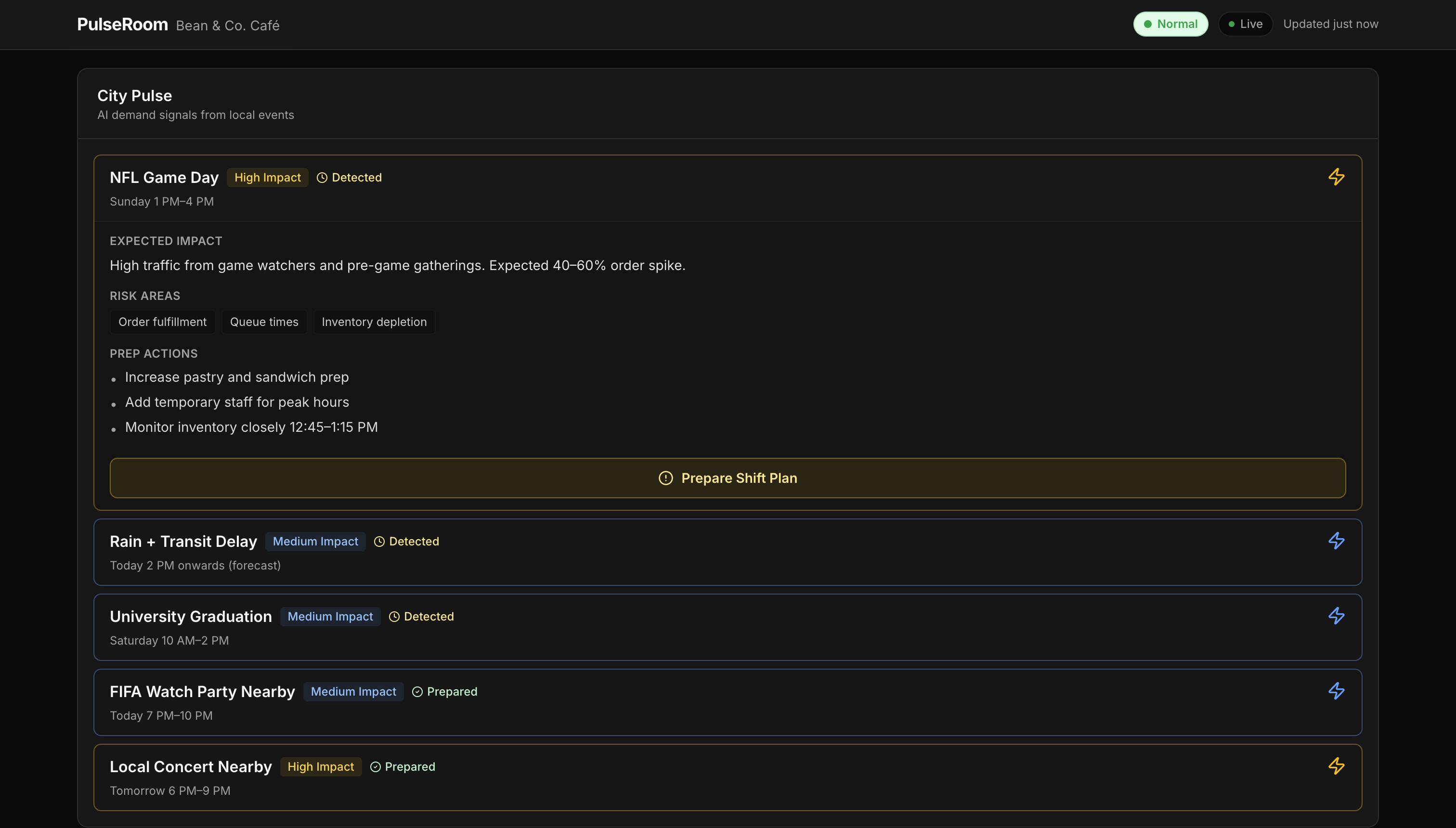
City Pulse: Prepare before the crowd arrives.
-
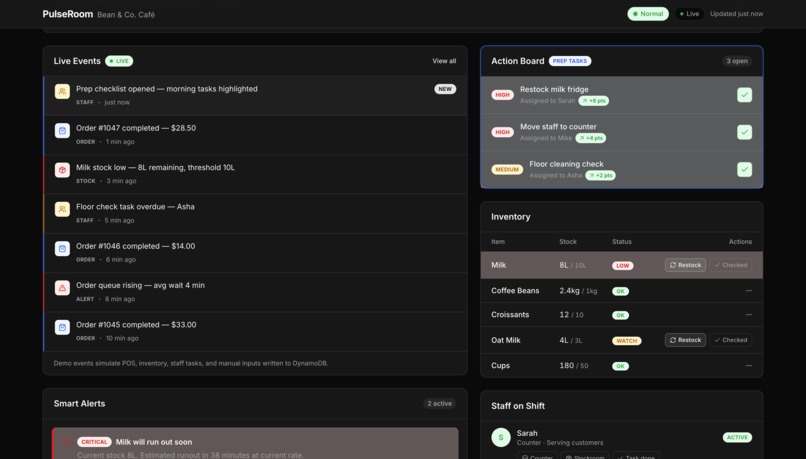
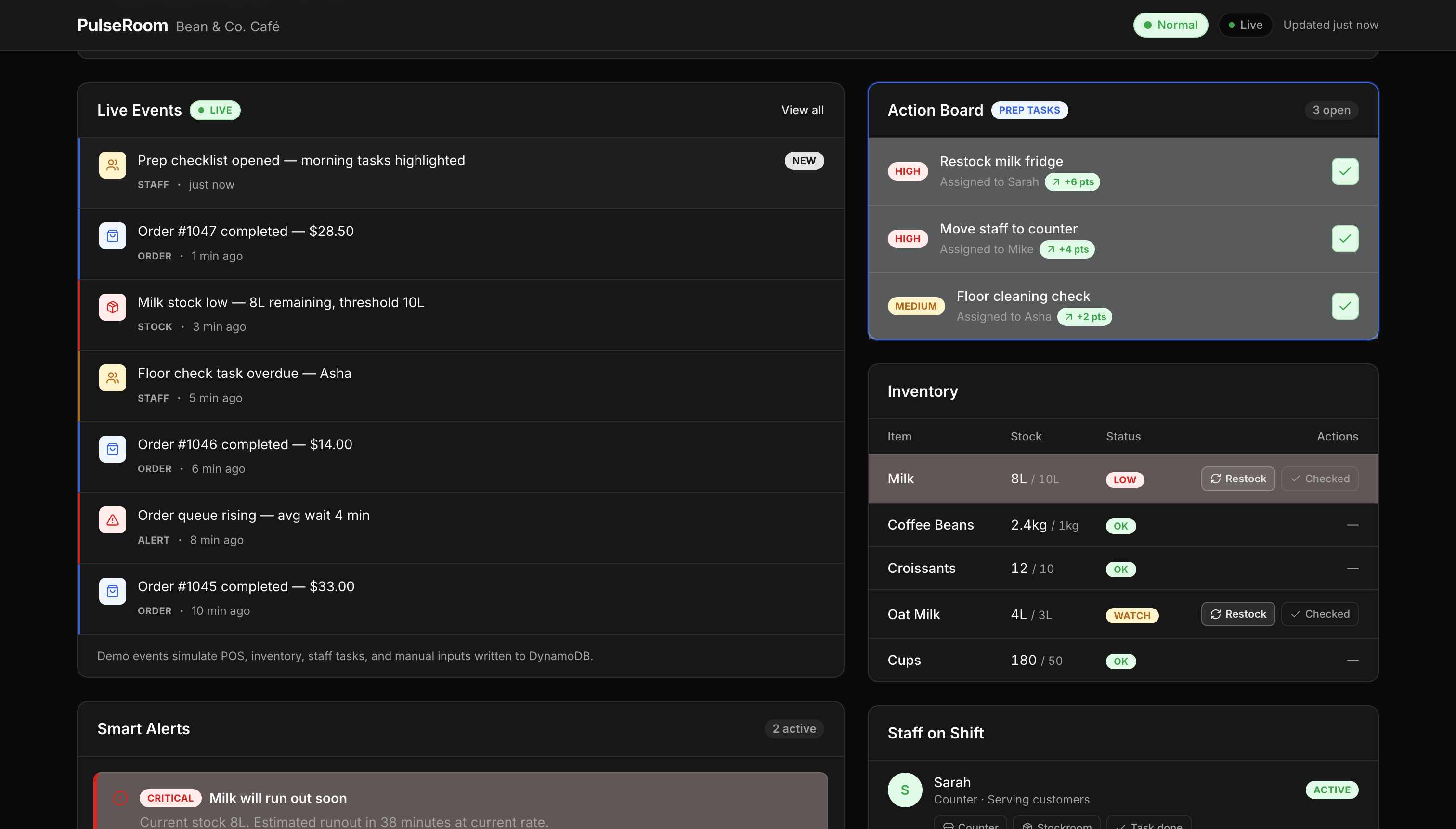
Action Board + Live Events; Every signal becomes an action.
-
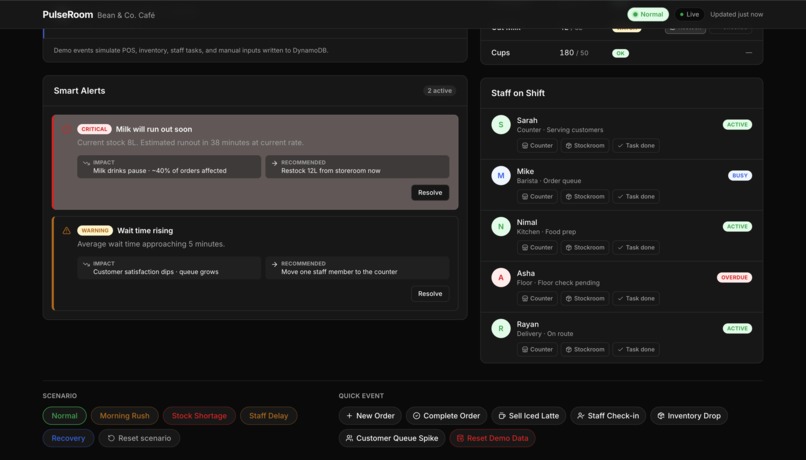
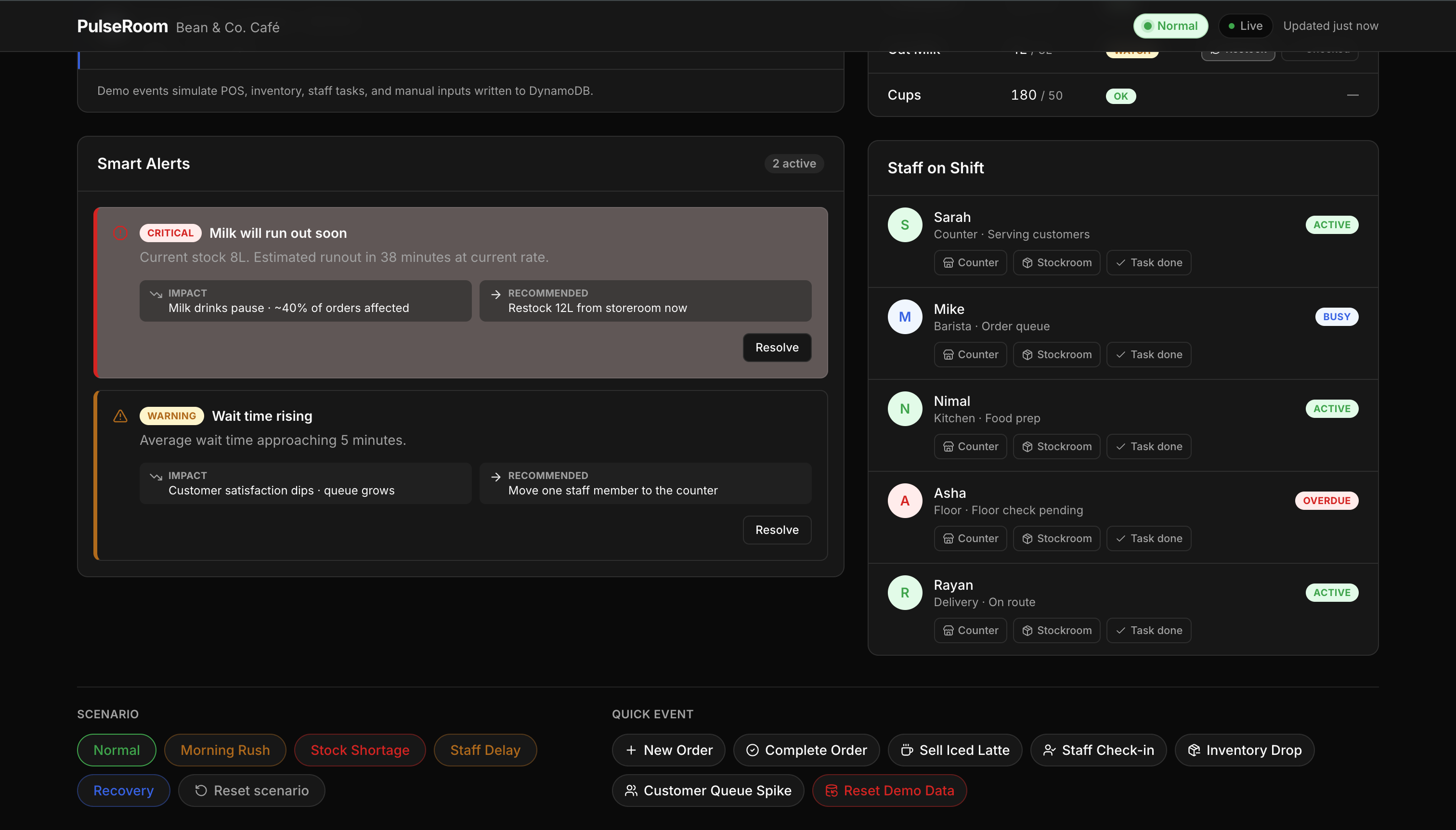
Smart Alerts: Know what is breaking before customers feel it.
-
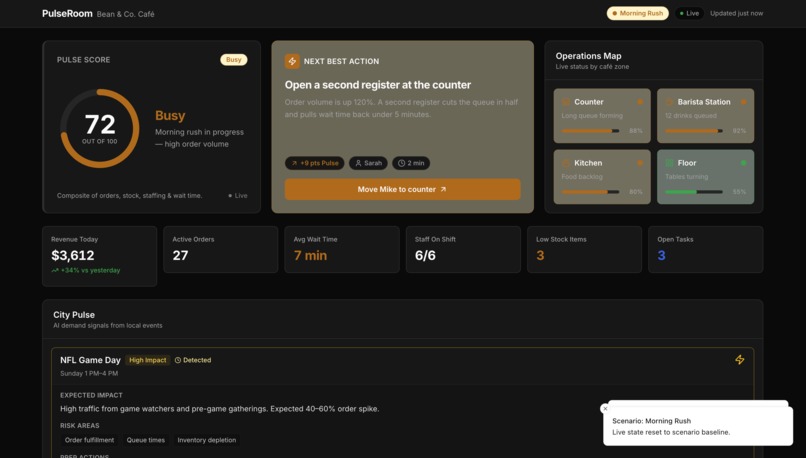
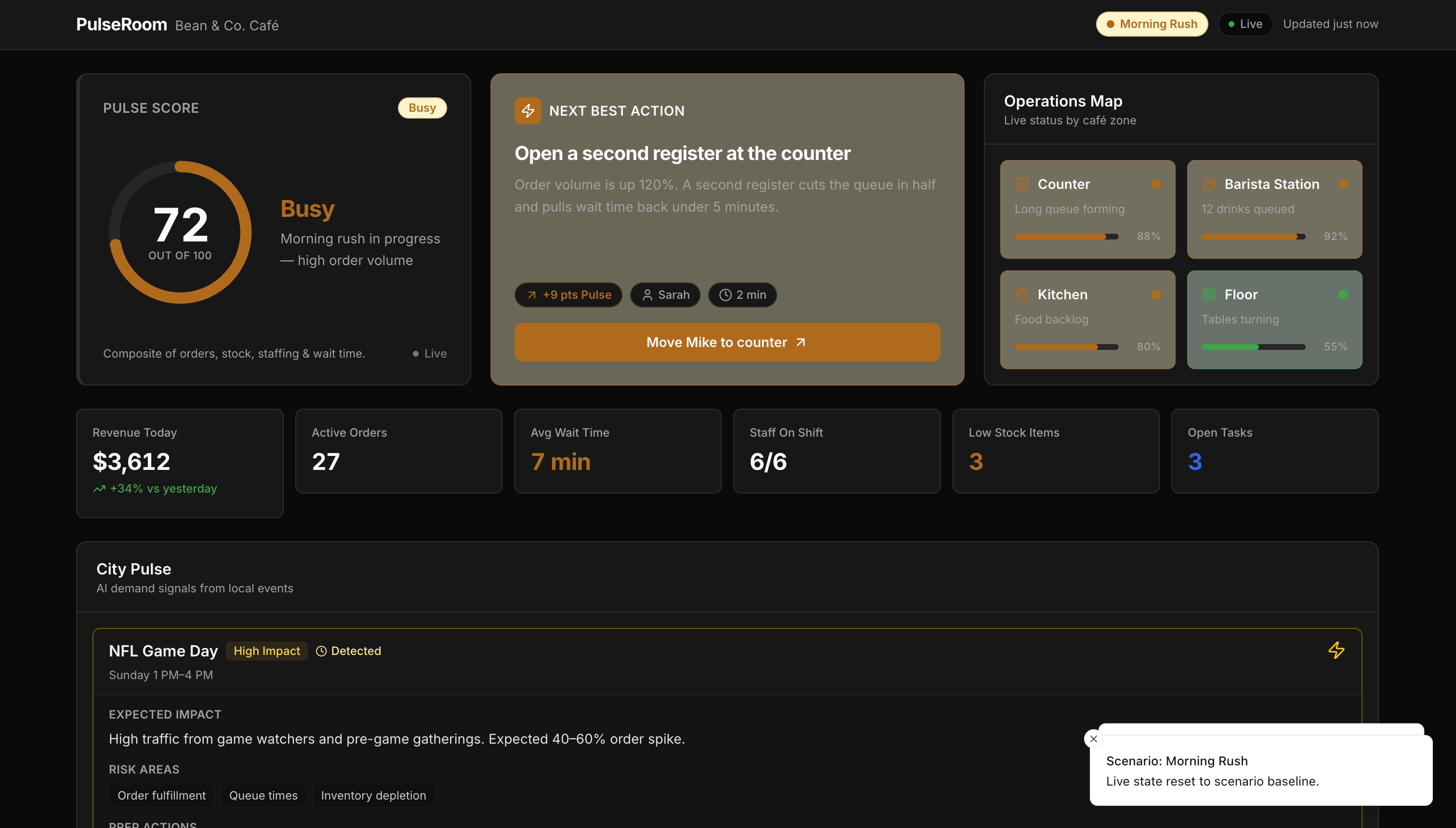
Morning Rush: Turn rush-hour pressure into a clear next step.
-
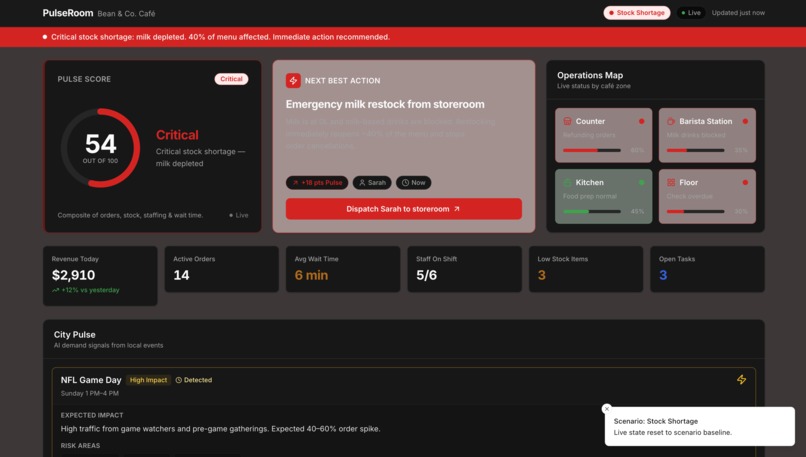
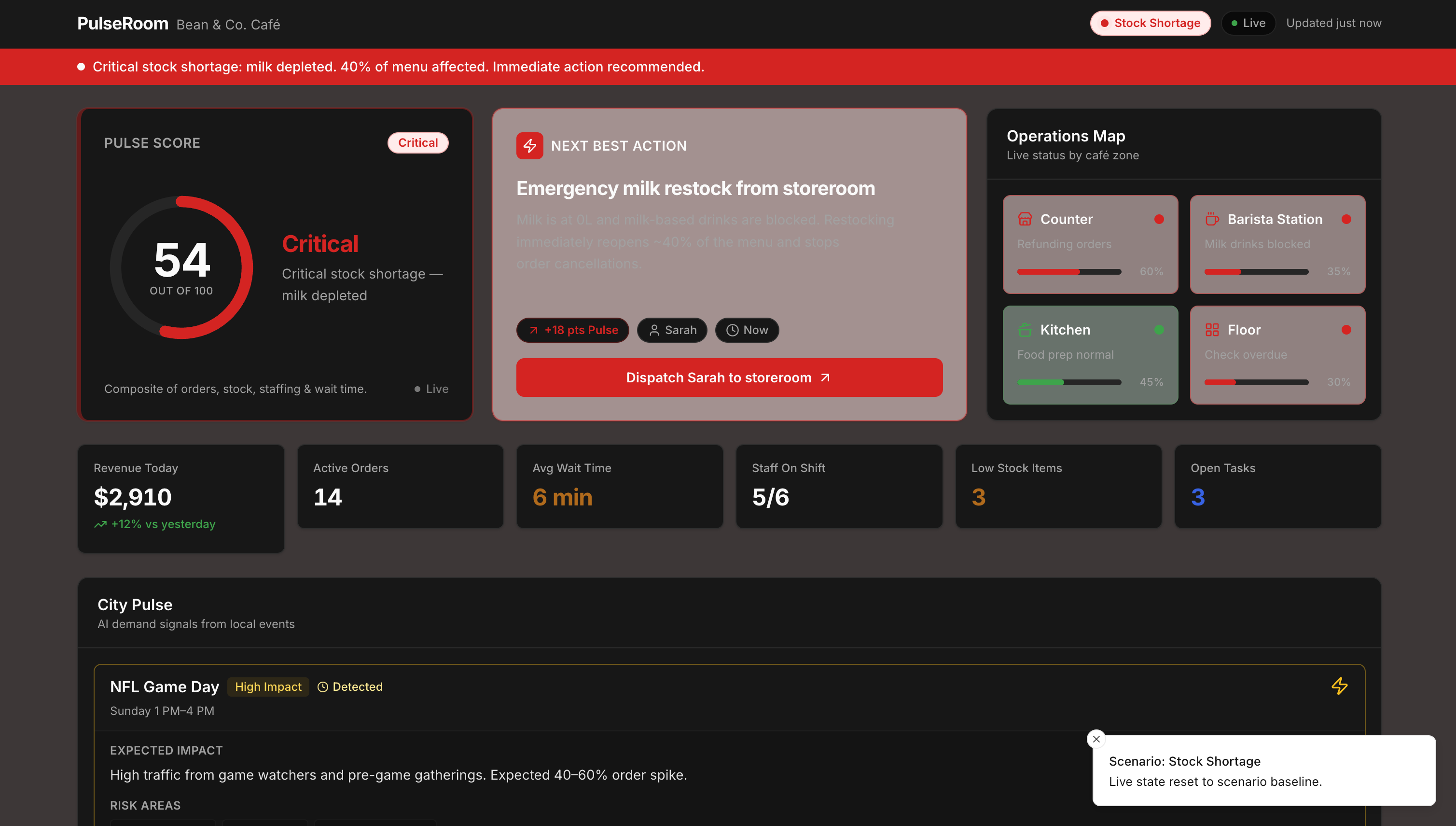
Stock Shortage: Detect stockouts before they become lost sales.
-
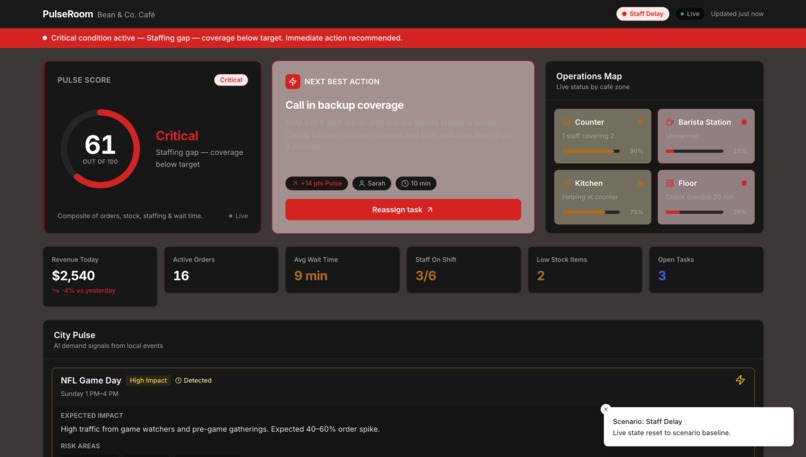
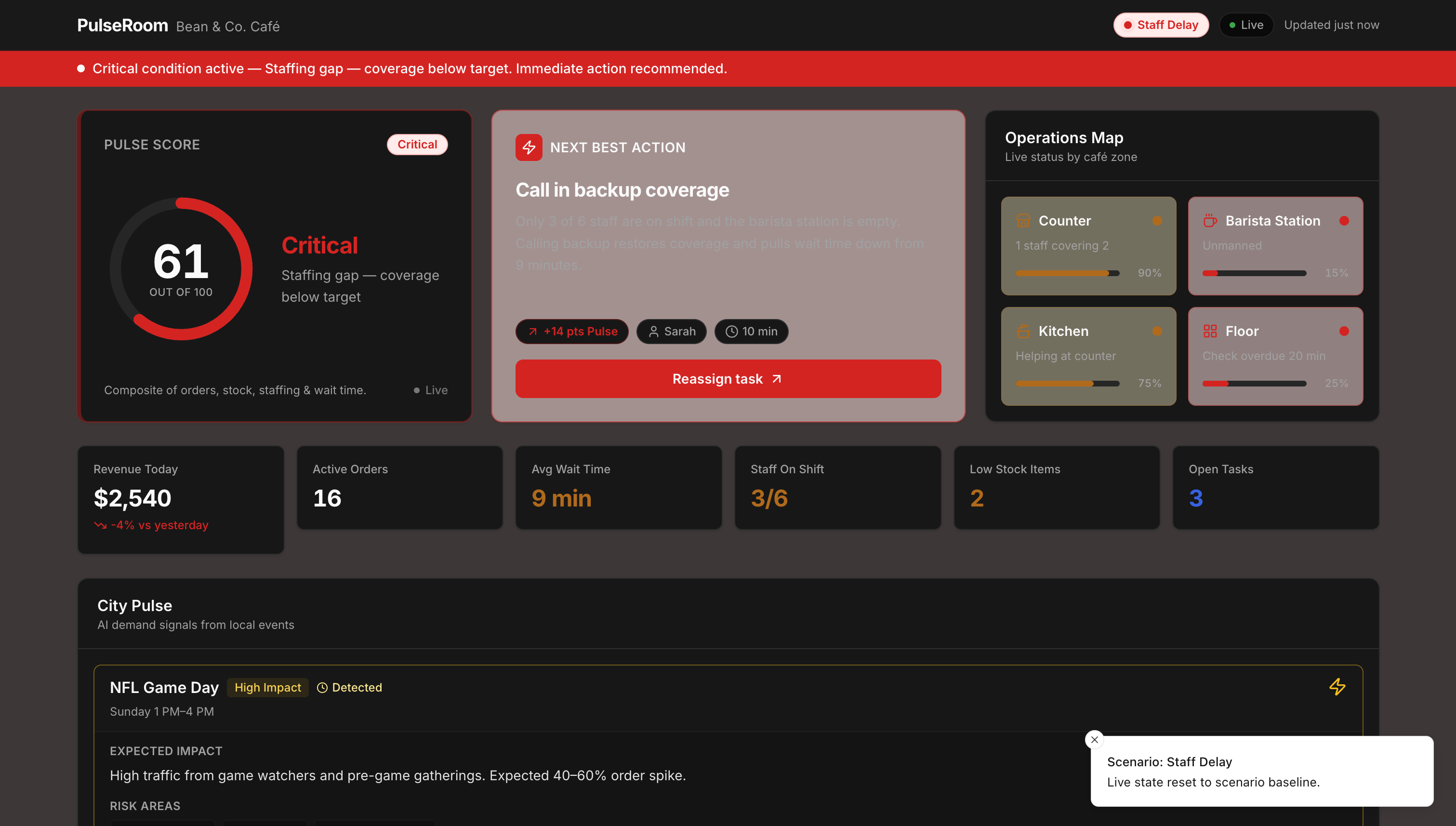
Staff Delay: Spot staffing gaps before wait time spikes.
-
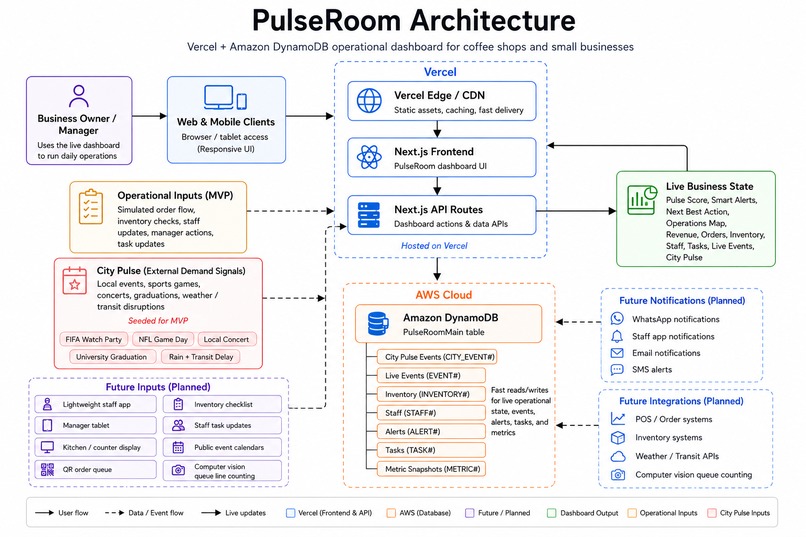
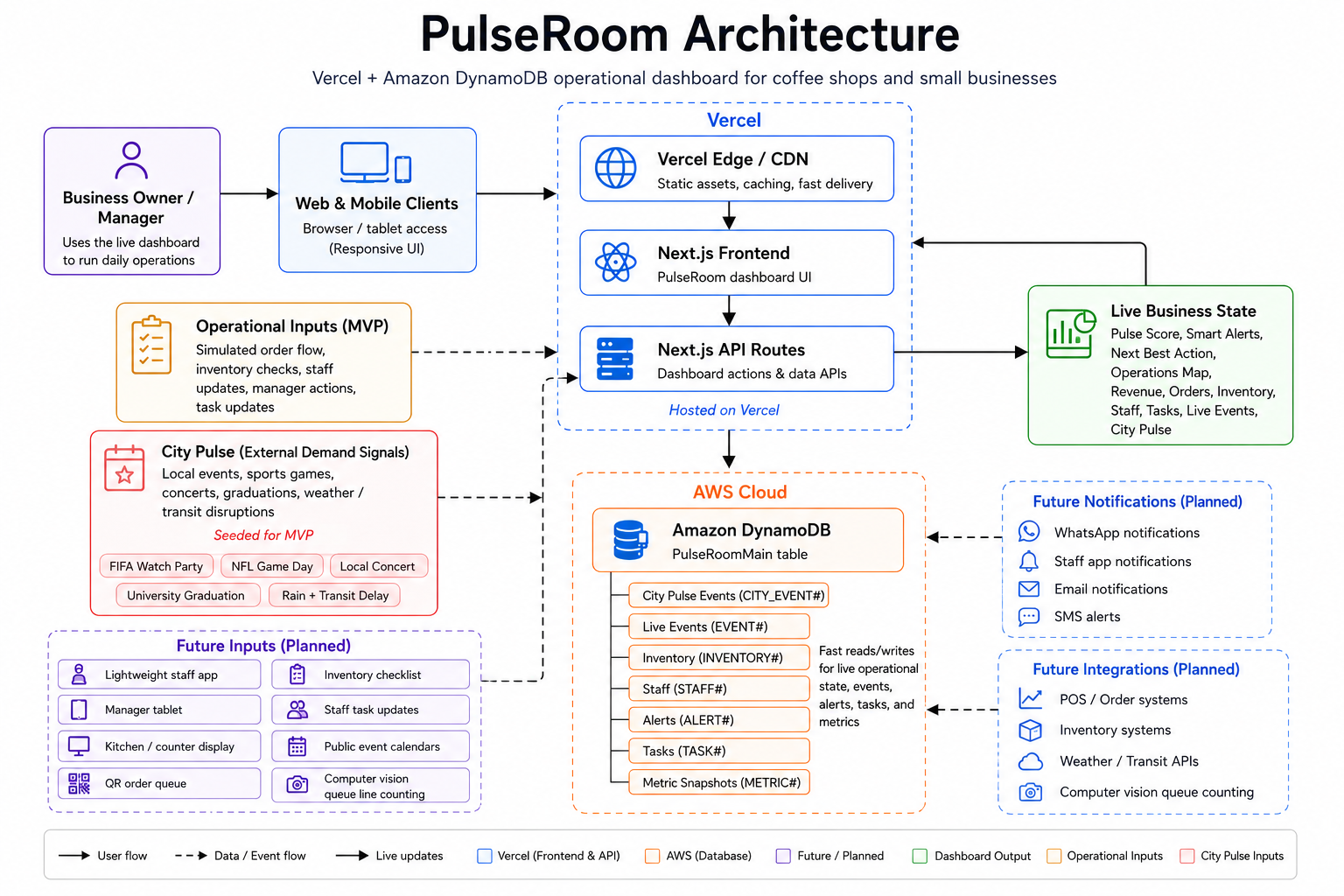
PulseRoom Architecture
Inspiration
I built PulseRoom because small business owners often run their day with too little live visibility.
In a coffee shop, problems build up quickly. The queue gets longer, staff get overloaded, milk runs low, orders slow down, and the owner only notices once customers are already waiting.
Large companies have command centers and operations teams. Small businesses usually rely on memory, staff messages, quick checks, and scattered operational updates. I wanted to build something that gives a small business owner that same kind of live awareness, without enterprise complexity.
PulseRoom started with one question: what if a small business owner could see the state of the shift in one place and act before small problems became lost sales?
What it does
PulseRoom is a live operating room for coffee shops and small businesses.
The demo is based on Bean & Co. Café. The dashboard shows what is happening right now across:
- Pulse Score
- Revenue today
- Active orders
- Average wait time
- Staff on shift
- Low stock items
- Open tasks
- Live events
- Smart alerts
- Inventory status
- Staff status
- Café operations map
- Next best action
- City Pulse demand signals
The main idea is not just to show data. PulseRoom helps the owner understand what needs attention and what action to take next.
For example, when a stock shortage happens, PulseRoom updates the inventory state, lowers the Pulse Score, shows a critical alert, explains that milk-based drinks are affected, and recommends sending staff to restock. When the owner takes action, the dashboard records the event and updates the business state.
I also added City Pulse, a demand-signal feature that helps the café prepare before external demand hits. For this MVP, City Pulse uses seeded local demand signals stored in DynamoDB, such as a FIFA watch party, NFL game day, local concert, university graduation, and rain or transit disruption. These signals simulate the kind of outside activity that can suddenly increase foot traffic and pressure the business.
When the owner clicks Prepare Shift Plan, PulseRoom creates prep tasks, adds a smart alert, records a live event, updates the City Pulse status, and writes the updated state to DynamoDB.
The goal is to help the owner act before a small issue becomes a customer-facing problem, and prepare before external demand becomes an operational bottleneck.
How we built it
PulseRoom was built using Vercel, v0, Next.js, React, TypeScript, Tailwind CSS, and Amazon DynamoDB.
The frontend is a Vercel-hosted Next.js application. I used v0 to build and refine the interface, then connected the working dashboard to backend API routes inside the Next.js app.
Amazon DynamoDB is used as the main database. I chose DynamoDB because PulseRoom is event-driven. A small business creates constant operational signals during a shift: order flow changes, inventory checks, staff updates, task completions, alerts, external demand signals, and metric snapshots.
The demo uses a DynamoDB table called PulseRoomMain. It stores Bean & Co. Café’s operational state, including live events, inventory items, staff status, alerts, tasks, metric snapshots, and City Pulse event signals.
The dashboard reads from DynamoDB, and actions such as scenario changes, task completions, alert resolutions, City Pulse preparation, and reset demo data write back to DynamoDB.
For this MVP, the operational inputs are simulated. They represent what would happen in a real coffee shop: order queue changes, inventory checks, staff actions, manager quick actions, task updates, and local demand signals. In a real deployment, these signals could come from a lightweight staff app, manager tablet, kitchen display, QR order queue, inventory checklist, public event calendars, sports schedules, weather or transit updates, and future computer vision queue counting.
Challenges we ran into
The biggest challenge was making PulseRoom feel like a real working product instead of a static dashboard.
At first, it was easy to display numbers. The harder part was making the dashboard respond when the business condition changed. The Pulse Score, next best action, operations map, alerts, tasks, inventory, staff state, City Pulse signals, and live events all needed to move together.
Another challenge was keeping the product simple. Small business owners do not want extra work. If the system requires too much manual input, it becomes another burden. So I designed PulseRoom around lightweight operational signals: quick staff updates, manager actions, inventory checks, queue changes, event signals, and future automation through queue counting or connected order systems.
The DynamoDB integration also required careful setup. I had to structure the table so the app could store different types of operational data and still retrieve the live dashboard state cleanly. City Pulse added another layer because external demand signals needed to create tasks, alerts, and live events without making the product feel complicated.
Accomplishments that we're proud of
I am proud that PulseRoom is a working, deployed MVP connected to Amazon DynamoDB.
The dashboard is interactive. It can move between different operating states such as normal service, morning rush, stock shortage, staff delay, and recovery. Each state changes the Pulse Score, metrics, live events, smart alerts, action board, inventory, staff status, and operations map.
I am also proud of the next best action flow. PulseRoom does not only say that something is wrong. It explains the impact and gives the owner a direct action to take.
City Pulse is another part I am proud of. PulseRoom can now help the café prepare for external demand signals, not just react to problems happening inside the business. When a local event is detected, the owner can prepare the shift plan, create prep tasks, trigger an alert, and record the preparation event.
The strongest accomplishment is that the app demonstrates a full loop:
Operational signal or external demand signal → DynamoDB update → dashboard state change → alert/action recommendation → owner action → updated business state.
What we learned
I learned that a dashboard is only valuable if it helps someone make a decision.
PulseRoom became stronger when I stopped thinking of it as an analytics screen and started thinking of it as an operating room. The owner does not need more charts. They need to know what is happening, why it matters, and what to do next.
I also learned that the data model matters a lot for this type of product. DynamoDB was not just a place to store rows. It became the event layer and memory of the business.
The other important lesson was product scope. PulseRoom can grow into staff notifications, queue prediction, inventory prediction, local event intelligence, and multi-location operations, but the MVP needed one clear story: helping a coffee shop owner react faster during a shift and prepare earlier when demand is about to spike.
What's next for PulseRoom
The first pilot would be with coffee shops because the operational pressure is easy to understand: queues, stock, staff, tasks, wait time, and demand spikes.
The next version would replace simulated events with real operational inputs. These could come from:
- A lightweight staff app
- Manager quick-action buttons
- Counter or kitchen tablets
- QR order queue updates
- Inventory checklists
- Staff task updates
- Public event calendars
- Sports schedules
- Weather and transit updates
- Computer vision queue line counting
City Pulse would also become more powerful in the next version. Instead of seeded demand signals, it could connect to public event calendars, sports schedules, local news, weather and transit updates, and social signals from platforms like X. That would help small businesses identify demand spikes before they reach the store.
Future features include order-time prediction, shift pressure prediction, inventory runout prediction, staff notifications through WhatsApp or a lightweight staff app, City Pulse integrations with live public event sources, and queue line detection using computer vision.
After coffee shops, PulseRoom could expand to other small businesses such as restaurants, gyms, salons, retail stores, clinics, and service businesses.
The long-term vision is to give small businesses enterprise-style operational awareness without enterprise complexity, helping them react to what is happening inside the business and prepare for what is happening around it.
Built With
- amazon-dynamodb
- amazon-web-services
- aws-sdk-v3
- next.js
- next.js-api-routes
- shadcn/ui
- tailwind
- typescript
- v0
- vercel

Log in or sign up for Devpost to join the conversation.