Inspiration
Deploying an AI model to a mobile device involves more than simply converting it to TensorFlow Lite.
Developers still have to answer practical questions:
- Should I ship FP32 or INT8?
- How many CPU threads should I use?
- Does quantization actually improve performance on my target device?
- Is using more CPU threads always faster?
- How much storage do I actually save?
These decisions are often based on assumptions or desktop benchmarks instead of measurements from the device where the model will actually run.
That inspired QuantForge: a developer-focused Android tool that benchmarks AI configurations directly on an Arm64 device and recommends the configuration that actually performs best.
«Don't guess which AI configuration to ship. Measure it.»
What it does
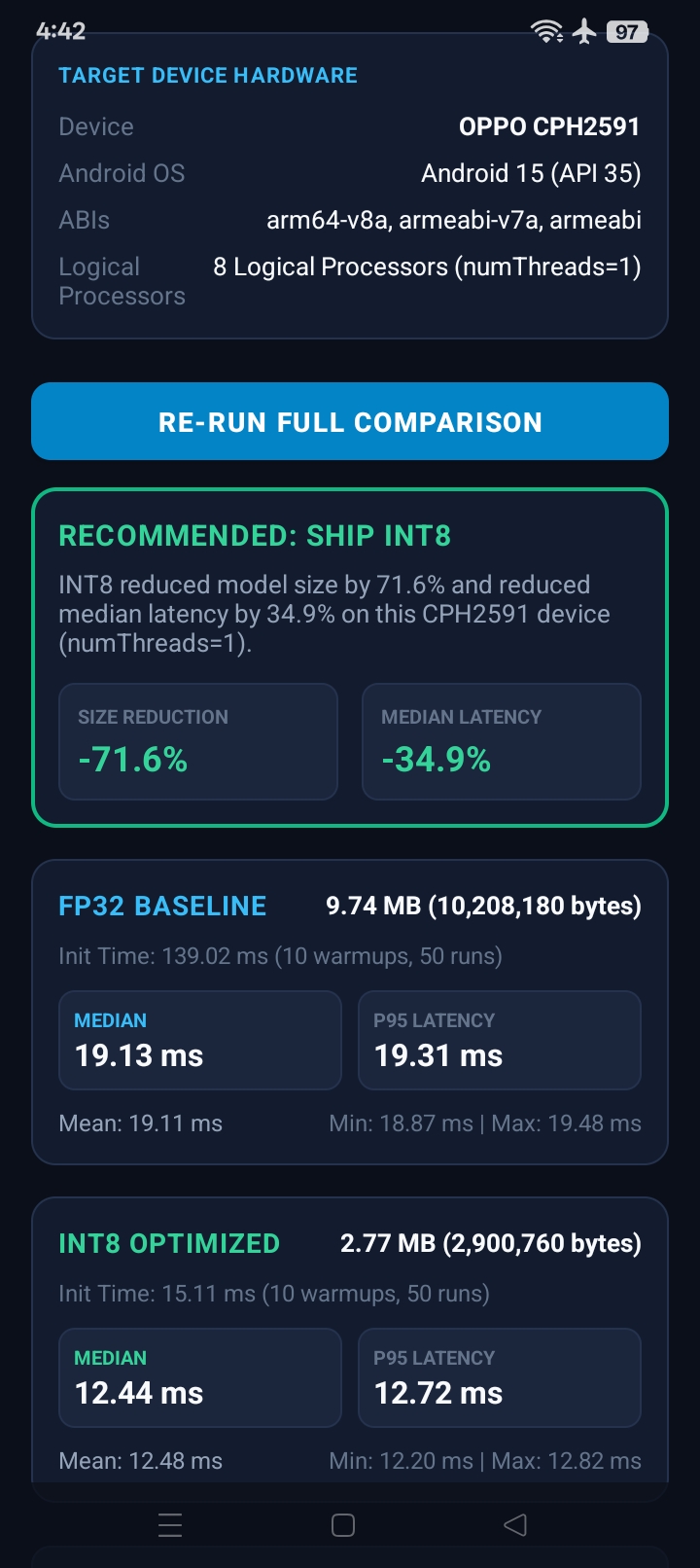
QuantForge runs a real optimization experiment directly on an Arm-powered Android phone.
For the current implementation, it compares two versions of MobileNetV3-Small:
- FP32 baseline
- Post-training INT8 optimized model
It then benchmarks both models using:
- 1 CPU thread
- 2 CPU threads
- 4 CPU threads
This produces six real runtime configurations.
For every configuration, QuantForge measures:
- Mean inference latency
- Median inference latency
- P95 latency
- Minimum latency
- Maximum latency
- Model loading time
- Model size
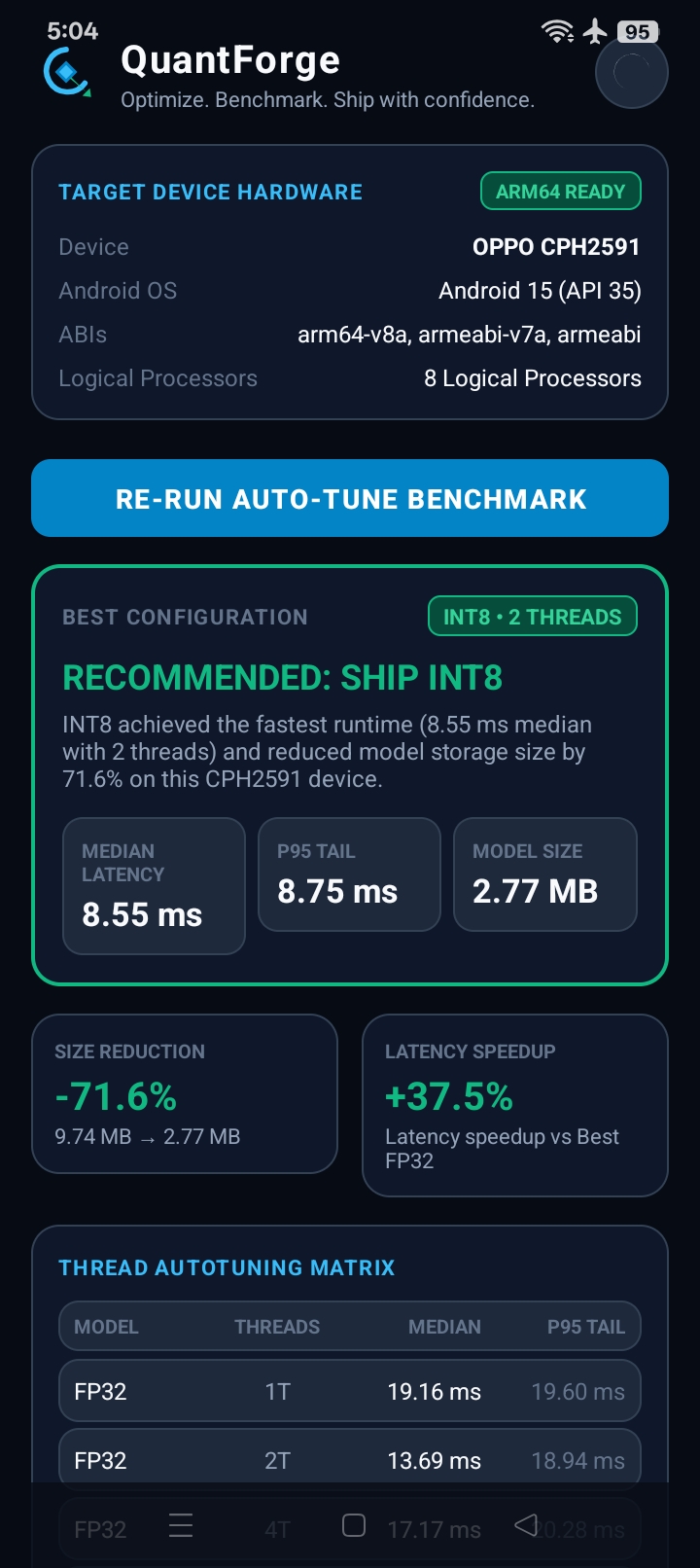
The app then automatically finds the best measured configuration and produces a deployment recommendation.
Real Arm64 result
The final benchmark was performed on a physical:
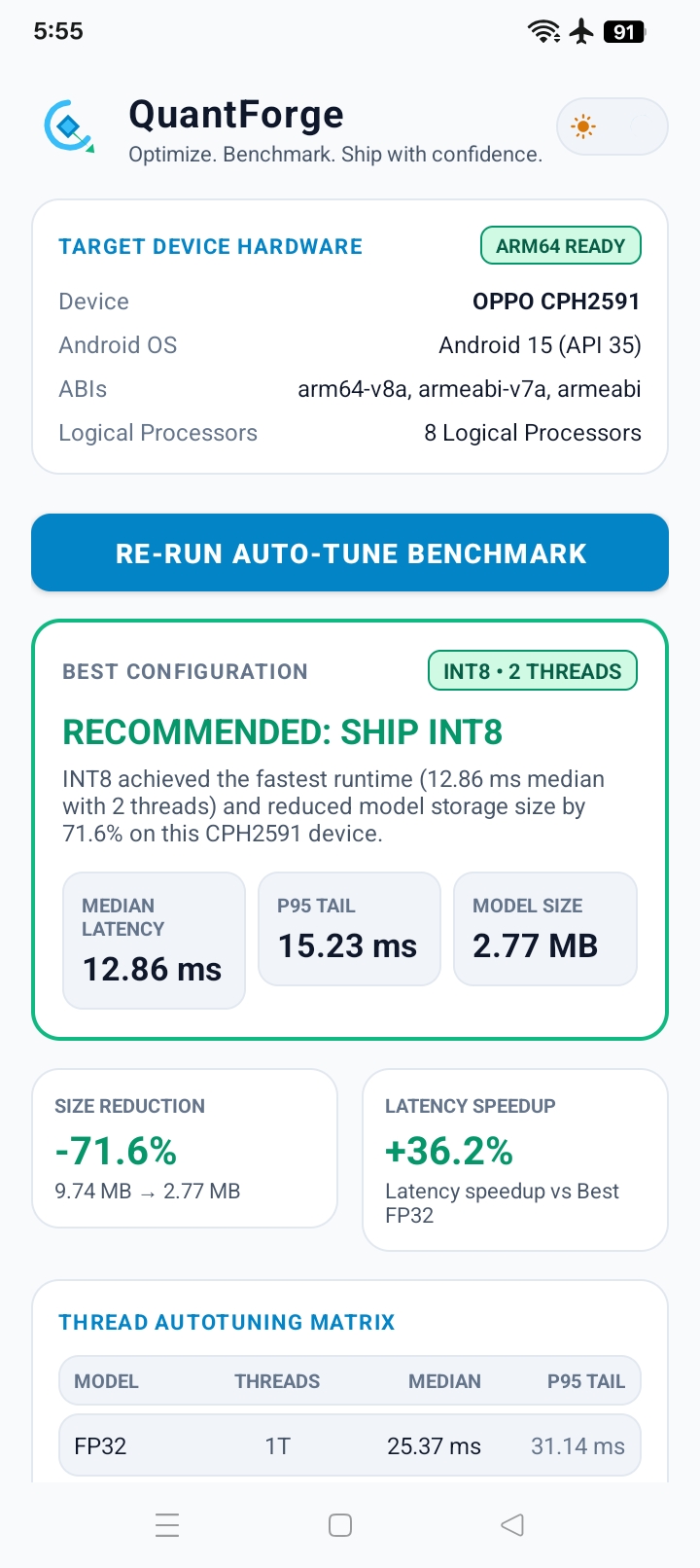
OPPO CPH2591
- Android 15
- API 35
- "arm64-v8a"
- 8 logical processors
Using TensorFlow Lite CPU inference, QuantForge measured:
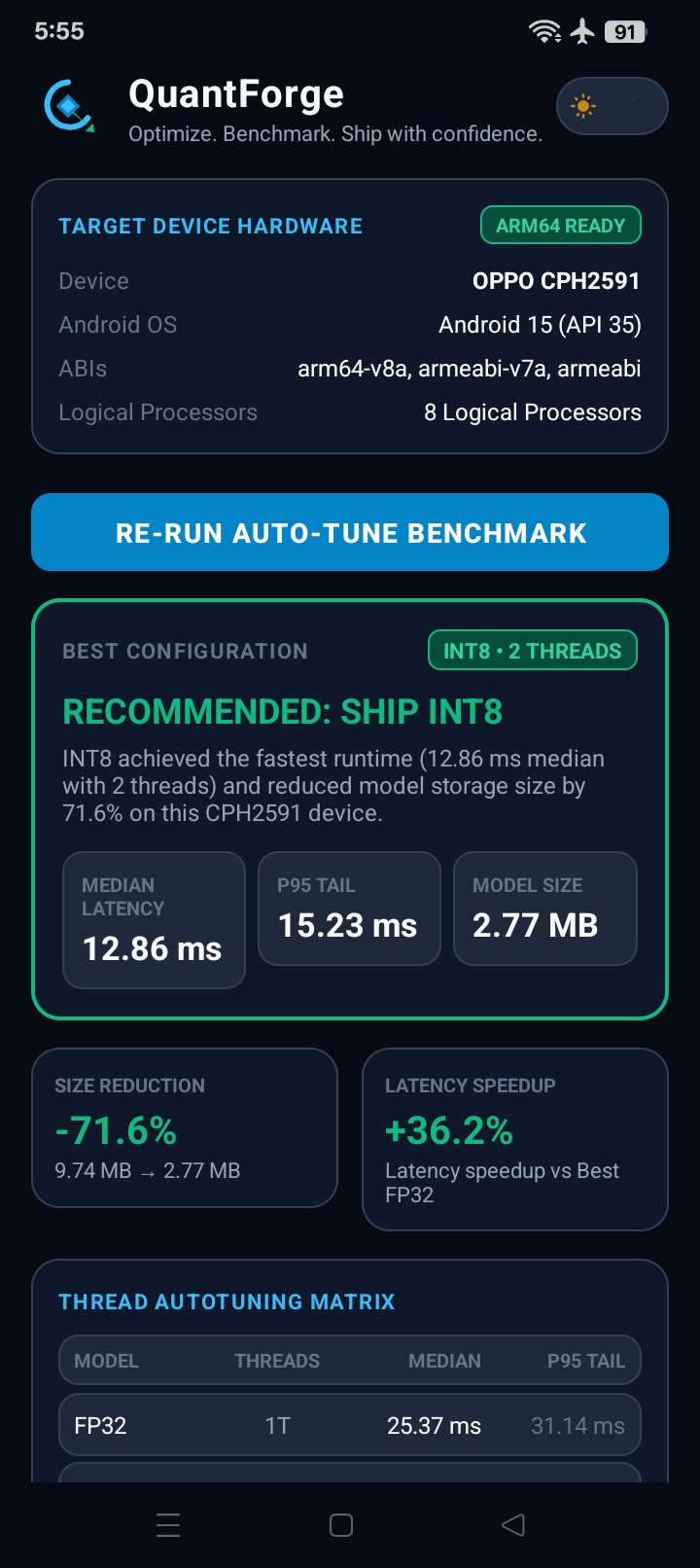
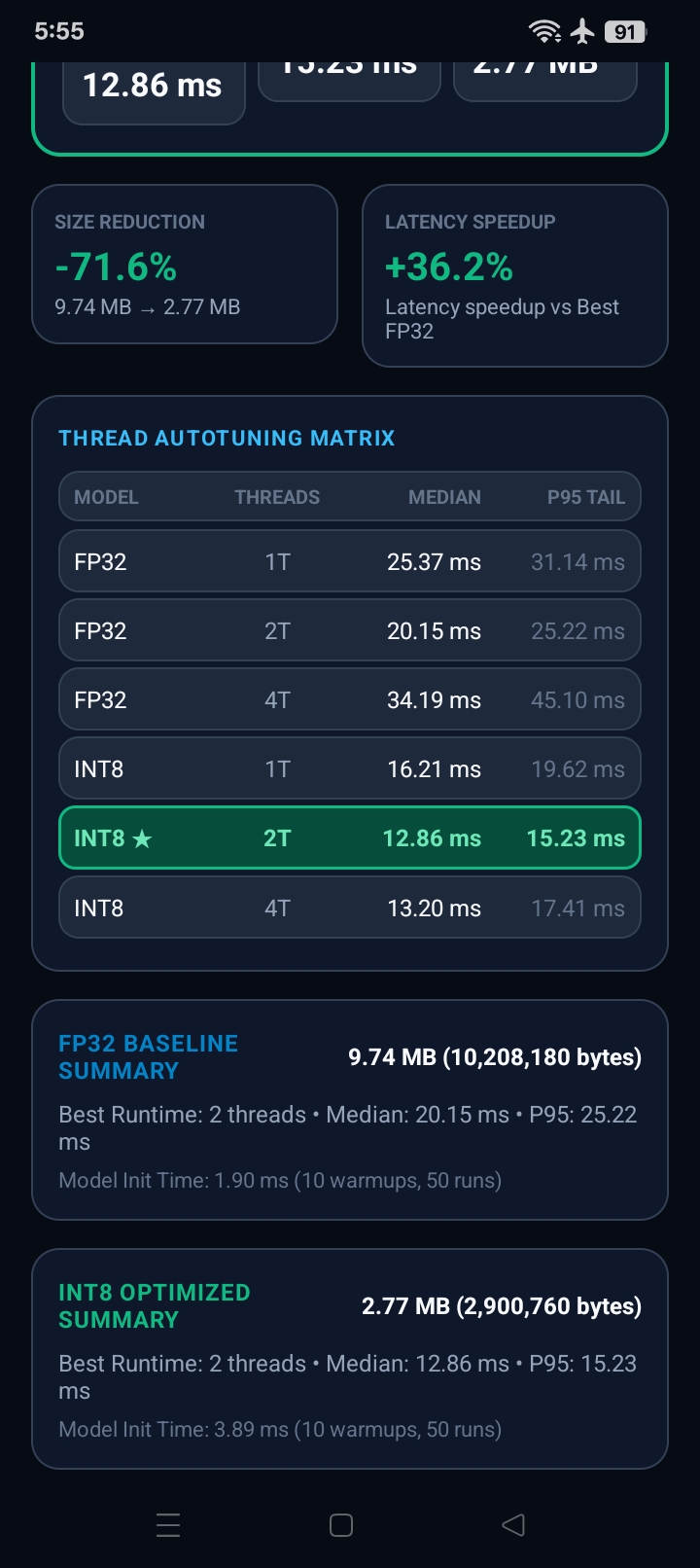
Model| Threads| Median| P95 FP32| 1| 25.37 ms| 31.14 ms FP32| 2| 20.15 ms| 25.22 ms FP32| 4| 34.19 ms| 45.10 ms INT8| 1| 16.21 ms| 19.62 ms INT8| 2| 12.86 ms| 15.23 ms INT8| 4| 13.20 ms| 17.41 ms
Winning configuration
MobileNetV3-Small INT8 × 2 CPU threads
The optimized model achieved:
- 12.86 ms median inference latency
- 15.23 ms P95 latency
- 36.2% lower median latency than the best FP32 configuration
- 71.6% smaller model size
- 9.74 MB → 2.77 MB
The recommendation generated by QuantForge was:
RECOMMENDED: SHIP INT8
All of these values were measured on the physical Android device rather than simulated.
The result that surprised me
One of the most interesting results was that using more CPU threads did not always make inference faster.
For INT8:
1 thread → 16.21 ms 2 threads → 12.86 ms ← FASTEST 4 threads → 13.20 ms
For FP32 the difference was even larger:
1 thread → 25.37 ms 2 threads → 20.15 ms ← FASTEST 4 threads → 34.19 ms
The phone has 8 logical processors, yet 2 inference threads performed better than 4.
That is exactly why QuantForge performs device-specific auto-tuning instead of assuming that the maximum thread count is the best configuration.
How I built it
QuantForge consists of two main parts.
- Model optimization pipeline
A Python/TensorFlow pipeline prepares the model variants.
MobileNetV3-Small ↓ FP32 TensorFlow Lite baseline ↓ Post-training INT8 quantization ↓ Optimized TensorFlow Lite model
The resulting models are packaged with the Android application.
Their measured file sizes are:
FP32: 10,208,180 bytes ≈ 9.74 MB INT8: 2,900,760 bytes ≈ 2.77 MB
That gives a 71.58% model-size reduction.
- Android benchmark engine
The Android application is written in Kotlin and uses the TensorFlow Lite Interpreter.
QuantForge creates fresh Interpreter configurations with:
val options = Interpreter.Options() .setNumThreads(threadCount)
For each model/thread combination it performs:
- 10 warm-up runs
- 50 measured inference runs
- identical "[1, 224, 224, 3]" input
- high-resolution timing using "System.nanoTime()"
The configuration with the lowest median latency becomes the recommended deployment configuration.
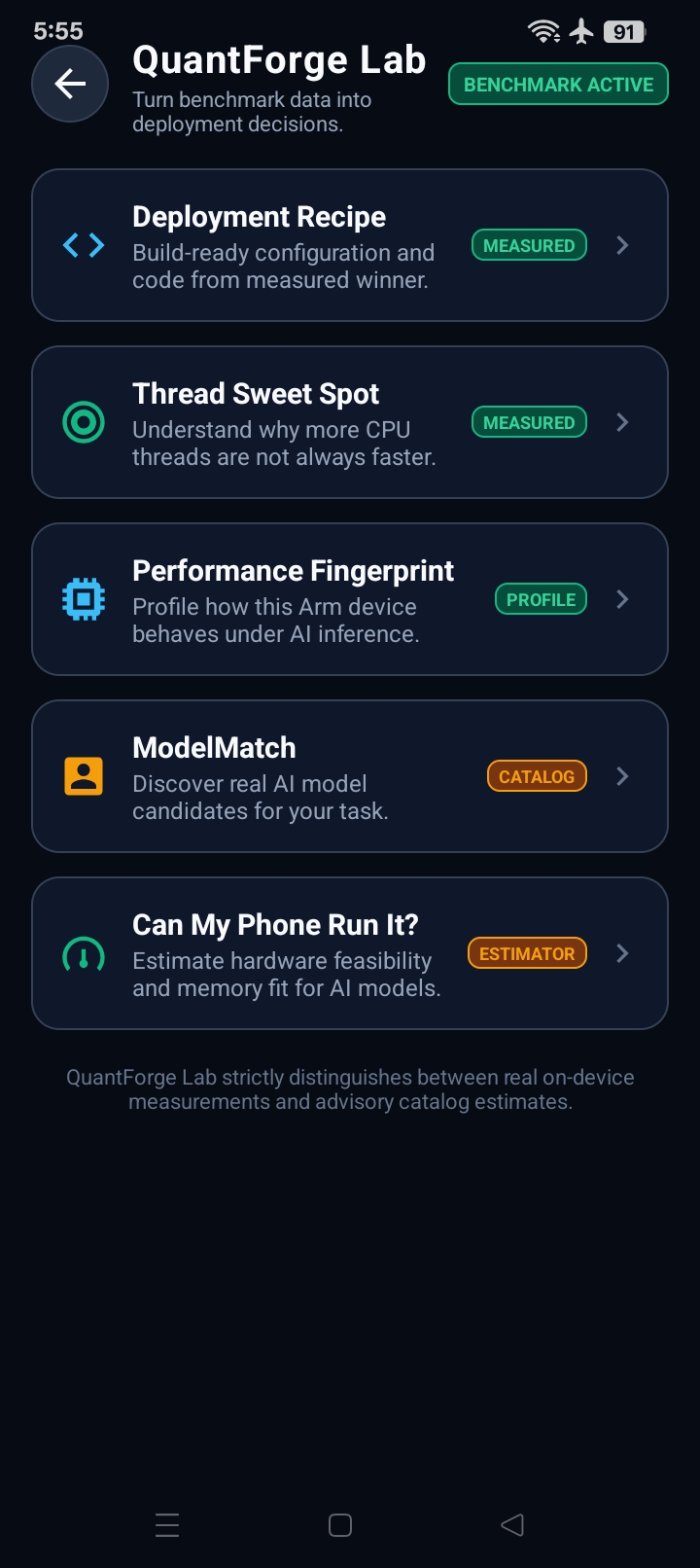
QuantForge Lab
I also built QuantForge Lab, a separate developer-focused area that turns benchmark data into practical deployment guidance.
It includes:
Deployment Recipe
Transforms the winning benchmark into a deployment configuration developers can use.
For this device:
Model: MobileNetV3-Small Variant: INT8 Runtime: TensorFlow Lite Architecture: arm64-v8a Threads: 2 Median: 12.86 ms P95: 15.23 ms Model size: 2.77 MB
Thread Sweet Spot
Explains how different thread counts behaved and identifies the measured optimal configuration.
Performance Fingerprint
Summarizes the device's measured inference behavior.
ModelMatch
Provides model candidates for different AI tasks while clearly separating models measured on the current device from unbenchmarked candidates.
Can My Phone Run It?
Provides device-fit guidance without pretending that unmeasured models have benchmark data.
QuantForge intentionally distinguishes between measured results, catalog information, and estimated compatibility.
Challenges I faced
Benchmark variability
Mobile inference performance can change because of temperature, background processes, CPU scheduling, and other runtime conditions.
Instead of relying on one inference call, I added warm-ups and repeated measurements and report median and P95 latency.
Finding the right thread count
I initially expected additional threads to always improve performance.
Real-device testing showed otherwise.
The discovery that 2 threads could outperform 4 became one of the most valuable parts of the project and led to the auto-tuning approach.
Keeping results honest
It would have been easy to display estimated performance for models that were never actually benchmarked.
Instead, QuantForge separates:
- Measured on this device
- Candidate / profile-based information
- Estimated device fit
I also avoid claiming GPU, NPU, NNAPI, power, battery, or model-accuracy improvements that were not measured.
Accomplishments that I'm proud of
- Built a working Android AI benchmarking application
- Ran TensorFlow Lite inference directly on a real Arm64 phone
- Implemented automatic FP32 vs INT8 comparison
- Implemented 1 / 2 / 4 thread auto-tuning
- Collected repeated median and P95 measurements
- Reduced the model from 9.74 MB to 2.77 MB
- Measured 36.2% lower median latency for the winning INT8 configuration
- Discovered that 2 threads outperform 4 threads on the tested device
- Added automatic deployment recommendations
- Added exportable benchmark evidence
- Built the developer-focused QuantForge Lab
- Open-sourced the complete project
What I learned
The biggest lesson from QuantForge was that AI optimization is hardware-dependent.
A theoretically better configuration is not necessarily the fastest configuration on a real phone.
Model precision, runtime configuration, CPU threading, thermal conditions, and the target hardware all matter.
The project changed the question from:
«"What configuration should be faster?"»
to:
«"What configuration did the target device actually measure as faster?"»
What's next for QuantForge
Future versions could expand the same measurement-first approach to:
- More Arm Android devices
- More vision model families
- Additional quantization strategies
- Additional inference runtimes
- Performance regression testing
- Larger compatibility catalogs
- Automated benchmarking across device fleets
The long-term idea is to make QuantForge a practical optimization layer between an AI model and the hardware where developers intend to deploy it.
Why QuantForge for Arm Create
QuantForge directly focuses on the optimization problems at the center of the Mobile AI track:
- AI model-size optimization
- Real Arm64 execution
- Inference latency
- Runtime configuration
- CPU thread auto-tuning
- Developer experience
- Reproducible benchmarking
Rather than showing only an optimized model, QuantForge provides a workflow for discovering which optimized configuration should actually be shipped.

Log in or sign up for Devpost to join the conversation.