-
-
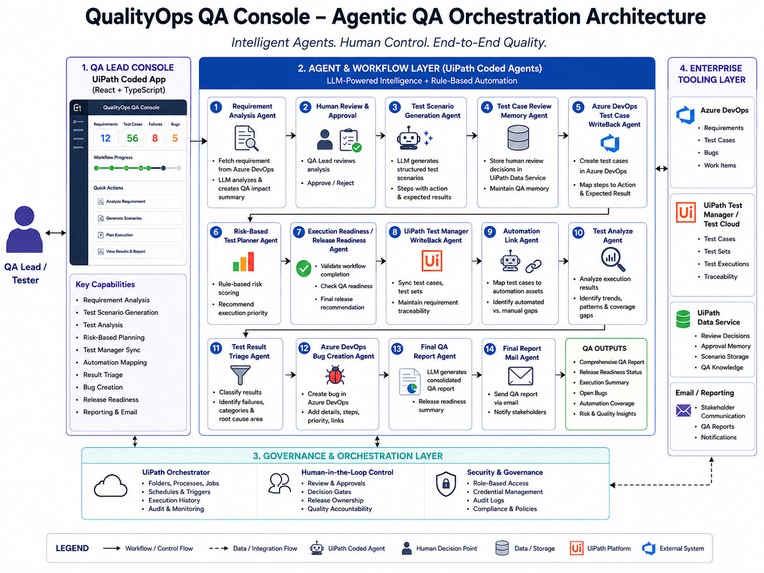
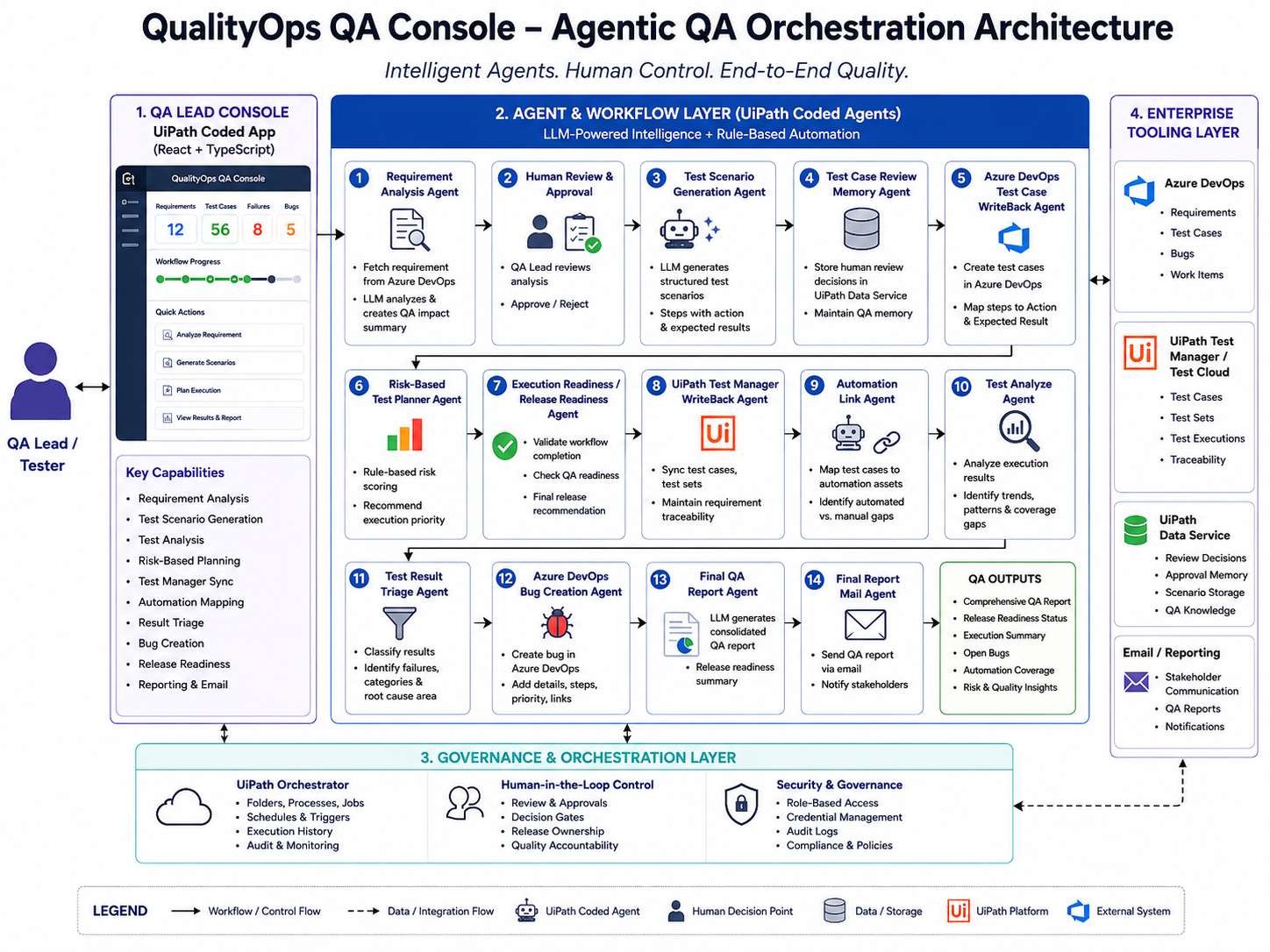
Complete agentic QA orchestration architecture showing the Coded App, Coded Agents,Test Cloud, Azure DevOps, Data Fabric.
-
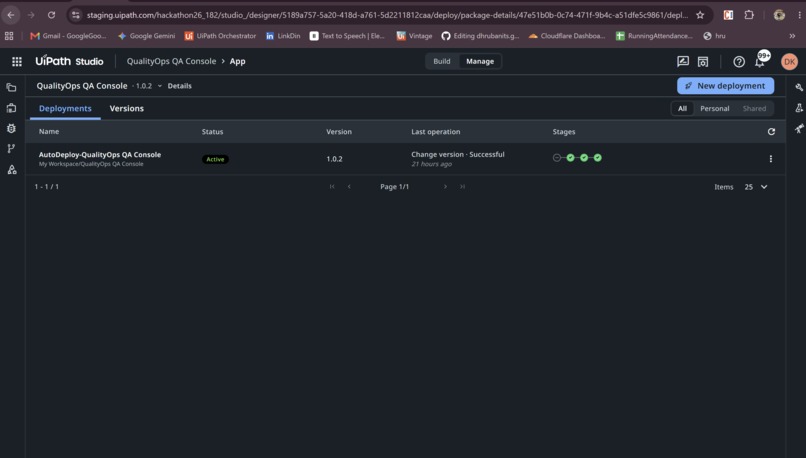
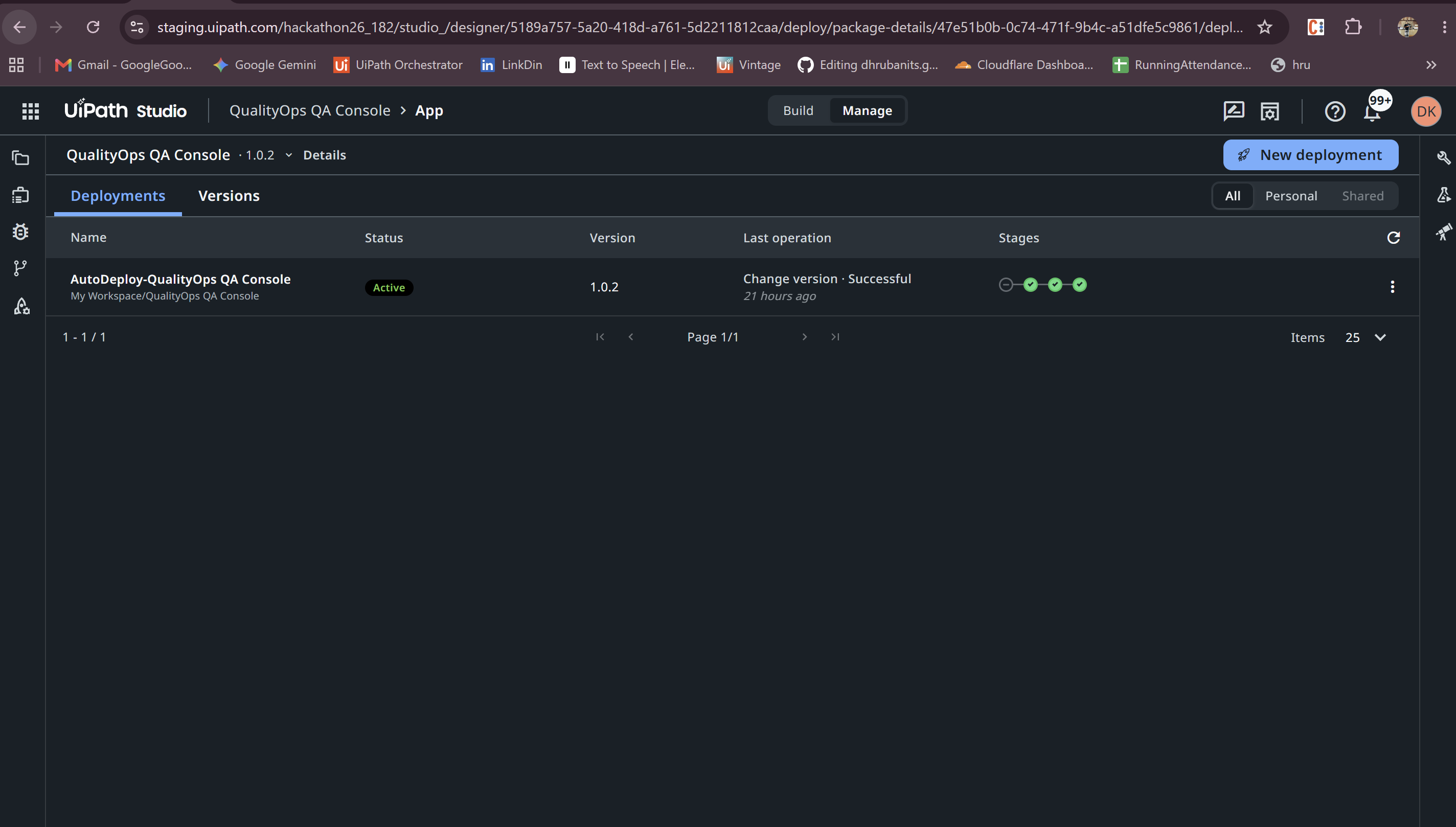
QualityOps QA Console deployed successfully as a UiPath Coded App on UiPath Automation Cloud.
-
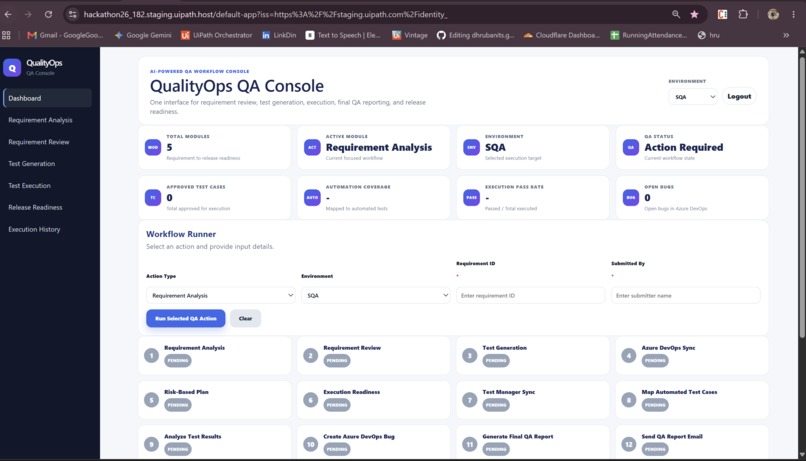
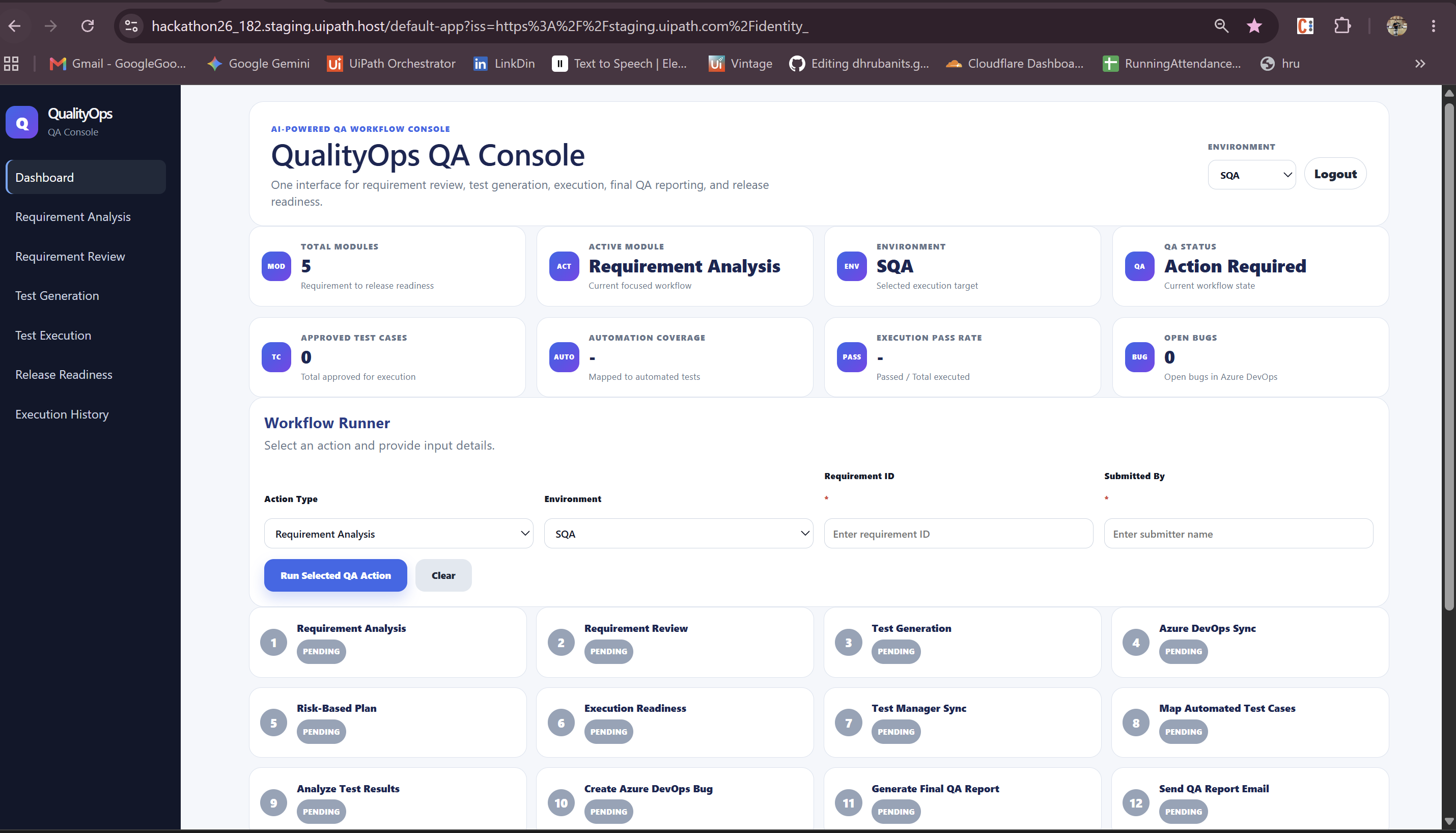
QualityOps QA Console dashboard to run requirement analysis, test generation, execution planning, triage, and release readiness workflows.
-
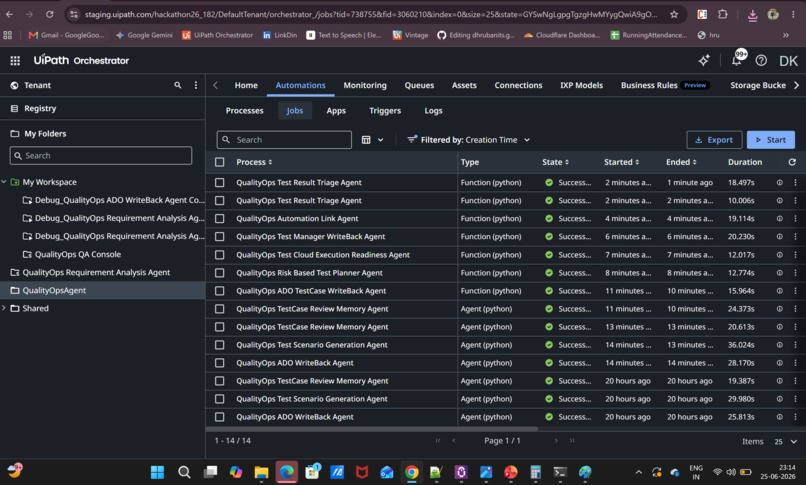
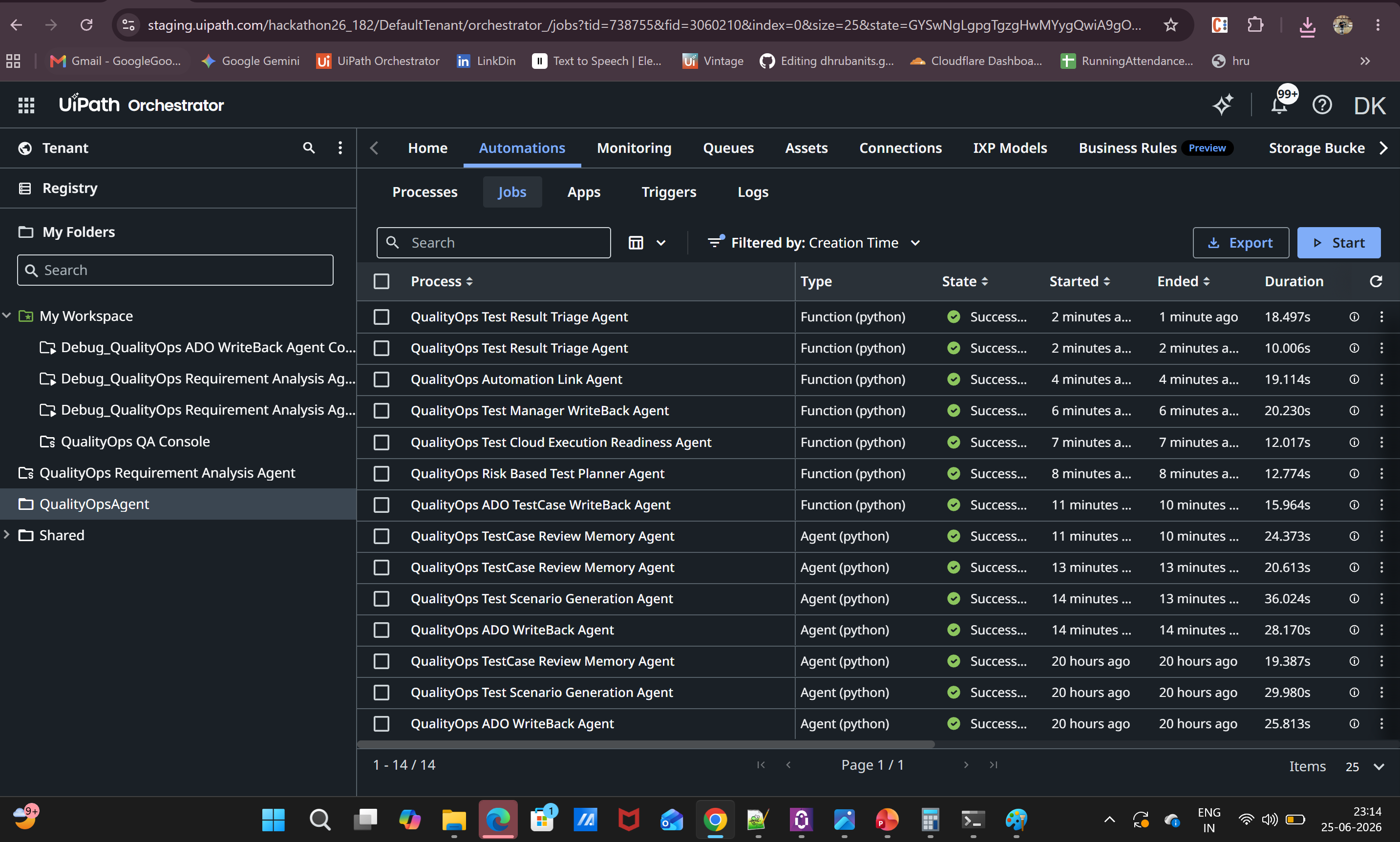
UiPath Orchestrator job history showing multiple QualityOps Coded Agents running as managed cloud automation jobs.
-
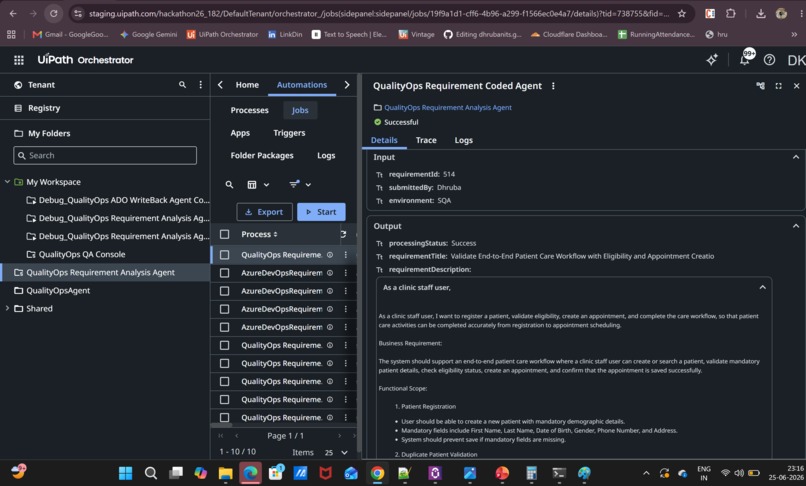
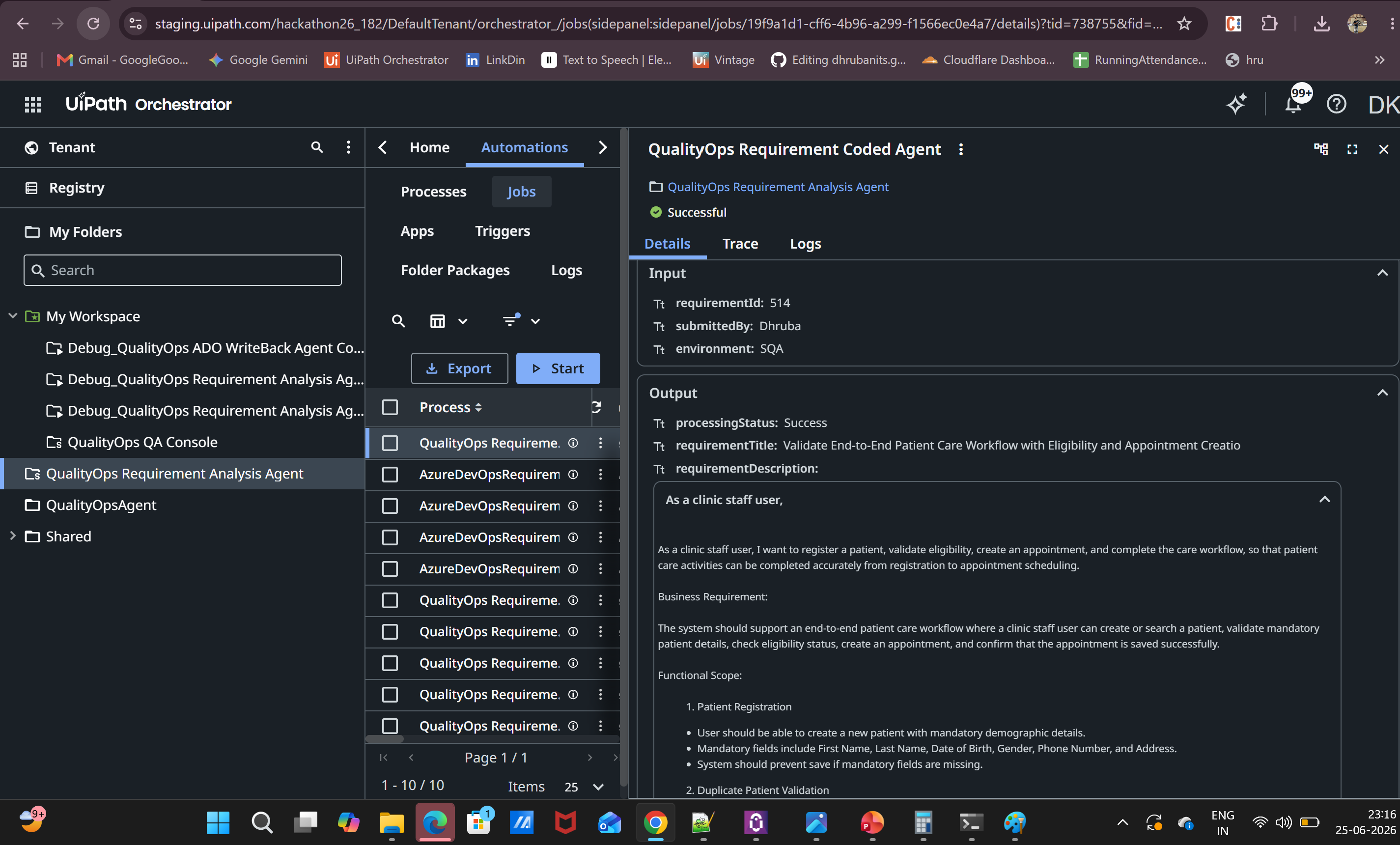
Example Orchestrator job detail showing successful agent execution with input and output data for a QualityOps workflow step.
-
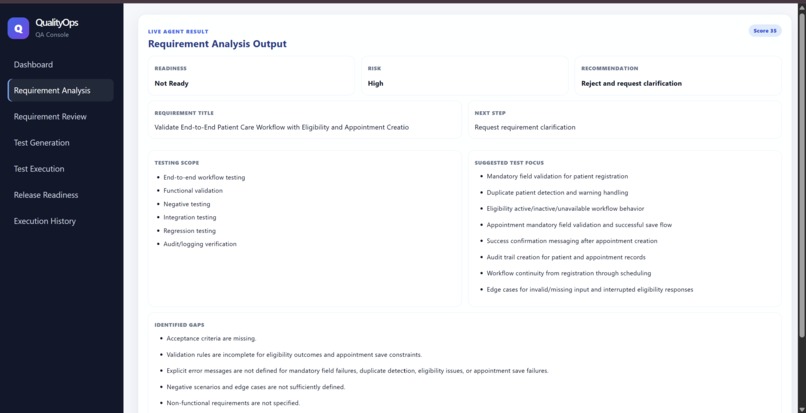
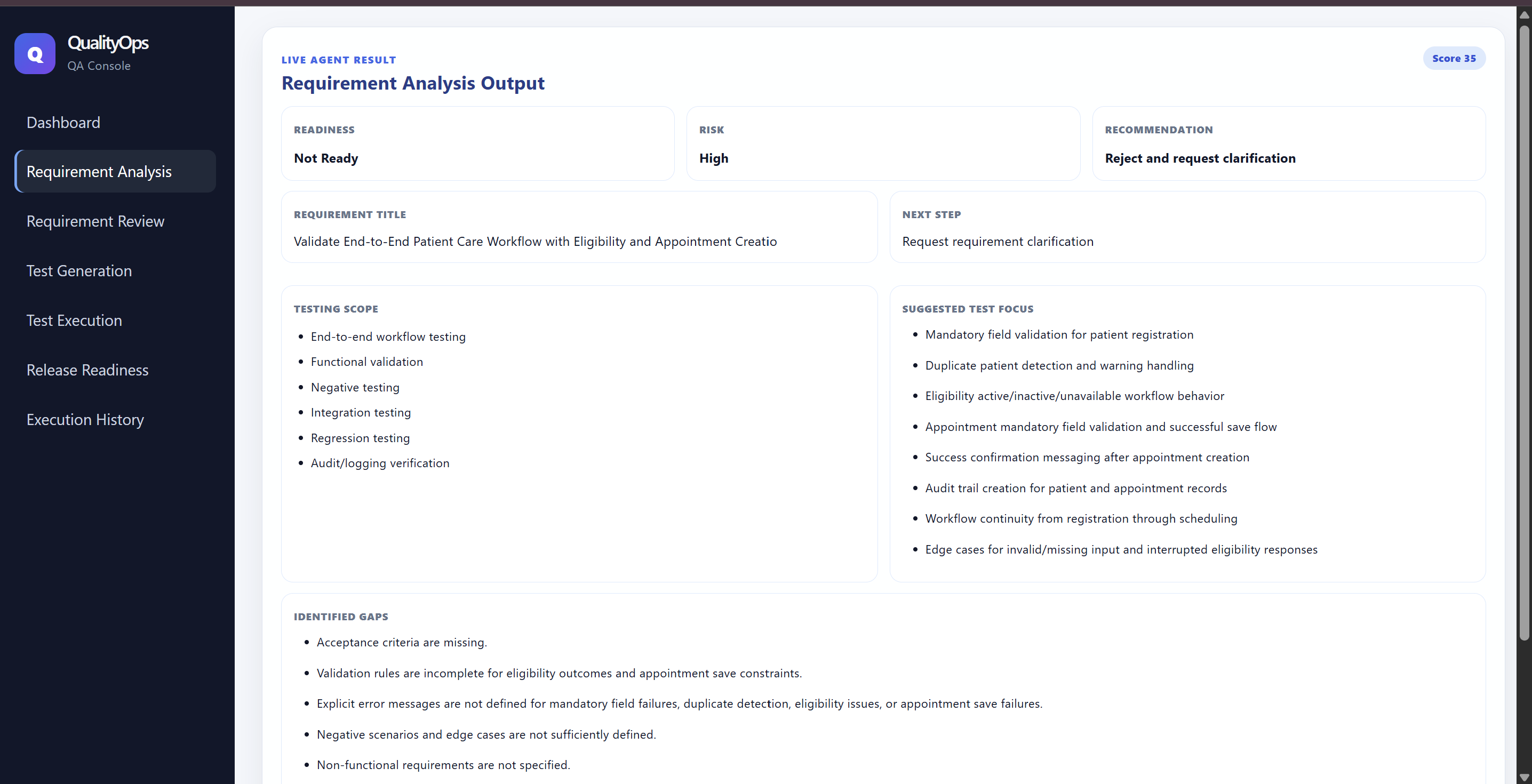
Requirement Analysis Agent converts an Azure DevOps requirement into QA-ready insights including impacted modules, risk level, testing scope
-
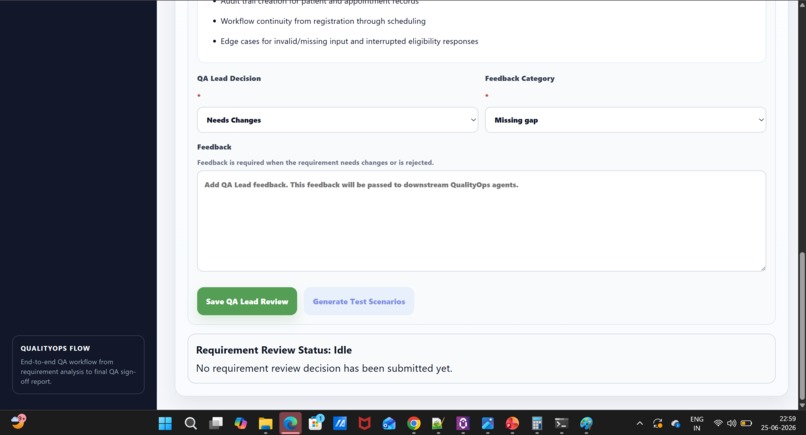
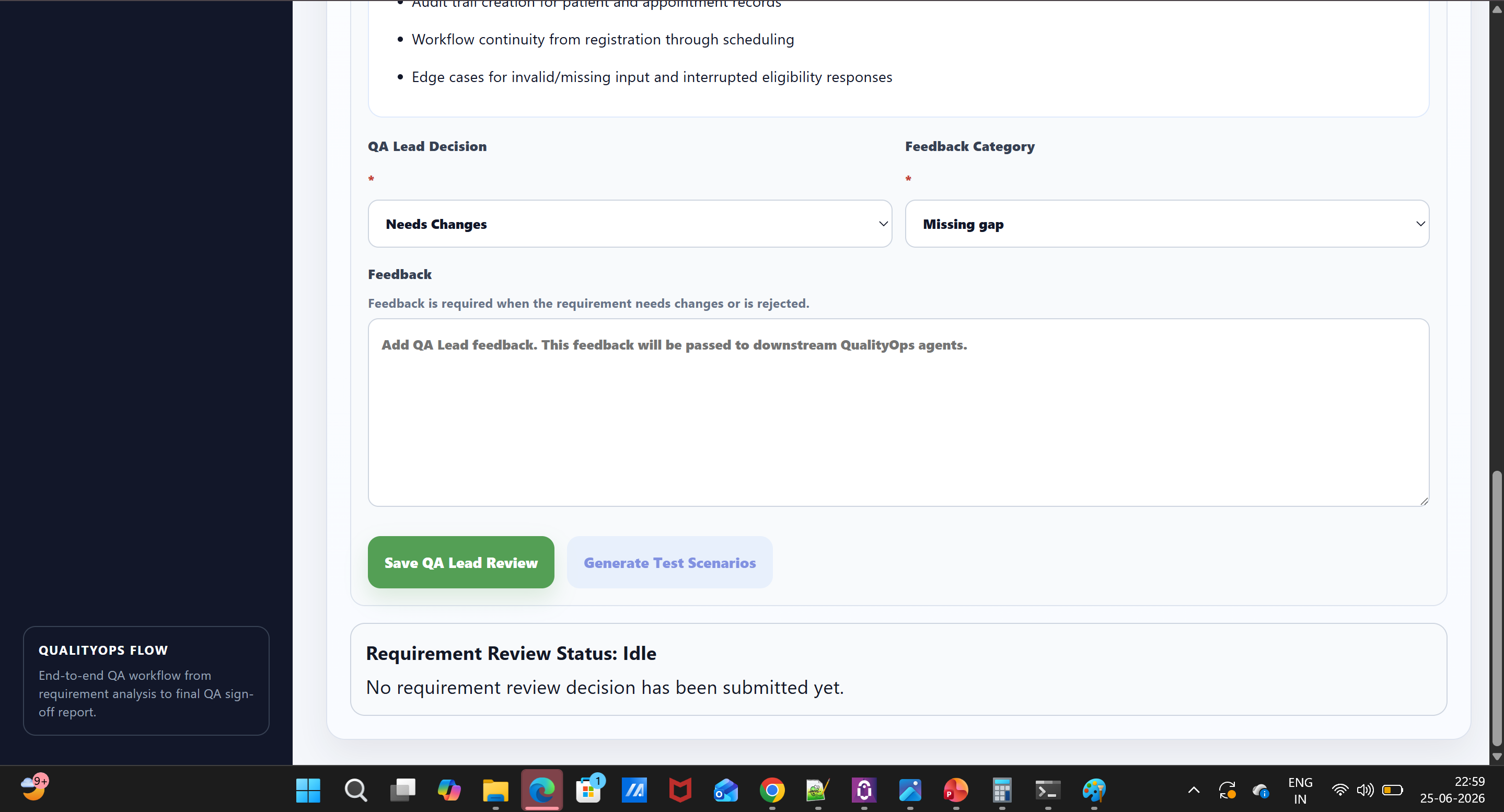
Human-in-the-loop checkpoint where the QA lead reviews and approves agent output before test generation and downstream actions continue.
-
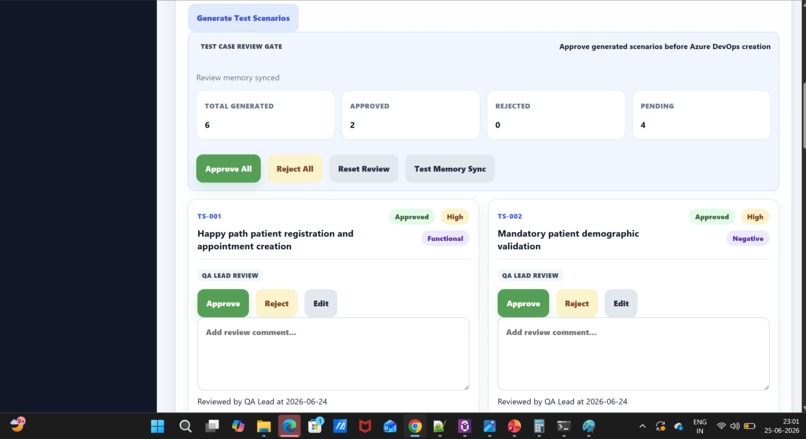
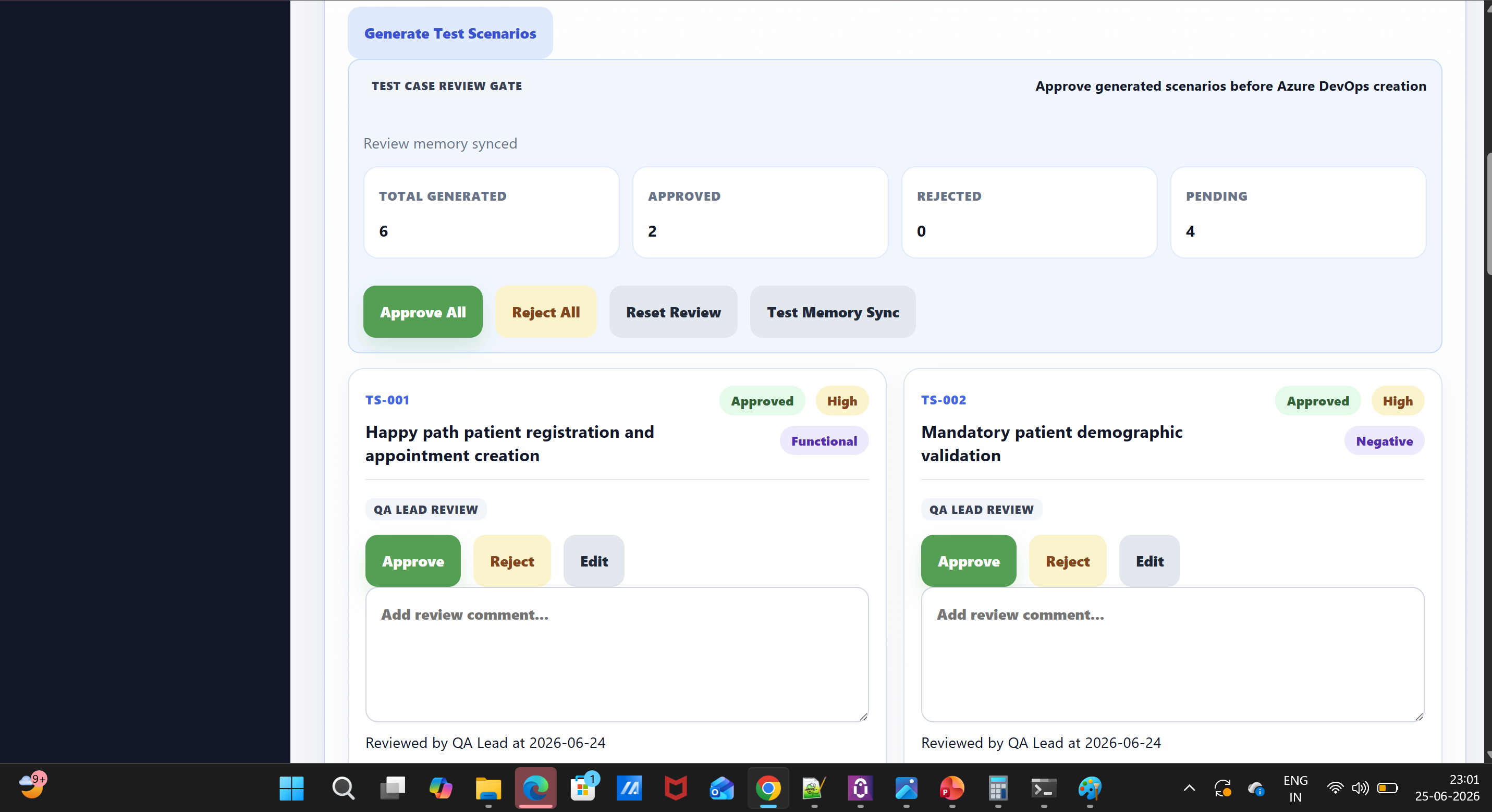
Test Scenario Generation Agent creates structured functional, negative, regression, integration, and edge-case scenarios with actions.
-
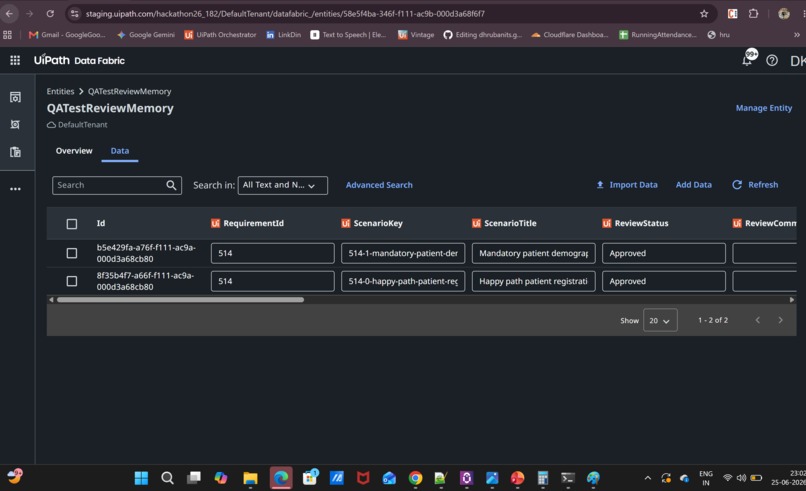
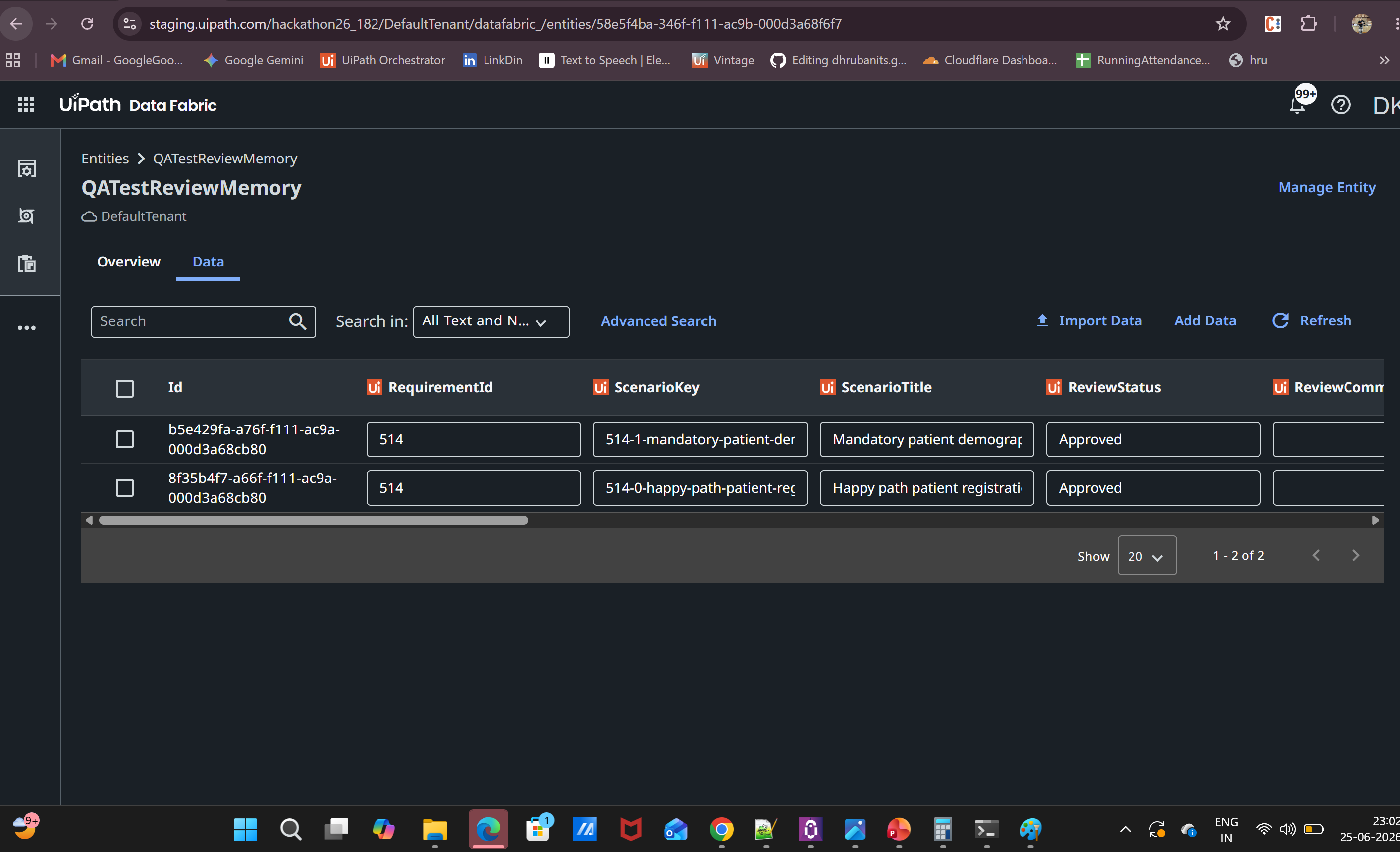
UiPath Data Fabric stores QA review memory, including approved scenarios, reviewer details, review status, comments, and scenario metadata.
-
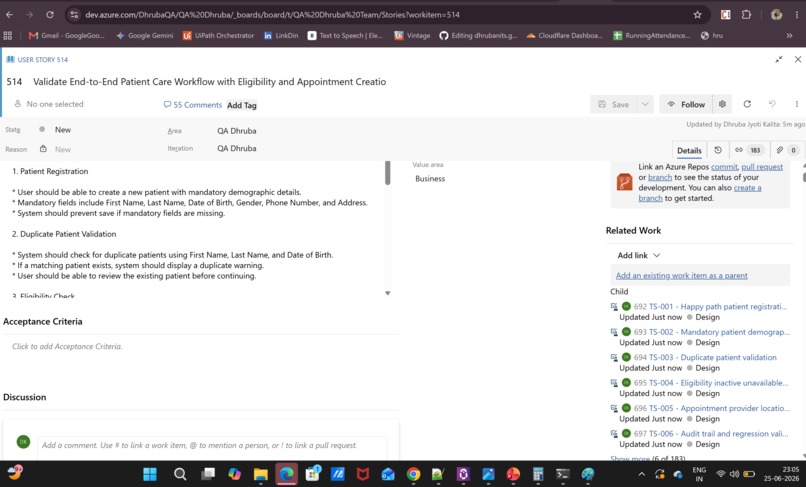
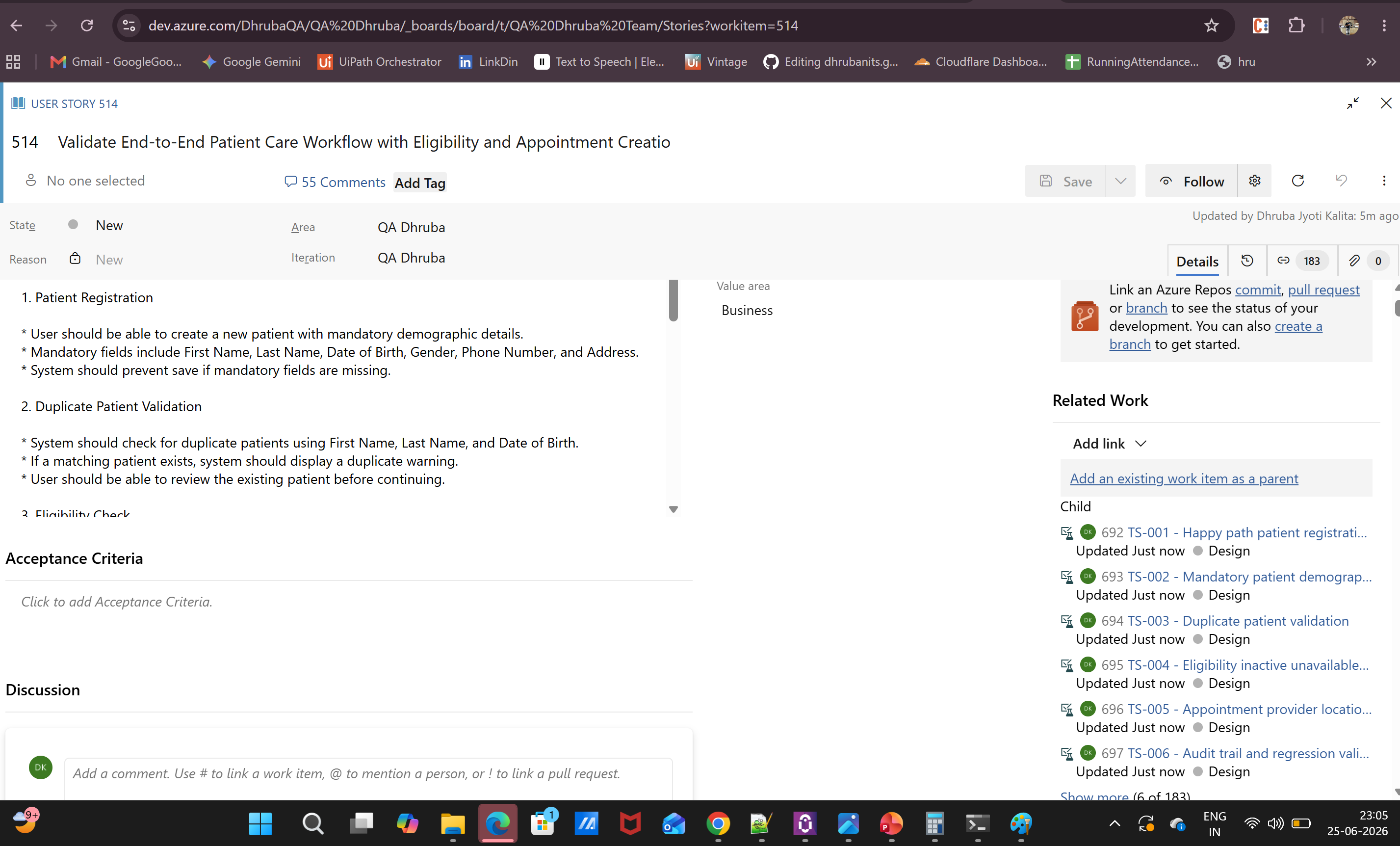
Approved scenarios are written back to Azure DevOps as test cases with properly mapped test steps and expected results.
-
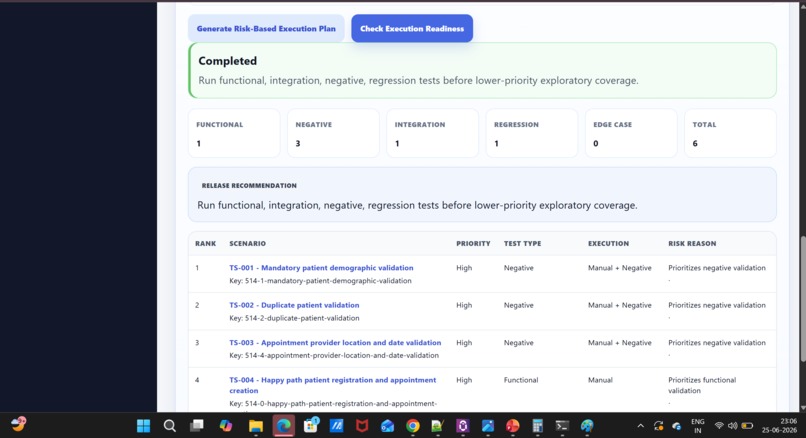
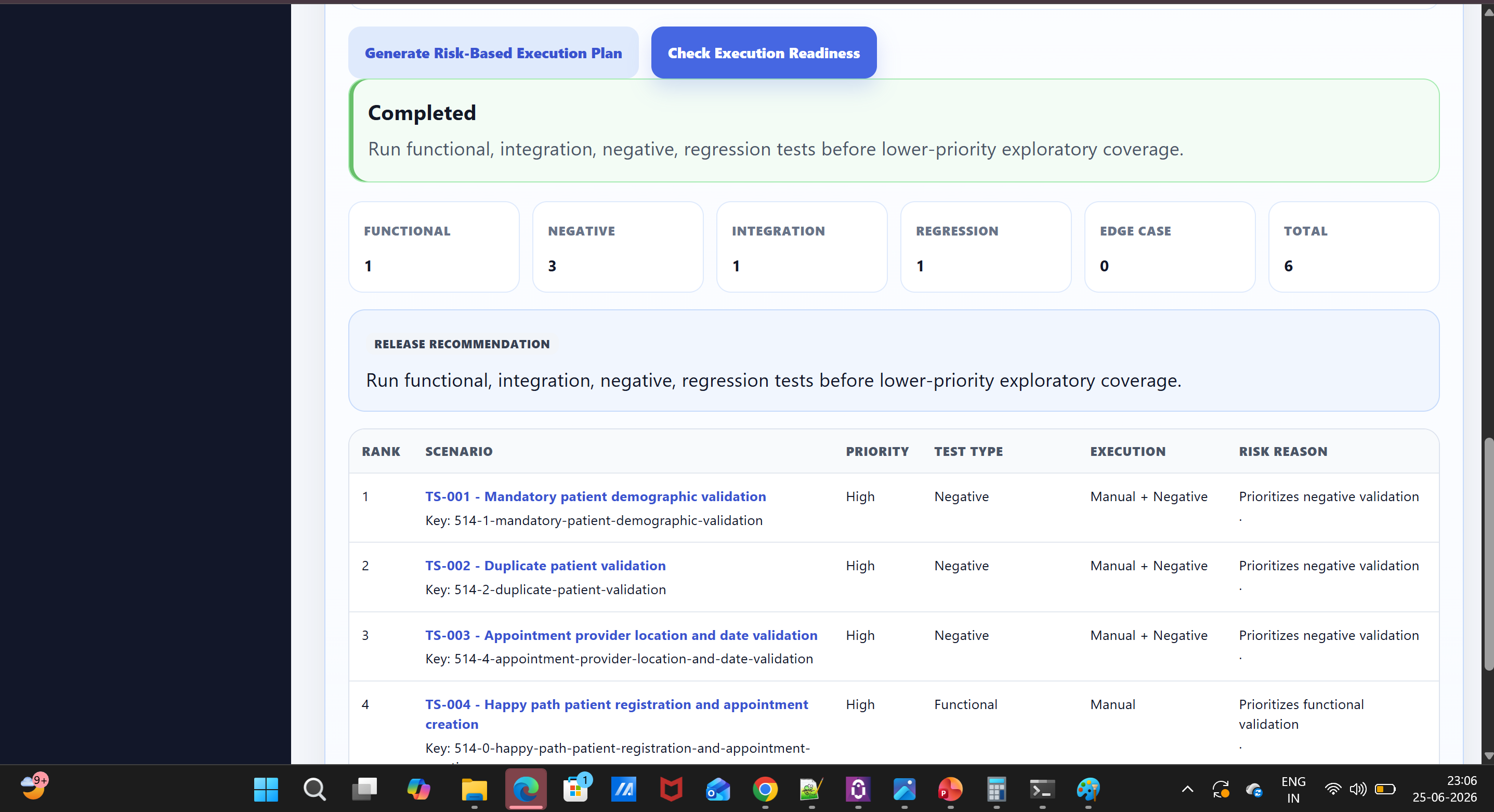
Risk-Based Test Planner Agent recommends execution order using risk level, priority, test type, coverage focus, and change impact.
-
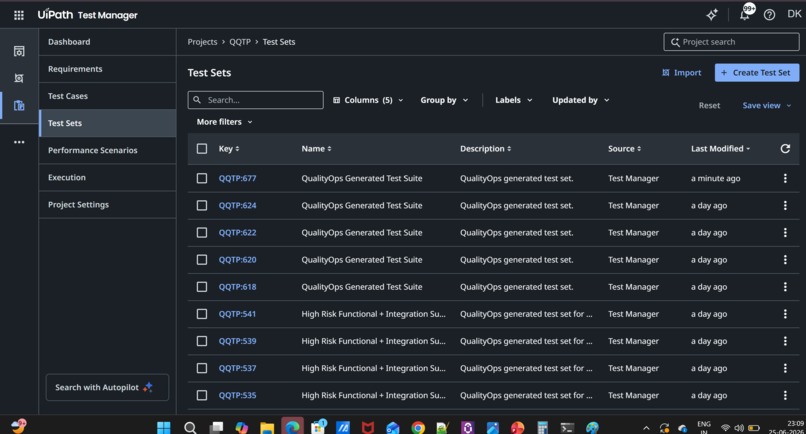
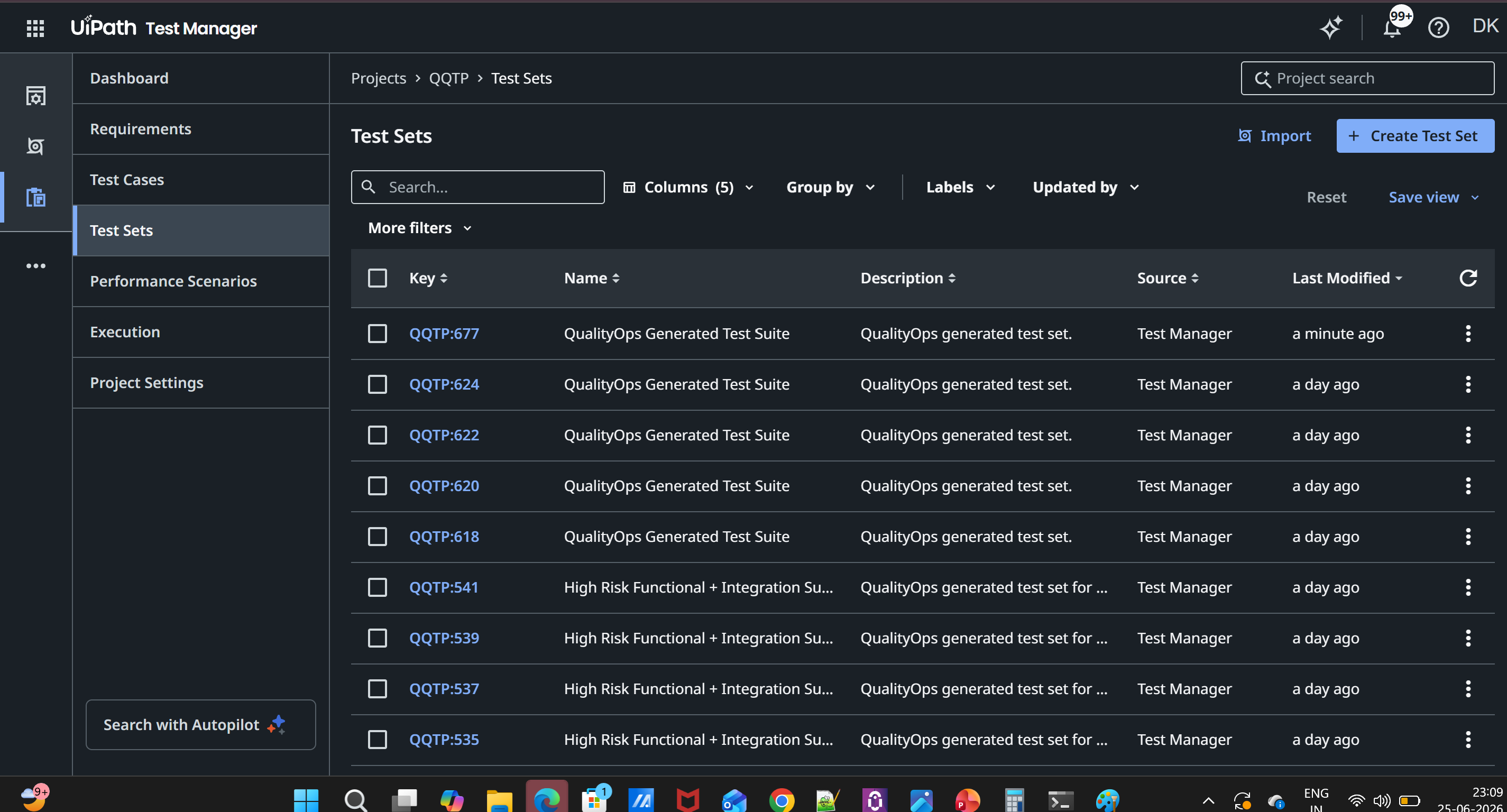
Generated and approved test cases are synced into UiPath Test Manager / Test Cloud for execution planning and traceability.
-
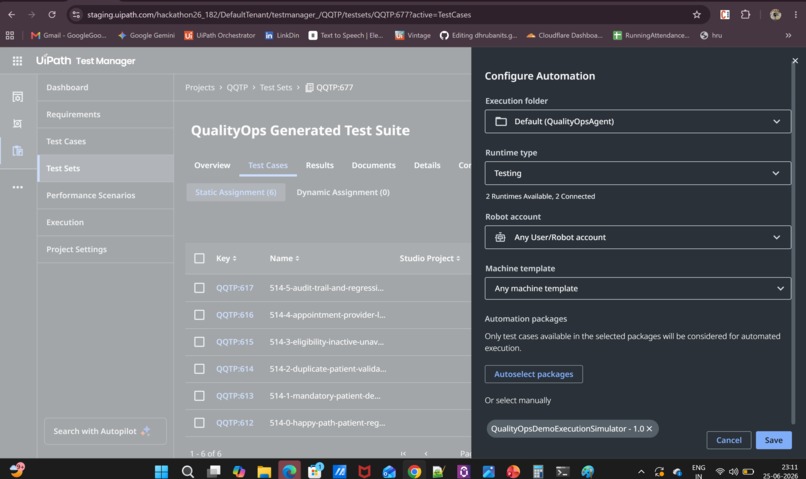
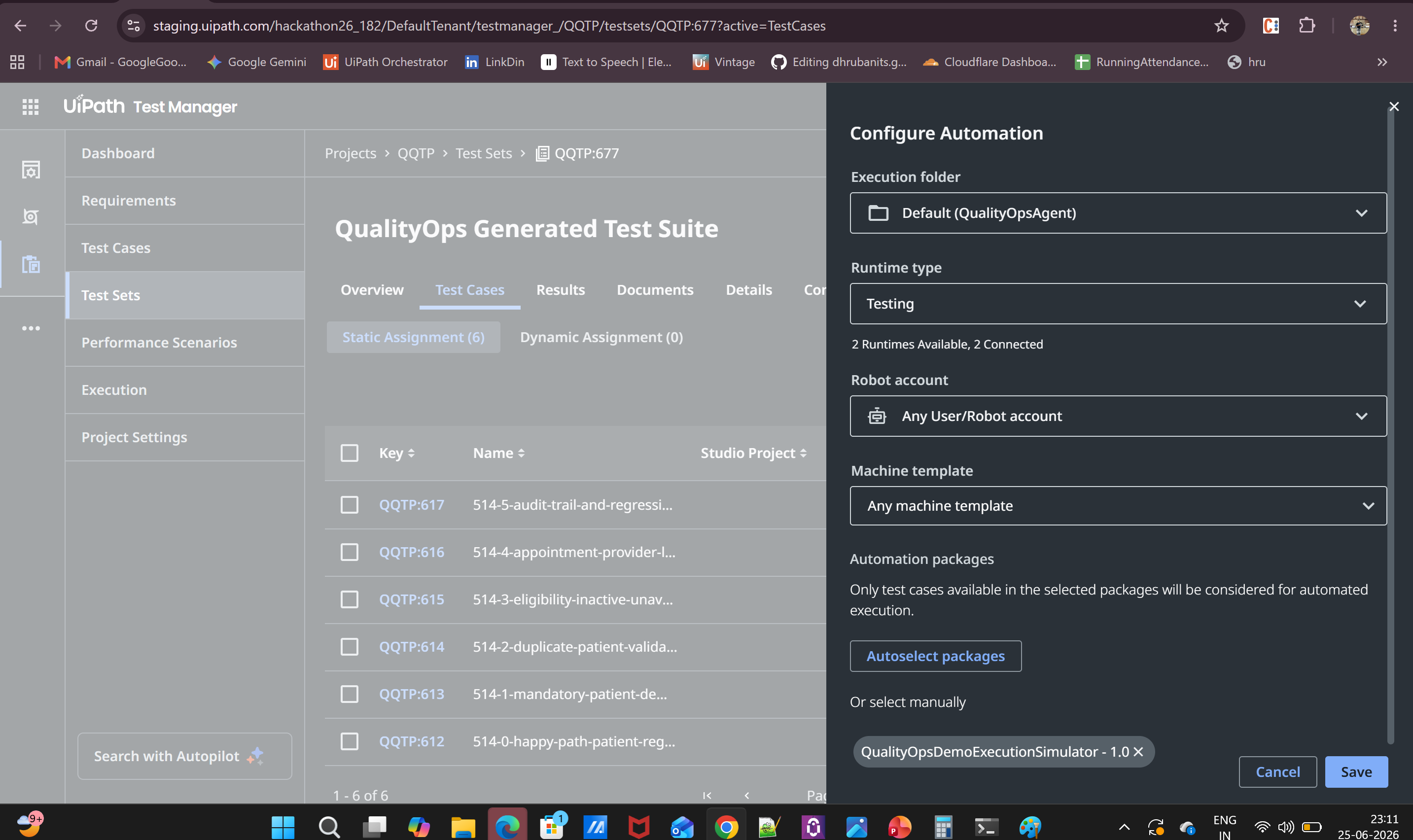
Automation Link Agent maps test cases to UiPath automation assets and identifies automated versus manual coverage gaps.
-
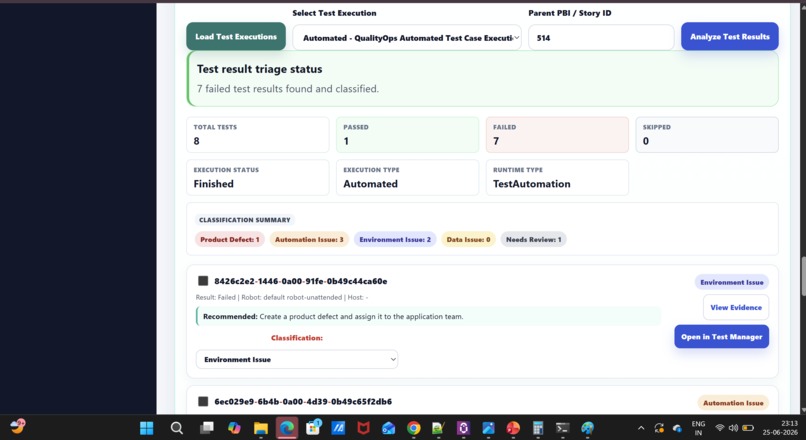
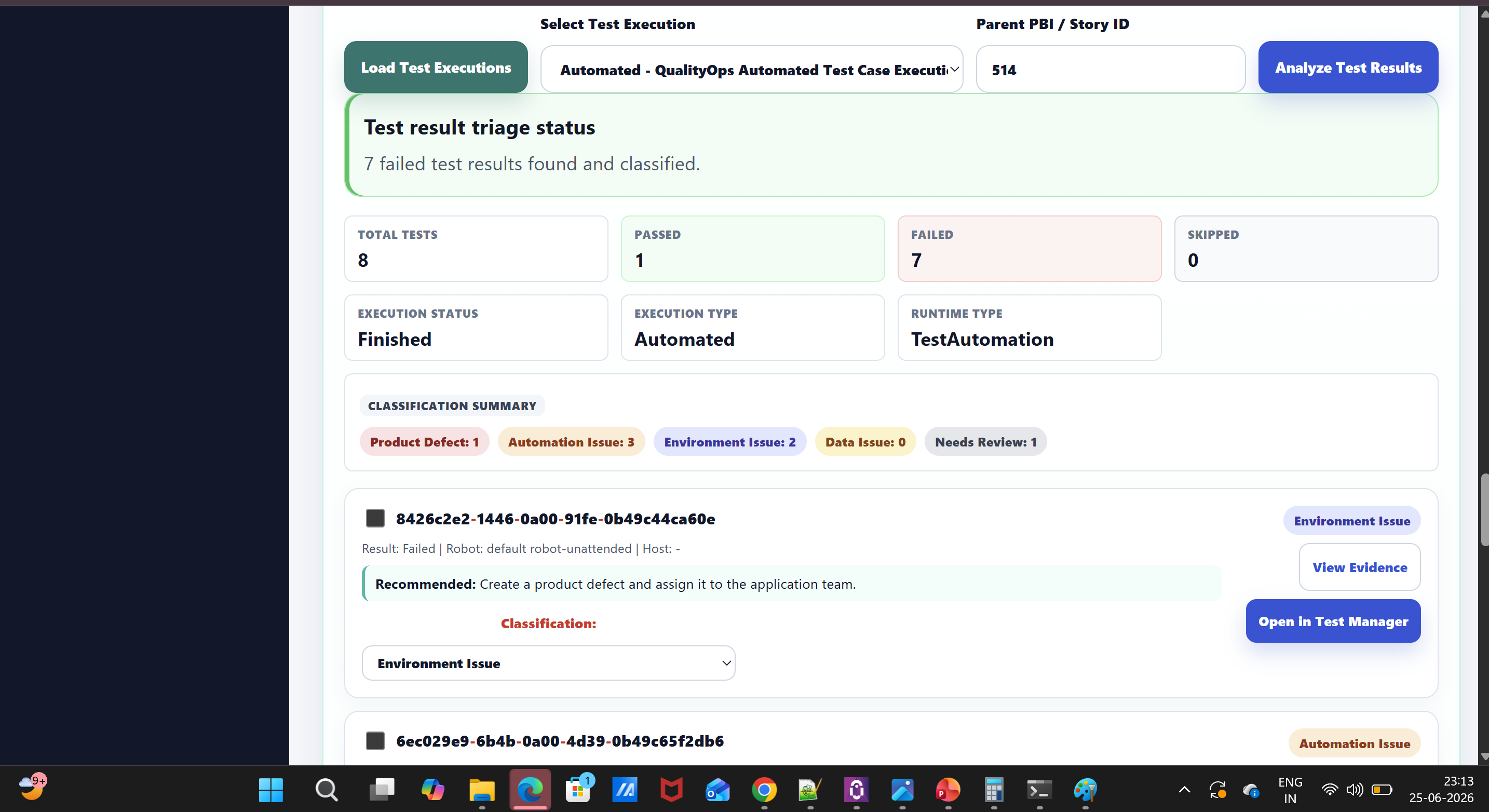
Test Analyze and Triage Agents classify results, identify failure patterns, separate product defects, automation issues,environment problems
-
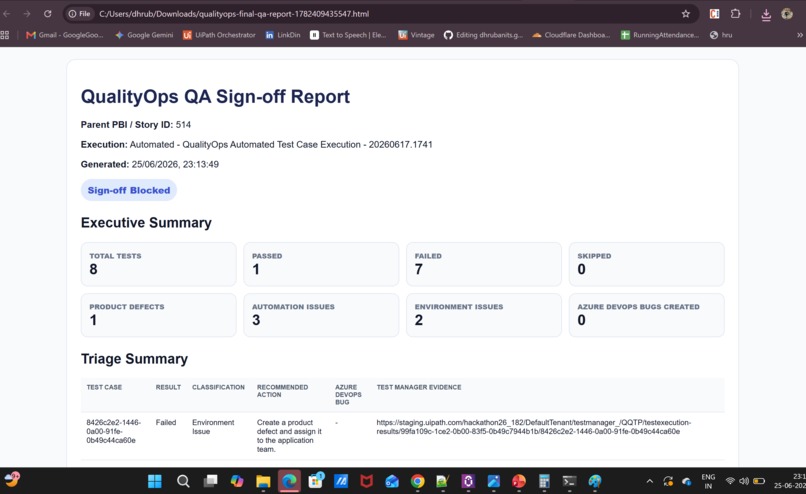
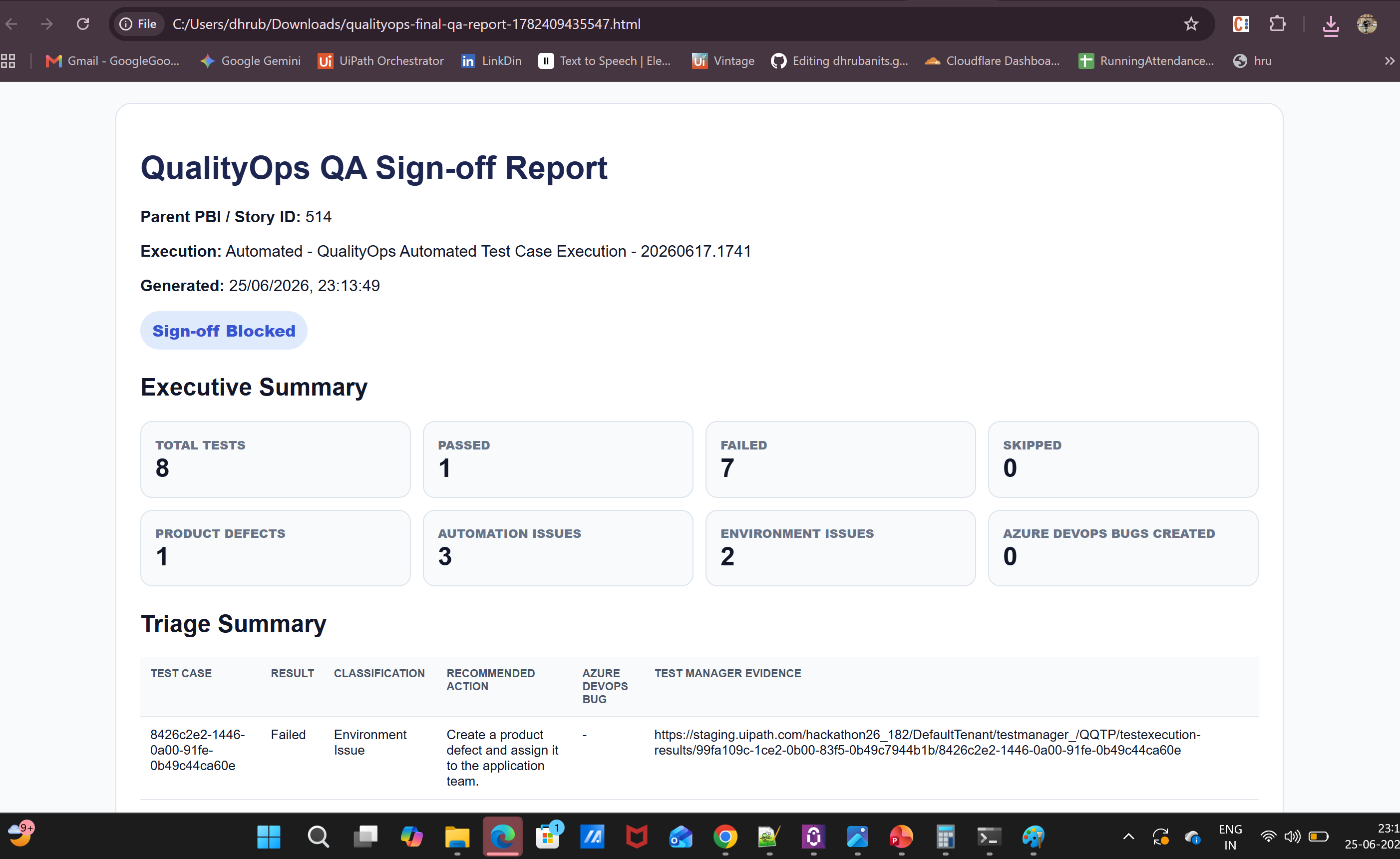
Final QA output showing release readiness summary, stakeholder reporting
Inspiration
QA teams spend a large amount of time on repetitive coordination work instead of actual testing. Requirements must be reviewed, test scenarios must be written, test cases must be created, execution must be planned, failures must be analyzed, bugs must be logged, and release reports must be prepared.
This becomes harder when QA work is spread across Azure DevOps, UiPath Test Manager, Orchestrator, automation packages, execution results, and stakeholder reports.
QualityOps QA Console was built to solve this problem for the Agentic Testing with Test Cloud track.
The idea is simple: QA teams should focus on the critical 30% of work that requires human testing skill, validation, risk judgment, and release ownership, while UiPath agents support the repetitive 70% of QA operations.
This does not replace QA engineers. It gives them more time to do better testing.
What it does
QualityOps QA Console is an end-to-end agentic QA workflow running on the UiPath Platform.
It helps a QA lead move from requirement to release readiness using one guided console.
The solution can:
- Fetch and analyze Azure DevOps requirements.
- Convert requirements into QA-ready insights such as impacted modules, risk level, testing scope, and suggested test focus.
- Keep human review and approval before downstream actions.
- Generate structured functional, negative, regression, integration, and edge-case test scenarios.
- Store human review decisions in UiPath Data Service as QA memory.
- Create approved test cases in Azure DevOps.
- Prioritize tests using a risk-based execution planner.
- Sync test cases and test sets into UiPath Test Manager / Test Cloud.
- Map tests with automation assets and identify automation coverage gaps.
- Analyze test execution results and classify failures.
- Create Azure DevOps bugs for valid product defects.
- Generate a final release readiness report.
- Send the final QA report to stakeholders.
The result is a governed QA workflow where humans stay in control and UiPath agents perform the repetitive orchestration work.
How we built it
We built QualityOps QA Console as an agentic QA orchestration solution using a UiPath Coded App as the main QA lead console and multiple UiPath Coded Agents as the execution layer.
The solution is built around four main layers:
1. QA Lead Console
The QA Lead Console is built as a UiPath Coded App using React, TypeScript, and the UiPath TypeScript SDK.
It provides one dashboard for requirement analysis, human review, test generation, execution planning, Test Manager sync, automation mapping, result triage, bug creation, final reporting, and email communication.
2. Agent Execution Layer
Multiple UiPath Coded Agents perform individual QA tasks. Each agent has a clear responsibility and returns structured output back to the console.
The workflow includes agents for requirement analysis, test scenario generation, review memory, Azure DevOps test case creation, risk-based planning, Test Manager sync, automation mapping, execution readiness, test result triage, bug creation, final report generation, and email delivery.
3. Governance and Orchestration Layer
UiPath Automation Cloud and UiPath Orchestrator manage the execution of coded agents as governed jobs.
Human approval is kept before important downstream actions, such as creating test cases, syncing into Test Manager, or making release recommendations.
4. Enterprise Tooling Layer
QualityOps integrates with:
- Azure DevOps for requirements, test cases, and bugs.
- UiPath Test Manager / Test Cloud for test case and test set management.
- UiPath Data Service for QA review memory.
- UiPath Integration Service for final report email delivery.
Agent logic and reasoning approach
QualityOps QA Console uses a mix of LLM-powered agents and deterministic rule-based agents.
LLM reasoning is used where human-like understanding is useful, such as reading requirements, understanding acceptance criteria, identifying impacted modules, generating test scenarios, summarizing failures, and preparing QA reports.
Rule-based logic is used where consistency and explainability are important, such as risk scoring, execution prioritization, workflow readiness checks, and status mapping.
This hybrid approach makes the solution practical for enterprise QA. LLMs help with interpretation and generation, while rule-based logic keeps important operational decisions stable, auditable, and repeatable.
Key workflow
The end-to-end QualityOps flow is:
Requirement → Analysis → Human Review → Test Scenario Generation → Review Memory → Test Case Creation → Risk-Based Planning → Test Manager Sync → Automation Mapping → Execution Readiness → Result Triage → Bug Creation → Final QA Report → Email Communication
Human-in-the-loop design
A key part of the solution is the human review step.
The agents handle repetitive tasks such as reading requirements, generating scenarios, updating tools, syncing test cases, analyzing results, creating bugs, and preparing reports. But the QA lead still controls important decisions.
The human is responsible for:
- Reviewing requirement analysis.
- Approving test scope.
- Approving generated scenarios.
- Making release decisions.
- Owning final quality judgment.
This matches our 30% / 70% concept. QA teams should spend more time on the 30% of work that requires human testing skill, judgment, and release ownership, while agents handle the remaining 70% of repetitive QA operations.
Use of coding agents
During development, we used coding-agent-assisted development with Codex to accelerate implementation and debugging.
Codex helped us build and refine the React/TypeScript UiPath Coded App, improve agent payload mapping, fix dashboard workflow navigation, debug Orchestrator job integration, stabilize Coded App deployment, and prepare documentation for submission.
This shows how coding agents can help teams build, test, and operationalize enterprise automation solutions faster while the final workflow remains orchestrated and governed through the UiPath Platform.
Challenges we ran into
One challenge was connecting many different QA activities into one simple workflow. Each step had different inputs and outputs, so we had to standardize how the UI, agents, and external tools communicate.
Another challenge was keeping the human-in-the-loop flow clean. We did not want agents to directly create test cases without review. So we added approval steps and review memory to make sure the QA lead remains responsible for important decisions.
We also handled real-world integration complexity across Azure DevOps work items, test case step mapping, UiPath Test Manager sync, automation mapping, Data Service review memory, Orchestrator job execution, result triage, bug creation, and final reporting.
Accomplishments that we're proud of
We are proud that this is not just a single-agent demo. QualityOps QA Console covers a full QA lifecycle.
Key accomplishments:
- Built a working QA dashboard using UiPath Coded App.
- Integrated multiple UiPath Coded Agents into one workflow.
- Added human review and approval before downstream actions.
- Stored QA review decisions using UiPath Data Service.
- Generated structured test scenarios from requirements.
- Created approved test cases in Azure DevOps.
- Synced generated test cases with UiPath Test Manager.
- Added risk-based execution planning.
- Added automation mapping and execution readiness checks.
- Added test result triage.
- Supported Azure DevOps bug creation.
- Generated a final QA release report.
- Added final report email delivery.
- Published the Coded App on UiPath Automation Cloud.
What we learned
We learned that agentic QA is not about removing testers. It is about helping testers spend more time on meaningful testing work.
In QA, humans are still needed for understanding business context, identifying risk, validating important scenarios, reviewing results, and making release decisions. Agents are useful for repetitive and connected work across tools.
We also learned that building an agent locally is only the first step. To make it enterprise-ready, we need orchestration, governance, secure execution, memory, approval checkpoints, and proper integration with tools like Orchestrator, Test Manager, Data Service, and Azure DevOps.
What's next for QualityOps QA Console
Next, we want to productionize the workflow further by adding more advanced Test Cloud analytics, deeper automation maintenance recommendations, flaky test detection, and stronger change-impact analysis.
Future improvements include:
- Deeper result analytics across large automated test runs.
- Better classification of product defects, automation issues, data issues, and environment issues.
- Suggested fixes for broken automation.
- More advanced automation coverage gap analysis.
- Multi-project and multi-environment support.
- Role-based views for QA leads, automation engineers, and managers.
- Release confidence scoring.
- More reusable UiPath-native workflow components for enterprise rollout.
Our long-term vision is to make QualityOps QA Console a governed QA operations layer where QA teams focus on real testing and release decisions, while UiPath agents handle the repetitive 70% of QA coordination work.
Built With
- api-triggers
- azure-devops-rest-apis
- azure-devops-test-plans
- codex
- github
- langgraph
- llm-reasoning
- python
- react
- rule-based-risk-scoring
- typescript
- uipath-automation-cloud
- uipath-coded-agents
- uipath-coded-app
- uipath-datafabrics
- uipath-orchestrator
- uipath-test-manager-/-test-cloud
- uipath-typescript-sdk
- vite


Log in or sign up for Devpost to join the conversation.