-
QR Code- Encoding and Decoding
-
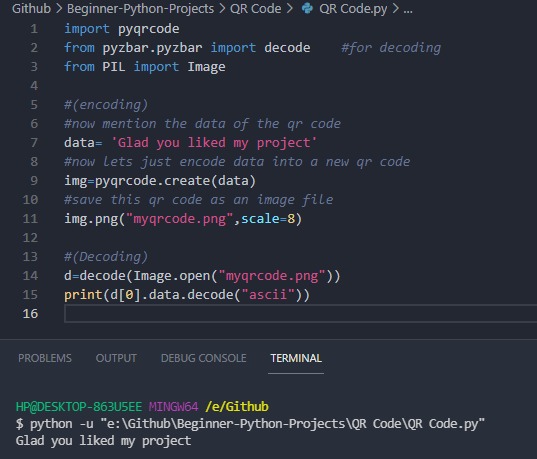
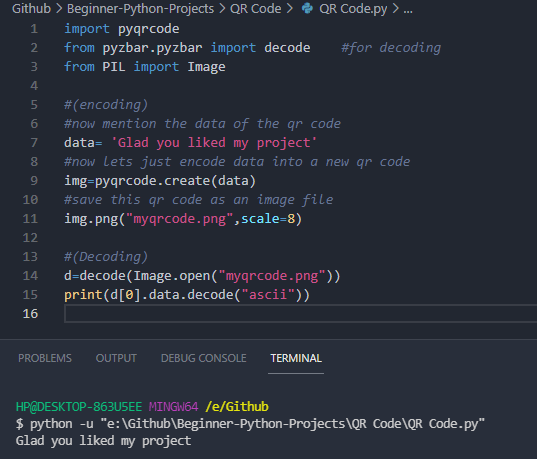
Code Decrypted when I ran the program.
Inspiration
I was thrilled to see when my niece made a handmade birthday card and at the back, she drew QR Code lines with a black sketch pen, just to give it a custom-made look. I thought to myself "What if people can make their own QR Code, that would be cool" so I looked up on the internet and found it!
What it does
QR code is an abbreviation of Quick Response Code. It is a two-dimensional code that can encrypt several thousand characters. It can for example store information about the product the code is attached to or link to a destination URL. QR Code can be used very frequently. I can simply put your QR code on my poster, my business cards, my flyers, packaging or clothing and
- reach my potential customers & followers
- provide more information about my product
- bring potential customers & followers to my (corporate) website or blog
- promote my social media presence
How we built it
I took the help of youtube, Free code camp, and some blogs to make this project.
Challenges we ran into
This Application can work on any platform if you have python installed previously. I read many blogs and got confused that is why it is better to stick to one website, follow it thoroughly, and make a draft project. Later it can be upgraded.
Accomplishments that we're proud of
Just for encoding and decoding, it is merely a 10 line code, I was very thrilled when I made this project in 25 minutes and I got to know more features of Open CV. (I didn't use it in it but it will be added soon!!)
What we learned
I learned about libraries like PIL, pyqrcode and pyzar. And learned a lot while reading about the project through Medium blogs.
What's next for QR Code - Encoding and Decoding
I will be adding the decoding of Single and Multiple QR Code.
Built With
- pil
- pyqrcode
- python
- pyzar

Log in or sign up for Devpost to join the conversation.