Why I built it
QLayer started from a problem I kept running into while using Codex.
I usually work with music, a podcast, or a video playing in the background. I also use voice dictation a lot because it is much faster for me to explain an idea by speaking than by typing it all out.
The annoying part was that every time I wanted to talk to Codex, I had to pause the audio, find the right window, open the right chat, start dictation, speak, finish, send the message, and then go back and resume what I was listening to.
It was a small interruption, but it happened over and over again. QLayer was my way of removing that friction.
What QLayer does
Voice Flow
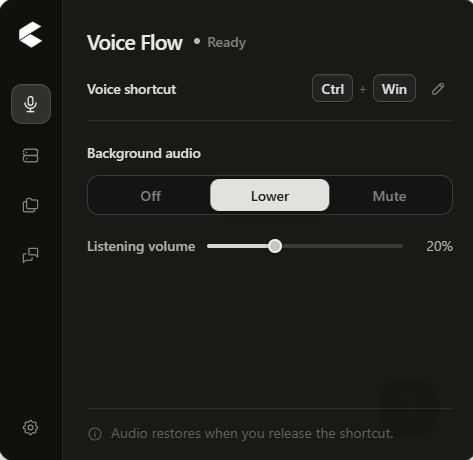
From anywhere in Windows, I can hold a global shortcut, choose the Codex or ChatGPT conversation I want, and start speaking.
QLayer focuses the correct app, starts native dictation, and lowers or mutes the audio playing in the background. When I release the shortcut, dictation finishes and the audio returns to its previous volume.
Chat Shortcuts
I can save and organize the chats I use most, group them by project, and choose where Voice Flow should go without manually searching through my recent conversations every time.
Localhost Manager
I often work on multiple projects at once, and I used to lose track of which localhost belonged to which project, which ports were active, how long they had been running, and how many resources they were using.
Localhost Manager detects local development servers, identifies their projects when possible, groups related ports, and shows the URL, process, memory usage, CPU usage, and uptime.
Projects
Projects connect a local folder with its chats and preferred development ports. This gives me one place to see the context I am working in instead of treating chats, folders, and local servers as completely separate things.
How I built it
I first started QLayer before Build Week using GPT-5.5, but I could not get the core Windows voice workflow working reliably. The project did not get much further than its initial foundation, so I left it unfinished.
When I received the OpenAI Build Week email on July 17, I decided to reopen it and try again.
I used ChatGPT voice conversations to clarify and organize the product idea, then brought those decisions into Codex. I used GPT-5.6 and Codex to implement, debug, test, and refine the Windows-specific parts of the app, including global shortcuts, audio control, window focus, dictation behavior, chat selection, localhost discovery, project grouping, and the release workflow.
The project came together over two focused days of iteration.
Privacy and scope
QLayer is local-first and open source. It has no telemetry, no cloud sync, and does not read Codex credentials, authentication files, browser cookies, or chat transcripts.
The current release supports Windows 10 and Windows 11 on x64. I only had access to Windows during development, so I chose to make one platform work properly instead of claiming support I could not test.
What I want QLayer to become
My goal is to keep adding practical quality-of-life tools that make Codex easier and less disruptive to use every day, and to share those tools with other developers through an open-source project.
Built With
- codex
- gpt-5.6
- react
- rust
- tailwind-css
- tauri-2
- typescript
- vite
- windows-api