-
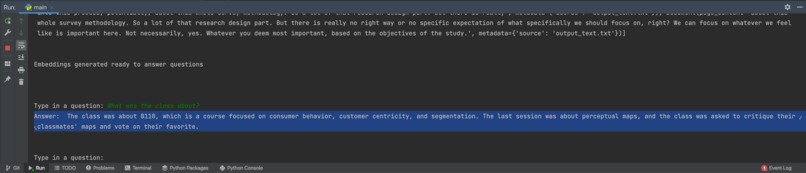
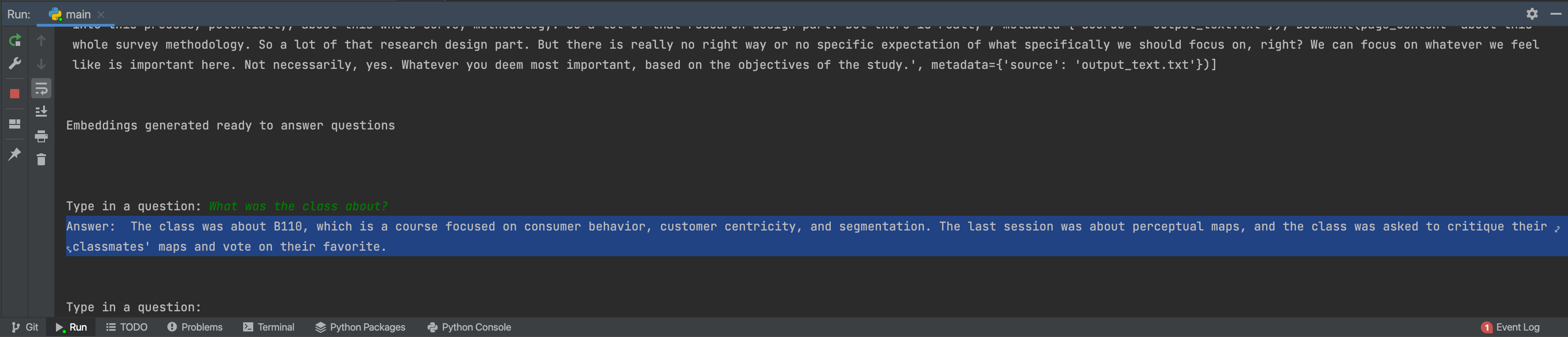
Example of answering a question about class recording
Use Case Title:
Answering questions about lecture
Description:
- Description: In educational settings, the use case involves converting lecture recordings into text and utilizing AI-driven tools for question and answer (QA) purposes. The AI tools include Whisper for video-to-text conversion and GPT with embedding generation for Q&A. Target Audience:
- The target audience for this use case includes educators, students, and institutions. Educators can benefit from AI-powered transcription to make their lectures more accessible and searchable. Students can use the converted text for reviewing and studying. It saves plenty of time on rewatching the whole recording.
- Accessibility: Transcriptions make lectures accessible to all, benefiting students with hearing impairments and non-native speakers (I can run automatic translation over generated text file, if needed).
- Study Aid: Students can review lecture content more efficiently through searchable text, improving comprehension and retention.
Tutorial for Use and Best Practices:
Generate OpenAI API key from your account (it's needed for generating embeddings and answering questions, the price will be super small, also audio to text model is running locally so it's free). Download the project from Github: https://github.com/vkram2711/QA-over-video/tree/main Follow README file in Github:
- Open the downloaded folder in Terminal
- Install requirements
- Run main.py
- Follow provided instructions
- Enter API Key
- Enter the link for the video (don't put YouTube script can't download videos from there, but it's possible after adding Google auth to the script, but for now, use something like https://domain.com/xyz.mp4)
- Wait, the download will be fast, but video-to-text will be at least the same as the duration of the video and depends on the hardware
- Check output_text.txt, edit if needed
- Wait for embedding generation (it usually takes a few seconds but depends on the size of the text file)
- Ask questions about your video recording content
Impacts on Learning:
- Accessibility: Without this use case, learners with hearing impairments or non-native speakers may struggle to access and understand the lecture content, limiting their educational opportunities.
- Efficiency: Learning without the use case would mean sifting through lengthy video recordings for specific information, leading to a time-consuming and less efficient study process. Students may miss key points and details due to the difficulty of navigating video content.
- Engagement: The lack of easy access to lecture content may affect student engagement, as they may become frustrated or disinterested in reviewing videos, leading to a less effective learning experience. In summary, this use case enhances the accessibility, efficiency, and engagement of the learning experience by providing transcriptions and AI-driven Q&A.
Limitations and Ethical Considerations:
Whisper is not perfect and often doesn't hear words correctly(also, different accents and mispronunciations also affect the quality of generated text). Because of this, QA can be not reliable and miss something because of the poor quality of the text file. Whisper takes a long time to convert to text; it is usually somewhat equal to video duration. It relies on GPU (and is quite demanding, so it's challenging to run this on the server), so if the hardware is not fast, it can slow down the process even more. Partially the problem may be solved by cutting the audio file into smaller pieces. Also, I tested it only on macOS so not sure how it will run on Linux and Windows.
Inspiration
Students often need to deal with long and complex educational videos. For example, a recording of the lecture. And it's very hard to navigate through it especially if you have a specific question with an answer in the recording but rewatching 90 minutes of video to do it is tiring.
What it does
That's why I made a simple Python script that converts video into text and then makes a QA chat with this text document.
How we built it
I used Whisper for converting video to audio and then generated embeddings using OpenAI's Ada model, stored them into FAISS local vector storage to search for answer, and then ran GPT over the search results for the final answer.
What's next for QA over video
Current QA doesn't support chat memory because it is a bit complicated and can confuse GPT with irrelevant context and requires prompt engineering to make it work properly
Built With
- gpt
- python
- whisper


Log in or sign up for Devpost to join the conversation.