-
-
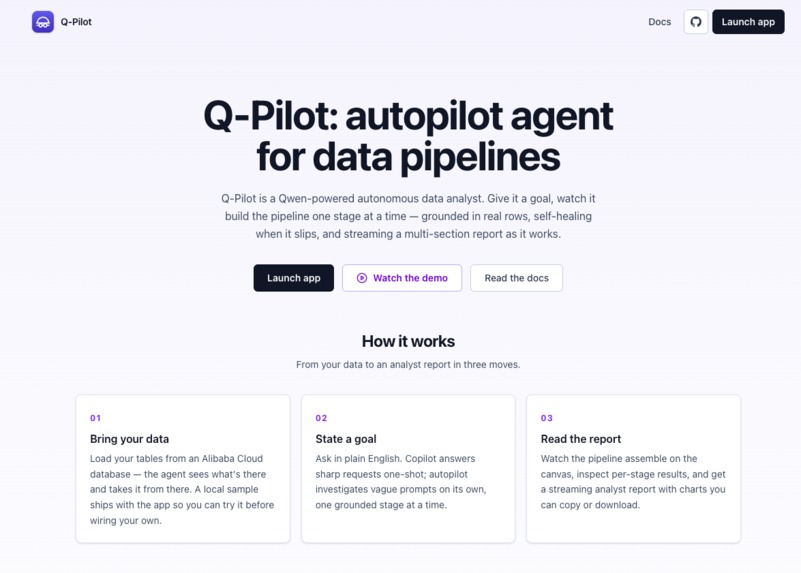
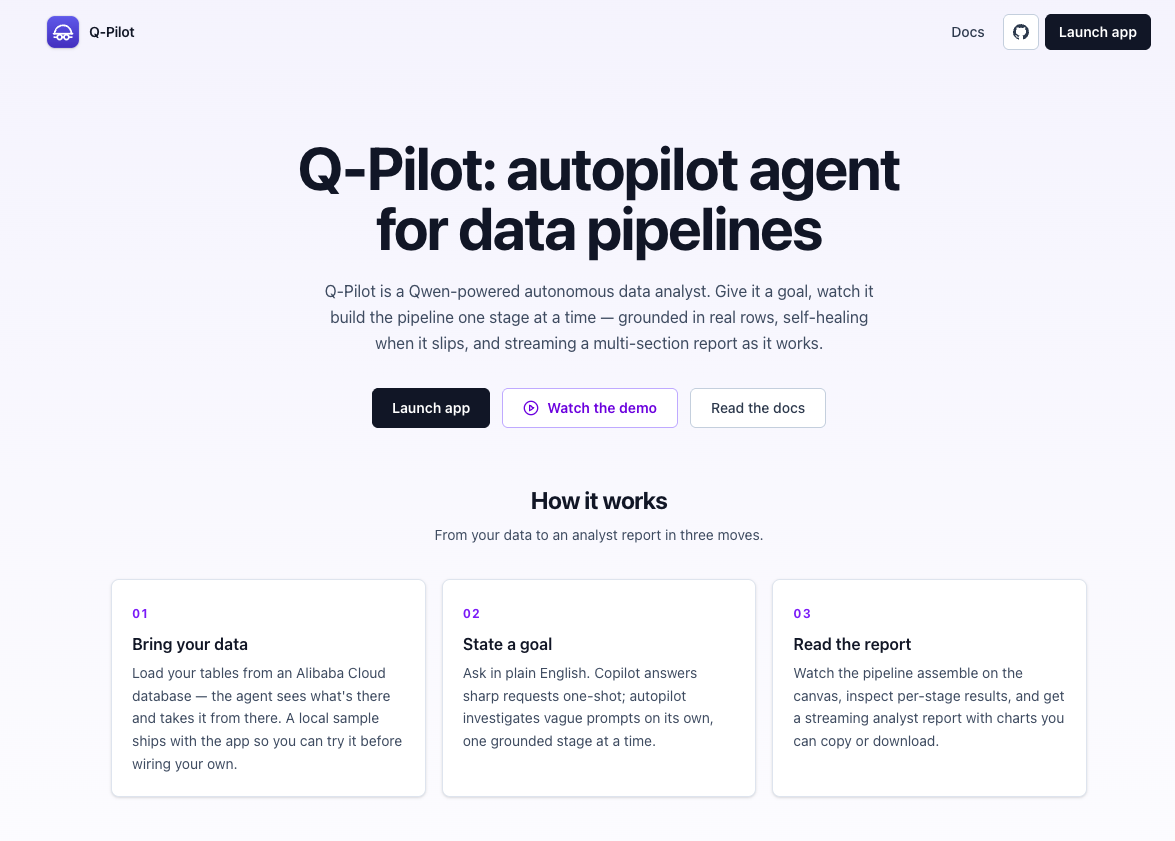
Landing page
-
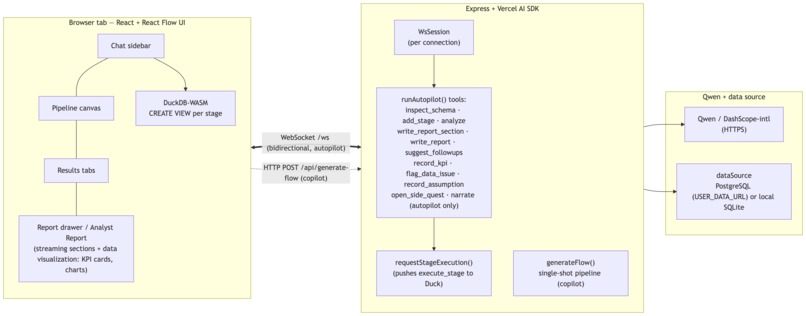
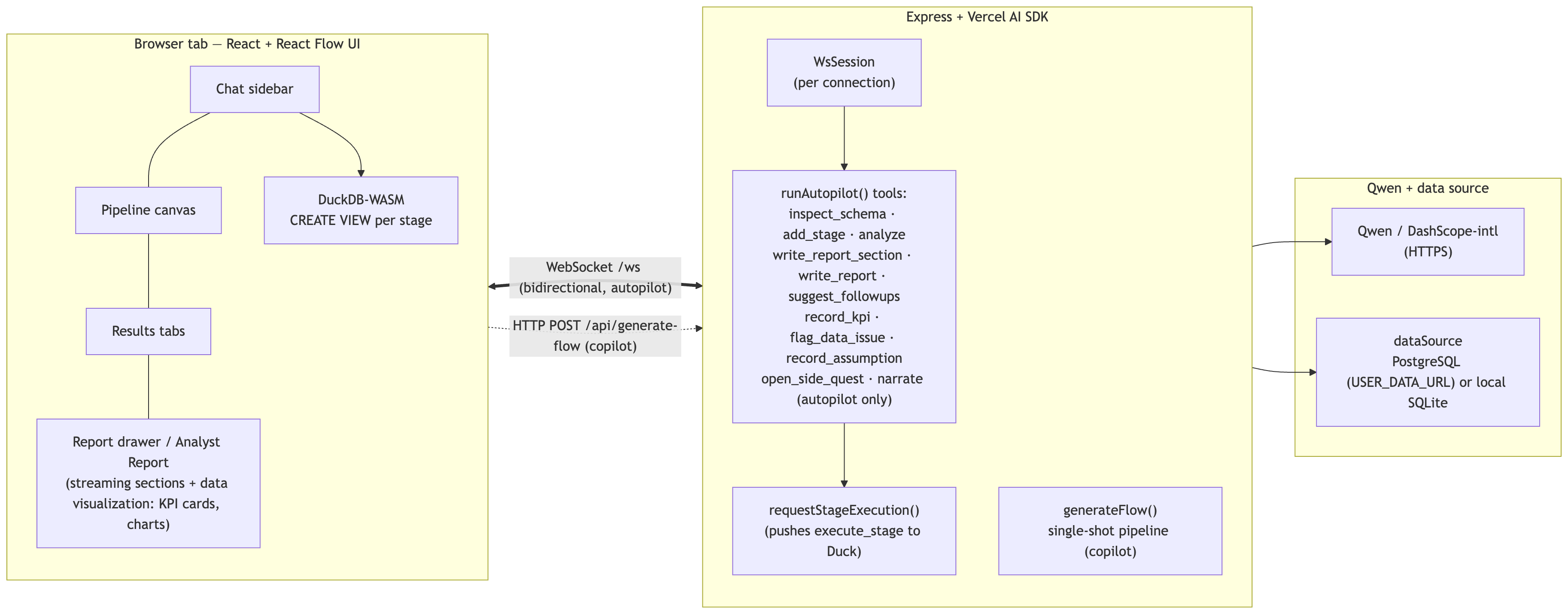
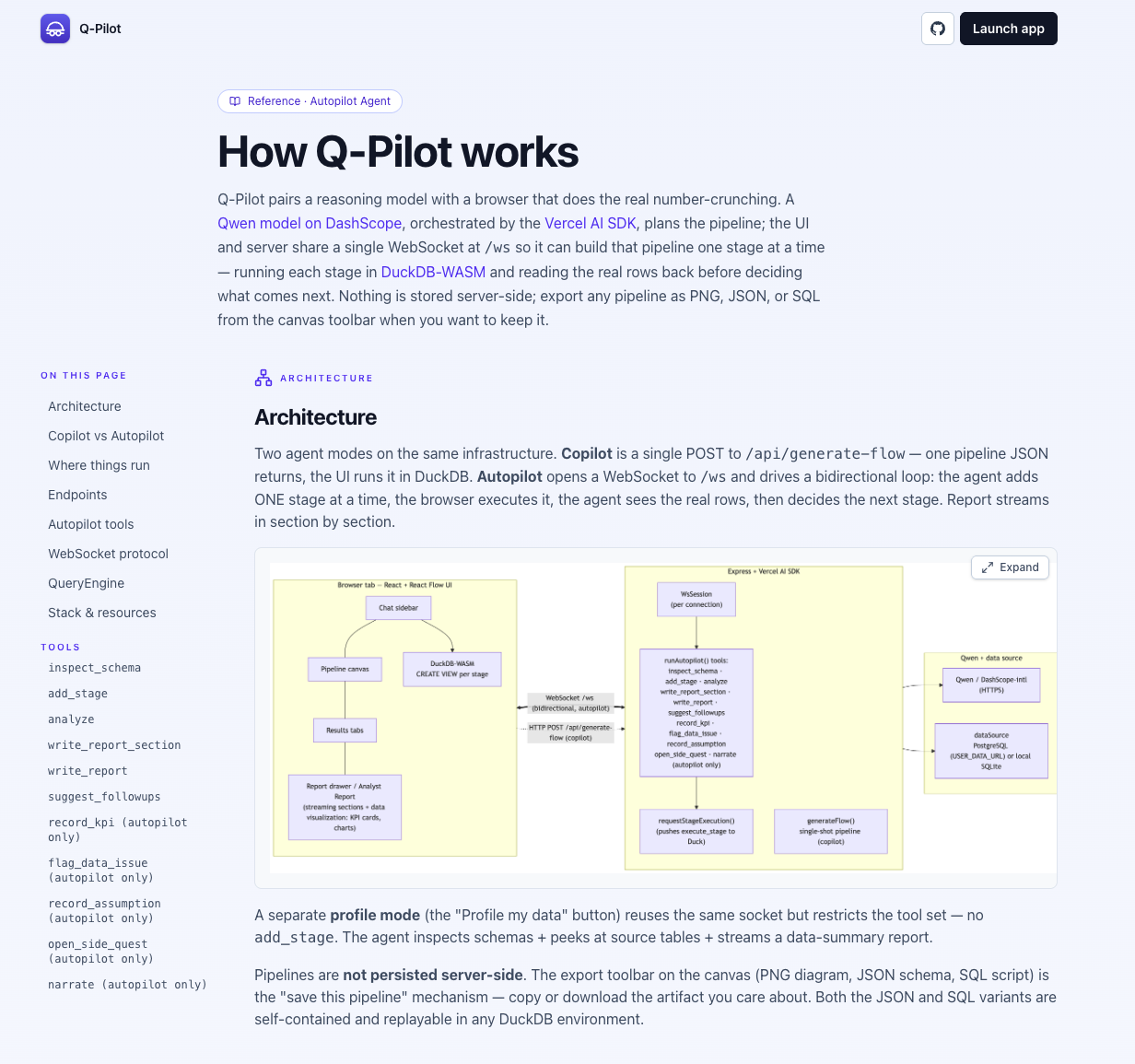
Architecture
-
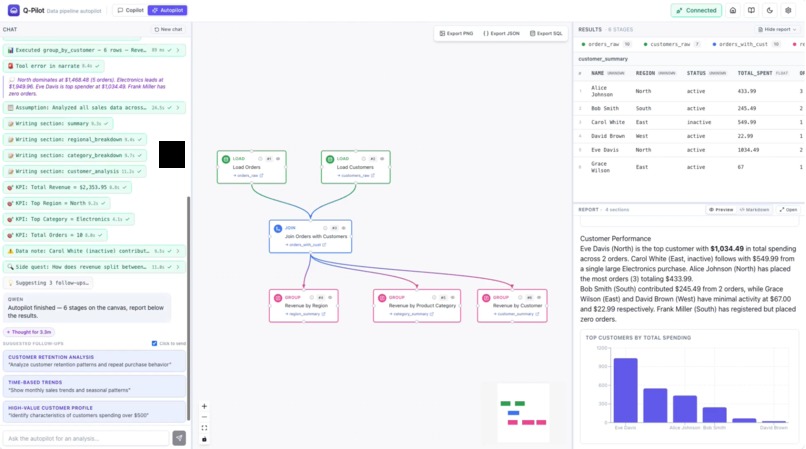
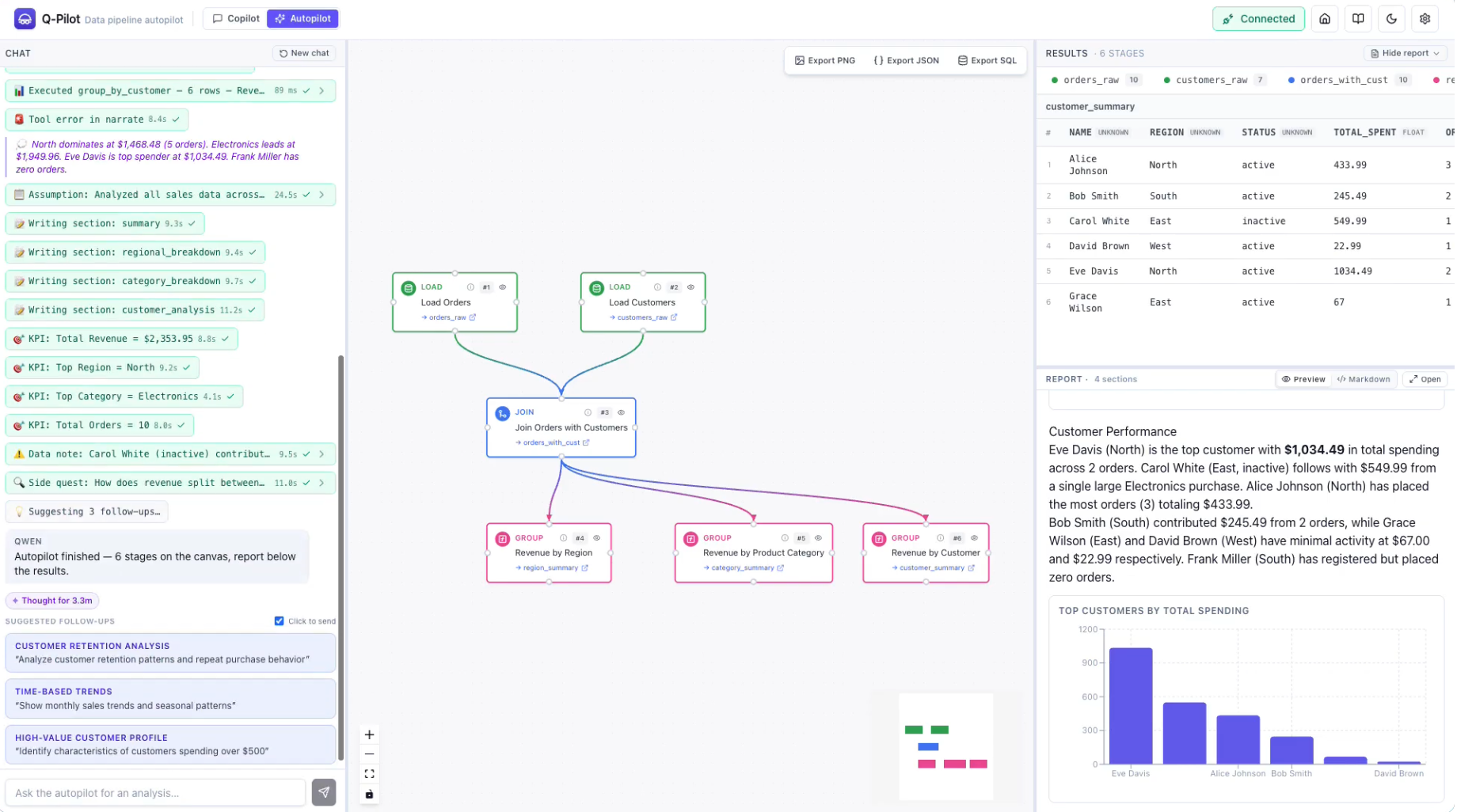
Autopilot run
-
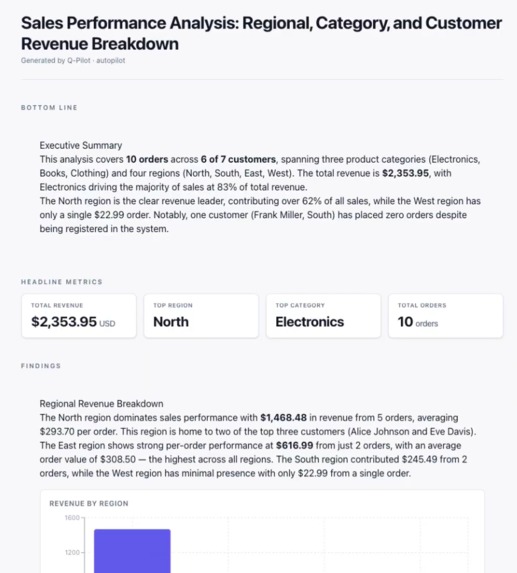
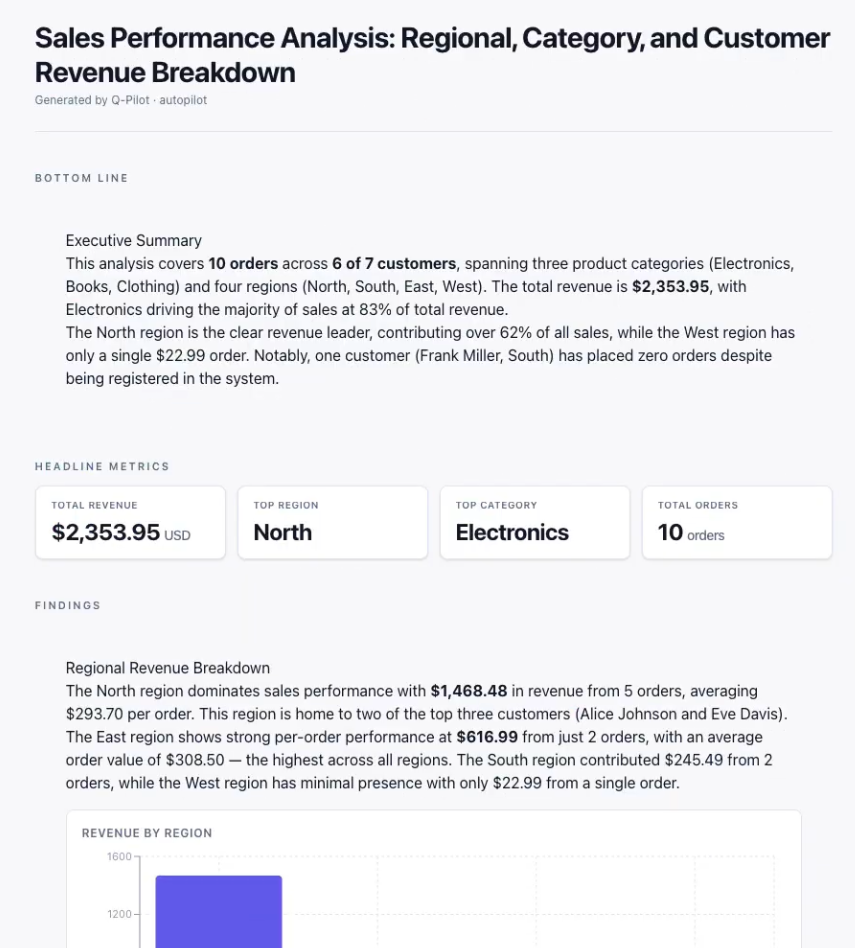
Autopilot report, top
-
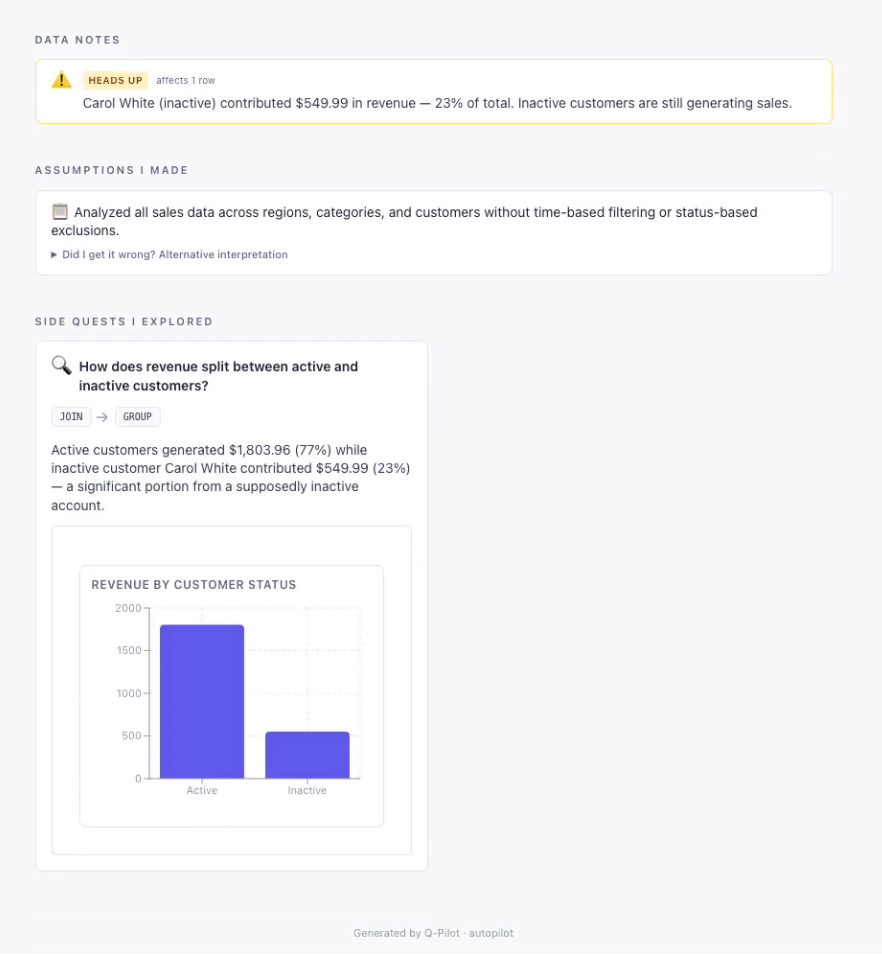
Autopilot report, bottom
-
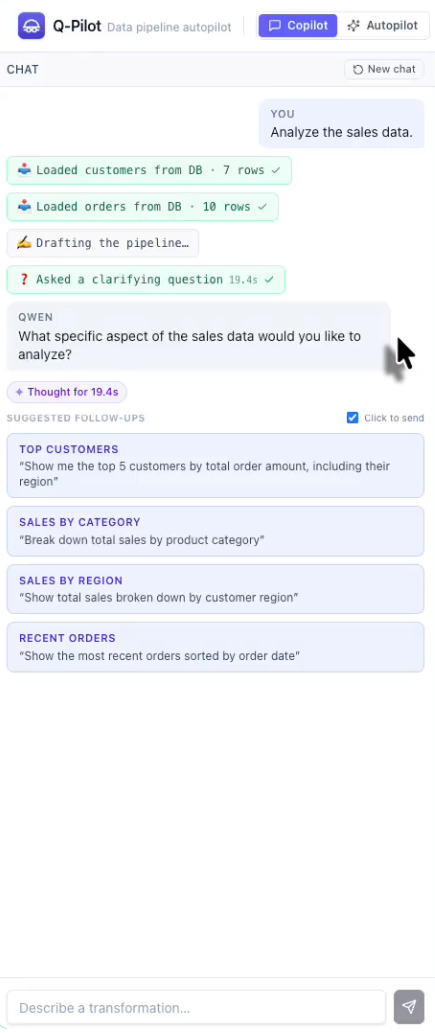
Copilot, vague prompt
-
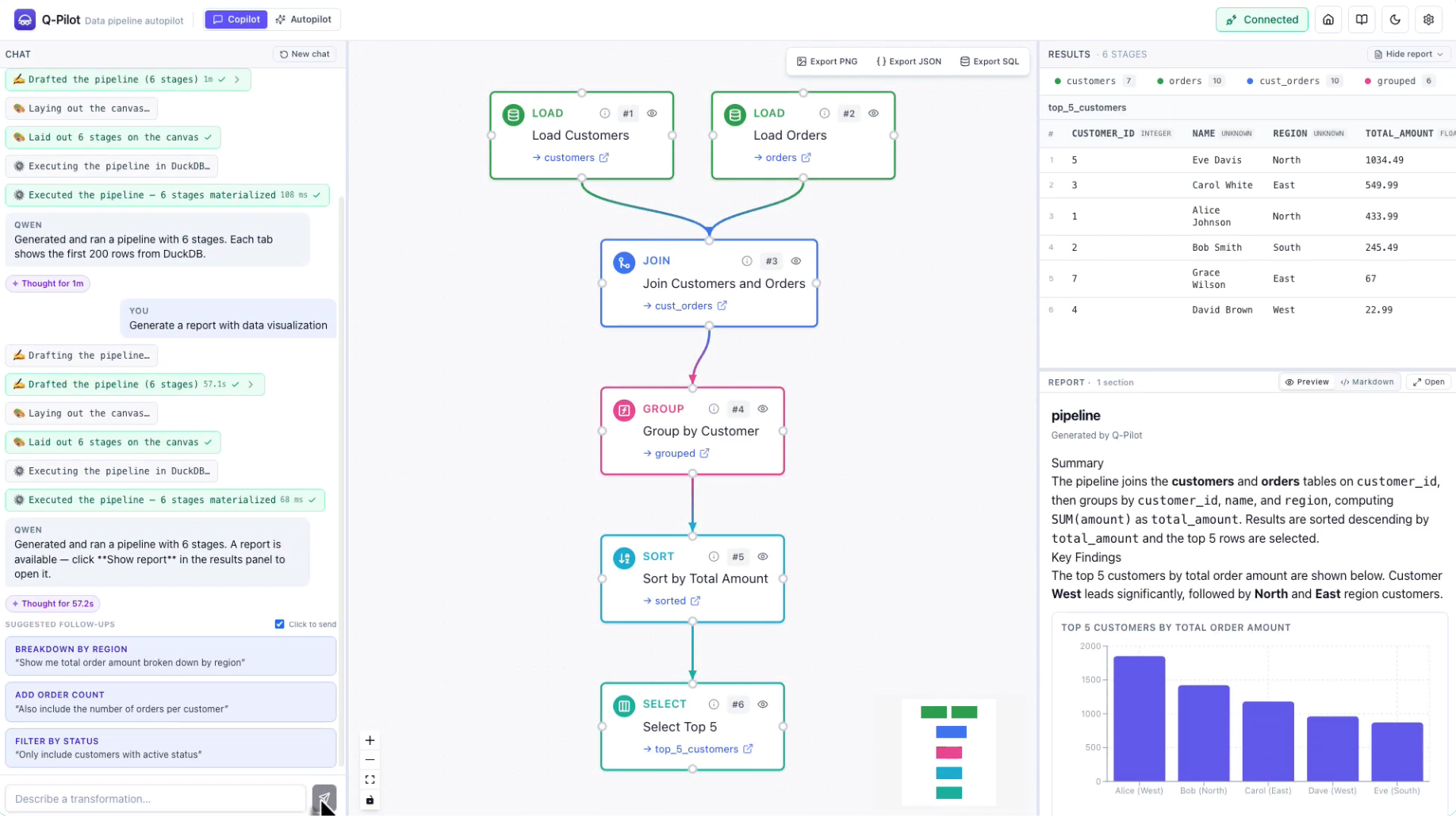
Copilot, clear prompt
-
Landing page 2
-
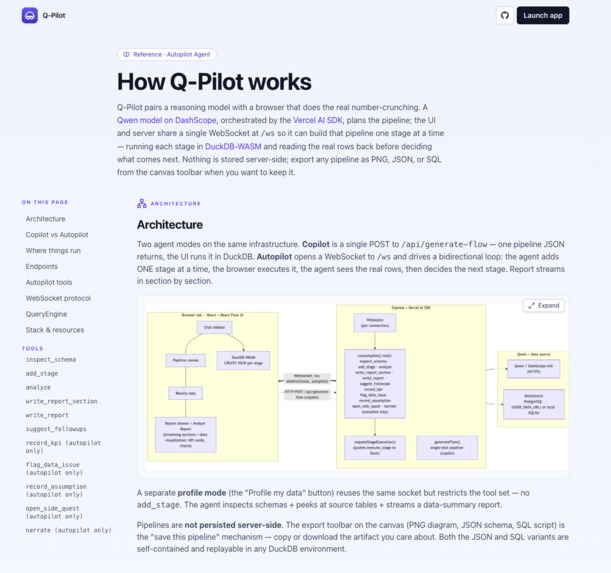
Doc page
-
Q-Pilot: autopilot agent for data pipelines.
Inspiration
Turning a business question into a shipped analysis is stuck between two bad options today. Manual SQL is hours of joins, filters, and charts before anyone sees a result. Chat AIs answer the same question with a black-box chart you can't verify, re-run, or hand off. We wanted an autopilot agent that does the analyst's job end-to-end — but keeps every step visible on a canvas and grounded in the actual rows, so the output is a shipped deliverable, not a chat reply.
Track 4 (Autopilot Agent) named exactly the shape we wanted to build.
What it does
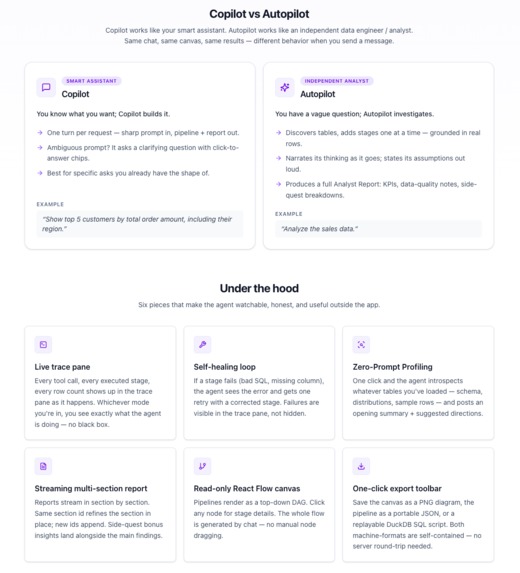
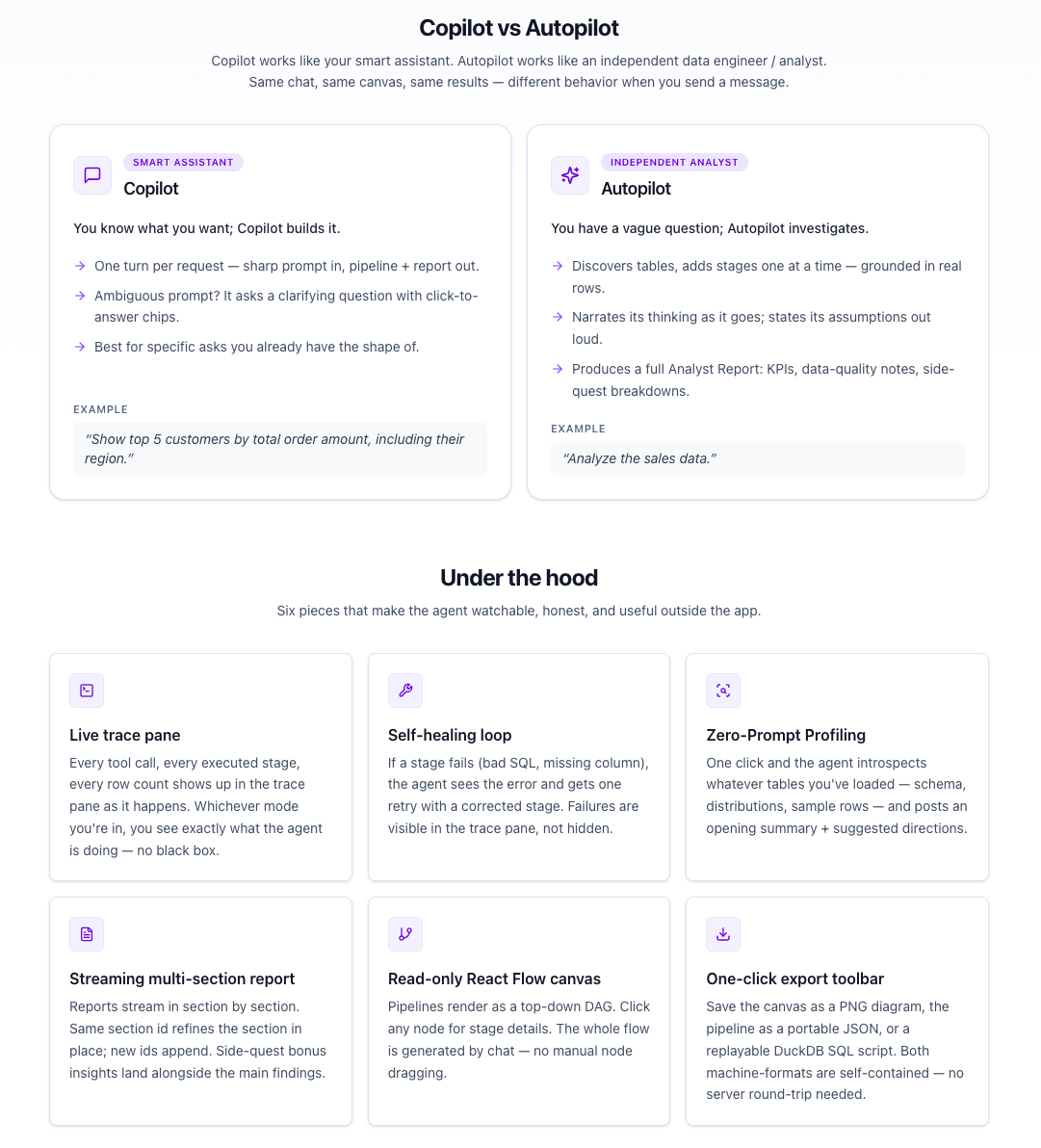
Q-Pilot ships two modes on one infrastructure:
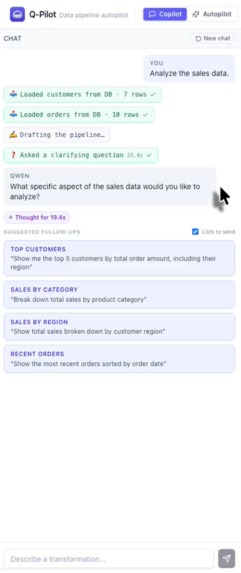
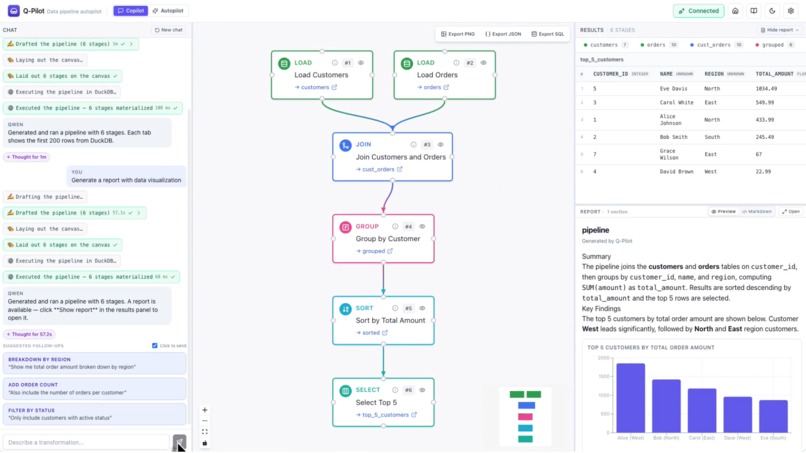
- Copilot — sharp prompt in, one-shot pipeline + compact markdown report out. Asks a clarifying question with click-to-answer chips when the request is vague, so a human stays in the loop.
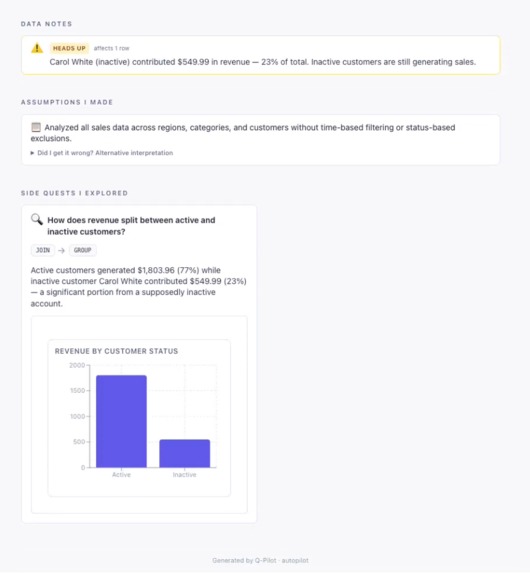
- Autopilot — one autonomous run turns a vague ask into a grounded pipeline plus a full-viewport Analyst Report (headline KPIs, findings with charts, data-quality callouts, an assumption log, and side-quest mini-analyses). Every stage runs on real rows before the agent decides the next one — it's grounded, not hallucinated. Failures self-heal with one retry.
Same left-side chat, canvas, and results tabs; categorically different outputs. Pipelines are exportable as PNG, JSON, or runnable SQL — an analyst can hand off to a data engineer or re-run deterministically.
Try it live at http://47.79.250.239:8080.
How we built it
- Frontend — React 19 + Vite + Tailwind v4. React Flow for the pipeline canvas, DuckDB-WASM in the browser for every stage after LOAD, Recharts for the analyst report's inline visualizations.
- Server — Express + TypeScript. A persistent WebSocket at
/wsholds Autopilot's tool loop; plain HTTPPOST /api/generate-flowhandles Copilot's single-shot generation. - LLM — Qwen
qwen-pluson Qwen Cloud, called through the DashScope OpenAI-compatible endpoint. Autopilot uses Vercel AI SDK'sstreamTextwith tools:inspect_schema,add_stage,analyze,set_report_title,write_report_section,record_kpi,flag_data_issue,record_assumption,open_side_quest,narrate,suggest_followups. - Grounding protocol — the
add_stagetool doesn't just append to a DAG; it invokes anexecute_stagecallback that asks the browser to run the new stage in DuckDB-WASM and awaits the real result rows. Those rows go back to the model as tool output, so every "next stage" decision is grounded in what the previous stage actually returned. - Data source —
USER_DATA_URLpoints at any PostgreSQL-wire endpoint (ApsaraDB / PolarDB / Hologres / AnalyticDB for PostgreSQL), with a SQLite fallback for local dev. LOAD stages fetch up to 2000 rows per table; downstream computation is entirely in-browser. - Deployment — Docker Compose (app + PostgreSQL) on Alibaba Cloud
Simple Application Server. Image built locally, uploaded via
Workbench,
docker compose up -d. Full walkthrough (including the ACR path and every gotcha we hit) is in the repo: https://github.com/TLiu2014/qwen-data-wrangler/blob/main/deployment.md.
Challenges we ran into
- Grounding through an async tool loop. Making the agent wait
for the browser to execute a stage before choosing the next one
sounds simple; making it feel natural over a WebSocket with
correlation IDs, retries, and a streaming UI was the hardest piece
of the project. The bidirectional
execute_stageprotocol went through three iterations before the trace pane felt honest. - Streaming report scroll UX. Two subtle bugs surfaced late: the
compact side-panel report stopped auto-following the stream because
its "near-bottom" check never fired after the first append; the
full-page report jumped to the bottom when opened mid-stream
instead of showing the top. Both fixed with a proper
stickToBottomRefpattern that starts pinned and only releases when the user actively scrolls up. - Docker + monorepo gotchas.
.dockerignorewas excludingdocs/, breaking a Vite raw-import at build time. pnpm 10 tightenedpnpm deploydefaults (needed--legacy).server/package.jsonneeded an explicitfiles: ["dist"]field so the compiled JS actually shipped into the runtime image. - Alibaba Cloud SAS deployment friction. Workbench upload failed
until we targeted
/tmp/(default/root/is unwritable by the non-rootadminuser). The Docker daemon socket denied non-root until we joined thedockergroup. Compose tried to pull our local image from Docker Hub until we addedpull_policy: never. The 1 GiB SAS plan needed a 1 GiB swap file to survive first boot. - Git push rejected. We accidentally committed a 106 MB Docker
docker savetarball. GitHub rejects any single blob >100 MB, so we had to squash the offending commits, drop the tarball, and add*.tar.gzto.gitignorebefore the push would take.
Each fix landed in the repo's troubleshooting table so the next person deploying doesn't rediscover them: https://github.com/TLiu2014/qwen-data-wrangler/blob/main/deployment.md#troubleshooting.
Accomplishments that we're proud of
- True grounding, not simulated pacing. Many "streaming agent"
demos fake per-stage progress with
setTimeout. Ours actually pauses the tool loop, hands control to the browser, executes in DuckDB-WASM, and feeds the real rows back. Every "next stage" is a genuine decision — the trace pane shows an agent, not a spinner. - Two categorically different artifacts on one infrastructure. Copilot returns a compact markdown drawer; Autopilot streams a full-viewport Analyst Report with KPI tiles, findings, data-quality callouts, assumption logs, and side-quest mini-analyses. Same tool registry, same WebSocket, same canvas — the deliverable is what changes.
- Self-healing that surfaces the failure. A stage that errors gets one retry via the same stage id, and both the failure and the retry land in the trace pane. The "watchable agent" claim survives the unhappy path, which is where most demos fall apart.
- Structured, portable output. The pipeline itself exports as typed JSON or runnable SQL. An analyst can save it, version it, hand it to a data engineer, or re-run it deterministically — output is reusable infrastructure, not disposable prose.
- Deploy path is a first-class artifact. Every SAS gotcha we hit is documented with the exact command that resolved it, so reviewers who want to redeploy the project themselves can.
What we learned
- Show-your-work is a UX feature, not a claim. Streaming a trace pane of the agent's real tool calls next to the canvas made "grounded" tangible to test users. Judges reading the code alone wouldn't get the same feeling — the visible tool log is where the claim lands.
- Grounding beats raw model quality on this task.
qwen-pluswith real rows returned between stages makes better pipeline decisions than a stronger model that never sees the data. When the model can observe, it doesn't need to guess. - Small config gotchas block otherwise-ready deployments.
.dockerignore,pnpm deploydefaults,files:["dist"]inpackage.json, non-root docker groups, Workbench upload targets — none of these are code problems, all of them cost real time. Writing them down was the difference between "works on our machine" and "reviewers can redeploy."
What's next for Q-Pilot: autopilot agent for data pipelines
- Server-side compute backend. The
QueryEngineinterface is already designed to swapBrowserDuckDBEnginefor Function Compute- DuckDB, or push directly to Hologres / AnalyticDB for PostgreSQL, without touching the agent or the UI. That unlocks TB-scale user tables that don't fit in browser memory.
- Stage-level refinement. Today Autopilot is a one-shot investigation. Next is an "edit this stage" loop — user comments on one node, agent revises just that stage and everything downstream of it, without regenerating the whole pipeline.
- Team-shared pipelines. Pipelines are ephemeral today. Add save/share + a lightweight workspace so analysts can hand off work the way engineers hand off pull requests.
- More data sources. File uploads (CSV, Parquet), streaming sources (Kafka via a preview window), and eventually write connectors — today the app is read-only against its data source.
- Pipeline versioning + diffs. Because pipelines are typed JSON, we can version them like code and diff between agent runs. Useful when the same prompt produces different pipelines on different days — you can see what changed and why.
- Multimodal input. "Here's a screenshot of last quarter's dashboard — rebuild it against this quarter's data." Qwen's vision models make this reachable; we just haven't wired the ingest yet.
Built With
- alibaba-cloud
- alibaba-cloud-sas
- dashscope
- docker
- duckdb-wasm
- node.js
- openai-api
- postgresql
- qwen
- react
- sqlite
- tailwind
- typescript
- vercel-ai-sdk
- vite
- websockets
- zod


Log in or sign up for Devpost to join the conversation.